SaneBox Review 2026: Best Email Management Tool for a Busy Inbox?
AI Email Management
SaneBox Review 2026: Best Email Management Tool for a Busy Inbox?
8.0/10
“SaneBox suits a busy owner or professional who wants a calmer inbox without changing email apps. Use the full 7-day trial on your busiest account, train it from the first morning, and if it works, buy Lunch on annual billing rather than paying monthly.”
Hands-on testedIncludes direct use of the product, alongside its documentation, pricing pages and customer reviews. How we work.
Starting price
From $5.42/month billed yearly ($9.49 monthly), 1 email account
Best for
Busy business owners and professionals buried in email
Free trial
7-day free trial, no credit card required
Based on
SaneBox’s pricing page, homepage, FAQ, business page, five help center articles, terms of service and privacy policy, my own seven-day SaneBox trial with every feature in use, and customer ratings on G2, Capterra and Trustpilot
Scores
Ease of setup & use9.0
Feature depth8.5
Pricing & value6.5
Integrations8.0
Support & terms8.0
How these scores were worked out
Ease of setup & use: 9.0 (Strong) Nothing to install, it works inside the email apps you already use, and you train it by moving messages. Setup took minutes in my seven-day test. It needs a week or two of corrections before it can be trusted.
Feature depth: 8.5 (Strong) Sorting, a daily digest, unanswered-email tracking, reminders, snooze, a block list and attachment handling cover the real problems of a busy inbox. Every feature I used in my seven-day test worked as described: a reminder arrived within two minutes of the time I set, and Reply Draft saved a reply to my Drafts folder without sending it. Reply Draft is barely documented, and Snack rations the tools to two.
Pricing & value: 6.5 (Average) Annual billing is reasonable, from $65 a year. Monthly billing costs about 60 to 75 percent more, Dinner is expensive, there is no free plan, and the trial is short.
Integrations: 8.0 (Strong) Works with Gmail, Microsoft 365, iCloud, Yahoo, Fastmail, IMAP and Exchange, on every device and app. Business connections to Active Directory, Office 365 and Salesforce. POP accounts are not supported.
Support & terms: 8.0 (Strong) Email, chat and concierge call support on every plan, a clear written answer to my trial question in about five hours, ratings of 4.8 on all three review sites, header-only access and a 30-day guarantee. Held down by terms and a privacy policy from 2021 and no published security certification.
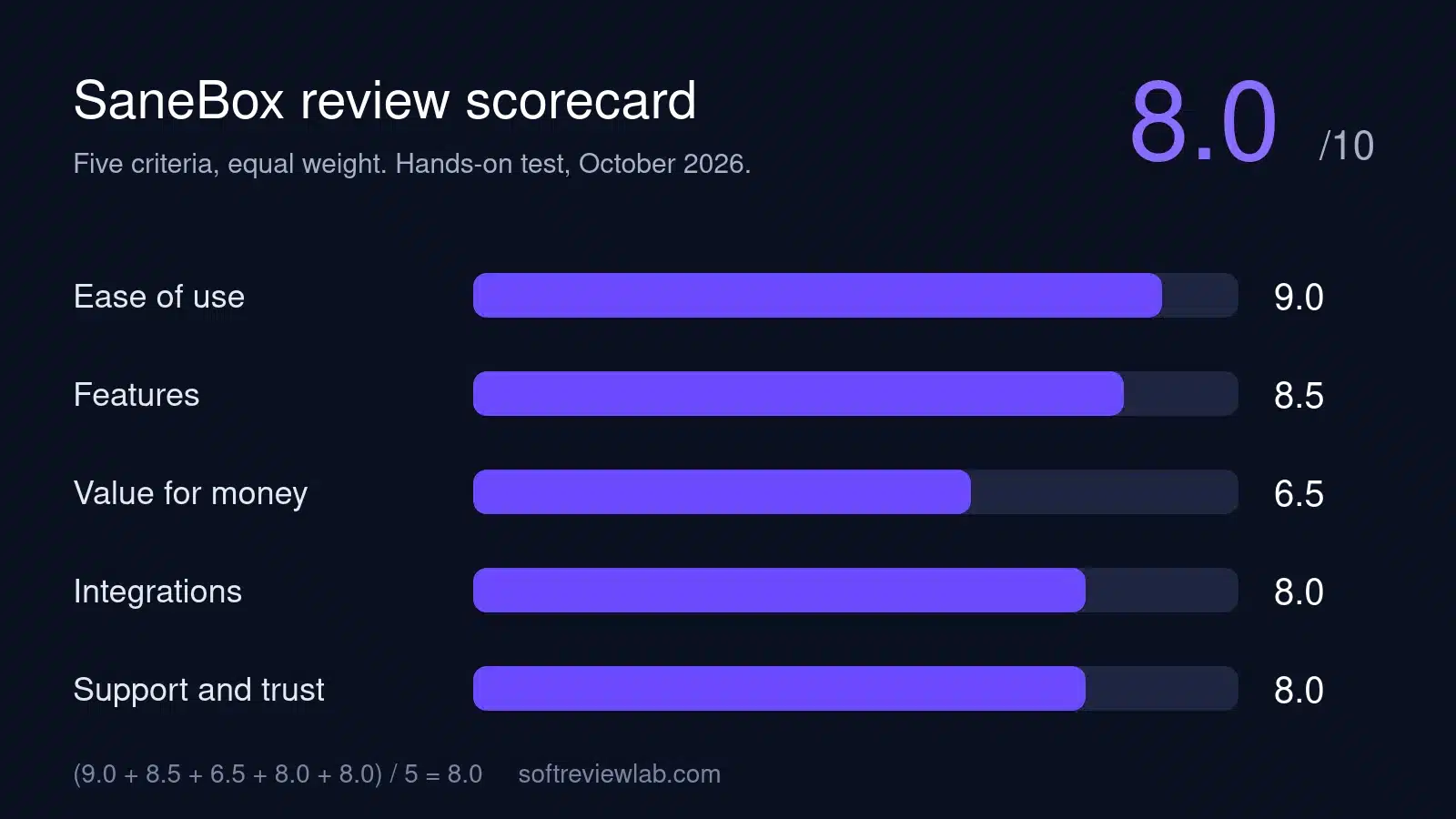
Overall: (9.0 + 8.5 + 6.5 + 8.0 + 8.0) ÷ 5 = 8.00, shown as 8.0. The five criteria are weighted equally.
Scores are editorial judgments in half-point steps, based on documented features, published pricing and repeated themes in customer reviews. They are not lab measurements, so treat the words as the guide: 8.0+ Strong, 7.0 to 7.9 Good, 6.0 to 6.9 Average, below 6.0 Weak.
What works
Works with almost any email provider and in every email app, because the sorting happens on the server.
Nothing to install, and setup takes minutes.
Reads headers only, and your email never leaves your own account.
Useful extras for business email: a list of unanswered emails, reply reminders, snooze and a one-step block list.
Clean cancellation: you choose whether to keep or remove the folders, and your email stays where it was.
Ratings of 4.8 on G2, Capterra and Trustpilot.
A 30-day money-back guarantee, and 25% off for non-profit, education and government.
What doesn’t
Monthly billing is expensive: $9.49 for one account with two tools, and $42.99 for Dinner.
Snack limits you to two of the eleven power tools.
No free plan, and a trial of only seven days.
Its AI is mainly sorting: a Reply Draft tool appears in the dashboard but is not described on the pricing page.
Terms and privacy policy dated 2021, with no SOC 2 or ISO 27001 report mentioned.
Business prices are not published on SaneBox’s own site.
What we couldn’t verify
SaneBox’s sorting accuracy over months was not measured; my seven-day trial cannot show it, so long-term accuracy is based on customer reviews.
Business pricing is not published on SaneBox’s site; the $8.25 per licence figure comes from G2’s vendor-supplied listing.
Security claims, including annual assessments for Google’s restricted data access, Leviathan Security Group audits and HackerOne testing, are SaneBox’s own statements; SaneBox confirmed in October 2026 that it holds no SOC 2 or ISO 27001 certification yet, and its expected SOC 2 date is not guaranteed.
Time-saving figures (3 to 4 hours a week, over 100 hours a year, 2.5 hours a week, more than 12 hours a month) are SaneBox’s own claims and were not verified.
What happens to the unused part of an annual or two-year plan after the 30-day refund window is not stated; SaneBox support said it would confirm.
How Reply Draft processes the body of your emails was still awaiting confirmation from SaneBox support at the time of writing.
If any of these matter to your decision, check them directly with the vendor or during your trial.
Who should skip it
Light email users, anyone who needs a free tool, people whose main need is AI that writes or summarises email, old POP email accounts, and companies that need SOC 2 or ISO 27001 documents before connecting work email.
By Abdullahi Abdirahman, Founder & Editor, SoftReviewLab. Pricing and plan details checked on SaneBox’s official pricing page, help center, terms and privacy policy in October 2026. This review combines SaneBox’s own documentation and customer ratings on G2, Capterra and Trustpilot with my own seven-day trial, in which I used every feature in my trial account. Seven days is enough to see how the features work, not how accurately SaneBox sorts mail over months. Disclosure: SoftReviewLab is a SaneBox affiliate partner. This page contains affiliate links, and if you sign up through them, SoftReviewLab may earn a commission at no extra cost to you. See our affiliate disclosure and research and scoring method.
Table of Contents
SaneBox Review at a Glance: The Short Answer
This SaneBox review scores the service 8.0 out of 10. SaneBox is an email filter that works behind your existing inbox. It looks at who sent each message and how you have dealt with that sender before, keeps the important mail in your inbox, and moves the rest into folders such as SaneLater, which you review once a day through a digest email. It works with Gmail, Outlook, Apple Mail and most other providers, and there is nothing to install.
Its strengths are how little it asks of you, how it works in any email app on any device, and very strong customer ratings. Its weaknesses are a monthly price that is high for what is a focused tool, plan limits on how many of its tools you can use, and terms and a privacy policy that have not been updated since 2021. It suits a busy owner or manager who gets more email than they can read. Someone who gets thirty emails a day and already uses their inbox’s own filters does not need it.
SaneBox
Overall score
8.0 out of 10 (research plus my own seven-day test)
What it is
An email filter that sorts incoming mail by importance, with reminders, a daily digest and a sender block list
Starting price
Snack at $5.42 a month billed annually, $4.54 billed every two years, or $9.49 paid monthly, for 1 email account
How it is priced
By plan: the number of email accounts and how many of its tools you can turn on
Free plan
No
Free trial
7 days in my trial account. The homepage says no credit card is required
Refunds
A 30-day money-back guarantee for eligible purchases, requested through support
Best for
Busy owners, managers and professionals who receive more email than they can read
Not ideal for
Light email users, anyone who needs a free tool, and teams that need current compliance paperwork
Customer ratings
4.8 on G2 (243 reviews), 4.8 on Capterra (71 reviews), 4.8 on Trustpilot (758 reviews)
Prices and limits from SaneBox’s pricing page, help center and terms, October 2026. Ratings checked October 2026.
If that sounds like your inbox and you would like to see what SaneBox does with it, you can start a SaneBox free trial. No card is needed to start.
What Is SaneBox and How Does It Work?
SaneBox, Inc. is a US company whose terms are governed by Massachusetts law. Its pricing page says it is used by more than 100,000 people. It sells one thing: a service that sorts your email so the messages that matter stay in front of you.
The way it does that is unusual, and it explains most of what is good about the product. SaneBox does not replace your email app and does not send or receive email. According to its help center, it connects to your email provider and asks your provider’s server to move less important messages into a folder called @SaneLater. Because the sorting happens on the server, the folders show up in every app you use: Gmail on the web, Outlook on a laptop, the mail app on your phone. You do not install anything.
To decide what is important, SaneBox reads message headers, which means the sender, the subject line and the date, and not the body of the email. Its FAQ says it weighs how you have behaved with each sender in the past: which emails you open and reply to, how quickly, how often, and how long you have been in touch. Email from real people you deal with stays in your inbox by default. Newsletters, notifications and first-time senders are the usual candidates for SaneLater.
You correct it by moving messages. Drag an email from your inbox into SaneLater, or from SaneLater back to your inbox, and SaneBox learns that sender for the future. If SaneBox ever stops working, the FAQ says your email still arrives as normal, just unsorted, until the service is back.
In the default mode, the dashboard of my trial account explained that only important email stays in the inbox and that new contacts are moved to SaneLater. If you want first-time senders, such as new customers, to stay in your inbox, SaneBox’s support team recommends setting Include New Contacts to Yes on the dashboard’s Folders page, and moving any customer emails already in SaneLater back to the inbox to train those senders. For a business, that matters: the first email from a new customer or lead can land in SaneLater instead of your inbox. Check SaneLater and the digest every day, at least until SaneBox has learned your contacts, or change the inbox mode from the dashboard.
The first digest arrived within hours of connecting my trial account. Its subject line asked me to review four recent messages, all newsletters that SaneBox had filed in SaneNews. The digest page let me move each message to the inbox, train SaneBox on it, archive it, remove it or send the sender to SaneBlackHole, and it suggested four senders I might want to unsubscribe from.
How I Evaluated SaneBox
I scored SaneBox on the same five criteria I use for every review: ease of use, features, value for money, integrations, and support and trust. Each is scored out of 10 and weighted equally, and the overall score is the plain average. The reasons for each number are in the scorecard further down.
The evidence is SaneBox’s pricing page on all three billing options, its homepage, FAQ, business page and help center, its terms of service and privacy policy, and customer ratings on G2, Capterra and Trustpilot, all checked in October 2026. I also used SaneBox myself for the full seven-day trial. A seven-day trial cannot show how well SaneBox sorts over months, so statements about long-term accuracy come from customer reviews and are labelled that way.
What I found in my seven-day test: I used every feature in my trial account, including the sorting folders, the daily digest, reminders and Reply Draft. Each one worked as SaneBox describes, and I didn’t run into any problems during the week.
SaneBox Features: What You Actually Get
SaneBox splits its features into two groups on the pricing page. A set of basics comes with every plan, and a menu of eleven power tools is rationed by plan. Here is what each part does, as far as SaneBox’s own pages describe it.
The Basics on Every Plan
Email Organize: the core sorting, which keeps important mail in the inbox and moves the rest to Sane folders.
Daily Digest: a daily email summarising the unimportant messages you have not opened yet, so you can scan them in one go and rescue anything that matters.
Email Deep Clean: a tool for clearing out old email in bulk.
Subject filters, domain filters and advanced filtering: rules you set yourself, on top of the automatic sorting.
iOS and Android apps for managing SaneBox on your phone.
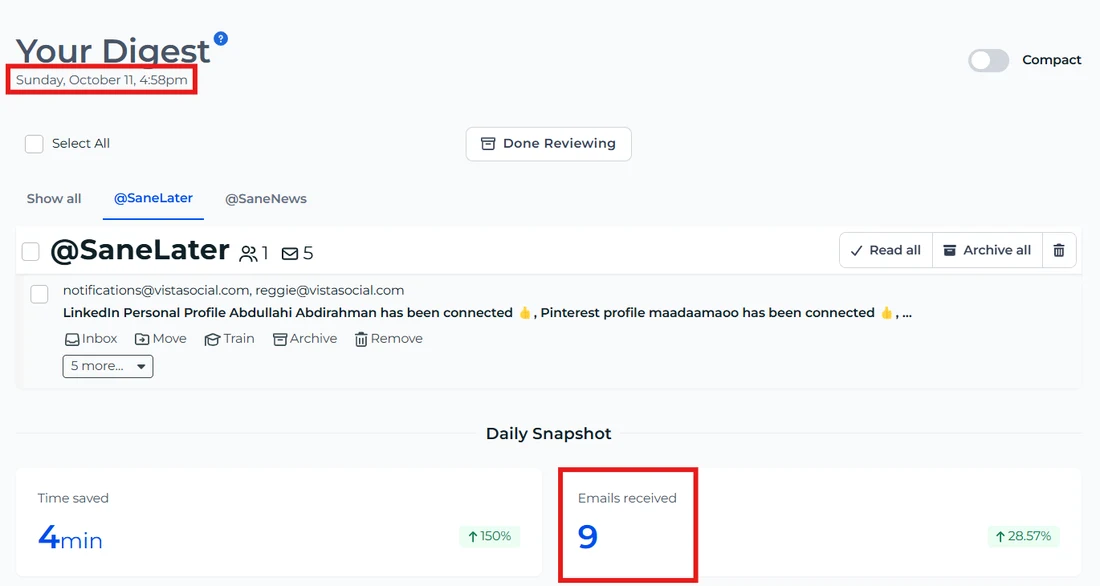
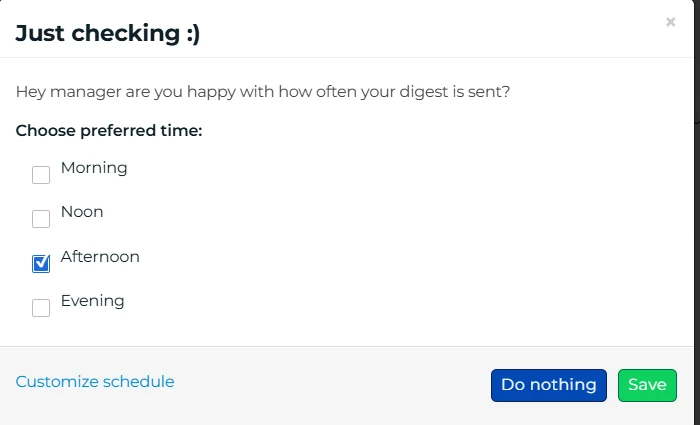
The digest gathers the less important mail SaneBox held back, grouped by folder. Open each tab, move anything that matters back to the Inbox, then click Done Reviewing. The Daily Snapshot at the bottom counts the emails received.SaneBox asks when you want the digest delivered: morning, noon, afternoon or evening. Customize schedule lets you set your own times.
The Power Tools
These are the features most people buy SaneBox for. The number you can use depends on the plan: two on Snack, six per account on Lunch, and all of them on Dinner.
SaneLater: the main folder for mail that can wait.
SaneBlackHole: drag a sender here once and you will not see them again. The homepage presents it as a way to get rid of unwanted senders, alongside a one-click unsubscribe, and the trial dashboard says messages sent there are kept for up to seven days before they go to the trash.
SaneNoReplies: a list of emails you sent that are still waiting for an answer, so you know who to chase.
Reminders: a reminder if someone has not replied by a date you set, or a reminder to yourself.
Custom Snooze: hide an email until a time you choose, such as Monday morning. The trial dashboard also offers ready-made snooze folders for tomorrow, next Monday and the first of next month.
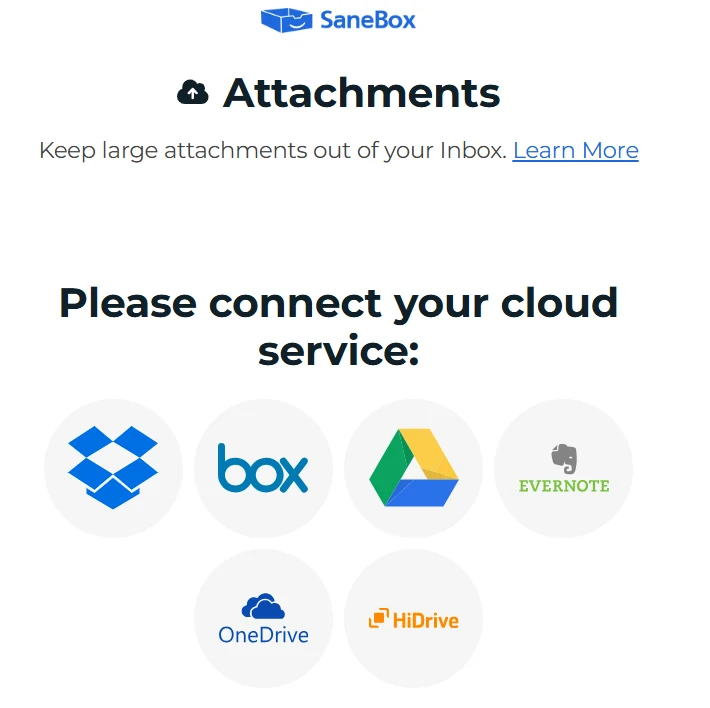
Attachments: large attachments are moved automatically to your cloud storage. The trial dashboard offers Dropbox, Box, Google Drive, Evernote, OneDrive and HiDrive.
SaneDoNotDisturb: hold back email for a period so you can work without interruptions.
SaneNews, SaneCC, SaneScreener and SaneNotSpam: folders for newsletters and mailing lists, emails you are copied on, first-time senders you have not trained yet, and possibly important messages rescued from your spam folder, as the trial dashboard describes them.
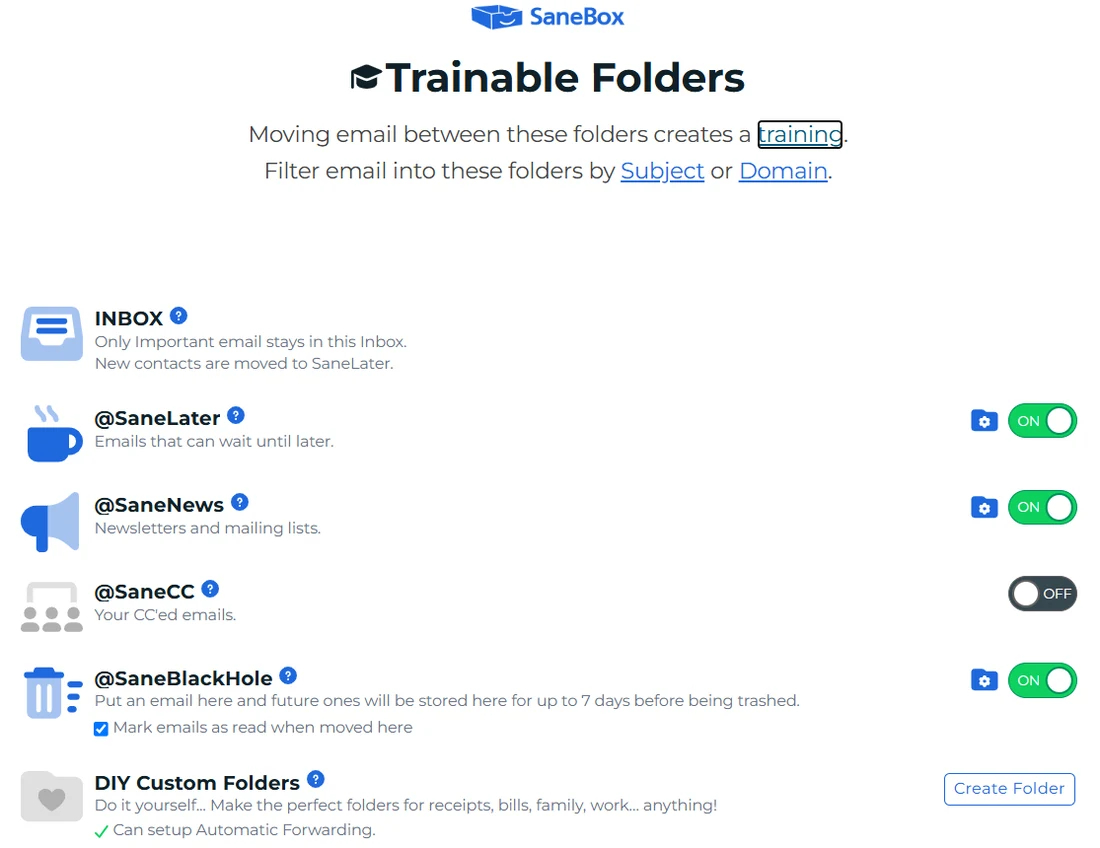
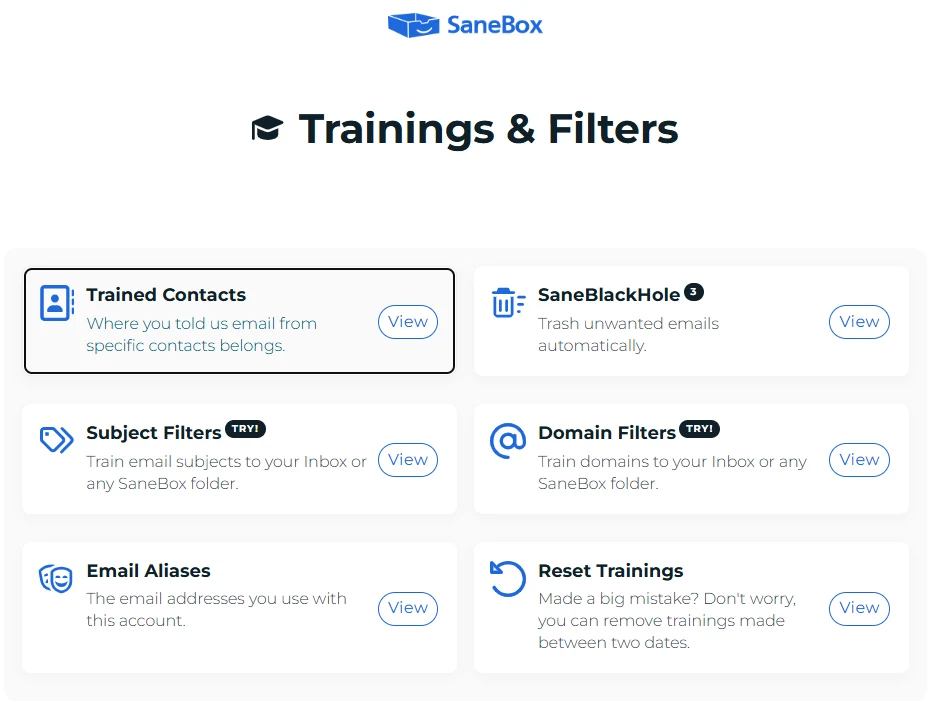
These are the folders SaneBox sorts into: the Inbox for important mail, @SaneLater for mail that can wait, @SaneNews for newsletters, @SaneCC for emails where you are only copied, and @SaneBlackHole for unwanted mail held for up to seven days before it is trashed. Moving a message between folders teaches SaneBox, each folder has an on/off switch, and you can create your own.This page shows what SaneBox has learned. Trained Contacts lists the senders you assigned to a folder, Subject Filters and Domain Filters sort mail by subject or domain, and Reset Trainings removes trainings made between two dates if you made a mistake.
Two of those deserve a closer look. SaneNoReplies and Reminders address a problem most business owners recognise: a quote or an invoice goes out, nobody answers, and nobody notices. Having a list of unanswered emails is worth more to some people than the sorting itself. SaneBlackHole is the simplest way I know of to make a sender disappear without hunting for an unsubscribe link.
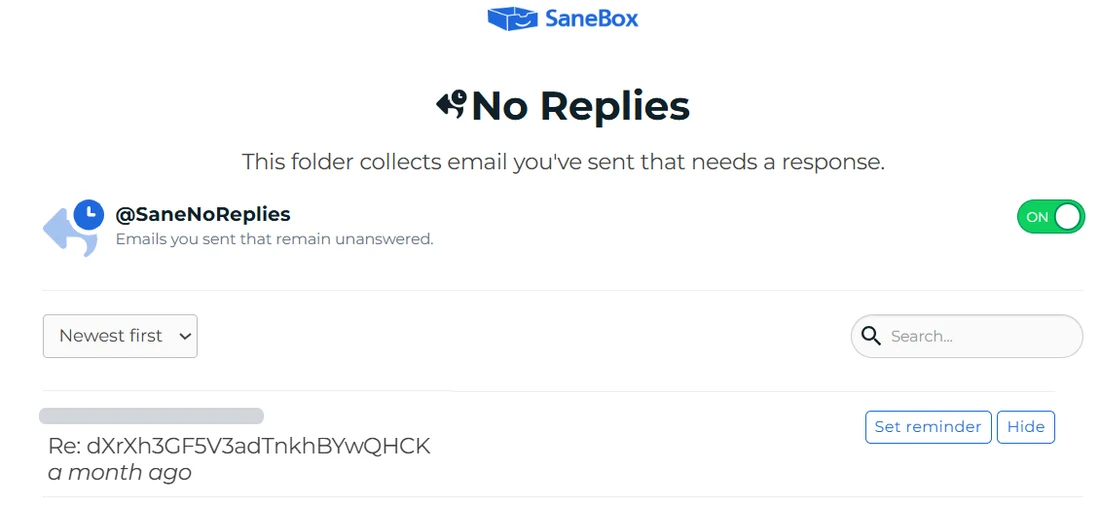
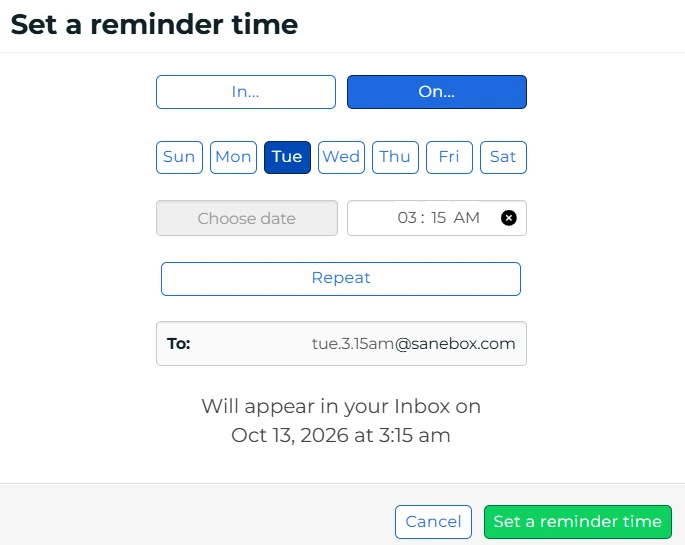
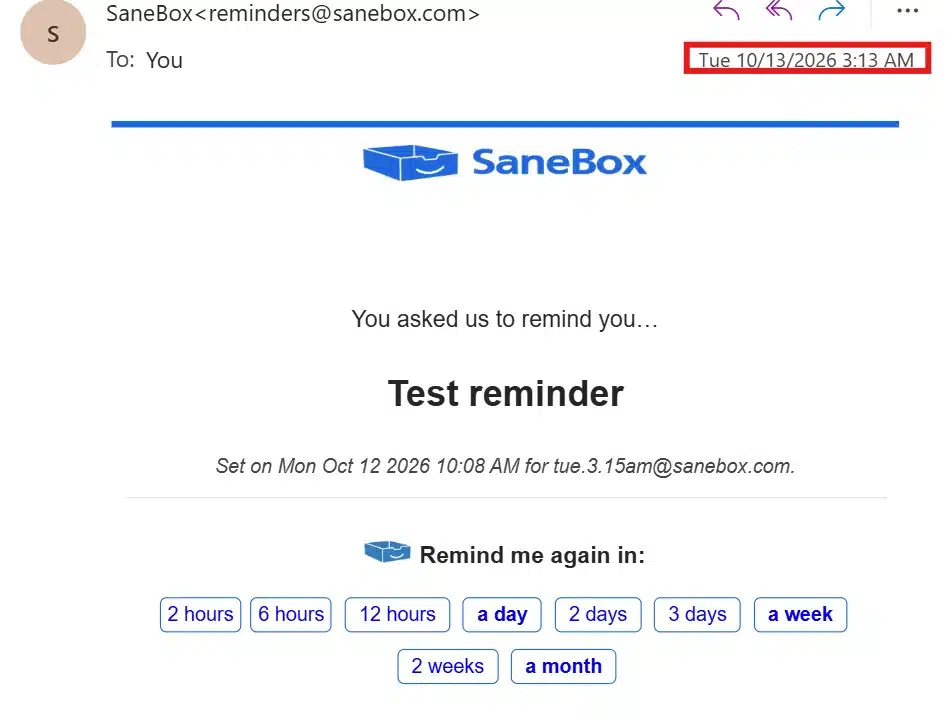
No Replies collects emails you sent that have not been answered, so nothing you are waiting on gets lost. Set reminder brings an email back to your inbox at a time you choose, and Hide takes it off the list.To set a reminder, pick a delay or a day and time. SaneBox builds a reminder address from your choice, such as tue.3.15am@sanebox.com, and shows when the email will return. Send an email to that address, or add it to an email you are sending, and it comes back to your inbox at that time.Scheduled reminders are listed with their subject and the time they will return. Edit or Remove changes a reminder before it arrives.When the time comes, the reminder arrives as an email from SaneBox with the subject you gave it. The buttons push it back: 2 hours, 6 hours, 12 hours, a day, 2 days, 3 days, a week, 2 weeks or a month. The red box marks the arrival time: 3:13 am for a reminder set for 3:15 am.
AI Drafting and Other Extras
SaneBox calls itself an AI email management service, and its core is automated sorting. The dashboard of my trial account also lists two tools that are not on the pricing page: Reply Draft, described as replies drafted for you, and SaneTodo, which connects TickTick or Todoist so you can turn emails into tasks. SaneBox’s public pages say little about Reply Draft.
Reply Draft saves its drafts in your normal Drafts folder, marked [Draft]. This one is a reply to an email from Vista Social (Re: Report you requested). Nothing is sent until you send it.
In my test, Reply Draft wrote a draft reply to a Vista Social email and left it in my Drafts folder, where I could read it before deciding what to do. To use it, open Drafts after an email that needs an answer arrives, check the recipient, the subject and every fact in the text, then edit and send it yourself or delete it. Treat it as a first draft that saves you the blank page, not as a reply that is ready to go.
SaneBox’s support team confirmed in October 2026 that Reply Draft only drafts replies and never sends them on its own. It also said its AI features are options on every plan, and that plans differ in how many features you can turn on rather than which ones. At the time of writing, support had not yet confirmed how Reply Draft handles the body of your emails.
Drafting a reply would seem to need it, so if header-only access is the reason you chose SaneBox, ask before you turn Reply Draft on. If writing and summarising email with AI is your main goal, judge SaneBox on its sorting and treat drafting as a bonus. My guide to choosing AI tools for a small business explains how to weigh features like this before you pay.
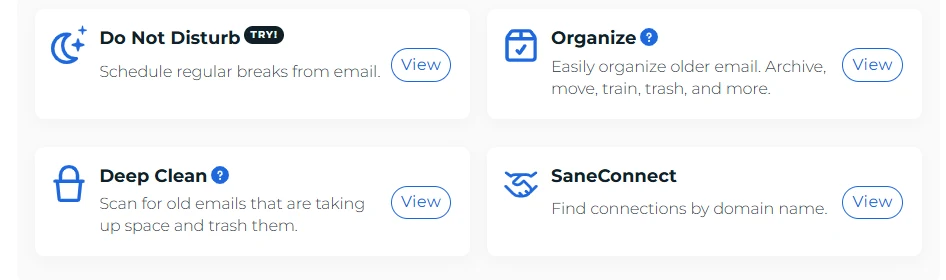
The Tools page holds the cleanup and focus features: Do Not Disturb schedules regular breaks from email, Organize archives, moves or trashes older mail in bulk, Deep Clean finds old emails that take up space so you can trash them, and SaneConnect finds contacts by domain name.Attachments keeps large files out of your inbox by uploading them to a cloud storage account. Connect Dropbox, Box, Google Drive, Evernote, OneDrive or HiDrive to turn it on.
SaneBox for Teams
SaneBox also sells a business version. Its business page lists team accounts, company-wide rules, two-factor authentication, encrypted disks on the mail-processing machines, and connections to Active Directory, Office 365, Notes and Salesforce, the last for Salesforce Enterprise customers. It does not publish team prices on its own site. G2’s listing, with pricing supplied by SaneBox, shows the business version at $8.25 per licence per month. Treat that as a starting point to confirm with SaneBox’s sales team.
SaneBox Pricing 2026: Plans and Real Costs
SaneBox has three plans, named Snack, Lunch and Dinner, and three ways to pay: monthly, annually or every two years. The plans differ in two things: how many email accounts SaneBox manages, and how many of the power tools you can switch on.
SaneBox Plans
Plan
Paid monthly
Billed annually
Billed every 2 years
Email accounts
Power tools
Support
Snack
$9.49
$5.42
$4.54
1
2 of 11
Email and chat
Lunch
$15.99
$9.08
$7.46
2
6 per account
Email and chat
Dinner
$42.99
$26.58
$22.04
4
All
Email, chat and phone
SaneBox plans: price a month by billing option (SaneBox pricing page, October 2026)
Every plan includes the basics described above, concierge call support and email and live chat support. Phone support is listed on Dinner only. The help center says that if you need more than four accounts on Dinner, you contact support.
What a Year of SaneBox Costs
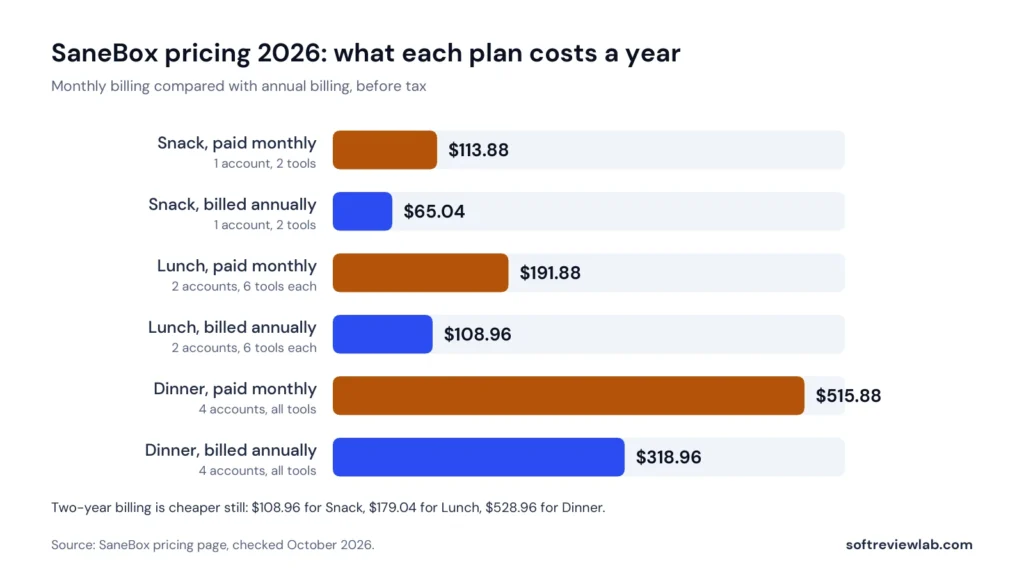
The billing option matters more than the plan for most buyers. Paying annually costs 38 to 43 percent less than paying month by month.
Plan
Paid monthly for 12 months
Billed annually
Saving with annual billing
Snack
$113.88
$65.04
$48.84
Lunch
$191.88
$108.96
$82.92
Dinner
$515.88
$318.96
$196.92
What SaneBox costs over a year, before tax
Yearly cost of each SaneBox plan on monthly and annual billing. Source: SaneBox pricing page, October 2026.
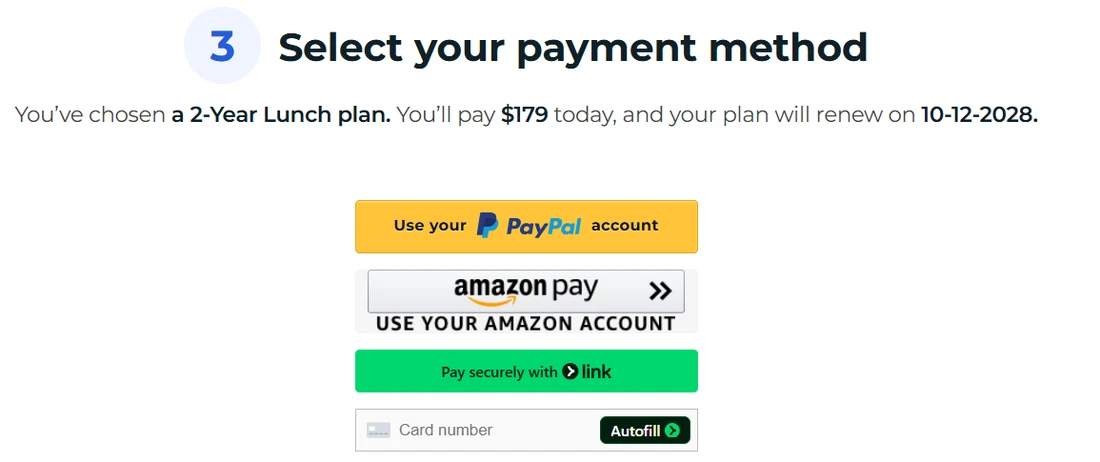
Two-year billing lowers the monthly rate further. Snack works out at $108.96 for two years, Lunch at $179.04 and Dinner at $528.96, paid up front. That is the cheapest way to buy SaneBox and also the longest commitment, so I would only choose it after a full year of using the service. The checkout page states that plans renew automatically at the same price, for example a yearly Lunch plan at $109, and accepts PayPal, Amazon Pay, Link and cards.
Which Plan Makes Sense
Snack is cheap, but two tools is a tight limit. Most people will want SaneLater plus at least one of SaneBlackHole, SaneNoReplies or Reminders, and that already uses both slots. You can swap tools whenever you like, according to the Snack help article, but you cannot run more than two at once.
Lunch is where SaneBox becomes the product its marketing describes: two accounts, such as a work and a personal address, and six tools on each. For one person with one or two busy inboxes, Lunch on annual billing at about $109 a year is the plan I would start with.
Dinner is for someone with three or four accounts, or who wants every tool and phone support. At $42.99 a month on monthly billing it is expensive for an email filter, and even on annual billing it costs about $319 a year.
One detail on the pricing page is confusing: the Snack plan is described as the most popular plan, while the Lunch plan carries a Most Popular badge. It does not change the prices, but it shows the page is not carefully kept.
Discounts
SaneBox’s homepage says educational, non-profit and government organisations get 25 percent off any plan. The help center also describes a referral scheme in which you and a friend each get a $5 credit when they sign up through your link.
SaneBox Free Trial, Refunds and Cancellation
The Free Trial
SaneBox has no free plan. It has a free trial, and its own pages disagree on how long it lasts. The FAQ and the help center say one week, while the terms of service and some page descriptions say two weeks. My trial account showed seven days remaining when it started, and the checkout page confirmed an expiry date seven days after sign-up, so plan on seven days.
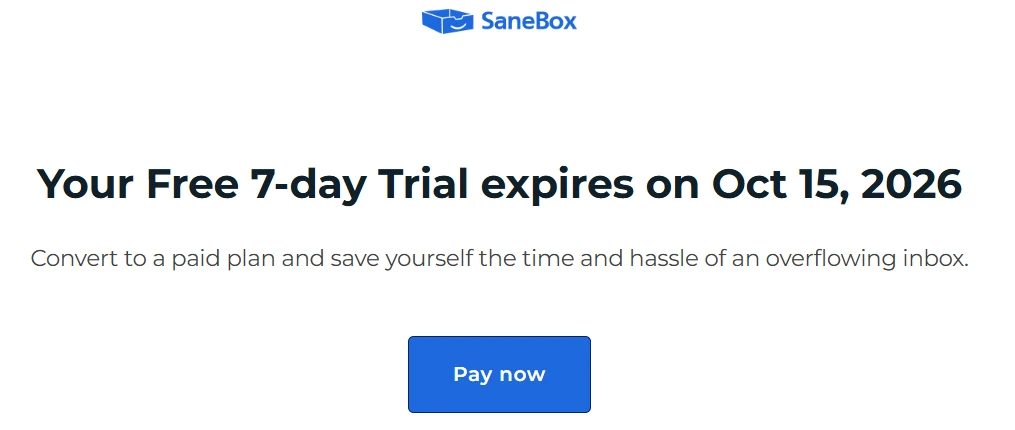
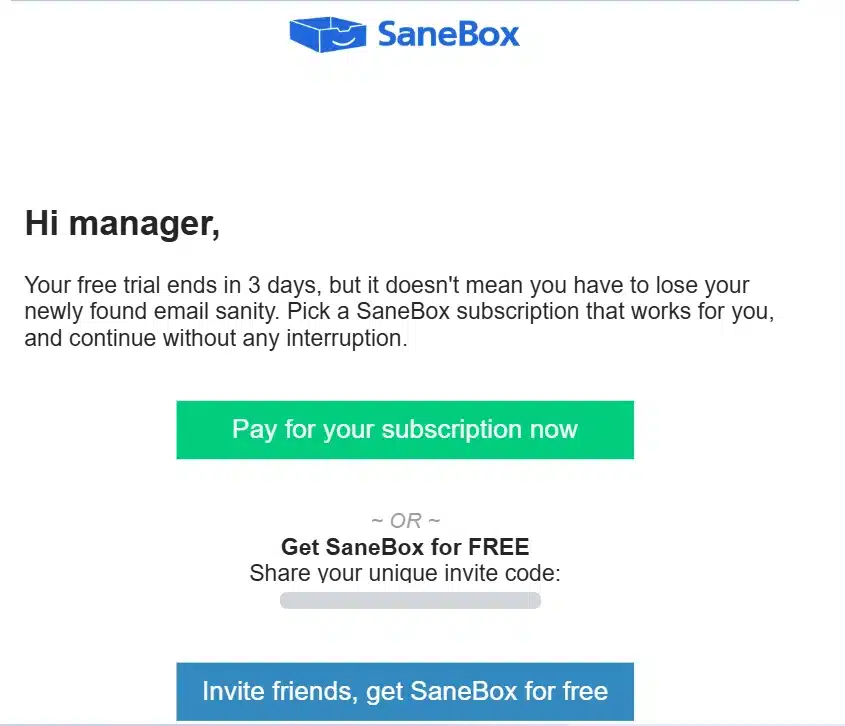
This notice shows when the free trial ends and offers a Pay now button to switch to a paid plan before it does.
SaneBox’s support team confirmed in writing in October 2026 that the trial is seven days and that the two-week reference in its terms is out of date. If you buy before the trial ends, the checkout page says the remaining trial days are added to your new plan. The homepage says no credit card is required, which means the trial cannot turn into a charge on its own.
Choosing a plan opens checkout, where you pick a payment method: PayPal, Amazon Pay, Link or card. The line at the top confirms the plan, the price due today and the renewal date.
A week is short for a tool that learns from your behaviour. My advice is to start the trial on a normal working Monday, not on a quiet day, and to move messages in and out of SaneLater from the first morning, so it has something to learn from before the week ends. If that sounds worth trying with your own inbox, you can start the SaneBox trial here.
Three days before the trial ends, SaneBox sends this email with two options: pay for a subscription now, or share your personal invite link. SaneBox help center describes a $5 credit for you and for the friend who signs up through it; the email itself does not list the conditions. The link is hidden here.
Refunds
SaneBox’s cancellation article describes a 30-day money-back guarantee for eligible purchases. Cancelling does not trigger a refund by itself. You have to contact support within 30 days of the purchase and ask. The terms of service put it more loosely, saying SaneBox will refund within 30 days of purchase if it cannot fix a problem you are unhappy with.
The terms do not say what happens to the unused part of a longer subscription after 30 days, so assume no refund after that point. SaneBox’s support team confirmed the 30-day guarantee for eligible purchases, said a refund has to be requested, and said its published policy does not promise a prorated refund after 30 days. It said it would confirm how unused time on an annual plan is handled.
Cancelling
You cancel from your SaneBox dashboard, under the settings for the email account. The help center says you are asked whether to keep or remove the Sane folders. If you keep them, the folders and the email inside them stay in your account. If you remove them, SaneBox moves the email back to your inbox and deletes the folders. Either way your email stays in your own account, because SaneBox never held it. That is a real advantage over tools that store your mail on their own servers.
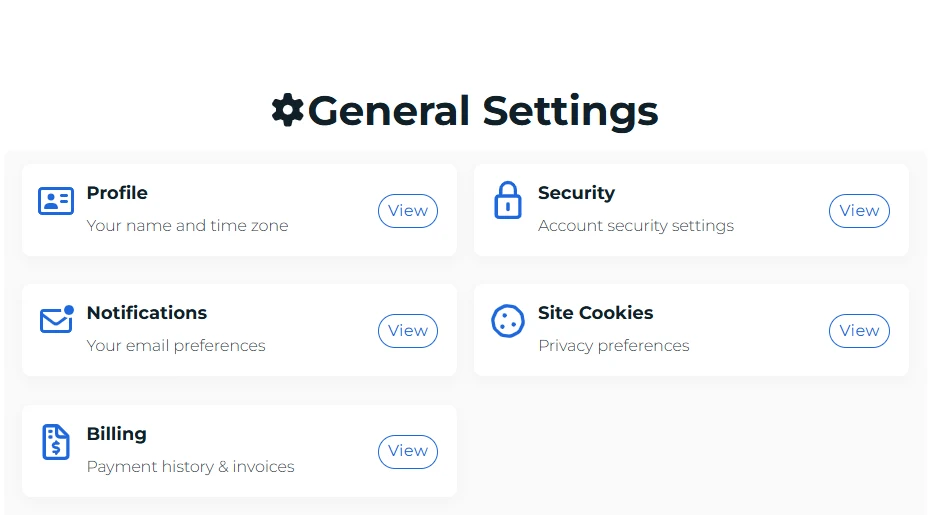
General Settings holds your name and time zone, security options, email notification preferences, cookie privacy choices and Billing, where you find payment history and invoices.
SaneBox Compatibility, Setup and Support
Which Email Services It Works With
Because SaneBox works on the server, it is not tied to one email app. SaneBox’s homepage lists Gmail, Microsoft 365, Apple iCloud, Yahoo Mail and Fastmail, plus any IMAP, Microsoft Exchange or ActiveSync server, and says it works on iOS, Android, desktop and web. In practice, if your email lives with a mainstream provider or on your own company’s mail server, SaneBox can probably work with it.
There is one exception worth knowing. The FAQ notes that old POP accounts do not support folders, and folders are how SaneBox works. If your business still uses POP email from a cheap hosting package, check this first.
Setup
Setup is the part SaneBox gets most right. You sign up, connect your email account, and SaneBox looks at your past email to decide who matters. There is no software to install and no rules to write. G2 lists the average time to implement as under one month, and the Trustpilot summary of recent reviews highlights how simple setup and training are.
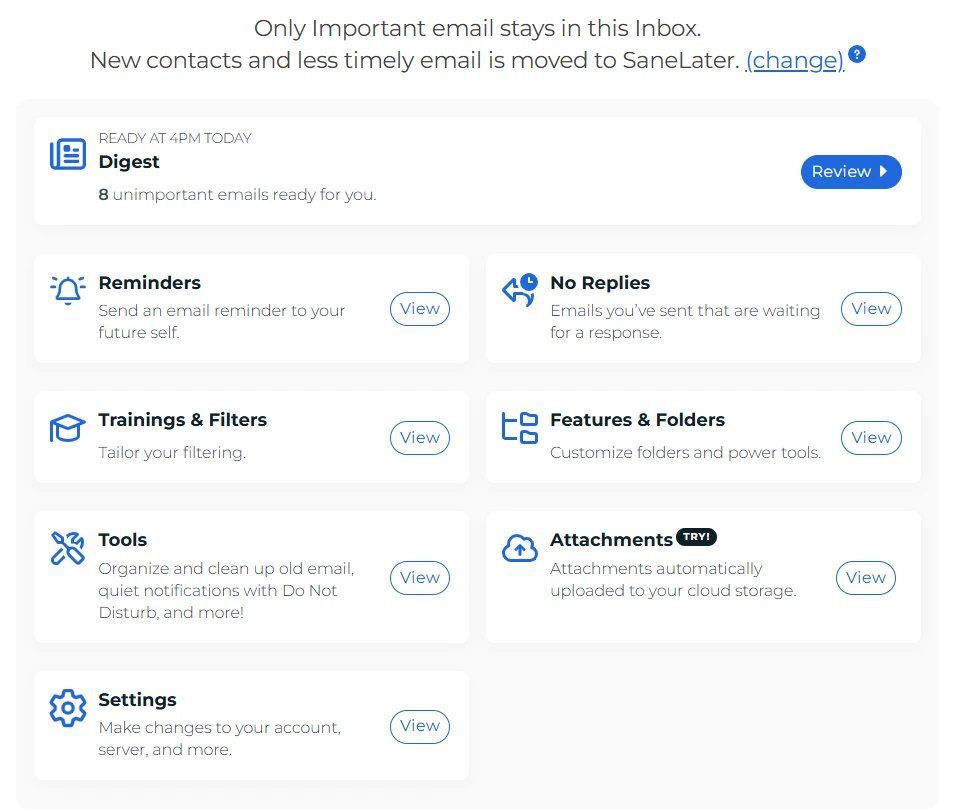
The dashboard is the home screen. From here you open the Digest, set Reminders, check No Replies, edit Trainings and Filters, manage Folders and Tools, connect Attachments and change Settings.
What you do need is a week or two of correcting it. SaneBox will put some messages in the wrong place at first, and every time you move one back, it learns. People who skip this step are the ones who end up missing an email in SaneLater.
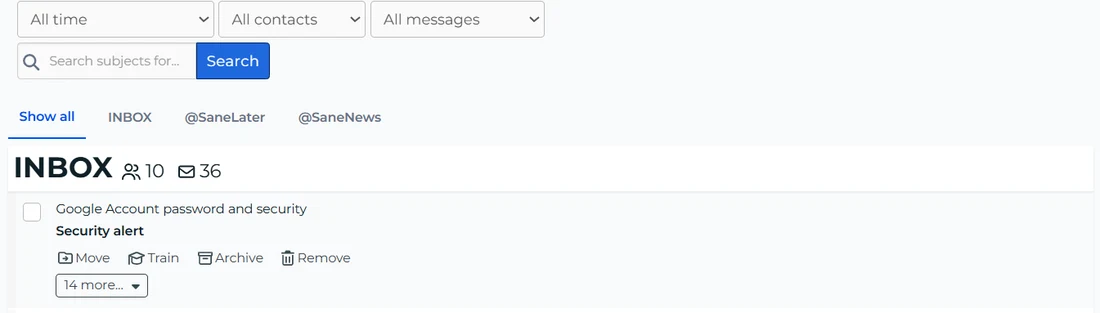
The web inbox groups your mail by SaneBox folder. Use the tabs to switch between the Inbox, @SaneLater and @SaneNews, and the Move, Train, Archive and Remove buttons to sort a message and teach SaneBox where that sender belongs.
Support
Every plan lists email and live chat support and concierge call support, and Dinner adds phone support. SaneBox’s help center is detailed, with step-by-step articles for each feature and each email provider. On Trustpilot, SaneBox had replied to every negative review, typically within a month.
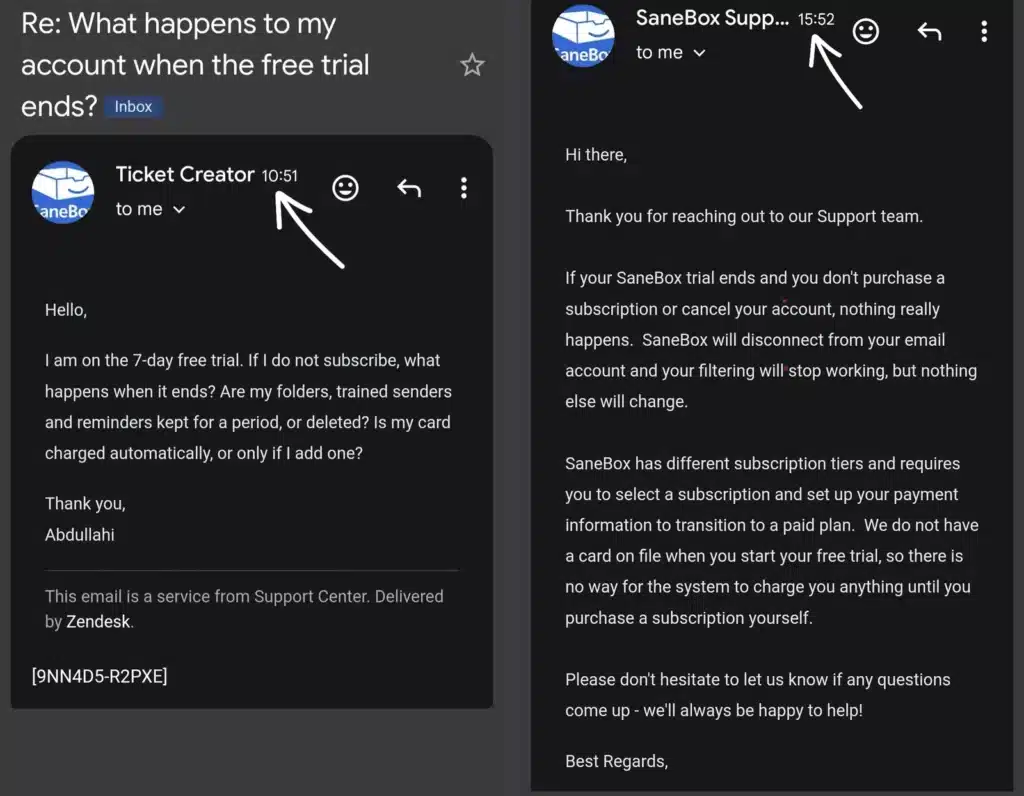
I tested support with one real question: what happens to an account when the free trial ends, and whether a card is charged automatically. I sent it to SaneBox support at 10:51 and the written reply reached my inbox at 15:52, about five hours later. The answer was clear on the point that matters most.
SaneBox support confirms that no card is on file during the trial, so nothing is charged until you subscribe. If the trial ends, SaneBox disconnects from your email account and filtering stops.
It did not say whether trained senders, folders and reminders are kept after the trial, so that part is still open. This is the only exchange I timed, so read five hours as one data point, not a promise.
SaneBox Privacy and Security
Giving any company access to your email is a serious decision, so this section matters more than usual. Here is what SaneBox says, and where its documents are thin.
What it reads: the privacy policy says SaneBox accesses only the envelope and header data of your emails, meaning sender, recipients, subject and date, and does not download the body.
Where your email lives: your email stays on your provider’s server. The policy says it is never held on SaneBox’s servers, and the homepage says SaneBox never stores full emails or attachments.
How it connects: through OAuth or your password. The FAQ says credentials are encrypted and stored on a server that cannot be reached from the public internet, and you can revoke access at any time.
Checks it cites: the homepage says its security is assessed every year as part of Google’s verification for restricted data access, that it has passed external audits by Leviathan Security Group, and that it runs ongoing testing through HackerOne.
Selling data: the policy says SaneBox does not sell personal data, and the FAQ says it does not show ads.
Deletion: on cancellation, the policy says your personal data is deleted, activity logs older than 30 days are removed, and cached data from inactive accounts is removed after 90 days.
The weak spot is the paperwork, not the design. The privacy policy was last updated on February 1, 2021, and the terms of service on January 6, 2021. The privacy policy still refers to the EU-U.S. Privacy Shield, an arrangement that is no longer in use for transferring data from Europe. Neither the business page nor the privacy policy mentions a SOC 2 report or ISO 27001 certification. SaneBox’s support team confirmed in October 2026 that it does not currently hold SOC 2 certification or an ISO 27001 certificate.
It said it expects to complete SOC 2 within the next few months, without guaranteeing the date, and pointed to its Security page and its Cloud Application Security Assessment documentation in the meantime. For a sole trader that may not matter. For a company with a security questionnaire, or clients in Europe, ask SaneBox for current documents before you connect a work account.
The design itself is reassuring. Reading headers instead of message bodies, and leaving your email on your own server, limits what SaneBox could expose even in a bad case. That is a more conservative approach than tools that copy your mailbox to their own systems.
What Customers Say About SaneBox
Platform
Rating
Reviews
What stands out
G2
4.8 out of 5
243
Average implementation under one month. Perceived cost of three out of five
Capterra
4.8 out of 5
71
97% positive, 0% neutral and 3% negative
Trustpilot
4.8 out of 5, Excellent
758
Replied to 100% of negative reviews, typically within a month
SaneBox customer ratings (checked October 2026)
These are among the most consistent ratings I have seen for any tool I have reviewed. The Trustpilot summary of recent reviews praises the filtering, the time saved, simple setup and the free training resources. Trustpilot also notes that SaneBox has not invited customers to review it recently, so the score comes from people who chose to post, which usually skews negative rather than positive. That makes a 4.8 more meaningful, not less.
Two cautions. The review counts on G2 and Capterra are modest, so a few dozen voices carry a lot of weight. And SaneBox’s own pages make claims I cannot check: that users save three to four hours a week, that the average business user saves over 100 hours a year, and figures from named customers. G2’s vendor description gives 2.5 hours a week and Capterra’s gives more than 12 hours a month. Those are SaneBox’s numbers in different forms, not independent measurements.
SaneBox Pros and Cons
What Works
Works with almost any email provider and in every email app, because the sorting happens on the server
Nothing to install, and setup takes minutes
Reads headers only, and your email never leaves your own account
Useful extras for business email: a list of unanswered emails, reply reminders, snooze and a one-step block list
Cancelling is clean: you choose whether to keep or remove the folders, and your email stays where it was
Very strong and consistent customer ratings across G2, Capterra and Trustpilot
A 30-day money-back guarantee, and a 25 percent discount for non-profit, education and government
What Doesn’t
Monthly billing is expensive: $9.49 for one account with two tools, and $42.99 for Dinner
Snack limits you to two of the eleven power tools
No free plan, and a trial of only seven days
Its AI is mainly sorting: a Reply Draft tool appears in the dashboard but is not described on the pricing page
Terms and privacy policy dated 2021, with no SOC 2 or ISO 27001 report mentioned
SaneBox’s own pages disagree on which plan is most popular
Business prices are not published on its own site
SaneBox Scorecard: How I Reached 8.0 out of 10
I score every tool on the same five criteria, each weighted equally. Here is the reason behind each number.
Criterion
Score
Why
Ease of use
9.0
Nothing to install, it works inside the email apps you already use, and you train it by moving messages. Setup took minutes in my seven-day test, and customers single out simple setup too. It needs a week or two of corrections before it can be trusted.
Features
8.5
Sorting, a daily digest, unanswered-email tracking, reminders, snooze, a block list and attachment handling cover the real problems of a busy inbox. Every feature I used in my seven-day test worked as described: a reminder arrived within two minutes of the time I set, and Reply Draft saved a reply to my Drafts folder without sending it. Reply Draft is barely documented, and Snack rations the tools to two.
Value for money
6.5
Annual billing is reasonable, from $65 a year. Monthly billing costs about 60 to 75 percent more, Dinner is expensive, there is no free plan, and the trial is short.
Integrations
8.0
Works with Gmail, Microsoft 365, iCloud, Yahoo, Fastmail, IMAP and Exchange, on every device and app. Business connections to Active Directory, Office 365 and Salesforce. POP accounts are not supported.
Support and trust
8.0
Email, chat and concierge call support on every plan, a clear written answer to my trial question in about five hours, ratings of 4.8 on all three review sites, header-only access and a 30-day guarantee. Held down by terms and a privacy policy from 2021 and no published security certification.
SaneBox scorecard with the reason for each score
SaneBox scorecard: five equally weighted criteria averaged into the overall score.
The sum is (9.0 + 8.5 + 6.5 + 8.0 + 8.0) ÷ 5 = 8.0. The score describes how well SaneBox fits a busy business owner or professional who wants a calmer inbox without changing email apps.
Common Mistakes When Trying SaneBox
Missing new customers. In the default mode, first-time senders go to SaneLater. Set Include New Contacts to Yes on the dashboard’s Folders page, as SaneBox’s support team recommends, or check SaneLater daily until SaneBox knows your contacts.
Not training it. Move misplaced messages in both directions during the first week. That is how it learns.
Never opening the digest. The daily digest is your safety net for anything sorted by mistake. Read it every day for the first month.
Choosing Snack for a busy inbox. Two tools is a tight limit. If you want SaneLater, SaneBlackHole and reply tracking together, you need Lunch.
Paying monthly by default. Annual billing costs about 40 percent less. Pay monthly for the first month if you are unsure, then switch.
Connecting a work account without asking. If your company has an IT or security policy, check it first, and ask SaneBox for current security documents.
SaneBox vs Other Email Management Tools
Before you pay for any email filter, try the free tools you already have. Gmail can sort mail into category tabs and filter by sender, and Outlook has a Focused Inbox and rules. For someone with moderate email volume, a few rules and a weekly unsubscribe session may be enough, and my guide on how to manage email overload walks through nine free fixes. SaneBox is worth paying for when those tools have stopped keeping up, or when you use several accounts or several email apps and want one system across all of them.
Option
What it is
How it differs from SaneBox
Gmail and Outlook built-in tools
Category tabs, Focused Inbox, filters and rules
Free, but tied to one provider and set up by hand. No reply tracking across accounts
Mailbutler
An email assistant that adds features to your email app
Listed by G2 as an alternative. Works as an add-on to an email app rather than on the server. I have not reviewed it
Superhuman Mail
A separate email app built for speed
Listed by G2 as an alternative. You switch to its app instead of keeping your own. I have not reviewed it
SaneBox and other ways to tame your inbox
I have not reviewed Mailbutler or Superhuman yet, so I am not ranking them. If what you are really after is AI that writes and summarises email, look at assistant-style tools instead of a filter like SaneBox.
Who Should Use SaneBox and Who Should Skip It
SaneBox Is a Good Fit If
You get more email than you can read, and important messages get lost among newsletters and notifications
You use more than one email app or device and want the same sorting everywhere
You send quotes, proposals or invoices and need to know who has not replied
You want a tool that works in the background, without learning a new email app
You are comfortable paying annually for a tool you will use every day
Skip SaneBox If
You get a few dozen emails a day and your inbox is under control
You need a free tool
Your main need is AI that writes or summarises email for you
Your email is an old POP account without folders
Your company needs SOC 2 or ISO 27001 documents before connecting a work account, and SaneBox cannot provide them
SaneBox Review Verdict: Is SaneBox Worth It in 2026?
SaneBox earns 8.0 out of 10. It does one job, sorting email by importance, and it does it in a way that respects how people actually work: no new app, no setup project, and your email never leaves your own account. The extras, especially the list of unanswered emails and reply reminders, solve problems that cost small businesses real money.
What holds the score down is price and paperwork. Monthly billing is expensive for a focused tool, Snack is too limited for most busy inboxes, the trial is only a week, and the terms and privacy policy have not been updated since 2021.
My advice: try it for the full seven days with your busiest account. Check that the Sane folders appear in every email app you use, spend two minutes each morning moving misplaced messages in both directions, and on the last day count the important emails you would have missed. If none slipped through and your inbox felt lighter, buy Lunch on annual billing rather than paying monthly. If you need a security report for your employer or clients, get it from SaneBox before you connect a work account.
If your inbox is the problem SaneBox is built for, you can try SaneBox free and decide after the week.
Frequently Asked Questions About SaneBox
Is SaneBox the best email management tool for a busy inbox?
It is a strong choice if your problem is incoming mail you have to sort by hand. SaneBox filters the inbox you already use, in Gmail, Outlook or most other providers, and moves less important mail out of the way, so you don’t need to switch apps. In my seven-day test I used every feature, and Reply Draft worked as described. It is not the right pick for everyone: if you get a few dozen emails a day, the free filters in Gmail and Outlook may be enough, and if you want a new email app or a shared team inbox, look at other tools first.
How much does SaneBox cost in 2026?
Snack costs $9.49 a month paid monthly, $5.42 a month billed annually or $4.54 a month billed every two years. Lunch costs $15.99, $9.08 or $7.46, and Dinner $42.99, $26.58 or $22.04, on the same billing options.
Does SaneBox have a free trial?
Yes. The trial is seven days: my trial account showed seven days, and SaneBox’s support team confirmed in October 2026 that the two-week reference in its terms is out of date. The homepage says no credit card is required, and none was asked for when I signed up. There is no free plan after the trial.
Is SaneBox safe to use?
SaneBox says it reads only email headers, not message bodies, and that your email stays on your own provider’s server. It cites annual security assessments for Google’s restricted data access, external audits and ongoing security testing. Its privacy policy and terms date from 2021, and SaneBox confirmed in October 2026 that it does not yet hold SOC 2 or ISO 27001 certification, though it expects to complete SOC 2 within months. Businesses with formal security requirements should ask for its Cloud Application Security Assessment documentation.
Does SaneBox read my emails?
According to its privacy policy and FAQ, SaneBox accesses only the envelope and header data, such as sender, subject and date, and does not download the body of your emails. It decides importance from how you have dealt with each sender in the past.
Does SaneBox work with Gmail and Outlook?
Yes. SaneBox lists Gmail, Microsoft 365, Apple iCloud, Yahoo Mail and Fastmail, as well as any IMAP, Exchange or ActiveSync server. Because it works on the server, its folders appear in whatever email app you use. Old POP accounts are not supported because they have no folders.
Sources and References
Every fact in this review comes from the pages below, checked in October 2026. Prices and terms change, so confirm them on SaneBox’s own pages before you buy.
“An easy way for a small business to add live chat, a help desk and an AI agent, with one catch: three separate usage meters make the real cost higher than the starting price.”
From $24.17/month billed yearly ($29 monthly)Best for: Small online stores and service businesses that want live chat and AI answers in one tool7-day free trial (no card needed)
“A feature-rich helpdesk for Shopify stores that charges by ticket instead of by seat, held back by a steep jump between plans, metered AI and non-refundable fees.”
From $10/month for 50 tickets (Basic $60, or $50 billed yearly)Best for: Shopify stores with steady support volume and a shared support inboxFree trial, no card needed (sign-up page says 30 days; other Gorgias pages say 7)


![SaneBox review: email Drafts folder showing a reply draft created by SaneBox, marked [Draft], for an email from Vista Social](https://softreviewlab.com/wp-content/uploads/2026/10/sanebox-review-reply-draft.webp "SaneBox Review 2026: Best Email Management Tool for a Busy Inbox? 9")