
AI Customer Support Chatbots: A Buyer’s Guide for Small Businesses
AI customer support chatbots explained for small businesses: 9 checks before you buy, real 2026 prices from 8 vendors, legal risks and a 14-day trial plan.
How to choose AI tools for a small business in 2026: 7 practical steps, real prices from 4 vendors, data privacy checks and a one-week trial plan.

By Abdullahi Abdirahman, Founder & Editor, SoftReviewLab. Prices checked in October 2026 on each vendor’s official pricing or help page. This is a research-based buying guide: it draws on vendor pricing and privacy pages and on published government guidance, not on a lab test of every AI tool. It contains no affiliate links.
If you want to know how to choose AI tools for a small business, start with one task that costs you real hours every week, not with a tool that looks impressive in a demo. Check whether software you already pay for can do that task, decide how accurate the result has to be, and only then compare two or three tools on price, data handling and how well they handled your own work in a trial.
Most wasted AI spending doesn’t come from picking a bad tool. It comes from overlapping subscriptions, seats nobody opens, credits that run out mid-month and yearly commitments made after a ten-minute demo. The seven steps in this guide are built to prevent those four things.
The phrase AI tool covers very different products, and they are bought, priced and judged in different ways. Sorting a tool into one of five types tells you most of what you need to ask about it.
| Type | What it does | Examples | How it is usually priced |
|---|---|---|---|
| General AI assistant | Answers questions, drafts and edits text, summarises documents and analyses files | ChatGPT, Claude, Gemini, Microsoft 365 Copilot | Per user per month |
| AI inside software you already use | Adds drafting, summaries and automation to your email, documents, CRM or project tool | Gemini in Google Workspace, Copilot in Microsoft 365, AI features in CRMs | Included in the plan, sold as an add-on per user, or metered with monthly credits |
| Single-purpose AI tool | Does one job, such as ad images, meeting notes or sorting email | AdCreative.ai for ad creative | A monthly plan with a credit or usage cap |
| Customer-facing AI | Talks to your customers through a website chatbot or an AI phone receptionist | Chatbots in support tools, call answering in call tracking tools | Usage-based, often on top of a base plan |
| AI agents and automation | Carries out multi-step tasks, such as researching leads or updating records | Agents inside CRMs and assistants | Credits or usage-based |
The type matters because it changes what can go wrong. A drafting assistant that makes a mistake costs you a few minutes of editing. A chatbot that gives a customer the wrong refund policy costs you a great deal more. Keep the type in mind through every step below.
Before the steps, it helps to know what you are trying to avoid. From reading vendors’ pricing pages and terms, these are the patterns that turn a cheap tool into an expensive one:
None of these is about the quality of the AI. They are buying mistakes, which is good news, because buying mistakes are avoidable.
An AI tool is only worth money against a specific job. So before you look at any product, pick one task and describe it. The best first candidates are frequent, text-heavy and low-risk: first drafts of quotes and proposals, summaries of long documents or calls, replies to routine emails, product descriptions, meeting notes.
| Question | Why it matters | Example answer |
|---|---|---|
| What exactly is the task? | A tool is only useful against a specific job | Writing first drafts of customer quotes |
| How many hours a week does it take? | Sets the most a tool could ever save | 5 hours |
| Who does it? | Decides how many seats you need | 2 people |
| What happens if the result is wrong? | Sets how much checking is needed | A wrong price reaches a customer, so every draft is checked |
| How will you know it worked? | Gives you a number to test during the trial | Draft time falls from 40 minutes to 15 |
If you can’t fill in this table for a task, you aren’t ready to buy a tool for it. And if the honest answer to the second question is twenty minutes a week, no subscription will pay for itself.
Before adding a subscription, look at the software you already have. Many business tools now include AI, and the version you already own has one large advantage: it works on data that is already inside it.
Google lists Gemini features inside its Workspace plans. Its pricing page shows limited access on Business Starter, where Gemini works in Gmail and Vids only, and expanded access across Gmail, Docs, Sheets, Slides, Drive, Meet and Chat on Business Standard and above. Microsoft sells Copilot inside bundles, such as Microsoft 365 Business Standard with Copilot, and as an add-on to a qualifying Microsoft 365 plan.
The same applies to sales and marketing software. In my monday.com review, I noted that each plan comes with a monthly allowance of AI credits, and HubSpot’s pricing page lists monthly HubSpot Credits on its paid plans. If your CRM, help desk or email platform already includes AI features, test those first. They cost nothing extra until you reach the allowance. My Tidio review and Gorgias review show how two customer support tools price their AI agents. If the job is sorting a crowded inbox rather than writing replies, my SaneBox review covers a tool built only for that.
A rule that suits most small businesses, in my view: one general assistant for the team, plus the AI built into tools you already own. Add a single-purpose tool only when one specific task clearly justifies it.
AI tools produce confident, well-written text that is sometimes wrong. That isn’t a fault you can buy your way out of, so the practical question is how much checking each task needs. The US Small Business Administration’s guidance on AI advises having another person review AI output, and says humans should review customer-facing communications.
| Level | Typical tasks | What a mistake costs | How to check |
|---|---|---|---|
| Low | Brainstorming, first drafts, summarising your own notes, rewording emails | A few minutes | The author reads it before using it |
| Medium | Marketing copy, customer replies, reports, product descriptions | A confused customer, a correction, some embarrassment | A second person reviews anything a customer will see |
| High | Contracts, pricing, tax, legal, medical or hiring decisions | Money, legal trouble or harm to a person | A qualified person makes the decision, and AI only assists |
Start with low-risk tasks. They show you how the tool behaves without putting a customer in the way of its mistakes, and they are where the time savings are easiest to measure. Move to medium-risk work once you know how often it gets things wrong. I would keep high-risk decisions with a person, whatever the vendor’s marketing says.
AI tools are priced in three main ways, and many combine them. Knowing which model you are looking at tells you where the bill can grow.
General assistants are mostly sold per user per month. OpenAI’s help center lists ChatGPT Business at $20 per user a month on yearly billing or $25 on monthly billing, with a minimum of 2 seats. Claude’s pricing page lists Team standard seats at $20 on yearly billing or $25 on monthly billing. Both vendors also list premium seats with higher usage limits at $100 a month on yearly billing, which is five times the standard price.
Count the people who will really use the tool. A seat for someone who opens it twice a month is the easiest money to waste, and a premium seat only makes sense for someone who reaches the standard limit most weeks.
Many AI tools meter what you can do with credits. One credit usually equals one action or one finished output, and when the credits run out, the feature stops or you buy more. In my AdCreative.ai review, the Starter plan’s 10 credits meant ten finished downloads a month. In my Atria review, one round of AI image generation uses 480 of the Core plan’s 4,000 monthly credits. monday.com lists 1,000 AI credits a month on its Basic plan and, in its article on AI credits, prices extra credits at $0.01 each on yearly billing. HubSpot lists 500 credits a month on Starter and extra credits at $0.010 each.
Before you buy any credit-based tool, ask three things: what one credit buys, how many credits your real workload would use in a month, and what happens when you run out.
Microsoft 365 Copilot Business shows how add-on pricing works. Microsoft’s pricing page lists it from $18 per user a month paid yearly, marked down from $21 until December 31, 2026, or $25.20 on monthly billing. The page also says a separate licence for a qualifying Microsoft 365 plan is required, so the real cost is the add-on plus the plan underneath it. Microsoft lists bundles as well: Business Standard with Copilot at $23.50 per user a month paid yearly, and Business Premium with Copilot at $32.
Yearly billing is cheaper for every product in this guide. ChatGPT Business and Claude Team both drop from $25 to $20 per user. But a yearly plan is a commitment: Microsoft’s page says its yearly subscriptions renew automatically, and its one-month free trial requires a credit card.
AI products change quickly, and the tool that is best for your task in January may not be in June. My advice is to pay monthly for the first two or three months, and to switch to yearly billing only when the team is using the tool every week and you have checked the renewal terms.
This is the step small businesses skip most often, and the one with the largest downside. There are two questions: can the vendor use what you type in to train its models, and who else can see it?
The answer often depends on the plan, not only on the vendor. Business plans and personal plans from the same company can have different defaults.
| Vendor | What its pages say about business plans | What to note about personal plans |
|---|---|---|
| OpenAI (ChatGPT) | Does not train on business data by default on ChatGPT Business and Enterprise, customers own their inputs and outputs, and a SOC 2 Type 2 audit has been completed | The pricing page lists model training on the Free, Go, Plus and Pro plans as opt-out available |
| Anthropic (Claude) | The pricing page lists model training on Team and Enterprise content as none by default | The page describes the Free and Pro plans differently, so check the privacy setting |
| Google (Gemini in Workspace) | The privacy hub says Workspace does not use customer data to train models without the customer’s permission, content is not reviewed by people, and interactions stay within the organisation | The privacy hub covers Workspace Business, Enterprise and Education editions, not personal Google accounts |
| Microsoft (Microsoft 365 Copilot) | Prompts, responses and data accessed through Microsoft 365 are not used to train foundation models, and Copilot only shows a user the data that user already has permission to view | This statement covers Microsoft 365 Copilot for organisations |
Two practical rules follow from that table. First, the most likely leak is a member of staff using a personal free account for company work, because the business terms don’t apply to it. Second, the SBA’s guidance goes further and advises against entering sensitive or proprietary data into AI systems at all.
Sources for the table: OpenAI’s enterprise privacy page, Claude’s pricing page, Google’s generative AI privacy hub and Microsoft’s page on Copilot data, privacy and security.
Questions to answer before any customer or company data goes into a tool:
That last question matters more than it sounds. An assistant connected to your shared drive can surface any file a user is technically allowed to open, including ones that were shared too widely years ago. Tidy your file permissions before you connect one.
You don’t need a legal department to use AI, but a few points are worth knowing. I’m not a lawyer, so treat this as orientation and ask a professional about your own situation.
There is also a voluntary reference worth knowing about. The NIST AI Risk Management Framework, released in January 2023, is organised around four functions: Govern, Map, Measure and Manage. NIST added a profile for generative AI in July 2024. A five-person business doesn’t need to implement it, but as I read them, the four words make a useful checklist: decide who is responsible, list where you use AI, check the quality of what it produces, and fix problems when you find them.
A demo shows the tool at its best, on the vendor’s examples. A trial with your own work shows what you would actually be paying for. Keep it small and structured.
| Step | What to do | What you learn |
|---|---|---|
| 1 | Collect ten real tasks from last month, with customer personal details removed | Whether the tool handles your kind of work |
| 2 | Run all ten through each tool, using the same instructions | A fair comparison between tools |
| 3 | Ask the person who normally does the work to mark each result: usable, needs edits or wrong | How often you can trust the output |
| 4 | Time each task, including the checking | The real time saved |
| 5 | Note how many credits or messages the ten tasks used | Whether the plan’s limits fit a full month |
| 6 | Add and remove a user, find the privacy settings, and export your data | Whether you can manage it without help |
| 7 | Send support one real question | How quickly and how well they answer |
| 8 | Find out how to cancel, and whether the trial took a card | What happens if you do nothing |
Check the trial terms before you start. Microsoft’s Copilot trial requires a credit card, and so does the 7-day AdCreative.ai trial I covered in my review. Put the end date in your calendar on the day you sign up.
These are the listed prices for business plans from four vendors, checked in October 2026. They are per user per month in US dollars, before tax.
| Product | Yearly billing | Monthly billing | Notes |
|---|---|---|---|
| ChatGPT Business | $20 | $25 | Minimum 2 seats. Premium seats with higher limits are $100 yearly or $125 monthly |
| Claude Team | $20 | $25 | Standard seats. Premium seats with higher limits are $100 yearly or $125 monthly |
| Microsoft 365 Copilot Business | $18, marked down from $21 until December 31, 2026 | $25.20 | An add-on. A qualifying Microsoft 365 plan is needed as well |
| Microsoft 365 Business Standard with Copilot | $23.50 | $28.20 | A bundle with the Microsoft 365 apps, for up to 300 users |
| Google Workspace Business Starter | €6.12, marked as 10% off for 12 months (regular €6.80) | €7.29 (regular €8.10) | Shown in euros. Gemini in Gmail and the Gemini app |
| Google Workspace Business Standard | €12.24, marked as 10% off for 12 months (regular €13.60) | €14.58 (regular €16.20) | Shown in euros. Gemini in Gmail, Docs, Meet and more |
| Google Workspace Business Plus | €21.10 | €25.30 | Shown in euros. For up to 300 users |
Google’s page showed its prices in euros when I checked, so they aren’t directly comparable with the dollar prices above. Its 10% discount is for new customers, covers the first 20 users for 12 months, and is followed by standard pricing. Google also lists a 14-day free trial.
Per-user prices mean little until you multiply them. Here is the same list for a team of five over twelve months.
| Product | On yearly billing | On monthly billing |
|---|---|---|
| ChatGPT Business | $1,200 | $1,500 |
| Claude Team, standard seats | $1,200 | $1,500 |
| Microsoft 365 Copilot Business, add-on only | $1,080 at the promotional price | $1,512 |
| Microsoft 365 Business Standard with Copilot | $1,410 | $1,692 |
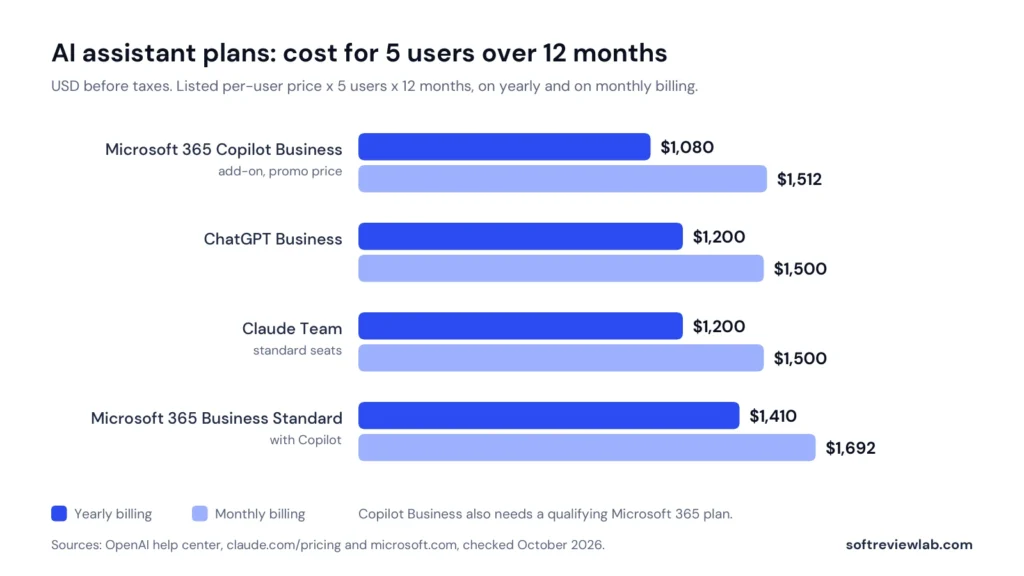
Three things stand out. The general assistants are priced almost identically, so price alone shouldn’t decide between them. Monthly billing costs about a quarter more than yearly billing, which is the price of keeping your freedom to leave. And the Copilot add-on looks cheapest only if you already pay for a qualifying Microsoft 365 plan.
Individual plans cost less. Claude’s pricing page lists Pro at $17 a month on yearly billing or $20 monthly, and ChatGPT’s pricing page lists Go at $5 a month, Plus at $20 and Pro from $100, alongside a free plan. For company work, though, the business plans are the ones that come with admin controls and the data terms described in Step 5. OpenAI’s comparison table shows features such as single sign-on and an admin console as not included on its individual plans.
The sum is simple. The hard part is being honest about the first number.
| Case | Time saved per person, after checking | Value per month for 2 people at $30 an hour | Cost of 2 seats at $25 | Result |
|---|---|---|---|---|
| A task done many times a week | 2 hours a week | $516 | $50 | Clearly worth it |
| A task done occasionally | 15 minutes a week | About $65 | $50 | Barely breaks even |
The second row is the common one. A tool that saves a quarter of an hour a week is pleasant to have and almost pays for itself, but it won’t change your business. Measure the time saved during your trial using the method in Step 7, and don’t accept a vendor’s estimate in place of your own.
| Your situation | Start with | Why |
|---|---|---|
| Your team already works in Google Workspace or Microsoft 365 | The AI built into that suite | It works on your existing files and email, and you may already be paying for it |
| You write a lot of proposals, emails and reports | One general assistant on a business plan | The widest range of uses for a predictable per-user price |
| You run many ads on small budgets | A single-purpose creative tool, after checking its credit caps | Useful only if the monthly credits match your output. My AdCreative.ai review shows how the caps work |
| You miss phone calls or website chats | Customer-facing AI with a clear route to a person | It answers when you can’t, but mistakes reach customers directly. My CallRail review covers one AI call-answering feature |
| You handle health, legal or financial information | Advice from a professional before any tool | The data rules are stricter, and a business plan with a signed data agreement is the minimum |
| You are one person testing the water | A free plan, with no confidential data in it | Enough to learn what AI is good at before you spend anything |
Free plans are a sensible way to learn. They are enough when you are one person, the work contains nothing confidential and you only need occasional help with drafting or summarising. The SBA’s guidance suggests starting small and testing free or low-cost tools first, and I agree with it.
They stop being enough in three situations. The first is when the work involves customer or company data, because the business data terms in Step 5 apply to business plans. The second is when several people need it, because free plans have no shared workspace or admin controls. The third is when usage limits interrupt real work. OpenAI’s pricing page also notes that its Go plan may include ads, which is worth knowing before you put it in front of staff.
A short written policy prevents most problems, and it doesn’t need legal language. These six rules are a starting point to adapt, not legal advice.
| Week | What to do | Result |
|---|---|---|
| Week 1 | Set up company accounts, check the privacy settings, and share the one-page policy | A safe setup |
| Week 2 | Use the tool for the one task you chose, and save the instructions that work as shared templates | A repeatable way of working |
| Week 3 | Measure the time per task, including checking, and compare it with your starting figure | Real numbers, not impressions |
| Week 4 | Review usage: who used it, how many credits or messages, what went wrong | A decision to keep, change plan or cancel |
If nobody has opened the tool by week three, that is your answer. Cancel it and go back to Step 1 with a different task.
The prices come from OpenAI’s help center and pricing page, Claude’s pricing page, Microsoft’s Copilot pricing page and Google’s Workspace pricing page, all checked in October 2026. The data-handling statements come from each vendor’s own privacy or security pages. The guidance on review, disclosure and regulation comes from the US Small Business Administration, the Federal Trade Commission, the National Institute of Standards and Technology and the European Commission. The credit examples for AdCreative.ai, Atria and monday.com come from my own reviews, and the HubSpot figures from its pricing page.
The seven steps, the worksheets, the trial plan, the policy and the cost examples are my own editorial advice. The two pay-back examples use round numbers to show the method.
What I couldn’t verify: I haven’t compared the quality of each assistant’s output, so this guide doesn’t rank them. Google Workspace prices were shown to me in euros, so its prices in US dollars may differ from a simple conversion. The vendors’ statements about data and training are their own descriptions, and I haven’t audited them. The legal points are a summary for orientation, not legal advice, and the rules differ by country. AI prices and terms change often, so check each vendor’s page on the day you buy.
Related reading: Tidio vs Gorgias, the buyer’s guide to AI customer support chatbots and Atria vs AdCreative.ai.
There isn’t one best AI tool for every small business. Start with the AI built into software you already pay for, such as Google Workspace or Microsoft 365, and add one general assistant on a business plan if you need more. Choose between assistants by testing them on ten of your own tasks, because their listed prices are almost the same.
Based on official pages checked in October 2026, business plans for general AI assistants are listed at about $18 to $25 per user a month. ChatGPT Business and Claude Team are both $20 on yearly billing or $25 on monthly billing, and Microsoft 365 Copilot Business is listed from $18 as an add-on to a Microsoft 365 plan. For five users, that is roughly $1,080 to $1,500 a year.
Free plans are fine for learning and for work that contains nothing confidential. For customer or company data, use a business plan, because the vendors’ commitments about not training on your data are stated for their business plans. The US Small Business Administration advises against entering sensitive or proprietary data into AI systems.
It depends on the plan. OpenAI says it does not train on business data by default on ChatGPT Business and Enterprise, Claude’s pricing page lists no training by default on Team and Enterprise, Google says Workspace does not use customer data for training without permission, and Microsoft says Copilot prompts and responses are not used to train foundation models. Personal plans can have different defaults, so check the setting.
If customers are talking to a chatbot, tell them. The European Commission says the EU AI Act’s transparency rules apply from August 2026 and that people should be informed when they are interacting with an AI system. In the US, the SBA describes disclosure as becoming expected best practice, though not a legal requirement. Ask a lawyer about your own situation.
How this guide was put together. Built from vendor documentation and pricing pages, and from recurring themes in public customer reviews — not from a hands-on lab test. Prices move; confirm on the vendor’s own page before you buy. How we work.
Keep going
AI customer support chatbots explained for small businesses: 9 checks before you buy, real 2026 prices from 8 vendors, legal risks and a 14-day trial plan.
How to choose a CRM for a small business in 2026: 7 practical steps, real prices from 5 vendors, hidden costs to check and a free-trial test plan.
A practical 6-step guide to choosing email marketing software for a small business: what to check, what it really costs, and how to test tools before you commit.