monday.com Review 2026: Features, CRM, Pricing, Pros and Cons
Work Management & CRM
monday.com Review 2026: Features, CRM, Pricing, Pros and Cons
7.6/10
“monday.com suits teams of three or more that want projects and sales on one visual platform and value ease of use. Price it for the seat group you must buy, not your headcount: seats come in groups of 3, 5, 10 and up. Automations start on Standard with 250 actions a month, and time tracking and private boards need Pro. Use the 14-day trial with real work before you choose yearly billing.”
Research-based review · not hands-on testedBuilt from the vendor’s documentation and pricing pages and from patterns in customer reviews. How we work.
Starting price
From $9/seat/month billed yearly (3-seat minimum)
Best for
Small and mid-sized teams that want projects and sales in one tool
Free trial
14-day free trial on Pro (no card needed)
Based on
monday.com's pricing pages, help center and AI credits article, plus customer ratings on G2, Capterra and Trustpilot, and written answers from monday.com’s partnership team (October 2026)
Scores
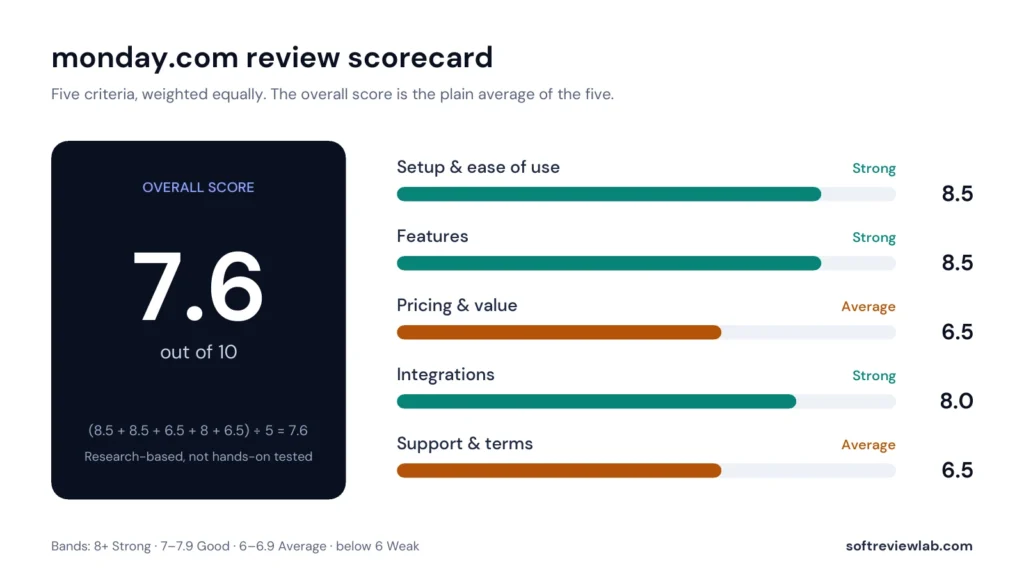
Ease of setup & use8.5
Feature depth8.5
Pricing & value6.5
Integrations8.0
Support & terms6.5
How these scores were worked out
Ease of setup & use: 8.5 (Strong) Self-serve setup, templates, a free plan and a no-card trial; ease of use is the most praised point in reviews, though complex setups take time to learn.
Feature depth: 8.5 (Strong) Boards, views, dashboards, automations, docs, forms, CRM and AI in one platform; several key features are reserved for Pro.
Pricing & value: 6.5 (Average) Fair per-seat prices, but seat groups, a three-seat minimum and the low automation cap on Standard raise the real cost.
Integrations: 8.0 (Strong) More than 200 apps and an API; no integrations listed on Basic and a 250-action cap on Standard.
Support & terms: 6.5 (Average) 24/7 help that starts with an AI assistant, no guaranteed response time on Basic, Standard or Pro, a limited refund window and a low Trustpilot score.
Overall: (8.5 + 8.5 + 6.5 + 8.0 + 6.5) ÷ 5 = 7.60, shown as 7.6. The five criteria are weighted equally.
Scores are editorial judgments in half-point steps, based on documented features, published pricing and repeated themes in customer reviews. They are not lab measurements, so treat the words as the guide: 8.0+ Strong, 7.0 to 7.9 Good, 6.0 to 6.9 Average, below 6.0 Weak.
What works
Easy to start, with templates and a visual board that non-technical teams understand.
One platform for projects, sales, development and service.
A free plan for two people and a 14-day Pro trial with no card.
Unlimited free viewers on paid plans, and unlimited free guests on Pro.
More than 200 integrations and AI features on every paid plan.
High ratings on G2 (4.7) and Capterra (4.6) from thousands of reviews.
What doesn’t
Seats are sold in groups with a minimum of three, so small teams pay for seats they don't use.
Automations and integrations start on Standard and are capped at 250 actions a month.
Time tracking, formula columns and private boards need Pro.
monday CRM has no free plan, and its Basic plan allows only 5 columns per board.
Refunds apply only to yearly plans cancelled within 30 days.
A Trustpilot score of 2.1, with complaints about support, costs and cancelling.
What we couldn’t verify
monday.com was not tested hands-on; ease of use, speed and reliability are based on its documentation and customer reviews.
The quality of the AI features, including Sidekick, agents and the notetaker, was not assessed.
Support response times are not guaranteed on Basic, Standard or Pro, as monday.com confirmed by email, and were not measured.
Figures such as use by over 60% of the Fortune 500 and 35,000 CRM customers are monday.com's own claims.
If any of these matter to your decision, check them directly with the vendor or during your trial.
Who should skip it
Solo users and pairs who outgrow the Free plan, teams just above a seat group on a tight budget, businesses that need heavy automation on the cheapest plan, and anyone who only needs a simple sales pipeline.
By Abdullahi Abdirahman, Founder & Editor, SoftReviewLab. Pricing and plan limits checked on monday.com’s official pricing pages and help center in October 2026. This is a research-based review built from monday.com’s own documentation, plus customer ratings on G2, Capterra and Trustpilot. I have not run my own projects or sales pipeline in monday.com. This page contains affiliate links: if you sign up through them, SoftReviewLab may earn a commission at no extra cost to you. See our affiliate disclosure and research and scoring method.
Table of Contents
monday.com Review at a Glance: The Short Answer
This monday.com review answers the question most small teams ask before they sign up: is it worth paying for, or will a cheaper tool do? My short answer is that monday.com is one of the easier platforms to adopt for managing projects and sales in one place, and customers rate it highly for ease of use. Its weak point is the real cost. Seats are sold in fixed group sizes with a minimum of three, automations only start on the Standard plan with a monthly cap, and several features that teams expect, such as time tracking and private boards, sit on the Pro plan.
monday.com is a cloud platform built around customisable boards. The same boards power its separate products: monday work management for projects and tasks, monday CRM for sales pipelines, monday dev for software teams, plus monday service and monday campaigns. This review covers the platform as a whole, with the most detail on work management and monday CRM, because those are the two products small businesses usually choose between.
monday.com
Overall score
7.6 out of 10 (research-based)
What it is
A board-based work platform with separate products for projects, CRM, software development, service and email campaigns
Starting price
Work management from $9 per seat a month on yearly billing; monday CRM from $12
Minimum purchase
3 seats, then groups of 5, 10, 15 and so on
Free plan
Yes for work management: 2 seats, 3 boards, 200 items. No free plan for monday CRM
Free trial
14 days on the Pro plan, no credit card needed
Best for
Small and mid-sized teams that want projects and sales in one visual tool
Not ideal for
Solo users, pairs on a tight budget, and teams that need heavy automation on the cheapest plan
Customer ratings
4.7 on G2 (17,248 reviews), 4.6 on Capterra (6,118 reviews), 2.1 on Trustpilot (3,438 reviews)
Prices and limits from monday.com’s pricing pages and help center, October 2026. Ratings checked October 2026.
If monday.com already sounds like a fit and you want to test it, you can try monday.com free for 14 days, or keep reading for the full picture.
What Is monday.com and How Does It Work?
Everything in monday.com starts with a board. A board is a table: each row is an item, such as a task, a deal or a client, and each column holds one piece of information about it, such as an owner, a status, a date or a number. You can group items, for example by month or by sales stage, and open any item to add notes, files and updates.
The same board can be shown in different views. A Kanban view turns statuses into columns of cards, a calendar or timeline view shows the same items by date, and a dashboard combines numbers from several boards into charts. Automations then handle routine steps, such as notifying an owner when a status changes.
monday.com sells this foundation as separate products, each with its own templates and pricing:
monday work management: projects, tasks, requests and approvals, resource and portfolio management.
monday CRM: leads, contacts, deals, email sync and sales reporting.
monday dev: sprints, roadmaps and bug tracking for software teams.
monday service and monday campaigns: ticketing and email marketing.
The company says it is trusted by over 60 percent of the Fortune 500 and that monday CRM has more than 35,000 customers. Those are vendor figures. What matters for a small business is narrower: how fast your team can set it up, what the plan you can afford includes, and what it costs for your real headcount.
How I Evaluated monday.com
I scored monday.com on the five criteria I use for every review: setup and ease of use, feature depth, pricing and value, integrations, and support and terms. Each criterion gets a score out of 10 and the overall score is the plain average, as explained in our research and scoring method. The facts come from monday.com’s pricing pages and help center, which I link in the references. Statements about fit, value and who should skip it are my editorial judgment.
I did not test monday.com hands-on, so I make no claims about speed, reliability or how well the AI features perform. Where I couldn’t confirm something, I say so.
monday.com Features: What You Actually Get
Boards, Items and Columns
Paid plans include unlimited items and unlimited boards, according to monday.com’s help center. The Free plan is limited to 3 boards and 200 items. Columns are where the flexibility comes from: status, people, date, numbers, files and many more. Two columns that teams often expect are reserved for the Pro plan: the time tracking column and the formula column, which calculates values from other columns.
Views: Kanban, Timeline, Gantt and More
Which views you get depends on the plan. This matters more than it sounds, because a project manager who needs a Gantt chart can’t use the Basic plan for it.
Dashboards pull numbers from your boards into charts and summaries. The limit is how many boards one dashboard can combine: 1 board on Basic, 5 on Standard, 20 on Pro and 50 on Enterprise. A business owner who wants one screen covering sales, projects and support will need Standard at least, and Pro if the work is spread across many boards.
Automations
Automations follow a simple pattern: when something happens, do something. For example, when a status changes to “Done”, notify the manager, or when a date arrives, create a task. monday.com counts each completed step as an action, and plans limit actions per month.
Plan
Automation actions a month
Integration actions a month
Free and Basic
Not listed
Not listed
Standard
250
250
Pro
25,000
25,000
Enterprise
250,000
250,000
Source: monday.com pricing page and help center, October 2026.
The jump from 250 to 25,000 is the detail to notice. As a simple illustration, five people who each trigger three automated notifications a day will use 300 actions in 20 working days, which is already over the Standard limit. In my judgment, any team that relies on automation should budget for Pro, not Standard.
Docs, Forms and Files
monday.com includes shared documents and forms that turn submissions into board items, which is useful for client requests, job applications or lead capture. File storage depends on the plan: 500 MB on Free, 5 GB on Basic, 20 GB on Standard, 100 GB on Pro and 1,000 GB on Enterprise.
Members, Viewers and Guests
Only members and admins take up paid seats. Viewers have read-only access, don’t count toward your plan, and monday.com says you can invite an unlimited number of them. Guests are people outside your company, such as clients or freelancers, who work on specific shared boards.
Guest rules change by plan. According to monday.com’s user types article, the Standard plan allows up to three guests free and counts every fourth guest as a paid member, while Pro and Enterprise allow unlimited guests free. If you work with many outside clients, that difference can decide the plan for you.
monday CRM: Features for Sales Teams
monday CRM is the same board system set up for selling. Leads, contacts, accounts and deals each live on a board, and deals move through pipeline stages you define. According to monday.com’s CRM page, it includes:
Pipeline and contact management: customisable deal stages, plus lead, contact and account records.
Email sync: connections with Gmail and Outlook.
Activity tracking: calls, emails and meetings recorded automatically on each record.
Dashboards and forecasting: pipeline value, team performance and revenue forecasts.
Quotes and invoices: with a monthly limit that depends on the plan.
Mass emails and email sequences: listed on the Pro plan.
The plan limits are specific, and they are the main thing to check before you buy:
Limit
Basic
Standard
Pro
Active contacts and deals
1,000
10,000
100,000
Custom dashboards
1
5
50
Workspaces
1
3
15
Columns per board
5
15
75
Quotes and invoices a month
20
50
250
Custom automations a month
Not listed
250
25,000
Mass emails and email sequences
Not listed
Not listed
Yes
Source: monday CRM pricing page, October 2026. The Ultimate plan lists unlimited contacts, deals and dashboards.
Two limits stand out. Basic allows only 5 columns per board, which is tight for a deal record that needs a value, stage, owner, close date, source and next step. And 250 automations a month on Standard is the same low ceiling as in work management. For most sales teams, Standard is the realistic starting plan, and Pro is where email sequences begin.
monday.com now describes itself as an AI work platform, and AI features appear on every paid plan. The main ones named on its pricing pages are:
Sidekick: an AI assistant inside the platform.
Agents: AI agents that carry out tasks, including a builder for your own agents.
AI Notetaker: meeting transcripts and summaries.
Vibe: a tool for building small custom apps from a written prompt.
AI columns and an AI workflow builder: the workflow builder is listed from the Pro plan.
CRM agents: such as a lead sourcing agent, a meeting prep agent and an outreach calling agent, listed from CRM Standard.
These features run on AI credits. monday.com’s pricing page lists 1,000 credits a month on Basic, 2,000 on Standard and 3,000 on Pro, with a custom amount on Enterprise. Its article on AI credits explains that each AI action deducts a set number of credits, that extra credits cost $0.01 each on yearly billing or $0.0125 on monthly billing and are sold in fixed bundles, and that when you run out, credit-based features pause while free AI features keep working. The free ones include the AI formula builder, AI in workdocs and the CRM email generator.
The allowance is shared across the whole account, not given to each seat. monday.com’s partnership team confirmed this to me by email in October 2026, and said an account that uses both work management and monday CRM draws on the same pool of credits. monday.com says a typical three-person team uses 800 to 1,200 credits a month. That is the vendor’s estimate. I haven’t assessed the quality of the AI output, and I would treat credits as a cost to watch: an agent that runs every day will use more than an occasional summary.
monday.com Pricing 2026: Plans and Real Costs
monday.com pricing looks simple on the page and gets more complicated at checkout. There are three things to understand: the per-seat price, the seat groups and what each plan leaves out.
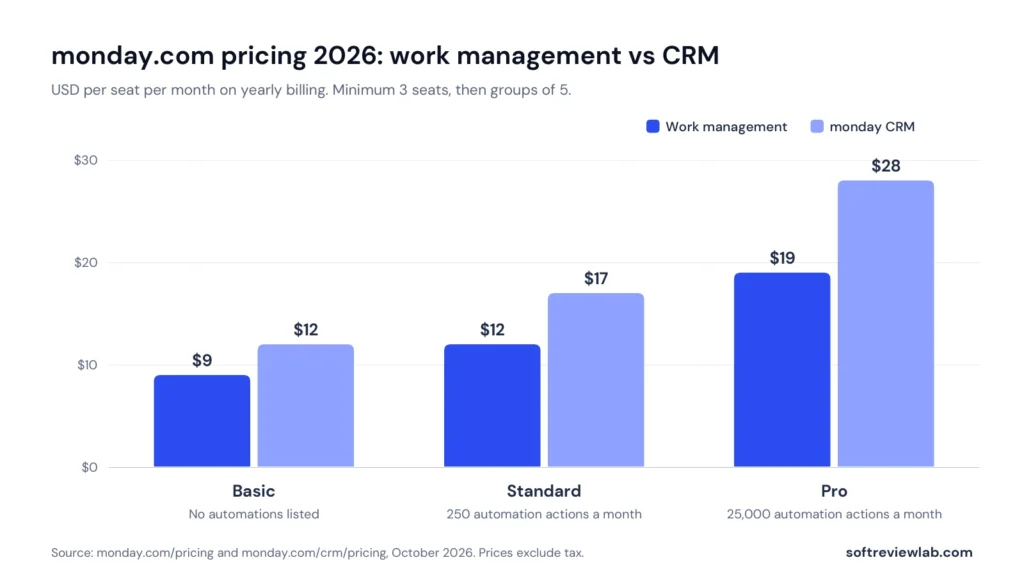
monday Work Management Plans
Plan
Price per seat a month
Main limits
Free
$0
Up to 2 seats, 3 boards, 200 items, 500 MB storage
Basic
$9 on yearly billing, $12 on monthly
Unlimited items and viewers, 5 GB storage, 1-board dashboards, 1,000 AI credits a month
Standard
$12 on yearly billing, $14 on monthly
Timeline, Gantt and calendar views, guest access, 250 automation and 250 integration actions a month, 20 GB storage
Pro
$19 on yearly billing, $24 on monthly
Private boards, time tracking, formula column, chart and workload views, 25,000 automation and integration actions a month, 100 GB storage
Enterprise
Custom quote
Enterprise security and permissions, 250,000 actions a month, 1,000 GB storage, 24/7 enterprise support and a 99.9% uptime commitment
monday.com pricing per seat a month on yearly billing. CRM plans cost more than the matching work management plans.
On monthly billing the same plans cost $12, $14 and $24 per seat. The pricing page advertises an 18 percent saving for yearly billing, but the gap varies by plan: about 25 percent on Basic, 14 percent on Standard and 21 percent on Pro.
monday dev, the product for software teams, is listed at $9, $12 and $20 per seat on yearly billing, also from 3 seats. You can see monday dev here.
How Seat Groups Change the Real Price
This is the part most buyers miss. monday.com’s pricing help article says plans start at a minimum of 3 seats and then go up in multiples of 5, and that pricing works per group of seats, not per seat. So you can buy 3, 5, 10 or 15 seats, but not 4 or 6.
Here is what that means in practice on yearly billing:
Team size
Seats you must buy
Standard work management, per year
Standard CRM, per year
1 to 3 people
3
$432
$612
4 or 5 people
5
$720
$1,020
6 to 10 people
10
$1,440
$2,040
Calculated as the listed per-seat price × seats × 12 months, before tax.
A team of six pays for ten seats. On Standard work management that is $1,440 a year, which works out to $20 per actual user a month, not the $12 on the pricing page. A solo user pays for three seats, so the $9 Basic plan really costs $27 a month. Viewers are free, so one way to narrow the gap is to give read-only colleagues viewer access.
Extra Costs to Plan For
The plan jump for automation: moving from Standard to Pro raises the per-seat price from $12 to $19 in work management and from $17 to $28 in CRM.
Guests on Standard: only three are free. Every fourth guest counts as a paid member.
AI credits: extra credits are sold in bundles, at the prices given in the AI section above.
Tax: prices exclude tax, which depends on your billing country.
Separate products: work management and CRM are separate subscriptions, so using both means paying for both. monday.com’s partnership team confirmed that the seat counts do not have to match and that both can sit on one renewal and one invoice.
Billing, Cancellation and Refunds
You can pay monthly or yearly, by card or PayPal. The CRM pricing FAQ says debit cards are not accepted, and invoicing is available for larger Enterprise orders. Admins can change the plan or seat count at any time in the billing section.
The refund rule is short. If you paid for a yearly subscription within the last 30 days and cancel, you get a prorated refund of the remaining balance. After 30 days there is no refund, including when you downgrade. The pricing FAQ doesn’t describe refunds for monthly plans. monday.com also offers discounted pricing for qualified nonprofits.
Details That Differ Between monday.com’s Own Pages
The CRM pricing page shows $12 on yearly billing against $18 on monthly billing, a saving of about a third, while the FAQ on the same page says the yearly discount is 18 percent.
The help center describes a one-time trial allowance of 6,000 AI credits on the Free to Pro plans, while the pricing page lists monthly credit allowances by plan.
monday work management has a free plan with no time limit. It allows 2 seats, 3 boards, 200 items and 500 MB of storage, with Kanban, files and forms views. monday.com’s help center says you can earn 100 extra items for each person you refer. It is enough for one or two people to manage a simple task list, and too small for a growing team.
The free trial is separate. It runs for 14 days on the Pro plan and covers work management, CRM and dev, and monday.com says no credit card is needed. The help center states that trials can’t be extended: when the trial ends, you either choose a paid plan or move to the Free plan. monday CRM has no free plan, so after its trial you need to pay to keep using it.
Because the trial is on Pro, you will be testing features that Basic and Standard don’t include. Before the trial ends, check which of the features you used are on the plan you intend to buy.
monday.com Integrations, Setup and Support
Integrations
monday.com says it integrates with more than 200 apps. Its CRM page names Gmail, Outlook, Slack, Zoom, QuickBooks, Google Workspace and DocuSign. Integrations use the same monthly action limits as automations: 250 on Standard and 25,000 on Pro. The Basic plan doesn’t list integrations at all, so a team that wants monday.com connected to email or Slack should start at Standard.
For developers, the pricing page lists API limits of 1,000 calls a day on Standard, 10,000 on Pro and 25,000 on Enterprise.
Setup
Setup is self-serve. You sign up, pick a template and start adding items. Ease of use is the most praised quality in customer reviews: on G2 it is the most-mentioned positive, in 3,935 reviews. A steep learning curve is also one of the most common complaints there, in 1,163 reviews, linked to implementation and working with large amounts of data. In my judgment, the basics are easy and the advanced setup takes planning.
Support
monday.com’s support article says help is available 24/7. Contact starts with an AI assistant in the chat, which can pass you to a human agent, and there is a knowledge base, a community forum and an academy. There is no guaranteed response time on Basic, Standard or Pro. monday.com’s partnership team confirmed this by email in October 2026, and said support was handling a high volume of chats and tickets, so it could not give an estimate for a human reply. The Enterprise plan lists 24/7 enterprise support, tailored onboarding and a 99.9 percent uptime commitment, and CRM Ultimate lists prioritised 24/7 support.
Security and Compliance
monday.com’s pricing FAQ lists compliance with ISO/IEC 27001 and ISO/IEC 27018, annual security audits, and SOC 2 and HIPAA. On monday CRM, HIPAA compliance, advanced permissions and governance features are listed under the Ultimate plan, and enterprise-grade security and multi-level permissions sit on the Enterprise plan in work management. If you handle health data or need audit controls, confirm in writing which plan covers your requirement.
What Customers Say About monday.com
I checked three review sites in October 2026. The gap between them is worth understanding.
Site
Rating
Reviews
What stands out
G2
4.7 out of 5
17,248
Ease of use, team collaboration and project tracking are praised most; missing or limited features and the learning curve are the top complaints
Capterra
4.6 out of 5
6,118
Ease of use rated 4.5 and customer service 4.4; pricing and seat packages are the main complaint
Trustpilot
2.1 out of 5
3,438
Complaints focus on reaching support, unexpected costs and cancelling
Ratings as shown on each site when checked in October 2026.
Trustpilot’s own page adds two cautions. Most of the 3,438 reviews there are five-star, so the 2.1 score is not a simple average of all reviews. Trustpilot also notes that monday.com hasn’t invited customers to leave reviews recently, so the reviews may not be representative. It shows that the company replied to 33 percent of negative reviews.
In my judgment, both signals are real. People who use the product every day rate it highly, and the complaints on Trustpilot cluster around billing and support, not around the software itself. The practical lesson is to read the billing terms carefully before you pay, especially the seat groups and the refund window.
monday.com Pros and Cons
Pros
Easy to start, with templates and a visual board that non-technical teams understand.
One platform for projects, sales, development and service.
A free plan for two people and a 14-day Pro trial with no card.
Unlimited free viewers on paid plans, and unlimited free guests on Pro.
More than 200 integrations and AI features on every paid plan.
High ratings on G2 and Capterra from thousands of reviews.
Cons
Seats are sold in groups with a minimum of three, so small teams pay for seats they don’t use.
Automations and integrations start on Standard and are capped at 250 actions a month.
Time tracking, formula columns and private boards need Pro.
monday CRM has no free plan, and its Basic plan allows only 5 columns per board.
Refunds apply only to yearly plans cancelled within 30 days.
A Trustpilot score of 2.1, with complaints about support, costs and cancelling.
monday.com Scorecard
monday.com scores 7.6 out of 10, the plain average of five criteria.
Criterion
Score
Why
Setup and ease of use
8.5
Self-serve setup, templates, a free plan and a no-card trial; ease of use is the most praised point in reviews, though complex setups take time to learn
Feature depth
8.5
Boards, views, dashboards, automations, docs, forms, CRM and AI in one platform; several key features are reserved for Pro
Pricing and value
6.5
Fair per-seat prices, but seat groups, a three-seat minimum and the low automation cap on Standard raise the real cost
Integrations
8.0
More than 200 apps and an API; no integrations listed on Basic and a 250-action cap on Standard
Support and terms
6.5
24/7 help that starts with an AI assistant, no guaranteed response time on Basic, Standard or Pro, a limited refund window and a low Trustpilot score
Overall
7.6
Plain average of the five scores
Scores are my editorial judgment based on monday.com’s published plans and customer ratings.
The sum is (8.5 + 8.5 + 6.5 + 8.0 + 6.5) ÷ 5 = 7.6.
Common monday.com Mistakes to Avoid
Budgeting on the per-seat price. Multiply by the seat group you must buy, not by your headcount.
Choosing Basic for a team that needs automation. Automations and integrations are listed from Standard.
Assuming Standard’s 250 actions will be enough. Count your likely automations for a month first.
Judging the product on the Pro trial alone. Check which trial features are on your chosen plan.
Paying yearly without a plan to test. A yearly plan has a 30-day window for a prorated refund, so do your serious testing inside it.
Giving everyone a paid seat. Use free viewers for people who only need to read.
monday.com Alternatives: What Else to Consider
monday.com is not the only way to manage projects or sales. None of the mentions below are paid placements.
A sales-first CRM: if you only need a pipeline, tools such as Pipedrive, Zoho CRM and HubSpot are built for selling first. My CRM buyer’s guide compares their published prices. My monday CRM vs HubSpot CRM comparison looks at the closest alternative in detail.
A spreadsheet or the Free plan: for one or two people with simple needs, a shared spreadsheet or monday.com’s own Free plan may be enough.
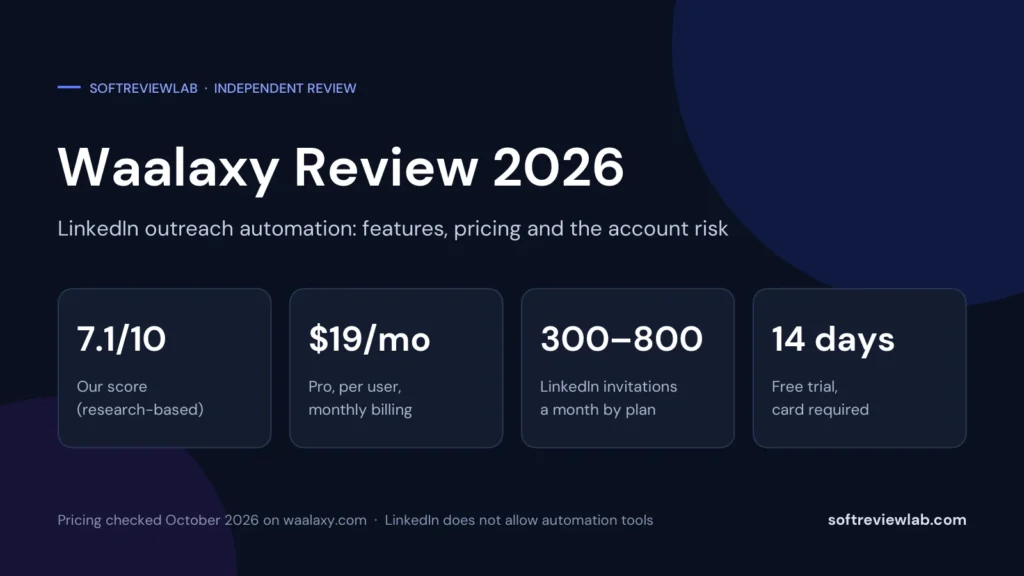
A LinkedIn outreach tool: if your problem is finding leads, not tracking them, see my Waalaxy review.
Other work management platforms: pricing models differ, so compare the yearly cost for your exact headcount, not the per-seat headline.
Who Should Use monday.com, and Who Should Skip It
monday.com Is a Good Fit If
Your team has three or more people, ideally a number close to a seat group such as 5 or 10.
You want projects and sales tracked in one visual tool.
You value ease of use over deep specialist features.
You can afford Pro if you depend on automation, time tracking or private boards.
You work with outside clients and can use free viewers or guests.
Skip monday.com If
You work alone or with one other person and the Free plan is too small.
Your team size sits just above a seat group, such as 6 or 11 people, and budget is tight.
You need heavy automation on the cheapest plan.
You only need a simple sales pipeline and nothing else.
You want a guaranteed support response time or a longer refund window.
monday.com Review Verdict
monday.com earns its popularity. It is flexible, visual and easy for non-technical teams to pick up, and it lets a small business run projects and sales on one platform. Customer ratings on G2 and Capterra are high across thousands of reviews.
The cost is where to slow down. Seat groups mean you often pay for more seats than people, the Standard plan caps automations at 250 actions a month, and features such as time tracking and private boards need Pro. Add a refund window limited to yearly plans in the first 30 days and a poor Trustpilot score, and the overall score lands at 7.6 out of 10.
My recommendation: use the 14-day trial with real work: build one real board, set up the three automations you would use every week and count the actions they would run in a month, then price the plan that includes every feature you used for the seat group you would actually buy. Choose yearly billing only once you are sure. For teams of five or ten that want one tool for projects and sales, it is a strong option. For one or two people, start with the Free plan or a simpler tool. You can check current plans on monday.com’s website. If leads are slipping through as your team grows, my article on how to stop losing leads covers the free fixes to try first.
Frequently Asked Questions About monday.com
How much does monday.com cost in 2026?
monday work management is listed at $9 per seat a month on Basic, $12 on Standard and $19 on Pro with yearly billing. monday CRM is $12, $17 and $28. On monthly billing, work management costs $12, $14 and $24. Plans start at 3 seats and go up in groups of 5.
Is monday.com free?
monday work management has a free plan for up to 2 seats, with 3 boards and 200 items. monday CRM has no free plan, only a 14-day trial.
Is monday.com a CRM?
monday.com sells a separate product called monday CRM, built on the same boards, with pipelines, contact management, email sync and sales dashboards. It is priced separately from monday work management.
Is monday.com good for small businesses?
It suits small teams of three or more that want projects and sales in one easy tool. Solo users and pairs pay for a three-seat minimum, so the Free plan or a simpler tool may fit better.