Waalaxy Review 2026: Features, Pricing, Safety, Pros and Cons
LinkedIn Outreach Automation
Waalaxy Review 2026: Features, Pricing, Safety, Pros and Cons
7.1/10
“Waalaxy suits founders, freelancers and small sales teams who already prospect on LinkedIn and want to save hours each week. It is simple, cloud-based and cheap to start. But Waalaxy's own terms say LinkedIn does not allow automation, so start with low quotas, a narrow list and messages you would send by hand, and cancel the trial in time if it isn't for you.”
Research-based review · not hands-on testedBuilt from the vendor’s documentation and pricing pages and from patterns in customer reviews. How we work.
Starting price
From $19/user/month ($16 billed yearly)
Best for
Founders and small sales teams prospecting on LinkedIn
Free trial
14-day free trial (card required)
Based on
Waalaxy's pricing page, help center and terms, plus customer ratings on G2, Trustpilot and Capterra
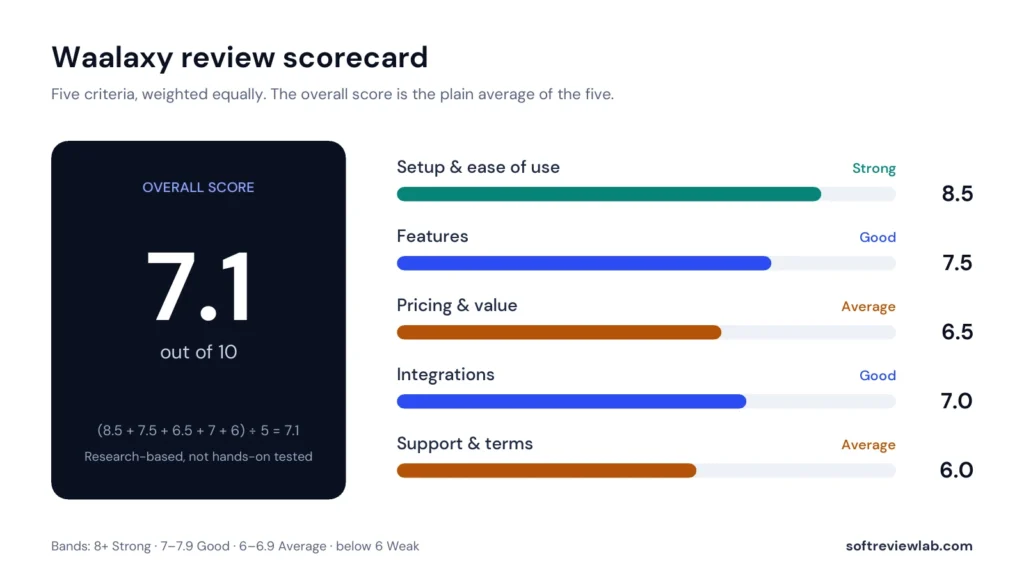
Scores
Ease of setup & use8.5
Feature depth7.5
Pricing & value6.5
Integrations7.0
Support & terms6.0
How these scores were worked out
Ease of setup & use: 8.5 (Strong) Cloud-based, template sequences and a four-step start; ease of use is the top theme in customer reviews.
Feature depth: 7.5 (Good) Solid LinkedIn sequences, quotas, AI drafts and an email finder; the inbox is an add-on and email needs Business.
Pricing & value: 6.5 (Average) Low entry price, but a card-required trial that auto-converts, paid add-ons and inconsistent pricing details.
Integrations: 7.0 (Good) CRM sync with 2,000+ tools through Make, Zapier and n8n, with API access from Advanced.
Support & terms: 6.0 (Average) Chat support on weekdays, but the tool breaks LinkedIn's terms, the risk sits with you and refunds are limited.
Overall: (8.5 + 7.5 + 6.5 + 7.0 + 6.0) ÷ 5 = 7.10, shown as 7.1. The five criteria are weighted equally.
Scores are editorial judgments in half-point steps, based on documented features, published pricing and repeated themes in customer reviews. They are not lab measurements, so treat the words as the guide: 8.0+ Strong, 7.0 to 7.9 Good, 6.0 to 6.9 Average, below 6.0 Weak.
What works
Easy to set up and use, the theme customers mention most.
Low entry price: $19 a month, or $16 on yearly billing.
Cloud-based, so campaigns run without your browser open.
Sequence templates, automatic stop on reply and daily quotas built in.
Email finder, plus LinkedIn and email in one sequence on Business.
Open documentation about LinkedIn limits and restrictions.
What doesn’t
LinkedIn does not allow automation tools; the account risk is yours.
Waalaxy says it cannot recover a banned account.
The trial needs a card and converts to a paid plan automatically.
The LinkedIn Inbox costs extra, and cold email needs the top plan.
Pricing details differ between Waalaxy's own pages.
Refunds are limited to 15 days after your first subscription.
What we couldn’t verify
Acceptance, reply and LinkedIn restriction rates were not measured for this review.
Waalaxy's claim that LinkedIn cannot detect its tool is the vendor's own claim.
The email finder's 61% match rate is Waalaxy's figure.
The plan and price charged when the trial converts: Waalaxy's pages give different details, so confirm at checkout.
Waalaxy's Chrome Web Store rating could not be checked, because the extension has been removed from the Chrome Web Store.
The quality of Waami's AI-written messages was not assessed.
If any of these matter to your decision, check them directly with the vendor or during your trial.
Who should skip it
Anyone whose LinkedIn account is critical to their income, people with new or inactive accounts, businesses that only need a few conversations a month, and teams that mainly want cold email.
By Abdullahi Abdirahman, Founder & Editor, SoftReviewLab. Pricing and plan limits checked on Waalaxy’s official pricing page and help center in October 2026. This is a research-based review built from Waalaxy’s own documentation and terms, plus customer ratings on G2, Trustpilot and Capterra. I did not run live LinkedIn campaigns through the tool. This page contains affiliate links, explained in our affiliate disclosure.
Table of Contents
Waalaxy Review at a Glance: The Short Answer
This Waalaxy review answers two questions that matter before you connect it to your LinkedIn account: does it save real time on B2B outreach, and what are you risking? My short answer is that Waalaxy is one of the easier ways to automate LinkedIn prospecting, and it is priced within reach of a solo founder. However, it automates actions that LinkedIn does not allow, and Waalaxy says so itself in its terms. You carry that risk, not Waalaxy.
Waalaxy is a cloud tool that sends LinkedIn connection requests, follow-up messages and, on its top plan, emails for you in timed sequences. You import a list of prospects, pick a sequence template, write your messages and let it run within daily limits. Customers rate it highly for ease of use. The weak points are the LinkedIn rule issue, a card-required trial that converts to a paid plan automatically, and plan details that differ between pages. I score Waalaxy 7.1 out of 10.
Best for: founders, freelancers, recruiters and small sales teams who prospect on LinkedIn every week and accept the account risk.
Skip it if: your LinkedIn account is critical to your income and you can’t afford a restriction, or you only need a few conversations a month.
Starting price: $19 per user a month on monthly billing, or $16 on yearly billing, for 300 invitations a month.
Free trial: 14 days. Waalaxy’s help center says the trial is started with a card and converts to a paid plan unless you cancel.
If Waalaxy sounds like it fits your outreach and you want to try it, you can see the current plans and start the trial on Waalaxy’s website. That is an affiliate link: if you subscribe, SoftReviewLab may earn a commission at no extra cost to you.
What Is Waalaxy and How Does It Work?
Waalaxy is a LinkedIn and email outreach tool made by WAAPI, a French company. Its job is to do the repetitive part of prospecting for you: visiting profiles, sending connection requests, and following up with messages on a schedule, so you only step in when someone replies. For the wider routine around it, see my article on how to get B2B leads from LinkedIn.
Until recently Waalaxy ran as a Chrome extension. According to its help center, Waalaxy is now fully cloud-based: campaigns run from its web app in the background, even when your browser is closed, and the original extension has been removed from the Chrome Web Store. An optional extension called Alien Copilot exists to speed up imports.
Find prospects. Run a search on LinkedIn or Sales Navigator, copy the search link and import the results into Waalaxy. It recommends 1,000 to 1,500 prospects per campaign.
Create a campaign. Choose a sequence template, such as an invitation followed by three messages, add your prospects and write the messages.
Follow the analytics. Watch the acceptance rate and reply rate. Waalaxy suggests aiming for 30 to 40 percent acceptance and a 14 to 15 percent reply rate as starting targets.
Reply from the inbox. Tag replies as interested or not, use saved replies and schedule follow-ups.
Those targets are Waalaxy’s own guidance, not results I have measured. Your numbers will depend mostly on who you target and what you write.
How I Evaluated Waalaxy
This review is research-based. I worked from Waalaxy’s pricing page, its help center articles on quotas, LinkedIn restrictions, subscriptions and payments, and its terms of use. For customer experience, I used Waalaxy’s ratings on G2, Trustpilot and Capterra. I did not connect a LinkedIn account and run campaigns, so I don’t report acceptance rates, reply rates or restriction rates of my own.
I score every tool on five criteria, each worth 20 percent: setup and ease of use, features, pricing and value, integrations, and support and terms. The overall score is the plain average. Facts such as prices, limits and ratings come from the named sources. Statements about who the tool suits and how much the LinkedIn risk should worry you are my editorial judgment. The full method is on our About page.
Waalaxy Features: What You Actually Get
Prospect Imports
You can import prospects from a standard LinkedIn search, Sales Navigator, Recruiter Lite or a CSV file, on every plan. Sales Navigator is optional, but Waalaxy recommends it for better filtering. Imports from several team members’ accounts and duplicate prevention are included, so two colleagues don’t contact the same person.
Campaign Sequences
A campaign is a sequence of actions with waiting periods between them: for example, visit the profile, send an invitation, then send a message a few days after the person accepts. Waalaxy provides pre-built sequence templates on every plan and lets you set delays from 0 to 28 days between steps.
Two rules are worth knowing. When a prospect replies, Waalaxy removes them from the sequence so they don’t get another automated follow-up. In an invitation-and-message campaign, a prospect has 30 days to accept before they leave the campaign. A single campaign can hold up to 5,000 active prospects at once.
Quotas and the Queue
Waalaxy does not send everything at once. It applies daily quotas to each user, and it picks a random number between 80 and 100 percent of the maximum each day. You can lower your quotas in the settings, but you can’t raise them above the maximum.
These are Waalaxy’s limits, and LinkedIn has its own. Waalaxy says LinkedIn caps invitations at about 200 a week, and that your actions stop when either limit is reached. That is why the Advanced and Business plans advertise 800 invitations a month: 200 a week for four weeks.
Waami, the AI Message Writer
Waami is Waalaxy’s AI message generator. You describe your audience, what you offer and what you want the reader to do, and it drafts messages you can regenerate or edit. I haven’t assessed the quality of its output. In my judgment, treat it as a starting draft, because G2 reviewers say that messages which feel personal still need manual work.
LinkedIn Inbox Add-On
The LinkedIn Inbox is a paid add-on on every plan, listed at €20 a month. It gives you saved replies, scheduled follow-ups, reminders, tags and CRM export for your LinkedIn conversations. Waalaxy lets you try it with 500 free conversations and no time limit, so you can see whether you need it before paying.
Email Finder
The Email Finder looks up professional email addresses for your prospects through three data providers. A credit is only used when an email is found, and unused credits do not roll over to the next month. Pro and Advanced include 25 credits per seat a month, and Business includes 500. You can buy more credits. Waalaxy advertises a match rate above 61 percent, which is its own claim.
Cold Email and Multichannel Campaigns
Sending emails from Waalaxy requires the Business plan, according to its email FAQ. You connect a mailbox such as Gmail or Outlook and add email steps to a LinkedIn sequence. Sending limits depend on your email provider, not on Waalaxy: it lists 500 a week for Gmail and 100 a week for Outlook, for example. Whatever tool sends your cold email, set up your domain properly first. My email deliverability guide covers that.
Team Features and Analytics
Every plan includes a team workspace, shared analytics, unified billing and duplicate prevention. For teams of five or more seats, Waalaxy offers an Enterprise plan with volume discounts and onboarding. Each campaign has a dashboard with acceptance and reply rates.
Is Waalaxy Safe? LinkedIn’s Rules and the Real Risk
This is the most important section of this review, so I will be direct. Waalaxy automates activity on LinkedIn, and LinkedIn does not permit that.
You don’t have to take my word for it. LinkedIn’s help page about third-party software and extensions says it does not permit third-party software, bots or browser extensions that automate activity on its website. Waalaxy’s own help article on LinkedIn warnings and restrictions puts it plainly: “Waalaxy does not comply with LinkedIn’s Terms of Service.” The same article explains that LinkedIn can show warnings, temporarily restrict an account and, in some cases, ban it.
LinkedIn can show a warning or restrict an account when the volume of visits, invitations and messages rises suddenly.
Waalaxy describes these restrictions as temporary, typically 24 to 48 hours, and says they can repeat while the account is under review.
Its advice after a warning is to log out of Waalaxy for 24 to 48 hours, then cut your quotas in half and avoid large imports.
Waalaxy says it has no way to recover a banned account for you.
Waalaxy claims its tool can’t be detected, because LinkedIn looks at activity patterns. That is the vendor’s claim, and I can’t verify it.
Waalaxy also tells users to warm up their LinkedIn account first: build 200 to 300 connections by hand, complete the profile and post or comment regularly before automating anything. It warns that skipping this risks a quick ban.
My judgment: Waalaxy is open about the risk in its documentation, and its quotas are designed to keep activity modest. That lowers the risk; it doesn’t remove it. If your LinkedIn profile is how clients find you, or you work in a regulated or reputation-sensitive field, think carefully before automating it. If you go ahead, start with low quotas, target narrowly and write messages you would be comfortable sending by hand.
Waalaxy Pricing 2026: Plans and Real Costs
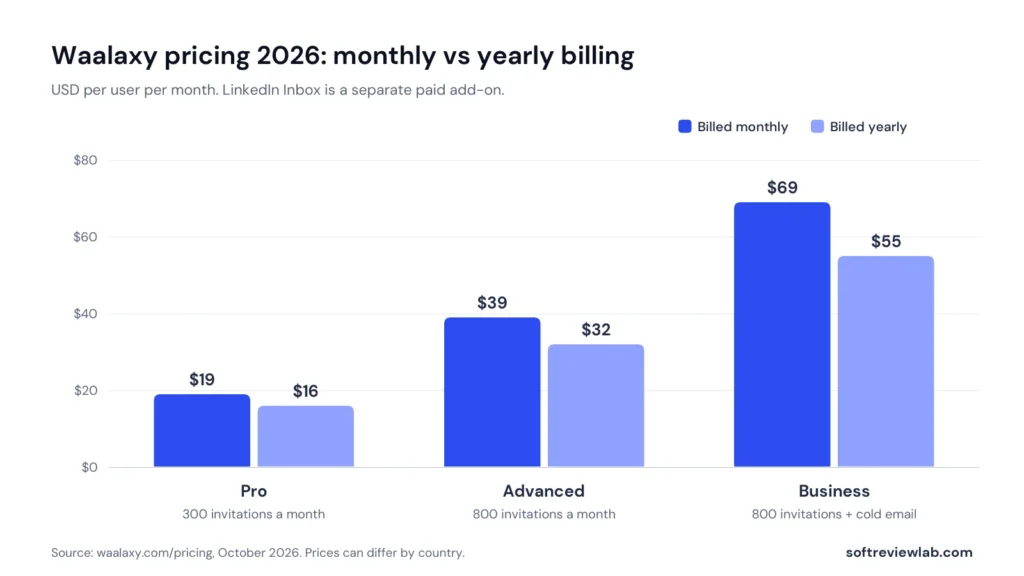
Waalaxy has three public plans, priced per user. These are the US dollar prices shown on its pricing page in October 2026.
Plan
Monthly billing
Yearly billing
Invitations
Main additions
Pro
$19 per user a month
$16
300 a month
Unlimited campaigns, sequence templates, automated follow-ups, CRM sync, team tools, 25 email finder credits
Advanced
$39
$32
800 a month
Higher invitation limits, API access, Make, Zapier and n8n modules, live chat support
Business
$69
$55
800 a month
Cold email sequences, LinkedIn plus email campaigns, 500 email finder credits
Enterprise
On request
On request
Not listed
For 5 or more seats: volume discounts and onboarding
Source: Waalaxy pricing, checked October 2026. Prices can differ by country and currency.
Waalaxy’s per-user prices on monthly and yearly billing.
For most people, the choice is between Pro and Advanced. Pro’s 300 invitations a month works out to about 11 a day, which suits someone testing LinkedIn outreach. Advanced raises that to LinkedIn’s practical ceiling of about 200 a week and adds integrations through Make, Zapier and n8n. Business only makes sense if you want email steps in the same sequence.
Extra Costs to Plan For
LinkedIn Inbox: a paid add-on listed at €20 a month.
Extra email finder credits: sold separately once you use your monthly allowance.
Seats: every user needs their own seat, and quotas apply per user.
LinkedIn itself: Waalaxy says free LinkedIn accounts are limited to 5 invitation notes a month, so personalised invitation notes at volume need a paid LinkedIn plan.
Billing, Cancellation and Refunds
Waalaxy takes card payments and SEPA direct debit for European customers, and does not accept PayPal or bank transfer, according to its payments article. Each billing period is paid in one instalment. You can cancel from the settings up to 24 hours before renewal, keep access until the period ends, and then drop to a free Freemium account with no automation.
On refunds, Waalaxy’s terms say you have up to 15 days after subscribing for the first time to request a refund. Otherwise, payments are non-refundable and there are no credits for unused time or quotas. Read that clause yourself before paying for a year.
Details That Differ Between Waalaxy’s Own Pages
While checking the pricing, I found a few points where Waalaxy’s pages don’t agree with each other. None is alarming, but confirm them at checkout:
The pricing toggle shows a 20 percent saving on yearly billing, while the FAQ on the same page mentions quarterly billing and savings of up to 50 percent.
The plan cards list 500 email finder credits and cold email under Business only, while the comparison table shows them for Advanced as well. The help center sides with the plan cards.
A help center article mentions a standard Business price of €139 a month, while the pricing page shows $69.
Waalaxy Free Trial: What to Expect
Waalaxy offers a 14-day free trial on every plan. Its subscriptions article adds three details the pricing page doesn’t spell out. The trial is started with a card when you create your account, it gives you the features of the Business plan, and it converts to a paid subscription automatically unless you cancel.
So set a reminder for day 12. Before the trial ends, check which plan and price you will be charged, and downgrade or cancel if Business isn’t what you need. If you cancel, the account moves to Freemium, which keeps your prospect and campaign data but has no automation.
Waalaxy Integrations, Setup and Support
Waalaxy lists CRM sync with more than 2,000 tools on every plan, and names HubSpot and Pipedrive on its site. The connections run through Make, Zapier and n8n, and the pricing page lists those modules and API access from the Advanced plan. If you are still choosing a CRM to send leads into, my guide to choosing a CRM for a small business can help.
Setup is light. Because the tool is cloud-based, there is nothing to install: you create an account, connect LinkedIn, import a list and launch a template campaign. Ease of use and quick setup are the two things G2 reviewers praise most.
Plan
Support
Pro
Chat and email, reply within 48 hours
Advanced
Live chat and email, reply within 4 hours
Business
Priority support
Source: Waalaxy pricing page, October 2026. Waalaxy says chat support runs Monday to Friday.
What Customers Say About Waalaxy
Source
Rating
Reviews
What stands out
G2
4.5 out of 5
1,601
1,136 five-star and 7 one-star reviews; praised for ease of use and quick setup
Trustpilot
4.8 out of 5 (“Excellent”)
1,299
Waalaxy replied to 100% of negative reviews, typically within a week
Capterra
4.4 out of 5
253
91% positive, 7% neutral and 2% negative reviews
Ratings as shown on each site in early October 2026.
On G2, the most common positive themes are ease of use and easy setup. The most common negatives are price, especially for small businesses, and campaign management. A recent reviewer also noted that making messages feel personal still takes manual work across different audiences.
On Trustpilot, Waalaxy holds a 4.8 score from 1,299 reviews. Trustpilot notes that the company has no recent history of inviting customers to review, and that it has replied to all of its negative reviews.
On Capterra, Waalaxy scores 4.4 out of 5 from 253 reviews, and Capterra classes 91 percent of them as positive, 7 percent as neutral and 2 percent as negative. So all three sites tell a similar story: most customers who leave a review are satisfied.
Two cautions. First, Waalaxy quotes its own ratings in its marketing, including a Chrome Web Store rating, but the extension has since been removed from that store, so I couldn’t check it. Second, high ratings tell you the tool is pleasant to use. They don’t change the LinkedIn rule issue described above.
Waalaxy Pros and Cons
Pros
Easy to set up and use, the theme customers mention most.
Low entry price: $19 a month, or $16 on yearly billing.
Cloud-based since 2026, so campaigns run without your browser open.
Sequence templates, automatic stop when a prospect replies, and daily quotas built in.
Email finder and, on Business, LinkedIn plus email in one sequence.
Open documentation about LinkedIn limits and restrictions.
Cons
LinkedIn does not allow automation tools, and Waalaxy’s help center says it does not comply with LinkedIn’s terms. The account risk is yours.
Waalaxy says it can’t recover a banned account.
The trial is started with a card and converts to a paid plan automatically.
The LinkedIn Inbox costs extra, and cold email needs the top plan.
Pricing details differ between Waalaxy’s own pages.
Refunds are limited to 15 days after your first subscription.
Cloud-based, template sequences and a four-step start. Ease of use is the top theme in customer reviews.
Features
7.5
Solid LinkedIn sequences, quotas, AI drafts and an email finder. The inbox is an add-on, and email needs Business.
Pricing and value
6.5
Low entry price, but a card-required trial that auto-converts, paid add-ons and inconsistent pricing details.
Integrations
7.0
CRM sync with 2,000+ tools through Make, Zapier and n8n, with API access from Advanced.
Support and terms
6.0
Chat support on weekdays, but the tool breaks LinkedIn’s terms, the risk sits with you and refunds are limited.
Overall score 7.1 out of 10. Research-based scoring, not a hands-on test.
Common Waalaxy Mistakes to Avoid
Automating a cold account. Build connections and activity by hand first, as Waalaxy itself advises.
Running at maximum quotas from day one. Start low and raise volume slowly.
Importing a huge, vague list. A narrow, relevant list gets better acceptance and fewer complaints.
Sending generic messages. Automation multiplies whatever you write, good or bad.
Forgetting the trial end date. Cancel or change plan before day 14 if Business isn’t right for you.
Paying yearly before testing. Run a month on monthly billing first, given the limited refund window.
Ignoring a LinkedIn warning. Pause, reduce volume and review your targeting before continuing.
Waalaxy Alternatives: What Else to Consider
Manual outreach on LinkedIn. Slower, but it carries no automation risk. Ten thoughtful messages a day is often enough for a small business.
LinkedIn Sales Navigator. LinkedIn’s own paid prospecting product. It helps you find and filter leads, and Waalaxy can import from it, so some teams use both. I compare the two in my Waalaxy vs LinkedIn Sales Navigator comparison.
Email-first outreach. If your buyers respond to email, a dedicated email tool may suit you better. My guide to email marketing automation covers the workflows.
Other LinkedIn automation tools. They exist, and the same LinkedIn rule applies to all of them. Compare how each one handles limits, and read its terms before you connect your account.
Who Should Use Waalaxy, and Who Should Skip It
Waalaxy Is a Good Fit If
You sell B2B and your buyers are active on LinkedIn.
You already prospect by hand and want to save hours each week.
You have an established LinkedIn account with real connections and activity.
You understand and accept that automation breaks LinkedIn’s rules.
You want a simple tool rather than a complex sales platform.
Skip Waalaxy If
Losing access to your LinkedIn account, even for a few days, would hurt your business.
Your account is new or inactive.
You only need a handful of new conversations a month.
Your employer or industry has strict rules about how you contact people.
You mainly want cold email, where a dedicated email tool is a better fit.
Waalaxy Review Verdict
Waalaxy does what it promises in a way that non-technical people can manage. It is cloud-based, cheap to start, built around sensible daily limits and well liked by the customers who rate it. For a founder or small sales team that already prospects on LinkedIn, it can turn hours of clicking into a background process.
The trade-off is clear and Waalaxy states it itself: LinkedIn does not allow automation, restrictions can happen, and Waalaxy can’t get a banned account back. Add a trial that converts automatically and some inconsistent plan details, and the overall score lands at 7.1 out of 10.
My recommendation: if LinkedIn is central to your reputation, prospect by hand. If you accept the risk, start on Pro or Advanced with low quotas, a narrow list and messages you would send personally, and review the results after a month before you commit to a year. In the 14-day trial, note the end date and the plan you will be charged for, check acceptance and reply rates after a week, and decide before day 12 whether to cancel, drop to Pro or keep going. You can check current plans on Waalaxy’s website.
Frequently Asked Questions About Waalaxy
How much does Waalaxy cost in 2026?
Waalaxy’s pricing page lists Pro at $19 per user a month, Advanced at $39 and Business at $69 on monthly billing. Yearly billing lowers these to $16, $32 and $55. The LinkedIn Inbox is a paid add-on listed at 20 euros a month. Prices can differ by country.
Is Waalaxy safe to use with LinkedIn?
Waalaxy uses daily quotas to keep activity modest, but LinkedIn does not allow automation tools, and Waalaxy’s own help center says it does not comply with LinkedIn’s terms of service. LinkedIn can warn or restrict accounts, and Waalaxy says it cannot recover a banned account.
Does Waalaxy have a free plan?
Waalaxy has a Freemium account with limited features and no automation, which accounts fall back to after cancelling. Its paid plans come with a 14-day free trial.
Can Waalaxy send cold emails?
Yes, but only on the Business plan according to Waalaxy’s email FAQ. You connect a mailbox such as Gmail or Outlook, and sending limits depend on your email provider.
Is Waalaxy still a Chrome extension?
No. Waalaxy’s help center says the tool became fully cloud-based in 2026 and the original extension was removed from the Chrome Web Store. An optional extension called Alien Copilot speeds up imports.
“An easy, flexible platform for running projects and sales in one place, with one catch: seat groups and plan limits make the real cost higher than the per-seat price.”
From $9/seat/month billed yearly (3-seat minimum)Best for: Small and mid-sized teams that want projects and sales in one tool14-day free trial on Pro (no card needed)