
- Home
- Comparisons
- monday CRM vs HubSpot CRM: Which Is the Better Fit for a Small Team?
monday CRM vs HubSpot CRM: Which Is the Better Fit for a Small Team?

Research-based comparison · not hands-on tested We compare the value each tool gives a specific kind of buyer, not which company is bigger or better, so there is no overall winner. How we compare.
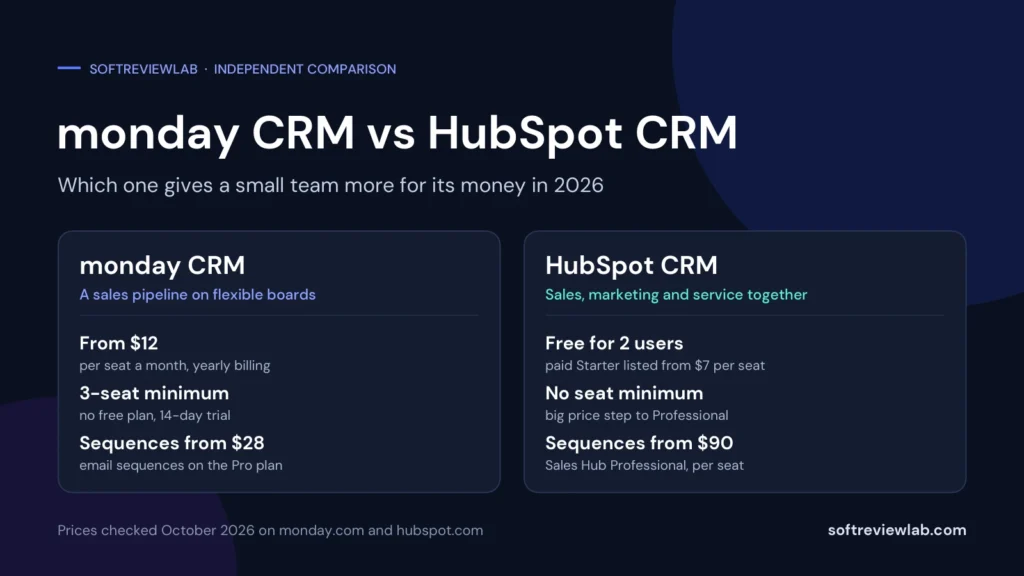
Short answer: in the monday CRM vs HubSpot decision, there is no overall winner, because the two tools give a small team different things for its money. monday CRM is a sales pipeline built on flexible boards, with plain per-seat prices from $12 a month on yearly billing, a three-seat minimum and email sequences on its $28 Pro plan. HubSpot is a customer platform with a free CRM for up to 2 users, a cheap Starter plan, and marketing and service tools in the same account, but its sales automation sits on a Professional plan listed at $90 per seat. A team that wants one customisable tool for sales and day-to-day work gets more value from monday CRM. A team of one or two, or one that wants marketing and sales in the same system, gets more value from HubSpot.
Table of Contents
Disclosure: I’m a monday.com affiliate partner, so I may earn a commission if you buy through the monday CRM link in this article. I have no affiliate relationship with HubSpot. That doesn’t change the facts below: every price and limit comes from each vendor’s own pages, checked in October 2026, and I name the plan and the source each time. I haven’t run a sales team on either CRM, so this is a research-based comparison, and the list of what I couldn’t verify is at the end of this page. More detail is in my affiliate disclosure.
monday CRM vs HubSpot at a Glance
| Point | monday CRM | HubSpot CRM |
|---|---|---|
| What it is | A sales CRM built on monday.com’s customisable boards | A customer platform: a free CRM plus paid sales, marketing and service tools |
| Free plan | No | Yes, for up to 2 users |
| Free trial | 14 days, no credit card | Not needed for the free plan, which has no time limit |
| Entry paid plan | Basic, $12 per seat a month | Starter, $7 per seat a month, marked as a limited-time discount ($20 regular price) |
| Minimum purchase | 3 seats, then groups of 5 | No minimum listed; Starter covers up to 10 users |
| Plan with email sequences | Pro, $28 per seat a month | Sales Hub Professional, $90 per seat a month |
| One-time onboarding fee | None listed | $1,500 listed on Sales Hub Professional |
| Refund on yearly plans | Prorated if you cancel within 30 days | No refunds, and no cancelling before the term ends |
| Marketing email | A separate product (monday campaigns); mass emails are listed on CRM Pro | 2,000 sends a month in the free tools, with HubSpot branding |
| Customer rating on G2 | 4.5 from 1,758 reviews | 4.4 from 14,347 reviews (Sales Hub) |
What Each Tool Is, in Plain English
monday CRM is one of several products from monday.com. It uses the same board system as monday’s project tool: leads, contacts, accounts and deals each sit on a board, and you move deals through stages you define. monday.com’s CRM page lists email sync with Gmail and Outlook, activity tracking, dashboards and sales forecasting, and says more than 35,000 customers use it. That last figure is the vendor’s own. I covered the wider platform in my monday.com review.
HubSpot CRM is the free core of HubSpot’s customer platform. HubSpot’s page lists contact management, deal pipelines, tasks, a reporting dashboard, email tracking and templates, a meeting scheduler, live chat, forms, landing pages and a mobile app in the free tools, for up to 2 users and 1,000 contacts. Paid plans are sold as hubs, such as Sales Hub, Marketing Hub and Service Hub, each with Starter, Professional and Enterprise tiers. HubSpot says it has 306,000 customers in more than 135 countries, which is also a vendor figure.
So the names are similar, but the products are not built the same way. monday CRM is a paid sales tool you shape to your own process. HubSpot is a free customer database with a ladder of paid upgrades on top. Most of the differences in this comparison come from that.
The Biggest Difference: Flexible Boards vs an All-in-One Platform
With monday CRM, you get a system you can bend. Boards, columns, views and automations are the building blocks, and the same platform can hold your projects, onboarding checklists or support requests if you also use monday work management. The value is flexibility: a small team with an unusual sales process, or one that wants sales and delivery work side by side, can build what it needs without a developer.
With HubSpot, you get a system that is already shaped. Contacts, companies and deals are set objects, and the marketing, sales and service tools all read from the same records. The value is breadth: a form on your website creates a contact, a marketing email goes to that contact, and the deal sits beside the email history, without connecting separate tools.
In my view, this is the question to answer first. If your main problem is organising how the team works its deals, flexibility matters more. If your main problem is getting leads from your website and emails into the sales process, breadth matters more. Price comes second, because the wrong shape of tool costs more in wasted time than the difference between two subscriptions.
monday CRM vs HubSpot Pricing
Both vendors publish their prices, which makes this part easy to check. The catch is that the headline numbers hide very different rules about seats, discounts and fees.
monday CRM Pricing
| Plan | Yearly billing | Monthly billing | Main limits |
|---|---|---|---|
| Basic | $12 | $18 | 1,000 active contacts and deals, 1 custom dashboard, 5 columns per board, no custom automations listed |
| Standard | $17 | $25 | 10,000 contacts and deals, 5 dashboards, 250 automation actions a month |
| Pro | $28 | $41 | 100,000 contacts and deals, 50 dashboards, 25,000 automation actions, mass emails and sequences |
| Ultimate | Custom quote | Custom quote | Unlimited contacts and deals, HIPAA compliance, advanced permissions, prioritised support |
The monday CRM pricing page lists a minimum of 3 seats, and seats are sold in groups: 3, then 5, 10, 15 and so on. A team of four pays for five seats. A team of seven pays for ten. There is no free plan for monday CRM, only a 14-day trial that doesn’t ask for a credit card.
HubSpot CRM Pricing
| Plan | Yearly billing | Monthly billing | Main limits |
|---|---|---|---|
| Free tools | $0 | $0 | Up to 2 users, 1,000 contacts, 1 personal meeting link, 10 dashboards |
| Starter | $7, marked as a limited-time 65% discount | $10, marked as 50% off ($20 regular price) | Up to 10 users, up to 15 pipelines, up to 50 workflows, 30 dashboards |
| Sales Hub Professional | $90 | $100 | Up to 100 pipelines, up to 300 workflows, sequences, forecasting and playbooks, plus a listed $1,500 one-time onboarding fee |
| Sales Hub Enterprise | $175 on HubSpot’s main pricing page | $175 | Up to 350 pipelines, up to 1,000 workflows, plus a listed $3,500 one-time onboarding fee |
Three things about HubSpot’s pricing need explaining. First, the $7 Starter price was marked as a limited-time discount when I checked. HubSpot’s chat assistant told me the regular reference price is $20 per seat a month, and that the length and eligibility of the promotion vary by region, product and billing term. HubSpot’s free CRM page also mentions paid plans starting at $15 a month, so the same vendor shows more than one starting figure. Budget with $20 for year two.
Second, the step from Starter to Professional is large: from $7 or $20 to $90 per seat. Third, the Sales Hub pricing page lists a required one-time onboarding fee of $1,500 on Professional and $3,500 on Enterprise. When I asked HubSpot’s chat assistant in October 2026, I was told onboarding may be required depending on the package, and that it can sometimes be waived after a discussion. Get the fee, or the waiver, in writing.
What You Would Really Pay: Worked Examples
Per-seat prices don’t tell you much until you multiply them by your real team. This table uses yearly billing, the listed prices above and monday’s seat groups.
| Team size | monday CRM Standard | monday CRM Pro | HubSpot Starter | HubSpot Sales Hub Professional |
|---|---|---|---|---|
| 2 people | $612 (3 seats) | $1,008 (3 seats) | $168, or $480 at the regular price (the Free plan also covers 2 users) | $3,660 |
| 5 people | $1,020 | $1,680 | $420, or $1,200 | $6,900 |
| 8 people | $2,040 (10 seats) | $3,360 (10 seats) | $672, or $1,920 | $10,140 |
| 10 people | $2,040 | $3,360 | $840, or $2,400 | $12,300 |
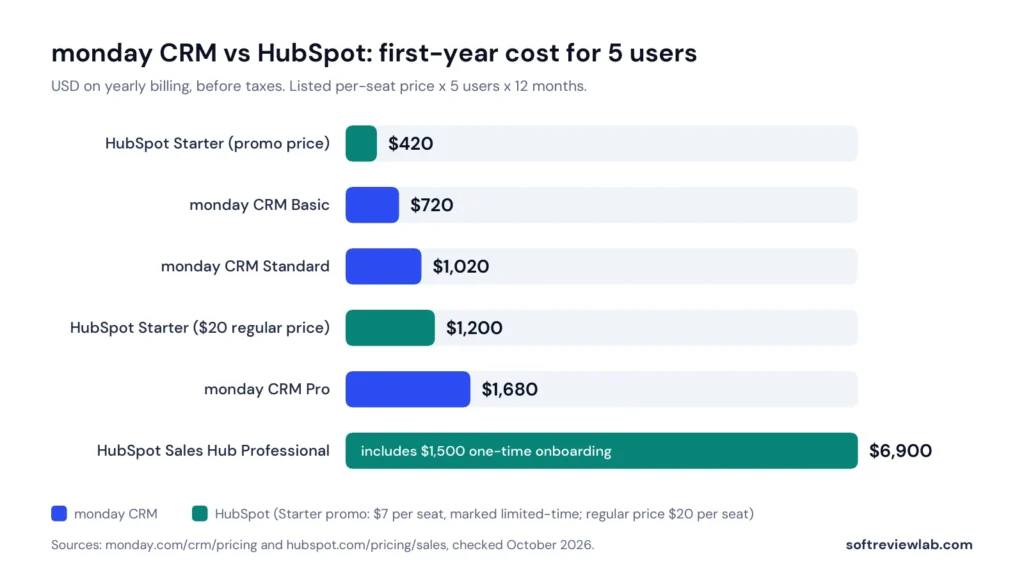
The pattern is clear. At the entry level, HubSpot is cheaper, and free for two people. The moment you need sequences, forecasting or fuller automation, the positions swap: monday CRM Pro for five people is $1,680 a year, while HubSpot Sales Hub Professional is $6,900 in the first year on listed prices. One thing can soften that. HubSpot’s seat rules say view-only seats are free, so a team where only some people sell doesn’t need a paid sales seat for everyone.
Costs That Are Easy to Miss
- monday’s seat groups. You buy 3, 5, 10 or 15 seats, not the exact number you need, so some teams pay for empty seats.
- HubSpot’s promotional price. HubSpot’s customer terms say fees can rise to the current list price at renewal, with at least 30 days’ notice.
- HubSpot’s onboarding fee. It is listed at $1,500 on Sales Hub Professional.
- AI usage. Both tools meter AI with credits. monday.com lists extra credits at $0.01 each on yearly billing, and HubSpot lists extra HubSpot Credits at $0.010 each.
- Monthly billing. monday CRM Standard rises from $17 to $25 per seat on monthly billing. HubSpot Sales Hub Professional rises from $90 to $100.
- Tax. Both vendors list prices before tax.
Free Plan and Free Trial
This is the simplest difference. HubSpot’s free tools cost nothing, don’t expire and don’t ask for a card, according to its pricing pages. They cover up to 2 users and 1,000 contacts, with HubSpot branding on things like the meeting link, live chat and marketing emails. For a solo founder or a two-person business, that is a working CRM at no cost.
monday CRM has no free plan. You get a 14-day trial with no credit card, and after that you pay or stop. monday.com does have a free plan for its work management product, but that is a different product. So if your budget is zero, the choice is made for you. If you can pay, treat HubSpot’s free plan as what it is: a good starting point with a 2-user ceiling, not a permanent home for a growing team.
Contacts, Deals and Pipelines
monday CRM’s pricing page lists unlimited pipelines on every plan and puts the limit on records instead: 1,000 active contacts and deals on Basic, 10,000 on Standard and 100,000 on Pro. The Basic plan also allows only 5 columns per board, which is tight, because every detail you track on a deal, such as value, stage, owner, close date and source, is a column. In my view, Standard is the real starting plan for a team that sells every day.
HubSpot does it the other way round. Its Sales Hub pricing page lists up to 15 pipelines on Starter, up to 100 on Professional and up to 350 on Enterprise, and its free CRM page lists 1,000 contacts on the free tools. I couldn’t find a clear published contact limit for the Starter plan on the pages I checked, so ask before you import a large list.
For most small teams, either set of limits is enough. Few five-person teams need more than a handful of pipelines or 10,000 active deals. The two limits a small team is likely to hit first are the 5-column cap on monday CRM Basic and the 1,000 contacts on HubSpot’s free plan.
Email, Sequences and Mass Email
Both tools connect to your inbox. monday.com’s CRM page lists email sync with Gmail and Outlook and activity tracking. HubSpot lists email tracking and templates in its free tools, with up to 3 email templates on the Free plan.
The gap opens with sequences, meaning a timed series of follow-up emails that go out automatically. monday CRM lists mass emails and email sequences on its Pro plan, at $28 per seat. HubSpot’s help article on sequences says they need a Sales Hub or Service Hub Professional or Enterprise subscription and an assigned paid seat, and Sales Hub Professional is listed at $90 per seat. For a small team whose main need is automatic follow-up, that is the single biggest price difference in this comparison. If follow-up is where your deals go missing, my article on how to stop losing leads as your team grows covers the fixes that cost nothing first.
HubSpot also lists marketing email on its free plan: 2,000 sends a month with HubSpot branding. That is newsletter-style email to a list, not one-to-one sales follow-up, but for a small business that wants both from one login, it counts. On monday, mass emails are listed on CRM Pro, and email marketing is sold as a separate product, monday campaigns.
Automation
The two vendors count automation differently, so the numbers can’t be compared directly. monday CRM limits actions: 250 a month on Standard and 25,000 on Pro, with no custom automations listed on Basic. Spread over a month, 250 actions is roughly a dozen per working day. A busy five-person team can use that up.
HubSpot limits the number of workflows you can build: up to 50 on Starter, up to 300 on Professional and up to 1,000 on Enterprise. HubSpot describes the Professional workflows as fully customizable, which suggests the Starter ones are simpler, though I couldn’t check how much simpler.
My reading: on the cheaper plans, both tools give you a taste of automation and keep the real thing for the next tier. The difference is what that next tier costs. monday CRM Pro is $28 per seat. HubSpot Sales Hub Professional is $90.
Reporting and Forecasting
monday CRM lists 1 custom dashboard on Basic, 5 on Standard and 50 on Pro. Its CRM page mentions sales forecasting, but the pricing details I read didn’t make clear which plan it starts on.
HubSpot lists 10 dashboards on the Free plan, 30 on Starter, 75 on Professional and 100 on Enterprise, each with up to 50 reports. Forecasting is listed from Sales Hub Professional. So HubSpot is more generous with dashboards at the low end, including on the free plan, while its forecasting sits on the expensive tier.
If you just want to see open deals by stage and by person, both tools cover it on their entry plans. If forecasting matters to you, confirm the plan with each vendor before you buy.
AI Features
Both vendors now sell AI as part of the CRM, and both meter it with credits. monday CRM lists AI agents for lead sourcing, meeting preparation and outreach calls, an AI notetaker and its Sidekick assistant. monday.com’s main pricing page lists 1,000 AI credits a month on Basic, 2,000 on Standard and 3,000 on Pro, and its article on AI credits puts extra credits at $0.01 each on yearly billing. monday.com’s partnership team confirmed to me by email in October 2026 that the allowance is shared across the whole account, not given to each seat.
HubSpot lists its Breeze Assistant among the free tools, and its Sales Hub pricing page lists 500 HubSpot Credits a month on Starter, 3,000 on Professional and 5,000 on Enterprise. The credits reset monthly, and the page notes that included credits don’t add up across HubSpot products.
I can’t tell you which AI is better, because I haven’t run either on real sales work, and a vendor’s own demo isn’t evidence. What I can say is that credits are a running cost on both, and that you shouldn’t choose a CRM for its AI features until you have tried them in a trial with your own data.
Integrations
HubSpot says it offers more than 2,000 integrations. monday.com says it integrates with more than 200 apps, and its CRM page names Gmail, Outlook, Slack, Zoom, QuickBooks, Google Workspace and DocuSign. On monday, integrations share the same monthly action limits as automations, and the Basic plan doesn’t list integrations at all.
A bigger number isn’t automatically better value. What matters is whether the three or four tools you already use connect properly, and on which plan. Write down your accounting tool, your email, your calendar and your phone system, then look each one up on both vendors’ integration pages. If you rely on a less common tool, HubSpot’s larger catalogue makes a match more likely.
Beyond Sales: Marketing, Service and Project Work
This is where each tool’s extra value lies, and it points in opposite directions.
HubSpot’s extras face the customer. The free tools list forms, landing pages, live chat, a chatbot builder, a shared inbox, ad management and marketing email. If you want your website enquiries, newsletters and sales pipeline in one database, HubSpot gives you that without buying another product. Be aware that the paid marketing tiers are priced separately and climb steeply: HubSpot’s Product and Services Catalog lists required onboarding of $3,000 for Marketing Hub Professional alone.
monday’s extras face the team. The same platform runs projects, tasks, approvals and client onboarding through monday work management, so a deal marked as won can hand over to a delivery board. That suits agencies, consultancies and service businesses where the real work starts after the sale. Work management and CRM are separate subscriptions, though, so using both means paying for both. monday.com’s partnership team confirmed that the seat counts do not have to match and that both can sit on one invoice.
Contracts, Cancellation and Refunds
The terms differ more than most buyers expect, and this is the part I would read carefully before paying for a year.
monday.com’s pricing FAQ says that if you cancel a yearly plan within 30 days of paying, you get a prorated refund, and that there are no refunds after that. You can pay by credit card or PayPal, and the CRM pricing FAQ says debit cards aren’t accepted.
HubSpot’s Customer Terms of Service, last modified in September 2026, are stricter. In summary, they say you can’t cancel a subscription before the end of its term, prepaid fees aren’t refunded, subscriptions renew automatically unless you turn off auto-renewal before the term ends, and fees can rise to the current list price at renewal with at least 30 days’ notice. HubSpot’s help article on seats adds that seats can’t be reduced below your minimum commitment and that removals take effect at the next billing period.
None of this is unusual for business software, and the same terms say HubSpot’s free tools stay available if a paid subscription ends. But the practical advice follows directly: on HubSpot, start with the free plan or monthly billing until you are sure, and don’t sign a yearly Professional contract on the strength of a demo.
Support and Onboarding
monday.com’s support article says help is available 24/7, starting with an AI assistant in the chat that can pass you to a person. monday.com’s partnership team confirmed by email in October 2026 that there is no guaranteed response time on Basic, Standard or Pro, and said support was handling a high volume of chats and tickets. Prioritised 24/7 support is listed on the CRM Ultimate plan.
HubSpot ties support to the plan. Its pricing pages list community support, HubSpot Academy and the knowledge base for free users, email and in-app chat support on Starter, and email and phone support on Professional and Enterprise. In my opinion, HubSpot Academy is a real advantage for a team with no CRM experience, because it is open even to free users.
monday.com confirmed it has no guaranteed response time on its standard plans, and I couldn’t find one for HubSpot’s small-business plans. If fast human support matters to you, test it during the trial: send a real question and time the answer.
Security and Compliance
monday.com’s pricing FAQ lists ISO/IEC 27001 and ISO/IEC 27018, SOC 2 and HIPAA, with HIPAA compliance listed under the CRM Ultimate plan. HubSpot’s security page describes a SOC 2 Type 2 report and a public SOC 3 report, encryption in transit and at rest, two-factor authentication for all customers, an EU data centre in Frankfurt, and SAML single sign-on at the Enterprise tier.
For a typical small team, both meet the baseline. If you handle health data, need single sign-on or must keep data in a specific region, those requirements push you towards the top tier on either tool, so get the answer in writing before you compare anything else.
What Customers Say
| Site | monday CRM | HubSpot |
|---|---|---|
| G2 | 4.5 out of 5 from 1,758 reviews | 4.4 out of 5 from 14,347 reviews (Sales Hub) |
| Capterra | 4.6 out of 5 from 6,118 reviews (monday.com) | 4.5 out of 5 from 4,490 reviews (HubSpot CRM) |
| Trustpilot | 2.1 out of 5 from 3,438 reviews (monday.com) | 1.5 out of 5 from 1,173 reviews |
On G2, the most-mentioned strengths of monday CRM are its user-friendly interface, integrations, automation and customisability. The most-mentioned complaints are a steep learning curve, missing or limited features and cost. For HubSpot Sales Hub, ease of use leads the praise, and the complaints are almost the same list: missing features, limited features, a steep learning curve and price. On Capterra, HubSpot CRM reviewers praise having sales and marketing in one place and the email tracking, and criticise pricing that rises quickly because key features sit on higher plans.
The Trustpilot scores are much lower for both. Trustpilot notes that neither company has a recent history of asking for reviews there, and the complaints on both pages centre on billing, contracts or cancelling, and support. I wouldn’t read 2.1 or 1.5 as a fair score for either product, given the thousands of positive reviews elsewhere. I would read the complaints as the same warning in both cases: understand the contract and the renewal terms before you pay.
Pros and Cons of Each Tool
monday CRM Pros and Cons
Pros
- Email sequences, mass emails and 25,000 automation actions a month on the $28 Pro plan
- Unlimited pipelines listed on every plan
- Boards you can shape to your own sales process
- Shares a platform with monday work management, so sales can hand over to delivery
- Prorated refund on yearly plans cancelled within 30 days
- 14-day trial with no credit card
Cons
- No free plan
- A three-seat minimum, and seats sold in groups
- Basic is limited to 5 columns per board and 1,000 active contacts and deals, with no custom automations listed
- Only 250 automation actions a month on Standard
- Far fewer integrations than HubSpot
- A Trustpilot score of 2.1 for monday.com, with complaints about support, costs and cancelling
HubSpot CRM Pros and Cons
Pros
- A free plan for up to 2 users with no time limit
- A low Starter price, currently promotional
- Sales, marketing and service tools on one customer database
- More dashboards on the low plans: 10 on Free and 30 on Starter
- More than 2,000 integrations
- No seat minimum listed, and free view-only seats
- HubSpot Academy for free users, email and in-app chat support from Starter and phone support from Professional
Cons
- Sequences and forecasting need Sales Hub Professional, at $90 per seat
- A $1,500 one-time onboarding fee is listed on Sales Hub Professional
- The Starter price was marked as a limited-time promotion, and the terms allow renewal at list price
- No cancelling before the term ends, and no refunds of prepaid fees
- The free plan stops at 2 users and 1,000 contacts and carries HubSpot branding
- A Trustpilot score of 1.5, with complaints about pricing, contracts and support
Real-World Scenarios: Which Tool Fits?
These are examples I worked through from the published plans, not customer case studies.
A Solo Founder or a Two-Person Business
HubSpot’s free plan is hard to argue with here. It costs nothing, covers two users, and lists the meeting link, forms and email tracking a small business uses first. monday CRM would cost $432 a year on Basic or $612 on Standard, because of the three-seat minimum. Unless you already run your work on monday.com, start with HubSpot’s free tools.
A Five-Person Sales Team That Needs Follow-Up Sequences
monday CRM Pro costs $1,680 a year for five seats and lists sequences, mass emails and 25,000 automation actions a month. HubSpot Sales Hub Professional costs $6,900 in year one on listed prices. Professional is the deeper sales product, with playbooks, forecasting and up to 300 workflows, but a five-person team has to be sure it will use that depth. For this need, monday CRM gives more for the money.
An Agency or Service Business That Delivers Projects After the Sale
The sale is only the start: someone has to onboard the client and run the work. monday CRM fits this well, because a won deal can move to a project board on the same platform, and the team learns one interface. With HubSpot, you would run delivery in a separate project tool and connect the two. Budget for both monday products if you go this way, since CRM and work management are priced separately.
A Business That Gets Most Leads From Its Website and Email List
If enquiries arrive through website forms, live chat and newsletters, HubSpot fits better. Its free tools list forms, landing pages, live chat and 2,000 marketing emails a month, all feeding the same contact records the sales pipeline uses. On monday CRM you would need to connect outside tools or add a separate product for the marketing side.
A Team of Ten That Plans to Grow
Both tools have a step waiting. HubSpot’s pricing showed Starter for up to 10 users, so the eleventh person raises the question of Professional at $90 per seat. On monday CRM, the eleventh person means buying the 15-seat group: $3,060 a year on Standard or $5,040 on Pro. Neither step is hidden, but both are easy to forget when you sign up with eight people. Price your team at its size in 12 months, not today.
Mistakes to Avoid
- Comparing $7 with $12. Compare the plans that contain your must-have features. For sequences, that is $28 against $90.
- Counting people instead of seats. On monday CRM, seven people means ten seats.
- Treating a promotion as the price. Budget HubSpot Starter at its $20 regular price for year two.
- Signing a yearly HubSpot contract after a demo. The terms don’t allow early cancellation or refunds, so use the free plan or monthly billing first.
- Starting on monday CRM Basic without checking the limits. Five columns per board and no listed automations are restrictive for daily selling.
- Buying for the AI. Both vendors meter AI with credits, and I couldn’t assess the quality of either.
- Skipping the test with real data. Twenty real deals tell you more than any feature list.
Other Options to Consider
monday CRM and HubSpot aren’t the only choices, and for some teams neither is right. Based on the published prices in my guide to choosing a CRM for a small business:
- Pipedrive: a sales-pipeline-first CRM. Lite is listed at $14 per seat on yearly billing, and email sequences and automations start on Growth at $39.
- Zoho CRM: a Free Edition for up to 3 users, with Standard at $9 and Professional at $16 per user on yearly billing.
- Salesforce Starter Suite: from $25 per user, for teams that expect to need heavy customisation later.
- A shared spreadsheet: still reasonable for one person with a handful of open deals.
If your real problem is finding leads, not tracking them, a CRM won’t fix it. My article on getting B2B leads from LinkedIn covers that side.
monday CRM or HubSpot: Which Should You Choose?
Choose monday CRM If
- You have three or more people selling and want sequences and automation without a $90 seat price
- Your sales process doesn’t fit a standard pipeline and you want to design your own boards
- You deliver projects after the sale and want sales and delivery on one platform
- You want a 30-day refund window on a yearly plan
If that sounds like your team, you can start a monday CRM trial here. It runs for 14 days and doesn’t ask for a credit card. My monday.com review covers the rest of the platform, including the scores and what I couldn’t verify.
Choose HubSpot If
- You are one or two people and want a capable CRM at no cost
- Your leads come from website forms, live chat or a newsletter, and you want them in the same system as your deals
- You depend on integrations with many other tools
- You expect to grow into a larger platform and can afford the Professional tier when you get there
Use Neither If
- You have a handful of deals and a spreadsheet is working
- You only need a simple pipeline and want the lowest predictable price, in which case look at the other options above
- You haven’t yet written down your sales stages, because no CRM will do that for you
monday CRM vs HubSpot: My Verdict
I don’t think there is one winner between monday CRM and HubSpot, and I would be wary of any comparison that names one without asking about your team. The published plans point to a split.
For a team of one or two, HubSpot’s free plan gives the most for the money, because the price is zero and monday CRM starts at three paid seats. For a team of three to ten that needs sequences and real automation, monday CRM Pro gives more for the money, at $28 per seat against $90 plus a listed onboarding fee. For a business that wants marketing and sales on one customer record, HubSpot’s breadth is worth paying for. For a business that wants sales and project work together, monday’s platform is.
That is my editorial judgment from the vendors’ own pages, not from running either tool with a sales team. Check the prices on the day you buy, because both vendors change them, and test with your own deals before you commit to a year. monday CRM’s 14-day trial and HubSpot’s free plan can run side by side, so add the same real deals to both and keep the one your team opens without being asked. If monday CRM is on your shortlist, you can start its free trial here.
Frequently Asked Questions
Is monday CRM better than HubSpot?
Neither is better for everyone. monday CRM gives more value to teams of three or more that want sequences, automation and customisable boards at a moderate price. HubSpot gives more value to one or two users who want a free CRM, and to businesses that want marketing and sales tools together.
Which is cheaper, monday CRM or HubSpot?
It depends on the plan. HubSpot is cheaper at the entry level: free for 2 users, and Starter at $7 per seat on a limited-time promotion against monday CRM Basic at $12. Once you need sequences, monday CRM is cheaper: Pro is $28 per seat, while HubSpot Sales Hub Professional is $90 per seat plus a listed $1,500 onboarding fee.
Which is better for a small team of five?
For five people who mainly need a pipeline, HubSpot Starter is the cheaper start at $420 a year on the promotional price. For five people who need sequences and heavier automation, monday CRM Pro costs $1,680 a year against $6,900 in year one for HubSpot Sales Hub Professional on listed prices.
References
- monday.com. monday CRM pricing and monday CRM product page. Accessed October 2026.
- monday.com. monday AI credits. Accessed October 2026.
- monday.com Help Center. How to contact support. Accessed October 2026.
- HubSpot. Sales Hub pricing and CRM pricing. Accessed October 2026.
- HubSpot. Free CRM product page. Accessed October 2026.
- HubSpot. Customer Terms of Service. Last modified September 2026.
- HubSpot. Product and Services Catalog. Accessed October 2026.
- HubSpot Knowledge Base. Create and edit sequences and Manage seats. Updated August 2026.
- HubSpot. Security. Accessed October 2026.
- HubSpot chat assistant, answers on onboarding fees and Starter pricing, October 2026.
- Customer ratings: G2, Capterra and Trustpilot listings for monday CRM, monday.com, HubSpot Sales Hub and HubSpot CRM, checked October 2026.
What we couldn’t verify
- We did not run a sales team on either CRM, so ease of use, speed and support quality were not assessed first-hand.
- HubSpot’s Starter price was marked as a limited-time promotion. How long it lasts and who qualifies can vary, and HubSpot’s own pages show more than one starting price.
- Whether the $1,500 onboarding fee listed for Sales Hub Professional is charged or waived depends on HubSpot’s quote.
- The contact limit on HubSpot’s Starter plan was not clear on the pages we checked.
- Which monday CRM plan includes sales forecasting.
- The quality of each tool’s AI features was not assessed.
- monday.com confirmed by email that it has no guaranteed support response time on Basic, Standard or Pro; no published response time was found for HubSpot’s small-business plans.
- The Capterra and Trustpilot ratings shown for monday cover monday.com as a whole, not only monday CRM.
If any of these matter to your decision, check them directly with the vendors or during a free trial.
See every matchup
Browse the rest of the head-to-head comparisons, or jump straight to the full reviews.