
- Home
- Comparisons
- ActiveCampaign vs Mailchimp: Which Email Automation Tool Fits a Small Business?
ActiveCampaign vs Mailchimp: Which Email Automation Tool Fits a Small Business?

Research-based comparison · not hands-on tested We compare the value each tool gives a specific kind of buyer, not which company is bigger or better, so there is no overall winner. How we compare.
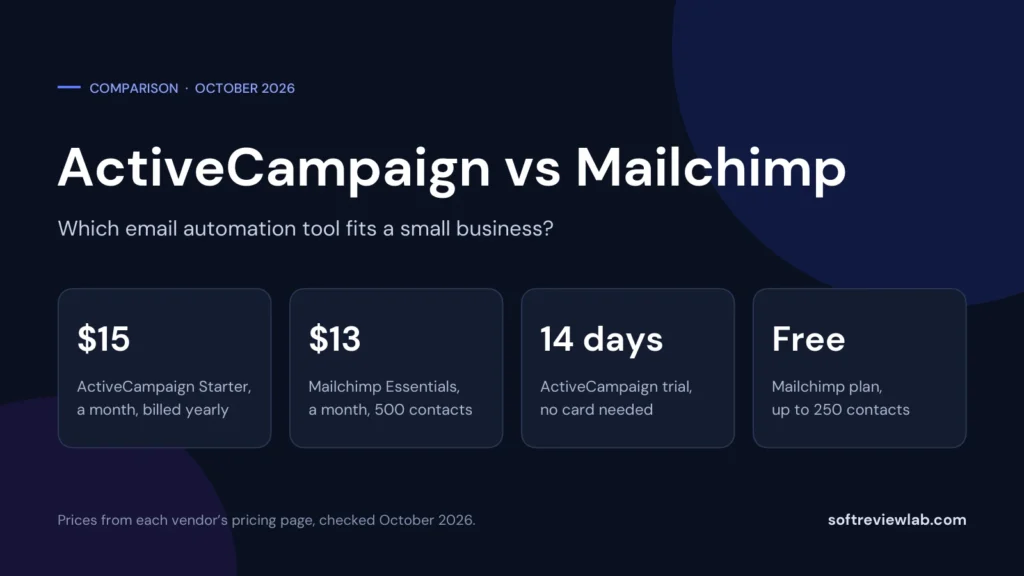
Short answer: in the ActiveCampaign vs Mailchimp decision there is no overall winner, because the two tools are built for different stages of email marketing. Mailchimp is the easier start: a free plan for up to 250 contacts, paid plans billed month by month from $13, three to five user seats on its two main paid plans, and landing pages on every plan. ActiveCampaign goes deeper on automation: unlimited automation actions from its Plus plan, more than 950 ready-made recipes, AI builders on every plan, and an optional sales CRM and WhatsApp channel, from $15 a month on annual billing for 1,000 contacts and one user. A business that sends newsletters and a few simple automated emails gets more value from Mailchimp. A business that wants its follow-up driven by what each contact does, and has someone to build it, gets more value from ActiveCampaign. One finding may surprise you: for branching automation, Mailchimp Standard cost less than ActiveCampaign Plus at every list size I checked.
Disclosure: SoftReviewLab is an ActiveCampaign affiliate partner. This page contains ActiveCampaign affiliate links, and SoftReviewLab may earn a commission if you sign up through them, at no extra cost to you. SoftReviewLab has no affiliate relationship with Mailchimp. Every figure below comes from each vendor’s own pages, and where Mailchimp is the better fit I say so. See our affiliate disclosure and research and scoring method.
Table of Contents
ActiveCampaign vs Mailchimp at a Glance
| ActiveCampaign | Mailchimp | |
|---|---|---|
| What it is | An email marketing and automation platform, with add-ons for a sales CRM, SMS and WhatsApp | An all-in-one email marketing tool with a builder, forms, landing pages and automation flows |
| Starting price | Starter at $15 a month on annual billing, for 1,000 contacts and 1 user | Essentials at $13 a month, for up to 500 contacts and 3 users |
| How you are billed | Annual prices shown. Monthly on request, at higher prices | Monthly. Annual billing only through sales for large lists |
| Free plan | No | Yes, for up to 250 contacts and 500 sends a month |
| Free trial | 14 days, no credit card, up to 100 email sends | 14 days on Essentials and Standard, with terms shown at sign-up |
| Money-back guarantee | 30 days for new accounts on annual plans, with conditions | None listed |
| Automation on the cheapest paid plan | 5 actions per automation | Up to 4 flow steps, no branching |
| Plan where automation opens up | Plus, $49 a month at 1,000 contacts | Standard, $45 a month in the 1,500-contact tier |
| Users included | 1 on Starter and Plus, 3 on Pro, 5 on Enterprise | 3 on Essentials, 5 on Standard, unlimited on Premium |
| AI | AI campaign and automation builders on every plan. Content and image generation from Plus | Generative AI on Standard and Premium only |
| Sales CRM | Paid add-on from Plus, $85 a month on Plus | None listed |
| SMS and WhatsApp | SMS add-on from Plus. Separate WhatsApp plans | SMS add-on from Essentials. WhatsApp not listed |
| Integrations | More than 1,000, some held back from Starter | More than 300, all on every plan |
| Support | Email and chat on every plan. No phone support listed | 24/7 email and chat on paid plans. Phone on Premium only |
| How contacts are counted | All contacts, on accounts created since November 2025 | Subscribed, unsubscribed and non-subscribed. Archived contacts are free |
| My review score | 7.6 out of 10 | 7.2 out of 10 |
| Closest fit | Businesses that depend on behaviour-based automation and have someone to build it | Beginners and small teams that want newsletters, landing pages and simpler automation |
This comparison looks at what each tool does for a buyer and what it costs, not at the companies behind them. It is research-based: the figures come from each vendor’s pricing page, plan comparison, help center and terms, and from public customer reviews, all checked in October 2026. I also looked at the billing page inside an ActiveCampaign trial account and asked ActiveCampaign’s support team for the prices it does not publish. I have not run campaigns through either tool. My full findings on each are in the ActiveCampaign review and the Mailchimp review.
What Each Tool Does, in Plain English
Mailchimp is an all-in-one email marketing tool. You design emails in a drag-and-drop builder, collect subscribers with forms and landing pages, send newsletters and promotions, and set up automated emails with Marketing Automation Flows. SMS and transactional email can be added. Its strength is that a beginner can send a good-looking campaign on the first day, and the free plan lets you do that without paying.
ActiveCampaign is an email marketing and automation platform. It sends newsletters too, but it is built around automations that react to behaviour: a contact fills in a form, clicks a link, visits a page or abandons a cart, and that event starts a sequence of emails, waits, conditions and tasks. Around that engine it sells add-ons for a sales CRM, SMS and transactional email, and separate plans for WhatsApp. Its strength is how much of your follow-up it can run for you once it is set up.
Both tools do the basics: campaigns, sign-up forms, segments, A/B tests, reports and ecommerce connections. The differences that decide the choice are in how far the automation goes, how each one charges, and how much setup each one asks of you.
The Biggest Difference: An Easy Start vs Automation Depth
If you take one idea from this comparison, take this one. Mailchimp is designed so that sending is easy and automation is a feature you grow into. ActiveCampaign is designed so that automation is the centre and everything else feeds it.
You can see it in the cheapest paid plans. Mailchimp Essentials limits an automation flow to four steps with no branching. ActiveCampaign Starter limits an automation to five actions. On both, a short welcome series fits and a real behaviour-based workflow does not. The plans where automation opens up are Mailchimp Standard, with up to 200 flows, branching and multiple starting points, and ActiveCampaign Plus, with unlimited actions.
From there the two go in different directions. Mailchimp Standard bundles a lot around the flows: five user seats, send time optimisation, predictive segmentation, multivariate testing and generative AI. ActiveCampaign Plus gives you the deeper builder, cross-channel automation and a library of more than 950 recipes, and keeps several of the equivalent extras, such as predictive sending and conditional content, for its Pro plan. So the fair summary is that Mailchimp gives a small team more features per dollar at the Standard level, and ActiveCampaign gives a business that lives on automation a more capable engine and more places to take it.
If you are not sure which side of that line you are on, my guide to email marketing automation workflows describes the seven workflows most businesses build first. Count how many you would really use.
ActiveCampaign vs Mailchimp Pricing
Both tools charge by plan and by the number of contacts, and both get expensive as a list grows. The details differ in ways that matter.
ActiveCampaign Pricing
| Plan | 1,000 contacts | 2,500 contacts | 10,000 contacts | Users included |
|---|---|---|---|---|
| Starter | $15 | $39 | $149 | 1 |
| Plus | $49 | $95 | $189 | 1 |
| Pro | $79 | $149 | $375 | 3 |
| Enterprise | $145 | $255 | $589 | 5 |
Every price on ActiveCampaign’s pricing page was labelled as billed annually when I checked, and the billing page inside a trial account showed the same. ActiveCampaign’s support team told me in writing that monthly billing is available on every plan, at higher prices: $59 a month for Plus and $99 for Pro at 1,000 contacts. Starter is limited to five actions per automation, one user, five lists and email-only automation. Plus removes the action limit and adds landing pages, AI content generation and access to add-ons. The add-ons are priced only on request: the support team quoted $85 a month for the sales CRM and $159 for custom reporting on Plus, $21 for 1,000 SMS credits, and $15 for each extra user on Plus.
Mailchimp Pricing
| Contacts | Essentials | Standard | Premium |
|---|---|---|---|
| Up to 500 | $13 | $20 | $350 |
| 1,500 | $26.50 | $45 | $350 |
| 2,500 | $45 | $60 | $350 |
| 5,000 | $75 | $100 | $350 |
| 10,000 | $110 | $135 | $350 |
Mailchimp bills monthly, and its plan comparison says annual billing is offered only through its sales team, for Standard and Premium plans with 10,000 or more contacts. Essentials includes three user seats and three audiences, Standard five of each, and Premium is unlimited. Mailchimp also runs discounts for new customers that change often. When I reviewed it earlier in October 2026 the offer was 50 percent off for the first 12 months, and on a later visit the plan cards showed a different offer aimed at larger lists. Budget with the regular prices above and treat any discount as a bonus.
Like for Like: What You Pay for Real Automation
The fair comparison is between the plans that remove the automation limits: ActiveCampaign Plus and Mailchimp Standard. Mailchimp has no 1,000-contact tier, so a list of 1,000 falls into its 1,500-contact tier.
| List size | ActiveCampaign Plus | Mailchimp Standard | Difference |
|---|---|---|---|
| 1,000 contacts | $588 ($49 a month, paid yearly) | $540 ($45 a month, 1,500-contact tier) | Mailchimp costs $48 less |
| 2,500 contacts | $1,140 ($95 a month, paid yearly) | $720 ($60 a month) | Mailchimp costs $420 less |
| 10,000 contacts | $2,268 ($189 a month, paid yearly) | $1,620 ($135 a month) | Mailchimp costs $648 less |
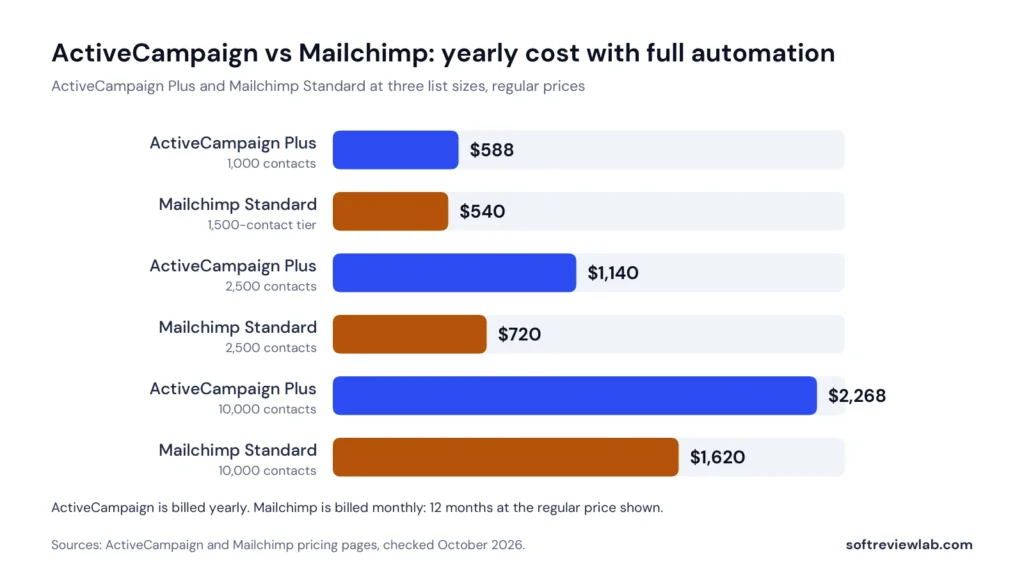
On price alone, Mailchimp Standard is cheaper at each of these sizes, and it includes five seats where ActiveCampaign Plus includes one. What the extra money buys with ActiveCampaign is the deeper automation builder, the recipe library, the AI builders and the option to add a sales CRM or WhatsApp later. Whether that is worth $48 or $648 a year depends on how much of your revenue comes from automated follow-up. If you pay ActiveCampaign monthly instead, Plus at 1,000 contacts is $59 a month, or $708 over a year, which widens the gap with Mailchimp Standard to $168.
| List size | ActiveCampaign Starter | Mailchimp Essentials | Difference |
|---|---|---|---|
| 1,000 contacts | $180 ($15 a month, paid yearly) | $318 ($26.50 a month, 1,500-contact tier) | ActiveCampaign costs $138 less |
| 2,500 contacts | $468 ($39 a month, paid yearly) | $540 ($45 a month) | ActiveCampaign costs $72 less |
| 10,000 contacts | $1,788 ($149 a month, paid yearly) | $1,320 ($110 a month) | Mailchimp costs $468 less |
At the entry level the picture reverses for small lists: ActiveCampaign Starter is cheaper than Mailchimp Essentials at 1,000 and 2,500 contacts, and Mailchimp is cheaper at 10,000. Remember what you get at this level on each side: one user and five actions per automation on ActiveCampaign, three users and four-step flows on Mailchimp. And for a list under 250 contacts, Mailchimp’s free plan costs nothing at all.
How You Are Billed: A Year Up Front vs Month by Month
This difference is easy to overlook, and it changes the risk. With Mailchimp you pay each month and can change or pause your plan from the billing page. ActiveCampaign’s pricing page and in-account billing page show annual prices, and ActiveCampaign’s support team told me monthly billing is available on every plan at a higher price: $59 instead of $49 a month for Plus at 1,000 contacts. So you can avoid a yearly commitment with either tool, but on ActiveCampaign it costs about 20 percent more on Plus, and you may need to ask for it.
ActiveCampaign softens the commitment with a 30-day money-back guarantee for new accounts on annual plans, covered below. Mailchimp lists no guarantee, and it does not need one in the same way, because a monthly customer can simply stop. For a business that is still finding out whether email marketing works for it, paying monthly is the lower-risk way to learn.
Costs That Are Easy to Miss
- Unsubscribed contacts count on both. Mailchimp’s pricing help article says subscribed, unsubscribed and non-subscribed contacts all count toward your tier, and archived contacts do not. ActiveCampaign’s help center says that for accounts created since November 2025, all contacts count regardless of status. On either tool, clean your list every month.
- Going over your contact limit. Mailchimp says it will not interrupt service on a paid plan and adds a charge instead, without stating the amount in the article I read. ActiveCampaign stops sending emails until you upgrade, unless you switch on auto-upgrade.
- Going over your send limit. Both set the monthly allowance at 10 to 15 times your contact limit, depending on the plan. ActiveCampaign charges $0.005 for each extra email. Mailchimp counts test and transactional emails toward the limit.
- Users. ActiveCampaign Starter and Plus include one user. Its support team quoted extra users at $10 a month on Starter, with only one extra allowed, $15 on Plus and $30 on Pro, rising to $39 and $59 once you add the CRM. Mailchimp includes three on Essentials and five on Standard.
- Add-ons. SMS and transactional email cost extra on both. ActiveCampaign’s sales CRM ($85 a month on Plus, $139 on Pro) and custom reporting ($159) are add-ons too, according to its support team.
- Promotions that end. A first-year discount on Mailchimp returns to the regular price afterwards. Plan for the regular price.
If the ActiveCampaign prices look workable for your list and you want to check the exact figure at your own contact count, its pricing page has a selector for it. Mailchimp’s current prices are on its pricing page.
Free Plan, Free Trial and Guarantee
| ActiveCampaign | Mailchimp | |
|---|---|---|
| Free plan | None | Yes: up to 250 contacts, 500 sends a month and 1 user, with Mailchimp branding and no scheduling |
| Free trial | 14 days, no credit card, up to 100 email sends, Pro-level features | 14 days on Essentials and Standard, with the terms shown at sign-up |
| Money-back guarantee | 30 days for new accounts on annual plans. You must cancel and open a refund ticket within the 30 days | None listed |
| Pay as you go | Not offered | Email credits for occasional senders |
These suit different people. Mailchimp’s free plan is the only way here to run a small list with no bill, and it is a good place to learn the basics. It is limited on purpose: no scheduling, no A/B testing, and email support for the first 30 days only.
ActiveCampaign’s trial is short but generous in what it shows, since it runs on Pro-level features, and it asks for no card. I went through the sign-up form in October 2026 and it did not ask for card details. The catch is that 100 sends is enough to test the builder and not enough to judge results, and the features you see are more than Starter or Plus include. The 30-day guarantee then gives a new account on an annual plan a second window after paying, with conditions: it excludes SMS and WhatsApp credits, and its terms describe the refund as being at ActiveCampaign’s discretion.
If you would like to see ActiveCampaign from the inside before deciding, you can start its 14-day free trial without a card. Mailchimp’s free plan and trial are available from its own site.
Automation: What Each Plan Lets You Build
| Level | ActiveCampaign | Mailchimp |
|---|---|---|
| Free | No free plan | A preview of automation flows |
| Cheapest paid plan | Starter: 5 actions per automation, email only | Essentials: up to 4 flow steps, no branching, no multiple starting points |
| Main automation plan | Plus: unlimited actions, cross-channel automation, sales automation | Standard: up to 200 flows, branching, multiple starting points |
| Higher plans | Pro: A/B testing inside automations, an automations map, predictive sending, conditional content | Premium: the same flow limits as Standard, with more seats and support |
| Ready-made starting points | More than 950 automation recipes, listed on every plan | Pre-built SMS automations with the add-on. I found no published count of email flow templates |
For the common small-business workflows, both tools are enough once you are on the right plan. A welcome series, an abandoned cart reminder, a post-purchase follow-up and a win-back sequence can all be built on Mailchimp Standard or ActiveCampaign Plus. If you have not built the first of those yet, my guide on how to set up a welcome email series works with either tool.
ActiveCampaign pulls ahead when the logic gets more involved: many branches, goals that move a contact forward when they act, lead scoring through the CRM add-on, and steps that hand a lead to a salesperson. If your plan is to connect marketing to a sales process, that is what you are paying for. ActiveCampaign’s marketing automation page shows the builder if you want to see how it is laid out.
Mailchimp holds its own when the need is simpler. Two hundred flows with branching is far more than most small businesses will build, and the builder sits inside a tool that the same person can use for newsletters, forms and landing pages without much training.
Email Design, Templates and Testing
This is the area where customer reviews most clearly favour Mailchimp. Ease of use and templates are among the themes G2 reviewers praise most often in Mailchimp, while Capterra’s summary of ActiveCampaign reviews lists the builder tools among the most common criticisms. I have not used either editor for live campaigns, so I am reporting what customers say, not my own experience.
On paper, both have a drag-and-drop designer and a template library. ActiveCampaign lists more than 250 templates on every plan. Mailchimp gives the free plan a limited set and paid plans the full library, and it needs Standard to send custom-coded templates.
| Feature | ActiveCampaign | Mailchimp |
|---|---|---|
| A/B testing of emails | Every plan | Essentials and above. Not on Free |
| Multivariate testing | Not listed in the plan comparison | Standard and Premium |
| Send time optimisation | Predictive sending on Pro and Enterprise | Standard and Premium |
| Content that changes by recipient | Conditional content on Pro and Enterprise | Dynamic content on Standard and Premium |
| Inbox previews | Unlimited on Enterprise, 5 a month on Pro and Plus, none on Starter | Not checked for this comparison |
The pattern repeats. Mailchimp puts its optimisation features on Standard, its mid-priced plan, and ActiveCampaign puts its equivalents on Pro. If send time optimisation or content that changes for each recipient matters to you, compare Mailchimp Standard with ActiveCampaign Pro, and the price gap widens: $135 against $375 a month at 10,000 contacts.
Segmentation and Personalisation
Both tools let you group contacts by what you know about them and what they have done. Mailchimp includes tags and basic segmentation on every plan and adds advanced and predictive segmentation, including purchase likelihood and customer lifetime value, on Standard and Premium. Those predictions are aimed at online stores with enough order history to make them meaningful.
ActiveCampaign grades segmentation as limited on Starter, standard on Plus, advanced on Pro and premium on Enterprise, without spelling out on its pricing page what separates the levels. It adds AI-suggested segments on every plan and custom objects on Enterprise. If you rely on complex segments, ask each vendor to confirm that the conditions you need are available on the plan you are pricing.
Mailchimp also has a structural point worth knowing: audiences. Essentials allows three and Standard five. Audiences are separate lists, which is useful for a business with distinct brands. ActiveCampaign uses lists inside one account and limits Starter to five.
AI Features
Both vendors have added AI, in different places. ActiveCampaign calls its set Active Intelligence and includes an AI campaign builder and an AI automation builder on every plan, with AI content and image generation from Plus. The billing page inside a trial account describes every plan as having limited premium AI credits, and ActiveCampaign’s support team told me every plan starts at 200 credits a month, with roughly one credit used for each contact that passes through an AI step. ActiveCampaign also lists connections for Claude and ChatGPT.
Mailchimp’s generative AI, branded Intuit Assist, is listed on Standard and Premium at no extra cost and is not included on Free or Essentials. Mailchimp describes it as beta and available in English. Every Mailchimp plan also has a few assisted features, such as a subject line helper and product recommendations.
I have not assessed the quality of either tool’s AI output. Treat both as a way to get a first draft faster, and read everything before it is sent. ActiveCampaign’s own terms say AI output may be inaccurate. My guide to choosing AI tools for a small business explains how to weigh AI features in a purchase like this one.
Forms, Landing Pages and Other Channels
| Channel | ActiveCampaign | Mailchimp |
|---|---|---|
| Sign-up forms | Every plan. Starter has standard and inline forms only | Every plan, including Free |
| Landing pages | Plus and above | Every plan, including Free |
| SMS | Paid add-on on Plus and above, bought as credits | Paid add-on on Essentials and above. MMS on Standard and Premium |
| Separate plans from $99 a month for 5,000 WhatsApp contacts, or bundled with email | Not listed in the plan comparison | |
| Transactional email | Paid add-on on every plan, price not published | Paid add-on on Standard and Premium, $20 for each block of 25,000 emails |
| Ads and social | Google, Facebook and LinkedIn ad audiences from Plus | Social posting on every plan. Google retargeting ads and social scheduling on Standard and Premium |
Mailchimp is the more complete package for a small business that wants a sign-up form, a landing page and a newsletter from one free or low-cost account. ActiveCampaign is the stronger option if WhatsApp matters to your customers, since Mailchimp’s plan comparison does not list it. On SMS, check coverage for your own country with either vendor before you plan around it. ActiveCampaign’s help center limits one-off SMS broadcasts to the United States, the United Kingdom and Australia.
If you only need transactional email, such as order confirmations and password resets, neither of these is the natural choice. A dedicated sending service is simpler, and my SMTP.com review covers one.
Sales CRM
This is a clear difference in what the two tools can do. ActiveCampaign sells Enhanced CRM as an add-on for Plus, Pro and Enterprise. It adds deal pipelines, deal and account records, lead scoring, automated one-to-one emails and a win probability estimate, and it lets an automation move a lead into a pipeline and assign it to a salesperson. Its price is not on the public site, and ActiveCampaign’s support team quoted $85 a month on Plus and $139 on Pro.
Mailchimp’s plan comparison lists no sales pipeline. It keeps contact profiles, tags and purchase data for marketing, and you would connect a separate CRM through an integration. For a shop or a newsletter business that is fine. For a service business with a sales process, it means running a second tool. If that is your situation, my guide to choosing a CRM for a small business sets out what to check.
Integrations and Ecommerce
Both connect to the tools a small business is likely to use. ActiveCampaign lists more than 1,000 integrations and Mailchimp more than 300, and Mailchimp makes all of its integrations available on every plan, including Free. ActiveCampaign holds some back by plan: Shopify, WooCommerce and Square are on every plan, while PayPal, Stripe, Slack, Calendly and the ad platforms start on Plus, and Salesforce and Microsoft Dynamics are reserved for Enterprise.
For online stores, both can send abandoned cart emails. ActiveCampaign lists abandoned cart on every plan, product catalogue and coupons from Plus, and recurring payments on Pro and Enterprise. Mailchimp builds cart reminders in its automation flows, which are limited to four steps on Essentials, and adds predictive features for stores on Standard. A count of 300 against 1,000 matters less than whether the two or three tools you rely on are covered, so check those by name.
Users, Audiences and Team Use
| ActiveCampaign | Mailchimp | |
|---|---|---|
| Users included | Starter 1, Plus 1, Pro 3, Enterprise 5 | Free 1, Essentials 3, Standard 5, Premium unlimited |
| Extra users | $10 a month on Starter (one at most), $15 on Plus, $30 on Pro | Not listed as an add-on. Higher plans include more |
| Roles and permissions | Custom user permissions from Plus | 2 roles on Essentials, 4 on Standard, 5 on Premium |
| Separate lists or audiences | Up to 5 lists on Starter | 3 audiences on Essentials, 5 on Standard, unlimited on Premium |
For a team of two to five people who all need to log in, Mailchimp is noticeably better value on the lower plans. On ActiveCampaign, the same team would need Pro, or Plus with three extra users at $15 a month each.
Support, Onboarding and Switching
| ActiveCampaign | Mailchimp | |
|---|---|---|
| Lowest paid plans | Email and chat, graded basic on Starter and Plus | 24/7 email and chat on Essentials and Standard |
| Higher plans | Priority email and chat on Pro and Enterprise. Dedicated account team on Enterprise | Phone and priority support on Premium |
| Free plan | No free plan | Email support for the first 30 days |
| Phone support | Not listed for customers | Premium only, in English |
| Onboarding | Onboarding and migration support on every plan, basic or priority by plan | 1 session on Standard, 4 on Premium |
Neither tool gives a small business phone support on an affordable plan. Mailchimp’s round-the-clock email and chat on Essentials and Standard is the more specific promise. ActiveCampaign’s is the help with moving in. When I sent ActiveCampaign nine pricing questions through chat during my trial, it moved them to email and answered in writing the same day.
If you are switching from Mailchimp to ActiveCampaign, ActiveCampaign offers a migration tool for exactly that. Its comparison page says the tool connects to your Mailchimp account and brings over contacts, templates, forms and automations, that it is run with a partner whose terms you accept, and that most migrations take under two hours. Those are ActiveCampaign’s own descriptions, and I have not tested the tool. The same page makes performance claims against Mailchimp on click rates, deliverability and customer surveys. They rest on ActiveCampaign’s own data and on sources it selected, I could not verify them, and I have left them out of this comparison. If you want to read its case for switching, it is on ActiveCampaign’s Mailchimp comparison page.
Whichever direction you move, protect your sender reputation: authenticate your domain on the new platform and move your most engaged contacts first. My email deliverability guide explains why.
Cancellation and Refunds
Mailchimp is the simpler of the two to leave. Plans are monthly, you can change or pause from the billing page, and its plan comparison says you will not be refunded for charges already billed when you downgrade. The most you have at risk is the current month.
ActiveCampaign’s terms say cancellation takes effect at the end of the current subscription period, and its help center’s refund policy says the company does not give full or partial refunds. On an annual plan that means the year is paid for. The exception is the 30-day money-back guarantee for new accounts on annual plans that buy directly, which requires cancelling and opening a support ticket within 30 days of purchase. After cancellation there is no access to your data, so export it first. I cover these terms in detail in the ActiveCampaign review.
What Customers Say
| Site | ActiveCampaign | Mailchimp |
|---|---|---|
| G2 | 4.4 out of 5 from 14,809 reviews | 4.3 out of 5 from 12,989 reviews |
| Capterra | 4.6 out of 5 from 2,570 reviews | No rating on the current listing when checked |
| Trustpilot | 2.7 out of 5 from 1,446 reviews. Replied to 50% of negative reviews | 2.5 out of 5 from 1,531 reviews. Replied to 92% of negative reviews |
The two are closer than their marketing suggests. Both are rated well by the large number of people who review them on G2 as working tools, and both are rated poorly on Trustpilot, where reviews more often reflect account and billing experiences. On G2, Mailchimp is praised for ease of use, templates and integrations and criticised for pricing that grows with the list and for automation limits on lower plans. ActiveCampaign is praised on Capterra for its email automation and criticised for its builder tools and for bugs.
One difference is in how each responds. Trustpilot showed Mailchimp replying to 92 percent of negative reviews, typically within 24 hours, and ActiveCampaign replying to 50 percent, typically within two weeks. Neither set of ratings should decide the choice. Both are a reason to understand the billing rules before you pay.
How the Two Scored in My Reviews
| Criterion | ActiveCampaign | Mailchimp |
|---|---|---|
| Ease of use | 7.0 | 8.0 |
| Features | 9.0 | 8.0 |
| Value for money | 6.5 | 5.5 |
| Integrations | 9.0 | 8.5 |
| Support and trust | 6.5 | 6.0 |
| Overall | 7.6 | 7.2 |
ActiveCampaign scored higher overall, mostly on features and integrations, and Mailchimp scored higher on ease of use. Do not read the totals as a ranking for every buyer. Each score describes how well the tool serves the buyer it is built for, and a 7.6 for an automation platform is no use to a business that needs a simple newsletter tool. The value scores were also set one review at a time, before I put the two side by side. For a small team that needs branching automation and several seats, the tables above show Mailchimp Standard costing less.
Pros and Cons of Each Tool
ActiveCampaign Pros and Cons
What works:
- A deep automation builder, with unlimited actions from Plus and more than 950 recipes
- AI campaign and automation builders on every plan
- An optional sales CRM, SMS and WhatsApp in the same account
- More than 1,000 integrations
- A 14-day trial with no card, and a 30-day guarantee for new annual accounts
- Onboarding and migration help on every plan, including a tool for moving from Mailchimp
What doesn’t:
- Monthly billing costs more and has to be requested
- One user on Starter and Plus
- Starter is limited to five actions per automation
- It costs more than Mailchimp Standard for comparable automation at the list sizes I checked
- The CRM, SMS, custom reporting and extra users cost extra, with prices given only on request
- No free plan, and no refunds outside the guarantee
- Builder tools are criticised in customer reviews
Mailchimp Pros and Cons
What works:
- A free plan for up to 250 contacts
- Monthly billing with no annual commitment
- 3 seats on Essentials and 5 on Standard
- Forms and landing pages on every plan
- Standard includes branching automation, send time optimisation, predictive segmentation and generative AI
- More than 300 integrations on every plan
- 24/7 email and chat support on Essentials and Standard
- Ease of use is praised in customer reviews
What doesn’t:
- Essentials automation is limited to four steps with no branching
- Prices climb steeply past 10,000 contacts
- Unsubscribed and non-subscribed contacts count toward billing unless you archive them
- No sales pipeline and no WhatsApp listed
- Phone support on Premium only
- First-year discounts end and the regular price applies
- A 2.5 rating on Trustpilot
Real-World Scenarios: Which Tool Fits?
A New Business With Its First 200 Subscribers
Start on Mailchimp’s free plan. It costs nothing, it covers a sign-up form, a landing page and a regular newsletter, and it lets you learn what your subscribers respond to. Move to a paid plan on either tool when you need scheduling, automation or more than 250 contacts. ActiveCampaign’s 14-day trial is worth running at that point, when you have real contacts to test with.
An Online Store With 2,500 Customers
Both can run cart reminders, post-purchase emails and win-back sequences. Mailchimp Standard is $720 a year at this size and includes predictive segmentation for stores. ActiveCampaign Plus is $1,140 a year and gives you more control over the logic, with product catalogue and coupon features. If your flows are the standard four or five, Mailchimp is the better value. If you want to branch heavily on purchase behaviour, or add WhatsApp later, ActiveCampaign earns the difference.
A Service Business With a Sales Process
A consultancy, agency or B2B supplier that qualifies leads and follows up by hand is the buyer ActiveCampaign suits best. Automation can score a lead, move it into a pipeline and alert a salesperson, provided you pay for the CRM add-on on Plus or above. Mailchimp would cover the newsletter and nurture emails, and you would need a separate CRM alongside it. Get the add-on price in writing before you compare totals.
A Team of Four Sharing One Account
Mailchimp Standard includes five seats and four roles. ActiveCampaign includes one user on Starter and Plus and three on Pro, so four people means Enterprise or paid extra seats. Unless the automation depth is essential, Mailchimp is the practical choice for a small team.
A Business That Sends One Newsletter a Month
You do not need ActiveCampaign. Mailchimp’s free plan or Essentials covers it, and so would several simpler tools. Paying for an automation platform you will not automate with is a common way to overspend on email software. If the newsletter is not producing sales, the cause is more likely the content and the list than the tool, which I cover in why your email newsletter isn’t bringing in sales.
Mistakes to Avoid
- Comparing starting prices. $15 and $13 describe plans that limit automation to a handful of steps. Compare the plans you will really use.
- Ignoring billing terms. ActiveCampaign shows annual prices and charges more for monthly billing, while Mailchimp is monthly by default.
- Budgeting with a first-year discount. Use the regular price.
- Counting only subscribers. Both tools bill for unsubscribed contacts unless you remove or archive them.
- Choosing a plan from the ActiveCampaign trial. The trial shows Pro features, which Starter and Plus do not include.
- Assuming a CRM is included. It is a paid add-on on ActiveCampaign, and Mailchimp lists none.
- Forgetting seats. Count how many people need to log in before you compare.
- Switching without authenticating your domain. Set up authentication on the new platform before you send.
Other Options to Consider
A two-tool comparison should never push you into one of the two. Depending on your needs, one of these may fit better:
- Campaigner: email and SMS automation, with multi-path workflows on its Advanced plan. Plans start from $14 a month for 1,000 contacts, and I scored it 7.1.
- Brevo: prices mainly by emails sent, not contacts stored, which can suit large lists that are emailed less often. I have not reviewed it yet.
- MailerLite: often shortlisted by small lists that want a simpler tool. I have not reviewed it yet.
- Klaviyo: often shortlisted by online stores. I have not reviewed it yet.
- monday CRM: if managing leads and deals matters more to you than email automation, start with a CRM.
My guide on how to choose email marketing software explains how to compare any of these at your own list size, and Campaigner vs Mailchimp compares two of them directly.
ActiveCampaign or Mailchimp: Which Should You Choose?
Choose ActiveCampaign If
- Automated follow-up is central to how you sell, and you have someone to build and maintain it
- You want marketing and a sales pipeline to share one contact record
- You expect to use WhatsApp, or to add channels over time
- You can commit to a year, or you are ready to pay more for monthly billing
- One or two people will manage the account
Choose Mailchimp If
- You are starting out and want a free plan or a monthly bill you can stop
- Your needs are newsletters, a landing page and a handful of automations
- Several people need to log in
- You want branching automation at the lowest cost and do not need a sales CRM
- Ease of use matters more to you than depth
Use Neither If
- You only send transactional emails from a website or app
- Your main need is a CRM, with email as a side feature
- Your list is very large and you email it rarely, where pricing by emails sent may suit you better
- You are not ready to authenticate a sending domain and look after a list, which any email tool depends on
ActiveCampaign vs Mailchimp: My Verdict
For a business that mainly sends newsletters and a few standard automations, Mailchimp gives more for the money. For a business whose growth depends on follow-up that reacts to each contact, ActiveCampaign is worth paying more for, provided someone will build the automations it is priced for.
The cheapest way to settle it is to test both with your own work. Open a Mailchimp free account, start ActiveCampaign’s 14-day trial, which does not ask for a card, and build your most important automation in each. Then price both for a full year at your real contact count, including unsubscribed contacts, extra users and add-ons. If ActiveCampaign turns out to be the one that fits what you need, you can try it free for 14 days before you decide.
Frequently Asked Questions
Is ActiveCampaign better than Mailchimp?
Neither is better overall. ActiveCampaign is the closer fit for businesses that depend on behaviour-based automation, a sales pipeline or WhatsApp. Mailchimp is the closer fit for beginners, small teams and businesses that want newsletters, landing pages and simpler automation at a lower cost.
Which is cheaper, ActiveCampaign or Mailchimp?
It depends on the plan. At 1,000 contacts, ActiveCampaign Starter costs $180 a year against $318 for Mailchimp Essentials. For plans with branching automation, Mailchimp Standard is cheaper than ActiveCampaign Plus: $540 against $588 a year at about 1,000 contacts, and $1,620 against $2,268 at 10,000. Mailchimp also has a free plan for up to 250 contacts.
Does ActiveCampaign or Mailchimp have a free plan?
Mailchimp has a free plan for up to 250 contacts and 500 sends a month. ActiveCampaign has no free plan. It offers a 14-day free trial that does not ask for a credit card and allows up to 100 email sends.
How do I switch from Mailchimp to ActiveCampaign?
ActiveCampaign offers a migration tool that it says connects to your Mailchimp account and moves contacts, templates, forms and automations. Before you switch, export your data, authenticate your sending domain on the new platform and move your most engaged contacts first.
References
Every fact in this comparison comes from the pages below, checked in October 2026. Prices and terms change, so confirm them on each vendor’s own pages before you buy.
- ActiveCampaign pricing page
- ActiveCampaign terms of service
- ActiveCampaign money-back guarantee terms and conditions
- ActiveCampaign FAQ
- ActiveCampaign help: overview of ActiveCampaign plans
- ActiveCampaign help: free trial capabilities
- ActiveCampaign help: what happens when I reach my contact limit
- ActiveCampaign help: email send limits and overage fees
- ActiveCampaign help: refund policy
- ActiveCampaign help: SMS supported countries and credits
- ActiveCampaign’s own page comparing itself with Mailchimp, the billing page inside an ActiveCampaign trial account, and written answers from ActiveCampaign’s customer experience team (October 2026)
- Mailchimp marketing pricing
- Mailchimp plan comparison
- Mailchimp help: about Mailchimp pricing plans
- Mailchimp help: archive and unarchive contacts
- Mailchimp Transactional Email pricing
- G2, Capterra and Trustpilot review pages for both tools (named, not linked)
- SoftReviewLab ActiveCampaign review and SoftReviewLab Mailchimp review
- How SoftReviewLab reviews and scores software
- SoftReviewLab editorial and affiliate policy
What we couldn’t verify
- Neither tool was used for live campaigns, so ease of use, the quality of the editors and inbox placement are based on each vendor’s documentation and on customer reviews.
- ActiveCampaign’s monthly prices and add-on prices come from a written answer by its support team in October 2026 and are not shown on its public pricing page; add-on prices on annual billing were not given.
- How to select monthly billing on ActiveCampaign: neither its pricing page nor the in-account billing page showed the option.
- The amount Mailchimp charges when you go over a contact tier or send limit, and how it bills a contact who is in more than one audience, are not stated in the article read.
- Mailchimp’s promotional discounts change often, so regular prices are used throughout. Its trial terms are shown only at sign-up.
- The quality of either tool’s AI output was not assessed.
- The claims on ActiveCampaign’s own page comparing itself with Mailchimp, including click rates, deliverability rankings, survey results and migration time, are the vendor’s own and were not verified.
- The yearly cost tables use list prices before tax and add-ons, and Mailchimp’s 1,500-contact tier stands in for a 1,000-contact list.
If any of these matter to your decision, check them directly with the vendors or during a free trial.
See every matchup
Browse the rest of the head-to-head comparisons, or jump straight to the full reviews.