
How to Post on Social Media Consistently When You Have No Time
Why posting on social media slips, how to fix each reason without paying, and how to use SocialBee when free schedulers stop being enough.
Build a lead follow-up process that stops leads and deals getting lost as your team grows: 7 causes, 9 free fixes, a lead tracking sheet, a follow-up schedule and a 30-day plan.

By Abdullahi Abdirahman, Founder & Editor, SoftReviewLab. Updated October 2026.
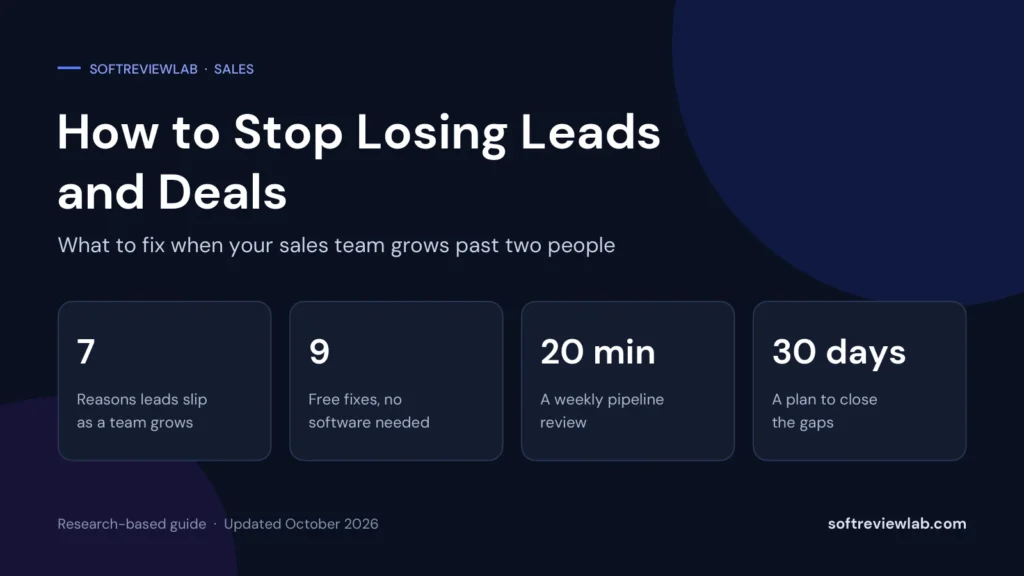
Short answer: here is how to stop losing leads and deals as your team grows: replace memory with a simple, shared lead follow-up process. Put every lead in one list, give each lead one named owner, set a rule for how fast you reply, make sure every open deal has a next step with a date, and review the whole pipeline together once a week. All of that is free and works in a shared spreadsheet. If your team has outgrown the spreadsheet, a CRM such as monday CRM can capture, assign and chase leads automatically, but it is an option, not a requirement.
This article is research-based. The process advice is my own editorial advice for small teams, the point about slow follow-up comes from Harvard Business Review, and the details about monday CRM come from monday.com’s own pages and help center. I haven’t run a sales team on monday CRM, and I say so where it matters. SoftReviewLab is a monday.com affiliate, as explained in our affiliate disclosure.
When one person sells, the system lives in that person’s head, and it mostly works. They know who called yesterday, who is waiting for a quote and who went quiet. The trouble starts with the second and third salesperson. Nothing obvious breaks. Leads simply start to slip, one at a time, and nobody notices until a customer says they never heard back.
In my view, growing teams lose leads for seven reasons, and none of them is laziness.
Each one has a free fix in the nine steps below, and the 30-minute audit shows which ones are costing you most.
Lost leads are easy to ignore because they don’t appear on any report. A deal you lose to a competitor is visible. A lead nobody answered just disappears. So it helps to put a number on it.
Here is an illustration with round numbers. It is an example, not data from a real company. Suppose your team gets 60 leads a month and one in ten never gets a proper follow-up. That is 6 leads. If you normally win one in four, those 6 leads would have produced 1.5 deals. At an average deal of $3,000, that is $4,500 a month, or $54,000 a year, from leads you had already paid to attract.
| Step | Example | Your number |
|---|---|---|
| Leads per month | 60 | |
| Share that get no proper follow-up | 1 in 10, so 6 leads | |
| Your usual win rate | 1 in 4, so 1.5 deals | |
| Average deal value | $3,000 | |
| Lost revenue per month | $4,500 | |
| Lost revenue per year | $54,000 |
Speed matters as well as coverage. For a Harvard Business Review article on online sales leads, published in 2011, researchers sent a test enquiry to 2,241 US companies through their websites: 24% took longer than a day to reply and 23% never replied at all. A second study in the same article, of 1.25 million leads received by 42 US companies, found that firms that tried to contact a lead within an hour were nearly seven times as likely to qualify it, meaning a real conversation with a decision-maker, as firms that tried even an hour later, and more than 60 times as likely as firms that waited 24 hours or longer. The figures are from 2011, so treat the exact multiples as old. The direction still holds: a lead goes cold in hours, not days.
The authors’ explanations will sound familiar to a growing team: leads collected from the system once a day instead of continuously, salespeople focused on finding their own leads instead of answering incoming ones, and rules that share out leads by geography and fairness instead of speed.
There are quieter costs too:
Before you change anything, find out where your leads are actually going missing. Fixing the wrong leak wastes effort. This audit takes about half an hour and needs nothing more than your inboxes and whatever lists the team keeps.
| Check | How to do it | What it tells you |
|---|---|---|
| Count last month’s leads | Add up enquiries from every source: forms, shared inboxes, phone log, social messages, referrals and events | Whether you have a complete list at all |
| Trace 20 leads | Pick 20 at random and note who replied, how long it took and what happened next | Where ownership and response time break down |
| Find stale deals | List every open deal with no contact in the last 14 days | How much follow-up relies on memory |
| Compare stages | Ask each seller to write down the steps a deal goes through | Whether the team shares one definition of progress |
| Review losses | Look at the last 10 lost deals and the reason recorded for each | Whether you are learning from losses or just counting them |
Most teams find one or two leaks that account for most of the damage. A common pattern is that leads from the website get a fast reply, while leads that arrive by phone or through social media are answered late or not at all, simply because nobody was told they were responsible.
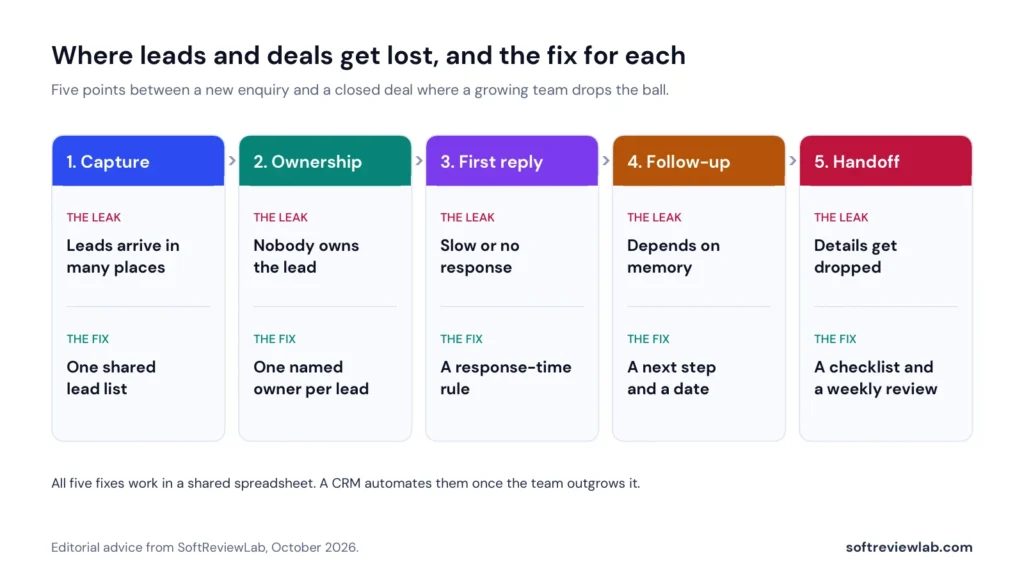
None of these needs new software. They need a shared spreadsheet, a few agreed rules and a short weekly meeting. Do them in order, because each one depends on the one before it.
Pick one place where every lead goes, whatever the source. A shared spreadsheet is fine to begin with. The rule is simple and has no exceptions: if it isn’t on the list, it doesn’t exist. A phone enquiry gets typed in before the call ends. A business card gets entered the same day. Forward form notifications to one address and make one person responsible for copying them across until the habit forms.
Each row on the list gets one person’s name, never a team name. That person is responsible for the next action, even if someone else ends up doing the work. Agree how new leads are shared out, using one of the rules in the assignment table below, so no one has to decide lead by lead.
Decide how quickly a new lead gets a first human reply, and write it down. A workable starting rule for a small team is: within one working hour during office hours, and by 10am the next working day for anything that arrives overnight. Pick a rule you can actually keep. A promise of ten minutes that you meet half the time is worse than a promise of one hour that you always meet.
The first reply doesn’t have to answer everything. It has to show that a real person has the enquiry and say what happens next.
This is the single most useful habit in this article. Every open deal has two extra fields: what happens next, and when. Call on Thursday. Send the revised quote by the 14th. Check in after their board meeting on the 20th. A deal with no next step isn’t really open. It is waiting to be forgotten.
Write down four to six stages that every deal passes through, and define each by something the buyer has done, not something you hope. For example: new lead, contacted, needs confirmed, quote sent, verbal yes, won or lost. Keep it short. When everyone uses the same stages, a manager can read the list in seconds and a colleague can pick up a deal without a briefing.
Decide in advance how many times you follow up and when, so the decision isn’t made by mood. A written schedule also removes the worry about being pushy, because everyone follows the same reasonable pattern. There is a sample schedule further down.
Once a week, the team looks at the list together. The purpose is to catch what has slipped, not to judge anyone: leads with no owner, deals with no next step and deals that haven’t moved. Twenty minutes is enough if you follow an agenda, and I give one below.
Whenever a lead or a customer passes from one person to another, the same short list of facts goes with it: who the contact is, what they asked for, their budget and deadline if known, what has been promised, and the next step. Five lines in the notes column will do. The test is whether the next person can call the customer without asking them to repeat anything.
When a deal is lost, choose a reason from a short fixed list: price, timing, chose a competitor, no response, not a fit. After two or three months, the pattern tells you what to fix. If no response is the top reason, your follow-up is the problem, not your price.
If you are starting from nothing, these columns are enough. Resist the urge to add more. Every extra column is one more thing people won’t fill in.
| Column | What goes in it | Why it matters |
|---|---|---|
| Date received | The day the enquiry arrived | Lets you measure response time |
| Source | Website form, phone, referral, social, event | Shows which sources produce real deals |
| Contact and company | Name, company, email, phone | One place to find them |
| What they need | One line, in the buyer’s words | Stops the customer repeating themselves |
| Owner | One person’s name | Makes someone responsible |
| Stage | One of your agreed stages | Shows progress at a glance |
| Value | Your best estimate | Lets you add up the pipeline |
| Next step | The specific action | Removes reliance on memory |
| Next step date | When it will happen | Lets you sort by what is due |
| Last contact | Date of the most recent contact | Reveals stale deals |
| Outcome and reason | Won, or lost with a reason | Tells you what to fix |
Sort the sheet by next step date each morning and you have a daily to-do list. Filter for rows where the owner or the next step is empty and you have your leaks.
How you share out leads matters less than having a rule everyone knows. These are the common ones.
| Rule | How it works | Fits |
|---|---|---|
| Round robin | Leads go to each seller in turn | Teams where everyone sells the same thing |
| By territory | Each seller covers a region or a set of postcodes | Businesses with local or field sales |
| By source | One person handles phone leads, another handles web forms | Teams with very different lead channels |
| By product or service | Leads go to whoever knows that offer best | Businesses with several distinct services |
| By size | Larger opportunities go to the most experienced seller | Teams with a mix of small and large deals |
| Named backup | Each owner has a stand-in for holidays and sick days | Every team, alongside one of the rules above |
Whichever rule you choose, add one safety net: if a lead has no reply after your response-time limit, it goes to the backup or to the manager. That single rule catches most of the leads that would otherwise sit in an inbox over a long weekend.
This is a suggested pattern, not a tested formula. Adjust the gaps to match how quickly your buyers usually decide.
| When | What to do |
|---|---|
| Same working day | Reply, confirm you have the enquiry, and ask one question or offer a time to talk |
| Day 2 | A short follow-up that adds one useful thing, such as an answer to a likely question |
| Day 5 | Try a different channel: phone if you emailed, email if you phoned |
| Day 9 | Share a relevant example of similar work, or a short case |
| Day 14 | A polite closing message that asks whether to keep the enquiry open |
| After 30 days | Move the lead to a quarterly check-in list instead of deleting it |
Stop as soon as the person says no or asks you to stop. The point of a schedule is consistency, not pressure.
Put this in the calendar at the same time every week and keep it short. If it runs long, people stop coming.
Notice what isn’t on the agenda: long stories about individual deals. Those belong in one-to-one conversations. The review exists to keep the list honest.
You don’t need a dashboard. Six numbers, checked weekly from the sheet, will tell you whether things are improving.
| Number | How to work it out | Warning sign |
|---|---|---|
| Time to first reply | Time between the enquiry and the first human reply | Longer than your own rule |
| Leads with no owner | Count the rows where the owner is empty | Anything above zero |
| Deals with no next step | Open deals with an empty or past next step date | Anything above zero |
| Stale deals | Open deals with no contact in 14 days | A number that grows week after week |
| Time in stage | Days a deal has spent in its current stage | Far longer than your usual deal |
| Lost to no response | Share of lost deals marked no response | The most common loss reason |
Track the direction, not the exact figure. If leads with no owner and deals with no next step are both at zero every week, you have closed the biggest leaks.
A shared sheet and the weekly review are enough. Your main risk is the informal handoff: one of you takes a call and forgets to tell the other. The one-list rule fixes most of it. Don’t buy software yet unless you want to.
This is where the spreadsheet starts to strain. People edit at the same time, leads come from more channels, and holidays leave gaps. The assignment rule, the named backup and the agreed stages matter most at this size. It is also the point where a CRM starts to save more time than it costs.
At this size, someone is managing the team, and that person needs to see the whole pipeline without asking for updates. Manual reminders and copy-and-paste from form notifications become a daily cost. Most teams this size are better served by a CRM with automatic assignment and reminders, as long as the rules above are agreed first.
A shared sheet and good habits will carry a small team a long way. You have probably outgrown them when several of these are true:
At that point the problem isn’t discipline. The team is doing by hand what software does automatically. If the process still isn’t agreed, though, fix that first. A CRM automates a process. It doesn’t create one.
There are many CRMs, and several would do this job. The one I suggest looking at for a growing team is monday CRM. It is one option, not the only one, and the section on who should skip it is as important as the rest.
I earn a commission if you buy through my link, so weigh my recommendation with that in mind. I cover the prices, the scores and the downsides in my monday.com review.
monday CRM is a sales tool from monday.com. Leads, contacts and deals each sit on a board, a deal is a row, and the columns hold details such as owner, stage, value and next step. You move deals through the stages you define, and dashboards add up the pipeline.
The part that matters for lost leads is automation. monday.com’s help center explains that an automation has three parts: a trigger, a condition and one or more actions. In plain terms: when this happens, and this is true, do that. Its article on alerts and reminders describes automations that notify someone when a date arrives and when an item is overdue. That is the next step and date habit from earlier, with the software doing the remembering.
Here is how the free fixes map onto what monday.com says the product does. The right-hand column is the vendor’s description from its lead management page and CRM page. I haven’t tested these with a sales team.
| The leak | The free fix | What monday.com says monday CRM does |
|---|---|---|
| Leads arrive in many places | One shared list | Captures leads from forms, ads, email, your website and integrations into one board |
| Nobody owns the lead | One named owner and an assignment rule | Assigns leads automatically by rules you set, such as territory, industry, deal size or round robin |
| Slow first reply | A response-time rule | Notifies the assigned person as soon as a lead arrives |
| Follow-up relies on memory | A next step, a date and a written schedule | Runs follow-up sequences based on stage changes, inactivity or dates, and sends reminders when a date arrives or an item is overdue |
| History lives in personal inboxes | A handoff checklist | Logs calls, emails and meetings against the record, with Gmail and Outlook integration |
| Nobody sees the whole pipeline | A weekly review | Dashboards showing where each lead stands and which sources perform |
There are limits worth knowing before you rely on this. monday.com’s pricing page doesn’t list custom automations on the CRM Basic plan, lists 250 automation actions a month on Standard and 25,000 on Pro, and lists email sequences on Pro. Its help article on actions explains that a notification sent to several people counts as one action per person, and that automations pause after a 72-hour grace period once the monthly quota is used up. A busy team on Standard can reach 250 actions quickly, so count how many leads and reminders you expect in a month before choosing a plan.
If you want to see whether it fits your process, you can try monday CRM free for 14 days. Bring your real lead sheet, set up your own stages, and build the one automation you would use most.
You don’t have to do everything at once. This plan spreads the work over four weeks, and the first three cost nothing.
| Week | What to do | Result |
|---|---|---|
| Week 1 | Run the 30-minute audit, create the shared list and move every open lead onto it | One complete list of leads and deals |
| Week 2 | Choose an assignment rule, name an owner and a backup for every lead, set the response-time rule and agree your stages | No lead without an owner |
| Week 3 | Add a next step and a date to every open deal, write the follow-up schedule and the handoff checklist | No deal without a next step |
| Week 4 | Hold the first two weekly reviews, start recording loss reasons and check the six numbers | A baseline you can improve on |
At the end of the month, look at the signs in the section on outgrowing free methods. If the sheet is coping, keep going. If the team is spending real time on copying, sorting and reminding, that is the moment to run a CRM trial. If you want to run it in monday CRM, you can start a monday CRM trial here and load the same sheet into it.
The causes, fixes and templates here are my own editorial advice, based on common sales-management practice rather than an experiment, and the cost example uses round numbers to show the method. The response-time figures come from the 2011 Harvard Business Review article above, and the monday CRM details from monday.com’s own pages, checked in October 2026. I haven’t used monday CRM with a sales team, and its lead management page doesn’t say which plan each feature starts on, so confirm that with monday.com before you buy. The response time, follow-up gaps and 14-day stale-deal threshold are my suggestions, not industry standards.
As fast as you can do consistently. A practical rule for a small team is a human reply within one working hour during office hours, and by 10am the next working day for enquiries that arrive overnight. A rule you always keep beats a faster one you often miss. Research published in Harvard Business Review in 2011 found that firms contacting an online lead within an hour were nearly seven times as likely to qualify it as firms that waited even an hour longer.
Decide in advance and write it down. A reasonable pattern is five contacts over about two weeks, using more than one channel, followed by a quarterly check-in. Stop as soon as the person says no or asks you to stop.
No. A shared spreadsheet with owners, next steps and a weekly review is enough for two or three people. A CRM becomes worth it when the team spends real time copying leads in by hand, sorting the sheet and sending reminders, which often happens at around four or more sellers.
Any clear rule is better than none. Round robin suits teams where everyone sells the same thing. Assigning by territory, lead source or product suits teams with different specialisms. Add a named backup for each owner so leads are covered during holidays.
Keep reading
Why posting on social media slips, how to fix each reason without paying, and how to use SocialBee when free schedulers stop being enough.
How to manage email overload: why inboxes get out of control, 9 free fixes for Gmail and Outlook, a daily routine, a 7-day plan,…

How to set up a welcome email series: 7 steps, a 5-email template you can copy, timings, free ways to run it, what to…