

How to Respond to a Negative Google Review (With Examples)
A negative review is read by every customer who comes after it. Here is how to respond to a fair complaint, a review that…
Move your website to a new host without downtime: copy and test it on the new host first, lower your DNS TTL, recreate email and DNS records, then switch. 9 steps, a checklist and how Hostinger’s free migration works.

By Abdullahi Abdirahman, Founder & Editor, SoftReviewLab. Updated October 2026.
Short answer: to move a website to a new host without downtime, copy the site to the new host first, test it there, and only then point your domain to it. Lower your DNS TTL a day or two before the switch, recreate your email and DNS records on the new host, and keep the old hosting running for about a week afterwards. Done in that order, visitors see a working site the whole time, because the old copy stays online until the new one has taken over.
These steps come from how DNS and hosting work and from Hostinger’s official migration documentation. I run this site on Hostinger and have used it since 2023, but I have not moved a site to it from another host, so the Hostinger migration steps below follow its documentation rather than my own move. This article contains affiliate links; see our affiliate disclosure.
The right method depends on what your site is built with. Find your row first, because one type can’t be moved at all.
| Your situation | What actually moves | How to move it |
|---|---|---|
| WordPress, Joomla or another open-source CMS on regular hosting | Files and a database | Your new host’s migration service, a migration plugin, or a manual copy |
| A plain HTML site | Files only | Upload the files to the new host |
| A site built on a website builder such as Shopify, Squarespace, Google Sites, Canva or Blogger | Nothing a new host can import | Rebuild the site on the new platform and redirect old URLs |
| Only changing where the domain is registered | No website files | A domain transfer, which is separate from hosting |
Changing hosts doesn’t mean moving your domain. Your domain can stay with the company where you registered it; you only change where it points.
Most problems after a move come from the parts people assume travel with the site but don’t.
| Problem | Why it happens | How to prevent it |
|---|---|---|
| The site goes offline | The domain was pointed to the new host before the copy was finished or tested | Copy and test first; switch the DNS last |
| Email stops arriving | MX and other email records weren’t recreated on the new DNS | Write down every DNS record before you start and recreate them |
| New orders, comments or edits disappear | Changes were made on the old site after the copy was taken | Freeze changes during the switch, or copy the database again just before it |
| Security warnings in the browser | No SSL certificate on the new host yet | Install SSL on the new host before or right after the switch |
| Search traffic drops | URLs changed without redirects, or a test copy was left blocked from search | Keep the same URLs and check the new site isn’t set to discourage search engines |
| The site vanishes a week later | The old hosting was cancelled before DNS had fully switched | Keep the old plan running for about a week |
Plan the move at least two weeks before your current hosting renews, so you don’t pay for another term, and avoid your busiest days. If you are moving because the site is slow, check first whether the host is really the cause; our guide on why a website is slow shows how to tell. To see every item that renews in a year, not just the hosting, check what a business website costs per year.
TTL (time to live) tells the internet how long to remember where your domain points, and many records are set to several hours. In your DNS settings, lower the TTL on your main records to about 300 seconds (5 minutes) at least one full old-TTL period before the switch, usually 24 to 48 hours ahead. When you switch, visitors then reach the new host within minutes instead of hours.
Download a complete backup of your files and your database, and keep a copy on your own computer, not only on the old host. If your email is hosted with the same company, back up important mailboxes too.
Screenshot or export your DNS zone: A and CNAME records for the site, MX records for email, and TXT records such as SPF, DKIM and DMARC. These records keep email working and out of spam, and they are not copied automatically.
Use the new host’s migration service if it offers one, a migration plugin for WordPress, or upload the files and import the database yourself. Don’t touch the domain yet: the old site keeps serving visitors while the copy is made.
Open the copy through the temporary or preview address your new host provides, or by editing your computer’s hosts file. Click through key pages, forms, logins and checkout, and fix anything broken now, while visitors still see the old site.
Turn on the SSL certificate (most hosts include a free one) and recreate your email accounts and the DNS records from step 4. If your email runs on a separate service such as Google Workspace or Microsoft 365, you only need to copy its records over.
Pause content edits, and if you run a shop, choose a quiet hour. Take a fresh database copy if anything changed since step 5, then point the domain to the new host by updating its nameservers or its A record.
Over the next day, check the site from different devices and networks, send a test email, and confirm the browser shows a padlock. Keep the old hosting active for about a week, until you are sure all traffic and email reach the new host, then cancel it.
Sponsored

Copying a small business site usually takes a few hours of work, or less with a host’s migration service, plus waiting time while the service runs. DNS changes can take up to 48 hours to reach everyone, but with a lowered TTL most visitors reach the new host within minutes to a few hours. Plan for the whole move, from backup to cancelling the old plan, to span about a week, most of it waiting.
If you are moving because your current host is slow or its renewal price keeps rising, the move is also a chance to pick a host that makes this easier. This site runs on Hostinger, and Hostinger moves WordPress and cPanel sites from other hosts for free, which takes the copying in step 5 off your hands.
Hostinger is a web hosting company that sells shared WordPress hosting, cloud hosting, VPS servers and a website builder, aimed at small businesses and individuals who want a site online without managing a server. Every plan includes a free SSL certificate and a free domain for the first year, and higher plans add daily backups and a CDN. I have used it since 2023, and SoftReviewLab runs on it.
You manage everything from hPanel, Hostinger’s own control panel. Each website gets a dashboard showing its plan, WordPress and PHP versions, security status and speed scores, with shortcuts to backups, the file manager, cache and the domain. Plans are paid upfront for one to four years, and the renewal price is higher than the first term, which our Hostinger review covers in detail.
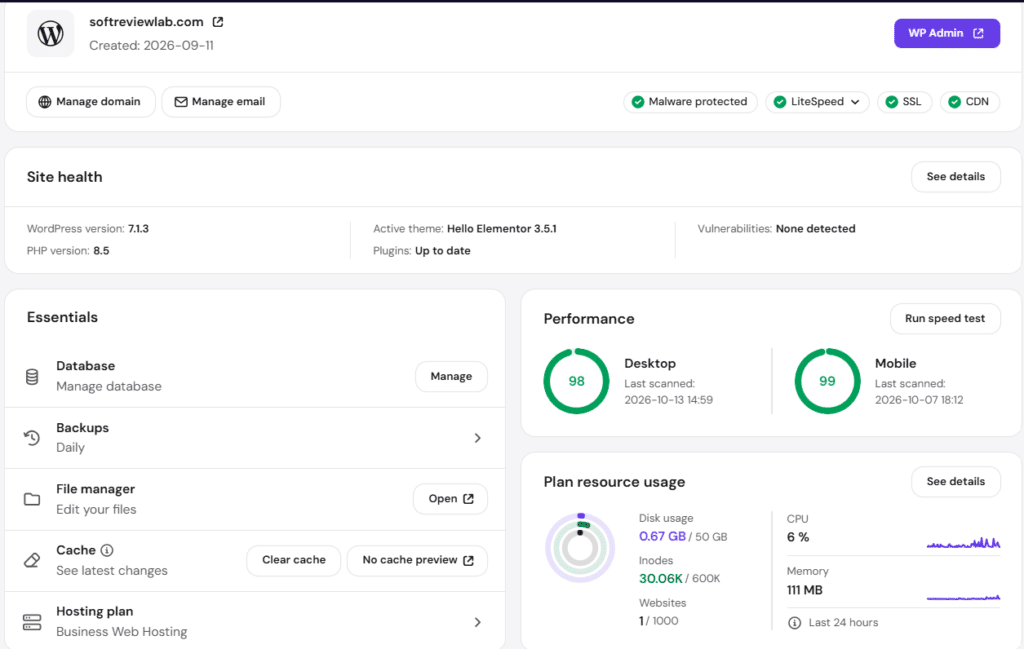
Hostinger’s migration service does the copying for you, which covers step 5 above. According to its documentation:
If Hostinger sounds like the right home for your site, you can see Hostinger’s plans with our 20% referral discount, which you are welcome to use. For renewal prices, the refund I tested and who should skip it, read our full Hostinger review.
No. You can keep the domain where it is registered and point it to the new host by changing its nameservers or A record. A domain transfer is a separate, optional step.
Not if your URLs stay the same and the new server works well. Google’s guidance on moving a site without changing URLs says it’s normal to see a short drop in how often Google crawls the site right after the move, followed by a steady increase over the next few days.
If your email is hosted with your old web host, it doesn’t move with the website. Create the mailboxes on the new host, copy the messages over and update your MX records. If your email runs on Google Workspace or Microsoft 365, just copy its DNS records to the new host.
Keep reading
A negative review is read by every customer who comes after it. Here is how to respond to a fair complaint, a review that…
DMARC tells Gmail and Outlook what to do with email that pretends to come from your domain. Here is what it does, why small…

A site missing from Google is either not indexed or not ranking, and each has a different fix. Here is how to tell which…