
- Home
- Comparisons
- CallRail vs WhatConverts: Which Call Tracking Tool Fits a Small Business?
CallRail vs WhatConverts: Which Call Tracking Tool Fits a Small Business?

Research-based comparison · not hands-on tested We compare the value each tool gives a specific kind of buyer, not which company is bigger or better, so there is no overall winner. How we compare.
Short answer: in the CallRail vs WhatConverts decision, choose CallRail if phone calls are your main source of leads and you want AI features such as call summaries and an AI receptionist that answers missed calls. Choose WhatConverts if you want to track calls, forms, chats and sales in one lead report at a lower price, or you are an agency that wants unlimited client accounts on one plan. Both offer a 14-day free trial, so the best move is to test the one that matches your main need.
Disclosure: SoftReviewLab is a CallRail affiliate partner. This page contains affiliate links, and if you sign up through them, SoftReviewLab may earn a commission at no extra cost to you. See our affiliate disclosure.
Table of Contents
CallRail vs WhatConverts at a Glance
| CallRail | WhatConverts | |
|---|---|---|
| Starting price | $50/mo billed annually ($55 monthly) | $30/mo, including $30 of usage credit |
| Free trial | 14 days, no credit card | 14 days |
| Call tracking and recording | Yes, every plan | Yes, every plan |
| Form tracking | From $95/mo (Complete plans) | From $60/mo (Plus) |
| Chat and e-commerce tracking | Limited | Yes, from Plus |
| Call transcription | Included | 2¢ per minute |
| AI call analysis | Yes, Lead Conversion plans | Lead Intelligence on Elite |
| AI receptionist | Yes, Voice Assist from $95/mo | No |
| Agency plans | Agency-friendly, priced per account | Unlimited accounts from $500/mo, white label +$50 |
| HIPAA option | Yes, healthcare setup with BAA | Yes, from Pro |
| Best for | Phone-heavy local businesses that want AI help | Businesses and agencies tracking every lead type on a budget |
What Each Tool Is, in Plain English
Both tools solve the same basic problem: your marketing reports show clicks and form fills, but not the phone calls that often turn into your best customers. Each one gives you tracking phone numbers, swaps them on your website depending on how the visitor arrived (dynamic number insertion), and records which ad, keyword or channel produced every call.
CallRail is the larger, more established call tracking platform, used by more than 225,000 businesses according to the company. It has grown from call tracking into a lead intelligence platform with AI call analysis, a shared lead inbox and Voice Assist, an AI receptionist that answers the calls your team misses. Our full CallRail review covers how it works, every feature and who should skip it.
WhatConverts positions itself as lead tracking and reporting software rather than a call tracking tool. Calls are one lead type among several: it also tracks web forms, chats and e-commerce transactions, and lets you record the quote or sale value of each lead, so reports can show revenue by marketing source rather than just lead counts. It is especially popular with marketing agencies, PPC and SEO specialists, and franchises.
CallRail vs WhatConverts Pricing
The two companies price very differently, which makes headline prices misleading. CallRail includes a set number of tracking numbers and minutes in each plan and charges for anything above that. WhatConverts gives every single-business plan $30 of usage credit and then charges for numbers and minutes as you use them.
CallRail Pricing
| Plan | Billed annually | What it adds |
|---|---|---|
| Lead Tracking | $50/mo | 5 local numbers, 250 minutes, 25 texts; call tracking, recording, routing, transcription |
| Lead Tracking Complete | $95/mo | Adds form tracking and multi-touch reporting |
| Lead Conversion | $150/mo | Adds AI call summaries, sentiment, auto-tagging and coaching |
| Lead Conversion Complete | $195/mo | Form tracking plus AI conversation analysis |
WhatConverts Pricing
| Plan | Monthly price | What it adds |
|---|---|---|
| Call Tracking | $30/mo | Call tracking only; form, chat and transaction tracking not included |
| Plus | $60/mo | Adds form, chat and transaction tracking (up to 300 a month, then 10¢ each) |
| Pro | $100/mo | Adds call flows, custom report builder, scheduled reports and HIPAA compliance |
| Elite | $160/mo | Adds customer journey, multi-click attribution and Lead Intelligence |
What You Would Really Pay: A Worked Example
Take a typical small service business that needs 5 local tracking numbers and takes about 500 minutes of calls a month. Here is roughly what each tool costs, using prices checked on October 8, 2026:
| Scenario | CallRail | WhatConverts |
|---|---|---|
| Calls only, with recording | About $65 (Lead Tracking $50 + 250 extra minutes) | About $35 (Call Tracking $30 + $35 usage − $30 credit) |
| Calls with transcription | About $65 (transcription included) | About $45 (adds 2¢ per minute) |
| Calls plus form tracking | About $110 (Lead Tracking Complete $95 + extra minutes) | About $65 (Plus $60 + usage above the credit) |
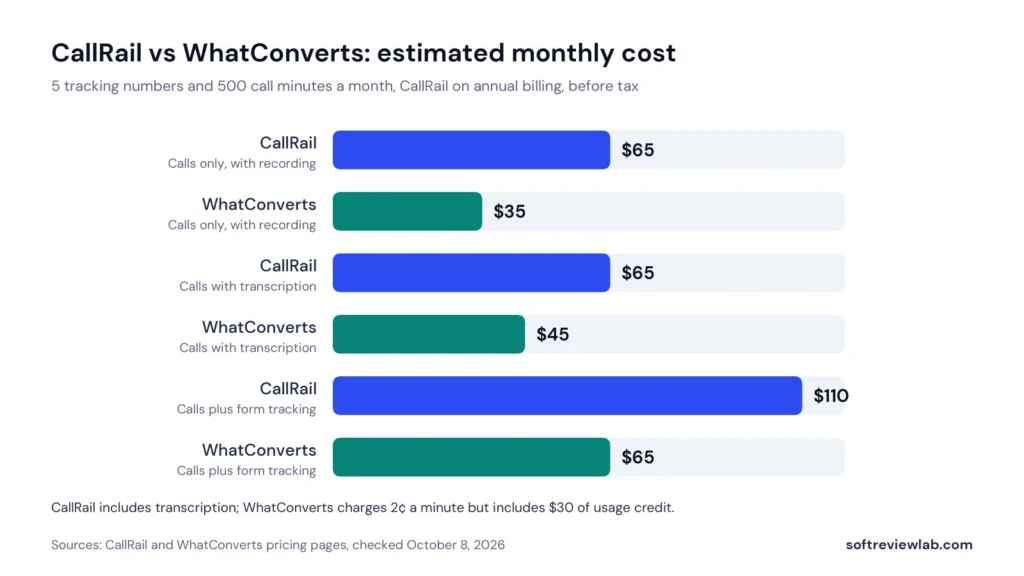
On pure price, WhatConverts wins for most small businesses, especially if you also want form tracking. CallRail’s higher price buys you included transcription, a more polished platform and access to its AI features. Your real numbers will differ, so price both tools at your actual call volume before you decide.
Call Tracking Features Compared
On the core job, the two tools are closer than their prices suggest. Both offer local and toll-free tracking numbers, dynamic number insertion down to the keyword level, call recording, and routing. Both send call conversions back to Google Ads, so you can see which campaigns produce phone leads and let Google’s bidding optimise for them, as explained in Google’s call conversion tracking guide. If you have not set up any call tracking yet, start with my article on how to find out which ads make your phone ring.
The differences are in the details. CallRail includes routing and transcription on every plan, while WhatConverts charges for transcription and puts advanced call flows on its Pro plan. If calls are the centre of your business and you want rich call handling from day one, CallRail is the more complete call tool. If you mainly want to know where calls came from, WhatConverts covers that for less.
Forms, Chats and All-Lead Tracking
This is where WhatConverts pulls ahead. Its Plus plan tracks forms, chats and e-commerce transactions alongside calls, so every lead lands in one list with its source, campaign and keyword. You can then mark leads as qualified and add the quote or sale value, which turns your reports from “how many leads did Google Ads bring?” into “how much revenue did Google Ads bring?”.
CallRail tracks forms on its Complete plans and brings calls, texts and forms together in its Lead Center, but chat and transaction tracking are not its focus. If your leads arrive through many channels and you want to report on value rather than volume, WhatConverts is the stronger fit.
AI Features and Automation
CallRail has invested heavily in AI. Its Lead Conversion plans summarise every call, detect sentiment, highlight trends and automatically tag calls as leads, conversions or spam. Voice Assist, sold as an add-on from $95 a month, answers missed calls around the clock, asks your intake questions and scores each lead. For a small team that can’t answer every call, that can recover business that would otherwise be lost.
WhatConverts is more focused on reporting than on AI. Its Elite plan adds Lead Intelligence, which applies qualification rules automatically, plus customer journey tracking and multi-click attribution. It does not offer an AI receptionist. If AI call handling matters to you, CallRail is the clear choice.
Reporting and Attribution
Both tools report on leads by source, campaign and keyword. CallRail’s reports are clean and easy to read, and multi-touch attribution is available on its Complete plans, although some users would like more freedom to customise dashboards. WhatConverts is built around reporting: the Pro plan adds a custom report builder and scheduled reports, and the ability to attach lead values means you can show return on ad spend, not just cost per lead. For agencies reporting to clients, that is a real advantage.
Integrations
CallRail offers more than 50 native integrations, including Google Ads, Microsoft Ads, Google Analytics, Google Business Profile, Meta, HubSpot, Salesforce and Slack, and they are generally deep and well maintained. WhatConverts advertises over 1,000 integrations, covering Google Ads, Facebook Ads, Microsoft Ads, Pipedrive, Calendly, Intercom, Formstack and AgencyAnalytics, with many of them available through connector tools. In practice, both connect to the platforms most small businesses use; check the specific CRM and ad accounts you rely on during the trial.
Which Is Better for Marketing Agencies?
Both have large agency followings, but they price agencies differently. WhatConverts has dedicated agency plans with unlimited client accounts, starting at $500 a month with $250 of usage credit, lower per-number and per-minute rates, and white labelling for an extra $50 a month. For an agency managing many small clients, that can be much simpler and cheaper than paying per account.
CallRail is widely used by agencies too, with more than 7,000 agency customers according to the company, and its clients often value the AI features and polished interface. Agencies with a handful of phone-heavy clients may prefer CallRail; agencies with many smaller clients and a focus on reporting will usually get more value from WhatConverts.
Healthcare and HIPAA
Both tools offer HIPAA-compliant options for healthcare businesses. WhatConverts includes HIPAA compliance from its Pro plan. CallRail offers a healthcare setup with a signed business associate agreement, but some recording, AI and integration features are restricted under it. If you are a medical, dental or therapy practice, confirm exactly which features remain available before you commit to either tool.
Ease of Use and Support
CallRail is widely praised for a clean, intuitive interface, with an average of about 4.5 out of 5 across more than 1,800 reviews on G2; the most common complaints are rising costs and the effort of setting up complex routing. WhatConverts reports an average of 4.9 out of 5 on G2 from a smaller base of reviews, and customers often mention responsive support. WhatConverts also lists phone support in both the US and UK. Both platforms are straightforward for a basic setup and take more planning for multi-location or agency configurations.
Side-by-Side Scorecard
I score both tools on the same five criteria I use for every review, each out of 10. These scores reflect my assessment of published plans, documentation and verified customer feedback, not a lab test.
| Criterion | CallRail | WhatConverts | Edge |
|---|---|---|---|
| Ease of setup and use | 7.5 | 8.0 | WhatConverts |
| Feature depth | 8.5 | 8.0 | CallRail (AI features) |
| Pricing and value | 6.5 | 8.5 | WhatConverts |
| Integrations | 8.5 | 8.0 | CallRail (deeper native) |
| Support and terms | 7.5 | 8.5 | WhatConverts |
| Overall | 7.7 | 8.2 | Depends on your priority |
WhatConverts scores higher overall mainly because of price and value. That doesn’t make it the better choice for everyone: if AI call handling or an AI receptionist matters to your business, CallRail’s feature lead outweighs the price difference.
Pros and Cons of Each Tool
CallRail Pros and Cons
| Pros | Cons |
|---|---|
| Transcription and routing included on every plan | Higher starting price, and usage fees add up |
| AI call summaries, sentiment and auto-tagging | Form tracking only on the more expensive Complete plans |
| Voice Assist AI receptionist for missed calls | Voice Assist is a separate cost on top of a tracking plan |
| Polished interface and deep native integrations | Limited chat and e-commerce tracking |
| 14-day trial with no credit card | Report customisation is limited |
WhatConverts Pros and Cons
| Pros | Cons |
|---|---|
| Lower starting price with $30 of usage credit | No AI receptionist |
| Tracks calls, forms, chats and transactions in one report | Transcription costs extra |
| Lead values let you report revenue by channel | Call flows and custom reports need the Pro plan |
| Unlimited-account agency plans and white labelling | Multi-click attribution and Lead Intelligence only on Elite |
| Strong customer ratings for support | Smaller company and user base than CallRail |
Setup Compared: What It Takes to Get Started
The setup process is similar for both tools, and a basic installation takes an afternoon rather than weeks. Here is what you’ll do in either case:
- Choose your tracking numbers. One number per offline campaign (print, radio, vehicle signs) and a small pool of numbers for your website so each visitor sees a unique number.
- Install the tracking script. Add the JavaScript snippet to your website directly or through Google Tag Manager. This powers dynamic number insertion and, with WhatConverts or CallRail’s Complete plans, form tracking.
- Connect your ad and analytics accounts. Link Google Ads and Google Analytics so call conversions flow back automatically.
- Set routing and recording. Decide where calls ring, your business hours, and whether you need a recording announcement for consent rules in your area.
- Test before you rely on it. Call your tracking numbers from different sources, submit a test form, and check each lead shows the right source and keyword.
WhatConverts has a slight edge for businesses that want every lead type tracked from day one, because forms and chats are part of the same setup on its Plus plan. CallRail takes more planning if you add Voice Assist or complex routing, but its onboarding materials and help center are extensive.
Real-World Scenarios: Which Tool Fits?
Feature tables only go so far. Here is how I’d choose for five common types of small business.
A Local Plumbing or HVAC Company
Most customers call rather than fill in a form, calls often come in when technicians are on jobs, and a missed call is usually a lost job. CallRail wins: call handling is its strength, and Voice Assist can answer and qualify callers the team can’t pick up. The higher price is easily covered by one extra booked job a month.
A Dental or Medical Practice
Patients book by phone and online forms, and HIPAA matters. It’s close. WhatConverts includes HIPAA compliance from its Pro plan and tracks forms alongside calls; CallRail’s healthcare setup restricts some recording and AI features. Compare exactly what each keeps available under HIPAA before choosing.
A PPC or SEO Agency With Many Clients
The agency needs client-ready reports that show revenue, not just calls, across dozens of accounts. WhatConverts wins: unlimited accounts on agency plans, white labelling and lead values make reporting simpler and cheaper at scale.
An Online Store With Phone Orders
Leads arrive as online purchases, chats and a smaller number of calls. WhatConverts wins: transaction and chat tracking sit alongside calls, so you can see which campaigns drive revenue across every channel.
A Multi-Location Business or Franchise
Calls need routing to the nearest branch, and head office wants to compare locations. It depends on call volume. CallRail’s routing, included transcription and AI analysis suit high-volume phone operations; WhatConverts is more economical if each location gets modest call volume and you care most about reporting.
Mistakes to Avoid When Choosing Call Tracking Software
- Comparing headline prices only. Both tools charge for numbers and minutes. Price each at your real usage, as in the worked example above.
- Buying features you won’t use. AI analysis and multi-click attribution are valuable, but only if someone will act on them. Start on the plan you need today.
- Using one number for your whole website. Without a number pool, you only learn that a call came from “the website”, not which ad or keyword.
- Forgetting your Google Business Profile. Many local calls come from your listing; give it its own tracking number.
- Not filtering spam calls. Robocalls inflate your numbers. Tag or filter them so your reports reflect real leads.
- Skipping the trial. Both tools offer 14 days. Use them on real campaigns before you commit.
Other Alternatives Worth Knowing
If neither tool feels right, two other options come up often. CallTrackingMetrics suits larger teams and contact centres that want advanced routing and customisation, at the cost of a steeper learning curve. And if Google Ads is your only paid channel, Google’s free call reporting can be enough to start, although it won’t record calls or cover other channels. For most small businesses weighing CallRail vs WhatConverts, though, one of these two will be the right fit.
CallRail or WhatConverts: Which Should You Choose?
Choose CallRail If
- Phone calls are your main source of leads, as in home services, legal, auto repair or local healthcare.
- You miss calls after hours and want an AI receptionist to capture those leads.
- You want AI summaries and automatic call tagging instead of listening to recordings.
- You value a polished, well-established platform and deep native integrations.
Choose WhatConverts If
- Your leads come through calls, forms, chats and online sales, and you want them all in one report.
- You want to report on revenue by channel, not just lead counts.
- Budget matters and you don’t need AI call handling.
- You are an agency managing many client accounts and want white-label reporting.
CallRail vs WhatConverts: My Verdict
There is no single winner, because the tools are built for different priorities. CallRail is the better call platform: stronger call handling, included transcription and AI features that WhatConverts doesn’t match, especially Voice Assist. WhatConverts is the better lead-reporting tool: cheaper, broader in the lead types it tracks and stronger on revenue reporting and agency pricing.
If phone calls drive your business, start with CallRail. If it sounds like a fit and you want to test it, you can try CallRail free for 14 days here, or read our CallRail review to learn how it works, what each plan includes and who should skip it. If you want every lead type in one affordable report, look at WhatConverts and its 14-day trial. Both offer a 14-day trial, so price each at your real number count and call minutes using the tables above, then run the one that fits on real campaigns and check after a week that every call shows the right source and keyword.
Frequently Asked Questions
Is WhatConverts cheaper than CallRail?
Usually, yes. WhatConverts starts at $30 a month with $30 of usage credit, and its form tracking plan costs $60 a month. CallRail starts at $50 a month billed annually, and form tracking starts at $95. For a small business with 5 numbers and 500 minutes, WhatConverts typically costs noticeably less.
Does WhatConverts have an AI receptionist like CallRail?
No. CallRail’s Voice Assist answers missed calls with AI and scores each lead. WhatConverts focuses on tracking and reporting and offers automated lead qualification through Lead Intelligence on its Elite plan.
Which is better for agencies, CallRail or WhatConverts?
For agencies with many clients, WhatConverts is often better value thanks to unlimited-account agency plans from $500 a month and white labelling. Agencies with fewer, phone-heavy clients that want AI call features may prefer CallRail.
Do both tools integrate with Google Ads?
Yes. Both send call conversions to Google Ads and Google Analytics, so you can see which campaigns and keywords produce phone leads.
Can I try CallRail and WhatConverts for free?
Yes. Both offer a 14-day free trial. CallRail’s trial does not require a credit card.
Is CallRail or WhatConverts better for a small business?
It depends on how your leads arrive. CallRail is better when phone calls are your main source of leads and you want AI help handling them. WhatConverts is better when leads come through calls, forms, chats and online sales and you want one affordable report for all of them.
Can I switch from CallRail to WhatConverts later?
Yes, but plan it carefully. You’ll need new tracking numbers or to port your existing ones, a new tracking script and fresh integrations, and your historical reports stay in the old tool. Export the data you need before cancelling.
References
- CallRail. Pricing. Accessed September 2026.
- WhatConverts. Pricing. Accessed September 2026.
- Google Ads Help. About call conversion tracking.
What we couldn’t verify
- Call attribution accuracy was not compared on live ad campaigns.
- The accuracy of each tool's AI call analysis and summaries is based on vendor documentation and customer reports.
- Final costs depend on usage fees for numbers and minutes, which vary by account.
- We did not test integrations with specific CRMs ourselves.
If any of these matter to your decision, check them directly with the vendors or during a free trial.
See every matchup
Browse the rest of the head-to-head comparisons, or jump straight to the full reviews.