CallRail Review 2026: Features, Pros, Cons and Honest Verdict
Call Tracking & Lead Intelligence
CallRail Review 2026: Features, Pros, Cons and Honest Verdict
7.7/10
“CallRail suits businesses that get a meaningful share of leads by phone and spend money on marketing. It shows which ads, keywords and channels make the phone ring and feeds that data back to Google Ads and your CRM. Budget for usage fees and add-ons, and use the 14-day free trial to prove the value on your own campaigns.”
Research-based review · not hands-on testedBuilt from the vendor’s documentation and pricing pages and from patterns in customer reviews. How we work.
Starting price
From $50/month billed annually
Best for
Local service businesses and agencies that rely on phone leads
Free trial
14-day free trial, no credit card required
Based on
Vendor plan details and help center documentation, published Google Ads call tracking guidance, and verified customer reviews
Scores
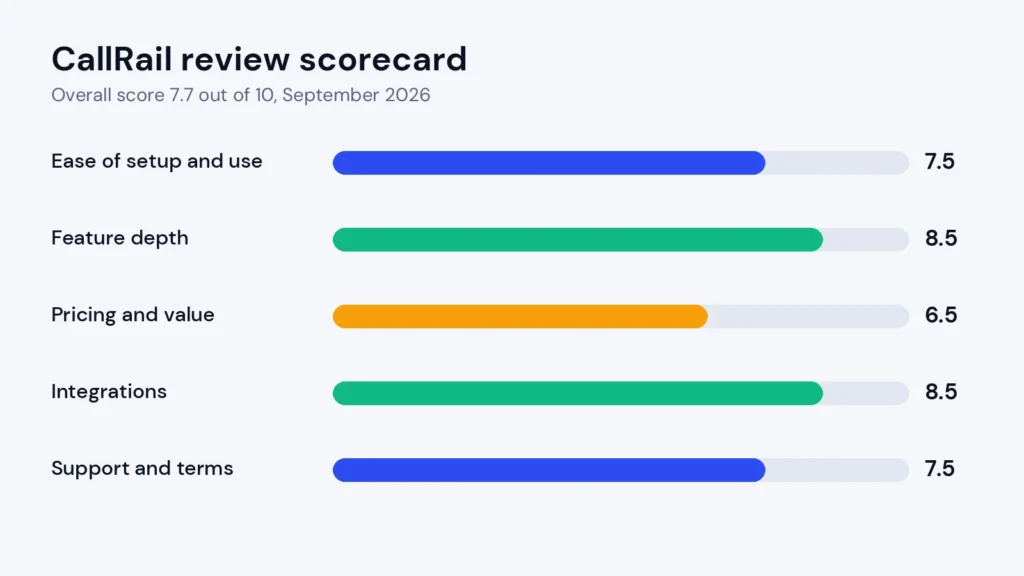
Ease of setup & use7.5
Feature depth8.5
Pricing & value6.5
Integrations8.5
Support & terms7.5
How these scores were worked out
Ease of setup & use: 7.5 (Good) Simple basics and a clean interface; complex call routing takes planning.
Feature depth: 8.5 (Strong) Call, form and AI analysis, recording and transcription, plus an AI receptionist.
Pricing & value: 6.5 (Average) Fair entry price, but usage fees for numbers, minutes and texts, plus add-ons, add up.
Integrations: 8.5 (Strong) More than 50 integrations, with strong Google Ads, Google Analytics, HubSpot and Salesforce connections.
Support & terms: 7.5 (Good) Detailed help centre, a 14-day trial with no card, and monthly or annual billing.
Overall: (7.5 + 8.5 + 6.5 + 8.5 + 7.5) ÷ 5 = 7.70, shown as 7.7. The five criteria are weighted equally.
Scores are editorial judgments in half-point steps, based on documented features, published pricing and repeated themes in customer reviews. They are not lab measurements, so treat the words as the guide: 8.0+ Strong, 7.0 to 7.9 Good, 6.0 to 6.9 Average, below 6.0 Weak.
What works
Accurate call attribution down to the keyword and landing page with dynamic number insertion.
Recording, transcription and routing included on every plan.
Strong integrations with Google Ads, Google Analytics and HubSpot; Salesforce costs $80 a month extra.
Useful AI features: call summaries, auto-tagging and a 24/7 AI receptionist.
14-day free trial with no credit card required.
Clean, easy-to-learn interface and a large agency user base.
What doesn’t
Usage fees for numbers, minutes and texts can nearly double the headline price.
Form tracking and AI analysis sit on higher plans.
Voice Assist is a separate cost on top of a tracking plan.
Spam calls can inflate reports unless you filter them.
Report and dashboard customisation is limited.
HIPAA use requires a specific healthcare setup with feature restrictions.
What we couldn’t verify
Call attribution accuracy was not measured on a live ad campaign for this review.
The accuracy of AI call summaries and Voice Assist lead scoring is based on CallRail's documentation and customer reports.
Usage fees for extra numbers, minutes and texts depend on your volume, so your final cost may differ from our examples.
We did not test integrations such as Google Ads and CRM syncing ourselves.
If any of these matter to your decision, check them directly with the vendor or during your trial.
Who should skip it
Businesses that rarely get phone calls or run no paid marketing, teams that only need a business phone system, tight budgets that cannot absorb usage-based fees, and healthcare providers that need full recording and AI features under HIPAA.
By Abdullahi Abdirahman, Founder & Editor, SoftReviewLab. Pricing and plan limits checked on CallRail’s pricing page on October 8, 2026. This review is based on CallRail’s plan details and documentation, its help center, and verified customer feedback.
Disclosure: SoftReviewLab is a CallRail affiliate partner. This page contains affiliate links, and if you sign up through them, SoftReviewLab may earn a commission at no extra cost to you. See our affiliate disclosure.
Table of Contents
CallRail Review at a Glance: The Short Answer
This CallRail review answers one question for small and mid-sized businesses: will CallRail show you which marketing actually makes your phone ring, and is it worth paying for? For most businesses that get a meaningful share of their leads by phone, my answer is yes. CallRail is one of the most established call tracking platforms available, it is easy to set up, and it connects calls, texts and forms back to the exact ad, keyword or campaign that produced them.
The trade-off is cost. The base plan is affordable, but usage fees, extra tracking numbers and the AI add-ons can push the monthly bill well past the headline price. I score CallRail 7.7 out of 10.
Best for: local service businesses, multi-location companies and marketing agencies that rely on phone leads and want to prove which campaigns drive them.
Skip it if: phone calls are a small part of how customers reach you, or you only need a basic business phone line.
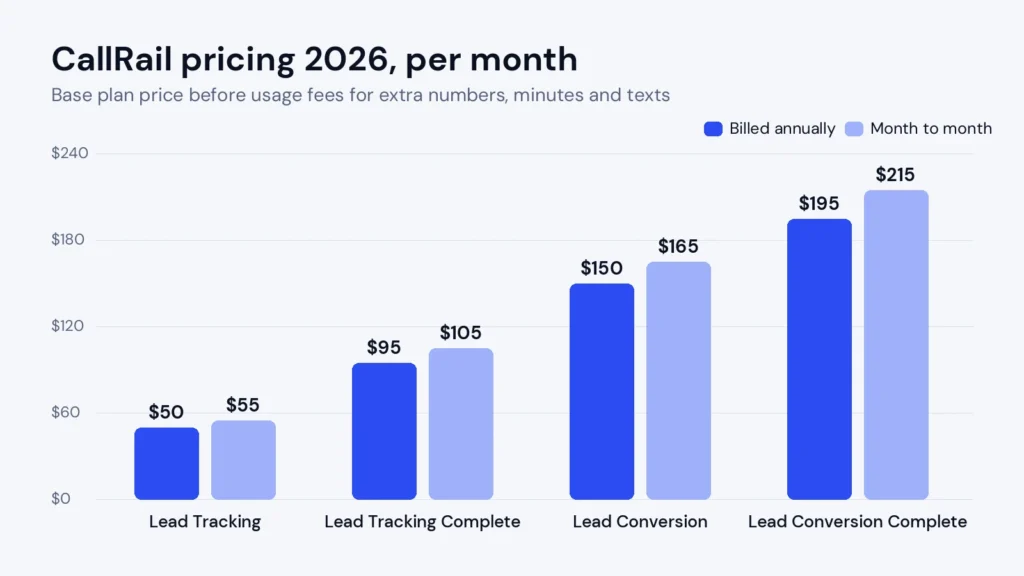
Starting price: $50 a month billed annually, or $55 month to month, for 5 local numbers and 250 minutes.
CallRail is a call tracking and lead intelligence platform. It answers a question most businesses can’t answer on their own: when the phone rings, which ad, search, social post or website visit caused that call? Online forms are easy to track, but phone calls usually disappear from your marketing reports. CallRail closes that gap. The company has been doing this for around 14 years and says more than 225,000 businesses and over 7,000 marketing agencies use it.
Here is how it works in practice:
You get tracking numbers. CallRail gives you local or toll-free phone numbers. Each number, or pool of numbers, is linked to a source such as Google Ads, Facebook, a billboard, a directory listing or your website.
Your website shows the right number to the right visitor. A small script on your site uses dynamic number insertion to swap your phone number depending on how the visitor arrived. Someone who clicked a Google ad sees one number; someone from organic search sees another.
Calls forward to your real phone. Customers call the tracking number and it rings your existing business line or team, so nothing changes for them or for you.
CallRail records what happened. Each call is logged with its source, campaign and, for website visitors, even the keyword and landing page. Calls can be recorded, transcribed and analysed.
The data flows back to your tools. Conversions are sent to Google Ads, Google Analytics, your CRM and other platforms, so you can see the real cost per lead and put more budget behind the campaigns that bring in customers.
On top of that core, CallRail has added form tracking, AI conversation analysis, an AI receptionist called Voice Assist and a shared inbox called Lead Center. Together, they turn it from a simple call counter into a system for capturing, qualifying and following up on every lead.
How I Evaluated CallRail
I score every platform on the same five criteria, weighted equally: ease of setup and use, feature depth, pricing and value, integrations, and support and terms. Each gets a score out of 10, and the overall score is the average. For this CallRail review I compared CallRail’s published plans and usage fees, checked on its pricing page on October 8, 2026, its help center documentation, and patterns in verified customer reviews. Prices change, so confirm the final figure on CallRail’s official pricing page before you buy.
CallRail Features: What You Actually Get
Call Tracking and Dynamic Number Insertion
This is the heart of CallRail and the reason most businesses buy it. You can use a single tracking number per campaign, which is enough for offline ads such as print, radio or vehicle wraps, or a pool of numbers on your website that shows each visitor a unique number. The pool method is what makes keyword-level and landing-page-level attribution possible: when the call comes in, CallRail knows exactly which search term, ad and page the caller used.
For a business spending money on Google Ads, this is often the difference between guessing and knowing. A campaign that looks weak in form fills may be your best source of phone bookings, and CallRail makes that visible. My article on how to find out which ads make your phone ring walks through the setup, including the free options.
Call Recording, Transcription and Routing
Every plan includes call recording, transcription and routing. You can route calls by time of day, location or source, set up simple phone menus, and send calls to different team members or offices. Recordings and transcripts are useful for training staff, settling disputes and understanding what customers actually ask for. Call recording rules differ by state and country, so use the built-in announcement options where consent is required.
Form Tracking
The “Complete” plans add form tracking, which attributes website form submissions to their marketing source in the same way as calls. It includes a custom form builder and multi-touch reporting, so you can see every interaction a lead had before converting. If you already track forms well in Google Analytics, this is a nice-to-have; if you want one report that shows calls and forms together, it is valuable.
Premium Conversation Intelligence
The Lead Conversion plans add CallRail’s AI call analysis. It writes call summaries, detects sentiment, highlights trends and can automatically tag calls as leads, conversions or spam based on what was said. Instead of listening to hundreds of recordings, a manager can scan summaries or filter for calls where a customer asked for a quote but didn’t book. It also includes coaching tools for improving how your team handles calls.
Voice Assist: CallRail’s AI Receptionist
Voice Assist answers calls your team can’t pick up, around the clock. According to CallRail’s own documentation, it collects the caller’s details, asks your intake questions, records and transcribes the call, and scores the lead from 0 to 100% based on how likely it is to convert. The captured details appear in your call log alongside your other leads, and there is a HIPAA-compliant option for healthcare businesses.
For a small business that misses calls after hours or during busy periods, this can recover leads that would otherwise go to a competitor. It is sold separately and requires a Lead Tracking plan underneath, which I cover in the pricing section.
Lead Center and Reporting
Lead Center brings calls, texts and form submissions into one place so your team can respond and follow up without switching tools. Reporting covers call volume, first-time callers, sources, campaigns and keywords, plus attribution across multiple touches. Customer reviews generally praise how clean the reports are, although some users would like more freedom to customise dashboards.
Feature
Lead Tracking
Lead Tracking Complete
Lead Conversion
Lead Conversion Complete
Call tracking, recording, routing, transcription
Yes
Yes
Yes
Yes
Form tracking and form builder
No
Yes
No
Yes
AI call summaries, sentiment and auto-tagging
No
No
Yes
Yes
Coaching tools
No
No
Yes
Yes
Voice Assist (AI receptionist)
Add-on
Add-on
Add-on
Add-on
CallRail features by plan, October 2026.
CallRail vs Free Google Ads Call Tracking: Why Pay?
Many small businesses ask whether they need CallRail at all, because Google Ads can already track calls for free. Google’s own call conversion tracking is a good starting point if Google Ads is your only paid channel and you only want to count calls from ads.
The limits appear quickly. Google’s tracking only covers Google traffic, so calls from Facebook, organic search, directories, email or offline ads stay invisible. It doesn’t record or transcribe calls, so you can’t tell a booked job from a wrong number, and it doesn’t give you one report across every channel. CallRail is worth paying for when you run more than one channel, need to know which calls turned into customers, or need to prove results to a client or a boss.
CallRail Pricing 2026: Plans and Real Costs
CallRail has four main plans. Annual billing saves up to 10%, so month-to-month prices run slightly higher than the annual figures CallRail shows by default.
Adds form tracking (1,000 submissions), form builder, multi-touch reporting
Lead Conversion
$150/mo
$165/mo
Adds AI call summaries, sentiment, auto-tagging, coaching; 10,000 analysis minutes
Lead Conversion Complete
$195/mo
$215/mo
Everything above: form tracking plus conversation intelligence
CallRail pricing page, checked October 8, 2026. Usage above the included allowance is billed separately. On annual billing, the base fee for the next 12 months is due up front and usage is billed monthly.
CallRail plan prices, billed annually versus month to month.
Usage Fees That Change the Bill
Item
Cost
Extra local number
$3 each per month
Extra local minutes
$0.06 per minute
Toll-free number
$5 each per month
Toll-free minutes
$0.08 per minute
Text messages
$0.03 each
Extra form submissions (Complete plans)
$0.02 each
Extra analysis minutes (Conversion plans)
$0.05 per minute
Advanced call flow steps
$15 per company per month
Premium integrations (Salesforce, Marketo and others)
$80 each per month
CallRail usage fees from its pricing page, October 8, 2026.
Here is a realistic example. A home services business on Lead Tracking, billed annually, runs 10 tracking numbers and takes about 800 minutes of calls a month. That is $50 for the plan, $15 for the five extra numbers and $33 for 550 extra minutes, so around $98 a month, nearly double the headline price. Website number pools add numbers quickly, so estimate your real number count and call minutes before you compare plans.
Voice Assist Pricing
Voice Assist tier
Monthly price
Calls included
Extra calls
Base
$95
50
$1.00 each
Mid-tier
$550
1,000
$0.60 each
Enterprise
$2,500
5,000
$0.55 each
Voice Assist pricing from CallRail’s help center, September 2026. Only calls over 15 seconds count.
Because Voice Assist needs a Lead Tracking plan underneath, the realistic starting cost for an AI receptionist with call tracking is around $145 to $150 a month before usage.
Is CallRail Worth It? A Simple ROI Check
You don’t need a complex model to decide whether CallRail pays for itself. Work through three numbers for your own business:
Your monthly ad spend. If you spend $2,000 a month on ads and even 10% of it goes to campaigns that never produce calls, that is $200 a month of waste you can’t currently see.
The value of one customer. If an average job or client is worth $400, one extra booked call a month covers a typical CallRail bill several times over.
Your missed calls. If you miss five calls a week after hours and one of them would have booked, an AI receptionist that captures it can pay for itself quickly.
These figures are illustrations, not promises, but the logic holds: CallRail is worth it when phone leads are valuable and you spend money to get them. If you spend very little on marketing and rarely get calls, the maths doesn’t work, and a free option is enough.
CallRail Free Trial: What to Expect
CallRail offers a 14-day free trial with no credit card required, which is generous compared with many business tools. Fourteen days is enough to connect your website, run a real campaign through a tracking number and see calls attributed in your reports, as long as you set it up on day one. I share a trial plan later in this review.
CallRail Integrations and Setup
CallRail connects with more than 50 platforms, including Google Ads, Microsoft Ads, Google Analytics, Google Business Profile, Meta, HubSpot, Slack and Unbounce. Salesforce, Marketo and a few others are premium integrations at $80 a month each. The most valuable integration for most small businesses is Google Ads: sending call conversions back means Google’s bidding can optimise for real phone leads, not just clicks.
A typical setup looks like this:
Create tracking numbers for each offline campaign and a number pool for your website.
Add CallRail’s JavaScript snippet to your website, or install it through your tag manager.
Connect Google Ads, Google Analytics and your CRM so conversions and caller details flow back automatically.
Set routing rules, business hours and any call recording announcements you need.
Place a few test calls from different sources and check they appear correctly in your reports.
A basic setup with a few numbers can be done in an afternoon. More complex setups, with many locations, routing rules and a CRM sync, take more planning; some customers say the initial configuration could be clearer. Some reviewers also want deeper customisation in the Salesforce and CRM integrations.
If you plan to follow up phone leads with automated email, our guide to choosing email marketing software explains what to look for in the tool that sits alongside CallRail.
Support and Terms
CallRail has a detailed help center with setup guides for each feature and integration, and live support for account and technical questions. You can choose monthly or annual billing: monthly gives you flexibility while you prove the value, and annual saves up to 10% once you’re confident. Because the bill depends on usage, check your first two invoices carefully and adjust your number pool if costs run higher than expected.
Who Uses CallRail: Real-World Use Cases
Local service businesses such as plumbers, HVAC companies, law firms and dental practices, where most customers call rather than fill in a form. CallRail shows which ads and listings bring in booked jobs.
Marketing agencies that need to prove the value of their campaigns to clients. CallRail has a large agency user base and client-level reporting.
Multi-location businesses that route calls to the nearest branch and compare performance across locations.
Healthcare providers, with an important caveat: HIPAA compliance requires CallRail’s healthcare setup with a signed business associate agreement, and some recording, AI and integration features are restricted under it. Check the details with CallRail before you buy.
What Customers Say About CallRail
CallRail is well rated by its users, with an average of about 4.5 out of 5 across more than 1,800 reviews on G2 at the time of writing. The same themes come up again and again. Users praise the clean, intuitive interface, the clear link between calls and campaigns, the value of recordings and AI summaries for training, and the Google Ads and Analytics integrations. Several reviewers say Voice Assist has made day-to-day call handling noticeably easier.
The most common complaints are about cost rising quickly as call volume, numbers and AI features grow; spam calls inflating the numbers; initial setup of routing and multiple numbers; and limited report customisation. None of these is unusual for call tracking software, but the pricing point is worth planning for.
CallRail Pros and Cons
Pros
Accurate call attribution down to the keyword and landing page with dynamic number insertion.
Recording, transcription and routing included on every plan.
Strong integrations with Google Ads, Google Analytics and HubSpot; Salesforce is an $80-a-month premium integration.
Useful AI features: call summaries, auto-tagging and a 24/7 AI receptionist.
Clean, easy-to-learn interface and a large agency user base.
Cons
Usage fees for numbers, minutes and texts can nearly double the headline price.
Form tracking and AI analysis sit on higher plans.
Voice Assist is a separate cost on top of a tracking plan.
Spam calls can inflate reports unless you filter them.
Report and dashboard customisation is limited.
HIPAA use requires a specific healthcare setup with feature restrictions.
CallRail Scorecard
Criterion
Score (out of 10)
Why
Ease of setup and use
7.5
Simple basics and a clean interface; complex routing takes planning
Feature depth
8.5
Call, form and AI analysis, plus an AI receptionist
Pricing and value
6.5
Fair entry price, but usage fees and add-ons add up
Integrations
8.5
50+ integrations, with strong Google Ads and CRM connections
Support and terms
7.5
Detailed help center, generous trial, monthly or annual billing
Overall
7.7
A leading call tracking platform that is worth it when phone leads matter
CallRail review scorecard, October 2026.
My CallRail review scorecard: strongest on features and integrations, weakest on pricing.
Common CallRail Mistakes to Avoid
Most disappointment with call tracking comes from setup choices, not the software. These are the mistakes I see most often in customer feedback and in how businesses describe their setups:
Using one number for everything. A single tracking number tells you a call came from “the website”, not which ad or keyword. Use a number pool for web traffic and separate numbers for each offline campaign.
Forgetting your Google Business Profile. Many local calls come from your listing. Use a tracking number there, with your main number kept as an additional number, so your listing details stay consistent.
Not filtering spam calls. Robocalls inflate call counts and make campaigns look better than they are. Use call tagging and, on Conversion plans, AI tagging to separate real leads.
Ignoring minutes and number counts. Oversized number pools and long calls push up usage fees. Review your first bills and resize the pool to match your real traffic.
Never sending conversions back to Google Ads. Tracking calls without feeding them to your ad platform wastes half the value. Connect the integration on day one.
Avoid these five and CallRail’s reports become something you can make budget decisions from.
CallRail Alternatives
CallRail’s best-known competitors are CallTrackingMetrics, which leans towards larger teams and contact centres that want more routing and customisation, and WhatConverts, which focuses on combining calls, forms and chats into one lead report with a strong agency focus. Some businesses also rely on the call reporting built into Google Ads, which is free but only covers Google traffic. I compare the two in detail in my CallRail vs WhatConverts comparison.
Who Should Use CallRail, and Who Should Skip It
CallRail Is a Good Fit If
A meaningful share of your leads or sales starts with a phone call.
You spend money on Google Ads, local search or other paid channels and want to know which ones produce calls.
You are an agency that needs to prove results to clients.
You miss calls after hours and want an AI receptionist that captures those leads.
Skip CallRail If
Very few of your customers call you, or you don’t run paid marketing.
You only need a business phone system, not attribution.
Your budget can’t absorb usage fees that grow with call volume.
You are a healthcare provider that needs full recording and AI features under HIPAA.
How to Test CallRail in Your 14-Day Trial
Days 1 to 2: create one number for your main paid campaign and a small website number pool, install the tracking script and connect Google Ads and Google Analytics.
Days 3 to 7: let real calls come in. Check that each call shows the right source, keyword and landing page, and listen to a few recordings.
Days 8 to 11: set up routing rules and, if you’re considering it, test Voice Assist on after-hours calls.
Days 12 to 14: review the reports. Compare cost per call by campaign, estimate your real monthly numbers and minutes, and work out the plan you’d actually need.
CallRail Review Verdict
CallRail does its core job very well: it shows you which marketing makes your phone ring, and it sends that data to the tools where you make decisions. The AI features, especially Voice Assist and call summaries, add real value for small teams that can’t answer or review every call. The main thing to plan for is cost, because usage fees and add-ons can take the bill well beyond the headline price. If phone leads matter to your business, CallRail is one of the safest choices you can make, and the free trial lets you prove it on your own campaigns before you pay anything.
CallRail starts at $50 a month billed annually, or $55 month to month, for 5 local numbers and 250 minutes. Lead Tracking Complete costs $95, Lead Conversion $150 and Lead Conversion Complete $195 a month billed annually. Extra numbers, minutes and texts are billed on top.
Does CallRail have a free trial?
Yes. CallRail offers a 14-day free trial with no credit card required.
How does CallRail track calls?
CallRail assigns tracking numbers to your campaigns and uses dynamic number insertion on your website to show each visitor a number tied to their source. When someone calls, the call forwards to your real phone and CallRail records which ad, keyword and page led to it.
What is CallRail Voice Assist?
Voice Assist is CallRail’s AI receptionist. It answers calls your team misses, collects caller details, asks intake questions and scores each lead. It starts at $95 a month for 50 calls and requires a Lead Tracking plan.
Does CallRail integrate with Google Ads?
Yes. CallRail sends call conversions to Google Ads and Google Analytics, so you can see which campaigns and keywords produce phone leads and let Google optimise bids for them.
Is CallRail HIPAA compliant?
CallRail offers a HIPAA-compliant setup for healthcare businesses with a signed business associate agreement, but some recording, AI and integration features are restricted. Confirm the details with CallRail before you buy.
Is CallRail good for marketing agencies?
Yes. CallRail says more than 7,000 agencies use it, and its attribution reports make it easier to show clients which campaigns produce calls and customers. Agencies should budget carefully, because numbers and minutes add up across many client accounts.
“A strong scheduler for small businesses, built on content categories and evergreen recycling. The two cheaper plans include one user.”
From $29/mo ($24.17/mo billed yearly)Best for: Small businesses that want consistent posting across several networks14-day free trial with full Pro access, no credit card
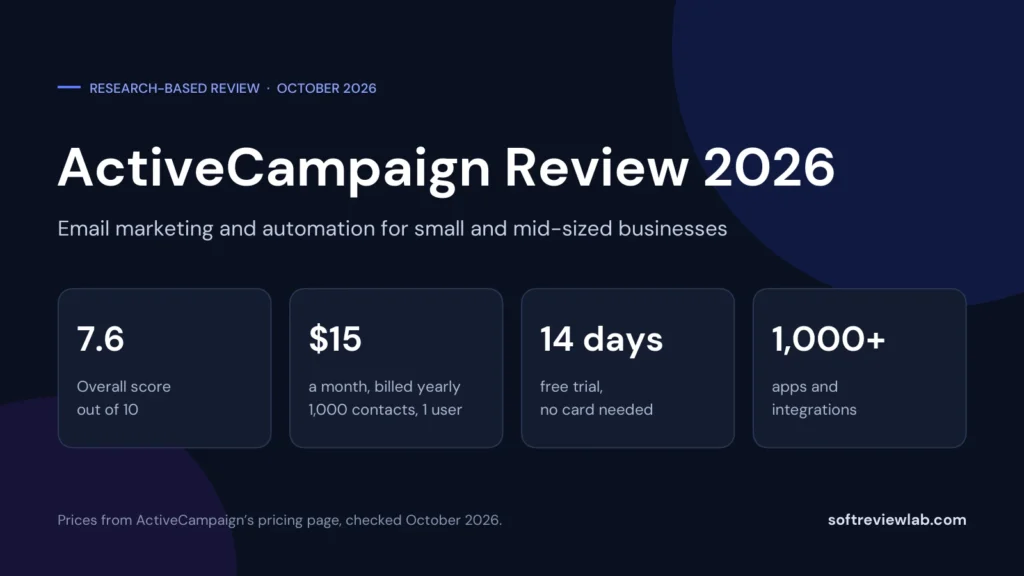
“A deep automation platform with AI tools and more than 1,000 integrations, held back by a price that climbs with your list, a five-action cap on the cheapest plan and paid add-ons for the sales CRM and SMS.”
From $15/month (1,000 contacts, 1 user); Plus $49 billed yearly or $59 monthlyBest for: Small and mid-sized businesses that want behaviour-based email automation14-day free trial: no credit card, no contact limit, 100 email sends
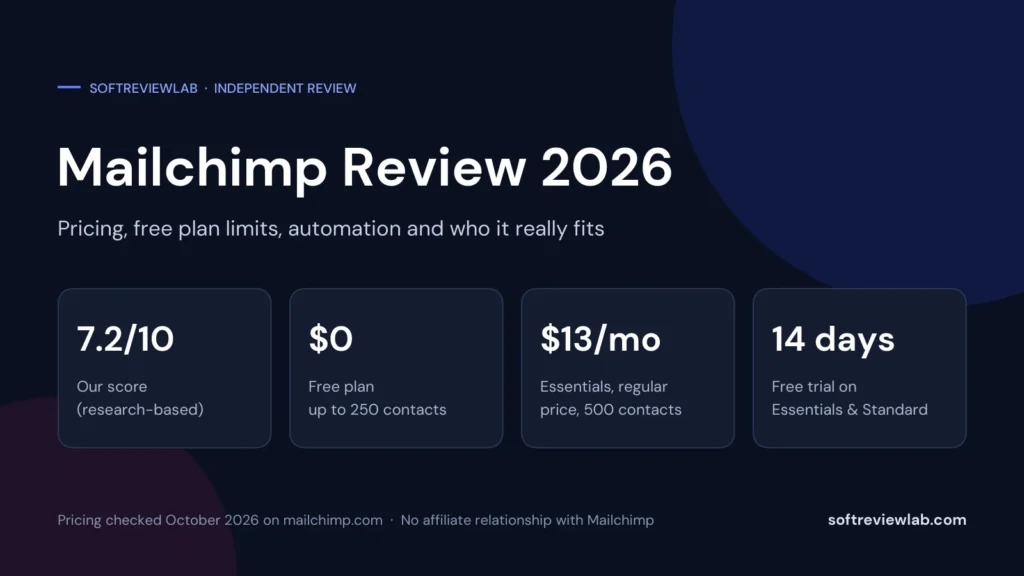
“An easy, all-in-one email platform with a real free plan and 300+ integrations, held back by pricing that climbs quickly with your list and weak support outside Premium.”
Free plan; paid from $13/monthBest for: Small businesses and creators starting email marketingFree plan for 250 contacts; 14-day trial on Essentials and Standard