
How to Post on Social Media Consistently When You Have No Time
Why posting on social media slips, how to fix each reason without paying, and how to use SocialBee when free schedulers stop being enough.
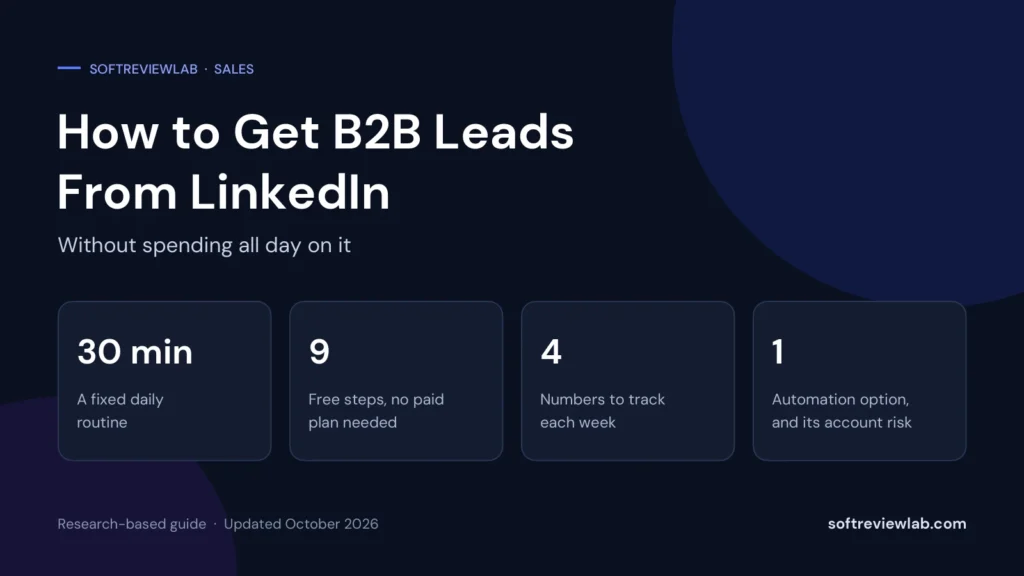
How to get B2B leads from LinkedIn in 30 minutes a day: 9 free steps, a daily routine, message templates, the numbers to track and what to know about automation safety.

By Abdullahi Abdirahman, Founder & Editor, SoftReviewLab. Updated October 2026.
Short answer: to get B2B leads from LinkedIn without spending all day on it, focus on one clearly defined buyer and a fixed 30-minute daily routine. Rewrite your profile so it speaks to that buyer, build a list of 50 to 100 target people, send a small batch of connection requests each day, follow up with three short messages, and spend ten minutes commenting on your buyers’ posts. All of that is free. If the routine works and your time is the only limit, an automation tool such as Waalaxy can send the invitations and follow-ups for you. LinkedIn does not allow automation tools, though, so read the account safety section before you try one.
This article is research-based. The LinkedIn advice comes from LinkedIn’s own sales pages, the limits and safety details come from Waalaxy’s help center and terms, and the routine, templates and plans are my own editorial advice. I haven’t run campaigns to measure results, and I say so where it matters. SoftReviewLab is a Waalaxy affiliate, as explained in our affiliate disclosure.
The people you want to reach are very likely on LinkedIn. The company reports more than 1.3 billion members, and on its social selling page it says 89 percent of B2B marketers use LinkedIn to generate leads. Reach isn’t the problem. The problem is that the work is manual, repetitive and easy to do in the wrong order. In my judgment, seven causes explain most of the wasted time.
Each of these has a free fix, and the nine steps below take them in order.
Time is the real cost. Here is what a daily LinkedIn habit adds up to over a five-day working week:
| Time per day | Per week | Per month (approx.) |
|---|---|---|
| 30 minutes | 2.5 hours | About 11 hours |
| 60 minutes | 5 hours | About 22 hours |
| 90 minutes | 7.5 hours | About 33 hours |
At 90 minutes a day, LinkedIn takes almost one full working day every week. To put a price on it, multiply the hours by what an hour of your time is worth. As an example, at $50 an hour, 7.5 hours is $375 a week. The aim of this article is to get you to the first row: 30 focused minutes a day that produce conversations.
There is a second cost that is harder to see. Hours spent on unfocused outreach are hours not spent on calls with people who are ready to talk, on proposals or on existing clients.
LinkedIn scores sellers with its Social Selling Index, a number from 0 to 100 based on four things: how well you establish a professional brand, find the right prospects, engage with insights and build relationships. You don’t need to chase the score, but the four parts make a useful checklist, because a weak spot in any one of them wastes the effort you put into the others.
| Part | What it means for a small business | Where it sits in the routine |
|---|---|---|
| Establish a professional brand | A profile that says who you help and how, plus occasional useful posts | A one-off rewrite, then one or two posts a week |
| Find the right prospects | A short, specific list of people who match your ideal buyer | A weekly list-building session |
| Engage with insights | Comments on your buyers’ posts and sharing what you learn | Ten minutes a day |
| Build relationships | Connecting, following up politely and moving to a real conversation | Fifteen to twenty minutes a day |
LinkedIn says sellers who score well on this index create 45 percent more opportunities than peers with lower scores and are 51 percent more likely to reach their sales targets. Those figures come from LinkedIn’s own internal study, so treat them as a vendor’s numbers, not independent research.
None of these steps needs a paid LinkedIn plan or any software. Do them in order, because each one makes the next one work better.
Write one sentence with four parts: job title, type of company, location and the problem you solve. For example: “Operations managers at logistics companies with 20 to 200 staff in the UK who are struggling with late deliveries.” If you serve several kinds of buyer, pick one for the next 30 days.
A good test is whether the sentence tells you what to type into LinkedIn’s search. If it doesn’t, it is still too vague.
LinkedIn’s first recommended step for social selling is to optimise your profile, so that it shows the key information that helps your audience trust you. Four changes matter most:
Use LinkedIn’s people search to find the job titles from your one-sentence buyer, then narrow the results with the filters, such as location and industry. Add the best matches to a simple spreadsheet with their name, company, role and profile link.
Keep the list short on purpose. Fifty to a hundred well-chosen people is enough for two to four weeks of outreach at the pace in this article, and a short list forces you to choose people who really fit. Waalaxy’s help center notes that LinkedIn limits how many searches a free account can run in a month, which is one more reason to search with a clear target.
Send 10 to 15 connection requests a day, five days a week. That is 50 to 75 a week, well inside the roughly 200 a week that Waalaxy says LinkedIn allows, and it takes about ten minutes once your list exists.
Should you add a note? On a free account you may have little choice. Waalaxy says free LinkedIn accounts can personalise only five invitations a month, with notes limited to 200 characters. Save those notes for your most important prospects and send the rest without one. A relevant profile does much of the work a note would do.
Once someone accepts, send a short thank-you that asks a question about their work, not a pitch. If there is no reply, follow up twice more over the next two weeks, each time adding something useful: a relevant article, a short observation about their industry or a specific question. Then stop. Three messages is polite persistence. Six is pestering.
The templates later in this article give you wording to adapt.
Spend ten minutes a day leaving thoughtful comments on posts by people on your target list. A comment that adds an example or a useful question puts your name in front of the author and everyone else reading the thread. When your connection request or message arrives later, you are no longer a stranger.
LinkedIn’s social selling advice makes the same point: grow your network by sharing and engaging with useful content, and by joining groups that are relevant to your potential customers.
You don’t need to become a content creator. One or two short posts a week is enough to give visitors to your profile something to judge you by. Write about problems your buyers have, mistakes you see and simple fixes. Avoid posts that are only about your company.
A workable pattern is one “problem and fix” post and one short story from your work each week. Twenty minutes on a Monday covers both.
B2B purchases are rarely decided by one person. LinkedIn says the average sales cycle requires sellers to engage up to 11 people inside a target company. In my judgment the number is much lower when a small business sells to other small businesses, but the principle holds. Connect with two or three relevant people at each target company, such as the person who feels the problem, their manager and whoever controls the budget.
Add four columns to your list: date the request was sent, accepted (yes or no), replied (yes or no) and next action. Update it at the end of each daily session. It takes two minutes, and it is what lets you see which part of the process to fix. If you already use a CRM, record conversations there once a prospect replies. If you don’t, my guide to choosing a CRM for a small business explains when one becomes worth it.
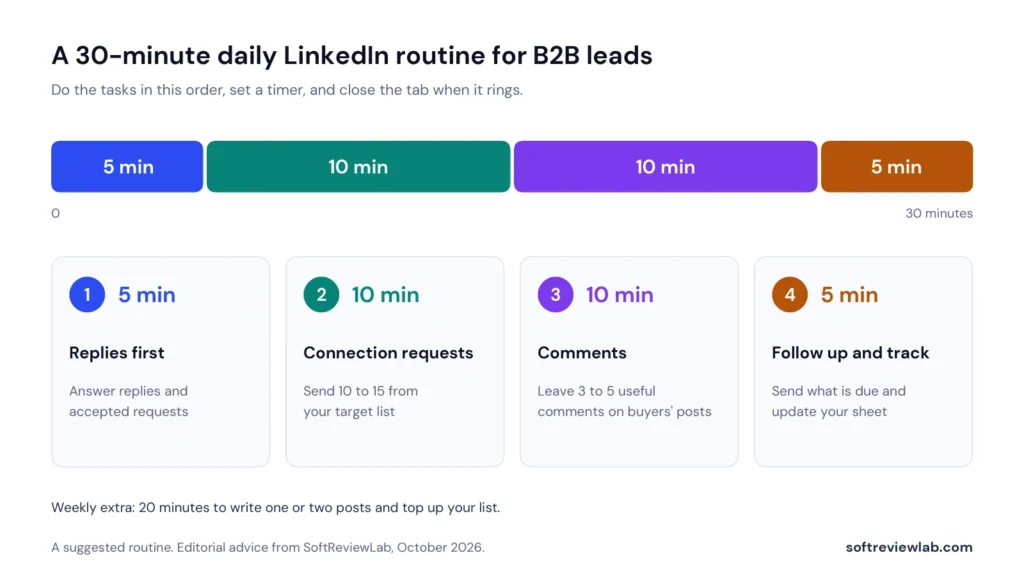
Here is how the steps above fit into half an hour. Do the tasks in this order, set a timer and close the tab when it rings.
| Minutes | Task | What to do |
|---|---|---|
| 5 | Replies first | Answer every reply and accepted request from the day before. Conversations come before new outreach. |
| 10 | Connection requests | Send 10 to 15 requests to people on your target list. |
| 10 | Comments | Leave three to five useful comments on posts by people on your list. |
| 5 | Follow up and track | Send any follow-up messages that are due and update your sheet. |
The order matters. Replies come first because a warm conversation is worth more than a new request. Tracking comes last so that it actually gets done. With the weekly 20-minute session, the whole routine comes to just under three hours a week.
Adapt these to your own voice and your buyer’s problem. Keep each message short enough to read on a phone without scrolling.
Hi [Name], I help [type of company] with [problem]. Your post on [topic] matched what I hear from clients, so I’d like to connect and follow your work.
If you are on a free account, keep the note under 200 characters, which Waalaxy says is the limit for invitation notes.
Thanks for connecting, [Name]. I’m curious: how are you handling [problem] at [company] at the moment? I ask because it comes up a lot with [type of company].
Hi [Name], I thought of you when I wrote this short checklist on [problem]. No sign-up needed: [link]. Would it help if I shared what similar companies are doing about it?
Hi [Name], I don’t want to crowd your inbox, so this is my last note. If [problem] becomes a priority, I’m happy to share what has worked for others. Either way, good luck with [something specific to them].
Notice what is missing: no price, no product description and no meeting link in the first message. The aim of these messages is a reply, not a sale.
| Number | How to calculate it | What a low number points to |
|---|---|---|
| Acceptance rate | Requests accepted ÷ requests sent | The wrong list, or a profile that doesn’t speak to the buyer |
| Reply rate | Replies ÷ people you messaged | Messages that are too long, too generic or too sales-led |
| Conversations per week | Replies that turned into a real exchange | Follow-ups that don’t ask a question |
| Calls booked per month | Conversations that led to a call or meeting | No clear next step offered |
As a reference point, Waalaxy’s getting-started guide suggests aiming for an acceptance rate of 30 to 40 percent and a reply rate of around 14 to 15 percent. Those are a vendor’s targets, not guarantees, and your results will depend on your market. They are still useful as a rough yardstick. If your acceptance rate is far below that range, work on your list and profile before you send more requests.
Here is the routine turned into numbers, using the middle of Waalaxy’s target ranges. This is an illustration of the arithmetic, not a forecast and not a result I measured.
| Step | Per week | Per month (4 weeks) |
|---|---|---|
| Connection requests sent (15 a day, 5 days) | 75 | 300 |
| Accepted at 35 percent | About 26 | About 105 |
| Replies at 15 percent of those accepted | About 4 | About 16 |
Roughly four new conversations a week from 30 minutes a day is what the arithmetic gives you if you reach those rates. Not every conversation becomes a customer, and some will take months. For many small B2B businesses, though, a steady 15 or so conversations a month with the right people is plenty.
A reply is where the lead starts, and it is the part no tool can do for you. Three habits help:
When a call is booked, move the contact into your CRM or sales sheet with a note of what they told you. From here it is a normal sales conversation, and LinkedIn has done its job.
The steps stay the same, but the emphasis shifts. These are my editorial suggestions.
Your profile is the product, so spend more time on posts and comments and keep outreach small and personal. Ten requests a day to carefully chosen people is plenty. Your account is also your reputation, which makes the risk of automation harder to justify.
Pick one niche per month so that your posts, profile and messages all speak to the same buyer. If several team members prospect, share one list so two people don’t approach the same company with different messages.
Several people usually influence the purchase, so step 8 matters most. Connect with the person who would use the product, their manager and the budget holder, and share material that helps them make the case internally.
Buyers in these sectors may post less often, which leaves fewer openings for comments. If that is true of your buyers, put more weight on a precise list and a clear first message, and allow more time for replies.
These limits shape what any routine, manual or automated, can achieve. The figures below are the ones Waalaxy’s help center attributes to LinkedIn. I haven’t confirmed them against LinkedIn’s own Help Center, and LinkedIn can change them, so treat them as a guide.
The practical lesson is that volume is capped for everyone. Past a certain point, the only ways to get more leads are a better list, a better profile and better messages.
The free routine works for many small businesses, and you should run it by hand for at least a month before paying for anything. It stops being enough when:
If your rates are poor, automation won’t help. It will only send a weak message to more people. Fix the list, profile and wording first.
There are several LinkedIn outreach tools, and the right one depends on how much you send and how much risk you can accept. For small B2B teams whose manual routine already works and whose limit is time, one option I recommend looking at is Waalaxy. It isn’t right for everyone, and the next section explains a risk you must understand before using any automation tool. If it sounds like a fit and you accept that risk, you can start a 14-day Waalaxy trial here, or read our full Waalaxy review first for pricing, pros and cons, and who it fits.
Waalaxy is a tool that connects to your LinkedIn account and carries out outreach steps for you. According to its help center, it now runs fully in the cloud, so campaigns keep running in the background without a browser extension.
The process mirrors the manual routine:
Look at the 30-minute routine again. Sending requests, sending follow-ups and tracking who is due what take about half of it. Those are the tasks Waalaxy automates. What is left is the part only you can do: replying to people, commenting and writing posts.
| Task | By hand | With Waalaxy |
|---|---|---|
| Building the list | You | You, then import it |
| Sending connection requests | You, every day | Automated within quotas |
| Sending follow-ups on time | You, from your sheet | Automated, and stopped when someone replies |
| Tracking who is at which step | Your spreadsheet | Tracked in the campaign |
| Replying and having conversations | You | You |
| Commenting and posting | You | You |
On its Pro plan, Waalaxy sends about 11 invitations a day, close to the pace of the manual routine. Its higher plans allow up to 100 a day, capped at 200 a week.
The short answer is that it is never risk-free. Here is what the sources say, without softening it.
LinkedIn publishes its policy on third-party software and extensions in its Help Center. It says LinkedIn does not permit third-party software, bots or browser extensions that automate activity on its website. Waalaxy’s own help article on LinkedIn warnings and restrictions says plainly that Waalaxy does not comply with LinkedIn’s terms of service, and explains that LinkedIn can show warnings, temporarily restrict an account and, in some cases, ban it.
According to Waalaxy’s article on LinkedIn warnings and restrictions, restrictions usually last 24 to 48 hours and can happen again while an account is under review, and Waalaxy has no way to recover an account that LinkedIn bans. Waalaxy also claims its tool can’t be detected. That is the vendor’s claim, and I couldn’t verify it.
For a small business, think about what a restricted account would cost. If LinkedIn is where clients check your credibility, losing access for even a few days matters, and a permanent ban means rebuilding your network from nothing.
You can’t remove the risk, but Waalaxy’s help center describes steps that reduce it. The last point is my own advice.
Stay with the manual routine. It is free and within the rules. If your real problem is finding the right people, LinkedIn’s own paid tool, Sales Navigator, adds advanced search filters and lead alerts and carries no rule risk, though it doesn’t send messages for you. My Waalaxy vs LinkedIn Sales Navigator comparison explains which one fits which need.
Ready to test it? If you have run the routine by hand, your numbers are healthy and you accept the risk, test automation with one small campaign of 100 to 200 people at reduced quotas. You can try Waalaxy free for 14 days. The trial needs a card and turns into a paid plan unless you cancel, so note the end date. Our Waalaxy review covers plans, cancellation and refunds.
At the end of the month you will know your own rates, how many conversations half an hour a day produces, and whether time is now the thing holding you back. That is the right moment to decide whether automation or a paid LinkedIn plan is worth it.
Give a consistent routine at least 30 days before you judge it. Requests take time to be accepted and follow-ups are spread over two weeks. B2B decisions often involve several people, so some conversations take months to become customers.
Waalaxy’s help center says LinkedIn caps invitations at about 200 a week. The routine in this article uses 50 to 75 a week, which leaves a wide margin. LinkedIn can change its limits, so check its Help Center for the current rules.
No. The nine steps in this article work on a free account. Sales Navigator adds advanced search filters and alerts, which help if finding the right people is your main problem, but it is not required to start.
It is never risk-free. LinkedIn does not permit tools that automate activity on its website, and Waalaxy’s own help center says accounts can be warned, restricted or banned. You can lower the risk by warming up your account, using low quotas and sending relevant messages, but you can’t remove it.
Keep reading
Why posting on social media slips, how to fix each reason without paying, and how to use SocialBee when free schedulers stop being enough.
How to manage email overload: why inboxes get out of control, 9 free fixes for Gmail and Outlook, a daily routine, a 7-day plan,…
How to set up a welcome email series: 7 steps, a 5-email template you can copy, timings, free ways to run it, what to…