SocialBee Review 2026: Best Social Media Scheduling Tool for Small Businesses?
Social Media Management
SocialBee Review 2026: Best Social Media Scheduling Tool for Small Businesses?
8.5/10
“SocialBee solves the real problem behind inconsistent social media: you build a library of posts once, and categories and recycling keep every profile active. Start on Accelerate, and price extra users before a colleague joins.”
Hands-on testedIncludes direct use of the product, alongside its documentation, pricing pages and customer reviews. How we work.
Starting price
From $29/mo ($24.17/mo billed yearly)
Best for
Small businesses that want consistent posting across several networks
Free trial
14-day free trial with full Pro access, no credit card
Based on
My own 14-day SocialBee Pro trial (October 2026: LinkedIn and Pinterest connected, three categories, about 38 posts scheduled and published, RSS feed and AI Copilot used), SocialBee’s pricing page, plan comparison table and FAQ (checked October 9, 2026), answers from SocialBee’s support team (October 2026), and the pricing pages of Buffer, Later, Hootsuite and Sprout Social
Scores
Ease of setup & use8.5
Feature depth9.0
Pricing & value8.0
Integrations8.5
Support & terms8.5
How these scores were worked out
Ease of setup & use: 8.5 (Strong) Setup and ease of use (8.5): A clear model: connect profiles, build categories, set a weekly schedule. The category system needs some planning at the start, and SocialBee runs live demo webinars to help.
Feature depth: 9.0 (Strong) Features (9.0): Categories, recycling, expiry, AI writing, an inbox and solid analytics on every plan, and in my test every scheduled post went out on time. Bulk tools, approvals and advanced analytics need Accelerate or Pro.
Pricing & value: 8.0 (Strong) Pricing and value (8.0): Fair starting prices with several profiles included and 16% off yearly, held back by one user on the two cheaper plans and taxes added at checkout.
Integrations: 8.5 (Strong) Integrations (8.5): Direct posting to 10 networks, Canva, Unsplash, GIPHY, Quu, URL shorteners, Zapier, Pabbly and Make, and an RSS feed that filled a category automatically in my test. The inbox covers fewer networks.
Support & terms: 8.5 (Strong) Support and terms (8.5): A no-card trial with full Pro access, a 30-day money-back guarantee, no contracts, and help by chat, email or a call. I have not measured support response times.
Overall: (8.5 + 9.0 + 8.0 + 8.5 + 8.5) ÷ 5 = 8.50, shown as 8.5. The five criteria are weighted equally.
Scores are editorial judgments in half-point steps, based on documented features, published pricing and repeated themes in customer reviews. They are not lab measurements, so treat the words as the guide: 8.0+ Strong, 7.0 to 7.9 Good, 6.0 to 6.9 Average, below 6.0 Weak.
What works
Content categories and evergreen recycling keep profiles active without writing new posts every day
Plans from $24.17 a month on yearly billing, with several profiles included
Unlimited AI post generation on every plan, plus Canva, Unsplash and GIPHY
Direct posting to 10 networks, including Bluesky, Threads and Google Business Profile
A 14-day trial with full Pro access and no credit card, plus a 30-day money-back guarantee
No contracts, and you can switch plans or billing at any time
Automation through Zapier, Pabbly and Make
What doesn’t
Bootstrap and Accelerate include only one user
Bootstrap lacks the bulk editor, CSV uploads, approvals and advanced analytics, and keeps 3 months of data
SocialBee lists inbox support for 6 networks, not TikTok, Pinterest, Bluesky or Google Business Profile
Branded report exports are on Pro only
Taxes are added on top of the listed prices
The category system takes planning to set up before it starts saving time
What we couldn’t verify
Support response times: not measured yet.
Posting reliability beyond the 14-day trial: not measured.
Unlimited AI generation and the Pro plan's posts-per-category limit are as SocialBee lists them in October 2026.
If any of these matter to your decision, check them directly with the vendor or during your trial.
Who should skip it
Teams that need several logins on a Bootstrap budget, businesses whose conversations happen mainly on TikTok or Pinterest, and companies that need enterprise social listening.
By Abdullahi Abdirahman, Founder & Editor, SoftReviewLab. Updated October 2026. This review combines my own 14-day trial of SocialBee’s Pro plan with its pricing page, plan comparison table and FAQ, checked on October 9, 2026, and answers from SocialBee’s support team. During the trial I connected LinkedIn and Pinterest, built three categories, scheduled and published about 38 posts and ran my site’s RSS feed through it. Where a claim comes from SocialBee rather than from my test, I say so.
Disclosure: SoftReviewLab is a SocialBee affiliate. If you start a trial or subscribe through a link on this page, we may earn a commission at no extra cost to you. It does not change the score. See our affiliate disclosure and research and scoring method.
Table of Contents
SocialBee Review at a Glance: The Short Answer
If you are looking for the best social media scheduling tool for a small business, start with the problem it has to solve: keeping your profiles active without posting by hand every day. SocialBee solves that well, and my 14-day test backed it up. You write posts once, sort them into content categories such as tips, promotions, blog posts and customer stories, and SocialBee fills a weekly posting schedule across up to 10 networks, recycling evergreen posts so your profiles never go quiet. Plans start at $29 a month, or $24.17 a month billed yearly, with a 14-day free trial that needs no credit card. The trade-off: the two cheaper plans include only one user, and the full team features sit on the $99 Pro plan. I score SocialBee 8.5 out of 10.
Item
Details
Overall score
8.5 out of 10 (hands-on test plus research)
What it is
A social media scheduling and management tool built around content categories and evergreen recycling
Starting price
Bootstrap at $29 a month, or $290 a year ($24.17 a month)
Free trial
14 days with full Pro access, no credit card
Money-back guarantee
30 days
Networks
Facebook, Instagram, Threads, LinkedIn, TikTok, Pinterest, YouTube, X, Bluesky and Google Business Profile
Best for
Small businesses, solo marketers and small teams that want consistent posting without writing every post by hand
Not ideal for
Teams that need several logins on a small budget, or companies that need enterprise social listening
SocialBee at a glance (pricing page, October 9, 2026)
How to Choose the Best Social Media Scheduling Tool for a Small Business
Most small businesses don’t struggle with social media because they lack a scheduler. They struggle because they run out of things to post, post in bursts and then go quiet for weeks. The best social media scheduling tool fixes that problem, not just the clicking. If you want a routine that works before you pay for any tool, see how to post on social media consistently. Check these six things before you choose one:
Posting without daily work. Can you load a month of posts in one sitting and let the tool publish them?
A way to reuse good content. Evergreen posts, such as tips, FAQs and reviews, should go out again automatically instead of being rewritten.
The networks your customers use. Check that every profile you run supports direct posting, not just reminders.
Help writing posts. AI captions and a Canva link save the most time if you have no designer or writer.
Replies in one place. Comments and messages from several networks in one inbox, so nothing goes unanswered.
A price that fits your team. Many tools charge per user or per channel, so the starting price can double once a second person joins.
SocialBee covers all six, with one weak spot on the last point, which I explain in the pricing section.
What Is SocialBee and How Does It Work?
SocialBee is a social media management tool from SocialBee LABS SRL, part of WebPros. You connect your social profiles, then build a library of posts sorted into content categories. Each category gets slots in a weekly posting schedule, for example an educational post on Monday, a promotion on Wednesday and a customer story on Friday. At each slot, SocialBee publishes the next post from that category.
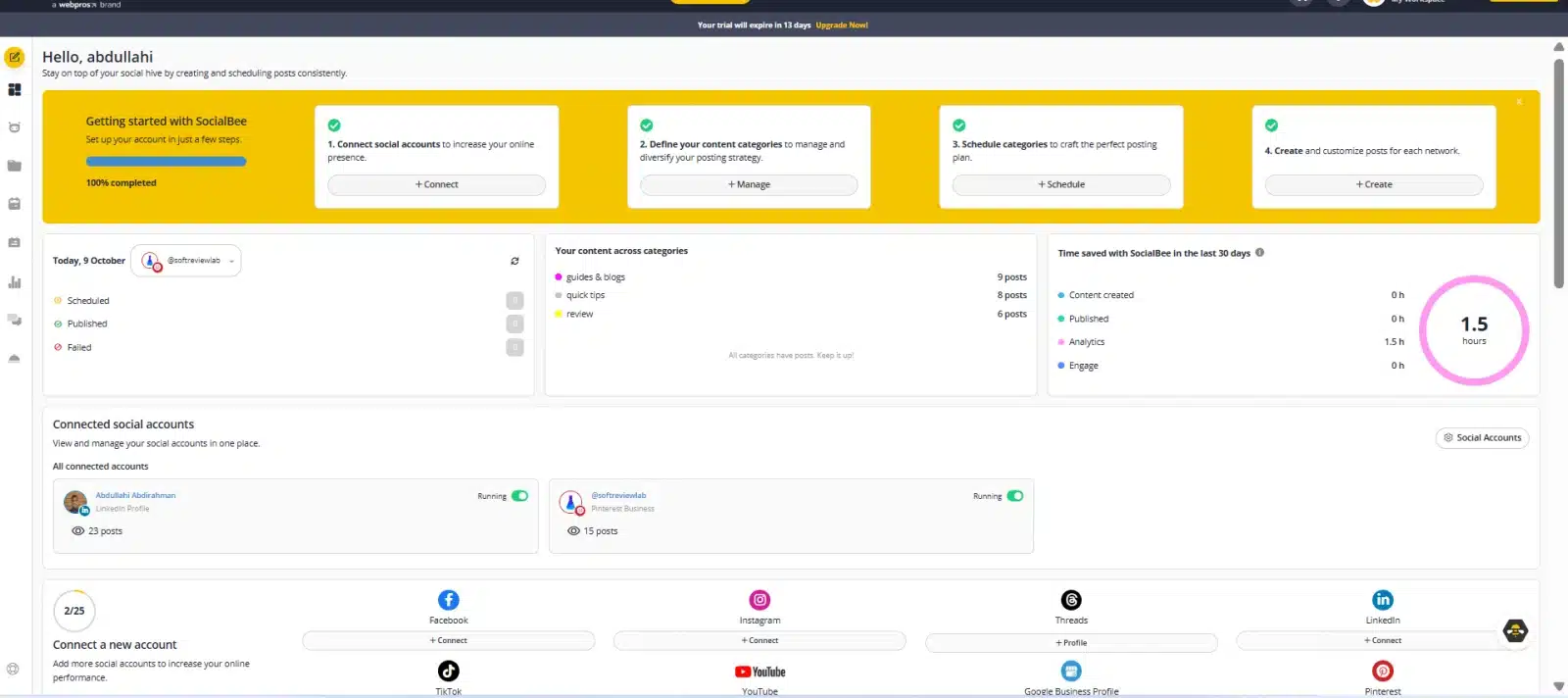
The dashboard shows today’s scheduled, published and failed posts, how many posts each category holds, the connected accounts and the setup checklist for new accounts.
The difference from a plain scheduler is what happens after a post goes out. Evergreen categories recycle their posts, so a library of 40 good posts can keep your profiles active for months. Posts that should not come back, such as a sale, can expire after a set number of shares or at a specific date and time. You can still schedule a one-off post for an exact time, or let SocialBee suggest the best time based on your most successful posts.
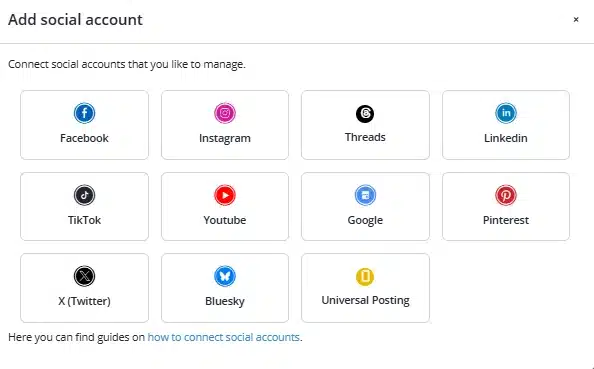
SocialBee connects to Facebook, Instagram, Threads, LinkedIn, TikTok, YouTube, Google Business Profile, Pinterest, X, Bluesky and Universal Posting.
SocialBee Features: What You Actually Get
Content Categories and Evergreen Recycling
This is the core of SocialBee and the main reason to choose it. Bootstrap allows 10 categories with up to 1,000 posts each, Accelerate 50 categories and Pro unlimited, with up to 5,000 posts per category on the two higher plans. SocialBee’s support team confirmed the Bootstrap and Accelerate limits to me in October 2026. Each profile can follow its own posting schedule, and you can tailor the same post for each network, for example a short version for X and a longer one for LinkedIn. Content sources pull in posts automatically, such as new articles from your blog: 10 sources on Bootstrap, 30 on Accelerate and unlimited on Pro.
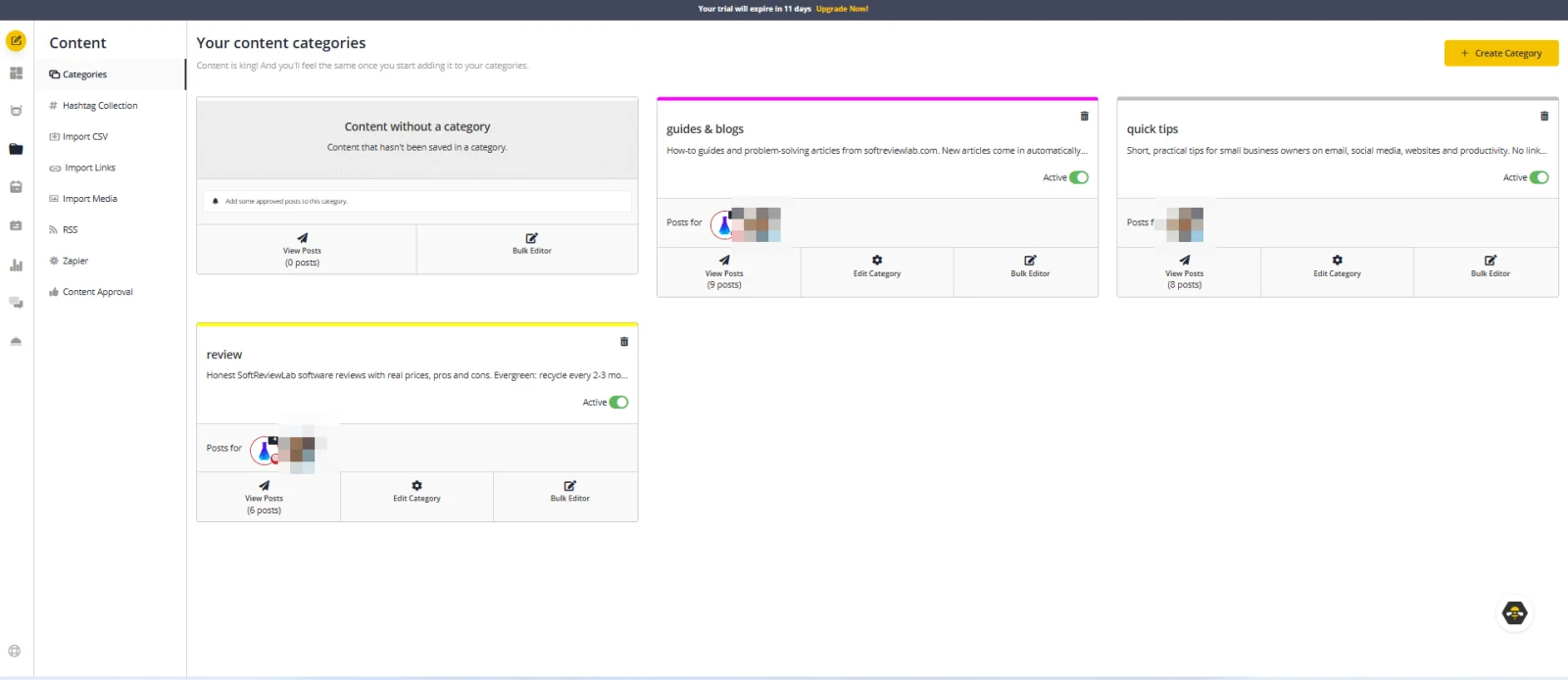
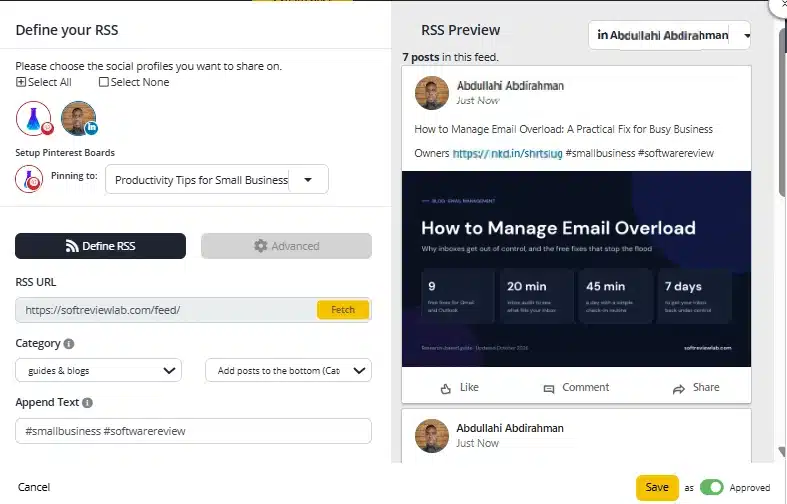
Each content category holds its own posts and can be switched on or off. A category can post to several profiles, and Bulk Editor changes many posts at once.An RSS feed can fill a category automatically: paste your site feed, choose the profiles and the Pinterest board, and add hashtags to every post. The preview shows how each post will look.
AI Copilot and AI Post Writing
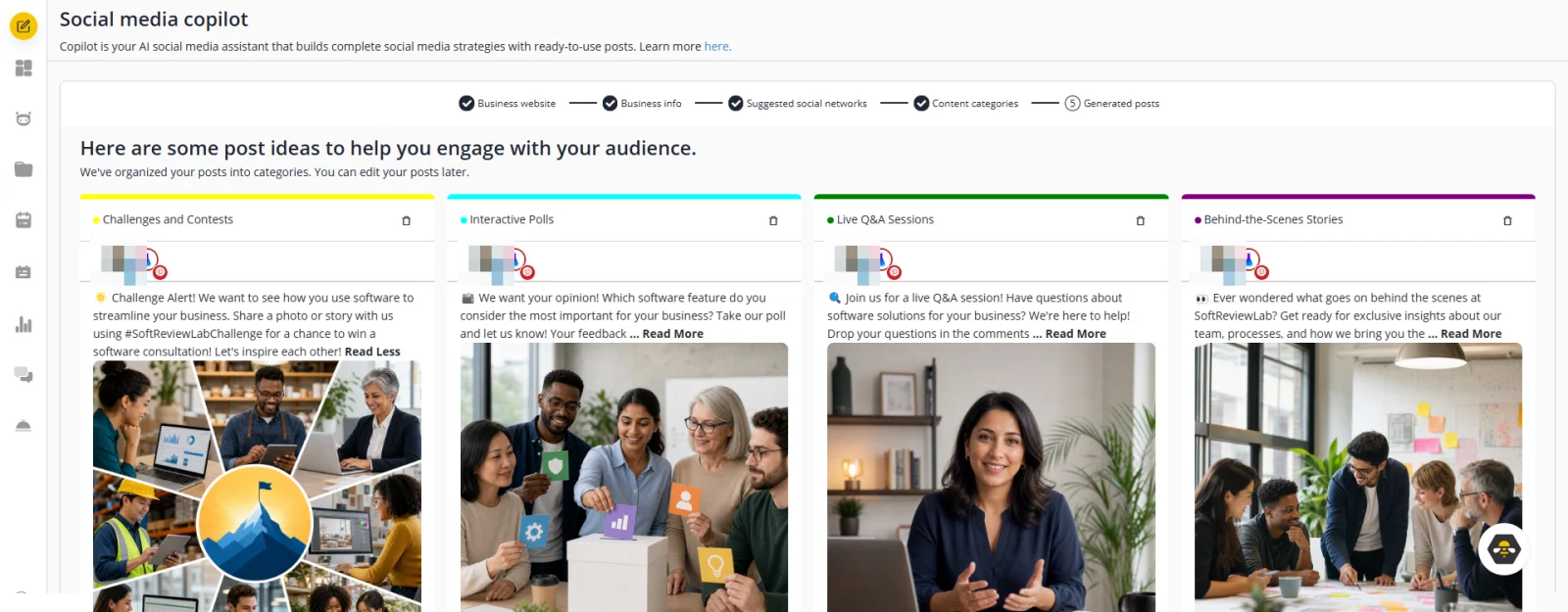
Every plan includes AI Copilot, which SocialBee says can generate an entire social media strategy with ready-to-use posts, plus unlimited AI generation of posts, captions, images and hashtags. Canva, Unsplash and GIPHY are built in for visuals, along with an image editor, alt text for images and custom video thumbnails. In my test, Copilot read my website correctly, but some of the posts it wrote promised a team, a contest and a live Q&A that do not exist, so treat its output as a first draft that still needs your voice and your facts.
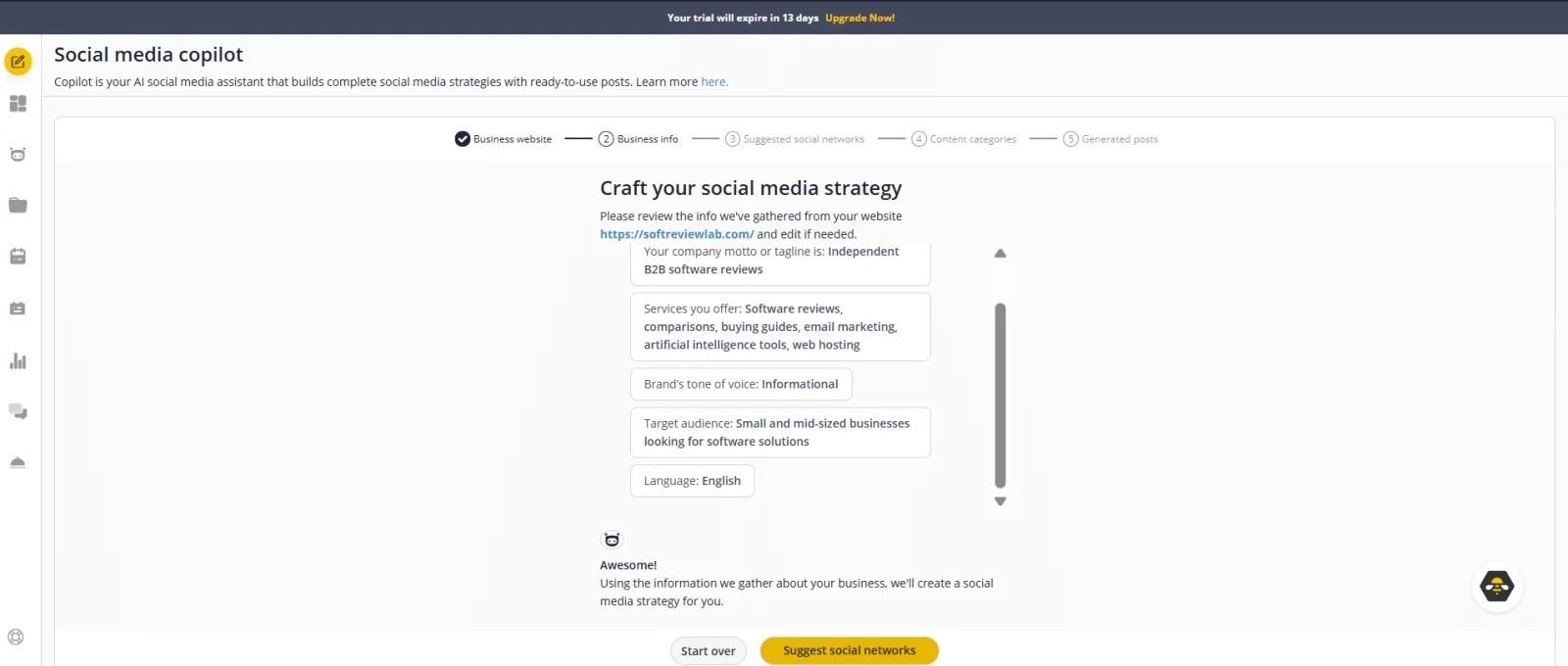
Copilot starts from your website: it reads the site and fills in your tagline, services, tone of voice, target audience and language, which you can edit before it suggests networks and categories.Copilot then writes posts with images for each suggested category and saves them for your approval. Read each one first: some can promise teams, contests or live events your business does not have.
Scheduling and Publishing
All plans include drafts, a posting schedule for each profile, recycling and expiry, posting at an exact or suggested time, an Instagram grid preview and scheduling the first comment. Bootstrap does not include the bulk post editor or CSV uploads, which matter if you want to import a large batch of posts at once. Direct posting covers Facebook, Instagram, Threads, LinkedIn, TikTok, Pinterest, YouTube, X, Bluesky and Google Business Profile. A feature called Universal Posting sends a reminder to SocialBee’s mobile app so you can post to places without direct posting, such as Facebook Groups, WhatsApp, Telegram or Mastodon.
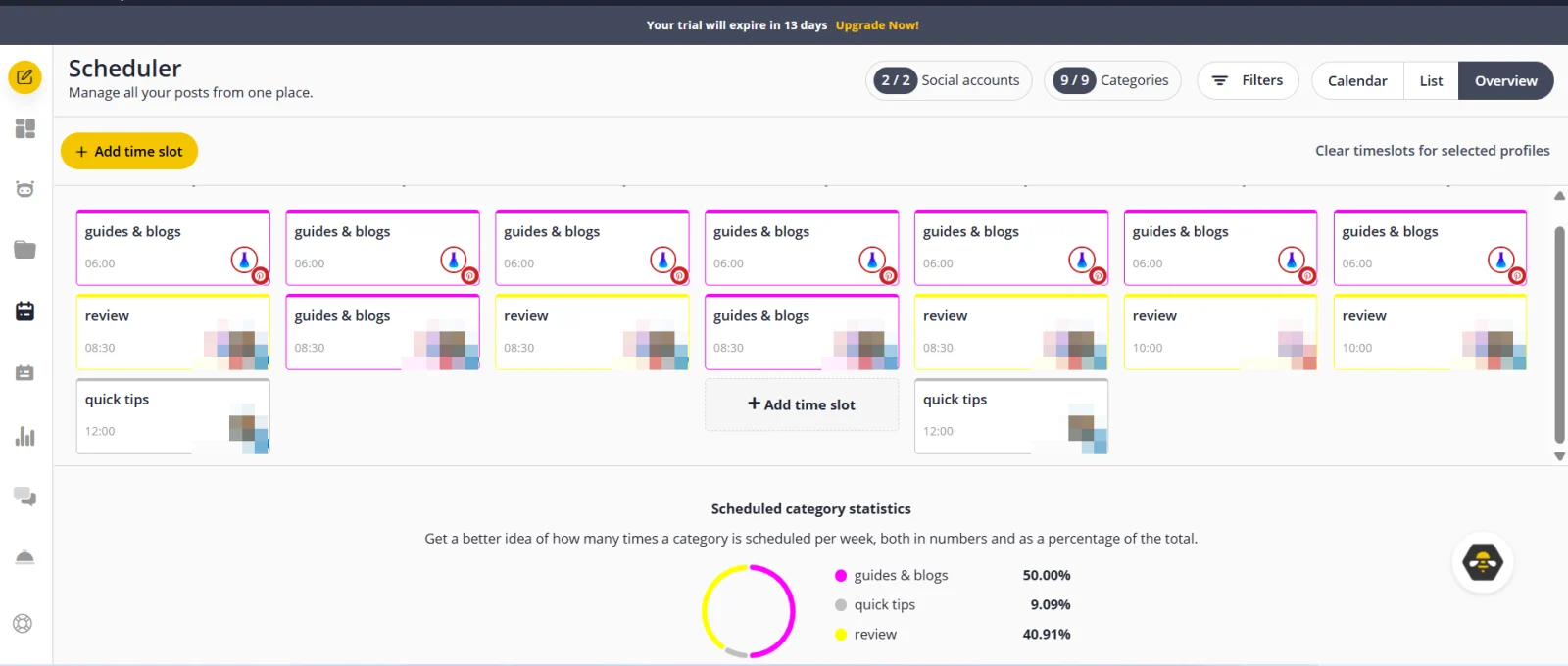
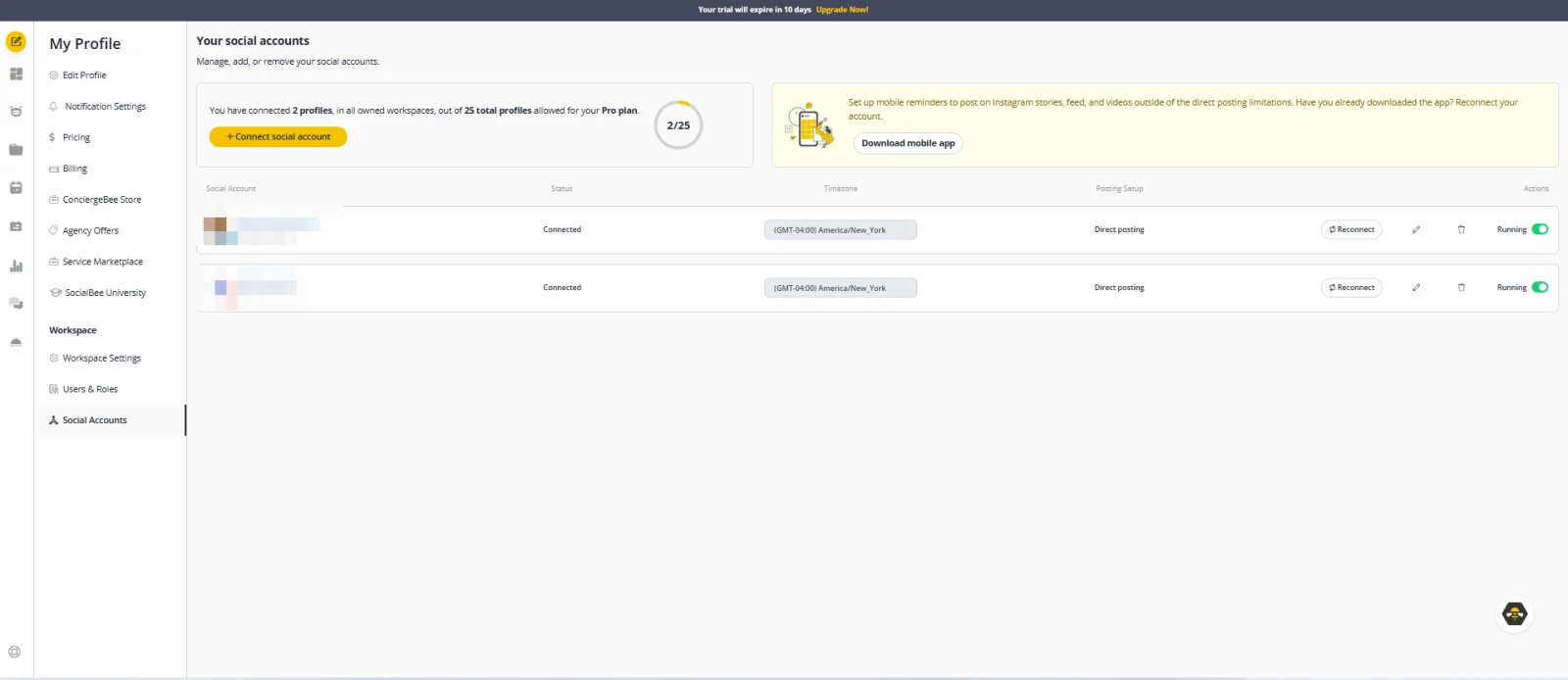
The scheduler works with time slots: each slot is tied to a category and to profiles, and SocialBee fills it with the next post from that category. The chart shows each category’s share of the week.Connected profiles are listed with their status, time zone and posting setup. The Pro plan allows 25 profiles.
Social Inbox: Comments, Mentions and Messages
The inbox brings comments, mentions and direct messages into one place on every plan, with internal notes for your team. It covers fewer networks than publishing: Facebook, Instagram, Threads, LinkedIn, YouTube and X. If most of your customer conversations happen on TikTok or Pinterest, you will still answer them in those apps.
In my test, both accounts I connected appeared in the inbox: my Pinterest account and my personal LinkedIn profile, not only a company page. My Pinterest account received no comments during the trial, so I could not confirm whether Pinterest comments reach the inbox, and SocialBee’s own engagement page does not list Pinterest.
Analytics and Reports
All plans show audience growth and demographics, profile growth, top-performing posts and content types, and UTM parameters for links, so you can see in Google Analytics which posts brought visitors to your site. Bootstrap keeps 3 months of data, while Accelerate and Pro keep 2 years and add advanced analytics. Only Pro exports branded reports, which matters if you report to a client or a manager.
In my test, analytics showed complete data for both connected accounts, including my personal LinkedIn profile: impressions, engagements, pin clicks and link clicks, and the numbers were correct, including zero where nothing had happened yet.
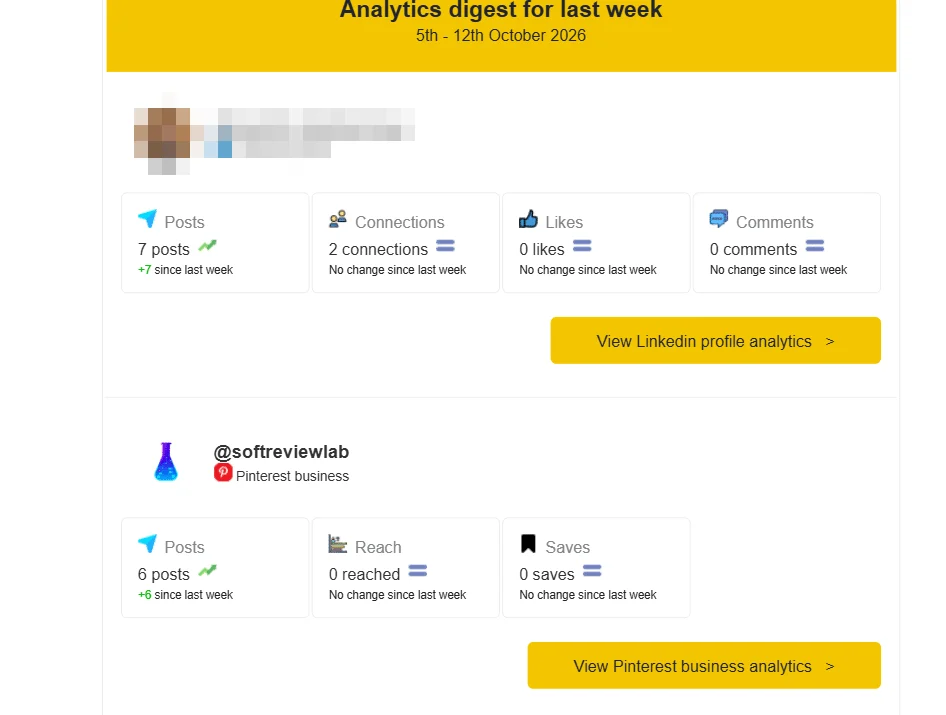
A weekly email sums up posts, connections, likes and comments for LinkedIn, and posts, reach and saves for Pinterest.
Team Collaboration and Approvals
This is where the plans differ most. Bootstrap and Accelerate include one user and one workspace. Pro includes 3 users in each of 5 workspaces. The post approval system starts on Accelerate, and internal feedback notes on posts are Pro only. Extra users and extra workspaces cost $10 a month each, or $100 a year, and a set of 5 extra profiles costs $15 a month, or $150 a year.
Integrations
Beyond Canva, Unsplash and GIPHY, SocialBee connects to Quu for content curation, to more than 10 URL shorteners for branded, trackable links, and to Zapier, Pabbly and Make for automated workflows, such as posting a new product from your store.
Done-for-You Help: ConciergeBee
If you have no time to create content at all, SocialBee’s in-house agency, ConciergeBee, offers content creation, video, community management, LinkedIn lead generation and ad campaigns as a paid service. The pricing page does not list prices for it.
SocialBee Pricing 2026: Plans and Real Costs
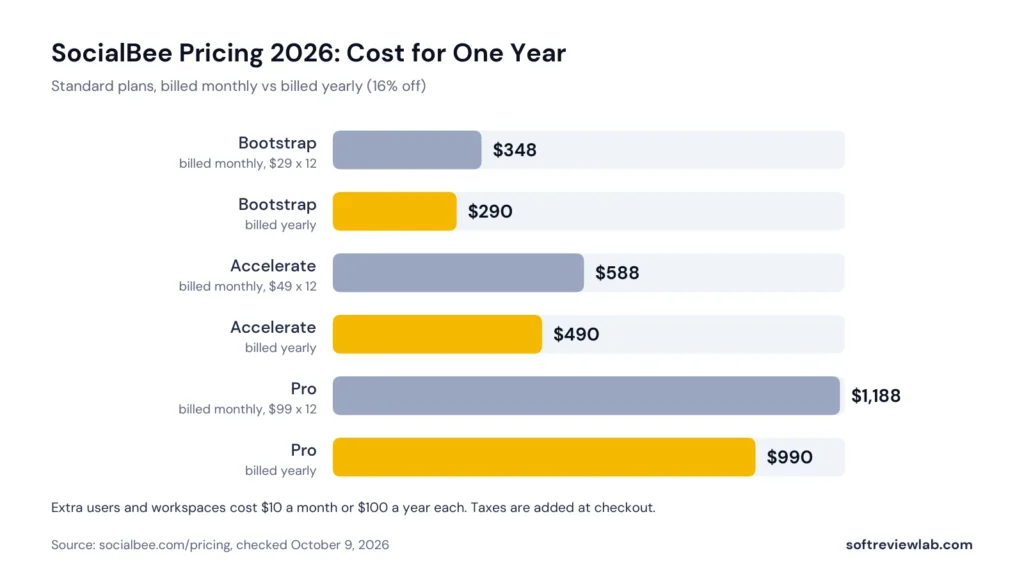
SocialBee has three standard plans and three agency plans. Yearly billing saves 16%, there are no contracts, and you can upgrade, downgrade or switch between monthly and yearly billing at any time from your account. Prices don’t include VAT, GST or other local taxes, which are added at checkout.
Plan
Monthly
Yearly
Profiles
Users and workspaces
Content categories
Bootstrap
$29
$290 ($24.17 a month)
5
1 user, 1 workspace
10
Accelerate
$49
$490 ($40.83 a month)
10
1 user, 1 workspace
50
Pro
$99
$990 ($82.50 a month)
25
3 users in each of 5 workspaces
Unlimited
SocialBee standard plans (pricing page, October 9, 2026)
What each SocialBee plan costs over a year, billed monthly or yearly (pricing page, October 9, 2026).
Plan
Monthly
Yearly, per month
Profiles
Users and workspaces
Pro50
$179
$149.17
50
5 users in each of 10 workspaces
Pro100
$329
$274.17
100
5 users in each of 20 workspaces
Pro150
$449
$374.17
150
5 users in each of 30 workspaces
SocialBee agency plans (pricing page, October 9, 2026)
Agency plans have the same features as Pro. The difference is scale: more profiles, more workspaces and more users, for agencies that manage several clients.
What It Really Costs a Small Team
The starting price is fair, but watch the user limit. A business owner working alone pays $24.17 a month on yearly Bootstrap. If one colleague needs their own login, add an extra user for $10 a month, or move to Pro, which costs $82.50 a month billed yearly and includes 3 users. If a writer and a manager need post approvals, the cheapest setup is Accelerate plus one extra user: $490 plus $100 a year, about $49 a month.
Free Trial and Money-Back Guarantee
The 14-day trial gives full Pro access and needs no credit card. When it ends, nothing is charged: the trial simply expires, posting stops until you choose a plan, and your content and schedules stay saved, as SocialBee’s support team confirmed to me in October 2026. After you pay, a 30-day money-back guarantee applies. SocialBee accepts credit and debit cards, PayPal and Amazon Payments, and yearly customers can ask for free access to SocialBee University, its social media course.
Which SocialBee Plan Makes Sense?
Bootstrap ($29 a month): one person posting to up to 5 profiles who mainly schedules and recycles posts. You give up the bulk editor, CSV import, hashtag organizer, approvals and advanced analytics.
Accelerate ($49 a month): the plan most small businesses should start on, with 10 profiles, 50 categories, bulk editing, CSV uploads, approvals and 2 years of analytics, but still one user.
Pro ($99 a month): a small team, or a freelancer managing up to 5 businesses, who needs several logins, separate workspaces, internal notes and branded reports.
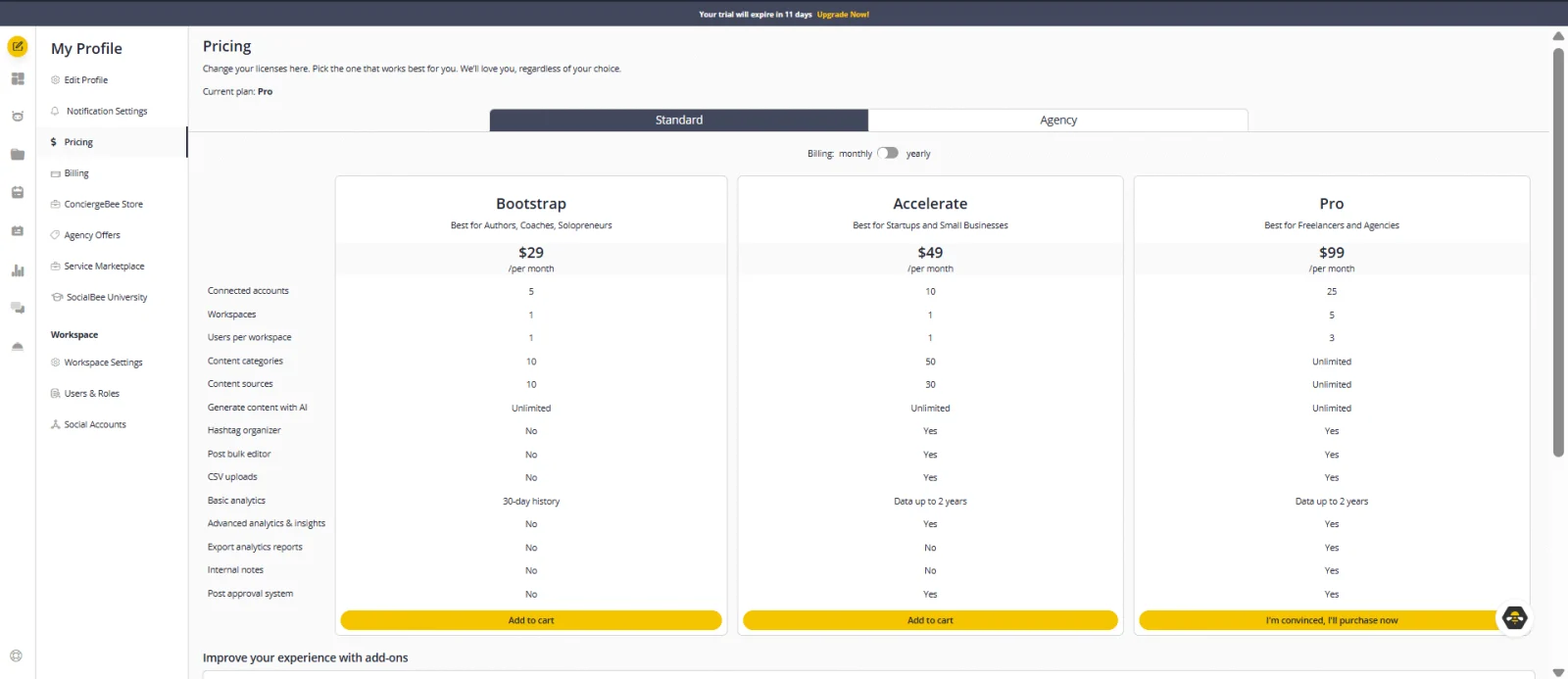
Plan limits in the app: Bootstrap ($29 a month) has 5 accounts and 10 categories, Accelerate ($49) has 10 accounts and 50 categories, and Pro ($99) has 25 accounts, unlimited categories and 3 users per workspace. AI content generation is unlimited on all three.
SocialBee vs Other Social Media Scheduling Tools
If you are comparing schedulers, these are the names that come up most. I haven’t reviewed them on SoftReviewLab yet, so the table only shows the starting price on each vendor’s own pricing page in October 2026 and the kind of buyer each tends to suit. Most charge per user or per channel, so price your real setup before you buy.
Tool
Starting price
How it is priced
Tends to suit
SocialBee
$29 a month, or $24.17 billed yearly, 5 profiles
Per plan
Small businesses that want categories and recycling
Buffer
Free plan for 3 channels; paid from $5 a month per channel
Per channel
Solo users posting to a few channels
Later
$18.75 a month billed yearly, 8 profiles, 1 user
Per plan
Visual brands focused on Instagram and TikTok
Hootsuite
From $99 per user a month
Per user
Larger teams that need listening and reporting
Sprout Social
$79 per seat a month billed yearly, $99 monthly
Per seat
Mid-size teams with a budget for analytics and support
Starting prices on each vendor’s pricing page, October 9, 2026
SocialBee’s advantage over the per-channel and per-user tools is that one price covers several profiles from the start. Its disadvantage is the single user on the two cheaper plans.
SocialBee Pros and Cons
What Works
Content categories and evergreen recycling keep profiles active without writing new posts every day
Plans from $24.17 a month on yearly billing, with several profiles included
Unlimited AI post generation on every plan, plus Canva, Unsplash and GIPHY
Direct posting to 10 networks, including Bluesky, Threads and Google Business Profile
A 14-day trial with full Pro access and no credit card, plus a 30-day money-back guarantee
No contracts, and you can switch plans or billing at any time
Automation through Zapier, Pabbly and Make
What Doesn’t
Bootstrap and Accelerate include only one user
Bootstrap lacks the bulk editor, CSV uploads, approvals and advanced analytics, and keeps 3 months of data
SocialBee lists inbox support for 6 networks, not TikTok, Pinterest, Bluesky or Google Business Profile
Branded report exports are on Pro only
Taxes are added on top of the listed prices
The category system takes planning to set up before it starts saving time
SocialBee Scorecard: How I Reached 8.5 out of 10
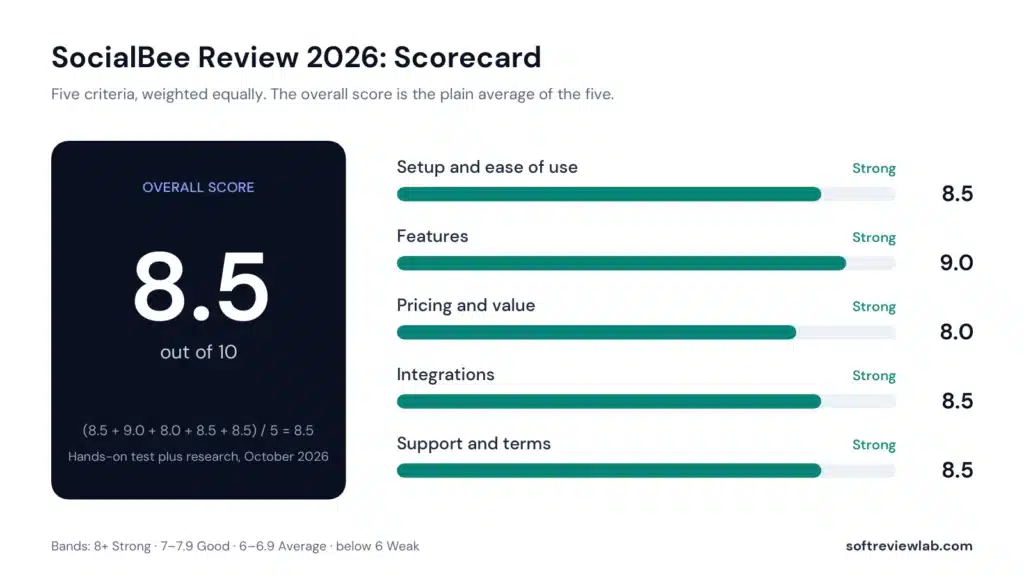
SocialBee scorecard: five criteria, each worth 20 percent, averaged into the overall score of 8.5.
Criterion
Score
Why
Setup and ease of use
8.5
A clear model: connect profiles, build categories, set a weekly schedule. The category system needs some planning at the start, and SocialBee runs live demo webinars to help.
Features
9.0
Categories, recycling, expiry, AI writing, an inbox and solid analytics on every plan, and in my test every scheduled post went out on time. Bulk tools, approvals and advanced analytics need Accelerate or Pro.
Pricing and value
8.0
Fair starting prices with several profiles included and 16% off yearly, held back by one user on the two cheaper plans and taxes added at checkout.
Integrations
8.5
Direct posting to 10 networks, Canva, Unsplash, GIPHY, Quu, URL shorteners, Zapier, Pabbly and Make, and an RSS feed that filled a category automatically in my test. The inbox covers fewer networks.
Support and terms
8.5
A no-card trial with full Pro access, a 30-day money-back guarantee, no contracts, and help by chat, email or a call. I have not measured support response times.
SocialBee scores by criterion
Common Mistakes When Buying SocialBee
Starting on Bootstrap when you need approvals. If one person writes and another approves, you need Accelerate at least.
Forgetting the second user. Price an extra user at $10 a month, or Pro, before you invite a colleague.
Skipping the category setup. Recycling only works if your evergreen categories have enough posts. Plan 20 to 40 posts per category before you rely on it.
Letting the trial end without a plan. Posting stops when the trial ends, so choose a plan before day 14 if your schedule is live.
Recycling posts that go out of date. Put sales, events and dated news in a category set to expire, or they will come back months later.
Who Should Use SocialBee, and Who Should Skip It
SocialBee Is a Good Fit If
You run a small business and want to post every week without writing every post that week
You have evergreen content, such as tips, products, FAQs and reviews, that can be shared more than once
You post to several networks and want one schedule for all of them
You are a freelancer or a small agency managing a few brands
Skip SocialBee If
Several people need their own login and your budget only covers Bootstrap
Most of your conversations happen on TikTok or Pinterest and you want them in one inbox
You need enterprise social listening and brand monitoring
You post rarely and a free plan from another tool would cover it
SocialBee Review Verdict: Is SocialBee Worth It in 2026?
SocialBee earns 8.5 out of 10. For the problem most small businesses actually have, posting consistently without spending every day on it, its content categories and evergreen recycling are a better answer than a plain scheduler. Accelerate, at $40.83 a month billed yearly, is the plan I would start most businesses on.
What holds the score down is team pricing: the two cheaper plans include one user, and the full collaboration tools sit on Pro. If you work alone or with one approver, that is easy to plan around.
Is SocialBee the best social media scheduling tool for a small business?
It is a strong choice if your problem is posting consistently. Content categories and recycling keep your profiles active, and in my 14-day test every scheduled post went out on time. It is not the right pick for everyone: if you post to two or three channels on your own, a free plan elsewhere may be enough, and if several people need logins on a small budget, compare SocialBee’s Pro plan with per-user tools first.
Is SocialBee good for small businesses?
Yes, especially if you want to post regularly without writing new posts every day. Content categories and recycling keep your profiles active, and plans start at $29 a month, or $24.17 a month billed yearly. The main limit is one user on the two cheaper plans.
How much does SocialBee cost?
On the pricing page in October 2026, Bootstrap costs $29 a month, Accelerate $49 and Pro $99, or $290, $490 and $990 a year. Agency plans start at $179 a month. Taxes are added at checkout.
Does SocialBee have a free plan?
No. It has a 14-day free trial with full Pro access and no credit card. When the trial ends, nothing is charged: posting stops until you choose a plan, and your content and schedules are kept.
Which networks does SocialBee support?
Direct posting covers Facebook, Instagram, Threads, LinkedIn, TikTok, Pinterest, YouTube, X, Bluesky and Google Business Profile. The inbox for comments and messages covers Facebook, Instagram, Threads, LinkedIn, YouTube and X.
Can I cancel SocialBee at any time?
Yes. There are no contracts, you can cancel, upgrade or downgrade from your account, and a 30-day money-back guarantee applies after you pay.
“A leading call tracking platform with accurate attribution and useful AI features, held back by usage fees and add-ons that raise the real monthly cost.”
From $50/month billed annuallyBest for: Local service businesses and agencies that rely on phone leads14-day free trial, no credit card required
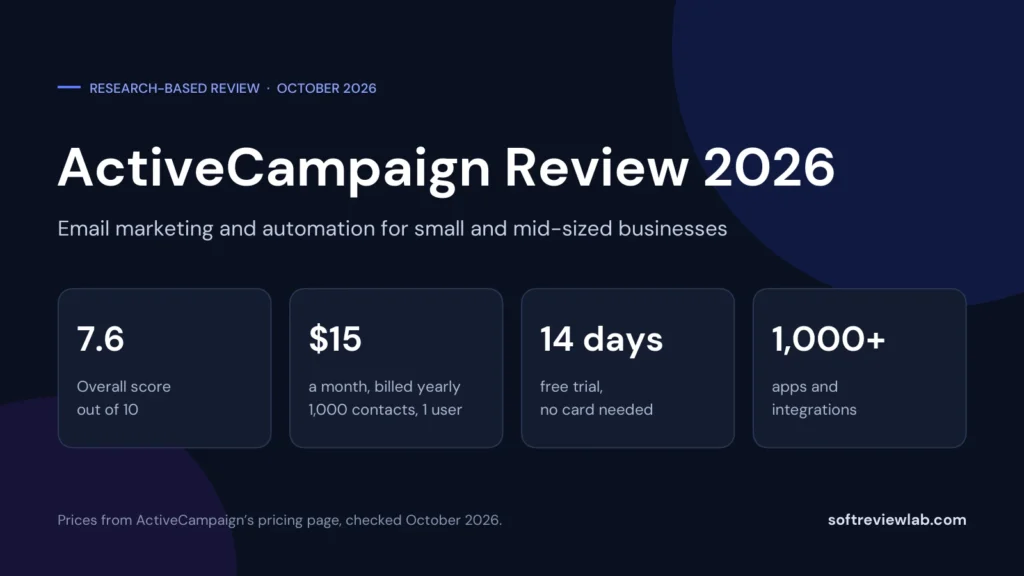
“A deep automation platform with AI tools and more than 1,000 integrations, held back by a price that climbs with your list, a five-action cap on the cheapest plan and paid add-ons for the sales CRM and SMS.”
From $15/month (1,000 contacts, 1 user); Plus $49 billed yearly or $59 monthlyBest for: Small and mid-sized businesses that want behaviour-based email automation14-day free trial: no credit card, no contact limit, 100 email sends
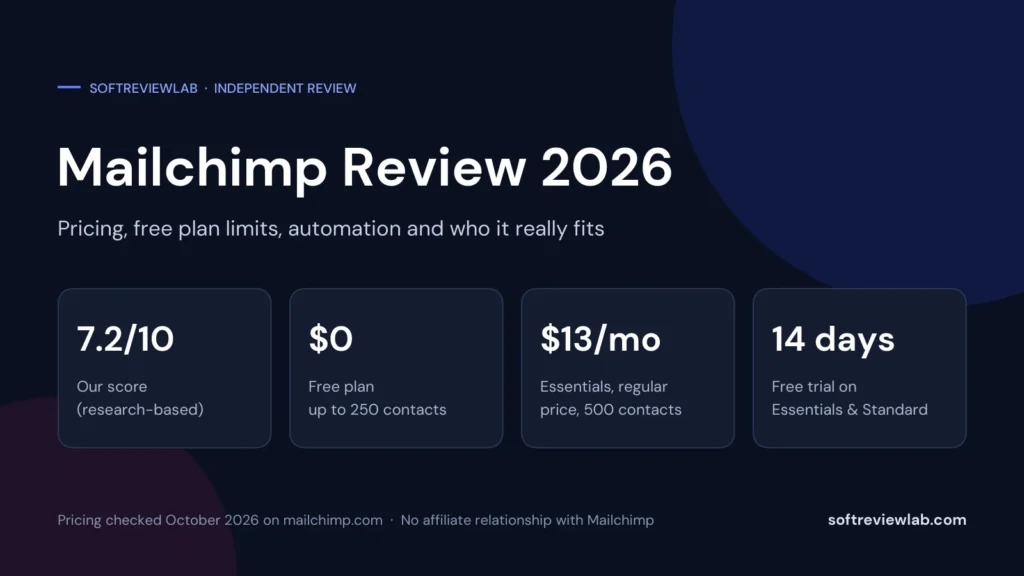
“An easy, all-in-one email platform with a real free plan and 300+ integrations, held back by pricing that climbs quickly with your list and weak support outside Premium.”
Free plan; paid from $13/monthBest for: Small businesses and creators starting email marketingFree plan for 250 contacts; 14-day trial on Essentials and Standard