ActiveCampaign Review 2026: Best Email Automation Tool for Small Business?
Email Marketing & Automation
ActiveCampaign Review 2026: Best Email Automation Tool for Small Business?
7.6/10
“ActiveCampaign suits a business that is ready to automate its email follow-up. Plan on Plus if automation is the reason you are buying, keep your list clean because new accounts are billed on every contact, and treat the 14-day trial and the 30-day guarantee as one six-week test before you commit to a year.”
Research-based review · not hands-on testedBuilt from the vendor’s documentation and pricing pages and from patterns in customer reviews. How we work.
Starting price
From $15/month (1,000 contacts, 1 user); Plus $49 billed yearly or $59 monthly
Best for
Small and mid-sized businesses that want behaviour-based email automation
Free trial
14-day free trial: no credit card, no contact limit, 100 email sends
Based on
ActiveCampaign’s pricing page, feature pages, nine help center articles, terms of service, money-back guarantee terms, privacy policy and security page, the billing page inside a trial account, written answers from its customer experience team, and customer ratings on G2, Capterra and Trustpilot
Scores
Ease of setup & use7.0
Feature depth9.0
Pricing & value6.5
Integrations9.0
Support & terms6.5
How these scores were worked out
Ease of setup & use: 7.0 (Good) Recipes, an AI builder and free onboarding shorten the start, and Capterra reviewers rate the product highly overall. It is still an automation platform with a learning curve, and the builder tools are among the most common complaints in Capterra’s summary.
Feature depth: 9.0 (Strong) Branching automation with goals and split paths, more than 950 recipes, AI tools in every plan, attribution, SMS and WhatsApp. The five-action cap on Starter and the sales CRM being a paid add-on keep it from a higher score.
Pricing & value: 6.5 (Average) The entry price is fair, going over the send limit is cheap, and there is a 30-day guarantee. Against that, monthly billing costs more and has to be requested, the price rises steeply with list size, new accounts are billed on all contacts, Starter and Plus include one user, and add-ons such as the $85 CRM are priced only on request.
Integrations: 9.0 (Strong) More than 1,000 apps, the main ecommerce platforms on every plan, an API, webhooks and MCP connections for AI assistants. Premium CRM integrations are reserved for Enterprise.
Support & terms: 6.5 (Average) Email and chat support on every plan, with detailed written answers within a day when I asked, free migration, a published guarantee and a SOC 2 report on request. Held down by refund pages that contradict each other, add-on prices given only on request, the AI training clause, and a 2.7 on Trustpilot with half of the negative reviews unanswered.
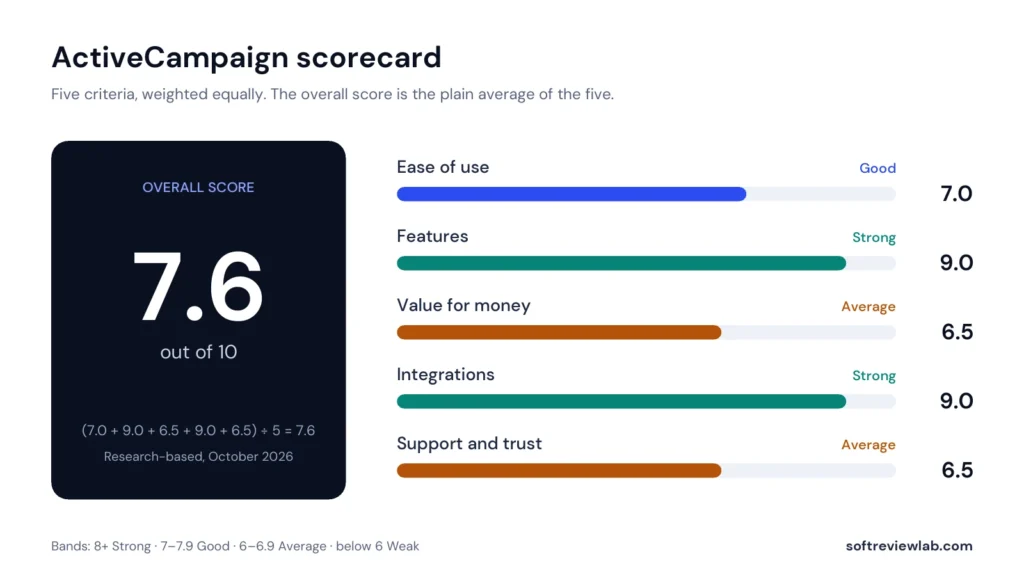
Overall: (7.0 + 9.0 + 6.5 + 9.0 + 6.5) ÷ 5 = 7.60, shown as 7.6. The five criteria are weighted equally.
Scores are editorial judgments in half-point steps, based on documented features, published pricing and repeated themes in customer reviews. They are not lab measurements, so treat the words as the guide: 8.0+ Strong, 7.0 to 7.9 Good, 6.0 to 6.9 Average, below 6.0 Weak.
What works
A visual automation builder with branching, split paths and goals, plus more than 950 ready-made recipes.
Unlimited automation actions from the Plus plan upward.
AI tools in every plan, including campaign and automation builders, and connections for Claude and ChatGPT.
More than 1,000 integrations, with Shopify, WooCommerce and Square on every plan.
A 14-day trial that needs no card, followed by a 30-day money-back guarantee for new annual accounts.
Free migration and onboarding help, email and chat support on every plan, and detailed written answers within a day when I asked.
Going over the send limit does not stop your emails: sending continues at $0.005 an email.
What doesn’t
Starter allows only five actions per automation, which rules out most real workflows.
The price climbs quickly with list size: Pro goes from $79 to $375 a month between 1,000 and 10,000 contacts.
For accounts created since November 2025, all contacts count toward the limit, whatever their status.
The sales CRM, SMS, custom reporting and extra users cost extra, with prices given only on request ($85 a month for the CRM on Plus).
Only one user on Starter and Plus.
Monthly billing costs 20 to 25 percent more on Plus and Pro, and outside the 30-day guarantee for new annual accounts the stated policy is no refunds.
A 2.7 rating on Trustpilot, with half of the negative reviews unanswered.
What we couldn’t verify
ActiveCampaign was not used for live campaigns; ease of use, the quality of the builders and inbox placement are based on its documentation and customer reviews.
Whether Starter costs the same $15 on monthly billing as on annual billing: the support team quoted it as a starting price without confirming it directly.
Add-on prices on annual billing, and add-on prices on Enterprise, were not part of the support team’s answer; the prices shown are monthly-billing prices.
How to select monthly billing: neither the pricing page nor the in-account billing page showed the option.
The 50,000 and 60,000 monthly email sends shown on the in-account billing page at 1,000 contacts, which differ from the 10 to 15 times multiples confirmed by the support team.
The WhatsApp line limit on the Plus bundle: the support team and the pricing page say 5, while the in-account billing page showed 2.
Onboarding and migration help beyond self-guided resources depends on eligibility that is confirmed only after purchase.
Vendor claims, such as building campaigns three times faster with AI, a 26% abandoned cart recovery rate and more than ten hours saved a week, are ActiveCampaign’s own figures and were not verified.
If any of these matter to your decision, check them directly with the vendor or during your trial.
Who should skip it
Newsletter-only senders, businesses that need a free plan, large lists on thin margins, teams that want a full sales CRM in the base price, and small teams that need several logins on the cheapest plans.
By Abdullahi Abdirahman, Founder & Editor, SoftReviewLab. Pricing and plan limits checked on ActiveCampaign’s official pricing page, help center and terms in October 2026, together with written answers from its customer experience team. This is a research-based review built from ActiveCampaign’s own documentation, plus customer ratings on G2, Capterra and Trustpilot. I have not run my own campaigns through ActiveCampaign. Disclosure: SoftReviewLab is an ActiveCampaign affiliate partner. This page contains affiliate links, and if you sign up through them, SoftReviewLab may earn a commission at no extra cost to you. See our affiliate disclosure and research and scoring method.
Table of Contents
ActiveCampaign Review at a Glance: The Short Answer
This ActiveCampaign review scores the platform 7.6 out of 10. ActiveCampaign is an email marketing and automation platform for businesses that want their emails to react to what each contact does: a welcome series after a sign-up, a reminder after an abandoned cart, a follow-up when a lead clicks a pricing link. Plans start at $15 a month on annual billing for 1,000 contacts and one user. Its strengths are the depth of its automation builder, a catalogue of more than 1,000 integrations, and AI tools included in every plan. Its weaknesses are a price that climbs quickly as your list grows, a cheapest plan capped at five actions per automation, a sales CRM that costs extra, and a Trustpilot rating far below its ratings elsewhere. Is ActiveCampaign good for small business? Yes, if you are ready to automate your follow-up and have someone willing to learn the tool. If you are searching for the best email automation tool for small business, it belongs on your shortlist. A business that only sends a monthly newsletter does not need it.
ActiveCampaign
Overall score
7.6 out of 10 (research-based)
What it is
An email marketing and automation platform with AI tools, plus paid add-ons for a sales CRM, SMS and WhatsApp
Starting price
Starter at $15 a month on annual billing, for 1,000 contacts and 1 user
How it is priced
By plan and by number of contacts, with a monthly email allowance tied to your contact limit
Free plan
No
Free trial
14 days, no credit card, up to 100 email sends
Money-back guarantee
30 days for new accounts on annual plans, with conditions
Best for
Small and mid-sized businesses that want behaviour-based email automation
Not ideal for
Newsletter-only senders, very tight budgets, and teams that want a full sales CRM in the base price
Customer ratings
4.4 on G2 (14,809 reviews), 4.6 on Capterra (2,570 reviews), 2.7 on Trustpilot (1,446 reviews)
Prices and limits from ActiveCampaign’s pricing page, help center and terms, October 2026. Ratings checked October 2026.
If that already sounds like the kind of tool your business needs and you would like to look inside before reading on, you can start ActiveCampaign’s 14-day free trial. It does not ask for a card.
What Is ActiveCampaign and How Does It Work?
ActiveCampaign started in 2003 in Chicago, where it is still based, and its founder Jason VandeBoom remains chief executive. On its about page the company describes itself as privately held and says it serves more than 180,000 customers in over 170 countries. The same page gives a figure of 150,000 in another answer, so treat the number as approximate.
The product is built around one idea: every contact has a record, and things that happen to that record can start an automation. A contact fills in a form, opens an email, visits a page on your site, buys something from your shop or reaches a score you set. Each of those can trigger a sequence of steps: wait two days, send an email, check whether they clicked, add a tag, notify a salesperson. Email newsletters are part of the product, but the automation engine is the reason businesses choose it over simpler tools.
Around that core, ActiveCampaign sells several layers. Email marketing and automation are in every plan. Active Intelligence, its set of AI tools, is included too, with limits on the two lower plans. A sales CRM with pipelines, SMS and transactional email are paid add-ons. WhatsApp messaging is sold as its own plan or bundled with email. That modular structure keeps the entry price low, and it is also the reason the final bill can be much higher than the headline price. I cover both sides in the pricing section.
How I Evaluated ActiveCampaign
I scored ActiveCampaign on the same five criteria I use for every review: ease of use, features, value for money, integrations, and support and trust. Each is scored out of 10 and weighted equally, and the overall score is the plain average. The full reasoning for each number is in the scorecard further down, and the method is explained on our research and scoring method page.
The evidence is ActiveCampaign’s pricing page at several contact levels, its feature pages, nine help center articles, its terms of service (last updated December 23, 2025), its money-back guarantee terms, its privacy policy and its security page, plus customer ratings on G2, Capterra and Trustpilot. I also went through the trial sign-up form to check whether it asks for a card, and looked at the billing page inside the trial account. I have not run live campaigns through the product, so statements about how it feels in daily use come from customer reviews and are labelled that way. Where ActiveCampaign’s own pages disagree with each other, I say so.
ActiveCampaign Features: What You Actually Get
Marketing Automation: The Main Reason to Buy
The automation builder is a visual canvas. You choose a trigger, then add steps: send an email, wait, branch on an if/else condition, split the audience to test two paths, update a field, add a tag, or hand the contact to another automation. ActiveCampaign’s marketing automation page lists behavioural triggers, site and event tracking, split and branching paths, goals, and reporting on each automation. The pricing page counts more than 950 ready-made automation recipes, so you rarely start from an empty canvas.
In practical terms this covers the workflows most small businesses want: a welcome series, an abandoned cart reminder, a re-engagement sequence for contacts who stopped opening, a follow-up after a purchase, and an alert to sales when a lead does something that signals interest. If you are not sure which of these to build first, my guide to email marketing automation workflows walks through seven of them, and I explain the first one step by step in how to set up a welcome email series.
One limit matters more than any other on the price list. The Starter plan allows five actions per automation. A simple welcome series of three emails with two waits between them already uses five. Add one condition and you are over. Plus, Pro and Enterprise list unlimited automation actions. So Starter is a way to learn the tool and send campaigns, and Plus is where the automation ActiveCampaign is known for becomes usable without workarounds.
The higher plans add the more specialised pieces. According to the pricing page’s plan comparison and the help center’s plan overview, Plus adds cross-channel automation and sales automation, and Pro adds connected automations, A/B testing inside automations, an automations map, conditional content, predictive sending, and attribution and conversion tracking. Enterprise adds premium triggers and actions, premium segmentation and custom objects. If you would like to see how ActiveCampaign presents the builder itself, its marketing automation page shows it with examples.
Email Campaigns and the Email Designer
For regular newsletters and promotions, ActiveCampaign has a drag-and-drop email designer and, by the pricing page’s count, more than 250 templates. The plan comparison lists scheduled campaigns, RSS-triggered campaigns, auto-responders, A/B testing and a content manager on every plan. Inbox preview and testing is unlimited on Enterprise, limited to five a month on Pro and Plus, and not included on Starter.
Two personalisation features are reserved for Pro and above. Conditional content swaps a block of an email depending on who receives it, so a single campaign can show one offer to customers and another to leads. Predictive sending picks a send time for each contact from their past behaviour. Both are useful, and neither is essential for a business sending its first automated emails.
The designer is also where customer opinion is most divided. Capterra’s review summary lists “limited and clunky builder tools” among the most common criticisms, next to praise for the automation features. I read that as a product whose engine is stronger than its editing surface. If polished newsletter design is your main need, test the designer during the trial before anything else. And if your newsletters go out but do not produce sales, the cause is usually the content and the list, which I cover in why your email newsletter isn’t bringing in sales.
Active Intelligence: The AI Layer
Active Intelligence is ActiveCampaign’s name for its AI features, and it is included in every email plan. The pricing page marks it as limited on Starter and Plus and lists the workspace and sidebar as unlimited on Pro and Enterprise. Inside a trial account, the billing page lists limited premium AI credits on all four plans, Pro and Enterprise included. Neither page gives a number, so I asked. ActiveCampaign’s support team told me in writing that every plan starts at 200 AI credits a month, that an AI step uses roughly one credit for each contact that passes through it, and that when the credits run out, features that use them may stop until the next billing period. Extra AI activities can be bought from the billing page.
From the feature pages, the AI layer does four kinds of work. It builds things from a written prompt: an AI campaign builder drafts a campaign and its follow-up, and an AI automation builder drafts a workflow. It writes and designs: content and image generation from the Plus plan upward, plus a brand kit that keeps colours, fonts and tone consistent (one kit on Starter, five on the other plans). It suggests: AI-suggested segments, suggested next actions and send times. And it watches: the Active Intelligence page describes scheduled tasks, proactive campaign ideas, finding gaps in your marketing and alerting you to problems.
ActiveCampaign also lists connections for Claude and ChatGPT through MCP, a standard that lets an AI assistant read from and act on another product. That is unusual in this category and useful if your team already works inside one of those assistants.
A caution on the marketing numbers. ActiveCampaign’s pages say you can build campaigns three times faster with AI and quote customer results such as a 26% abandoned cart recovery rate. Those are the vendor’s own claims and individual customer stories. I could not verify them, and your results will depend on your list and your offer. ActiveCampaign’s terms of service are more sober: they say AI output may be inaccurate and may not be unique to you, so a person should read anything the AI writes before it goes out. For a wider view of how to judge AI features in business software, see my guide to choosing AI tools for a small business. If the AI side is what interests you most, ActiveCampaign’s Active Intelligence page lists the current features.
Segmentation, Forms and Landing Pages
Segmentation is how you decide who receives what. ActiveCampaign grades it by plan: limited on Starter, standard on Plus, advanced on Pro and premium on Enterprise. The pricing page does not spell out what separates each level, so if you depend on complex segments (for example, customers who bought twice in 90 days but have not opened an email in 30), confirm with ActiveCampaign which plan supports the conditions you need.
Forms are included from Starter, where they are limited to standard and inline forms and the account is limited to five lists. Landing pages start on Plus, along with site messages and prospecting and retargeting ads on Google, Facebook and LinkedIn. The help center notes one trial restriction worth knowing: you cannot attach your own domain to a landing page until you pay.
Sales CRM: A Paid Add-On
ActiveCampaign is often described as an email tool with a CRM built in. In 2026 that is only partly true. Every plan stores contacts with custom fields, tags and a full activity history. The sales features are a separate purchase called Enhanced CRM, which bundles two add-ons. Pipelines covers deal stages, deal and account records and lead scoring. Sales Engagement adds automated one-to-one emails and a win probability estimate.
According to the pricing page’s plan comparison, Enhanced CRM is an add-on for Plus, Pro and Enterprise and is not offered on Starter. The public pages do not show its price, so I asked ActiveCampaign’s support team; the prices it gave me in writing are in the add-on table in the pricing section below. On Plus, the CRM costs more than the plan itself, so price the two together before you decide.
The appeal of having sales and marketing in one system is real. A lead who clicks a pricing link can be moved to a deal stage, scored and assigned to a salesperson without anyone exporting a list. ActiveCampaign says its sales automation saves teams more than ten hours a week, which again is the vendor’s own figure. If a CRM is the main thing you are buying, compare it against tools built for that job first. My guide to choosing a CRM for a small business lists what to check, and I have reviewed monday.com and its CRM in full. If you want to see how ActiveCampaign describes its own, the details are on its sales CRM page.
SMS and WhatsApp
SMS is an add-on that works on a credit system. The help center says unused credits do not carry over to the next month, and that the number of credits a message costs depends on the destination: one credit for a text to the United States or Canada, three for Australia, five for the United Kingdom, and up to 22 for some other countries. Automated texts can go to every country on ActiveCampaign’s list. One-off broadcasts are available only for Australia, the United Kingdom and the United States, and sending to US numbers requires A2P 10DLC registration, a carrier approval step for business texting.
Two things to know before you plan around SMS. The price is not on the public pages, and the figure ActiveCampaign’s support team gave me is in the add-on table below. And the add-on is not available on every plan: the pricing page’s plan comparison shows it for Plus, Pro and Enterprise and not for Starter, which matches the help center’s purchase article. The add-on is also unavailable during the free trial. If texting is central to your plan, work out how many credits your countries need before you choose a package. ActiveCampaign’s SMS marketing page covers the feature side if you want to see it.
WhatsApp is sold differently, as its own plan or bundled with email, and priced by the number of WhatsApp contacts. It includes a shared inbox, broadcasts, chatbots and flows. Outbound template messages use prepaid monthly credits, and the terms say those credits expire each month, are not refundable, and that usage beyond them is charged as overage. Prices are in the pricing section below, and the WhatsApp messaging page shows the features if that channel matters to your customers.
Reporting and Attribution
Every plan reports on campaigns, automations and contacts. Sales, revenue and ecommerce reporting start on Plus. Attribution and conversion tracking, which tries to show which emails and automations led to sales, starts on Pro. Custom reporting is included on Enterprise and offered as an add-on to Plus and Pro, at $159 a month on monthly billing according to ActiveCampaign’s support team. For a small business, campaign and automation reports are enough to see what is working. Attribution becomes worth paying for when you run several channels and need to decide where the budget goes.
ActiveCampaign Pricing 2026: Plans and Real Costs
ActiveCampaign’s price depends on three things: the plan, the number of contacts, and how you are billed. Every price on its pricing page in October 2026 was labelled as billed annually, so the table below shows the monthly equivalent of a yearly payment. The billing page inside a trial account showed the same annual prices and no monthly option. When I asked, ActiveCampaign’s support team confirmed in writing that monthly billing is available on every plan, at higher prices: at 1,000 contacts, $59 a month for Plus and $99 for Pro, with Starter quoted from $15. So you can pay month by month, but you may need to ask for it, and you pay about 20 to 25 percent more for Plus and Pro.
ActiveCampaign Email Plans
Plan
1,000 contacts
2,500 contacts
10,000 contacts
Users included
Monthly email allowance
Starter
$15
$39
$149
1
10 times your contact limit
Plus
$49
$95
$189
1
10 times your contact limit
Pro
$79
$149
$375
3
12 times your contact limit
Enterprise
$145
$255
$589
5
15 times your contact limit
ActiveCampaign email plans: price a month on annual billing, from its pricing page (checked October 2026)
What each plan adds, in plain terms:
Starter: email campaigns, automation limited to five actions per automation and to email only, limited segmentation, up to five lists, standard and inline forms, abandoned cart emails, standard ecommerce integrations (Shopify, WooCommerce and Square), Active Intelligence with limits and without AI content or image generation, basic support, and one user. The help center caps Starter at 25,000 contacts.
Plus: unlimited automation actions, cross-channel automation, landing pages, standard segmentation, AI content and image generation, sales, revenue and ecommerce reporting, integrations such as PayPal, Stripe, Slack and Calendly, and access to the SMS, WhatsApp, sales CRM and custom reporting add-ons. Still one user and basic support.
Pro: three users, advanced segmentation, predictive sending, conditional content, attribution and conversion tracking, A/B testing inside automations, premium ecommerce integrations and priority support.
Enterprise: five users, premium segmentation, custom objects, single sign-on, HIPAA support, custom reporting, premium CRM integrations, an uptime agreement and a dedicated account team.
How the Price Grows With Your List
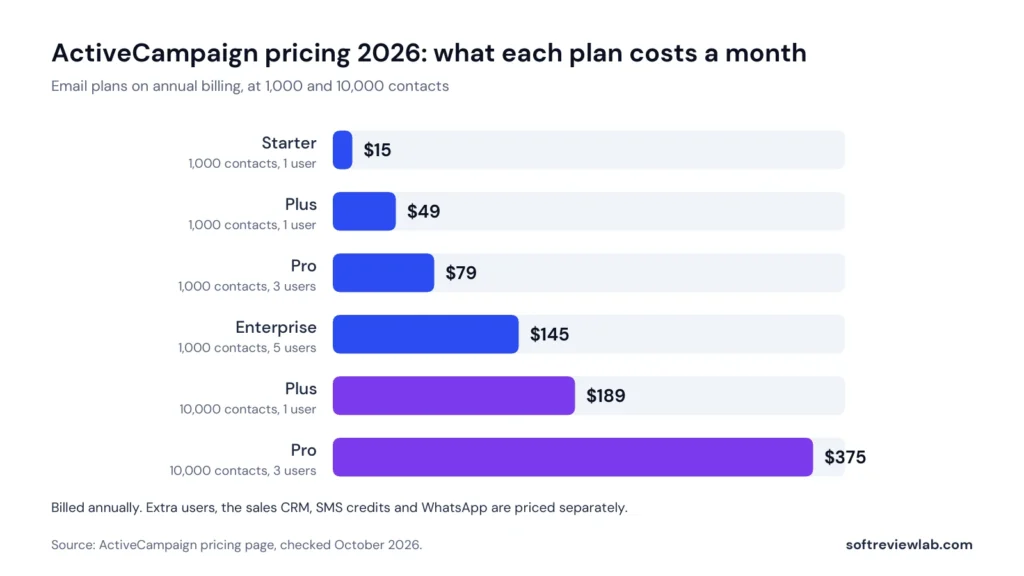
The entry price is fair. $15 a month for 1,000 contacts is in line with other email tools I have reviewed at that size. The pattern to understand is what happens next. On Starter, going from 1,000 to 2,500 contacts takes the price from $15 to $39, and at 10,000 contacts it is $149, almost ten times the starting figure for ten times the contacts. Pro goes from $79 to $375 over the same range.
There is a second pattern that works in the buyer’s favour. The gap between Starter and Plus shrinks as the list grows. At 1,000 contacts Plus costs more than three times as much as Starter. At 10,000 contacts the difference is $40 a month, $149 against $189, and Plus removes the five-action limit and adds landing pages. At that size I would not consider Starter at all.
Setup
Per month
Per year
Starter, 1,000 contacts
$15
$180
Plus, 1,000 contacts
$49
$588
Plus, 2,500 contacts
$95
$1,140
Pro, 2,500 contacts
$149
$1,788
Plus, 10,000 contacts
$189
$2,268
Pro, 10,000 contacts
$375
$4,500
What a year of ActiveCampaign costs on annual billing, before tax and add-ons
Monthly price of ActiveCampaign email plans on annual billing, at 1,000 and 10,000 contacts. Source: ActiveCampaign pricing page, October 2026.
These figures leave out everything sold separately. The add-on prices are not on the public site, so I asked ActiveCampaign’s support team, and this is what it gave me in writing in October 2026, as monthly prices:
Add-on
Starter
Plus
Pro
Extra user
$10, and only one extra user allowed
$15
$30 (3 users included)
Extra user on an account with the CRM add-on
Not available
$39
$59
Enhanced CRM (Pipelines and Sales Engagement)
Not available
$85
$139
Custom reporting
Not available
$159
$159
Transactional email, 10,000 emails
$15
$15
$15
SMS, base package of 1,000 credits
Not available
$21
$21
ActiveCampaign add-on prices a month, from its support team (October 2026)
Those numbers change the picture for anyone who wants more than email. On monthly billing at 1,000 contacts, Plus with the CRM add-on is $59 plus $85, or $144 a month, before SMS or extra users. Enterprise prices for the add-ons were not part of the answer. For a business that needs email automation only, the plan table above is the real cost. For a business that wants the CRM and texting as well, it is the floor.
If the plans look like a possible fit and you want to check the price at your own contact count, ActiveCampaign’s pricing page has a slider for it.
How ActiveCampaign Counts Contacts
This is the detail most buyers miss, and it changed recently. According to ActiveCampaign’s help article on reaching your contact limit, for accounts created on or after November 3, 2025, every contact counts toward your limit regardless of list status. Older accounts are counted on active contacts only. The practical meaning for a new customer is that people who unsubscribed or whose address bounced can still take up space in your paid limit until you remove them.
The same article explains what happens at the limit. Contacts can still arrive through forms, integrations and the API. Email sending stops until you upgrade: campaigns that have not started will not send, and automations keep running but skip their email steps. ActiveCampaign’s pricing FAQ says you will never be locked out of your account, which is accurate as far as it goes, since you can still log in and build. But a quiet pause in sending is the kind of problem you hear about from a customer first. There is an auto-upgrade setting that moves you to the next contact level automatically, and the terms say the higher fee then applies immediately on a pro-rated basis. Choose deliberately: auto-upgrade protects your sending, and switching it off protects your budget. Either way, clean your list every month.
Send Limits and Overage Fees
Each plan has a monthly email allowance tied to your contact limit: ten times on Starter and Plus, twelve times on Pro and fifteen times on Enterprise. With 2,500 contacts on Plus that is 25,000 emails a month, which is ten emails per contact and more than most small businesses send.
If you go over, the help center’s article on send limits and overage fees says sending continues and each extra email costs $0.005, which is $5 per thousand. It also says that if the extra sends reach three times your limit, sending is switched off until the next month. In-app warnings appear at 75%, 90% and 100% of the allowance. The limits cover campaigns and automation emails, not one-to-one or transactional emails. One difference to know: the billing page inside a trial account showed 50,000 email sends a month on Starter and Plus and 60,000 on Pro and Enterprise at 1,000 contacts, which is more than these multiples give. When I asked about it, ActiveCampaign’s support team confirmed the multiples above, 10 times on Starter and Plus, 12 on Pro and 15 on Enterprise, and asked for a screenshot to look into the higher figure. Plan on the multiples.
WhatsApp and Bundle Pricing
Plan
5,000 WhatsApp contacts
10,000 WhatsApp contacts
Lines and users
Monthly WhatsApp messages
Support
Core
$99
Not offered above 7,500 contacts
Up to 2 lines, 3 users
25 times your contact limit
Basic
Advanced
$99
$255
Up to 5 lines, 5 users
50 times your contact limit
Priority
Premium
$218
$692
Up to 5 lines, 8 users
100 times your contact limit
Priority, with a dedicated account team
ActiveCampaign WhatsApp plans: price a month on annual billing (pricing page, October 2026)
Every WhatsApp plan includes the shared team inbox, broadcasts, chatbots, flows, forms, landing pages and a Zapier connection. Core stops there. Advanced adds connected flows, advanced flow steps, team assignments, Meta conversion tracking, contact scoring, the API and webhooks, custom branded forms and landing pages, priority support, and the option to add email marketing. Premium adds single sign-on, a dedicated account team and an uptime agreement.
Core and Advanced showed the same $99 price at 5,000 contacts when I checked, which makes Advanced the obvious choice at that size. Message credits for outbound templates are prepaid on top of the plan, and extra users and extra lines are sold as add-ons.
Plan
1,000 email and 5,000 WhatsApp contacts
2,500 email and 5,000 WhatsApp contacts
10,000 email and 10,000 WhatsApp contacts
Plus
$112
$158
$390
Pro
$142
$212
$576
Enterprise
$284
$394
$1,135
ActiveCampaign email and WhatsApp bundles: price a month on annual billing (pricing page, October 2026)
For comparison, Plus email alone at 2,500 contacts is $95 and a standalone WhatsApp plan at 5,000 contacts is $99, a total of $194 bought separately against $158 for the Plus bundle. On the listed prices the bundle is cheaper if you need both channels. The billing page inside a trial account spells out what each bundle contains: Plus comes with the Core level of WhatsApp (3 users and up to 2 lines), Pro with the Advanced level and Enterprise with the Premium level. The public pricing page lists up to 5 lines on the Plus bundle, and ActiveCampaign’s support team confirmed in writing that the Plus bundle includes up to 5 lines, with the 2-line limit applying to the Core WhatsApp plan. If you rely on more than two lines, make sure your order shows five.
Billing, Cancellation and Refunds
ActiveCampaign’s terms describe a recurring subscription billed monthly, quarterly or annually. The account owner can cancel at any time from the billing page or by email, and cancellation takes effect at the end of the current period. Not using the account does not count as cancelling. The help center’s cancellation article adds one exception: accounts on an annual commitment that is paid monthly cannot cancel in the dashboard and have to contact the customer team.
On refunds, ActiveCampaign’s pages say two different things, and you need both to get the picture. The pricing page advertises a 30-day guarantee with a full refund if you are not satisfied. The guarantee’s terms, last updated February 4, 2026, limit it to first-time paying customers who buy directly from ActiveCampaign, and ActiveCampaign’s support team told me in writing that it applies only to newly created accounts on annual plans. To claim, you have to cancel the subscription and open a support ticket asking for the refund, both within 30 days of purchase. SMS credits, WhatsApp credits and one-time purchases are excluded, the refund is described as being at ActiveCampaign’s discretion, and the company can end the promotion at any time. No end date had been announced when I asked.
The help center’s refund policy, updated September 1, 2026, states the general rule: the company does not give full or partial refunds. The terms of service I read contain no refund clause for subscriptions at all. Put together, the reasonable reading is that the 30-day guarantee is a promotion for new accounts on annual plans, and outside it you should assume no refund, including for the unused months of an annual plan. That makes the first 30 days of a paid plan the time to decide.
Monthly plans can also be paused, which is one more reason to ask for monthly billing if you are unsure. The help center’s pause article says a pause lasts up to three months, starts at the end of the current billing term, can be used once every twelve months, and stops billing. You cannot log in while the account is paused, so export anything you need first. Annual plans cannot be paused.
One more point for charities: ActiveCampaign’s FAQ lists a 20% discount for non-profits with proof of status, arranged through its sales or support team.
ActiveCampaign Free Trial and Money-Back Guarantee
ActiveCampaign has no permanent free plan. It has a 14-day free trial, and the trial page says no credit card is needed. I went through the sign-up form in October 2026 and it did not ask for card details, so the trial cannot turn into a charge on its own. The FAQ confirms that you pay only if you choose to upgrade.
The limits, from the help center’s trial article and the FAQ:
Length: 14 days. One extension can be requested through support, and ActiveCampaign says not every request is granted.
Features: the trial runs on Pro-level features, so you see more than Starter or Plus would give you.
Sending and contacts: up to 100 email sends in total. ActiveCampaign’s support team confirmed there is no limit on the number of contacts you can add.
Users: one.
Test emails: these go only to your own address, and your sending domain has to be verified before anything is sent.
Not available: the SMS add-on, attaching a domain to a landing page, and the preference center.
Two cautions follow from that list. First, 100 sends is enough to test the builder and one small automation, and not enough to judge deliverability or results. Second, because the trial shows Pro features, note which ones you used before choosing a plan. Predictive sending, conditional content and attribution will not be there on Starter or Plus, and Starter will also cut your automations to five actions.
After the trial, the 30-day guarantee described above gives a new account on an annual plan a second window. Used together, that is about six weeks to decide. The condition is that you act inside the window: cancel and file the refund ticket before day 30, and remember that SMS and WhatsApp credits are not covered.
If ActiveCampaign sounds like it fits the way you want to follow up with customers and you would like to try it, you can start the 14-day free trial here. No card is asked for at sign-up.
ActiveCampaign Integrations, Setup and Support
What ActiveCampaign Connects To
Integrations are one of ActiveCampaign’s clearest strengths. Its apps directory listed 1,056 apps and integrations when I checked in October 2026, and the pricing comparison describes more than 1,000.
Type
Examples
Plans
Ecommerce, standard
Shopify, WooCommerce, Square
All plans
Ecommerce, premium
BigCommerce, Magento, Shopify Plus
Pro and Enterprise
CRM, standard
Freshsales, Pipedrive, Zoho
All plans
CRM, premium
Salesforce, Microsoft Dynamics, Zendesk
Enterprise
Payments, scheduling and team chat
PayPal, Stripe, Calendly, Eventbrite, Slack
Plus, Pro and Enterprise
Ad platforms
Google, Facebook and LinkedIn ads
Plus, Pro and Enterprise
Email inboxes
Gmail and Outlook
All plans
AI assistants
Claude and ChatGPT through MCP
All plans
Everything else
Zapier, an API and webhooks
All plans
ActiveCampaign connections by type and plan (pricing page plan comparison and apps directory, October 2026)
For an online shop, the ecommerce connection is what makes the automation worthwhile, because it feeds orders and abandoned carts into the contact record. The plan comparison shows abandoned cart on every plan, product catalogue and coupons from Plus, and recurring payments on Pro and Enterprise. A shop owner should still check during the trial that the data arrives as expected with their own store connected.
Setup, Migration and the Learning Curve
ActiveCampaign’s pricing page promises free migration and onboarding, and the FAQ says migration can include importing lists, contacts, custom fields and tags, and recreating forms, automations and email templates, with the level of help depending on your plan. The plan comparison grades onboarding and migration support as basic on Starter and Plus and priority on Pro and Enterprise. ActiveCampaign’s support team explained the difference in writing. Basic means self-guided help, such as ActiveOnboarding, training, workshops, tutorials and the help center, and eligible customers may also get up to 10 account items migrated for them, such as lists, forms, templates or automations. Priority adds an assigned onboarding specialist and one-to-one sessions. Eligibility depends on the plan, the account’s value, when you buy and the type of account, and is confirmed only after you pay, so do not count on more than the self-guided help on Starter or Plus.
The trade-off for all this capability is time. An automation platform asks more of you than a newsletter tool: you have to decide your triggers, write the emails, set the waits and test each path. The recipes and the AI builder shorten that work, and they do not remove it. Before you send anything, authenticate your sending domain. The help center says a verified domain is needed even to send a test during the trial, and it is the base of good inbox placement. My email deliverability guide explains the setup in plain language.
Support
The pricing page’s plan comparison lists email and chat support on every plan, graded basic on Starter and Plus and priority on Pro and Enterprise. A dedicated account team and an uptime agreement are listed for Enterprise only. The plan pages do not list phone support for customers.
I tried the support myself with a set of nine pricing and plan questions sent through the in-app chat during the trial in October 2026. The chat agent answered the first question, then moved the rest to email, saying a long list was better handled there, and the written reply arrived the same day, within the 24 hours promised. The answers were specific, including add-on prices that are not on the public site, and one question about send limits came back with a request for a screenshot. Customer reviews on support are mixed, which the ratings section covers. My advice is to put billing and pricing questions in writing, by email, and keep the reply.
ActiveCampaign Data, Privacy and Terms
ActiveCampaign, LLC is a US company based in Chicago. Its terms of service were last updated on December 23, 2025 and its privacy policy on October 1, 2026. These are the points a small business should know before uploading a customer list:
Where data goes: the terms say data is processed in the United States, and the privacy policy lists ActiveCampaign locations in the United States, Australia, Ireland, Brazil and Costa Rica. The policy says the company takes part in the EU-U.S. Data Privacy Framework and its UK and Swiss extensions.
Your contact data: the terms say it is not disclosed to third parties except service providers, in a sale of the business, or where the law requires it.
AI training: the terms allow ActiveCampaign to use your marketing content and contact data internally to train and improve its services.
After you leave: archived contacts can be restored for up to one year, and there is no access to data after cancellation. The terms tell customers to keep their own backups, so export your lists and reports before you cancel.
Publicity: the terms let ActiveCampaign use your business name and logo to identify you as a customer.
Account termination: ActiveCampaign can suspend or end an account at its discretion, and the help center says accounts closed for breaking the terms get no refund.
Disputes: Illinois law applies, disputes go to arbitration in Cook County, and claims must be brought within one year. You can opt out of arbitration by email within 30 days.
Liability: limited to the amounts you have paid.
On security, ActiveCampaign’s security page says multi-factor authentication is available on every account, single sign-on is supported (the pricing page places it on Enterprise), vulnerability scans run daily, and a SOC 2 report and a penetration test attestation are available through its trust center. The page says the company focuses on GDPR, SOC 2 and HIPAA compliance, with HIPAA support listed on Enterprise. It does not name its hosting provider or mention ISO 27001.
None of these terms is unusual for US marketing software. The two I would act on are the AI training clause, which matters if your contact data is sensitive, and the loss of access after cancellation, which makes an export the first step of leaving.
What Customers Say About ActiveCampaign
ActiveCampaign has a large public review record, and it tells two different stories.
Platform
Rating
Reviews
What stands out
G2
4.4 out of 5
14,809
A very large review base, and a G2 Top 100 badge on the profile
Capterra
4.6 out of 5
2,570
93% positive, 5% neutral and 2% negative. Praise for email automation, criticism of the builder tools and of bugs
Trustpilot
2.7 out of 5
1,446
Labelled Poor. Profile claimed in February 2021. ActiveCampaign has replied to 50% of negative reviews, typically within two weeks
ActiveCampaign customer ratings (checked October 2026)
On G2 and Capterra the picture is strongly positive. Capterra’s summary shows the email automation features as the most praised part of the product, and names clunky builder tools and frequent bugs and glitches as the most common complaints.
Trustpilot is much lower. Trustpilot notes that ActiveCampaign has no recent history of asking customers for reviews there, and a profile that is not fed by review invitations tends to collect more complaints than praise. That context matters, and it does not make the complaints disappear. A 2.7 from more than 1,400 reviews, with only half of the negative ones answered, is a pattern a buyer should weigh. Read the most recent reviews yourself and note the themes before you commit to an annual plan.
What I take from the pattern: the product is well regarded by the large number of people who review it on G2 and Capterra, the editing tools are its weak point, and the unhappy customers are a minority that is large enough to notice. The sensible response is to protect yourself on the commercial side. Know your contact count, understand the refund window, and keep written records of what you were told.
ActiveCampaign Pros and Cons
What Works
Automation depth: a visual builder with branching, split paths and goals, plus more than 950 recipes
Unlimited automation actions from Plus upward
AI tools in every plan, including campaign and automation builders, and connections for Claude and ChatGPT
More than 1,000 integrations, with Shopify, WooCommerce and Square on every plan
A 14-day trial that needs no card, followed by a 30-day money-back guarantee for new annual accounts
Free migration and onboarding help, email and chat support on every plan, and detailed written answers within a day when I asked
Going over the send limit does not stop your emails: sending continues at $0.005 an email
Strong ratings from large review bases on G2 and Capterra
What Doesn’t
Starter allows only five actions per automation, which rules out most real workflows
The price climbs quickly with list size: Pro goes from $79 to $375 a month between 1,000 and 10,000 contacts
For accounts created since November 2025, all contacts count toward the limit, whatever their status
The sales CRM, SMS, custom reporting and extra users cost extra, at prices given only on request: $85 a month for the CRM and $159 for custom reporting on Plus
Only one user on Starter and Plus
Monthly billing costs 20 to 25 percent more on Plus and Pro, and outside the 30-day guarantee for new annual accounts the stated policy is no refunds
Email sending stops when you pass your contact limit unless auto-upgrade is on
The builder tools draw regular criticism in customer reviews
A 2.7 rating on Trustpilot, with half of the negative reviews unanswered
ActiveCampaign Scorecard: How I Reached 7.6 out of 10
I score every tool on the same five criteria, each weighted equally. Here is the reason behind each number.
Criterion
Score
Why
Ease of use
7.0
Recipes, an AI builder and free onboarding shorten the start, and Capterra reviewers rate the product highly overall. It is still an automation platform with a learning curve, and the builder tools are among the most common complaints in Capterra’s summary.
Features
9.0
Branching automation with goals and split paths, more than 950 recipes, AI tools in every plan, attribution, SMS and WhatsApp. The five-action cap on Starter and the sales CRM being a paid add-on keep it from a higher score.
Value for money
6.5
The entry price is fair, going over the send limit is cheap, and there is a 30-day guarantee. Against that, monthly billing costs more and has to be requested, the price rises steeply with list size, new accounts are billed on all contacts, Starter and Plus include one user, and add-ons such as the $85 CRM are priced only on request.
Integrations
9.0
More than 1,000 apps, the main ecommerce platforms on every plan, an API, webhooks and MCP connections for AI assistants. Premium CRM integrations are reserved for Enterprise.
Support and trust
6.5
Email and chat support on every plan, with detailed written answers within a day when I asked, free migration, a published guarantee and a SOC 2 report on request. Held down by refund pages that contradict each other, add-on prices given only on request, the AI training clause, and a 2.7 on Trustpilot with half of the negative reviews unanswered.
ActiveCampaign scorecard with the reason for each score
ActiveCampaign scorecard: five equally weighted criteria averaged into the overall score.
The sum is (7.0 + 9.0 + 6.5 + 9.0 + 6.5) ÷ 5 = 7.6. The score describes how well ActiveCampaign fits a small or mid-sized business buying it for email automation. A newsletter-only sender would get less value from it, and a team that uses the automation fully would get more.
Common Mistakes When Buying ActiveCampaign
Most of the avoidable costs come from a handful of decisions made in the first week.
Buying Starter for automation. Five actions per automation is the limit, so plan on Plus if automation is the reason you are buying.
Choosing a plan from the trial. The trial shows Pro features, so list what you actually used before you pick.
Ignoring how contacts are counted. On a new account every contact counts, so remove unsubscribed and bounced contacts regularly.
Leaving auto-upgrade unexamined. Decide whether you want your sending protected or your budget protected, and set it on purpose.
Paying for a year without a plan to test. Annual billing is the default on the billing page, and the stated policy outside the 30-day guarantee is no refunds. If you are unsure, ask for monthly billing.
Missing the guarantee steps. A refund needs both a cancellation and a support ticket inside 30 days.
Assuming the CRM and SMS are included. Both are add-ons priced only on request ($85 a month for the CRM and $21 for 1,000 SMS credits on Plus), and neither is offered on Starter.
Cancelling before exporting. Access to your data ends with the subscription.
ActiveCampaign Alternatives Worth a Look
ActiveCampaign is a strong choice for automation and a poor one for some other needs. These are the tools I would compare it with, depending on what you are trying to do.
Sends receipts, password resets and notifications from your app or site. It is not a marketing tool
ActiveCampaign alternatives and how they differ
I have reviewed each of these in full. I compare ActiveCampaign with the first of them in ActiveCampaign vs Mailchimp, and two of the others in Campaigner vs Mailchimp. Other names that come up often in this category are Brevo, Klaviyo and HubSpot. I have not reviewed them yet, so I am not ranking them here. If you are still deciding what kind of email tool you need, start with my guide on how to choose email marketing software.
Who Should Use ActiveCampaign and Who Should Skip It
ActiveCampaign Is a Good Fit If
You want emails that respond to what contacts do, and you have at least one person willing to build and maintain the automations
You run an online shop on Shopify, WooCommerce or Square and want abandoned cart and post-purchase follow-up
You sell a service with a sales process and want marketing and lead follow-up to share one contact record
You expect to add channels later, such as SMS or WhatsApp, and prefer one platform for all of them
Your list is small to mid-sized now, and the revenue from better follow-up can cover a price that rises with it
Skip ActiveCampaign If
You send one newsletter a month and have no plans to automate. A simpler tool will cost less and take less time
You need a free plan to get started
Your list is large and your margin per contact is thin
You want a full sales CRM included in the base price
Several people need to log in and you want to stay on the cheapest plans
You need a clear refund right beyond the first 30 days
How to Test ActiveCampaign Before You Pay
A trial only helps if you test the things that will decide your purchase. Fourteen days and 100 sends go quickly, so plan them.
Before you sign up, write down the two or three automations your business needs most.
Start the trial and verify your sending domain on day one, since nothing sends without it.
Import a small sample of real contacts and check how they count toward the limit.
Build your most important automation from a recipe, then count its actions. If it needs more than five, Starter is out.
Design one real newsletter in the email designer. The builder tools are what reviewers criticise most, so judge them yourself.
Connect your shop or your main app and confirm the data you need arrives on the contact record.
Try the AI campaign builder once and read the draft critically.
Open a support chat with a real question, such as the price of the SMS or CRM add-on, and see how quickly and clearly it is answered.
Note which Pro-only features you used, then price the plan you need at your real contact count.
If you buy, put a reminder in your calendar a week before day 30 to decide whether to keep it.
ActiveCampaign Review Verdict: Is ActiveCampaign Worth It in 2026?
ActiveCampaign earns 7.6 out of 10. It scores higher on features and integrations than any other email tool I have reviewed so far: the automation builder covers what a small business needs and a good deal more, AI tools come with every plan, and it connects to almost anything.
What holds the score down is cost and clarity. The price rises steeply with your list, new accounts pay for every contact, the CRM and SMS are extra, at prices you only get by asking, and ActiveCampaign’s own pages disagree about refunds. The Trustpilot rating shows that a noticeable minority of customers have ended up unhappy.
My advice is simple. If you only need newsletters, choose something simpler. If you want automation, skip Starter unless your list is small and your workflows are short, plan on Plus, keep your list clean, and treat the trial and the 30-day guarantee as one six-week test with a clear decision at the end. Used that way, ActiveCampaign is a sound choice for a business that is ready to automate its follow-up.
ActiveCampaign is used for email marketing and marketing automation. Businesses use it to send newsletters and to build automated sequences, such as welcome emails, abandoned cart reminders and lead follow-up, that are triggered by what each contact does. Paid add-ons extend it to a sales CRM, SMS and WhatsApp.
How much does ActiveCampaign cost in 2026?
On annual billing with 1,000 contacts, Starter is $15 a month, Plus is $49, Pro is $79 and Enterprise is $145. Prices rise with your contact count: at 10,000 contacts the same plans are $149, $189, $375 and $589. Monthly billing is available on request at higher prices, such as $59 for Plus and $99 for Pro at 1,000 contacts, and the sales CRM, SMS and extra users are priced separately.
Does ActiveCampaign have a free plan?
No. ActiveCampaign offers a 14-day free trial instead. The trial does not ask for a credit card, runs on Pro-level features and allows up to 100 email sends. You are charged only if you choose a paid plan.
Is ActiveCampaign the best email automation tool for a small business?
It is one of the strongest choices if automated follow-up is the main reason you are buying and someone on your team can set it up, because its automation builder goes deeper than simpler tools such as Mailchimp. It is not the best pick if you only send an occasional newsletter, want a free plan, or need several users on a small budget: Starter and Plus include one user, and Starter limits each automation to five actions.
Does ActiveCampaign include a CRM?
Every plan stores contacts with fields, tags and activity history. The sales CRM, with pipelines, deals, lead scoring and one-to-one email automation, is a paid add-on called Enhanced CRM. It is offered for Plus, Pro and Enterprise and not for Starter. ActiveCampaign’s support team quoted $85 a month on Plus and $139 on Pro, on monthly billing.
Can I get a refund from ActiveCampaign?
New accounts on annual plans can claim a full refund within 30 days of purchase under ActiveCampaign’s money-back guarantee. You must cancel and open a support ticket requesting the refund within those 30 days, and SMS and WhatsApp credits are excluded. Outside that guarantee, ActiveCampaign’s help center says it does not give full or partial refunds.
What happens if I go over my contact or send limit?
If you pass your contact limit, email sending stops until you upgrade, unless auto-upgrade is switched on, in which case you move to the next level and pay the pro-rated difference. If you pass your monthly send limit, sending continues and each extra email costs $0.005.
ActiveCampaign or Mailchimp: which is better?
They suit different buyers. Mailchimp is easier to start with and has a free plan, which makes it a better fit for newsletters and simple automation. ActiveCampaign has the deeper automation builder and more room to grow into, at a price that needs a clear return.
Sources and References
Every fact in this review comes from the pages below, checked in October 2026. Prices and terms change, so confirm them on ActiveCampaign’s own pages before you buy.
ActiveCampaign feature pages for marketing automation, email marketing, Active Intelligence, sales CRM, SMS and WhatsApp, and written answers from its customer experience team (October 2026)
G2, Capterra and Trustpilot review pages for ActiveCampaign (named, not linked)
“A strong scheduler for small businesses, built on content categories and evergreen recycling. The two cheaper plans include one user.”
From $29/mo ($24.17/mo billed yearly)Best for: Small businesses that want consistent posting across several networks14-day free trial with full Pro access, no credit card
“A leading call tracking platform with accurate attribution and useful AI features, held back by usage fees and add-ons that raise the real monthly cost.”
From $50/month billed annuallyBest for: Local service businesses and agencies that rely on phone leads14-day free trial, no credit card required
“An easy, all-in-one email platform with a real free plan and 300+ integrations, held back by pricing that climbs quickly with your list and weak support outside Premium.”
Free plan; paid from $13/monthBest for: Small businesses and creators starting email marketingFree plan for 250 contacts; 14-day trial on Essentials and Standard