
- Home
- Buyer’s guides
- B2B Email Deliverability Guide 2026: 9 Proven Fixes to Stop Landing in Spam
B2B Email Deliverability Guide 2026: 9 Proven Fixes to Stop Landing in Spam
B2B email deliverability guide for 2026: Gmail, Yahoo and Microsoft sender rules, 9 proven fixes, a 30-day recovery plan and real benchmarks.


By Abdullahi Abdirahman, Founder & Editor, SoftReviewLab. Updated October 2026.
Short answer: B2B email deliverability is the share of your emails that reach the inbox rather than the spam folder or nowhere at all. In 2026 it rests on four things: SPF, DKIM and DMARC set up and aligned for every domain you send from, a spam complaint rate below 0.1%, a clean, opted-in list, and steady sending volume. Gmail, Yahoo and Microsoft now enforce these as rules for bulk senders, so fix them first; content and design come after.
This guide is built from the published rules of Google, Yahoo and Microsoft, the relevant internet standards, independent benchmark reports and our own software reviews. It is practical guidance, not legal advice. Some tools named here are SoftReviewLab affiliate partners; this guide links only to our reviews of them. See our affiliate disclosure.
Table of Contents
What Decides Whether Your Emails Reach the Inbox in 2026
The stakes are real. Validity’s 2025 benchmark found that about one in six legitimate marketing emails never reached the inbox in 2024. At the same time, Gmail, Yahoo and Microsoft have turned best practice into hard rules. This guide explains those rules in plain language and gives you nine fixes you can apply this month.
- Must do: publish SPF, DKIM and DMARC for every domain you send from, aligned with your From address.
- Must do: offer one-click unsubscribe and honour requests within two days.
- Keep: your spam complaint rate below 0.1%, and never let it reach 0.3%.
- Avoid: bought lists, sudden volume spikes and sending cold outreach from your main company domain.
Why Inbox Placement Matters More in 2026
Validity analysed inbox placement across mailbox providers during 2024. The global average was 83.5% in the inbox, 6.7% in spam and 9.8% missing entirely. North America came in at 85.0%. Worse, placement fell during the year, from about 87% in the first quarter to 82.3% in the fourth, while spam placement almost doubled.
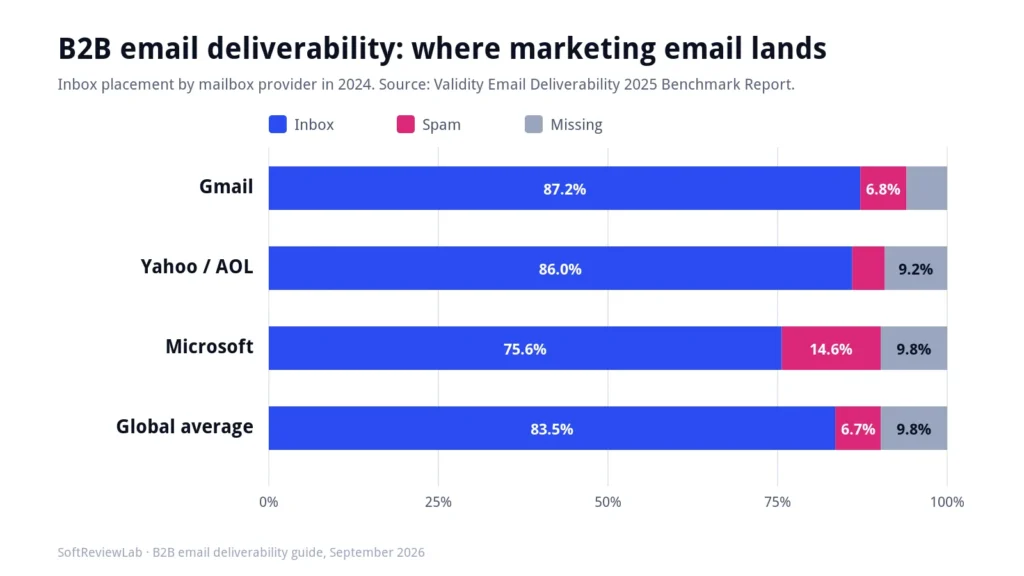
The provider gap matters for B2B senders. Microsoft placed only 75.6% of tested mail in the inbox and 14.6% in spam, compared with 87.2% inbox placement at Gmail. Because so many companies run on Microsoft 365, B2B marketers feel this gap more than consumer brands do.
Enforcement has also tightened. Microsoft began rejecting non-compliant bulk mail to Outlook.com, Hotmail and Live addresses on 5 May 2025. Google then warned that from November 2025, Gmail would ramp up enforcement, with temporary and permanent rejections for mail that fails its requirements.
Finally, buyers punish poor targeting. In a Gartner survey of 632 B2B buyers, 73% said they actively avoid suppliers that send irrelevant outreach. Deliverability and relevance are therefore two sides of the same problem: mail that people do not want eventually stops arriving for everyone.
The Sender Rules Every B2B Team Must Meet
The three largest consumer mailbox providers now publish similar requirements. The table summarises what each one expects from senders of marketing email.
| Provider | Who it applies to | Authentication | Unsubscribe | Complaint limit | In force since |
|---|---|---|---|---|---|
| Gmail | Close to 5,000+ messages a day to personal Gmail accounts, counted across your primary domain | SPF and DKIM, plus DMARC at least p=none, aligned with the From domain | One-click (RFC 8058) and a visible link; honour within 2 days | Below 0.1%; never 0.3% or higher | February 2024; stricter enforcement from November 2025 |
| Yahoo | Bulk senders; all senders must meet the basics | SPF and DKIM, plus DMARC at least p=none with aligned From domain | One-click (RFC 8058) and a visible link; honour within 2 days | Below 0.3% | February 2024 |
| Microsoft Outlook.com | More than 5,000 messages a day to Outlook.com, Hotmail and Live addresses | SPF, DKIM and DMARC at least p=none, aligned with SPF or DKIM | Functional unsubscribe link recommended | Not published as a number | 5 May 2025 |
Three Details Most B2B Teams Miss
First, Gmail’s bulk sender status is permanent. According to Google’s sender FAQ, once your domain crosses the threshold, it keeps that status even if volume later drops. Second, the count covers all mail from your primary domain, so sales, marketing and product email add up together.
Third, Google says these specific rules apply to personal Gmail accounts, not to Google Workspace business accounts. That does not make B2B senders exempt. Corporate mail filters, including Microsoft 365, Google Workspace and security gateways, apply their own checks, and they reward the same habits. Treat the published rules as the minimum standard for every recipient.
9 Proven Fixes for B2B Email Deliverability
The fixes below are ordered by impact. The first four address hard requirements; if you skip them, nothing else will save your inbox placement. The rest improve reputation over time.
Fix 1: Authenticate Every Sending Domain with SPF, DKIM and DMARC
SPF lists the servers allowed to send for your domain. DKIM adds a cryptographic signature that proves the message was not altered. DMARC ties the two to the domain in your From address and tells receivers what to do when checks fail.
Three practical rules help. Keep SPF within the 10 DNS lookup limit set by the SPF standard, because each email tool you add usually adds a lookup. Use 2048-bit DKIM keys where your DNS host supports them. And make sure your email platform signs with your own domain, not its shared domain, so DMARC alignment passes.
| DMARC stage | Policy | What it does | When to move on |
|---|---|---|---|
| 1. Monitor | p=none with rua reports | Collects reports without affecting delivery | When every legitimate sender passes for 2–4 weeks |
| 2. Quarantine | p=quarantine, optionally pct=25 then 100 | Sends failing mail to spam | When reports show no legitimate failures |
| 3. Enforce | p=reject | Blocks spoofed mail outright | Keep monitoring reports monthly |
Fix 2: Separate Your Sending Streams
Marketing newsletters, product notifications and sales outreach carry different risks. If they share one domain, a complaint spike from a cold campaign can damage delivery of password resets and invoices. Use separate subdomains, for example news.yourcompany.com for marketing and a distinct domain or subdomain for sales sequences.
Each subdomain still needs its own SPF, DKIM and DMARC setup. The goal is not to hide from filters but to keep one stream’s problems from spreading to the others.
Fix 3: Add One-Click Unsubscribe and Honour It Fast
Gmail and Yahoo require bulk senders to support one-click unsubscribe as defined in RFC 8058, alongside a visible unsubscribe link in the body, and to process requests within two days. Most modern email platforms add the required List-Unsubscribe headers automatically, but check a raw message to confirm.
The legal deadline is looser. The US CAN-SPAM Act allows 10 business days. Follow the stricter two-day rule, because an unsubscribe that is not processed quickly often turns into a spam complaint.
Fix 4: Keep Spam Complaints Below 0.1%
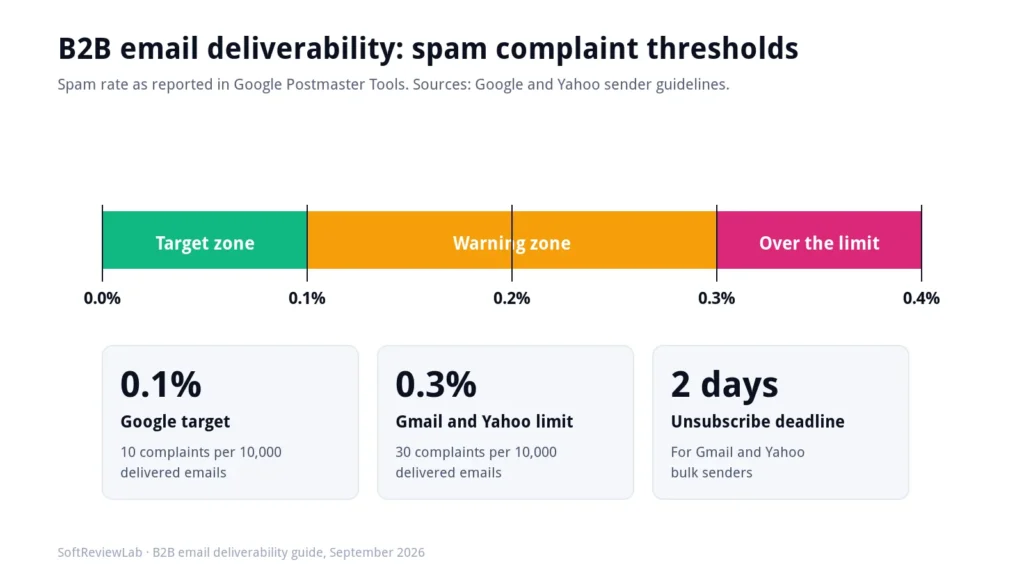
Complaint rate is the single strongest deliverability signal. Google asks senders to stay below 0.1% and never reach 0.3%, measured in Google Postmaster Tools. At 0.1%, that is one complaint per 1,000 delivered emails, so a single poorly targeted campaign can push you over.
The fastest ways to cut complaints are simple: email only people who opted in or have a clear business relationship with you, remind them why they are receiving the email, make the unsubscribe link easy to find, and send less often to less engaged contacts. A short welcome series helps from the first day, because it tells new subscribers what to expect; my guide to setting up a welcome email series shows how.
Fix 5: Verify and Clean Your List Continuously
B2B contact data decays quickly because people change jobs and companies change domains. Hard bounces tell mailbox providers that you are not maintaining your list. Verify new contacts at the point of capture, remove hard bounces immediately, and re-verify older segments before large sends.
Some platforms charge extra for this. Campaigner, for example, sells its Reputation Defender list-hygiene tool at 20% of the plan price, as covered in the tools section below. Standalone verification services are an alternative. Either way, budget for list hygiene as a normal operating cost.
Add a sunset policy as well. Contacts who have not clicked in six to twelve months should get a short re-engagement series and then be suppressed if they stay silent. Smaller, engaged lists deliver better than large, stale ones.
Fix 6: Warm Up New Domains and IP Addresses
Mailbox providers distrust new senders that suddenly send large volumes. When you start on a new domain, subdomain or dedicated IP, increase volume gradually and send your most engaged contacts first. The schedule below is an example, not a rule; your platform may recommend a different pace.
| Week | Daily volume (example) | Who to send to |
|---|---|---|
| 1 | 50–200 | Contacts who clicked in the last 30 days |
| 2 | 200–1,000 | Clicked in the last 90 days |
| 3 | 1,000–5,000 | Opened or clicked in the last 6 months |
| 4+ | Increase 30–50% a week if complaints and bounces stay low | Rest of the opted-in list |
Fix 7: Choose Shared or Dedicated IPs for the Right Reasons
On a shared IP, your reputation is pooled with other customers of your email platform. On a dedicated IP, it depends only on you. Dedicated IPs help large senders with steady volume, but a low-volume sender on a dedicated IP often performs worse, because providers see too little mail to build trust.
For most small and mid-sized B2B teams, a well-managed shared pool is the better choice. Ask your platform for its minimum recommended volume before paying for a dedicated IP, and remember that domain reputation now matters as much as IP reputation.
Fix 8: Write for Humans and Keep HTML Clean
Filters look at content signals too, though less than many marketers think. Use a recognisable From name, a subject line that matches the body, and links that point to your own branded domain. Avoid URL shorteners, image-only emails and attachments in marketing mail.
- Include a plain-text version alongside the HTML.
- Keep the HTML lightweight; Gmail clips messages larger than about 102 KB.
- Use a branded tracking domain rather than the platform’s default where possible.
- Put your postal address in the footer, as CAN-SPAM requires.
Fix 9: Monitor Reputation Every Week
You cannot fix what you do not measure. Register your domains with Google Postmaster Tools and Microsoft’s Smart Network Data Services, read your DMARC aggregate reports, and check bounce and complaint rates in your email platform after every send.
Seed testing adds another view. Send each campaign to test addresses at Gmail, Outlook, Yahoo and a Microsoft 365 business mailbox, and note where it lands. Track the results over time rather than reacting to a single test.
Cold Outreach vs Marketing Email: Different Risks
Many B2B companies send two kinds of email: opt-in marketing from an email platform and one-to-one cold outreach from sales tools. Cold outreach carries far higher complaint risk, so it should never share a domain with your newsletters or transactional mail.
Keep cold volumes low per mailbox, personalise genuinely, include an opt-out, and stop quickly when someone asks. If a sales tool promises thousands of cold emails a day from one domain, treat that as a deliverability risk, not a feature.
Legal Basics: CAN-SPAM, CASL and European Rules
Deliverability and compliance overlap, and the law applies to B2B email too. The FTC’s CAN-SPAM guide states that the law makes no exception for business-to-business email. Each violating email can cost up to $53,088. The core duties are accurate headers, honest subject lines, a postal address, a working opt-out and processing opt-outs within 10 business days.
Canada’s anti-spam legislation (CASL) is stricter: you generally need express or implied consent before sending commercial email. In the UK and EU, rules differ between corporate and individual subscribers, and data protection law still covers named work addresses; the UK ICO’s guidance is a good starting point. Check with a qualified adviser for your markets.
How Your Email Platform Affects Deliverability
Your platform cannot guarantee inbox placement, but it can make the right setup easy or hard. When you compare tools, look for the features below, and test each one during a trial rather than relying on a sales page.
| Feature | Why it matters | What to check |
|---|---|---|
| Custom domain authentication | Needed for DMARC alignment | Can you sign DKIM with your own domain? |
| Automatic one-click unsubscribe | Required by Gmail and Yahoo | Do raw headers include List-Unsubscribe-Post? |
| Bounce and complaint suppression | Protects reputation automatically | Are hard bounces and complaints suppressed at once? |
| List verification or hygiene tools | Reduces bounces | Included, or a paid add-on? |
| Engagement segmentation | Lets you sunset inactive contacts | Can you segment by last click date? |
| Deliverability support | Helps when problems start | Which plan includes human support? |
Tools to Consider by Need
The right tool depends on what you send, and many businesses end up with two: one platform for marketing email and one delivery service for website and app email, which also keeps those streams apart (Fix 2). These are the tools I have reviewed, with the deliverability point and the cost that matter most for each. My guide on how to choose email marketing software covers the rest of the decision.
| Need | Tools I have reviewed | Deliverability point to check | Cost to know |
|---|---|---|---|
| Newsletters and campaigns to a growing B2B list | Campaigner | Reputation Defender scans your contacts and flags invalid or risky addresses before you send | Reputation Defender adds 20% to any plan; plans from $14 a month for 1,000 contacts; 30-day free trial |
| Automated sequences that react to what each contact does | ActiveCampaign | You must verify your sending domain, even to send a test during the trial | No free plan; 14-day trial without a card, limited to 100 sends |
| A small list that is just starting | Mailchimp | Every contact counts toward the bill, including people who unsubscribed, so archive inactive contacts as part of your sunset policy | Free plan; Essentials $13 and Standard $20 a month for 500 contacts at the regular price |
| Receipts, invoices and password resets from your website or app | SMTP.com | A dedicated IP from the Starter plan, so your reputation depends only on your own sending | From $25 a month for 50,000 emails on a shared IP; dedicated IP from the $80 Starter plan (100,000 emails); no free plan |
A dedicated IP only pays off with steady volume (see Fix 7), so most small senders are better served by a shared IP at first. If you are not sure you need a paid delivery service yet, my guide to why website emails go to spam covers what to try first. To compare marketing platforms side by side, see Campaigner vs Mailchimp and ActiveCampaign vs Mailchimp, and if automation is your next step, read the B2B email marketing automation guide.
A 30-Day Deliverability Recovery Plan
If your emails are already landing in spam, follow this plan in order. Resist the urge to send a big campaign to test whether the problem is fixed.
Week 1: Diagnose
Check SPF, DKIM and DMARC for every sending domain and subdomain. Pull bounce, complaint and unsubscribe rates for the last 90 days, and look at Google Postmaster Tools for domain reputation trends.
Week 2: Repair
Fix authentication gaps, remove hard bounces and complaints, and suppress contacts with no clicks in the past year. Confirm one-click unsubscribe works by reading raw message headers.
Week 3: Rebuild
Send only to your most engaged segment, at a lower volume than usual. Make each email clearly useful and expected. Watch complaints after every send.
Week 4: Expand Carefully
If complaints stay under 0.1% and bounces stay low, add less engaged segments gradually. Start DMARC reporting if you have not already, and schedule a monthly deliverability review.
Benchmarks: What Good B2B Email Performance Looks Like
MailerLite’s 2025 benchmark study of 3.6 million campaigns reports medians by industry. The B2B-relevant figures below give you a rough reference for your own results.
| Industry | Open rate | Click rate | Click-to-open | Unsubscribe |
|---|---|---|---|---|
| Software and web app | 39.31% | 1.15% | 5.4% | 0.2% |
| Business and finance | 43.34% | 2.37% | 7.96% | 0.16% |
| Consulting | 45.96% | 2.41% | 7.67% | 0.23% |
| Marketing and advertising | 37.23% | 1.3% | 6.09% | 0.15% |
Treat open rates with caution. Apple Mail Privacy Protection marks many emails as opened automatically, so open rates overstate real attention. A sudden fall in clicks, or a rise in bounces or complaints, is a much better early warning of deliverability trouble. If your emails do arrive but still don’t turn into sales, the cause is usually the message, the offer or the follow-up rather than delivery; my article on why your email newsletter isn’t bringing in sales covers those causes.
B2B Email Deliverability Checklist
Use this checklist before every major campaign and once a quarter for a full review. If you cannot tick an item, fix it before you increase volume. Each line maps to one of the fixes above, so this checklist doubles as a quick audit.
- SPF, DKIM and DMARC pass and align for every sending domain and subdomain.
- SPF stays within the 10 DNS lookup limit after adding new tools.
- DMARC reports are collected and reviewed at least monthly.
- One-click unsubscribe headers are present, and a visible link sits in every footer.
- Unsubscribes are processed within two days.
- Spam complaints are below 0.1% in Google Postmaster Tools.
- Hard bounces and complaints are suppressed automatically.
- New contacts are verified at sign-up, and older segments before large sends.
- Contacts with no clicks in 6–12 months go through a re-engagement series, then suppression.
- Marketing, transactional and sales outreach use separate subdomains or domains.
- Volume increases are gradual, especially on new domains or IPs.
- Each campaign is seed-tested at Gmail, Outlook, Yahoo and a Microsoft 365 mailbox.
Teams that run this list every quarter rarely face sudden deliverability crises. Problems still happen, but they are caught at the first rise in bounces or complaints rather than after a month of lost pipeline.
How to Read a DMARC Report Without Being Technical
Once you publish a DMARC record with a reporting address, mailbox providers send you daily reports. They arrive as XML files that look intimidating, but you only need to answer three questions from them. If you haven’t published a DMARC record yet, my guide to what DMARC is and how to set it up starts with a monitoring record you can copy.
- Who is sending as my domain? Each report lists the servers that sent email using your domain. You should recognise every one: your email provider, your marketing platform, your CRM and any delivery service.
- Are my legitimate senders passing? Each source shows whether it passed SPF and DKIM alignment. If a tool you use is failing, add it to your SPF record or set up DKIM for it.
- Is anyone spoofing me? Unknown servers sending in your name are a sign of spoofing or a forgotten tool. Investigate before tightening your policy.
A free DMARC report reader, many of which are offered by email security vendors, turns the XML into a simple dashboard. When every legitimate source passes for a few weeks, move your policy from p=none to p=quarantine, and later to p=reject, which protects your domain from being used in phishing emails.
Common Deliverability Myths
- “Spam words cause most problems.” Modern filters weigh reputation and engagement far more than individual words.
- “A dedicated IP fixes deliverability.” It helps only with steady, high volume; otherwise it can hurt.
- “B2B email is exempt from the rules.” CAN-SPAM covers B2B email, and corporate filters reward the same practices.
- “High open rates prove good delivery.” Automatic opens inflate the number; watch clicks and complaints.
- “Bigger lists are better.” Unengaged contacts drag down reputation for everyone else on the list.
Frequently Asked Questions
What is B2B email deliverability?
B2B email deliverability is the share of your business emails that reach the recipient’s inbox rather than the spam folder or being blocked. It depends mainly on authentication, complaint rates, list quality and consistent sending.
Do Gmail’s sender rules apply to B2B email?
Google’s bulk sender rules apply to mail sent to personal Gmail accounts, not to Google Workspace business accounts. However, corporate filters use similar checks, so B2B senders should meet the same standards for every recipient.
Do I need DMARC for B2B email marketing?
Yes. Gmail and Yahoo require bulk senders to publish DMARC with at least a p=none policy, and Microsoft requires it for high-volume senders to Outlook.com. Start with p=none and move towards enforcement once reports are clean.
How long does it take to fix a poor sender reputation?
Most senders see improvement within two to six weeks after fixing authentication, cleaning the list and sending only to engaged contacts. Severe problems can take longer, and results depend on consistent sending.
References
- Validity. (2025). Email Deliverability 2025 Benchmark Report.
- Google. Email sender guidelines FAQ and Email sender guidelines. Accessed September 2026.
- Google. (2023, October). New Gmail protections for a safer, less spammy inbox.
- Yahoo. Sender best practices.
- IETF. RFC 7208: SPF, RFC 7489: DMARC and RFC 8058: One-click unsubscribe.
- Federal Trade Commission. CAN-SPAM Act: A compliance guide for business.
- CRTC. Canada’s anti-spam legislation. UK ICO. Direct marketing guidance.
- Gartner. (2025, June 25). Gartner sales survey finds 61% of B2B buyers prefer a rep-free buying experience.
- MailerLite. (2025). Email marketing benchmarks.
Prices move. Confirm the current price on the vendor’s own page before you buy. How we work.
Keep going
More buyer’s guides

How to Choose a CMS for a Business Website in 2026
How to choose a CMS for a business website: compare WordPress, Squarespace, Wix, Shopify and Webflow on cost, editing, exit options and fit, with 2026 prices.

AI Customer Support Chatbots: A Buyer’s Guide for Small Businesses
AI customer support chatbots explained for small businesses: 9 checks before you buy, real 2026 prices from 8 vendors, legal risks and a 14-day trial plan.