
- Home
- Comparisons
- Waalaxy vs LinkedIn Sales Navigator: What Small B2B Teams Actually Need
Waalaxy vs LinkedIn Sales Navigator: What Small B2B Teams Actually Need

Research-based comparison · not hands-on tested We compare the value each tool gives a specific kind of buyer, not which company is bigger or better, so there is no overall winner. How we compare.
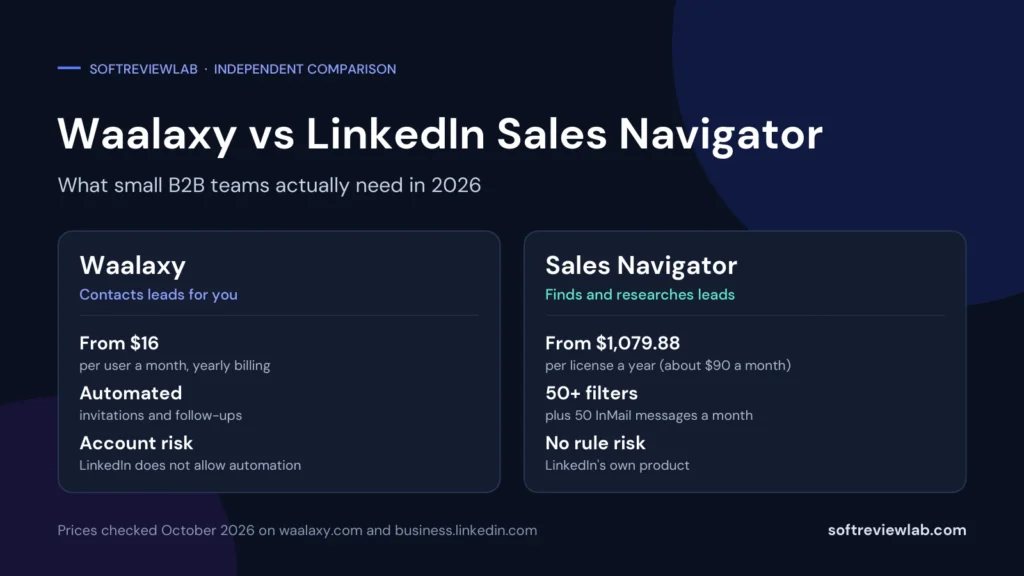
Short answer: in the Waalaxy vs Sales Navigator decision, the two tools do different jobs, so there is no overall winner. LinkedIn Sales Navigator helps you find and research the right people, and it is LinkedIn’s own product. Waalaxy sends connection requests and follow-up messages for you, which saves time but breaks LinkedIn’s rules on automation. A small B2B team that struggles to find good leads gets more value from Sales Navigator. A team that already knows who to contact and wants to save hours gets more value from Waalaxy, if it accepts the account risk.
Table of Contents
This Waalaxy vs LinkedIn Sales Navigator comparison looks at the value each tool gives a small B2B team, not at which company is bigger or better. It is research-based: I worked from each vendor’s official pricing pages and documentation and did not run live campaigns. SoftReviewLab is a Waalaxy affiliate and has no relationship with LinkedIn, as explained in our affiliate disclosure.
Waalaxy vs Sales Navigator at a Glance
| Waalaxy | LinkedIn Sales Navigator | |
|---|---|---|
| Main job | Automates LinkedIn invitations, follow-up messages and, on its top plan, emails | Finds, filters and researches leads and accounts on LinkedIn |
| Made by | WAAPI, a French software company | |
| Starting price | $19 per user a month, or $16 on yearly billing | Core from $119.99 a month, or $1,079.88 a year |
| Sends messages automatically | Yes, in timed sequences within daily quotas | No automated sequences listed; 50 InMail messages a month that you send yourself |
| LinkedIn’s rules | Waalaxy’s help center says it does not comply with LinkedIn’s terms | LinkedIn’s own product |
| Free trial | 14 days, started with a card | Free trial on Core and Advanced, card required |
| Best for | Teams that know who to contact and want to save time | Teams that need better lead lists and account research |
What Each Tool Is, in Plain English
LinkedIn Sales Navigator is a paid LinkedIn subscription for people who sell. It adds more than 50 search filters, saved lead and account lists, alerts when a lead changes job or posts something new, AI research summaries and 50 InMail messages a month so you can write to people you are not connected with. You still decide who to contact and you send each message yourself. LinkedIn describes its Core plan as best for individual sellers and its Advanced plan as best for sales teams.
Waalaxy is a separate tool that connects to your LinkedIn account and carries out outreach for you. You import a list of people, choose a sequence such as an invitation followed by three messages, write the messages once, and Waalaxy sends them over days or weeks within its daily limits. When someone replies, it stops the sequence for that person. My full Waalaxy review covers how it works, its pricing and its risks in detail.
So one tool is mostly about who to contact, and the other is about doing the contacting. That is why some teams use both: Waalaxy can import leads from a Sales Navigator search.
The Biggest Difference: Finding Leads vs Contacting Them
Before you compare prices, be honest about where your prospecting actually breaks down. Small teams usually have one of two problems.
- “We don’t know who to contact.” Your lists are vague, you reach the wrong job titles, or you can’t tell which companies are a fit. This is a research problem, and Sales Navigator is built for it.
- “We know who to contact, but we don’t have time.” You have a clear target and a message that works, but sending invitations and follow-ups by hand eats hours. This is a volume problem, and Waalaxy is built for it.
In my judgment, a tool that automates outreach to a poor list just sends more messages to the wrong people. If you are not yet sure who your best buyers are, fix the list first. If you already get good replies when you reach out by hand, automation is where the time saving is.
LinkedIn’s Rules: Where Each Tool Stands
This is the point that separates the two tools most clearly. Sales Navigator is sold by LinkedIn, so using it carries no rule-breaking risk. Waalaxy is different. LinkedIn’s help page about third-party software and extensions says it does not permit third-party software, bots or browser extensions that automate activity on its website, and Waalaxy’s own help article on LinkedIn warnings and restrictions says Waalaxy does not comply with LinkedIn’s terms of service. The same article explains that LinkedIn can show warnings, temporarily restrict an account and, in some cases, ban it.
Waalaxy’s help article on LinkedIn warnings and restrictions adds that restrictions are typically temporary, that they can repeat while an account is under review, and that Waalaxy has no way to recover a banned account. Waalaxy sets daily quotas to reduce the risk and advises users to build up a real, active profile before automating.
What this means for a small team: if LinkedIn is where clients find you and check your credibility, a restricted account is a real business cost. Sales Navigator is the safe choice on this point. Waalaxy is a trade: time saved in exchange for a risk you carry yourself.
Waalaxy vs Sales Navigator Pricing
Waalaxy Pricing
| Plan | Monthly billing | Yearly billing | Invitations |
|---|---|---|---|
| Pro | $19 per user a month | $16 | 300 a month |
| Advanced | $39 | $32 | 800 a month |
| Business | $69 | $55 | 800 a month, plus cold email |
LinkedIn Sales Navigator Pricing
| Plan | Monthly billing | Yearly billing | Best for, per LinkedIn |
|---|---|---|---|
| Core | From $119.99 a month | From $1,079.88 a year (about $90 a month) | Individual sellers |
| Advanced | From $159.99 a month | From $1,799.88 a year (about $150 a month) | Sales teams |
| Advanced Plus | Custom quote | Custom quote | Sales teams using an integrated CRM |
LinkedIn says annual billing saves about 25 percent on Core and about 6 percent on Advanced. Advanced Plus has no public price: LinkedIn quotes it on request, after a sales demo.
What You Would Really Pay: Worked Examples
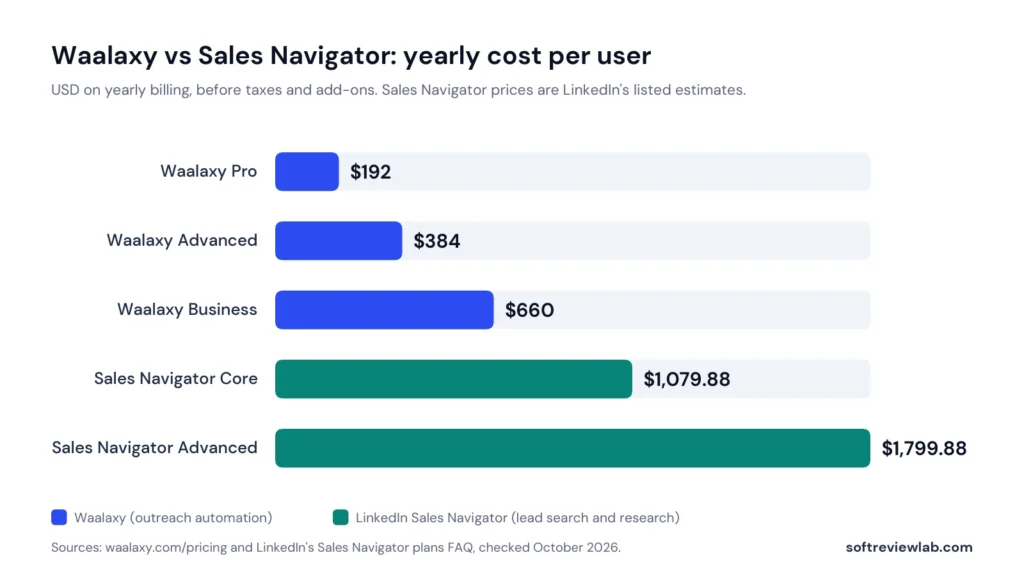
Here is the yearly cost per person on yearly billing, using the prices above:
| Setup | Per person, per year | Team of 3, per year |
|---|---|---|
| Waalaxy Pro only | $192 | $576 |
| Waalaxy Advanced only | $384 | $1,152 |
| Sales Navigator Core only | $1,079.88 | $3,239.64 |
| Sales Navigator Advanced only | $1,799.88 | $5,399.64 |
| Both: Waalaxy Advanced + Sales Navigator Core | $1,463.88 | $4,391.64 |
The gap is large. Sales Navigator Core costs about 5.6 times as much as Waalaxy Pro and about 2.8 times as much as Waalaxy Advanced. That doesn’t make it worse value, because it does a different job. It does mean a small team should be sure it will use the search and research features every week before paying for them.
Finding and Researching Leads
This is Sales Navigator’s home ground. According to LinkedIn’s plan table, every plan includes:
- Advanced search filters: more than 50 filters to narrow leads and accounts.
- Account IQ and Lead IQ: AI-generated summaries of an account or a lead, to cut research time.
- Relationship Explorer and Relationship Map: help you find the right people in a company and map the buying group.
- Alerts: real-time signals such as job changes and new posts.
The Advanced plan adds Buyer Intent, which shows when buyers are showing interest in your company, and TeamLink, which reveals introductions through your colleagues’ connections.
Waalaxy does not try to compete here. It has no lead database of its own. It imports people from a standard LinkedIn search, a Sales Navigator search, Recruiter Lite or a CSV file. Waalaxy itself notes that free LinkedIn accounts hit a monthly limit on commercial searches, and it recommends Sales Navigator for better filtering.
Fit: if finding the right people is your bottleneck, Sales Navigator is the better fit. Waalaxy depends on whatever list you feed it.
Outreach: Messages, InMail and Follow-Ups
Here the positions reverse. Sales Navigator gives you 50 InMail messages a month on every plan, which let you write to people you are not connected with. LinkedIn’s plan table lists no automated sequences or scheduled follow-ups, so each message is written and sent by you.
Waalaxy is built around sequences. Its quota article lists these daily limits:
| Action | Waalaxy Pro | Waalaxy Advanced and Business | Sales Navigator |
|---|---|---|---|
| Connection invitations | About 11 a day, 300 a month | Up to 100 a day, capped at 200 a week | Sent by hand, within LinkedIn’s own limits |
| Messages to connections | 120 to 150 a day, automated | 120 to 150 a day, automated | Sent by hand |
| Messages to non-connections | Through invitations | Through invitations | 50 InMail messages a month |
| Automatic follow-ups | Yes | Yes | Not listed |
| Email steps | No | Business plan only | No |
Waalaxy says LinkedIn caps invitations at about 200 a week, which is why its higher plans stop at 800 a month. It also notes that free LinkedIn accounts can add a note to only 5 invitations a month, so personalised invitation notes at volume need a paid LinkedIn plan.
Fit: if sending and following up is your bottleneck, Waalaxy saves far more time. If you send a small number of carefully written messages to senior people, 50 InMails a month may be all you need.
AI Features
Both tools use AI for writing, in different ways. Sales Navigator includes Message Assist on every plan, which drafts personalised outreach, plus Account IQ and Lead IQ for research. Waalaxy has Waami, an AI message generator that drafts campaign messages from a short description of your audience and offer.
I haven’t assessed the quality of either tool’s AI output. My view is that AI drafts are a starting point in both cases. A recent G2 reviewer of Waalaxy noted that making messages feel personal still takes manual work.
CRM and Integrations
The two tools take different routes, and the plan you need matters.
- Waalaxy: lists CRM sync with more than 2,000 tools and names HubSpot and Pipedrive. The connections run through Make, Zapier and n8n, and its pricing page lists those modules and API access from the Advanced plan.
- Sales Navigator: advanced CRM integrations with Salesforce, HubSpot, Microsoft Dynamics, Oracle and others are ticked only on Advanced Plus, the plan with custom pricing. Creating CRM leads and contacts from Sales Navigator and CRM import are also Advanced Plus features.
Fit: for a small team that wants leads pushed into a CRM without an enterprise contract, Waalaxy’s Advanced plan is the cheaper route. If your company already runs a large CRM and wants LinkedIn data inside it, that is what Sales Navigator Advanced Plus is for. If you are still choosing a CRM, my CRM buyer’s guide walks through the options.
Team Features
Waalaxy includes a team workspace, shared analytics, unified billing and duplicate prevention on every plan, so two colleagues don’t contact the same prospect. For five or more seats it offers an Enterprise plan with volume discounts and onboarding.
Sales Navigator keeps team features for its higher plans. Team seat management, centralised billing, TeamLink, Smart Links and team reporting start on Advanced. LinkedIn says you can buy up to five Advanced licenses online, and that a dedicated account team and tailored training are included only when you buy through a sales representative.
Fit: for a team of two to five, Waalaxy gives you team basics on the cheapest plan. Sales Navigator’s team features start on the Advanced plan, from $159.99 a seat on monthly billing.
Free Trials, Cancellation and Refunds
| Waalaxy | LinkedIn Sales Navigator | |
|---|---|---|
| Free trial | 14 days, with Business plan features | Free trial on Core and Advanced; length not stated on the plans page |
| Card required | Yes | Yes |
| What happens at the end | Converts to a paid plan unless you cancel | You are charged unless you cancel; LinkedIn sends a reminder 7 days before the trial ends |
| Who can get it | New accounts, at sign-up | Members with no paid LinkedIn subscription and no LinkedIn free trial in the past 365 days |
| Cancellation | Anytime, up to 24 hours before renewal; access until the period ends | Anytime; takes effect at the end of the month or paid year |
| Refunds | Within 15 days of your first subscription, per its terms | Not stated on the plans page |
Both trials need a card and both roll into a paid plan, so set a reminder a few days before the end. With Sales Navigator, note that an annual plan runs to the end of the paid year after you cancel.
Ease of Use and Support
Waalaxy is designed for people who have never automated outreach. It is cloud-based, so there is nothing to install, and customers on G2 praise its ease of use and quick setup more than anything else. Support runs by chat and email on weekdays, with a reply within 48 hours on Pro and within 4 hours on Advanced.
Sales Navigator sits inside LinkedIn, so the interface is familiar if you already use LinkedIn. On the Advanced plan, LinkedIn lists a dedicated account team and tailored training only for customers who buy through a sales representative. I haven’t compared support response times, because LinkedIn doesn’t publish them on its plans page.
What Customers Say
For Waalaxy, I collected ratings from three review sites in October 2026: 4.5 out of 5 on G2 from 1,601 reviews, 4.8 on Trustpilot from 1,299 reviews and 4.4 on Capterra from 253 reviews. The most common praise is ease of use, and the most common complaints are price and campaign management.
I haven’t collected customer ratings for Sales Navigator for this comparison, so I make no claim about how satisfied its customers are. LinkedIn quotes its own figures, such as members being connected to 4.3 times as many decision makers and a Forrester finding that the product pays for itself in six months. Those are vendor claims.
Pros and Cons of Each Tool
Waalaxy Pros and Cons
- Pro: low price, from $19 a month.
- Pro: automates invitations and follow-ups, and stops when a prospect replies.
- Pro: easy to set up, with team features on every plan.
- Con: LinkedIn does not allow automation tools, and the account risk is yours.
- Con: no lead database or research features of its own.
- Con: the inbox costs extra, and email needs the top plan.
Sales Navigator Pros and Cons
- Pro: LinkedIn’s own product, so no rule-breaking risk.
- Pro: strong search, alerts and AI research on every plan.
- Pro: 50 InMail messages a month to people outside your network.
- Con: much more expensive, from $119.99 a month.
- Con: no automated sequences; you send every message yourself.
- Con: CRM integrations need Advanced Plus, which has custom pricing.
Using Both Together: How It Works
Because the tools do different jobs, some teams combine them. The usual pattern is simple: build a tightly filtered lead list in Sales Navigator, import that search into Waalaxy, and let Waalaxy run the invitations and follow-ups.
This gives you better targeting and saved time, at a cost of about $1,464 per person a year on yearly billing. Two cautions apply. First, a Sales Navigator subscription does not change the rule issue: automation through Waalaxy is still automation. Second, start with one person and one campaign before paying for both tools across a team.
Real-World Scenarios: Which Tool Fits?
A Solo Founder or Consultant
You sell your own time and your LinkedIn profile is your shop window. If you need ten good conversations a month, manual outreach or Sales Navigator Core is the safer route. If you already know your niche and want to reach more people, Waalaxy Pro at low quotas is the cheapest way to test automation.
A Three-Person B2B Sales Team
Cost matters here. Three seats of Sales Navigator Core cost about $3,240 a year, against $576 for Waalaxy Pro or $1,152 for Waalaxy Advanced. Many small teams would do well to give Sales Navigator to the one person who builds the lists and decide on automation separately.
A Recruiter
Waalaxy can import from Recruiter Lite as well as Sales Navigator, so it fits recruiters who contact many candidates. The same LinkedIn rule applies, and a recruiter’s account is central to the job, so weigh the risk carefully.
An Agency Managing Outreach for Clients
Agencies care about team workspaces and running several accounts. Waalaxy includes team features on every plan and has an Enterprise option. The risk question is sharper for agencies, because the accounts at risk may belong to clients. Get the client’s informed agreement first.
A Larger Sales Team With a CRM
If you run Salesforce, HubSpot or Dynamics and want LinkedIn data inside it, Sales Navigator Advanced Plus is designed for that. Budget for a custom quote and ask about onboarding.
Mistakes to Avoid
- Buying automation to fix a targeting problem. More messages to the wrong people won’t help.
- Buying Sales Navigator and not using it. At about $90 a month or more, it needs weekly use to pay off.
- Assuming Sales Navigator makes automation safe. It doesn’t change LinkedIn’s rules on third-party tools.
- Starting Waalaxy at full quotas on a quiet account. Warm up the account and start low.
- Forgetting the trial end date. Both trials take a card and both convert to paid plans.
- Paying yearly before testing. A month on monthly billing costs more per month but shows whether the tool fits.
Other Options to Consider
- Manual outreach on a free LinkedIn account. No cost and no automation risk. Ten thoughtful messages a day is enough for many small businesses.
- LinkedIn’s other Premium plans. LinkedIn sells other paid subscriptions besides Sales Navigator, such as Premium Business. I haven’t checked their prices or features for this comparison, so look at LinkedIn’s own plan pages to see whether one covers what you need.
- Email-first outreach. If your buyers answer email, a dedicated email tool may suit you better. My guide to email automation workflows covers the basics.
- Other LinkedIn automation tools. They exist, and LinkedIn’s rule applies to all of them. Read each tool’s terms before you connect your account.
Waalaxy or Sales Navigator: Which Should You Choose?
Choose Waalaxy If
- You already know exactly who your buyers are.
- Manual invitations and follow-ups are taking hours each week.
- Your LinkedIn account is established and active.
- You understand and accept that automation breaks LinkedIn’s rules.
- Your budget is closer to $20 than $120 a month per person.
Choose Sales Navigator If
- Your main problem is finding and qualifying the right leads.
- You sell to senior people and send a small number of careful messages.
- You can’t risk a restriction on your LinkedIn account.
- You will use search, alerts and research every week.
- You have the budget for $1,080 a year or more per person.
Use Both If
- You need precise targeting and high outreach volume.
- You accept the automation risk and the combined cost of about $1,464 per person a year.
Use Neither If
- You need only a few conversations a month. A free account and a focused hour a week will do.
Waalaxy vs Sales Navigator: My Verdict
These tools are not rivals in the usual sense. Sales Navigator is a research and targeting product from LinkedIn that costs more and carries no rule risk. Waalaxy is an outreach automation tool that costs far less, saves real time, and carries a risk LinkedIn’s rules create and Waalaxy openly states.
For most small B2B teams, my advice is to start with the cheaper question: can you describe your buyer precisely and reach them by hand with good results? If not, neither tool will fix that, though Sales Navigator will help you learn. If yes, and time is the limit, Waalaxy is the better value, provided you accept the risk and start carefully. There is no overall winner, only the tool that fits the problem you have today. Whichever you choose, my article on how to get B2B leads from LinkedIn covers the daily routine that makes either tool pay off.
To test it, start with the tool that matches your main problem and judge it on replies, not activity. For Sales Navigator, build two saved searches and send ten InMails. For Waalaxy, run one campaign of 100 to 200 people at reduced quotas and decide before the trial converts. If Waalaxy fits, you can start its 14-day trial here. For Sales Navigator, use LinkedIn’s plans page.
Frequently Asked Questions
Is Waalaxy a replacement for LinkedIn Sales Navigator?
No. Sales Navigator helps you find and research leads, while Waalaxy automates invitations and follow-up messages. They do different jobs, and Waalaxy can import leads from a Sales Navigator search.
How much does LinkedIn Sales Navigator cost in 2026?
LinkedIn lists Sales Navigator Core from $119.99 a month or $1,079.88 a year, and Advanced from $159.99 a month or $1,799.88 a year. Advanced Plus is quoted on request. LinkedIn says these prices are estimates that may exclude taxes.
Is Waalaxy cheaper than Sales Navigator?
Yes. Waalaxy starts at $19 per user a month, or $16 on yearly billing, against about $90 a month for Sales Navigator Core on yearly billing. The tools do different jobs, so the cheaper one is not automatically the better value.
Is it safe to use Waalaxy with Sales Navigator?
A Sales Navigator subscription does not change LinkedIn’s rules. LinkedIn does not permit tools that automate activity on its website, and Waalaxy’s help center says Waalaxy does not comply with LinkedIn’s terms of service, whether or not you also pay for Sales Navigator.
Which is better for a small B2B team?
It depends on the problem. If you struggle to find the right leads, Sales Navigator fits better. If you know who to contact and lack time, Waalaxy fits better, as long as you accept the LinkedIn account risk.
References
- LinkedIn. Sales Navigator plans, pricing and FAQ. Updated 27 September 2026.
- LinkedIn. Sales Navigator product page. Accessed October 2026.
- Waalaxy. Pricing. Accessed October 2026.
- Waalaxy Help Center. What are quotas?, LinkedIn warning: understanding and managing restrictions and What are the different subscriptions?
- Customer ratings for Waalaxy: G2, Trustpilot and Capterra, checked October 2026.
What we couldn’t verify
- We did not run live outreach campaigns or compare reply rates between the two tools.
- The length of the Sales Navigator free trial is not stated on LinkedIn's plans page.
- LinkedIn says its listed Sales Navigator prices are estimates that can vary by region, device, taxes and promotions.
- Customer ratings for Sales Navigator were not collected for this comparison.
- The quality of each tool's AI-written messages and research summaries was not assessed.
- Waalaxy's statement that its tool is undetectable is the vendor's own claim, and the risk of a LinkedIn restriction could not be measured.
If any of these matter to your decision, check them directly with the vendors or during a free trial.
See every matchup
Browse the rest of the head-to-head comparisons, or jump straight to the full reviews.