Tidio Review 2026: Features, Lyro AI Agent, Pricing, Pros and Cons
AI Customer Service & Live Chat
Tidio Review 2026: Features, Lyro AI Agent, Pricing, Pros and Cons
7.8/10
“Tidio suits small online stores and service businesses with modest chat volumes that want live chat, tickets and AI answers in one tool, with no per-seat fee. Budget for the Lyro and Flows add-ons as well as the plan, decide on day one whether automatic upgrades stay on, and size your allowance on your busiest month. Start on the free plan and pay monthly, because Tidio does not refund unused time.”
Research-based review · not hands-on testedBuilt from the vendor’s documentation and pricing pages and from patterns in customer reviews. How we work.
Starting price
From $24.17/month billed yearly ($29 monthly)
Best for
Small online stores and service businesses that want live chat and AI answers in one tool
Free trial
7-day free trial (no card needed)
Based on
Tidio's pricing page, FAQ, terms and help center, plus customer ratings on G2, Capterra and Trustpilot
Scores
Ease of setup & use9.0
Feature depth8.5
Pricing & value6.5
Integrations8.0
Support & terms7.0
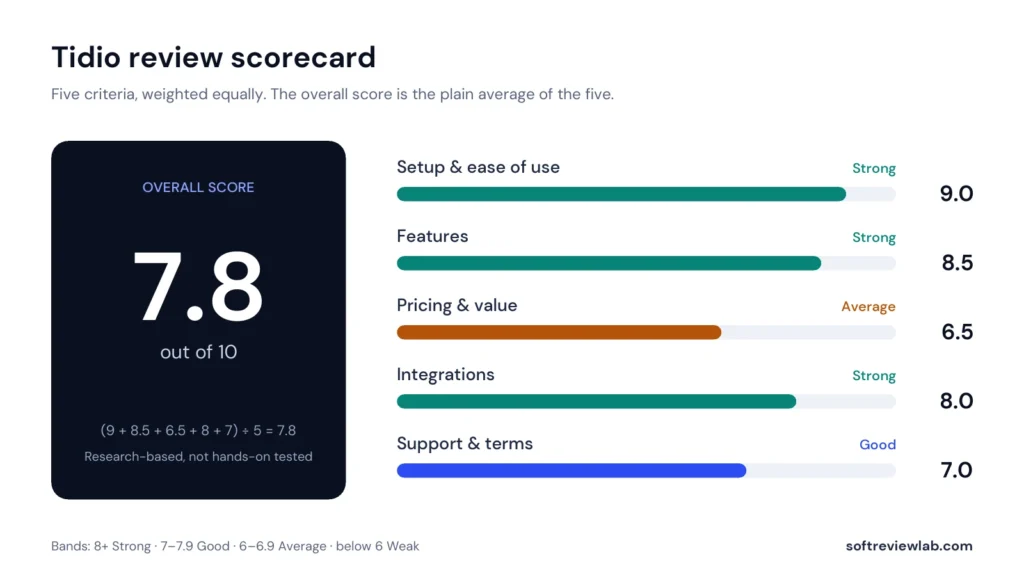
How these scores were worked out
Ease of setup & use: 9.0 (Strong) A free plan, a no-card trial and install in a few clicks; ease of use and setup lead the positives in customer reviews.
Feature depth: 8.5 (Strong) Live chat, tickets, five channels, Flows and an AI agent in one tool; branding, departments and the API need Plus.
Pricing & value: 6.5 (Average) A low entry price and no seat fees, but three meters, add-ons, default automatic upgrades and a steep step to Plus raise the real cost.
Integrations: 8.0 (Strong) More than 100 integrations including Shopify, WordPress and major CRMs; OpenAPI only from Plus.
Support & terms: 7.0 (Good) Support is praised in reviews and data is stored in the EEA, but there are no refunds, no published response times and prices can change without notice.
Overall: (9.0 + 8.5 + 6.5 + 8.0 + 7.0) ÷ 5 = 7.80, shown as 7.8. The five criteria are weighted equally.
Scores are editorial judgments in half-point steps, based on documented features, published pricing and repeated themes in customer reviews. They are not lab measurements, so treat the words as the guide: 8.0+ Strong, 7.0 to 7.9 Good, 6.0 to 6.9 Average, below 6.0 Weak.
What works
A free plan with 10 seats, ticketing and 50 conversations a month, with no card needed.
Live chat, email, Messenger, Instagram and WhatsApp in one inbox.
Lyro AI agent and no-code Flows in the same tool, with a test playground.
No per-seat charge on Free, Starter and Growth.
A 7-day trial that drops to the Free plan and does not bill you automatically.
EEA data storage and SOC 2 Type II certification.
High ratings on G2 (4.6) and Capterra (4.7), with ease of use the top positive.
What doesn’t
Three separate meters, so the real cost is well above the Starter price.
Automatic upgrades are on by default and raise your bill at 95% of a quota.
Over the limit with upgrades off, you can't see or answer incoming messages.
The 50 free Lyro conversations are one-off and never reset.
A large jump from Growth (from $49.17) to Plus (from $300 a month plus usage).
No refunds for the remaining billing period, and the terms allow price changes at any time.
Custom branding, departments and the OpenAPI are held back for Plus.
What we couldn’t verify
Tidio was not tested hands-on; ease of use, speed and reliability are based on its documentation and customer reviews.
How accurately Lyro answers real customer questions was not measured; the 67% figure is Tidio's own claim.
Tidio's own pages differ on when a conversation becomes billable, how a Lyro conversation is counted and when the monthly allowance resets.
Support response times are not published and were not measured.
The Shopify App Store and WordPress ratings shown on Tidio's site were not verified independently.
Figures such as use by more than 300,000 businesses are Tidio's own claims.
If any of these matter to your decision, check them directly with the vendor or during your trial.
Who should skip it
High-volume support teams that need a predictable bill, businesses that want AI answers without a second monthly fee, buyers who need custom branding or API access on a small budget, and anyone who needs a money-back period.
By Abdullahi Abdirahman, Founder & Editor, SoftReviewLab. Pricing and plan limits checked on Tidio’s official pricing page, FAQ, terms and help center in October 2026. This is a research-based review built from Tidio’s own documentation, plus customer ratings on G2, Capterra and Trustpilot. I have not run my own customer support in Tidio. This page contains affiliate links: if you sign up through them, SoftReviewLab may earn a commission at no extra cost to you. See our affiliate disclosure and research and scoring method.
Table of Contents
Tidio Review at a Glance: The Short Answer
This Tidio review scores the platform 7.8 out of 10. Tidio puts live chat, a shared inbox with tickets, no-code chatbots and an AI agent called Lyro into one tool that a small business can install without a developer. It has a free plan with 10 seats, and its paid plans start at $24.17 a month on yearly billing. The catch is how it charges: Tidio bills by usage, with three separate allowances for conversations, AI conversations and chatbot visitors, and an automatic upgrade that is switched on by default. It suits small online stores and service businesses with modest chat volumes. Busy support teams should price their real volume before they commit.
Tidio
Overall score
7.8 out of 10 (research-based)
What it is
A customer service platform that combines live chat, a shared inbox with tickets, no-code chatbots called Flows and an AI agent called Lyro
Starting price
Starter from $24.17 a month on yearly billing, or $29 on monthly billing
How it is priced
By usage, not per seat. Billable conversations, Lyro AI conversations and Flows visitors are three separate allowances
Free plan
Yes: 10 seats, 50 billable conversations a month, 100 Flows visitors a month and 50 one-off Lyro conversations
Free trial
7 days, no credit card needed
Best for
Small online stores and service businesses that want live chat and AI answers in one tool
Not ideal for
High-volume support teams on a tight budget, and buyers who need fixed costs or a refund option
Customer ratings
4.6 on G2 (1,962 reviews), 4.7 on Capterra (590 reviews) and 3.6 on Trustpilot (226 reviews)
Prices and limits from Tidio’s pricing page, FAQ and help center, October 2026. Ratings checked October 2026.
If you want to look at the product while you read, you can open Tidio’s site here. The free plan needs no card.
What Is Tidio and How Does It Work?
Tidio is a customer service platform aimed at small and mid-sized businesses, especially online stores. You add a chat widget to your website, and every conversation from that widget lands in one shared inbox. The same inbox can also collect email, Facebook Messenger, Instagram and WhatsApp messages, so your team answers everything from one screen.
On top of that inbox, Tidio sells two kinds of automation. Flows are rule-based chatbots you build without code, for example a greeting that appears when a visitor lingers on a pricing page. Lyro is an AI agent that reads your support content and answers customers’ questions in its own words, passing the conversation to a person when it can’t help.
Tidio says more than 300,000 businesses use it. That is the vendor’s own figure. What matters to a small business is narrower: how quickly you can get it running, what the plan you can afford allows each month, and what it costs once real customers start writing in.
How I Evaluated Tidio
I scored Tidio on the same five criteria I use for every review, each out of 10 and weighted equally: setup and ease of use, feature depth, pricing and value, integrations, and support and terms. The overall score is the plain average of the five.
The evidence is Tidio’s pricing page, its FAQ, its terms, seven help center articles and its product pages, all read in October 2026, plus customer ratings on G2, Capterra and Trustpilot. I haven’t installed Tidio on a live store or measured how well Lyro answers real customers, and I list what I couldn’t verify at the end of this page. Where Tidio’s own pages disagree with each other, I say so.
Tidio Features: What You Actually Get
Live Chat Widget
The chat widget is the core of the product. Tidio’s live chat page lists canned responses for repeated questions, a live typing preview that shows what a visitor is writing before they send it, multiple widget languages, visitor details beside each conversation and video calls. On the pricing page, the live visitors list and operating hours start on Starter, while the live typing preview, macros, automatic chat assignment, automatic replies and viewed pages history are listed from Growth.
Shared Inbox and Help Desk Tickets
Every plan, including the free one, lists ticketing. A ticket turns an email or an unresolved chat into a tracked item that someone owns until it is solved, which is the difference between a chat tool and a help desk. For a business that is currently answering customers from a personal mailbox, this is the feature that stops messages being lost.
Messenger, Instagram, WhatsApp and Email
Tidio’s help center lists connections to Messenger, Instagram and WhatsApp on the free version, alongside email. All of them arrive in the same inbox as website chats, and they count towards the same monthly conversation allowance. A shop that sells through Instagram as well as its own site can answer both without switching apps.
Flows: No-Code Chatbots
Flows are Tidio’s rule-based automations. You choose a trigger, such as a visitor opening a certain page, and a series of steps, such as a message, a question and a form. Tidio mentions more than 40 customisable templates for sales. The pricing page lists uses such as collecting contact details, handling quote requests and replying to missed conversations.
Flows are metered by the number of visitors they reach, not by conversations. The free allowance is 100 unique visitors a month, and paid Flows tiers run from 2,000 to 100,000 visitors.
Seats, Permissions and Analytics
Tidio doesn’t charge per person on its smaller plans. Free, Starter and Growth all list 10 seats, which is generous compared with per-seat tools. What separates the plans is usage and features: Free and Starter list basic analytics, Growth adds advanced analytics and user permissions, and Plus adds departments, more than one project, custom branding and access to Tidio’s OpenAPI.
Mobile and Desktop Apps
Tidio’s FAQ lists apps for iOS, Android, Windows, macOS and Linux, as well as the browser. For a business owner who answers chats between other jobs, replying from a phone is a practical requirement, not an extra.
Lyro AI Agent: How Tidio’s AI Works
What Lyro Does
Lyro is the part of Tidio that answers customers without a person. Tidio’s help article on Lyro, updated in October 2026, says it is powered by Claude, an AI model made by Anthropic, and that it can ask follow-up questions, interpret images and see up to three hours of conversation history. It works in live chat by default and can also answer on Messenger, Instagram, WhatsApp and email tickets. The article lists support for 47 languages.
When a visitor asks for a person, or Lyro can’t answer, it transfers the conversation to a live agent or creates a ticket. You can set different replies for when your team is online and offline.
What Lyro Learns From
Lyro answers from content you give it, not from the open internet. The help article lists website URLs, FAQ pages, question-and-answer pairs you write yourself, uploaded files and product catalogues from Shopify or WooCommerce. Weekly automatic re-syncing of website content is listed for Plus and Premium subscribers, so on smaller plans you should expect to refresh the content yourself when your policies change.
Two tools shape its behaviour. Guidance is a set of written instructions on how Lyro should talk and act in particular situations. Smart Actions connect Lyro to other systems so it can do things such as look up an order. The plan comparison on the pricing page lists 5 Guidance entries on Starter and Growth and up to 10 on Plus, with the first Action free and more once you buy a Lyro tier. A help center article gives lower figures, so check what your own account shows. There is also a playground for testing questions before customers see the answers.
How Lyro Conversations Are Counted
This matters, because Lyro is billed by conversation. Tidio’s article on the Lyro limit says one Lyro conversation is counted the first time Lyro replies in a new thread. Further replies in the same thread are free, but a thread closes after 15 minutes without activity, and a new message from the same visitor then starts a new thread that counts again. Handing over to a live agent doesn’t use up the allowance. The FAQ on Tidio’s pricing page describes the counting more generously: a Lyro conversation is any interaction with at least one AI reply, and it still counts as one if the customer leaves the chat and returns later.
New accounts get 50 Lyro conversations at no cost. That allowance is one-off: once it is used, Lyro stops working and the quota doesn’t reset. Paid Lyro tiers run from 50 to 1,000 conversations a month and reset on your subscription date.
What Tidio Claims, and What I Can Confirm
Tidio’s Lyro page says the agent can solve up to 67 percent of customer problems. That is a vendor claim, and “up to” describes a best case, not a typical one. A more useful number sits on the pricing page: the Premium plan lists a guaranteed 50 percent Lyro resolution rate. Tidio only puts that guarantee on its top plan, which tells you what it is prepared to promise in writing.
I haven’t measured Lyro’s accuracy. How well any AI agent performs depends heavily on the quality of the content you feed it, so the 50 free conversations are best spent on real customer questions, with someone reading every answer. You can see how Lyro works on Tidio’s site. For the wider questions to ask about any AI tool, see my guide to choosing AI tools for a small business.
Tidio Pricing 2026: Plans and Real Costs
Tidio’s pricing is easy to misread, because the headline price covers only one of three meters. Here is what its pricing page lists.
Tidio Plans
Plan
Yearly billing, per month
Monthly billing
Billable conversations
Seats
Main additions
Free
$0
$0
50 a month
10
Live chat, ticketing, basic analytics
Starter
$24.17
$29
100 a month
10
Live visitors list, operating hours
Growth
From $49.17
From $59
From 250 a month, up to 2,000
10
Advanced analytics, user permissions, automatic chat assignment, automatic reply, live typing preview, macros
Plus
From $300, plus monthly usage
From $300, plus monthly usage
Custom
Custom
Departments, custom branding, OpenAPI, premium support, a dedicated success manager
Premium
Contact sales
Contact sales
Custom
Custom
Guaranteed 50% Lyro resolution rate, pay-per-resolution billing, single sign-on, mobile SDK
Source: Tidio’s pricing page, FAQ and live chat page, October 2026. USD, before tax.
Tidio’s FAQ says yearly billing costs about 17 percent less than paying month to month, described as two months free. The step from Growth to Plus is the one to notice: it goes from $49.17 to $300 a month, before usage. Removing the Tidio branding from the chat widget is listed as a $20 a month add-on on Growth. It isn’t offered on Starter, and it is included from Plus.
Lyro AI and Flows Add-Ons
Lyro and Flows are sold separately from the plans above. A paid plan includes only the small free allowances: 50 one-off Lyro conversations and 100 Flows visitors a month.
Add-on
Starting price
What the entry tier includes
Range of tiers
Lyro AI Agent
From $32.50 ($39 on monthly billing)
50 Lyro conversations a month
50 to 1,000 conversations; more through the Plus plan
Flows
From $24.17 ($29 on monthly billing)
2,000 visitors reached a month
2,000 to 100,000 visitors
Source: Tidio’s pricing page and help center, October 2026. Prices are per month on yearly billing.
At the entry tier, $32.50 for 50 conversations works out at $0.65 per AI conversation. Tidio’s Lyro page quotes $0.50 per conversation, which I take to describe larger tiers. On monthly billing, the pricing page lists Lyro from $39 a month and Flows from $29. You can see Tidio’s current prices here.
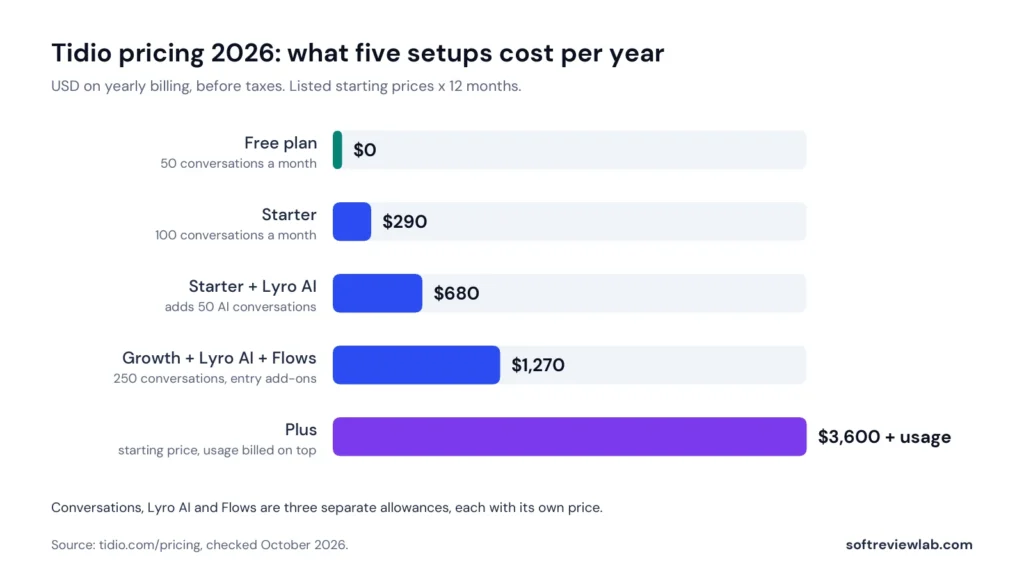
What Five Setups Cost Per Year
The useful question isn’t what Tidio starts at. It is what your setup costs for a year.
Setup
What it covers
Per month
Per year
Free plan
50 conversations a month, 10 seats
$0
$0
Starter
100 conversations a month
$24.17
About $290
Starter + Lyro
100 conversations, plus 50 AI conversations
$56.67
About $680
Growth + Lyro + Flows
250 conversations, 50 AI conversations, 2,000 Flows visitors
$105.84
About $1,270
Plus
Custom volumes
From $300
From $3,600, plus usage
Calculated as the listed starting price × 12 months on yearly billing, before tax. Higher tiers of Growth, Lyro and Flows cost more.
Tidio pricing by setup, on yearly billing. Conversations, Lyro AI and Flows are priced separately.
So a small store that wants live chat, AI answers and a few automated greetings is looking at about $1,270 a year at the entry tiers, not the $290 the Starter price suggests. That is still modest for a support tool. It is just more than four times the headline.
What Counts as a Billable Conversation
Tidio’s pricing page defines a billable conversation as any live chat, ticket, email or social media conversation that includes a message from a human agent. Messages from visitors that you never answer aren’t counted, and a long thread counts once however many messages it contains. Conversations handled by Flows and Lyro are metered separately.
That definition is fair. You pay for the conversations your team takes part in, not for spam or for visitors who leave. But it also means a busy week uses up the allowance faster than a quiet month suggests, so look at your busiest month when you choose a tier.
What Happens When You Hit a Limit
Tidio’s article on the monthly limit says a warning appears at 80 percent of your quota. If you go over the limit, you can no longer reply to incoming messages or see their details until you upgrade or the allowance resets. For a business that relies on chat for sales, that is a hard stop at the worst moment.
Tidio’s answer is automatic upgrades. When you reach 95 percent of a quota for conversations, Lyro or Flows, your account moves to the next tier and you are charged the higher price. The help center says this is enabled by default for new projects on standard monthly plans, and that you can switch it off in the subscription settings. If you switch it off, you get the 80 percent warning and have to upgrade by hand.
Neither option is comfortable. With automatic upgrades on, your bill can rise without a decision from you. With them off, your chat can stop answering. My advice is to decide which risk you prefer on the day you sign up, and to check the setting yourself.
Billing, Cancellation and Refunds
Tidio’s FAQ says you can cancel a paid subscription at any time, that the account stays active until the next billing date, and that no refunds are offered for the time remaining in the billing period. Tidio’s terms, last updated in March 2026, go further: they say Tidio is not obliged to provide a refund for any reason, although it may make exceptions. The terms also say Tidio can change its prices at any time, and they list credit cards and PayPal as payment methods.
The help center adds that subscription changes are made in the billing settings, and that Plus and Premium customers have to change their plan through their account manager or by email. In practice, a yearly plan is money you won’t get back, so I would start on monthly billing.
Details That Differ Between Tidio’s Own Pages
When a conversation is counted. The pricing page says a conversation is billable once a human agent replies or starts it. A help center article from May 2025 says it is counted when an agent closes it with the Solve button.
When the allowance resets. The same help article says the quota resets on the first day of each month. The pricing page says the limit refreshes every 30 days from your payment, and another help article ties the free plan’s reset to the account activation date.
How a Lyro conversation is counted. The pricing page FAQ says a customer who leaves and returns later still counts as one conversation. The help center says a thread closes after 15 minutes without activity, and that a new message then starts a new thread that counts again.
What Lyro costs per conversation. The Lyro page quotes $0.50, while the entry tier on the pricing page works out at $0.65.
How many integrations there are. The integrations page shows more than 100, while other pages mention 20 or more platforms.
None of these is alarming, but the first two affect your bill. Ask Tidio’s support which rule applies to your account before you rely on either.
Tidio Free Plan and Free Trial
Tidio’s free plan is one of its real strengths. Its FAQ describes it as free forever with no credit card required. The help center lists up to 10 agents, 50 conversations a month, Flows that reach 100 unique visitors a month, the Messenger, Instagram and WhatsApp connections, and the desktop and mobile apps. Ticketing and basic analytics are on the pricing page’s free column too.
The limit that matters is the 50 conversations. Once you pass it, incoming messages can’t be viewed or answered until the allowance resets. For a new site with a handful of enquiries a week, that is enough. For a store with steady traffic, it is a trial that happens to have no end date.
New accounts also get a 7-day trial of the paid features, with no card. Tidio says the account switches to the Free plan when the trial ends unless you choose a paid plan, so you can’t be charged by forgetting. That is a fairer arrangement than a trial that converts on its own.
Tidio Integrations, Setup and Support
Integrations
Tidio’s integrations page shows more than 100 integrations. The names include Shopify, WordPress, Adobe Commerce, HubSpot, Salesforce, Pipedrive, Zendesk, ActiveCampaign and Zapier, and the homepage adds WooCommerce, with live product and order data for Shopify. Tidio’s OpenAPI is listed on the Plus plan, and the integrations page says the Premium plan can connect to almost any app with help from an implementation specialist. If you depend on one particular tool, check that its integration is available on the plan you intend to buy.
Setup
Tidio says Lyro can be added to a website in a few clicks without technical knowledge, and ease of setup is one of the most-mentioned positives in customer reviews. The work that takes time is the part no vendor can do for you: writing clear answers to your common questions, because both Lyro and your canned responses are only as good as that content.
Support
The pricing page lists live chat support, premium support and a dedicated success manager on Plus, and support through Slack on Premium. The plan comparison lists support over email on Starter and Growth, and support over live chat only from Plus. I couldn’t find published response times for any plan. Customer reviews are encouraging here, with fast support among the most-mentioned positives on G2, but that isn’t the same as a published commitment.
Security and Compliance
Tidio’s FAQ states that it is SOC 2 Type II certified and compliant with GDPR and CCPA, and that it takes part in the EU–US Data Privacy Framework. It says all data is stored on servers in the European Economic Area, encrypted in transit with TLS 1.2 or higher and at rest with AES-256. Single sign-on is listed on the Premium plan.
For a small business, EEA data storage is a practical advantage if you have European customers. If you plan to let Lyro answer questions about orders or accounts, remember that it will be handling customer data, and tell visitors when they are talking to an AI agent.
What Customers Say About Tidio
Site
Rating
Reviews
Details
G2
4.6 out of 5
1,962
Most-mentioned positives: ease of use, fast support, AI chatbots, easy setup
Capterra
4.7 out of 5
590
Ease of use 4.7, features 4.6, customer service 4.6, value for money 4.5
Trustpilot
3.6 out of 5
226
Rated Average. Tidio has replied to 66% of negative reviews
Ratings checked October 2026.
On G2, ease of use is the most-mentioned positive, with 221 mentions, followed by fast customer support with 179 and easy setup and AI chatbots with 149 each. The complaints are consistent too: pricing described as expensive (76 mentions), limited customisation (57), cost for small businesses (56), missing features (55) and the limits of the free version (47).
Capterra reviewers make similar points. They praise having chat and email in one place and how easy the chatbots are to set up, and they criticise the free Lyro conversations that don’t reset and advanced features that need paid plans.
That pattern matches what the pricing page shows: people like using Tidio, and the friction is in what it costs as volume grows. Tidio’s site also displays ratings of 4.7 on Shopify and 4.7 on WordPress, which I didn’t check independently. On Trustpilot, Tidio scores 3.6 out of 5 from 226 reviews, a much smaller sample than the other two sites. Most of those ratings are five-star, with a visible share of one-star reviews. Trustpilot notes that Tidio has no recent history of asking for reviews there, so the page may not be representative, and that Tidio has replied to 66 percent of negative reviews, typically within a week.
Tidio Pros and Cons
Pros
A free plan with 10 seats, ticketing and 50 conversations a month, with no card needed.
Live chat, email, Messenger, Instagram and WhatsApp in one inbox.
Lyro AI agent and no-code Flows in the same tool, with a test playground.
No per-seat charge on Free, Starter and Growth.
A 7-day trial that drops to the Free plan and doesn’t bill you automatically.
EEA data storage and SOC 2 Type II certification.
High ratings on G2 (4.6) and Capterra (4.7), with ease of use the top positive.
Cons
Three separate meters, so the real cost is well above the Starter price.
Automatic upgrades are on by default and raise your bill at 95 percent of a quota.
Over the limit with upgrades off, you can’t see or answer incoming messages.
The 50 free Lyro conversations are one-off and never reset.
A large jump from Growth, from $49.17, to Plus, from $300 a month plus usage.
No refunds for the remaining billing period, and the terms allow price changes at any time.
Custom branding, departments and the OpenAPI are held back for Plus.
Tidio Scorecard
Criterion
Score
Why
Setup and ease of use
9.0
A free plan, a no-card trial and install in a few clicks; ease of use and setup lead the positives in customer reviews
Feature depth
8.5
Live chat, tickets, five channels, Flows and an AI agent in one tool; branding, departments and the API need Plus
Pricing and value
6.5
A low entry price and no seat fees, but three meters, add-ons, default automatic upgrades and a steep step to Plus raise the real cost
Integrations
8.0
More than 100 integrations including Shopify, WordPress and major CRMs; OpenAPI only from Plus
Support and terms
7.0
Support is praised in reviews and data is stored in the EEA, but there are no refunds, no published response times and prices can change without notice
Overall
7.8
Plain average of the five scores
Scores are my editorial judgment based on Tidio’s published plans and customer ratings.
Tidio scores 7.8 out of 10, the plain average of five criteria.
Common Tidio Mistakes to Avoid
Budgeting on the Starter price. Add the Lyro and Flows tiers you will actually need before you compare Tidio with anything else.
Leaving automatic upgrades untouched. Decide on day one whether you want them on, and check the setting.
Spending the 50 free Lyro conversations on tests. They never reset. Use the playground for testing and save the live allowance for real customers.
Feeding Lyro thin content. An AI agent can only repeat what you have written down. Write clear answers on delivery, returns and pricing first.
Choosing a tier from an average month. Size your conversation allowance on your busiest month.
Paying yearly at the start. There are no refunds for unused time, so use monthly billing until your volumes are steady.
Forgetting the handover. Set what Lyro says when nobody is online, so customers know when a person will reply.
Tidio Alternatives: What Else to Consider
Tidio isn’t the only option, and for some businesses it isn’t the right one.
A free live chat tool. If you only need a chat widget and volume is the problem, a tool that doesn’t meter conversations may cost less. Capterra’s comparison pages set Tidio against tools such as tawk.to, Crisp and Gorgias.
An e-commerce help desk. A store with a dedicated support team and heavy order-related queries may want a help desk built around order data. My Gorgias review covers one such tool, and my Tidio vs Gorgias comparison sets the two side by side.
The chat built into software you already use. Some CRMs and website builders include live chat. Check there before adding a subscription.
An AI phone receptionist. If your customers call more than they type, chat won’t solve the problem. My CallRail review covers one call-answering option.
A shared mailbox. With a handful of enquiries a week, a well-run shared inbox and a contact form are enough.
You run a small online store or service business and want live chat without hiring a developer.
Several people need access, and you don’t want to pay per seat.
Your customers ask the same questions repeatedly, and you have written answers an AI agent can use.
You sell through Instagram, Messenger or WhatsApp as well as your website.
You have European customers and want data stored in the EEA.
If that describes your business, you can start with Tidio’s free plan here. It needs no card, and the 7-day trial of paid features ends by dropping you back to Free.
Skip Tidio If
You handle thousands of conversations a month and need a predictable bill.
You want AI answers but can’t afford a second monthly fee on top of the plan.
You need your own branding, departments or API access on a small budget, since those are listed on Plus.
You need a money-back period, because Tidio’s terms don’t offer one.
Your customers mostly phone you.
Tidio Review Verdict
This Tidio review scores it 7.8 out of 10. Tidio does the difficult thing well: it makes live chat, a help desk and an AI agent usable by a small business with no technical staff, and it lets you start for nothing. Customer reviews support that, with ease of use and setup at the top of the praise.
The weakness is the bill. The Starter price is real, but it buys 100 conversations and little else. Add an AI agent and automation and the entry cost is closer to $1,270 a year, with automatic upgrades ready to raise it if you grow. None of that is hidden, but you have to read three meters to see it.
My view is that Tidio is a strong choice for a small store or service business with modest volumes that values an easy start. For a high-volume team, the usage pricing deserves a careful sum first. Either way, begin on the free plan, test Lyro with real questions, and pay monthly until you know your numbers. In the 7-day trial, decide on day one whether automatic upgrades stay on, read every Lyro answer, and after a few days count your conversations and Lyro conversations to price the tier you would need. You can check Tidio’s current plans and prices here.
Frequently Asked Questions About Tidio
How much does Tidio cost in 2026?
Tidio’s Starter plan is listed at $24.17 a month on yearly billing or $29 on monthly billing, with 100 billable conversations. Growth starts at $49.17 a month on yearly billing with 250 conversations, and Plus starts at $300 a month plus usage. The Lyro AI agent and Flows are separate add-ons, from $32.50 and $24.17 a month.
Is Tidio free?
Yes. Tidio has a free plan with no credit card required. It includes 10 seats, 50 billable conversations a month, 100 Flows visitors a month, ticketing and 50 one-off Lyro AI conversations.
What is Lyro and how much does it cost?
Lyro is Tidio’s AI agent, which answers customer questions from your own support content and hands over to a person when it can’t help. New accounts get 50 free conversations that don’t reset. Paid Lyro tiers start at $32.50 a month on yearly billing for 50 conversations and go up to 1,000 conversations.
Is Tidio good for small businesses?
Yes, for small businesses with modest chat volumes. The free plan, the 10 included seats and the easy setup suit a small team. Costs rise as conversations, AI use and automation grow, so work out your real monthly volume before choosing a paid tier.
“A server-side email filter that works in any email app and reads only headers, held back by expensive monthly pricing, a two-tool limit on the cheapest plan and terms that date from 2021.”
From $5.42/month billed yearly ($9.49 monthly), 1 email accountBest for: Busy business owners and professionals buried in email7-day free trial, no credit card required
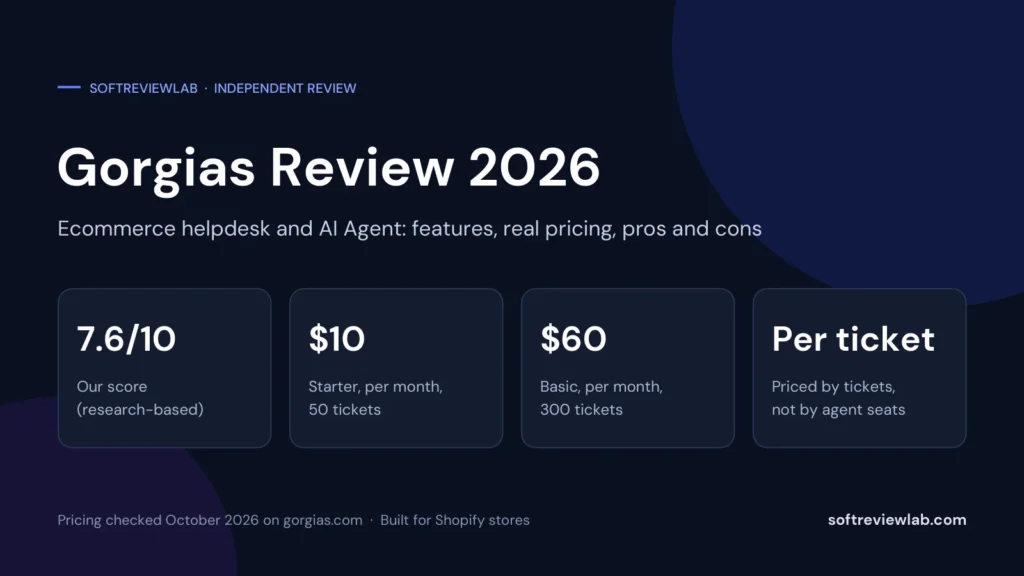
“A feature-rich helpdesk for Shopify stores that charges by ticket instead of by seat, held back by a steep jump between plans, metered AI and non-refundable fees.”
From $10/month for 50 tickets (Basic $60, or $50 billed yearly)Best for: Shopify stores with steady support volume and a shared support inboxFree trial, no card needed (sign-up page says 30 days; other Gorgias pages say 7)