
How to Choose AI Tools for a Small Business Without Wasting Money
How to choose AI tools for a small business in 2026: 7 practical steps, real prices from 4 vendors, data privacy checks and a one-week trial plan.
AI customer support chatbots explained for small businesses: 9 checks before you buy, real 2026 prices from 8 vendors, legal risks and a 14-day trial plan.

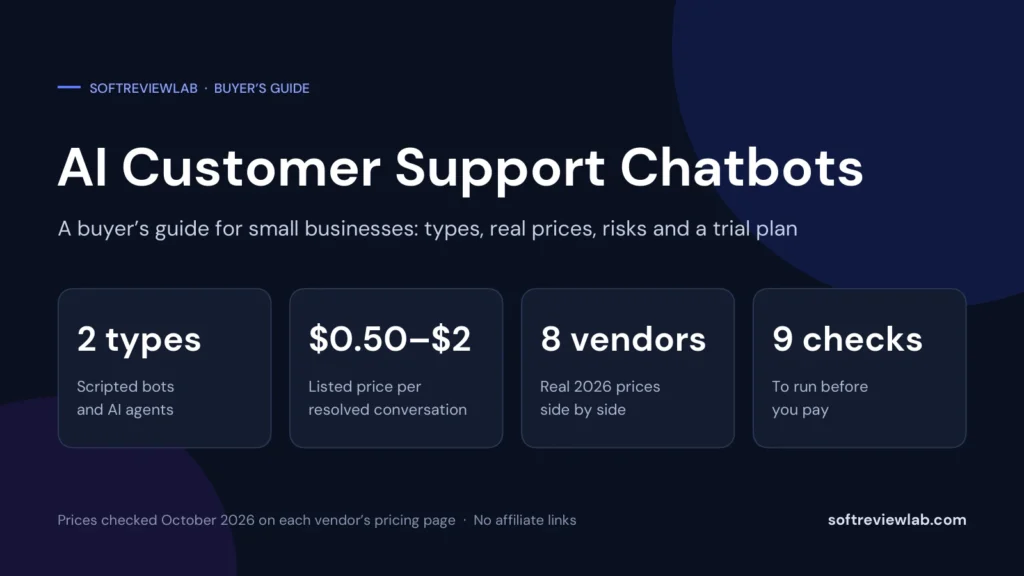
By Abdullahi Abdirahman, Founder & Editor, SoftReviewLab. Prices checked in October 2026 on each vendor’s official pricing or help page. This is a research-based buying guide: it draws on vendor pricing pages, help articles and terms, and on published guidance from regulators, not on a lab test of every chatbot. It contains no affiliate links.
An AI customer support chatbot is worth buying when you answer the same questions again and again, when you already have those answers written down, and when a wrong answer would be an inconvenience and not a disaster. If those three things are true, a chatbot can take a real share of your messages for somewhere between 50 cents and $2 per conversation it resolves, on top of the plan it runs on.
If they are not true, fix that first. A chatbot with nothing to read gives poor answers, and you remain responsible for every one of them. The rest of this guide covers nine checks to run before you pay, the real 2026 prices from eight vendors, and a way to work out whether the tool will pay for itself.
The word chatbot covers two very different things, and vendors do not always make clear which one they are selling.
A rule-based chatbot follows a script you build: if the visitor clicks this button, show that message. It can greet people, collect an email address, route a question to the right person or show your opening hours. It never invents an answer, because it only says what you wrote. It also cannot answer anything you did not plan for.
An AI agent reads your help articles, policies and product pages and writes its own answer to each question. It can handle wording you never anticipated, follow up, and pass the conversation to a person when it is stuck. Some can also take actions, such as looking up or cancelling an order. The price of that flexibility is that it can be confidently wrong.
Tidio, for example, sells rule-based chatbots under the name Flows and an AI agent under the name Lyro, each with its own allowance. Many businesses use the two together: a scripted greeting and routing at the front, and the AI agent for questions.
| Rule-based chatbot | AI agent | |
|---|---|---|
| How it answers | From a script you build | In its own words, from content you give it |
| Handles unexpected questions | No | Often, within what it has read |
| Risk of a wrong answer | Low: it only says what you wrote | Real: it can misread or invent |
| Setup work | Building the flows | Writing and tidying your help content |
| Typical charge | By visitors reached, or included in the plan | By conversation or by resolved conversation |
| Best for | Greetings, routing, collecting details | Repeated questions with written answers |
A chatbot is a tool for volume. Below a certain point it costs more attention than it saves.
| Usually a good fit | Usually a poor fit |
|---|---|
| Where is my order, and when will it arrive | Complaints from an upset customer |
| Opening hours, prices, delivery areas | Refunds outside your written policy |
| How to return or exchange an item | Legal, medical or financial questions |
| How to use a feature or reset a password | Faults that need investigation |
| Questions already answered on your website | Anything where a wrong answer costs real money |
Every vendor I looked at builds in a handover to a person for exactly this reason. Gorgias’s documentation, for instance, says its AI Agent hands over when it is not confident, when the topic is sensitive or when the customer shows frustration. Treat the right-hand column as work your team keeps.
Before you open a single pricing page, open your inbox. Take the last 100 to 200 customer messages and sort them into piles: order status, returns, prices, how-to questions, complaints, everything else. Then mark each pile with one question: could a new member of staff answer this from a page that already exists?
The share you can mark yes is your ceiling. No chatbot will resolve more than that, whatever the vendor’s headline figure says, because an AI agent answers from what it can read. If the answer is 30%, plan around 30%, not around the 60% on a sales page.
This count also gives you the number you need for every pricing model below: how many conversations a month, and how many of them are routine.
Many businesses shop for a chatbot they already own. Several helpdesk and chat vendors now include an AI agent in their standard plans and charge only for what it handles:
If you pay for any of these, test the built-in agent first. It already has your tickets, your help articles and your team, which removes most of the setup work.
This is where most of the confusion sits. Vendors use three pricing models, and the same word, conversation, means different things in each.
You pay each time the AI takes part in a conversation, whether or not it solves the problem. Tidio’s Lyro works this way: its entry tier is $39 a month for 50 AI conversations, or 78 cents each. Freshdesk charges $49 per 100 Freddy AI Agent sessions after the first 500, or 49 cents each. The unit price looks low, but you also pay for the conversations the AI could not finish.
You pay only when the AI resolves the conversation without a person. Gorgias lists $0.85 to $1.00 per automated interaction depending on plan. Intercom lists Fin from $0.99 per outcome. Zendesk charges $1.50 per automated resolution if you commit in advance and $2.00 pay-as-you-go. HubSpot charges $0.50 per resolved conversation.
Read the definition of resolved before you rely on it. Intercom’s help article counts a resolution when the customer confirms the answer or leaves without asking for more help. Gorgias’s documentation counts an interaction as automated when no person is needed within 72 hours. Under both, a customer who gets a poor answer and simply gives up can be counted as resolved. Check a sample of those conversations every month.
Some tools charge a fixed amount. tawk.to offers free live chat and lists its AI Assist from $29 a month. Crisp includes AI credits in each paid plan: $5 of credits on its $45 Mini plan, which it describes as about 90 automated conversations. Flat pricing is the easiest to budget, as long as you know what happens when the allowance runs out.
To compare a per-conversation price with a per-resolution price, divide by the share of conversations the AI actually resolves.
| Price per conversation | If 30% are resolved | If 50% are resolved | If 70% are resolved |
|---|---|---|---|
| $0.78 (Tidio Lyro, entry tier) | $2.60 | $1.56 | $1.11 |
| $0.49 (Freshdesk, after the first 500 sessions) | $1.63 | $0.98 | $0.70 |
So a per-conversation price that looks cheaper can cost more than a per-resolution price if your resolution rate is low, and less if it is high. That is why Step 1 comes first: you need your own rate to know which model suits you.
| Vendor | Plan fee starts at | How the AI is charged | Listed AI price |
|---|---|---|---|
| Tidio (Lyro) | Free plan; Starter $29 a month | Per AI conversation | From $39 a month for 50 conversations |
| Gorgias (AI Agent) | $10 a month for 50 tickets; AI needs a Shopify store | Per interaction resolved without a person | $0.85 to $1.00 each; $30 for 30 on the two smallest plans |
| Intercom (Fin) | $29 per seat a month, or no seats on another helpdesk | Per outcome | From $0.99 each |
| Zendesk (AI agents) | $19 per agent a month on annual billing | Per automated resolution | 5 to 10 included per agent a month, then $1.50 committed or $2.00 pay-as-you-go |
| HubSpot (Customer Agent) | A Pro or Enterprise plan is required | Per resolved conversation | $0.50 each |
| Freshdesk (Freddy AI Agent) | $19 per agent a month on annual billing | Per session | First 500 sessions included, then $49 per 100 |
| Crisp | Free plan; Mini $45 a month per workspace | AI credits included in the plan | $5 of credits on Mini, about 90 automated conversations |
| tawk.to (AI Assist) | Live chat is free | Monthly fee | From $29 a month |
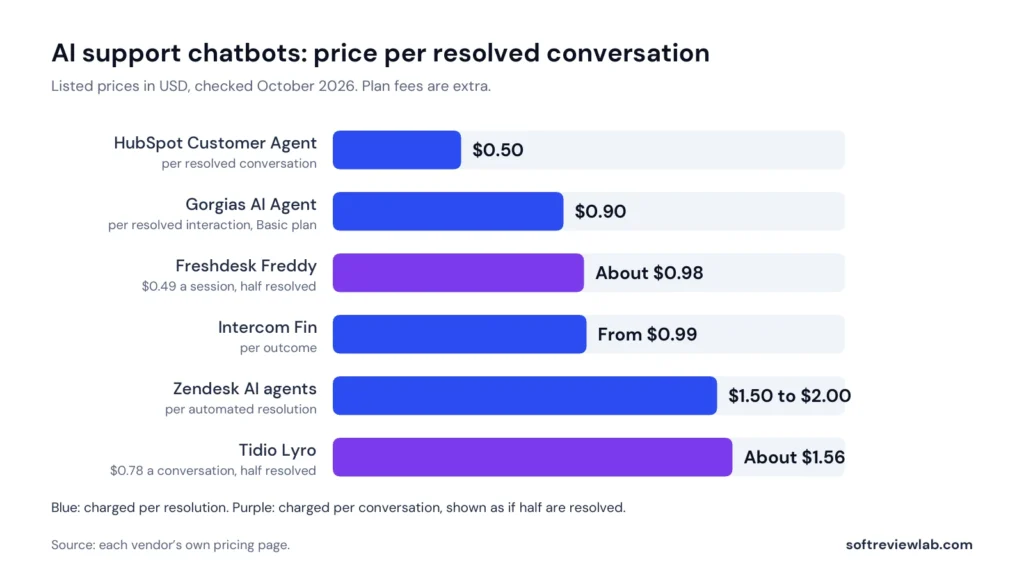
The sources are the pricing pages of Tidio, Gorgias, Intercom, Zendesk, Freshdesk, Crisp and tawk.to, and HubSpot’s pricing announcement of April 2026.
Three things are worth noticing. First, the AI price is never the whole price. HubSpot has the lowest price per resolution, but it needs a Pro or Enterprise plan, which I have not priced in this guide. Zendesk has the highest, but includes a small allowance with every agent. Second, per-seat tools such as Intercom, Zendesk and Freshdesk get more expensive as your team grows, while Tidio, Gorgias and Crisp charge by usage or by workspace. Third, the listed prices span roughly 50 cents to $2 per resolved conversation, which is the range to budget in.
The vendors also publish resolution claims: up to 67% for Tidio’s Lyro, 60% for Gorgias’s AI Agent, and 65% of conversations for HubSpot’s Customer Agent across more than 8,000 customers. These are the vendors’ own figures and I have not measured any of them. Your result will depend on your questions and on the quality of your help content.
I have reviewed two of these tools in full. My Tidio review covers a chat-first tool with a free plan, and my Gorgias review covers a helpdesk built around Shopify stores.
An AI agent is only as good as what you give it to read. The vendors I looked at list similar sources: your website pages, FAQ pages, question-and-answer pairs you write yourself, uploaded documents, and product or order data from your store. Tidio, for example, lists website URLs, FAQs, your own question-and-answer pairs, files and product catalogues from Shopify or WooCommerce. Gorgias lists help center articles, website content, documents, written guidance and Shopify data.
Three questions separate the tools here:
Do the preparation before the trial starts. Write a clear answer to each of your ten most common questions. Give each policy its own page: returns, delivery, refunds, warranty. Then remove anything out of date, such as an old price or a discontinued offer, because the AI will repeat it with full confidence.
Answering a question and changing something are different levels of risk. Most AI agents can now do both. Gorgias lists Actions such as cancelling an order, processing a return and updating a delivery address, available from its Basic plan and switched off until you enable them. Tidio lists Smart Actions that connect Lyro to other systems, for example to look up an order.
My advice is the same for any tool. Start with answers only. Read a week of conversations. Then switch on one action at a time, test it on a dummy order, and set limits in writing: which orders it may cancel, up to what value, and when it must hand over. A wrong answer costs you an apology. A wrong refund costs you money.
The handover decides how customers feel about the whole thing. A chatbot that answers easy questions quickly and passes hard ones on smoothly feels helpful. One that traps people in a loop feels like an obstacle. Check these points during your trial:
Do not hide the exit to save on staff time. The conversations that most need a person are the ones where a poor experience costs you the customer.
The European Commission’s page on the AI Act says people should be made aware that they are interacting with a machine so they can make an informed decision, and that the Act’s transparency rules apply from August 2026. If you have customers in the EU, say at the start of the chat that it is an AI assistant. It is good practice everywhere else too, because customers react worse to finding out later.
In February 2024 the British Columbia Civil Resolution Tribunal decided a case that every chatbot buyer should know. Air Canada’s website chatbot told a customer he could claim a bereavement fare refund within 90 days of travel. The airline’s actual policy did not allow that. According to the American Bar Association’s summary of the decision, the tribunal held that the airline was responsible for all the information on its website, whether it came from a static page or a chatbot, and awarded the customer about 650 Canadian dollars plus interest and fees.
Vendor contracts take the same line. Gorgias’s subscription agreement, for example, says AI output can be incorrect and that the customer is solely responsible for checking its accuracy. Whichever tool you buy, assume its answers are your answers.
Customer messages contain names, addresses and order details, so treat a chatbot like any other system that holds personal data. Ask each vendor four things: where the data is stored, which AI company’s model processes it, whether your conversations are used to train models, and whether a data processing agreement is available.
The answers differ. Tidio states that its data is stored in the European Economic Area and that Lyro is powered by Claude, a model from Anthropic. Gorgias lists hosting in the United States, the European Union and Australia, names OpenAI among its sub-processors, and says in its agreement that it may use customer data to improve its own AI models but not to train outside providers’ models. Neither answer is wrong, but you should know yours before a customer asks.
AI pricing is usage pricing, and usage pricing is where bills surprise people. Before you pay, find out:
The safe pattern is the same with every vendor: start on monthly billing, watch one full month of real usage, and only then consider an annual plan.
Most of these tools can be tested without paying. Zendesk and Freshdesk list 14-day trials. HubSpot lists a 28-day trial of its agents. Tidio has a 7-day trial, a free plan and 50 free AI conversations. Gorgias offers a trial with no card, though its own pages give the length as 30 days in one place and 7 in others. Use the time on purpose:
The sum is simple, and you should do it with your own trial numbers, not a vendor’s. Take the conversations the AI resolved, multiply by the minutes a person would have spent on each, and value that time. Then subtract what the AI cost.
| Line | Example |
|---|---|
| Customer conversations a month | 400 |
| Share the AI resolves, from your own trial | 40%, which is 160 conversations |
| Time a person spends on each | 5 minutes |
| Time saved | 800 minutes, about 13 hours |
| Value of that time at $20 an hour | About $267 |
| AI cost at $0.90 per resolved conversation | $144 |
| Monthly gain before the plan fee | About $123 |
Two honest notes on that example. First, the margin is thin. Halve the resolution rate to 20% and the gain falls to about $61, which a plan fee can wipe out. At small volumes a chatbot rarely pays for itself on staff time alone. Second, the sum leaves out the part many owners care about most: customers who write at 10 pm get an answer at 10 pm. If faster replies bring you sales or keep customers, count that too, but count it from evidence, not hope.
| Your situation | What to look at first | Why |
|---|---|---|
| A few enquiries a week | No chatbot: a shared mailbox and a clear FAQ page | The volume is too low to repay the setup |
| A website that gets questions before people buy | A chat-first tool with a free plan and a scripted bot, such as Tidio or Crisp | You can start at no cost and add AI when volume justifies it |
| A Shopify store with many order questions | An ecommerce helpdesk whose AI can read and act on orders, such as Gorgias | Order status and returns are the most automatable questions |
| You already pay for a helpdesk | The AI agent built into it | Your tickets and help articles are already there |
| Customers mostly phone you | A call-answering tool, not a chatbot | Chat does not solve a phone problem |
| You give legal, medical or financial advice | A scripted bot for routing only | A wrong AI answer carries too much risk |
For two of these I have written full reviews: my Tidio review for the chat-first route and my Gorgias review for the Shopify route. For phone-led businesses, my CallRail review covers a tool with an AI call-answering option.
I read the pricing pages of eight vendors in October 2026, the help articles that define how Tidio, Gorgias and Intercom count AI conversations, Gorgias’s subscription agreement, the European Commission’s page on the AI Act and the American Bar Association’s summary of the Air Canada decision. Every price in this guide comes from the vendor’s own page, and each one is linked in the references.
There are limits to what this guide can tell you. I have not tested the accuracy of any of these AI agents, and the resolution rates quoted are the vendors’ own claims. I have not priced HubSpot’s Pro and Enterprise plans or the higher tiers of Tidio’s Lyro. For the Air Canada case I relied on a published summary, not on the text of the tribunal’s decision. Prices and terms change often, so check the vendor’s page on the day you buy.
The facts above come from those sources. The fit table, the one-in-ten test for wrong answers and the worked example are my own judgment, and you should weigh them as such. My research and scoring method explains how I work.
Related reading: how to choose AI tools for a small business and Tidio vs Gorgias.
In October 2026, the vendors in this guide list between about 50 cents and $2 per conversation the AI resolves, on top of the plan it runs on. Examples: $0.50 at HubSpot, from $0.99 at Intercom, $0.85 to $1.00 at Gorgias and $1.50 to $2.00 at Zendesk. Tidio charges per AI conversation instead, from $39 a month for 50.
For a business with a few dozen conversations a month, a free plan can be enough to start. Tidio’s free plan includes 50 conversations a month and 50 one-off AI conversations, and tawk.to offers free live chat. Free plans cap volume, so treat them as a way to learn what customers ask before you pay.
If you have customers in the European Union, yes. The European Commission says people should be made aware that they are interacting with a machine, and the AI Act’s transparency rules apply from August 2026. It is sensible practice everywhere, because customers react badly to finding out later.
Assume that you are. In a 2024 Canadian case, a tribunal held Air Canada responsible for wrong information its website chatbot gave a customer. Vendor contracts also place responsibility for AI output on the business using it. Test the answers, limit what the chatbot may promise, and keep a person within reach.
Vendors claim between 60% and 67% in their marketing, and one guarantees 50% only on its top plan. Your own figure depends on how many of your questions are routine and already answered in writing. Count that share from your last 100 messages; it is the realistic ceiling.
Every price and rule in this guide comes from the pages below, checked in October 2026.
How this guide was put together. Built from vendor documentation and pricing pages, and from recurring themes in public customer reviews — not from a hands-on lab test. Prices move; confirm on the vendor’s own page before you buy. How we work.
Keep going
How to choose AI tools for a small business in 2026: 7 practical steps, real prices from 4 vendors, data privacy checks and a one-week trial plan.
How to choose a CRM for a small business in 2026: 7 practical steps, real prices from 5 vendors, hidden costs to check and a free-trial test plan.
A practical 6-step guide to choosing email marketing software for a small business: what to check, what it really costs, and how to test tools before you commit.