
- Home
- Comparisons
- Hostinger Website Builder vs WordPress: Which Should a Small Business Use?
Hostinger Website Builder vs WordPress: Which Should a Small Business Use?

Research-based comparison · not hands-on tested We compare the value each tool gives a specific kind of buyer, not which company is bigger or better, so there is no overall winner. How we compare.
Short answer: Hostinger website builder vs WordPress is not a question of cost at sign-up: Hostinger’s builder, now called the AI Builder in hPanel, and WordPress come with the same Hostinger hosting plans at the same price. The AI Builder is the faster, simpler route: you describe your business, get a ready-made site and edit it by dragging blocks, while Hostinger looks after the software. WordPress takes a little more setup and upkeep, but it gives you over 74,000 free plugins, no fixed limit on languages or products, and a site you can move to any host. For a simple business site that one person will update, the AI Builder is a sound choice. For a site you expect to grow, with a blog, a shop or features you haven’t thought of yet, WordPress is the safer long-term pick. One detail decides it for many small shops: an AI Builder store needs the Unlimited plan, while a WooCommerce store on WordPress can run on the cheaper Premium plan.
Disclosure: SoftReviewLab is a Hostinger affiliate partner, and this page contains a Hostinger referral link. If you sign up through it you get 20% off, and SoftReviewLab may earn a commission at no extra cost to you. Both options in this comparison are sold by Hostinger on the same plans, so the commission is the same whichever you choose. See our affiliate disclosure and research and scoring method.
Every price and limit below comes from Hostinger’s own pricing pages and help center, checked on October 10, 2026. The WordPress side also comes from my own use: SoftReviewLab runs on WordPress on Hostinger’s Unlimited plan. I have not built a site with the AI Builder, so its editor is described from Hostinger’s documentation, not from my own testing. My full Hostinger review covers the hosting itself: speed, backups, renewals and refunds.
Table of Contents
Hostinger Website Builder vs WordPress at a Glance
| Hostinger AI Builder | WordPress on Hostinger | |
|---|---|---|
| Included with | Premium, Unlimited and Cloud Startup hosting | Premium, Unlimited and Cloud Startup hosting |
| How you build | Describe the site, then edit by drag-and-drop (manual mode) or by chat (agentic mode) | One-click install, then edit with the block editor or Elementor; AI site setup available |
| Add-ons | 11 built-in integrations plus custom scripts | Over 74,000 free plugins on WordPress.org |
| Online store | Unlimited plan or higher; up to 1,000 products; no Hostinger sales commission | WooCommerce on any plan, Premium included |
| Languages | Up to 4, translated by hand | No fixed limit, with a multilingual plugin |
| Updates and security | Handled by Hostinger | Automatic updates offered; you check that plugins still work |
| Moving away later | Pages, text and images only; design, store, forms and SEO settings stay behind | The whole site, to any host |
| Best for | A simple site, one editor, the fastest start | A site that will grow: a blog, a shop or custom features |
What Each Option Is, in Plain English
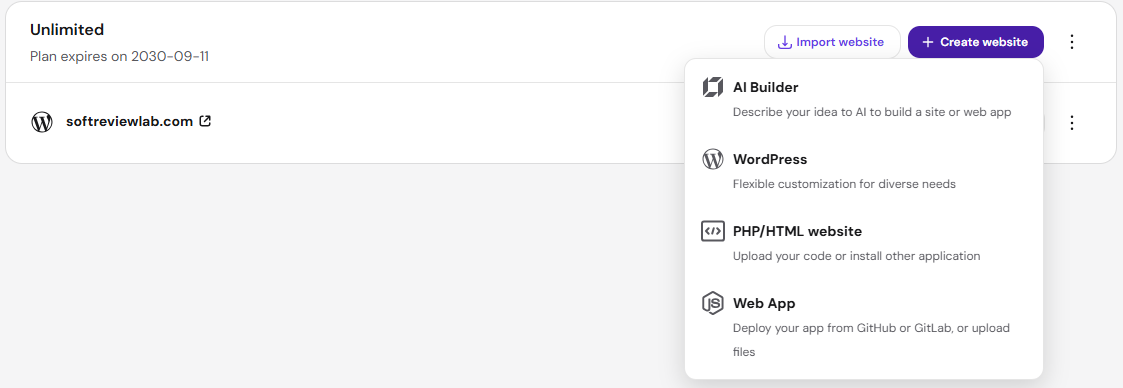
When you add a website in hPanel, Hostinger asks how you want to build it. On my Unlimited plan the choices are WordPress, the AI Builder, a site from your own code, or a web app from GitHub. The first two are the ones a small business owner would choose between.
Hostinger AI Builder
Hostinger used to call it the Hostinger Website Builder. It is now one website and app builder called the AI Builder, with two ways of working. In manual mode you describe your business in one prompt, get a finished site straight away and then adjust it with drag-and-drop. In agentic mode, which Hostinger also calls vibe coding, you build and change the site by chatting with the AI. Either way, the hosting, software, security and updates are Hostinger’s job. You never install anything.
The builder is a closed system. That is what makes it simple: there is nothing to update and nothing to break. It is also its main limit, because you can only use the features Hostinger has built in.
WordPress on Hostinger
WordPress is free, open-source software that runs about 40% of all websites. Hostinger installs it for you, logs you in from hPanel and, on its managed WordPress plans, offers automatic updates for WordPress, themes and plugins. You edit pages with the WordPress block editor or a page builder such as Elementor. Hostinger also has an AI tool that sets up a WordPress site from a description, so a quick AI start is not unique to the builder.
This is how I run SoftReviewLab: WordPress with separate content types for reviews, comparisons and guides, a custom plugin for the review boxes, and an SEO plugin. A setup like that is something a closed builder cannot do.
Sponsored

The Biggest Difference: Convenience Now vs Freedom Later
Both options can give a small business a good-looking, fast website. The real difference is who is in control. With the AI Builder, Hostinger decides what the site can do, keeps it running and makes leaving difficult. With WordPress, you decide what the site can do, you share the upkeep, and you can pack the whole site up and move it to another host whenever you like.
If your website is a digital business card, with a few pages, a contact form and your opening hours, the builder’s limits will probably never matter. If the website is where you win customers through articles, sell products, or plan to add bookings, memberships or a customer area, those limits will show up sooner or later, and moving off the builder then means rebuilding.
Price: Same Plans, One Catch for Online Stores
Hostinger does not sell the builder and WordPress at different prices. Both come with the same three web hosting plans, each paid upfront for the full term:
- Premium: $2.99 a month on a 48-month term ($143.52 upfront), renewing at $10.99 a month. Up to 3 websites, 20 GB storage and weekly backups.
- Unlimited: $3.99 a month on a 48-month term ($191.52 upfront), renewing at $16.99 a month. Unlimited websites, 50 GB NVMe storage and daily backups.
- Cloud Startup: $7.99 a month on a 48-month term ($383.52 upfront), renewing at $25.99 a month, with 100 GB NVMe storage and on-demand backups.
The catch is selling online. Hostinger’s ecommerce builder page lists the online store only on Unlimited and Cloud Startup. On the WordPress side, Hostinger’s plan table shows ecommerce on Premium too, because WooCommerce, the free shop plugin for WordPress, runs on any plan.
So for a shop, the builder costs $72 a year more at renewal than a WooCommerce store on Premium: $203.88 against $131.88. In practice the gap may close, because for a shop I would want daily backups anyway, and those start on Unlimited. Payment processing fees from Stripe or PayPal apply either way.
WordPress has its own optional costs: premium themes, paid plugins and the occasional hour of developer help. Many small business sites need none of them, but budget for them if you want features beyond the free plugins. My guide to what a business website really costs to run per year breaks down every item, including the domain and email.
Ease of Use and Upkeep
The AI Builder is easier, and that matters if the person updating the site is not technical. You see the page as visitors will see it, drag sections into place and publish. There are no plugins to choose, no updates to approve and no compatibility problems.
WordPress has a steeper first week. You pick a theme, learn the editor, choose a handful of plugins and decide how updates are handled. After that it is routine, but someone still needs to log in now and then, check that updates went through and keep the plugin list short. Too many plugins is one of the most common reasons a WordPress site slows down, as I explain in why your website is slow.
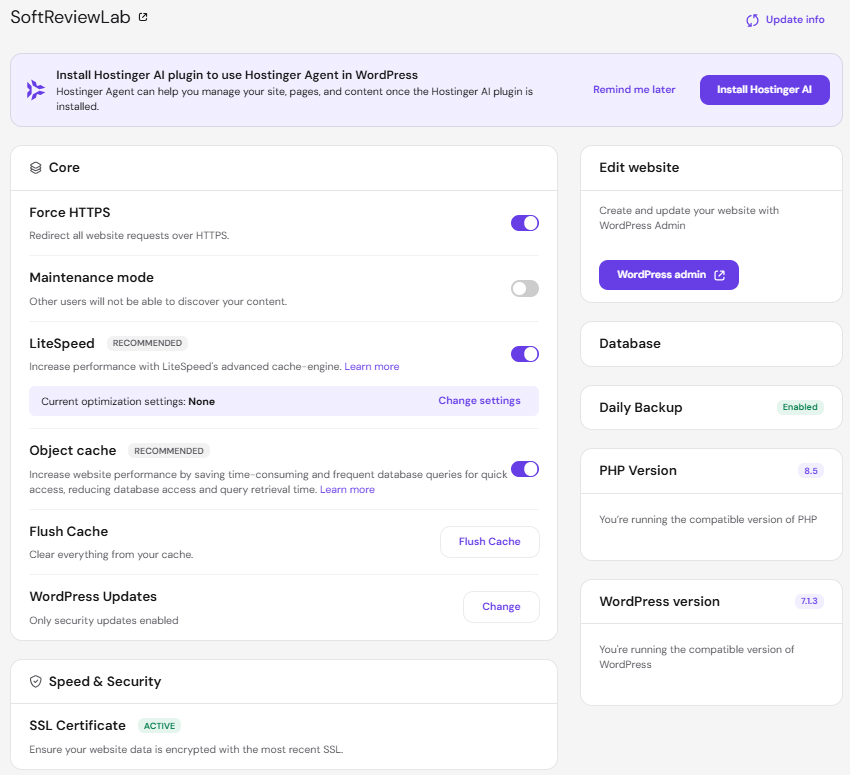
From my own site, the upkeep on Hostinger is light. The WordPress overview in hPanel shows the cache, backups and PHP version in one place, and with daily backups a bad plugin update means restoring yesterday’s copy, not starting over.
Features That Matter for a Business Site
Blog and Articles
Both can run a blog. Hostinger lists a blog among the AI Builder’s features, and it is fine for occasional news posts. WordPress was built for publishing and handles hundreds of articles, categories, tags, authors and scheduled posts with ease. If content marketing is how you plan to win customers from Google, WordPress is the stronger base.
Online Store
An AI Builder store is simple to set up: up to 1,000 products, payments through Stripe, PayPal or dLocal Go, and no sales commission from Hostinger. It also connects to Shippo for shipping labels and Printful for print-on-demand. For a small catalogue that is enough.
WooCommerce has no fixed product limit and a large range of extensions for subscriptions, bookings, wholesale prices and more, at the cost of more setup and more plugins to maintain. If the shop is the business rather than a side feature, compare both against a dedicated store platform before you decide.
Multiple Languages
An AI Builder site supports up to four languages, including the default one. Adding a language copies your pages, and you translate them yourself, because nothing is translated automatically. WordPress has no fixed limit when you use a multilingual plugin, though many of those plugins are paid. For a business serving two or three language markets the builder is workable; beyond four it is not.
Integrations and Add-ons
The builder has a fixed list of integrations: Google Analytics, Google Tag Manager, Google Tag, Meta Pixel, Hotjar, WhatsApp, Google AdSense, Google AdMob, Shippo, Printful and Hostinger Reach for email newsletters, plus a custom code option for other scripts. That covers tracking, ads and chat for most small businesses.
WordPress has the WordPress.org plugin directory, with more than 74,000 free plugins, plus paid ones. If you need a booking system, a CRM connection, a membership area or a specific payment provider, there is very likely a plugin for it. With the builder, if it is not on the list and cannot be added with a script, you go without.
SEO
Both can rank on Google. The AI Builder creates a sitemap automatically and uses AI to suggest keywords, page titles, meta descriptions and image alt text. WordPress needs an SEO plugin for the same job and gives you more control with it, such as schema markup, redirects and detailed settings for every page. The bigger SEO risk with the builder comes later: your SEO settings do not export, so a move means redoing titles, descriptions and redirects by hand.
Leaving Later: What You Can Take With You
This is the part most comparisons skip, and the one that costs the most if you get it wrong.
Hostinger lets you export AI Builder content to WordPress: regular pages, text, images and other files. It does not export the site’s styles and layout, the online store, integrations, forms, collected form submissions or SEO settings. In practice, moving from the builder to WordPress means rebuilding the design and the shop and setting up SEO again.
To reuse the same website slot, Hostinger’s switching guide has you delete the builder site first, and a deleted site cannot be restored. If you ever go down this road, export first and keep copies of everything.
A WordPress site is portable. You can download the full site, files and database, and move it to any host that runs WordPress, which is almost all of them. My guide on moving a website to a new host without downtime walks through it step by step.
Which One Should Your Business Use?
- Choose the AI Builder if your site is a few pages that rarely change, one non-technical person will update it, you don’t want to think about updates, and you will never need more than four languages or 1,000 products.
- Choose WordPress if you plan to publish articles regularly, want a shop on the Premium plan, need a feature such as bookings or memberships, or want the freedom to change host later.
- Not sure? Start with WordPress if the site matters to your sales. Rebuilding a builder site later takes more time than learning WordPress now.
If Hostinger isn’t your only option, my guide to choosing a CMS for a business website compares WordPress with other builders and platforms.
Our Verdict
For most small businesses that see their website as a sales tool, WordPress on Hostinger is the better choice. It costs the same to host, lets you start a shop on the cheaper plan, grows with plugins and stays yours to move. The AI Builder earns its place for simple sites run by someone who would rather not touch software, and its four-language and 1,000-product limits will not affect that kind of site.
Whichever you choose, you buy the same plan. If you decide on Hostinger, you are invited to use our Hostinger referral link for 20% off your plan, then pick WordPress or the AI Builder when you add your website.
Frequently Asked Questions
Can I use the AI Builder and WordPress on the same Hostinger plan?
Yes. Each one counts as a website on your plan, so you can run a WordPress site and an AI Builder site side by side: up to three websites in total on Premium, and many more on Unlimited and Cloud Startup. It also means you can try the builder on a spare site before deciding.
Is there a free trial of the Hostinger website builder?
Hostinger’s website builder page offers a 14-day free trial that includes the templates, drag-and-drop editor, AI tools and ecommerce features. Paid plans also come with a 30-day money-back guarantee, though the price of a free domain can be deducted from the refund, as I found when I tested it.
Do I need to know how to code to use WordPress?
No. Hostinger installs WordPress for you, and you edit pages visually with the block editor or Elementor. Code only comes in if you want something no theme or plugin offers, and for most business sites that never happens.
References
- Hostinger: AI Builder
- Hostinger: Website builder plans
- Hostinger: Ecommerce website builder
- Hostinger: Managed WordPress hosting
- Hostinger Help Center: How to export content to WordPress
- Hostinger Help Center: How to switch from the website builder to WordPress or another CMS
- Hostinger Help Center: How to add more languages in manual mode
- Hostinger Help Center: How to add integrations in manual mode
- WordPress.org: Plugin directory
- W3Techs: Usage statistics of content management systems
What we couldn’t verify
- I have not built a site with Hostinger’s AI Builder, so its editor, page speed and store checkout are described from Hostinger’s own pages and help articles, not my own testing. Hostinger’s pages do not say which plans include multilingual sites or the blog in the AI Builder.
If any of these matter to your decision, check them directly with the vendors or during a free trial.

See every matchup
Browse the rest of the head-to-head comparisons, or jump straight to the full reviews.