

- Home
- Comparisons
- Vista Social vs SocialBee: Which Social Media Tool Fits Your Business?
Vista Social vs SocialBee: Which Social Media Tool Fits Your Business?

Hands-on tested comparison We compare the value each tool gives a specific kind of buyer, not which company is bigger or better, so there is no overall winner. How we compare.

Short answer: in the Vista Social vs SocialBee decision there is no overall winner, because the two tools solve different problems. SocialBee is built to keep your profiles posting: you sort posts into content categories, give each category time slots, and evergreen posts recycle so the schedule never runs empty. Vista Social is built to run all of your social media work in one place: publishing plus a shared inbox, comment and DM automations, ready-to-send PDF reports, tasks for your team and an AI assistant, Ask Vista, that can schedule posts for you. I tested both hands-on on the same LinkedIn and Pinterest accounts in October 2026, and every scheduled post went out on time in both. If your problem is posting consistently, SocialBee does that job better. If you also answer comments, report to clients or work as a team, Vista Social does more.
Disclosure: SoftReviewLab is an affiliate of both SocialBee and Vista Social, so we may earn a commission if you sign up through a link on this page, at no extra cost to you. It does not change which tool I recommend for which job. See our affiliate disclosure.
Table of Contents
Vista Social vs SocialBee at a Glance
This comparison looks only at what each tool does and how it performed in my tests. For prices and plans, see my full SocialBee review and Vista Social review.
| Capability | SocialBee | Vista Social |
|---|---|---|
| Main job | Keep profiles posting with categories and recycling | Run publishing, inbox, automations and reports in one tool |
| Scheduling model | Weekly time slots per content category | A calendar and a composer, with optimal times and evergreen settings |
| Evergreen recycling | Built around it, with expiry by date or number of shares | Available through evergreen settings per post |
| AI | AI Copilot reads your website, suggests categories and drafts posts; AI writing on every plan | Ask Vista writes, schedules and reports from a chat; Brain sets brand rules |
| Social inbox | Comments and messages from 6 networks | Comments and messages in one inbox, with team notes and AI replies |
| Comment and DM automations | Not listed in its plans; automation runs through Zapier, Pabbly and Make | Built in, with templates, best on Instagram and Facebook |
| Reports | Analytics, weekly email summaries and report exports | Reports in the app, emailed PDFs and scheduled reports |
| Team tools | Approvals and internal notes on higher plans | Approvals, tasks with subtasks, and a shared media library |
| Blog to social | RSS feeds turn new articles into posts automatically | Posts with a link pick up the article image automatically |
What Each Tool Does, in Plain English
SocialBee is a social media scheduler for small businesses. You write a library of posts, sort them into categories such as tips, reviews or offers, and tell SocialBee which category to post at which time each week. When a slot comes up, it publishes the next post in that category, and evergreen posts go back into the queue. The result is a feed that keeps running while you work on your business.
Vista Social is a social media management platform. Publishing is only one part of it: comments and messages land in a shared inbox, automations reply or send messages when people comment, reports are built and emailed for you, and a task board keeps the team organized. Its AI assistant works inside your account, so it can schedule a post or build a report from a plain request.
The Biggest Difference: Posting Consistently vs Managing Everything
The two tools start from different questions. SocialBee asks how to keep your profiles active without writing new posts every day, and its answer is a library that recycles itself. Vista Social asks how a team can handle everything that happens on social media, from the first post to the last reply and the monthly report.
That shapes how they feel to use. In SocialBee most of the work happens once, when you set up categories and the weekly schedule, and after that it runs largely on its own. In Vista Social you work in it every day: the inbox, the calendar, the tasks and the reports are where a team spends its time.
Publishing and Scheduling
Both tools publish directly to the networks I tested, and both were reliable: about 38 posts in SocialBee and every post scheduled in Vista Social went out on LinkedIn and Pinterest at the set time.
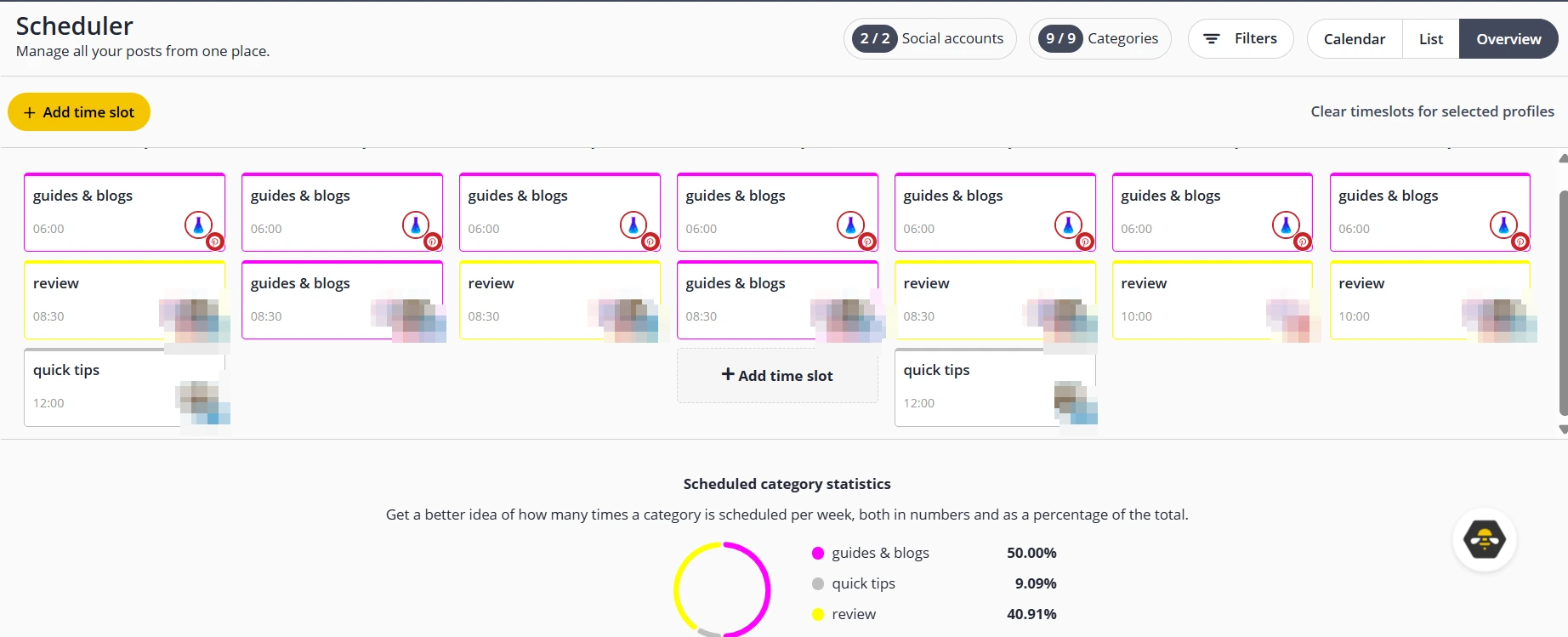
SocialBee’s strength is the weekly structure: once the slots are set, you only add posts to categories. Its RSS feature turned new articles from my site into posts on both networks without any extra work.
Vista Social works more like a classic scheduler with extras. You write a post once, see a live preview for each network, and change the text, image or link for one network without touching the others. Posts that contain a link pick up the article’s image automatically, and the calendar showed even the posts I had published outside the tool, so the whole month was visible in one view.
Keeping Profiles Active: Categories, Recycling and Evergreen Posts
This is where SocialBee leads. Recycling is the center of the product: evergreen categories send posts back into the queue, and posts that should not repeat, such as a sale, can expire after a date or a number of shares. A library of 40 good posts can keep profiles active for months.
Vista Social offers evergreen settings on a post, so a post can repeat later, but the tool is not built around a recycling library. If you want a schedule that refills itself, SocialBee does this with less effort.
Sponsored

AI Features: AI Copilot vs Ask Vista
The AI features show the clearest difference in approach.
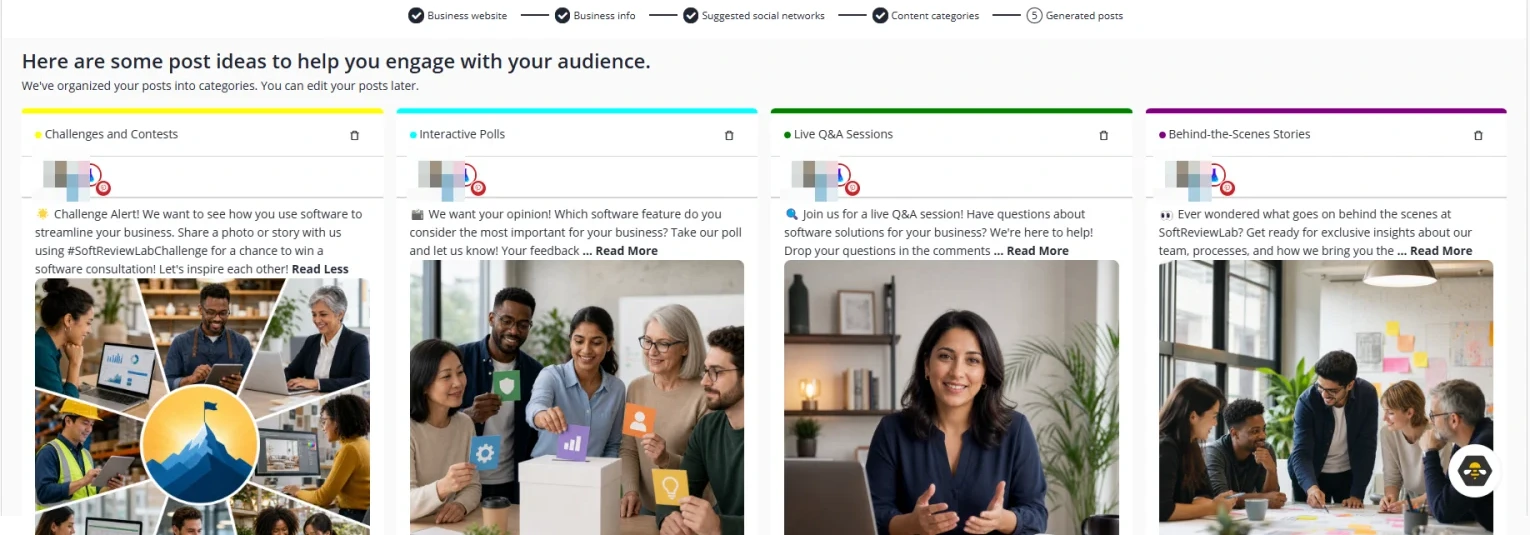
SocialBee’s AI Copilot builds a starting plan from your website. It was quick and the business details it gathered were correct, but some of the posts it wrote promised a team, a contest and a live Q&A that do not exist, so every draft needs checking before you approve it.

Vista Social’s Ask Vista does more than write: it scheduled posts and answered questions inside my account. A short post took under ten seconds. Its weak point was long chats, where it kept an older version of a post and needed a fresh chat to work. Its strong point was Brain, where you set brand rules: when I asked it to claim testing that never happened, it refused, and it would not quote a price it could not verify.
In short: SocialBee’s AI helps you fill a content library, while Vista Social’s AI acts as an assistant across the whole account and can be told what it must never say.
Social Inbox and Engagement
Both tools collect comments and messages in one inbox. SocialBee lists inbox support for six networks: Facebook, Instagram, Threads, LinkedIn, YouTube and X.
Vista Social’s inbox is built for teams: each conversation shows the original post and every comment, team members can leave private notes, the AI can draft a reply and long threads can be summarized. On LinkedIn personal profiles, comments sync only every five to six hours in Vista Social, so replies there are not real time.
Automations
Vista Social has a full automation builder. An automation starts from a trigger, such as a comment that contains a keyword, and then replies, sends a direct message with a link, tags the conversation, creates a task or opens a support ticket. Templates cover the common goals, and Ask Vista can build one from a description. The catch: most automations target Instagram and Facebook, and my LinkedIn automation never ran because real-time comment triggers are not available on LinkedIn personal profiles.
SocialBee’s plan comparison does not list a comment or DM automation builder. Its automation comes from connecting other tools through Zapier, Pabbly and Make, and from its own RSS and recycling features.
Analytics and Reports
SocialBee has analytics for each profile and sends a weekly email that sums up results for each network, which is enough to see whether your posting rhythm works. Report exports are on its top plan.
Vista Social goes further on reporting. Its reports compare profiles and periods with an AI-written summary, can be downloaded or emailed as a PDF straight away, and can be scheduled weekly or monthly. The PDF arrived as a ready-to-send report of about 25 pages, which suits anyone who reports to a manager or a client.
Team Work: Approvals, Tasks and Shared Assets
SocialBee supports post approvals and internal notes on its higher plans, and its two cheaper plans include one user.
Vista Social includes approvals, a task board where each task can link to the posts and automations it is about, with subtasks and checklists, and a shared media library that shows which images have alt text and how many posts use them. For a team, this means fewer separate tools.
Networks and Integrations
SocialBee publishes directly to 10 networks: Facebook, Instagram, Threads, LinkedIn, TikTok, Pinterest, YouTube, X, Bluesky and Google Business Profile. Canva, Unsplash and GIPHY are built in, and Zapier, Pabbly and Make connect it to other apps.
Vista Social covers Facebook, Instagram, LinkedIn, TikTok, YouTube, Threads, Reddit, Snapchat and Pinterest, and X is available as a paid add-on. It also offers listening, review management and employee advocacy, which SocialBee’s plan comparison does not list.
What I Found in My Tests
| Test | SocialBee | Vista Social |
|---|---|---|
| Connecting LinkedIn and Pinterest | About a minute each | About a minute each |
| Scheduled posts published on time | All of about 38 posts | All posts I scheduled |
| AI writing | Drafts quick, but some invented claims | Quick and accurate, with brand rules that blocked false claims |
| AI and scheduling | Copilot drafts go into categories, and the schedule publishes them | Scheduled posts from a chat; worked in a fresh chat, got stuck in a long one |
| Blog to social | RSS turned new articles into posts automatically | Link posts picked up the article image automatically |
| Comment automation on LinkedIn | Not listed in its plans | Did not run on a personal profile |
| Reports | Weekly email summary per network | 25-page PDF emailed on request |
Which One Should You Choose?
Choose SocialBee If
- Your main problem is posting regularly without writing new posts every day
- You want a library of evergreen posts that recycles itself
- You publish blog articles and want them turned into posts automatically
- You work alone or with one other person and mostly schedule posts
Choose Vista Social If
- You answer comments and messages and want them in one shared inbox
- You want automations that reply or send links when people comment, mainly on Instagram and Facebook
- You report results to a manager or clients and want ready-made PDF reports
- Two or more people share the work and need tasks and approvals in the same tool
- You want an AI assistant that can schedule posts and follows your brand rules
Vista Social vs SocialBee: My Verdict
Both tools did their core job well in my tests, and the right choice depends on the job you need done. SocialBee is the better tool for staying consistent: categories and recycling keep profiles active with little daily effort, and it scored 8.5 in my review. Vista Social is the better tool for managing social media as a team: inbox, automations, reports, tasks and an AI assistant with brand rules in one place, and it scored 8.0. Both offer a 14-day free trial without a card, so you can test the one that matches your job: try SocialBee free or try Vista Social free.
Frequently Asked Questions
Is Vista Social better than SocialBee?
It depends on the job. Vista Social does more: a shared inbox, comment and DM automations, PDF reports, tasks and an AI assistant that can schedule posts. SocialBee is better at keeping profiles posting with content categories and evergreen recycling.
Which is better for posting consistently?
SocialBee. Its weekly time slots publish the next post from each category, and evergreen posts recycle, so the schedule does not run empty. Vista Social can repeat posts with evergreen settings, but it is not built around a recycling library.
Which has better AI?
They do different things. SocialBee’s AI Copilot builds a content plan and drafts posts from your website, but some drafts need correcting. Vista Social’s Ask Vista writes, schedules and reports from a chat, and its Brain rules stopped it from making false claims in my test.
References
- My hands-on test of SocialBee, October 2026, and my SocialBee review
- My hands-on test of Vista Social, October 2026, and my Vista Social review
- SocialBee pricing and plan comparison (checked October 9, 2026)
- Vista Social plans and features (checked October 15, 2026)
What we couldn’t verify
- Both tools were tested on LinkedIn and Pinterest only; Instagram, Facebook and TikTok features, including Vista Social’s DM automations, were not tested.
- Vista Social’s listening, review management and employee advocacy were not tested.
- Feature limits per plan are as each vendor listed them in October 2026.
If any of these matter to your decision, check them directly with the vendors or during a free trial.
See every matchup
Browse the rest of the head-to-head comparisons, or jump straight to the full reviews.