
- Home
- Comparisons
- MailerLite vs ActiveCampaign: Which Email Tool Fits a Small Business?
MailerLite vs ActiveCampaign: Which Email Tool Fits a Small Business?

Hands-on tested comparison We compare the value each tool gives a specific kind of buyer, not which company is bigger or better, so there is no overall winner. How we compare.
Short answer: MailerLite and ActiveCampaign both send newsletters and automated emails, but they are priced for different levels of ambition. MailerLite costs less at every list size I checked, includes forms, landing pages and a small website, and allows up to 100 steps in an automation from its first paid plan. ActiveCampaign is the deeper automation tool, with branching journeys, goals, more than 950 ready-made recipes and more than 1,000 integrations, but its cheapest plan stops each automation at five actions, so real automation starts on its Plus plan. I opened an account on each in October 2026. If you send a newsletter and a few automated sequences, MailerLite is the better buy. If your follow-up depends on what each contact does and someone will invest time in building it, ActiveCampaign earns its higher price.
Disclosure: SoftReviewLab is an affiliate of both MailerLite and ActiveCampaign, so we may earn a commission if you sign up through a link on this page, at no extra cost to you. It does not change which tool I recommend for which job. See our affiliate disclosure.
Table of Contents
MailerLite vs ActiveCampaign at a Glance
| MailerLite | ActiveCampaign | |
|---|---|---|
| Built for | Newsletters, simple automations, forms and pages on a budget | Behaviour-based automation and sales follow-up |
| Free plan | Yes, with no time limit | No |
| Free trial | 14 days of paid features, no card | 14 days, no card, 100 email sends |
| Automation on the first paid plan | 50 active automations, up to 100 steps each | 5 actions per automation |
| User logins on the first paid plan | 3 | 1 |
| Landing pages and website | Landing pages and a website on every plan | Landing pages from Plus, no website builder |
| Integrations | More than 100 | More than 1,000 |
| My score | 7.4 out of 10 | 7.7 out of 10 |
Two Tools Built for Different Jobs
MailerLite is an email marketing tool first and a small website builder second. Its plans bundle newsletters, automations, sign-up forms, pop-ups, landing pages, a simple website and digital product sales, and everything is designed so a business owner can do it without help.
ActiveCampaign is an automation platform with email at its core. It is built around workflows that react to what a contact does, such as opening, clicking, buying or reaching a deal stage, and it sells a sales CRM, SMS and WhatsApp as extras on top. Every plan includes its AI tools, which it calls Active Intelligence.
That difference explains most of what follows. MailerLite makes the common jobs cheap and simple. ActiveCampaign makes complex jobs possible, and charges for it.
What Each Costs at Your List Size
Both tools price by the number of contacts, and both give a saving for paying a year at once. The table shows the yearly price per month on each vendor’s pricing page in October 2026:
| Contacts | MailerLite Comfort | MailerLite Power | ActiveCampaign Starter | ActiveCampaign Plus |
|---|---|---|---|---|
| 1,000 | $17.10 | $35.10 | $15 | $49 |
| 2,500 | $29.70 | $44.10 | $39 | $95 |
| 10,000 | $80.10 | $116.10 | $149 | $189 |
Paying month to month costs more on both. MailerLite adds about 10 percent, so Comfort at 1,000 subscribers is $19 a month. ActiveCampaign’s support team told me in writing that true monthly billing exists on Starter and Plus, at $19 and $59 a month for 1,000 contacts, while Pro is offered only as a 12-month commitment paid monthly. You can check the current figures on ActiveCampaign’s pricing page.
The fair comparison is not cheapest against cheapest. ActiveCampaign Starter caps each automation at five actions, which is too few for most real sequences, so the plan that matches MailerLite Comfort for automation is Plus. At 2,500 contacts that is $29.70 against $95 a month, more than three times as much. At 10,000 contacts the gap is smaller as a ratio but larger in dollars.
Two billing rules matter when you work out your own numbers. ActiveCampaign accounts created since November 2025 count every contact toward the limit, whatever its status, so clean your list before you import it. MailerLite counts active subscribers, and on its free plan sending locks once you pass 250 until you upgrade or remove subscribers.
Free Plan and Trial: What You Can Do Before Paying
MailerLite has a free plan with no time limit: 250 subscribers, 2,500 emails a month, two user logins, three active automations of up to five steps, one landing page, one website and three forms. It shrank from 500 subscribers in June 2026, so older articles that promise more are out of date. New accounts also get 14 days of paid features without a card, and when those end the account drops back to the free plan instead of being deleted.
ActiveCampaign has no free plan. Its 14-day trial needs no card and has no contact limit, but it allows only 100 email sends, so you can build and test but not run a real campaign. AI use is capped in the trial as well: 100 AI credits, against 500 a month on every paid plan.
For a business that wants to start small, that is a real advantage for MailerLite: your first 250 subscribers cost nothing.
Automation: Where the Real Difference Is
Automation is the main reason people compare these two, so it is worth being precise about what each plan allows.
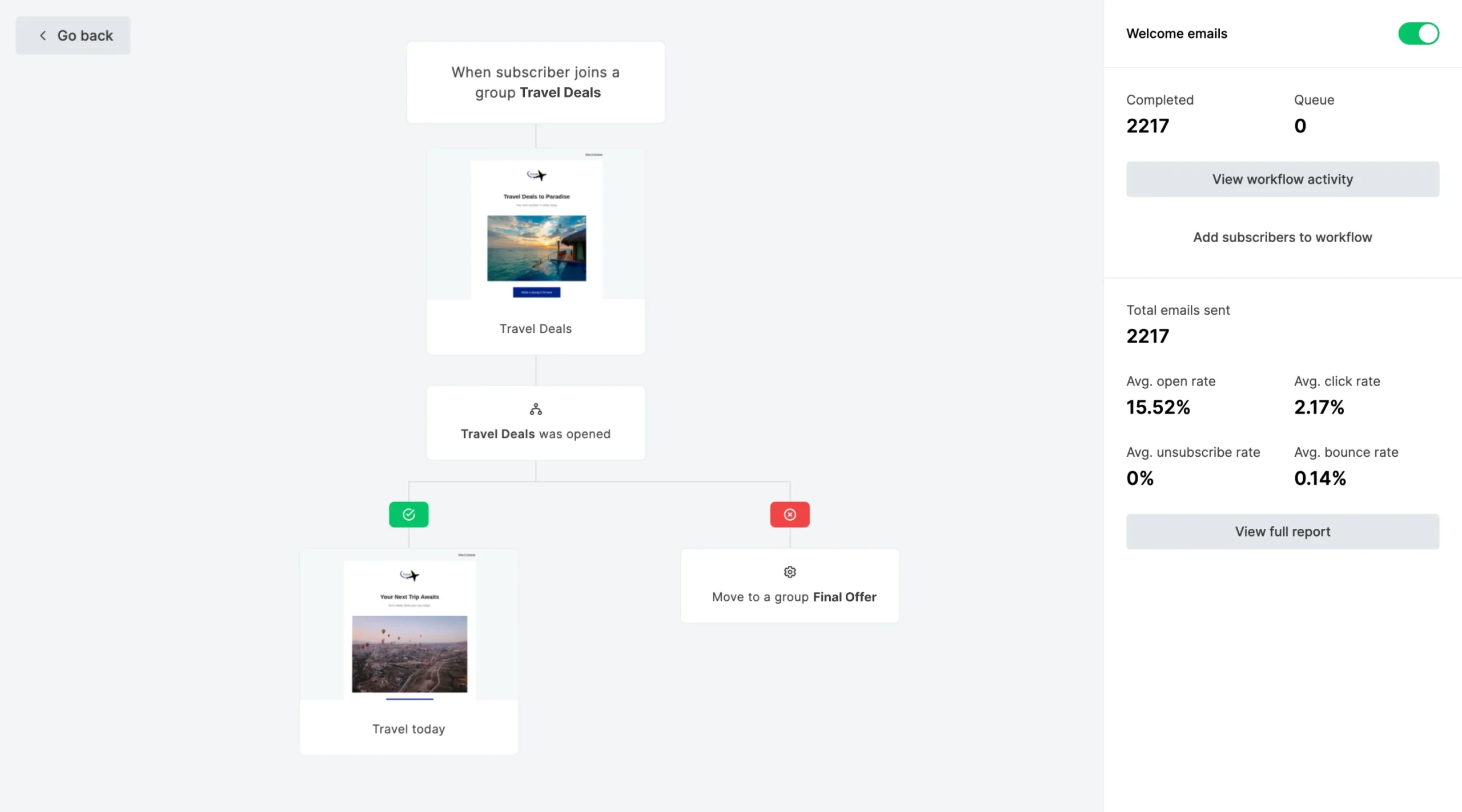
MailerLite automations start from a trigger: joining a group, completing a form, clicking a link, a date or, for online stores, an abandoned cart or a specific purchase. Free runs 3 automations, Comfort 50 with up to 100 steps each, and Power is unlimited and lets one automation start from several triggers. Workflows can branch on whether someone opened or clicked, and you can run A/B tests inside them.
ActiveCampaign goes further. Its builder branches on contact behaviour and data, uses goals that move a contact forward when they buy or book, runs split tests, and offers more than 950 recipes you can import and edit. The limit is the plan: Starter allows five actions per automation and email only. From Plus, actions are unlimited and other channels, such as SMS as a paid add-on, can join the flow.
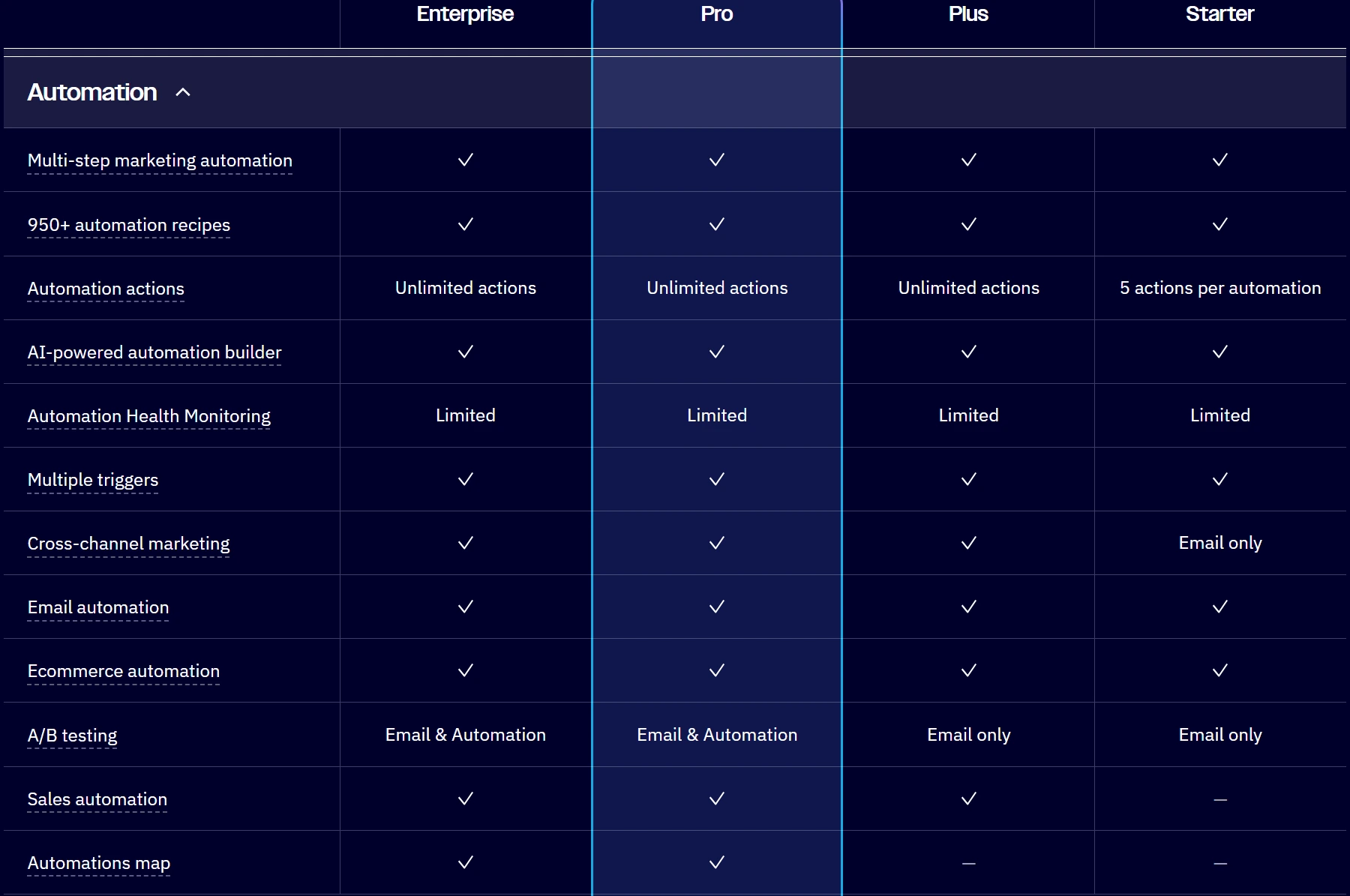
In practice, a welcome series of three emails with a branch for people who did not open fits comfortably in MailerLite Comfort. A journey that changes depending on which product page someone viewed, whether they booked a call and which deal stage they reached is the work ActiveCampaign is built for, and where MailerLite starts to feel short. Customers on Capterra say the same about MailerLite: easy for common flows, limited for complex journeys. If you are not sure which you need, my guide on how to set up a welcome email series shows what a first automation looks like.
What I Saw Setting Up Each One
I opened a MailerLite account and an ActiveCampaign trial in October 2026, so this part comes from my own use. I did not send campaigns to a real list in either tool.
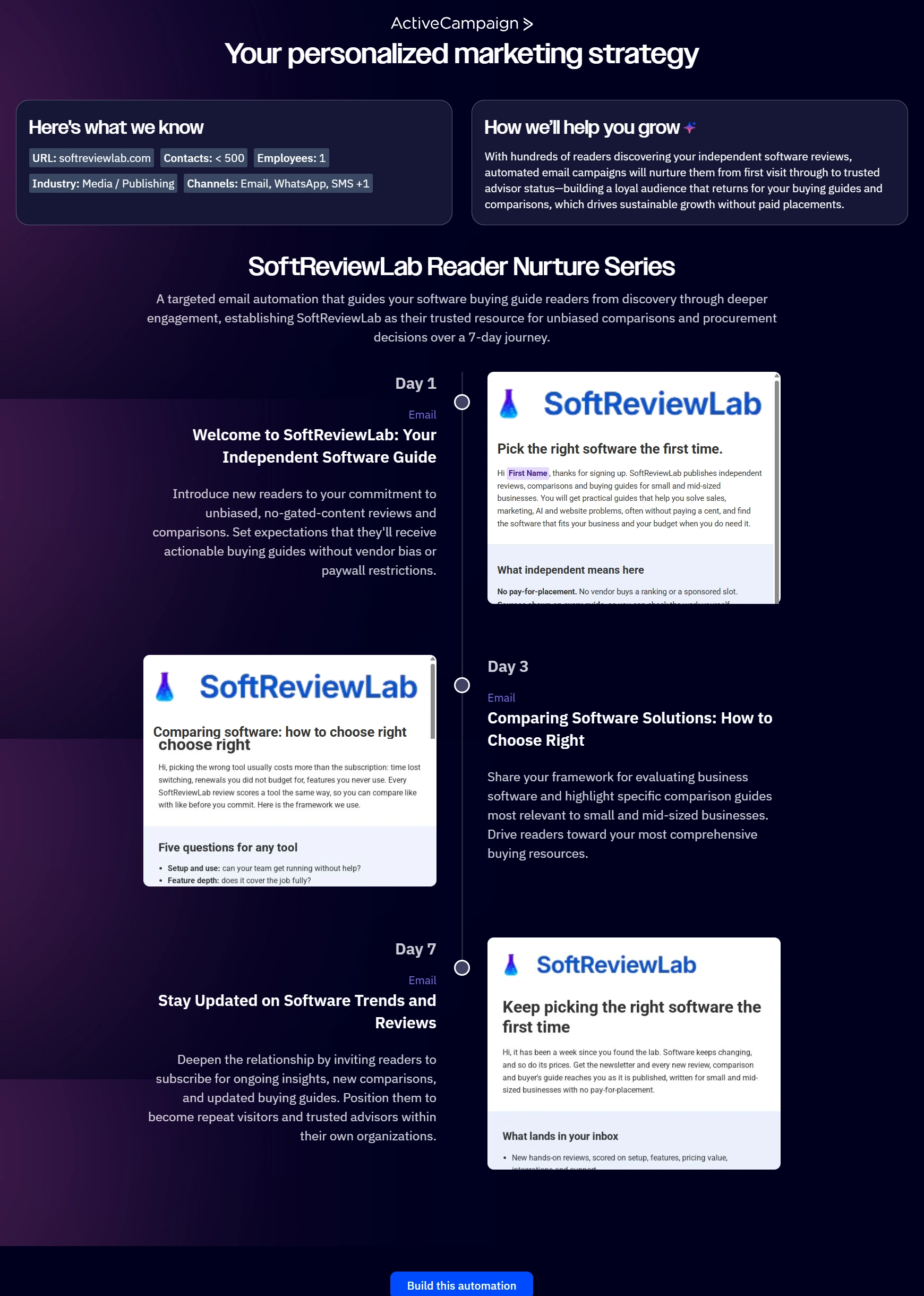
ActiveCampaign’s sign-up asks for a phone number and a few questions about your business, then offers to read your website. From softreviewlab.com its AI wrote a short business summary and a three-email nurture series, and one button turned that into a working automation with drafted emails. It was a faster start than MailerLite’s, which opens with a setup checklist instead. The drafts still needed checking: they mislabelled the send days, stated things about my site that were wrong and had no fallback for contacts without a first name.
A test email passed ActiveCampaign’s own spam check but landed in Gmail’s spam folder. I sent it from a domain I had not authenticated in the account, so treat it as a reminder rather than a verdict on deliverability: both tools expect you to send from your own authenticated domain.
MailerLite made that step straightforward to follow. It offered to add the DNS records automatically or to list them for manual setup. I did it by hand, because my domain already had an SPF record that had to be combined with MailerLite’s value rather than duplicated. Three records were needed, and the domain showed as authenticated the same evening. After the trial, MailerLite requires an authenticated domain before you can keep sending campaigns, and a free Gmail address comes with limits.
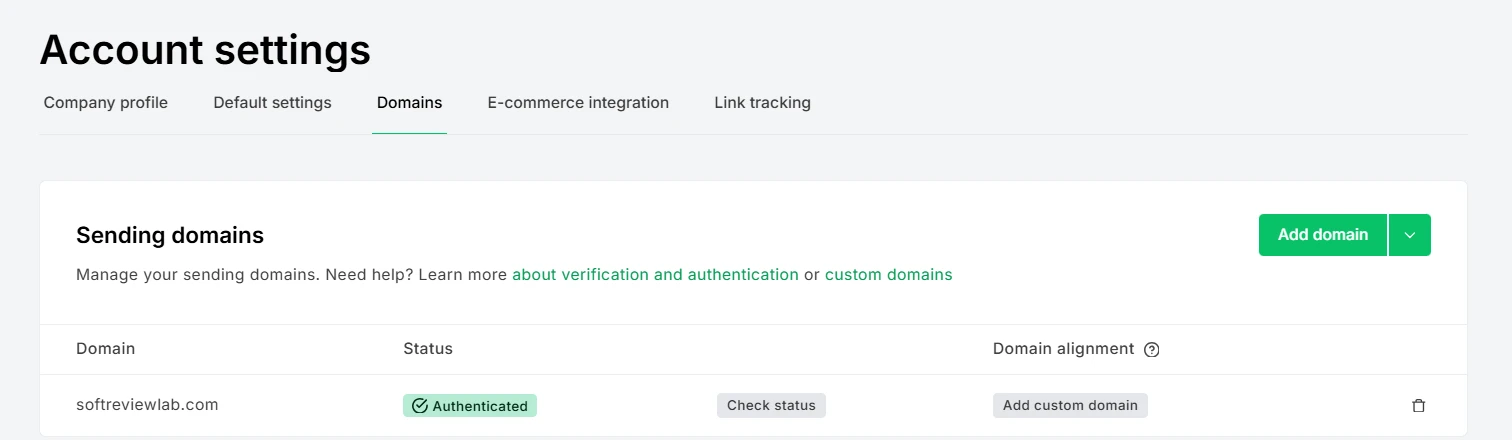
This is not a MailerLite quirk. Gmail’s email sender guidelines require every sender to set up SPF or DKIM, and anyone sending more than 5,000 messages a day to Gmail to add DMARC and one-click unsubscribe. Whichever tool you choose, set aside an hour for this before your first campaign.
Logins, Pages and Selling
Three practical differences catch small teams out.
- User logins: MailerLite includes 2 users on Free, 3 on Comfort and unlimited on Power. ActiveCampaign includes 1 on Starter and Plus, 3 on Pro and 5 on Enterprise. If two people need their own logins, MailerLite Comfort covers it, while ActiveCampaign needs Pro.
- Pages and website: MailerLite includes landing pages and a simple website on every plan, with limits on Free and Comfort, and sells digital products through Stripe without taking a commission. ActiveCampaign lists landing pages from Plus and has no website builder.
- Sales tools: ActiveCampaign sells a CRM with deals and pipelines, SMS and WhatsApp as add-ons, with prices given on request; the CRM was $85 a month on Plus when I asked. MailerLite has no CRM and expects you to connect one.
Integrations and AI
ActiveCampaign connects to more than 1,000 apps, with Shopify, WooCommerce and Square on every plan, plus an API, webhooks and connections for AI assistants such as Claude and ChatGPT. MailerLite connects to more than 100, which covers what most small businesses use: Shopify, with two-way sync since August 2026, WooCommerce, WordPress, Stripe and Zapier, plus its own MCP server for AI assistants, which is limited on the free plan.
For AI inside the tool, ActiveCampaign does more, with 500 AI credits a month on every paid plan for building campaigns, automations and segments. MailerLite’s AI writing assistant and smart sending start on Comfort.
Support, Refunds and What Customers Say
Support follows the plan. MailerLite Comfort includes email support around the clock, with live chat on Power or on lists of 50,000 or more, and free accounts get email and chat only for their first 14 days. ActiveCampaign includes email and chat on every plan, and when I sent it three billing questions in writing, a person answered all of them in under four hours.
Refunds are strict on both. MailerLite gives no refund for an unused plan or a forgotten cancellation. ActiveCampaign offers a 30-day money-back guarantee for new accounts on annual plans, and outside it the stated policy is no refunds. Either way, start on the free plan or the trial before paying for a year.
Customer ratings point the same way as my experience with support. MailerLite holds 4.7 out of 5 on Capterra from more than 2,300 reviews, with customer service its highest-rated area. ActiveCampaign has 2.7 on Trustpilot, with half of the negative reviews unanswered when I checked. The two figures come from different sites, so read them as a signal of how each company handles problems, not as a head-to-head score.
Which One Should You Choose?
Choose MailerLite If
- You send a newsletter and a handful of automated sequences
- You want forms, landing pages or a simple website in the same account
- Price matters and your list will stay under 10,000 for a while
- Two or three people need their own logins
Choose ActiveCampaign If
- Your follow-up depends on what each contact does, across several steps and channels
- You run an online store or a sales process and want goals, scoring or a CRM in one place
- You need integrations beyond the common ones
- Someone on your team will spend time building and maintaining automations
Consider Something Else If
If you mainly want the most familiar name and many integrations, read my Mailchimp review, or my comparison of ActiveCampaign vs Mailchimp if those two are your shortlist. If you want branching automation for less than ActiveCampaign Plus and can live with a dated interface, my Campaigner review covers its Advanced plan.
MailerLite vs ActiveCampaign: My Verdict
For most small businesses starting out or sending a regular newsletter, MailerLite is the better value. At 2,500 contacts it costs less than a third of ActiveCampaign Plus, it includes pages and forms, and more people can log in. ActiveCampaign is the better tool when automation is the job itself, and the extra money buys real depth. If you are unsure, start with MailerLite’s free plan; moving later is possible, and ActiveCampaign lists contact migration among its free services.
If MailerLite sounds right, you can create a free account on MailerLite’s site. If ActiveCampaign fits better, you can start its 14-day free trial without a card. For the full detail, read my MailerLite review and my ActiveCampaign review, or start with my guide on how to choose email marketing software.
Frequently Asked Questions
Is MailerLite better than ActiveCampaign?
For most small businesses sending newsletters and simple automated sequences, yes: MailerLite costs less, includes forms, landing pages and a website, and gives more user logins. ActiveCampaign is better when your follow-up depends on what each contact does across several steps, or when you want a CRM and wider integrations in the same place.
Is MailerLite cheaper than ActiveCampaign?
At comparable automation, yes. ActiveCampaign’s cheapest plan limits each automation to five actions, so the fair match for MailerLite Comfort is ActiveCampaign Plus. At 2,500 contacts on yearly billing, that is $29.70 a month for MailerLite Comfort against $95 for ActiveCampaign Plus.
Does ActiveCampaign have a free plan like MailerLite?
No. ActiveCampaign offers a 14-day trial with no card, but it allows only 100 email sends. MailerLite has a free plan with no time limit for up to 250 subscribers and 2,500 emails a month.
Is MailerLite any good for a small business?
Yes, for its price. It covers newsletters, automations, forms, landing pages and a simple website, and customers rate its support highly. Its limits are a small free plan since June 2026, a strict refund policy and automations that stay simpler than ActiveCampaign’s.
Can I move from MailerLite to ActiveCampaign later?
Yes. You can export your subscribers from MailerLite and import them into ActiveCampaign, which lists contact migration among its free services. Automations do not transfer between the two tools, so plan to rebuild them.
Sources and References
Every price and limit on this page was checked in October 2026. Prices change, so confirm them on each vendor’s site before you buy.
- MailerLite pricing page and help center
- ActiveCampaign pricing page and plan comparison
- Written answers from ActiveCampaign’s support team, October 2026
- My own MailerLite account and ActiveCampaign trial, October 2026
- Gmail Help: email sender guidelines
- Capterra and Trustpilot review pages for both tools
- How SoftReviewLab reviews and scores software
What we couldn’t verify
- Neither tool was used to send campaigns to a real list, so inbox placement at volume and day-to-day editing come from documentation and customer reviews.
- ActiveCampaign’s add-on prices other than the CRM figure, and its month-to-month prices above 1,000 contacts, were not checked.
- Customer ratings come from different sites (Capterra for MailerLite, Trustpilot for ActiveCampaign) and are not a like-for-like score.
If any of these matter to your decision, check them directly with the vendors or during a free trial.

See every matchup
Browse the rest of the head-to-head comparisons, or jump straight to the full reviews.