Vista Social Review 2026: Best Social Media Management Tool for Small Teams?
Social Media Management
Vista Social Review 2026: Best Social Media Management Tool for Small Teams?
8.0/10
“Vista Social is worth it when a team manages many profiles, answers comments and reports to a manager or clients: one account replaces several tools, and Ask Vista with Brain saves writing time without inventing claims. If you only schedule posts to a few profiles, a cheaper scheduler is the better buy.”
Hands-on testedIncludes direct use of the product, alongside its documentation, pricing pages and customer reviews. How we work.
Starting price
From $99/mo ($80/mo billed yearly)
Best for
Small marketing teams and agencies that manage many social profiles
Free trial
14-day free trial, no credit card
Based on
My own Vista Social trial (October 2026: LinkedIn and Pinterest connected, posts scheduled by hand and with Ask Vista, Brain rules tested, a LinkedIn automation built, inbox, reports and tasks used), Vista Social’s pricing page and FAQ (checked October 15, 2026), its homepage, and answers from its human support and AI support agent (October 14, 2026)
Scores
Ease of setup & use8.0
Feature depth9.0
Pricing & value6.5
Integrations8.0
Support & terms8.5
How these scores were worked out
Ease of setup & use: 8.0 (Strong) Setup and ease of use (8.0): Sign-up and connecting LinkedIn and Pinterest took minutes and no card. The first post took about ten minutes while learning the layout, and Ask Vista needs practice: long chats can get stuck.
Feature depth: 9.0 (Strong) Features (9.0): Publishing with per-network previews, a calendar, the inbox, DM and comment automations, PDF reports, tasks, a media library and the Ask Vista assistant with Brain rules. Every scheduled post in my test went out on time.
Pricing & value: 6.5 (Average) Pricing and value (6.5): Good value for teams with many profiles, with 15 profiles and 2 users from $80 a month billed yearly. Too expensive for small accounts, and X, listening and advocacy cost extra.
Integrations: 8.0 (Strong) Integrations (8.0): A wide range of networks, including TikTok, Reddit, Threads and Snapchat, plus Pinterest in my test. X is a paid add-on, and LinkedIn personal profiles get fewer inbox and automation features.
Support & terms: 8.5 (Strong) Support and terms (8.5): A 14-day trial without a card, no automatic charge when it ends, and clear answers from human support in about two hours. The pricing page states no refund policy.
Overall: (8.0 + 9.0 + 6.5 + 8.0 + 8.5) ÷ 5 = 8.00, shown as 8.0. The five criteria are weighted equally.
Scores are editorial judgments in half-point steps, based on my own use of the product, documented features, published pricing and repeated themes in customer reviews. They are not lab measurements, so treat the words as the guide: 8.0+ Strong, 7.0 to 7.9 Good, 6.0 to 6.9 Average, below 6.0 Weak.
What works
Publishing, inbox, automations, reports, tasks and AI in one account
Ask Vista writes and schedules posts, and Brain stops it from making false claims
Every scheduled post in my test went out on time, with link images added automatically
Ready-to-send PDF reports that can be scheduled weekly or monthly
15 profiles and 2 users on the cheapest plan
14-day trial without a card and no automatic charge when it ends
Human support answered by email in about two hours
What doesn’t
$99 a month is expensive for a solo owner with a few profiles
Ask Vista can get stuck in long chats and burn AI credits while you learn
Comment automations and live comment alerts do not work on LinkedIn personal profiles
X costs an extra $29 a month
The pricing page gives two different user counts and no refund policy
Data is deleted about 30 days after a trial ends without a subscription
What we couldn’t verify
DM automations on Instagram, Facebook and TikTok: not tested.
Listening, review management and employee advocacy: not tested; as Vista Social describes them in October 2026.
Refund terms: not stated on the pricing page.
If any of these matter to your decision, check them directly with the vendor or during your trial.
Who should skip it
Solo owners posting to two or three profiles on a tight budget, businesses that rely on a personal LinkedIn profile for comment automations, and anyone who needs X without paying for an add-on.
By Abdullahi Abdirahman, Founder & Editor, SoftReviewLab. Updated October 2026. This review is based on my own Vista Social trial, which I started on October 11, 2026, plus its pricing page, checked on October 24, 2026, and written answers from Vista Social’s support team. During the trial I connected LinkedIn and Pinterest, scheduled and published posts by hand and through its AI assistant, built an automation, used the inbox, ran reports and set up tasks. Where a claim comes from Vista Social rather than from my test, I say so.
Disclosure: SoftReviewLab is a Vista Social affiliate. If you start a trial or subscribe through a link on this page, we may earn a commission at no extra cost to you. It does not change the score. See our affiliate disclosure and research and scoring method.
Table of Contents
Vista Social Review: The Short Answer
This Vista Social review asks whether Vista Social is the best social media management tool for small teams, and scores it 8.0 out of 10. It does far more than schedule posts: one account covers publishing, a shared inbox, comment and DM automations, reports that arrive as PDFs, tasks for your team and an AI assistant called Ask Vista that can write and schedule posts for you. In my test every scheduled post went out on time on LinkedIn and Pinterest, and its human support answered my questions in about two hours.
The catch is the price and a few rough edges. Even the cheapest plan is more than a solo owner with two or three profiles needs to pay. Ask Vista can get stuck in a long chat, and some features, such as comment automations and live comment alerts, do not work on LinkedIn personal profiles. It suits a small marketing team or agency that manages many profiles and wants the inbox, automations and reports in the same tool.
Vista Social is a social media management platform for businesses and agencies. You connect your social accounts, which Vista Social calls profiles, and then plan, publish, answer and measure everything from one place. Its homepage lists Facebook, Instagram, LinkedIn, TikTok, YouTube, Threads, Reddit, Snapchat and X among its networks, and Pinterest worked in my test. X is a paid add-on.
The idea is simple: instead of logging in to every network, your team works from one calendar, one inbox and one set of reports. Profiles can be grouped by brand or client, and every plan is priced by how many profiles and users you need.
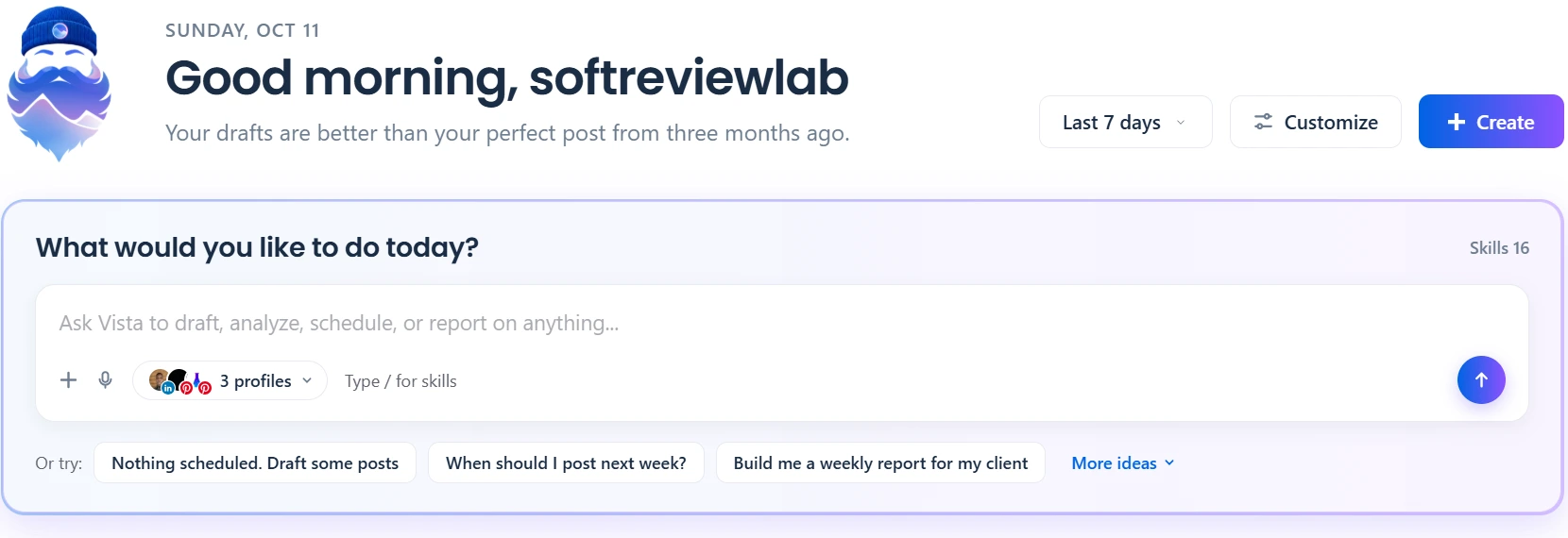
The home screen opens with Ask Vista, a chat box that works like a command center: you type a request such as draft some posts, find the best time to post next week or build a weekly report, choose which profiles it applies to, and the assistant does the work inside your account. The suggestions below the box are ready-made requests, and Skills shows the tasks Ask Vista can carry out.
How I Tested Vista Social
I used Vista Social as a real small business would, on SoftReviewLab’s own accounts:
Signed up in under three minutes without a card, then connected LinkedIn and Pinterest in about a minute each
Wrote and scheduled posts by hand for both networks, and checked that each one went out at its set time
Asked Ask Vista to write and schedule posts, and timed its answers and the AI credits each request used
Set up Vista Social Brain with brand rules and tested whether it would refuse to make false claims
Built a comment-to-DM automation on LinkedIn and posted test comments from a second account
Read and answered comments in the inbox, requested reports and opened the PDF
Created a task with linked posts, subtasks and a checklist
Emailed human support and used the AI chat agent, and recorded how long the answers took
The score also uses Vista Social’s pricing page and FAQ, checked on October 15, 2026. I did not test Facebook, Instagram or TikTok, listening, review management or employee advocacy, so those parts rely on what Vista Social publishes.
Advertisement
Vista Social Features: What You Actually Get
Home Dashboard and Performance Pulse
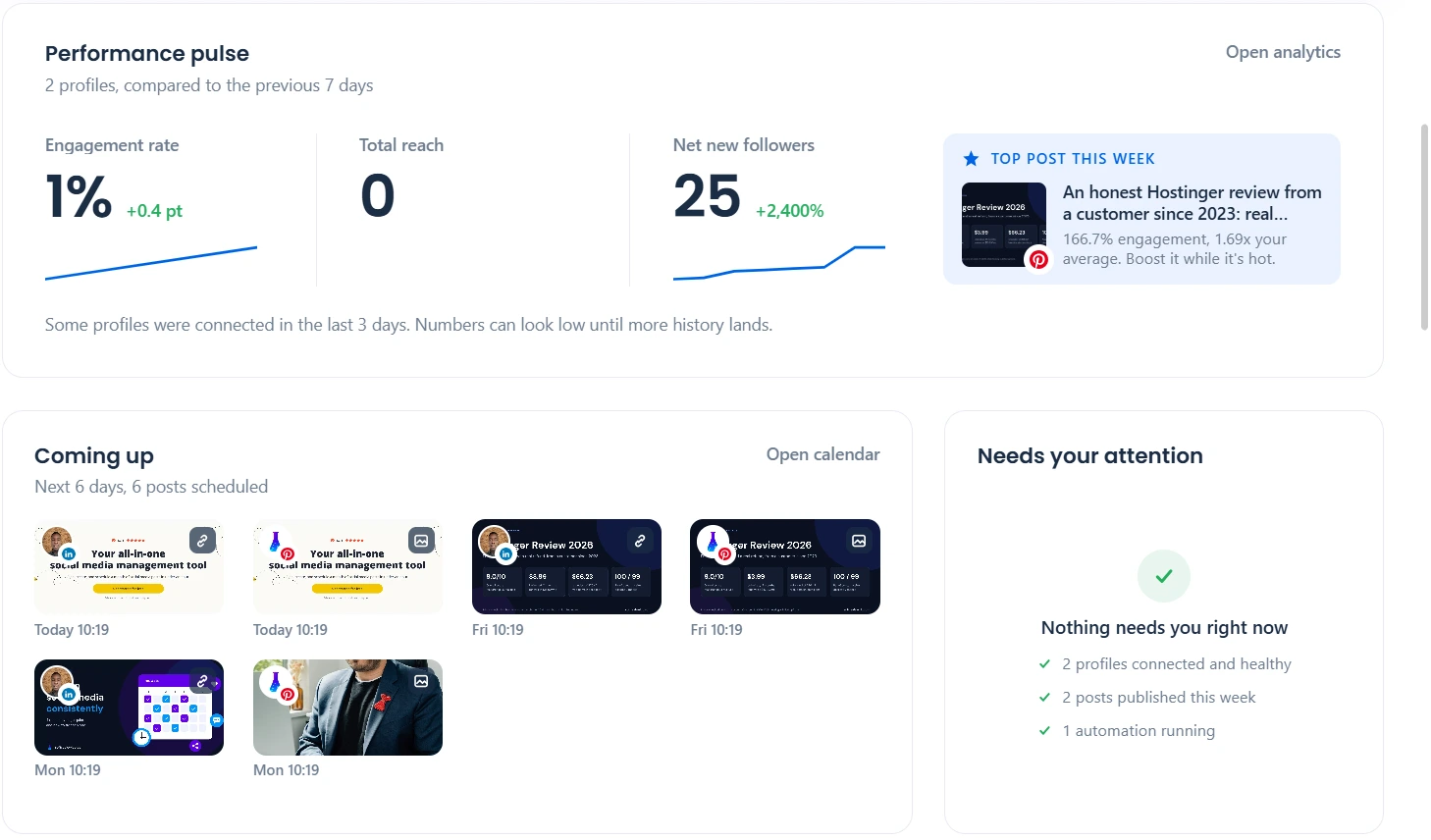
Below Ask Vista, the home dashboard sums up your week. It is the screen to check each morning, because it tells you whether anything is broken before you look for problems yourself.
Performance pulse compares the selected profiles with the previous seven days: engagement rate, total reach and net new followers, plus the top post of the week and how it performs against your average. Coming up lists the posts scheduled for the next few days with a thumbnail and time, so gaps in your plan are easy to spot. Needs your attention checks that every profile is connected, that posts were published and that automations are running, and shows a green check when nothing needs fixing.
Publishing and the Content Calendar
You write a post once and send it to several networks. When the post contains a link, Vista Social pulls in the article’s title and featured image for every network by itself, and on Pinterest it uses the link as the pin’s destination. You can then change the text, image or link for one network without touching the others. In my test, posts scheduled by hand and posts scheduled by Ask Vista all went out at their set times, and the calendar also showed posts I had published outside Vista Social, so the whole month was visible in one view.
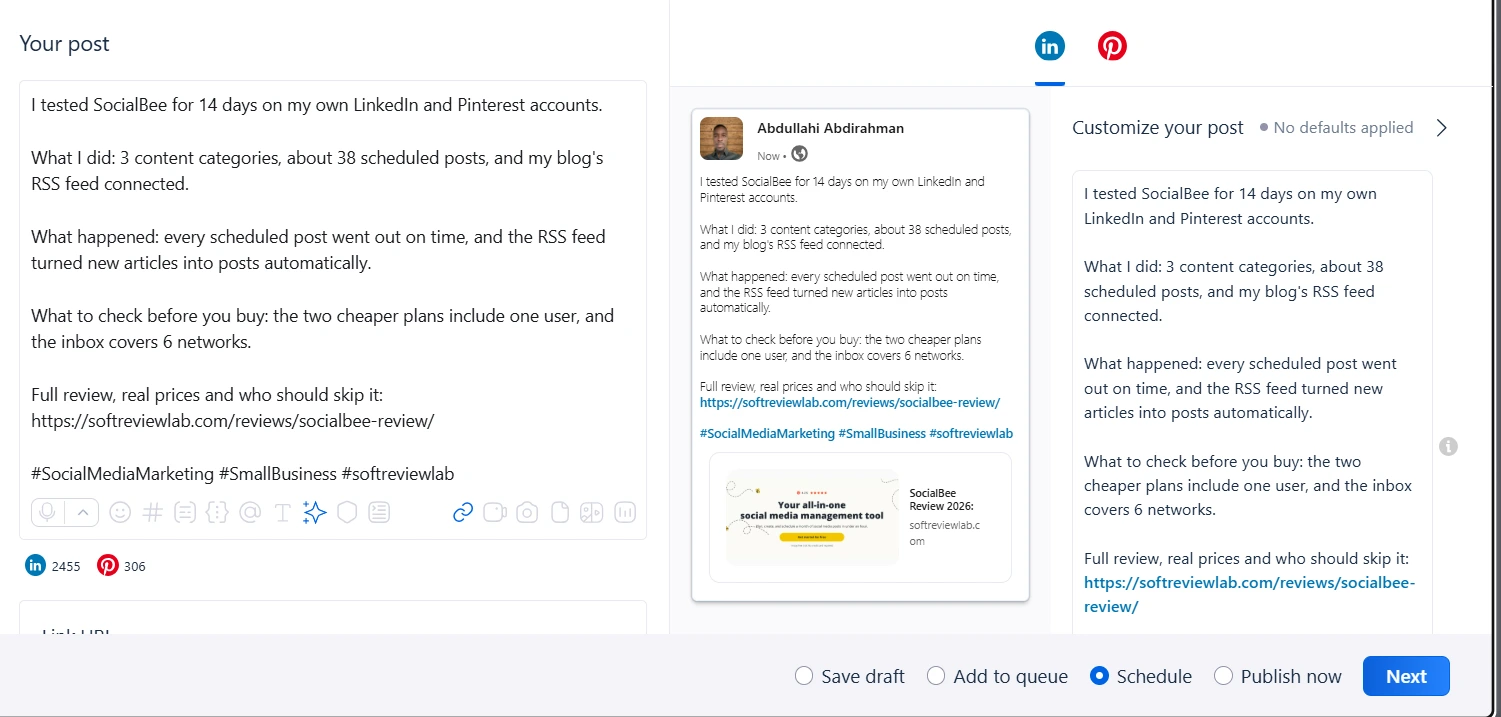
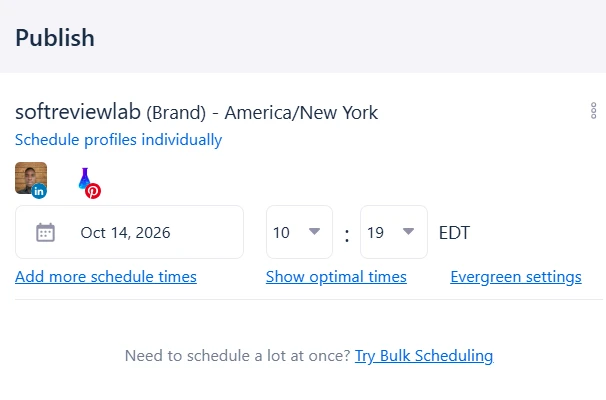
The composer keeps your text on the left and a live preview of each network on the right, so you see the post as your followers will before it goes out. The counters under the text show how many characters each network still allows, the link field fetches the page title, description and image automatically, and the buttons at the bottom let you save a draft, add the post to a queue, schedule it for a set time or publish it now.Switching to the Pinterest tab turns the same post into a pin with its own description, pin title, image and destination link, each with its own character limit. Auto publish sends the pin straight from Vista Social at the scheduled time. Changes here apply to Pinterest only, which is how one post can be adjusted for each network.The publish panel sets the date, time and time zone for the whole profile group, or you can schedule each profile on its own. Add more schedule times sends the same post more than once, Show optimal times suggests slots based on when your audience is active, Evergreen settings let a post repeat later, and Bulk Scheduling adds many posts in one go.
The first post took me about ten minutes because I was still learning where things are. After that, scheduling one post to two networks is a matter of a minute or two.
Ask Vista: The AI Assistant
Ask Vista is the feature that sets Vista Social apart. It is a chat assistant connected to your account, so it does not only write text: it can schedule posts, build reports and find information in your data. It runs on AI credits: every plan includes a monthly allowance (listed in the pricing table below), while the trial has a fixed 500 credits that do not reset.
Ask Vista answers a plain request in seconds: here a LinkedIn post with three practical steps, under 150 words and ending with a link. Because it is connected to your profiles, it then offers to schedule the post or save it as a draft. The profile selector under the reply box decides which accounts a request applies to, and typing a slash opens its list of skills.
What I found in practice:
A short LinkedIn post of about 105 words took under ten seconds and used 25 credits. The text was correct and had no invented claims, but it was generic in tone
Scheduling a Pinterest pin through Ask Vista needed every detail, including the board name, in one message. When I answered its questions one at a time, it kept asking for the board again
In a long chat, its confirmation card kept an older version of the post. Pressing Confirm four times scheduled nothing, and I had to cancel the card myself. The same request in a new chat worked at once
For a pin image it offered three options: upload one, pick from the media library or choose a stock photo from Unsplash
The lesson is to start a new chat for each task and give all the details in one message. Because Ask Vista and I kept misunderstanding each other, I repeated the same request about seven times, which used 213 credits. In total I used 299 of my 500 trial credits, so budget extra credits for the first weeks.
Vista Social Brain: Brand Rules for the AI
Brain is where you teach Ask Vista about your business: your brand voice, the content and products it may talk about, guidance on style, and escalation rules for questions it should not answer. I wrote a rule telling it never to claim testing that did not happen. When I then asked it to write that we had tested a tool for three months and saved ten hours a week, it refused and flagged the request. It also refused to quote a price that was not in its knowledge, and it answered questions about who runs SoftReviewLab correctly without inventing a team. Questions asked in the Brain test tab did not use any credits.
For a business, this is a real safeguard: an AI that writes posts for you should not invent results, prices or promises, and Brain is how you stop it.
Social Inbox: Comments and Messages in One Place
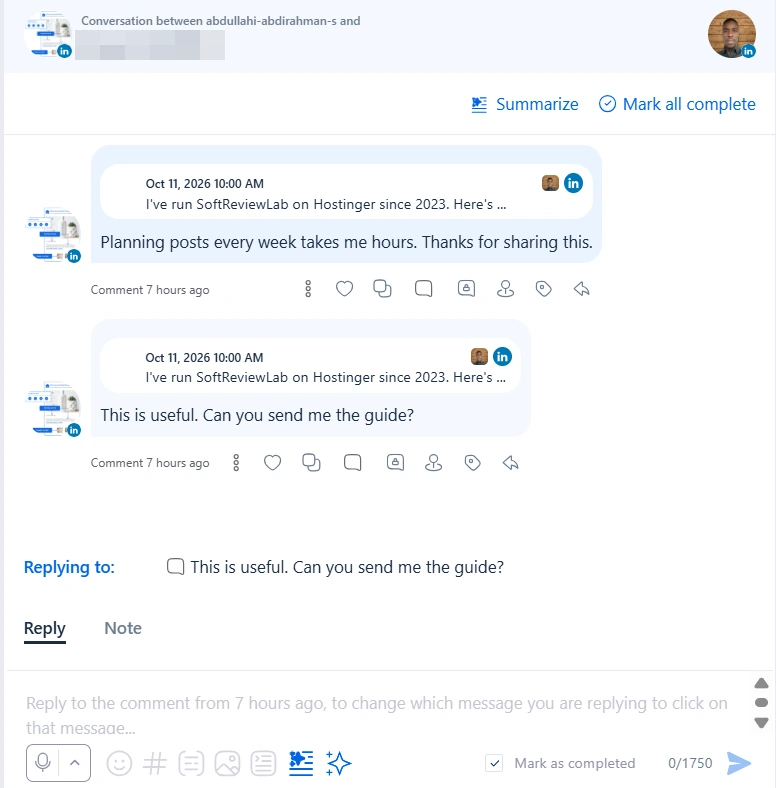
The inbox collects comments and messages from your connected profiles so your team can answer them without opening each network.
Each conversation shows the original post, every comment on it and a reply box at the bottom. Reply posts a public answer; Note leaves a private comment that only your team sees, which is useful when someone needs to check a fact before replying. The toolbar adds emoji, hashtags and images, the sparkle icon asks the AI to draft an answer, Summarize condenses a long thread, and Mark as completed moves the item out of the queue once it is handled.
There is one important limit on LinkedIn. Vista Social’s support agent told me that comments on LinkedIn personal profiles sync only every five to six hours, and that live comments, mentions and messages are not supported for personal profiles. LinkedIn Company Pages get real-time comment notifications. If your business runs on your personal LinkedIn profile, expect delays in the inbox.
DM and Comment Automations
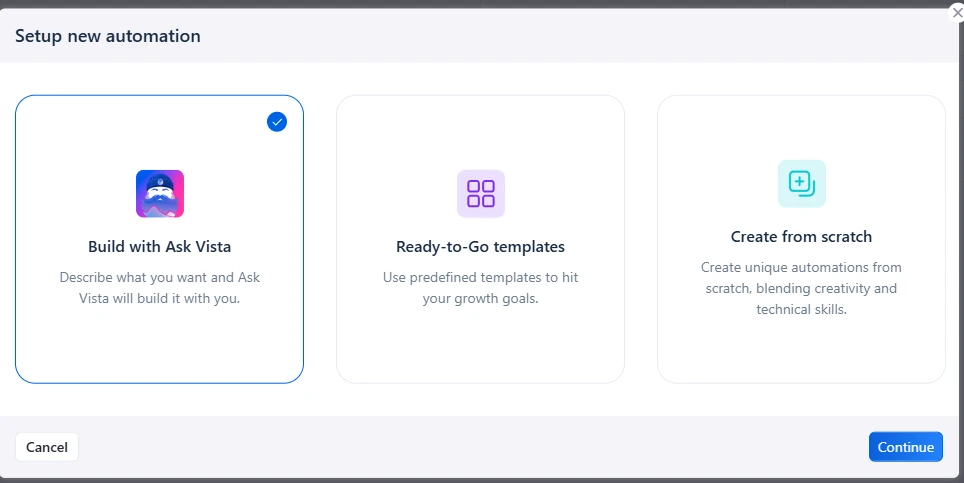
Automations reply to comments, send direct messages, apply tags or create tasks when something happens on your profiles. They run on rules: a trigger, such as a comment that contains a keyword, and one or more actions.
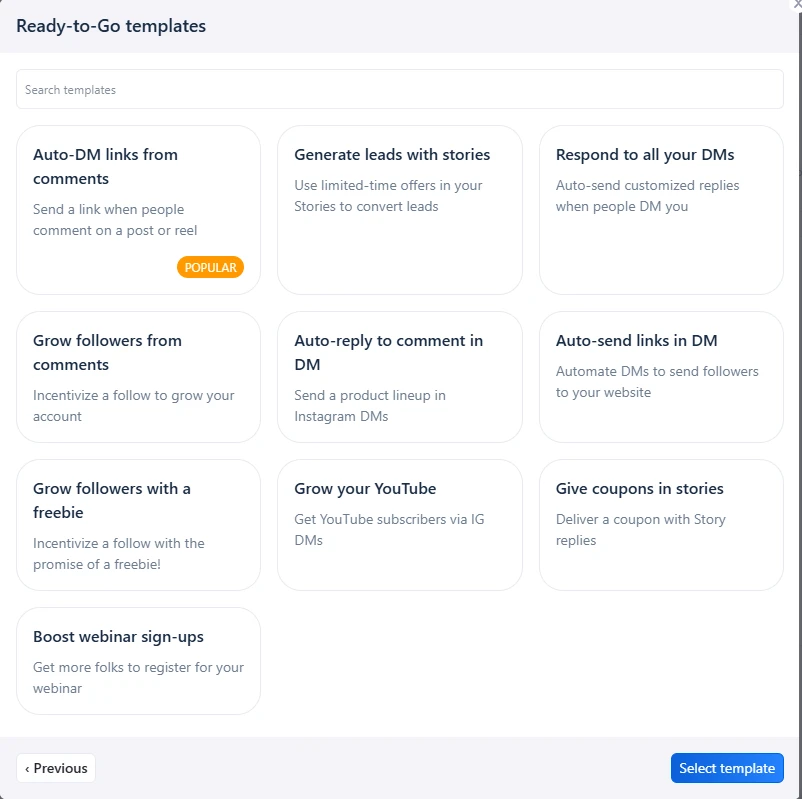
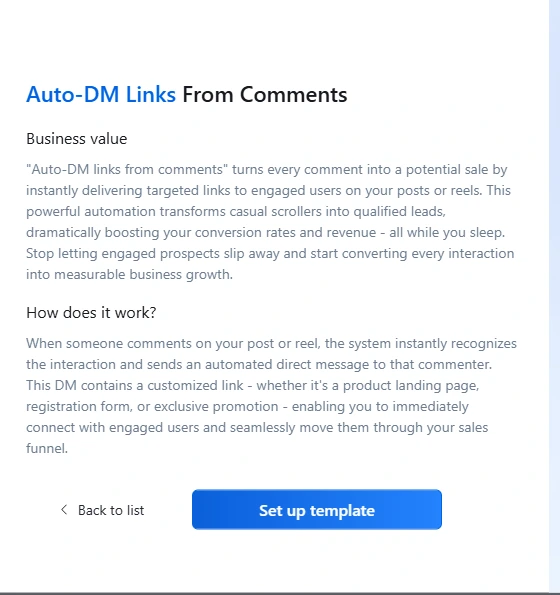
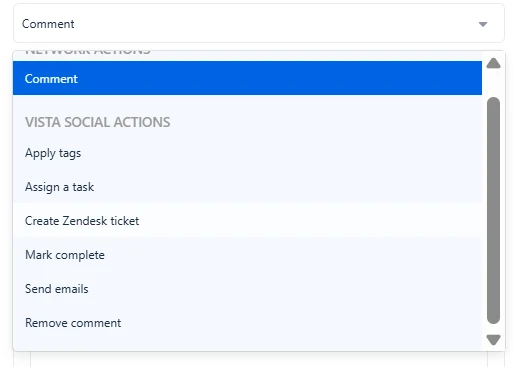
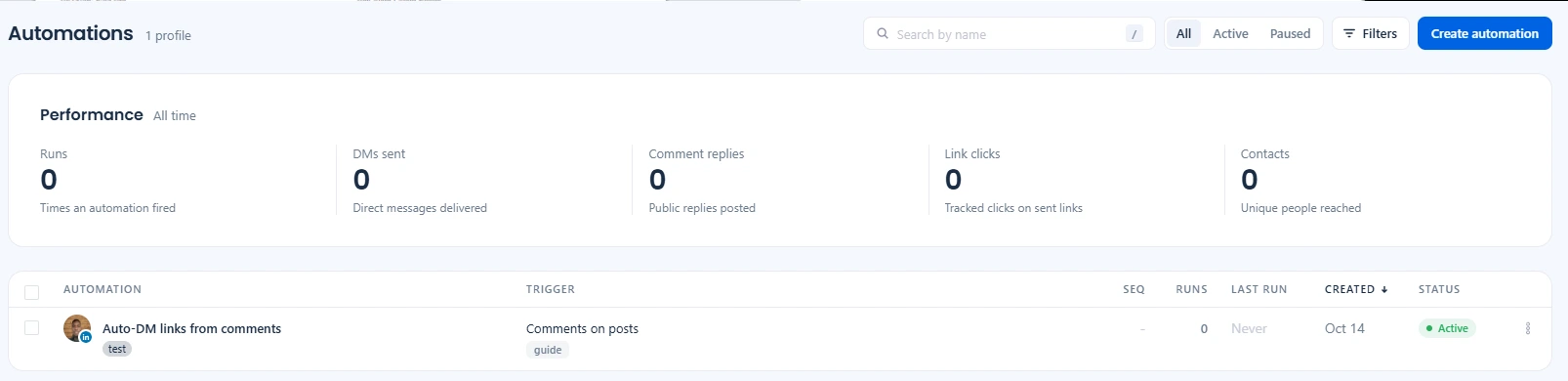
There are three ways to build an automation. Build with Ask Vista lets you describe what you want in plain words, Ready-to-Go templates start from a tested recipe, and Create from scratch gives full control over every trigger and action for more complex flows.The template library covers the most common goals: sending a link when people comment, growing followers from comments or a freebie, replying to every DM, turning story replies into leads or coupons, and promoting a webinar or a YouTube channel. Most templates are built for Instagram and Facebook, where direct messages can be automated.Each template explains its business value and how it works before you set it up. Auto-DM links from comments watches your posts for comments, sends the commenter a direct message with a link, such as a guide, a product page or a sign-up form.After the trigger, an automation can act on the network itself, by commenting, or inside Vista Social: apply tags to sort conversations, assign a task to a teammate, create a Zendesk ticket for support issues, mark the item complete, send an email or remove a comment, for example spam.The automations page lists every automation with its trigger, keyword, number of runs, last run, creation date and status, and the Performance row shows totals for all time: runs, DMs sent, public comment replies, tracked link clicks and unique people reached. A filter switches between active and paused automations.
My LinkedIn automation never fired, and support explained why: the Auto-DM template works only with Instagram and Facebook, and real-time comment triggers are not available on LinkedIn personal profiles because of LinkedIn’s own limits. The tool did not warn me about this when I set it up on a LinkedIn profile. If automations are the reason you are buying, test them on the exact network and profile type you use.
Reports and Analytics
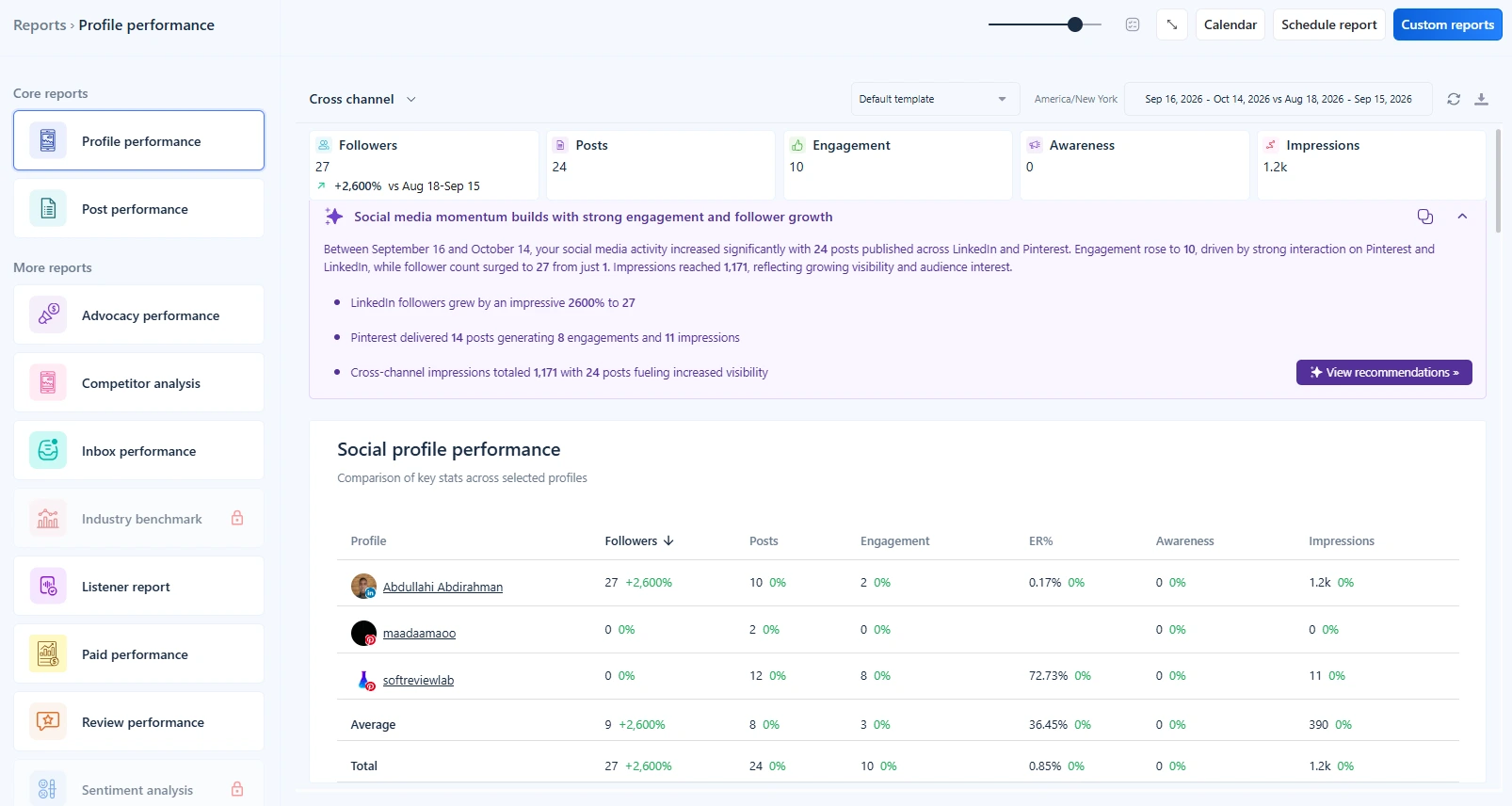
Reports are one of Vista Social’s strongest areas. You can view them in the app, download them, send them by email right away or schedule them weekly or monthly, which suits anyone who reports to a manager or a client.
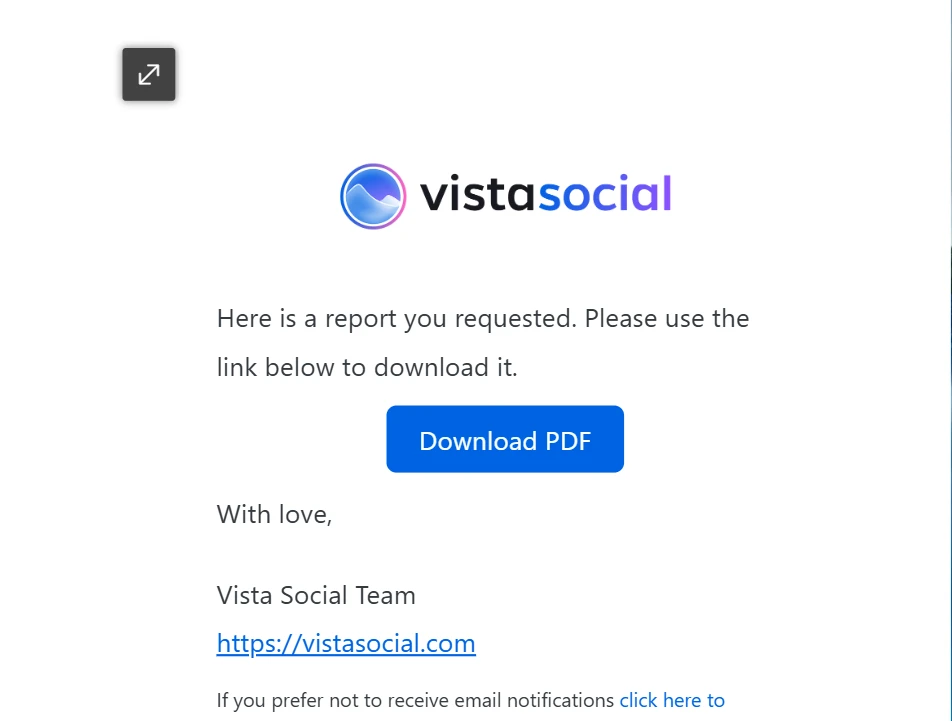
The Profile performance report compares followers, posts, engagement, awareness and impressions across all selected profiles against the previous period, and an AI-written summary explains the main changes in plain words. The menu on the left opens other reports, including post performance, inbox performance, competitor analysis, listening and reviews; those with a lock, such as industry benchmarks and sentiment analysis, need a higher plan or an add-on. Schedule report sends it automatically, and Custom reports lets you build your own layout.A requested report arrives by email within moments with a button to download the PDF. The PDF is a landscape report of about 25 pages with a cross-channel summary, a comparison table per profile, audience growth, engagement, posts, impressions and hashtags, followed by a section for each profile. It is ready to send to a client or manager without extra formatting.
Tasks and Team Work
Vista Social includes a simple task manager, so social media work does not have to live in a separate tool.
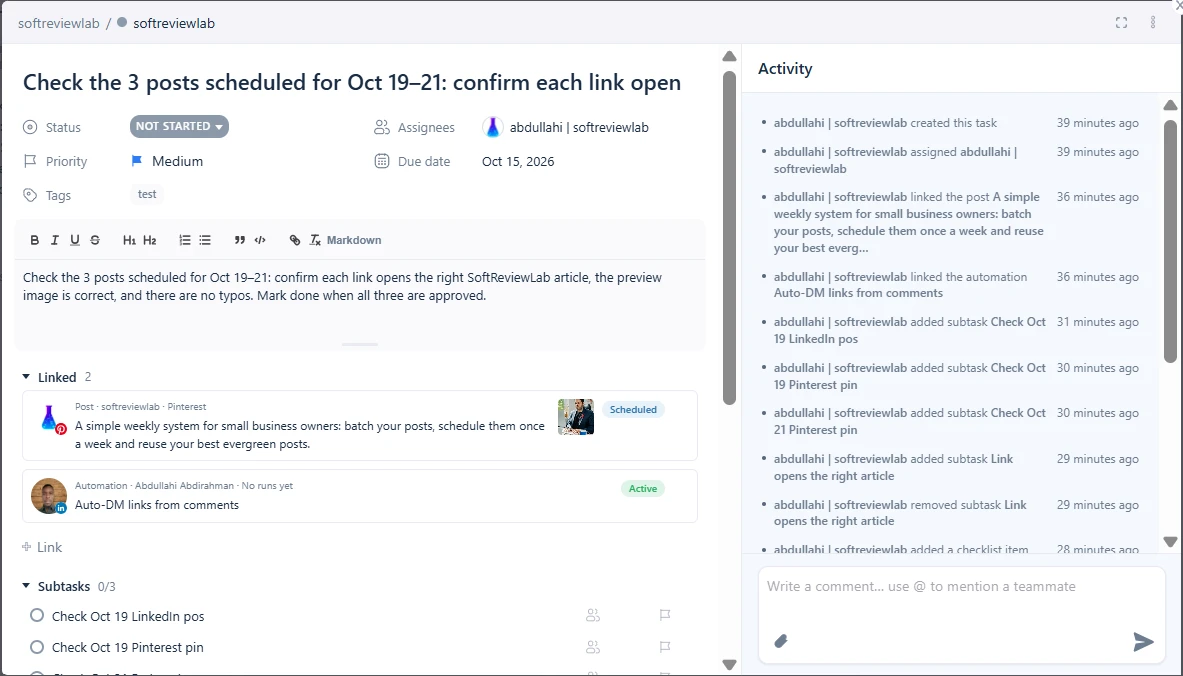
The tasks board shows work by status: Not started, In progress and Completed, and you can add your own columns. Each card shows the due date, subtasks, checklist progress, attachments and tags, and the same tasks can be viewed as a list or on a calendar. This suits a small team that needs to see who is doing what without paying for a separate project tool.Inside a task you set the status, priority, assignee, due date and tags, write instructions, and link the task to the things it is about, here a scheduled post and an automation. Subtasks and checklists break the work into steps, and the activity log on the right records every change, with comments and @mentions for discussion.
Media Library
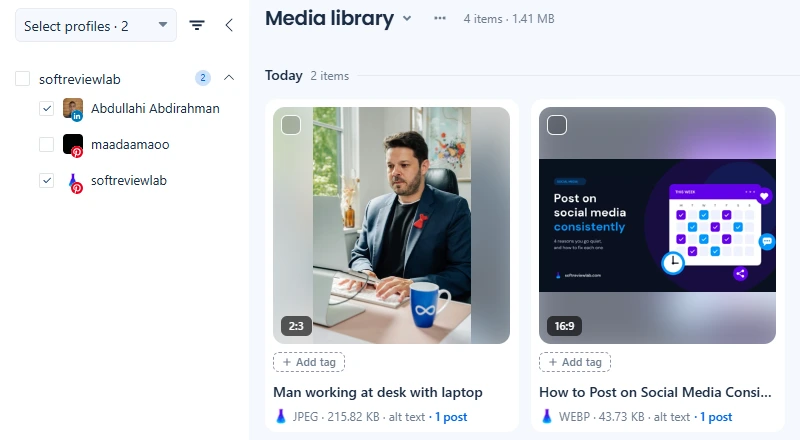
The media library keeps every image and video your team uploads in one place, grouped by date. Each file shows its aspect ratio, type, size, whether it has alt text and how many posts use it, and you can add tags or filter the library by profile. Reusing approved images from here keeps posts on brand and saves uploading the same file twice.
Listening, Reviews and Employee Advocacy
Vista Social also offers listening, review management and employee advocacy, which I did not test. According to its pricing page, listening on your own profiles is free on every plan, while listening across the web and news is a paid add-on. Employee advocacy, which lets staff share approved posts, is free to try with three advocates and is also sold as an add-on. If replying to Google reviews is the part you need, my guide on how to respond to a negative Google review covers the replies themselves and where Vista Social’s review inbox fits in.
Vista Social Pricing 2026: Plans and Real Costs
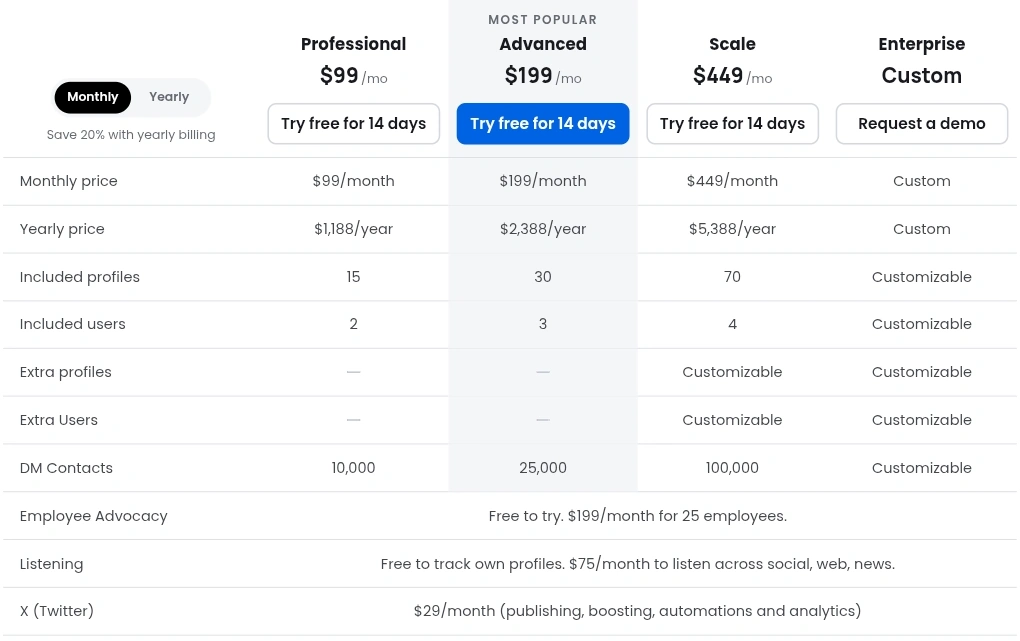
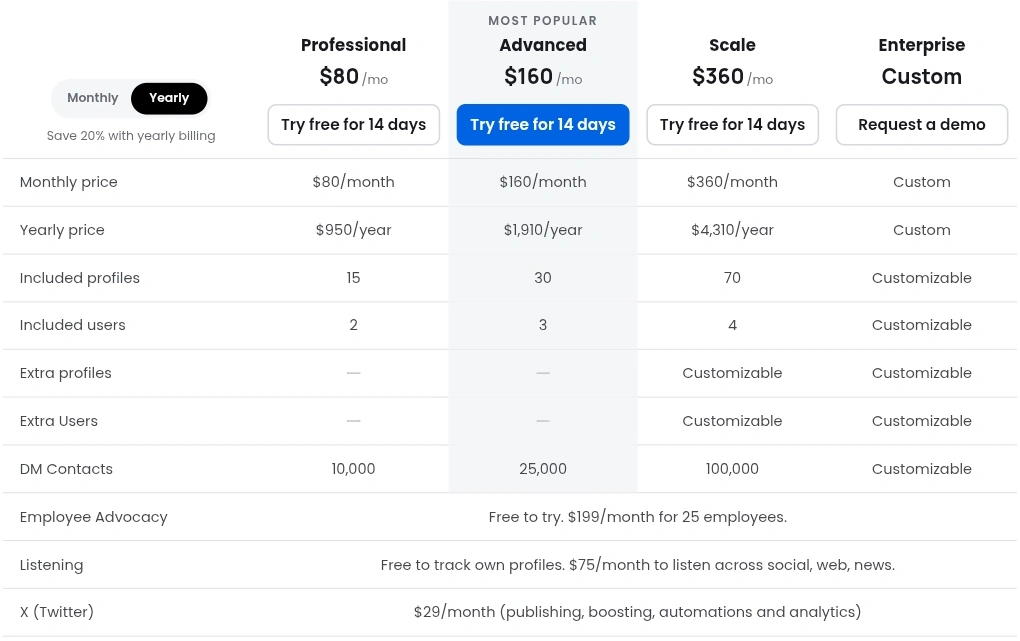
Vista Social prices its plans by the number of profiles, users and AI credits you get. Its pricing page compares the four plans in one table, first with monthly billing and then with yearly billing, which is paid upfront for the whole year. Both views below were checked on October 24, 2026.
Plan comparison with monthly billing. Each column shows what a plan costs, how many social profiles and users it includes, and how many contacts its DM automations can reach. The last three rows are add-ons, priced the same on every plan.The same comparison with yearly billing. The price at the top of each column is the monthly equivalent, and the Yearly price row is the amount charged upfront for twelve months.
One thing the table leaves out is the monthly AI credit allowance for Ask Vista: 1,000 credits on Professional, 2,000 on Advanced, 3,500 on Scale and unlimited on Enterprise. Taxes may be added at checkout.
The main differences between the plans, as the pricing page describes them:
Professional includes publishing, the inbox, DM automations, standard and scheduled reports, post approvals and email support
Advanced adds custom reports you can save, advanced DM automations for collecting leads, multi-stage approvals for teams and clients, and video call support
Scale adds white-label reports and dashboards and more DM contacts
Enterprise adds sentiment detection, single sign-on, a dedicated account manager and custom integrations
What It Really Costs a Small Team
For most small businesses the real choice is Professional. If you also need X, its add-on adds $348 a year, which takes a yearly Professional plan to $1,298. Vista Social’s support team confirmed to me that Professional is the cheapest plan for a business with two to five profiles.
Check the number of users before you buy. The pricing table lists 2 users on Professional and 3 on Advanced, while the FAQ on the same page says 3 and 6. Ask support which number applies to your account before adding colleagues.
If you only need to schedule posts to two or three profiles, Professional is more than the job needs. In that case a cheaper scheduler, or the free scheduling tools inside Facebook, Instagram and LinkedIn, will do the job.
Free Trial: No Card, and What Happens When It Ends
The free trial lasts 14 days and needs no credit card. I was able to switch my trial to a higher plan to test more features, still without a card.
I asked support what happens when the trial ends, and my own trial matched their answer. You are not charged automatically: when my trial ended, the account still opened, but straight to a page asking me to subscribe to a paid plan, and no card was requested. My scheduled posts were still there but paused, so none of them went out, and when I tried to schedule a new post it was refused.
Support added that your posts and data are queued for deletion about 30 days after the trial ends, so if you decide not to buy, export anything you want to keep before then. The pricing page does not state a refund policy, so ask before paying for a full year.
Advertisement
Vista Social vs SocialBee
SocialBee is the other social media tool I have tested hands-on, and the two suit different buyers. SocialBee starts at $29 a month with one user, has the same 14-day trial without a card, and is built around content categories and evergreen recycling that keep profiles posting. Vista Social costs more but adds what SocialBee is lighter on: a shared inbox, comment and DM automations, PDF reports and an assistant that acts inside your account.
Choose SocialBee if your main problem is posting regularly and you work alone or with one other person. Choose Vista Social if you also answer comments and messages, report to a manager or clients, and want automations and an AI assistant in the same tool. My SocialBee review covers its plans and limits in detail, and if consistency is your main struggle, my guide on how to post on social media consistently shows a routine that works with any tool.
Customer ratings on the big software review sites are high, with one warning sign worth knowing about. When I checked in early November 2026, G2 showed 4.8 out of 5 from 1,141 reviews, and Capterra showed 4.9 from 968 reviews, with 4.9 for ease of use and 4.8 for customer service.
Trustpilot tells a different story. Its page for Vista Social showed no star rating, with a notice that the rating was unavailable because of a breach of its guidelines and that it had removed a number of fake reviews for the company. Of the 78 reviews still listed, 79% were five-star and 17% one-star. That notice doesn’t prove the product is bad, but it means the ratings on that page can’t be taken at face value.
Across recent reviews, the same strengths come up again and again: the unified inbox, the scheduling calendar and responsive support. The complaints repeat too: a learning curve because there is so much in the product, a mobile app that does less than the web version, social accounts that sometimes disconnect, and, on Trustpilot, price increases and changes to old lifetime deals.
Vista Social Is a Good Fit If
You manage many profiles for one business or for several clients
Two or more people share the work and need tasks, approvals and one inbox
You report results to a manager or clients and want ready-made PDF reports
You want an AI assistant that can schedule posts, not just write them
Your audience is on Instagram, Facebook or TikTok, where DM automations work best
How to Test Vista Social in Your 14-Day Trial
Day 1: Connect the profiles you use every day and check that each one shows as healthy on the home dashboard
Days 1–3: Schedule a week of posts by hand, including one with a link, and check each preview before it goes out
Days 3–5: Ask Vista to draft and schedule a few posts. Use a new chat for each task and note how many credits each request uses
Days 5–7: Set up Brain with your brand voice and one rule it must never break, then test it
Days 7–10: Build one automation on the network where you get the most comments, and test it from a second account
Days 10–12: Answer comments in the inbox and invite the colleague who will use it most
Days 12–14: Request a report, read the PDF, and decide which plan fits your number of profiles and users
Vista Social Review Verdict: Is It Worth It in 2026?
It is one of the most complete social media management tools a small team can buy: publishing, inbox, automations, reports, tasks and an AI assistant that acts inside your account, with brand rules that stop it from inventing claims. It is not the cheapest way to schedule posts, and LinkedIn personal profiles get fewer features than other networks. If you manage many profiles or report to clients, the time it saves is likely to cover the subscription. If you post alone to a few profiles, start with a cheaper scheduler.
You can try Vista Social free for 14 days, and SoftReviewLab readers are invited to 10% off with the code Gn3TMZWy; check that the discount appears at checkout before you pay.
Frequently Asked Questions About Vista Social
Is Vista Social the best social media management tool for small teams?
It is one of the strongest choices if your team manages many profiles and needs more than scheduling. Publishing, the inbox, automations, reports, tasks and the Ask Vista AI assistant all come in one account, and the cheapest plan already covers 15 profiles. If you post alone to two or three profiles, it costs more than you need, and comment automations do not work on LinkedIn personal profiles.
Is Vista Social legit?
Yes. Vista Social is a real company, founded in 2022, with a working product I tested myself in a 14-day trial, and it is rated 4.8 on G2 and 4.9 on Capterra from more than 900 reviews each. One caution: Trustpilot has withheld its rating after removing fake reviews for the company, so rely on the larger review totals and on your own trial rather than on Trustpilot.
How much does Vista Social cost?
Plans start at $99 a month for Professional and go up to $449 for Scale, with yearly billing about 20% cheaper; Enterprise is priced on request. X and listening across the web cost extra.
Does Vista Social have a free plan?
No. It has a 14-day free trial with no credit card.
What happens when the Vista Social trial ends?
You are not charged automatically. When my trial ended, the account opened to a page asking me to subscribe, scheduled posts were paused and new posts could not be scheduled. According to Vista Social’s support team, your posts and data are queued for deletion about 30 days later unless you choose a plan.
Can Vista Social automate comments and DMs on LinkedIn?
Not on personal profiles. Vista Social’s support told me that comments on LinkedIn personal profiles sync every five to six hours and that real-time comment triggers are not supported there, so DM automations are best used on Instagram and Facebook. LinkedIn Company Pages get real-time comment notifications.
Does Ask Vista use AI credits?
Yes. Each request uses credits: a short post used 25 in my test, and the trial has 500 in total. Questions asked in the Brain test tab did not use credits.
Is Vista Social better than SocialBee?
It depends on the job. Vista Social is better for teams that need an inbox, automations, reports and an AI assistant. SocialBee is cheaper, from $29 a month, and better for a small business that mainly wants to post consistently.
Sources and References
Vista Social pricing and plans (checked October 24, 2026)
G2, Capterra and Trustpilot review pages for Vista Social (checked November 2026)
Vista Social homepage and supported networks (checked October 15, 2026)
Answers from Vista Social’s human support and AI support agent, October 14, 2026
My own Vista Social trial, started October 11, 2026
“A strong scheduler for small businesses, built on content categories and evergreen recycling. The two cheaper plans include one user.”
From $29/mo ($24.17/mo billed yearly)Best for: Small businesses that want consistent posting across several networks14-day free trial with full Pro access, no credit card
“A deep automation platform with AI tools and more than 1,000 integrations, held back by a price that climbs with your list, a five-action cap on the cheapest plan and paid add-ons for the sales CRM and SMS.”
From $15/month (1,000 contacts, 1 user); Plus $49 billed yearly or $59 monthlyBest for: Small and mid-sized businesses that want behaviour-based email automation14-day free trial: no credit card, no contact limit, 100 email sends
“A leading call tracking platform with accurate attribution and useful AI features, held back by usage fees and add-ons that raise the real monthly cost.”
From $50/month billed annuallyBest for: Local service businesses and agencies that rely on phone leads14-day free trial, no credit card required
We use Google Analytics cookies to see which articles help readers, and our ad partner Adsterra uses cookies to show ads. The site works the same whether you accept or not. Privacy