Atria Review 2026: Features, AI Ad Tools, Pricing, Pros and Cons
AI Ad Creative & Analytics
Atria Review 2026: Features, AI Ad Tools, Pricing, Pros and Cons
7.1/10
“Atria suits teams whose main channel is Meta and who publish new ads every week. Start on Core with monthly billing, notice whether sign-up asks for a card and when any trial ends, set up Brand World before you generate anything, and watch how fast credits are used before you commit to a year.”
Research-based review · not hands-on testedBuilt from the vendor’s documentation and pricing pages and from patterns in customer reviews. How we work.
Starting price
From $129/month billed yearly ($159 monthly), 5 seats included
Best for
Meta-focused marketing teams and agencies that publish new ad creatives every week
Free trial
Free start with 1,000 credits and no card on the sign-up form; a help article also describes a 7-day trial that takes a card
Based on
Atria’s pricing page, ten help center articles, terms of service and privacy policy, plus customer ratings on G2 and Trustpilot
Scores
Ease of setup & use7.5
Feature depth8.5
Pricing & value6.0
Integrations7.5
Support & terms6.0
How these scores were worked out
Ease of setup & use: 7.5 (Good) The first sync takes 15 to 20 minutes and Brand World about an hour, and G2 reviewers praise ease of use. G2 also lists an average of two months to implement, and reviewers mention a learning curve and slow loading.
Feature depth: 8.5 (Strong) Ad research, an AI assistant, ad grading, image and script creation and Meta launch in one product. Limited video generation, reported by G2 reviewers, keeps this below 9.
Pricing & value: 6.0 (Average) Core is fair for what it includes, but the next plan costs more than three times as much, credits are metered and non-refundable, there is no public top-up price, and Atria’s pages disagree on prices.
Integrations: 7.5 (Good) Strong on Meta, with MCP and API access from the lowest plan. TikTok is analysis only, launch is Meta only, and the Google Ads, Shopify and Triple Whale connections are thinly documented.
Support & terms: 6.0 (Average) Refund requests get a reply within one business day, but fees are non-refundable, some plans need a call to cancel, the privacy policy dates from 2022, and Trustpilot shows 3.0 from 8 reviews with no vendor replies.
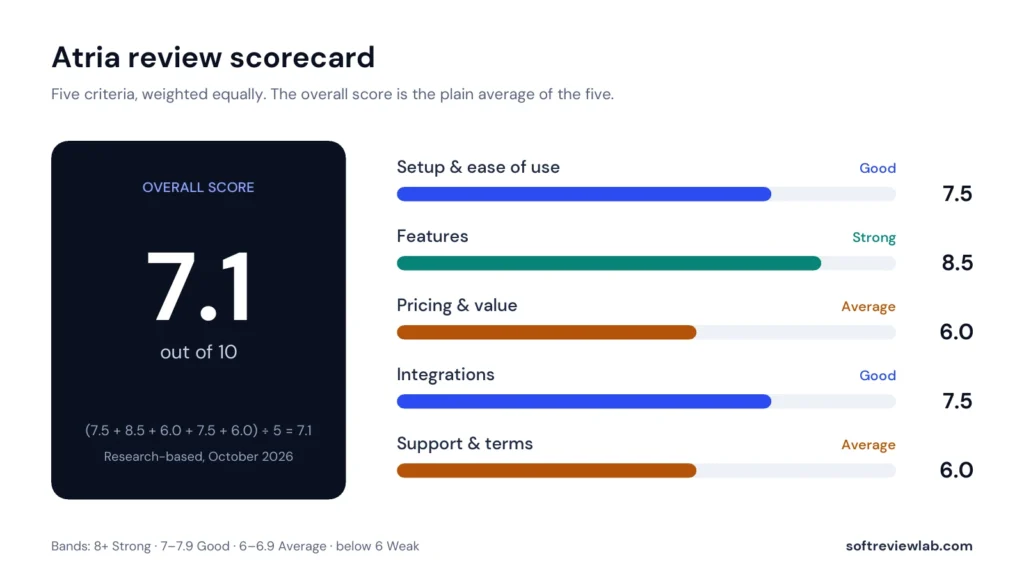
Overall: (7.5 + 8.5 + 6.0 + 7.5 + 6.0) ÷ 5 = 7.10, shown as 7.1. The five criteria are weighted equally.
Scores are editorial judgments in half-point steps, based on documented features, published pricing and repeated themes in customer reviews. They are not lab measurements, so treat the words as the guide: 8.0+ Strong, 7.0 to 7.9 Good, 6.0 to 6.9 Average, below 6.0 Weak.
What works
Research, creation, analysis and launch sit in one place, so a small team can replace several separate tools.
Radar sorts your ads into three clear piles: scale, iterate or leave alone.
Customisable reports, comparison reports and custom attribution windows are listed on every plan, Core included.
Every paid plan includes at least five seats, with extra seats at $20 each.
Getting started is quick: a 15 to 20 minute first sync and about an hour for Brand World.
You can start without a card: the sign-up form includes 1,000 free credits.
MCP and API access are included from the Core plan.
What doesn’t
A steep step from Core at $129 a month to Plus at $479 a month, both billed yearly.
AI credits are metered and non-refundable, and Atria publishes no price for buying more.
Atria’s own pages disagree on prices and on whether the trial needs a card.
Launching works for Meta only, and TikTok is analysis only.
G2 reviewers say video generation is limited.
The privacy policy dates from June 2022 and no security certifications are listed.
Trustpilot shows 3.0 out of 5 from 8 reviews, with billing complaints and no replies from Atria.
What we couldn’t verify
Atria was not tested hands-on; ease of use, speed and the quality of its generated ads are based on its documentation and customer reviews.
The sign-up form asks for no card and includes 1,000 free credits, but what happens when those credits run out, and when the 7-day card trial described in a help article applies, was not tested.
An Atria blog post from April 2026 gives a lower Plus price than the pricing page; the pricing page figures are used here.
The credit cost of most AI actions and the price of extra credits are shown only inside the app and could not be checked.
Vendor claims, such as Raya being trained on more than $9 billion of ad spend and uploads being ten times faster, are Atria’s own figures and were not verified.
How deep the Google Ads, Shopify and Triple Whale connections go is not documented on the pages read.
Which AI providers process customer data, and whether customer data is used to train models, is not stated in the privacy policy, which was last updated in June 2022.
Customer ratings rest on small samples: 22 reviews on G2 and 8 on Trustpilot.
If any of these matter to your decision, check them directly with the vendor or during your trial.
Who should skip it
Advertisers who spend mostly on Google Search or LinkedIn, teams that need AI video ads more than static images, solo businesses with small ad budgets, and companies that require security certifications before connecting ad accounts.
By Abdullahi Abdirahman, Founder & Editor, SoftReviewLab. Pricing and plan limits checked on Atria’s official pricing page, help center and terms in October 2026. This is a research-based review built from Atria’s own documentation, plus customer ratings on G2 and Trustpilot. I have not run my own ad account through Atria. This page contains affiliate links: if you sign up through them, SoftReviewLab may earn a commission at no extra cost to you. See our affiliate disclosure and research and scoring method.
Table of Contents
Atria Review at a Glance: The Short Answer
This Atria review scores the platform 7.1 out of 10. Atria is an AI ad workflow tool for brands and agencies that run paid ads on Meta. It combines four jobs that usually need separate tools: researching competitors’ ads, generating new image ads and scripts, grading the ads you already run, and publishing new ones to Meta. Its paid plans start at $129 a month on annual billing with 5 seats and 4,000 AI credits. The strengths are the breadth of the workflow and an AI assistant that reads your own ad account. The weaknesses are the price for a small business, a credit system whose costs are not published, non-refundable fees, and several places where Atria’s own pages disagree. It suits ecommerce brands and agencies that already spend real money on Meta ads every month. A business that runs an occasional boosted post does not need it.
Atria
Overall score
7.1 out of 10 (research-based)
What it is
An AI ad workflow platform: ad research, creative generation, ad analytics and publishing to Meta
Starting price
Core at $129 a month on annual billing, or $159 paid monthly, with 5 seats
How it is priced
By plan, with monthly AI credits and limits on ad accounts and analysed ad spend
Free plan
Yes, according to the help center. The sign-up form asks for no card and includes 1,000 free credits
Free trial
7 days of paid features, with a card required, according to another help article
Best for
Ecommerce brands and agencies with a steady monthly Meta ads budget
Not ideal for
Small businesses with a small ad budget, TikTok-first advertisers, and buyers who need a refund option
Customer ratings
5.0 on G2 from 22 reviews, and 3.0 on Trustpilot from 8 reviews
Prices and limits from Atria’s pricing page, help center and terms, October 2026. Ratings checked October 2026.
What Is Atria and How Does It Work?
Atria describes itself as a place where your ad creative gets analysed, decided on and made. In plain terms, it sits on top of your Meta ad account and tries to shorten the loop every advertiser runs: look at what competitors are doing, make new ads, launch them, see which ones work, and repeat.
According to Atria’s getting-started guide, the product is built for creative strategists, media buyers and performance marketers. You connect your Meta and TikTok ad accounts, set up a brand profile with your logo, colours, tone and products, and then work through four areas: Inspo for research, Creation for making ads, Analytics for grading them, and Launch for publishing. An AI assistant called Raya runs through all of them.
The company behind it is TESSERACT01, Inc., registered in Delaware, according to its terms of service. Atria says more than 20,000 teams use it. That figure is the vendor’s own.
How I Evaluated Atria
I scored Atria on the same five criteria I use for every review, each out of 10 and weighted equally: setup and ease of use, feature depth, pricing and value, integrations, and support and terms. The overall score is the plain average of the five.
The evidence is Atria’s website and pricing page, ten help center articles, its terms of service and privacy policy, and customer ratings on G2 and Trustpilot, all read in October 2026. I have not connected a live ad account or measured the quality of its generated ads. Where Atria’s own pages disagree, I say so and list the differences in the pricing section.
Atria Features: What You Actually Get
Inspo: Ad Research and Competitor Tracking
Inspo is the research side. You follow competitor brands, save ads to boards and browse what Atria calls Top Picks. One Atria blog post describes the library as holding more than 100 million saved ads. The number of brands you can follow depends on the plan: 50 on Core, 100 on Plus and 200 on Business, with AI insights on the two higher plans. For a team that currently screenshots competitors’ ads into a shared folder, this replaces that habit with something searchable.
Raya: The AI Assistant
Raya is the AI that runs through the whole product. Atria says it is trained on more than $9 billion of real ad spend, which is a vendor claim I cannot check. What the help center describes is concrete: you can ask Raya questions about your own account in plain English, and it grades ads, tags creative elements, writes briefs and builds reports. Atria also offers Raya inside Slack and a connection, called MCP, that brings your ad data into assistants such as Claude and ChatGPT.
Radar: Ad Grading and Analytics
Radar grades every ad in your account and sorts them into three piles: scale, iterate, or leave alone. The help center says it looks at hook, retention, click-through and conversion. The comparison table on the pricing page lists Radar, customisable reports, comparison reports and custom attribution windows on every plan, Core included. Naming convention settings start on Plus, and custom metrics on Business.
This is the feature G2 reviewers mention most often after time savings, because it turns a table of ad numbers into a short list of actions. Treat its advice as a starting point. An AI grade is a prediction, and your own results are the test.
Creation: Image Ads, Scripts and Briefs
Atria generates static image ads, scripts and briefs. The image generation guide lists four routes: starting from a template, cloning a competitor’s ad, iterating on an ad that already performs, or writing a prompt. You can select up to ten reference images, set the brand, product, objective, aspect ratio and persona, and edit the result afterwards with a tool called Magic Layer without paying to regenerate.
Two limits are worth knowing. The guide says each product needs its own profile with real images, or the AI will invent a plausible-looking version of your product. And I found no video generation in the help center; limited video is also one of the few complaints in G2 reviews. Atria writes video scripts, but you still need to produce the video.
Launch: Publishing to Meta
Launch builds ads inside Atria and pushes them to Meta, so you do not rebuild the same ad for every ad set. Atria’s homepage also lists bulk uploads and rules that scale winners and pause losers automatically. Launch works for Meta only. The connection guide says TikTok is supported for analysis today, not for launching ads.
Assets, Seats and Reporting
Each plan includes storage for creative files (5 GB on Core, 1 TB on Plus and 5 TB on Business), a number of seats, and brand profiles for separate brands or clients: 3 on Core, 8 on Plus and unlimited on Business. Inviting guests to the workspace starts on Business, although sharing ads and boards through guest access is listed on every plan. If you want Atria’s own description of all this, it is on Atria’s website.
Atria Pricing 2026: Plans and Real Costs
Atria charges by plan, not by seat or by ad. Four numbers decide which plan you need: how many people use it, how many brands or clients you manage, how much ad spend you want analysed, and how many AI credits you burn in a month.
Atria Plans
Plan
Price a month: billed yearly / paid monthly
Seats
Brand profiles
AI credits a month
Ad accounts and analysed ad spend
Core
$129 / $159
5
3
4,000
5 accounts, up to $500,000 a month
Plus
$479 / $599
8
8
10,000
10 accounts, up to $1 million a month
Business
$959 / $1,199
15
Unlimited
25,000
Unlimited
Enterprise
Custom
Custom
Unlimited
Custom
Custom number of accounts, unlimited ad spend
Atria plans from its pricing page, checked October 2026.
Atria’s pricing page has a switch for monthly and yearly billing. Paid monthly, Core is $159, Plus $599 and Business $1,199 a month. Billed yearly, they drop to $129, $479 and $959, which Atria advertises as a saving of 20%: $360 a year on Core, $1,440 on Plus and $2,880 on Business. Extra seats cost $20 a month each on every plan.
What the Limits Mean in Practice
For a single brand, Core is generous on paper. Five seats, five ad accounts and up to $500,000 of analysed ad spend a month cover almost any small or mid-sized advertiser. What Core holds back is narrower than the price gap suggests. AI insights on the brands you follow, naming convention settings and the Pro tier of Atria’s ready-made AI skills start on Plus, and custom metrics and guest invitations on Business. Customisable reports, comparison reports and custom attribution windows are listed on every plan.
For an agency, brand profiles are the limit that bites first. Core has three, so a fourth client means Plus at more than three times the price. Core also includes 600 MCP calls and 1,200 REST API calls a month, after which each call uses one AI credit, while the higher plans list both as unlimited.
On overages, Atria’s plan guide says that if you go over your plan’s limit it will tell you before it becomes a problem, and that you won’t be cut off silently in the middle of a campaign.
AI Credits: The Part That Is Hard to Budget
Credits are how you pay for AI work. Atria’s credits article says Raya draws on them whenever it analyses your account, answers a question, generates or iterates ads, or builds a report. So credits are not only for making images. Asking questions uses them too.
The article publishes one price: an Auto-Gen iteration costs 480 credits, for 12 images plus AI insights. On that basis the 4,000 credits on Core cover about eight Auto-Gen runs a month if you spent them on nothing else. For everything else, Atria shows the cost inside the product before you commit, for example next to each image model. I found no public price list for credits and no published price for topping up.
That makes Atria hard to budget from the outside. The practical answer is to use the free credits to measure your own burn rate over a normal week before you choose a plan.
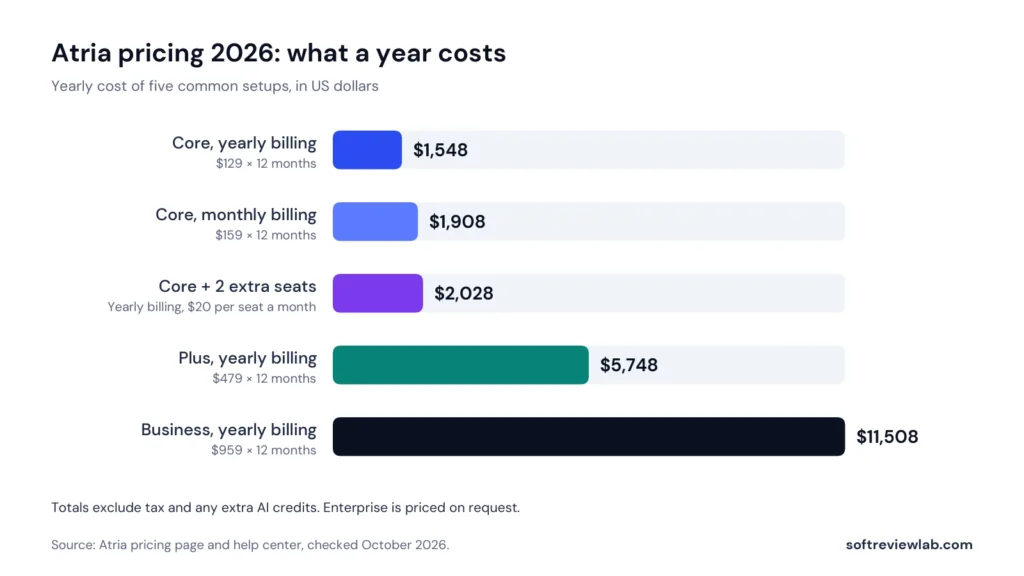
What a Year of Atria Costs
Setup
Per month
Per year
Core, annual billing
$129
$1,548
Core, monthly billing
$159
$1,908
Core, annual billing, with 2 extra seats
$169
$2,028
Plus, annual billing
$479
$5,748
Business, annual billing
$959
$11,508
Estimated yearly cost from listed prices, before tax and before any credit top-ups.
Estimated yearly cost of five Atria setups from listed prices, before tax and credit top-ups. Source: Atria pricing page, October 2026.
To put those numbers in context, a tool that only generates ad creatives costs far less. My AdCreative.ai review covers one that starts at $39 a month. Atria asks for three to four times that because it also does research, analytics and publishing. Whether that is good value depends on whether you would otherwise pay for those tools separately, and whether you would use them.
Billing, Cancellation and Refunds
Atria’s terms of service say subscription fees and purchases of AI credits are non-refundable unless the law requires a refund. Subscriptions renew automatically. If you cancel, recurring payments stop and you keep the paid features until the end of the current billing cycle. Payment runs through Stripe.
The help center adds detail. Its cancellation article says only a workspace admin can cancel, and that some plans require a brief call before the cancellation is completed. Refunds are reviewed case by case, with two examples given: being charged after you had already cancelled, and being billed twice for the same period. Atria says it usually replies within one business day. A downgrade has to be requested from support and takes effect at the end of the billing period.
A call before you can cancel is friction, and it is worth planning around. If you decide to leave, start the cancellation several days before your renewal date, and keep a record of when you asked.
Details That Differ Between Atria’s Own Pages
While checking these facts I found several points where Atria’s own pages do not agree. Confirm each one before you pay.
Free plan or free trial: the help center and sign-up form describe free access, which the next section explains, while the pricing page lists four paid plans and no free one.
The price of Plus: the pricing page lists $479 a month on annual billing, while an Atria blog post from April 2026 gives $269.
The G2 rating: Atria’s homepage shows 4.9, while G2 showed 5.0 from 22 reviews when I checked.
The size of the ad library: an Atria blog post says more than 100 million ads, while the Atria description on G2 says more than 25 million.
The likely explanation is that Atria changed its plans and product during 2026 and not every page was updated. That is my reading, not something Atria has stated.
Atria Free Plan and Free Trial
This is the least clear part of Atria’s offer, so here is what each page says. The plan guide says there is a free plan that is permanent and needs no credit card. The homepage and the sign-up form both say no credit card is required and that 1,000 free credits are included, and the form itself asks only for a name, an email address and a password. The free trial article describes something different: a 7-day trial from sign-up, with a card provided for verification, and automatic enrolment in a paid plan if you do not cancel before it ends.
Both may exist side by side, a free plan and a card-backed trial of the paid features. The sign-up form does not ask for a card, so the moment to watch comes later. If Atria asks for card details at any stage, you are on a trial with an end date: open your plan settings, write the date down and decide by day five. One Trustpilot reviewer reports being moved to a $159 plan soon after creating an account. That is a single report I cannot verify, but it is consistent with a trial that converts automatically.
If Atria sounds like it fits your ad work and you want to look inside before paying, this is Atria’s sign-up page. The homepage says no credit card is needed to start.
Atria Integrations, Setup and Support
Atria is built around Meta. That is where it launches ads and where its analysis goes deepest. Everything else is narrower, and it is worth knowing that before you assume one tool will cover every channel you advertise on.
What Atria Connects To
Connection
What it covers
Limit to know
Meta (Facebook and Instagram)
Performance analysis and launching ads from inside Atria
You grant the ads_management and business_management permissions
TikTok
Performance analysis
Analysis only. Atria does not launch TikTok ads
Google Ads
Listed as a connector for ad data
Atria’s pages say little about how deep it goes
Shopify and Triple Whale
Listed as data connections
Depth is not documented on the pages I read
Slack
Raya answers questions inside Slack
Not described in detail
MCP (Claude, ChatGPT)
Brings your ad data into an AI assistant
600 calls a month on Core, then one AI credit per call. Unlimited on higher plans
REST API
Access to your data from your own tools
1,200 calls a month on Core, then one AI credit per call. Unlimited on higher plans
Atria connections and what each one covers (Atria help center and pricing page, October 2026)
The ad account guide names the two Meta permissions Atria asks for. They are broad: they let a connected tool manage ads and business assets, not only read numbers. That is normal for software that publishes ads on your behalf, but it is a reason to connect only the ad accounts Atria needs and to remove access if you stop using it. The pricing page also lists Google Drive imports, a Chrome extension for saving ads and a Canva connection on every plan.
If most of your budget goes to Google Search, LinkedIn or YouTube, Atria covers a small part of your work. Its creative tools, its grading and its launch feature all assume Meta comes first.
How Long Setup Takes
Setup is short by the standards of ad software. According to the getting started guide, you connect an ad account and wait for the first sync, which Atria puts at 15 to 20 minutes. The longer job is Brand World, the profile of your brand that Raya draws on when it writes and designs. Atria suggests setting aside about an hour for it. That hour matters, because an AI that knows nothing about your products, tone and visual style produces generic ads. One caution: G2 lists an average time to implement of two months, based on its reviewers, so expect the full routine to take longer to settle than the first sync suggests.
Once that is done, the launch guide describes sending finished ads to Meta from inside Atria instead of uploading them one at a time in Ads Manager. Atria says this makes uploads ten times faster. That is the vendor’s figure, and I have not measured it.
Support
Help comes through a help center and chat. The cancellation and refund article says refund requests get a reply within one business day. I found no phone number and no published response-time commitment for general support on the pages I read, which is common for software at this price but worth knowing if you run ads for clients and need fast answers.
The Trustpilot complaints, covered below, are mostly about billing and reaching support. Atria had not replied to the negative reviews there when I checked. A vendor that answers its critics in public is easier to trust than one that stays silent, so this pulled the support score down.
Atria Data, Privacy and Terms
Atria is operated by TESSERACT01, Inc., a Delaware company. You are handing it access to ad accounts that spend real money, so the legal pages deserve ten minutes. Here is what the terms of service and the privacy policy say.
The privacy policy shows a last-updated date of June 7, 2022. That is older than most of the AI features Atria now sells, so it does not describe how they handle your data.
The policy says data may be transferred to other countries, and names Singapore and the Philippines.
I found no named security certification, such as SOC 2 or ISO 27001, on the pages I read. The pricing page lists enterprise-grade security and compliance as a feature of the Enterprise plan only, without naming a standard.
I found no public list of the AI providers or other sub-processors that handle customer data.
Fees and AI credits are non-refundable unless the law requires a refund.
Atria’s liability is limited to the fees you have paid.
The agreement is governed by Delaware law, and payments run through Stripe.
None of this is unusual for a young software company, and none of it means Atria handles data badly. It means the paperwork has not caught up with the product. If you are an agency connecting client ad accounts, or your company has a security review for new vendors, ask Atria three things in writing before you subscribe: which AI providers process your data, whether your data is used to train models, and what security documentation they can share.
What Customers Say About Atria
There are two public sources, and both are small.
Platform
Rating
Reviews
What stands out
G2
5.0 out of 5, with all 22 reviews at five stars (Atria’s own site displays 4.9)
22
Praise for ease of use, time saved and Radar’s ad grading. Requests for better video ad tools and client sharing, plus comments on load speed and a learning curve
Trustpilot
3.0 out of 5, labelled Average
8
63% of reviews are one star. Complaints about billing, unexpected charges, finding the cancel button and reaching support. No replies from Atria to the negative reviews
Atria customer ratings (checked October 2026)
Thirty reviews in total is too few to draw a firm conclusion in either direction. Vendors often invite satisfied customers to review them on G2, while Trustpilot tends to attract people who have a complaint, and the truth usually sits somewhere between the two. That is my reading, not a measured fact. Trustpilot adds a caution of its own: it notes that Atria has not invited customers to review it recently, so the reviews there may not be representative. Atria claimed its Trustpilot profile in June 2025.
What I take from the pattern is this. The people who use Atria for its main job seem to like the product. The people who are unhappy are mostly unhappy about money: a charge they did not expect, or trouble cancelling. That lines up with the unclear trial wording described above, and it is why I suggest writing down your trial end date on day one.
Atria Pros and Cons
What Works
Research, creation, analysis and launch sit in one place, so a small team can replace several separate tools.
Radar turns a table of ad numbers into three clear piles: scale, iterate or leave alone.
Customisable reports, comparison reports and custom attribution windows are listed on every plan, Core included.
Every paid plan includes at least five seats, with extra seats at $20 each.
Getting started is quick: a 15 to 20 minute first sync and about an hour for Brand World.
You can start without a card: the sign-up form includes 1,000 free credits.
MCP and API access are included from the Core plan, which I did not expect at this price.
What Doesn’t
The jump from Core at $129 a month to Plus at $479 a month, both billed yearly, is steep.
AI credits are metered and non-refundable, and Atria publishes no price for buying more.
Atria’s own pages disagree on prices and on whether the trial needs a card.
Launching works for Meta only, and TikTok is analysis only.
G2 reviewers say video generation is limited.
The privacy policy dates from June 2022 and no security certifications are listed.
Trustpilot shows 3.0 out of 5 from 8 reviews, with billing complaints and no replies from Atria.
Atria Scorecard: How I Reached 7.1 out of 10
I score every tool on the same five criteria, each weighted equally. The overall score is the plain average of the five. This is a research-based score: it comes from Atria’s documentation, pricing, legal terms and public reviews, not from running live campaigns through it.
Criterion
Score
Why
Setup & ease of use
7.5
The first sync takes 15 to 20 minutes and Brand World about an hour, and G2 reviewers praise ease of use. G2 also lists an average of two months to implement, and reviewers mention a learning curve and slow loading.
Features
8.5
Ad research, an AI assistant, ad grading, image and script creation and Meta launch in one product. Limited video generation, reported by G2 reviewers, keeps this below 9.
Pricing & value
6.0
Core is fair for what it includes, but the next plan costs more than three times as much, credits are metered and non-refundable, there is no public top-up price, and Atria’s pages disagree on prices.
Integrations
7.5
Strong on Meta, with MCP and API access from the lowest plan. TikTok is analysis only, launch is Meta only, and the Google Ads, Shopify and Triple Whale connections are thinly documented.
Support & terms
6.0
Refund requests get a reply within one business day, but fees are non-refundable, some plans need a call to cancel, the privacy policy dates from 2022, and Trustpilot shows 3.0 from 8 reviews with no vendor replies.
Atria scorecard with the reason for each score
Atria scorecard: five equally weighted criteria averaged into the overall score.
The sum is (7.5 + 8.5 + 6.0 + 7.5 + 6.0) ÷ 5 = 7.1. The scores are my editorial judgment. The facts they rest on come from the sources listed at the end of this review.
Common Mistakes When Buying Atria
Most of the complaints I read trace back to a handful of avoidable decisions.
Starting the trial without writing down the end date. If you gave card details at any stage, the trial article says you move to a paid plan automatically.
Paying for a year before using Atria for a month. Yearly billing saves $360 on Core, but the terms say fees are non-refundable, so a year paid upfront is a year spent.
Treating AI credits as unlimited. One Auto-Gen round costs 480 credits, so Core’s 4,000 credits cover eight rounds, or about 96 images, before any other AI use.
Expecting Atria to publish to every platform. It launches to Meta. TikTok is analysis only.
Skipping Brand World. Without it, the AI has nothing to work from and the ads look generic.
Buying Plus for a feature you may not need. The difference between Core and Plus is $4,200 a year on yearly billing, so name the specific Plus feature you will use every week before you upgrade.
Atria Alternatives Worth a Look
Atria’s selling point is that it joins research, creation and analysis. If you only need one of those jobs, a narrower tool or a free one may suit you better.
Saving and organising ads for inspiration, and writing briefs
Centred on research and planning, the job Atria calls Inspo
Motion
Creative analytics and reporting for ad teams
Centred on analysis, the job Atria calls Radar
Meta Ad Library and Ads Manager
Looking up competitors’ active ads, and launching and reporting on your own
Free. You do the organising and the analysis yourself
Atria alternatives and how they differ
I have reviewed AdCreative.ai but not Foreplay or Motion yet, so check their current pricing pages before you compare. I also put the two side by side in Atria vs AdCreative.ai. If you are still deciding whether AI ad tools belong in your marketing at all, my buyer’s guide to AI tools for business covers what to check first.
Who Should Use Atria and Who Should Skip It
Atria Is a Good Fit If
Meta is your main ad channel and you publish new creatives every week.
You are a small in-house team or agency that wants research, briefs, image ads and reporting in one login.
You already have ads running, so Radar has data to grade from day one.
You want to ask questions about your ad account in plain English, in Slack or inside an AI assistant.
Skip Atria If
You spend little on Meta, or most of your budget goes to Google Search or LinkedIn.
You need AI video ads more than static images. G2 reviewers describe video generation as limited.
You are a solo business with a small ad budget. At $129 a month or more, the software can cost more than the mistakes it prevents.
Your company requires security certifications or a current data processing document before connecting ad accounts. I found neither on the pages I read.
You need predictable costs and dislike metered credits.
Atria Review Verdict: Is Atria Worth It in 2026?
Atria earns 7.1 out of 10. On features it does well: research, an AI assistant, ad grading, image and script creation and Meta launch in one product, with API and MCP access from the lowest plan. For a team that lives in Meta ads, that covers most of the weekly creative routine.
What holds the score down is everything around the product: a large step from Core to Plus, metered and non-refundable credits, pages that disagree with each other, an old privacy policy and unanswered billing complaints. None of these is a reason to avoid Atria. Together they are a reason to start small and read your plan settings carefully.
For a Meta-focused team that ships new ads every week, Atria on the Core plan, billed monthly at first, is a reasonable thing to test. For everyone else, the free Meta tools or a narrower product will do the job for less. If you decide to try it, you can start from Atria’s website with one Meta ad account: build Brand World first, run one Auto-Gen round to see how many credits it uses, and check Radar’s verdicts against ads whose results you already know. If Atria asks for card details at any point, note the trial end date and decide by day five.
Frequently Asked Questions About Atria
What is Atria used for?
Atria is software for teams that run paid social ads, mainly on Meta. It combines four jobs: researching competitors’ ads, creating image ads, scripts and briefs with AI, grading the performance of your own ads, and launching ads to Meta. Its AI assistant is called Raya.
How much does Atria cost?
Atria’s pricing page lists Core at $159 a month, Plus at $599 and Business at $1,199 on monthly billing. Billed yearly, they are $129, $479 and $959 a month. There is also a custom Enterprise plan. Extra seats are $20 a month each.
Can Atria launch ads on TikTok or Google?
Not according to the help center. Launching from Atria is for Meta, which covers Facebook and Instagram. TikTok is supported for performance analysis only, and Google Ads appears as a data connector.
Is Atria safe to connect to my ad account?
Atria connects through Meta’s standard permission system and asks for the ads_management and business_management permissions, which allow it to manage ads. I found no security certifications on the pages I read, and the privacy policy was last updated in June 2022. Connect only the accounts you need, and ask Atria for its security documentation if your company requires it.
Is Atria better than AdCreative.ai?
They overlap but aim at different jobs. AdCreative.ai is centred on producing ad creatives in volume. Atria adds competitor research, account analysis and Meta launch around its creation tools, and costs more at the entry level. Which is the better buy depends on whether you need the extra jobs or only the creatives.
Sources and References
Every fact in this review comes from the pages below, checked in October 2026. Prices and terms change, so confirm them on Atria’s own pages before you buy.
“A strong scheduler for small businesses, built on content categories and evergreen recycling. The two cheaper plans include one user.”
From $29/mo ($24.17/mo billed yearly)Best for: Small businesses that want consistent posting across several networks14-day free trial with full Pro access, no credit card
“A leading call tracking platform with accurate attribution and useful AI features, held back by usage fees and add-ons that raise the real monthly cost.”
From $50/month billed annuallyBest for: Local service businesses and agencies that rely on phone leads14-day free trial, no credit card required
“A deep automation platform with AI tools and more than 1,000 integrations, held back by a price that climbs with your list, a five-action cap on the cheapest plan and paid add-ons for the sales CRM and SMS.”
From $15/month (1,000 contacts, 1 user); Plus $49 billed yearly or $59 monthlyBest for: Small and mid-sized businesses that want behaviour-based email automation14-day free trial: no credit card, no contact limit, 100 email sends