
AI Customer Support Chatbots: A Buyer’s Guide for Small Businesses
AI customer support chatbots explained for small businesses: 9 checks before you buy, real 2026 prices from 8 vendors, legal risks and a 14-day trial plan.
A practical 6-step guide to choosing email marketing software for a small business: what to check, what it really costs, and how to test tools before you commit.

By Abdullahi Abdirahman, Founder & Editor, SoftReviewLab. Updated October 2026. Prices were checked this month against vendor plan pages. This guide draws on published mailbox-provider rules, platform documentation and our own software reviews.
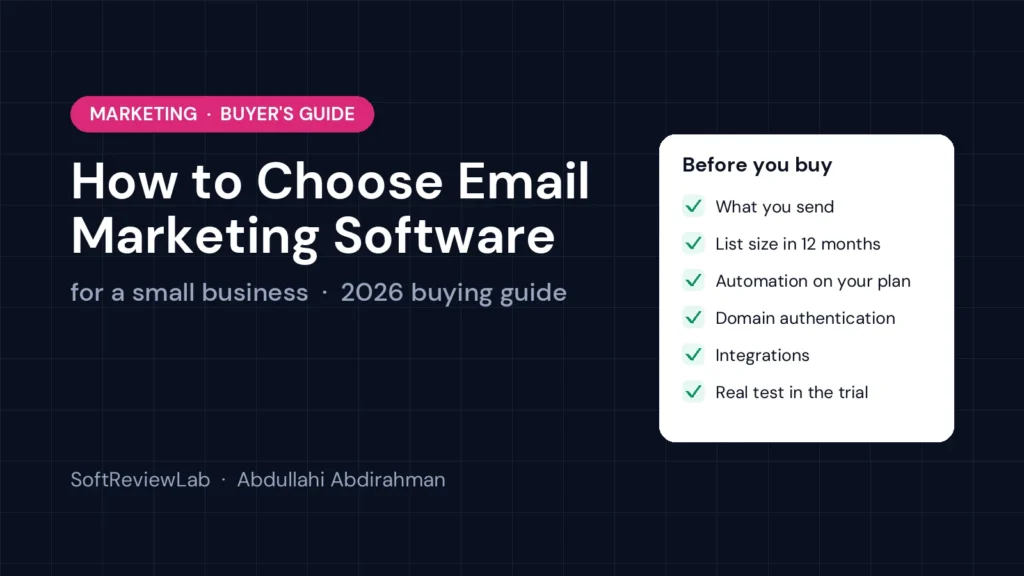
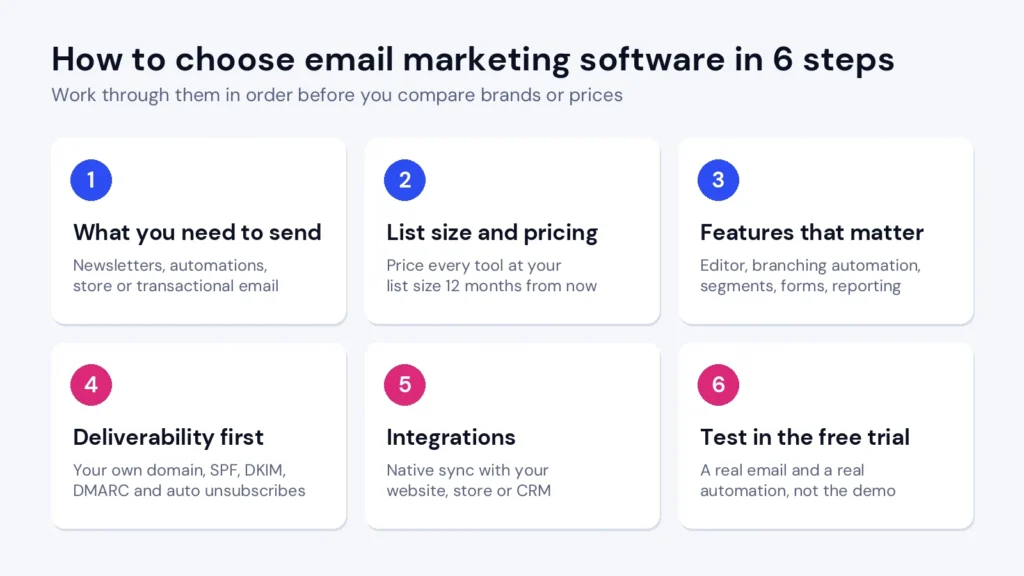
To choose email marketing software for a small business, start with what you need to send, not with feature lists. Work out whether you need simple newsletters, automated sequences, store emails or all three. Estimate how big your list will be in 12 months, because most tools charge by contacts. Check that the tool lets you authenticate your own domain, handles unsubscribes and bounces automatically, and connects to your website, store or CRM. Then shortlist two or three tools and test each one with a real task during the free trial, not a demo.
If you do only one thing from this guide, price every tool at the list size you expect next year, on the plan that actually includes the features you need. That single step prevents most of the expensive mistakes small businesses make with email software.
Most small businesses pick an email tool the same way: they sign up for the one they have heard of, or the one with a free plan, and start sending. It works for a few months. Then the problems appear.
None of these problems shows up on a pricing page. The steps below are designed to catch them before you commit.
“Email marketing” covers very different jobs, and no single tool is best at all of them. Write down which of these you send today and which you expect to send within a year.
| What you send | Examples | What kind of tool fits |
|---|---|---|
| Newsletters and announcements | Monthly update, new product, event invite | Almost any email marketing tool, including free plans |
| Automated sequences | Welcome series, lead nurture, re-engagement | A tool with a visual workflow builder and branching |
| Online store emails | Abandoned cart, post-purchase, win-back | A tool with a native integration to your store and purchase-based triggers |
| Transactional emails | Order confirmations, invoices, password resets | A dedicated email delivery service, or a marketing tool that includes transactional sending |
| SMS alongside email | Delivery updates, flash offers | A tool that offers SMS in your country, often as a paid extra |
If you only send a newsletter, a simple tool is enough and paying for automation is wasted money. If you know you’ll want automated sequences within a year, choose a tool that does them well now, because that is exactly the point where most businesses are forced to switch.
Email tools charge in three main ways, and the same business can pay very different amounts depending on which model it picks.
| Pricing model | How it works | Best for | Watch out for |
|---|---|---|---|
| Per contact | You pay for how many people are on your list | Businesses that email their list often | Costs rise as the list grows, even if you rarely send; ask whether unsubscribed or inactive contacts count |
| Per email sent | You pay for monthly or daily sending volume | Large lists you email occasionally | Busy seasons can push you into a higher tier |
| Per seat or bundle | You pay per user, often as part of a wider CRM suite | Teams already using that vendor’s CRM | Advanced email features can sit in expensive upper tiers |
Here is the free fix: take your current contact count, add your realistic growth for the next 12 months, and price every tool at that number. Then remove inactive contacts before you migrate. Contacts who haven’t opened or clicked in a year cost money on per-contact plans and hurt your deliverability, so cleaning them out is one of the few changes that saves money and improves results at the same time.
Every vendor lists hundreds of features. For a small business, eight of them decide whether the tool will still fit in two years:
What you can usually ignore at the start: AI subject-line generators, huge template libraries, predictive send-time features and advanced multivariate testing. They are nice to have, but they rarely decide whether a small business succeeds with email. Don’t pay a higher tier for them.
A beautiful email that lands in spam is worth nothing. Since 2024, Gmail and Yahoo have required bulk senders to authenticate their domain with SPF, DKIM and DMARC, offer one-click unsubscribe and keep spam complaints low, and Microsoft followed with similar rules for Outlook in 2025. Google’s email sender guidelines set out the details. Your email tool should make all of this easy.
Before you buy, ask each vendor, or check in the trial, whether you can:
You can also do free checks yourself. Send a test campaign to a personal Gmail account, open it, choose “Show original” and confirm SPF, DKIM and DMARC all say PASS. If your website’s own emails, such as order confirmations or contact form notifications, are already going to spam, our guide on why website emails go to spam and how to fix it walks through the free fixes step by step. For the full picture, see our email deliverability guide.
Your email tool is only as smart as the data it receives. List every system that holds customer information, such as your website, online store, CRM, booking tool, payment system or webinar platform, and check how each one connects.
Ask one specific question: which fields sync, in which direction, and how often? “Integrates with your CRM” can mean anything from a full two-way sync to a one-time import.
A free trial is only useful if you test the things that will matter in six months. Use this 14-day plan for each tool on your shortlist:
| Days | What to do | What you’re checking |
|---|---|---|
| 1 to 2 | Authenticate your domain and import a small, clean segment of your list | How hard setup is, and whether support answers quickly |
| 3 to 5 | Build your real welcome email and one real campaign | Whether the editor is comfortable for the person who will use it every week |
| 6 to 9 | Build one automation with at least one branch, such as “clicked or didn’t click” | Whether the plan you’d buy includes the automation you need |
| 10 to 12 | Connect your store, website form or CRM and trigger a real event | Whether data syncs correctly and quickly |
| 13 to 14 | Send a test to Gmail and Outlook, check authentication and read the reports | Deliverability and whether the reports answer your questions |
Before the trial ends, read the renewal and cancellation terms. Note whether the trial needs a card, whether it converts to a paid plan automatically, and how much notice cancellation requires.
Several well-known tools offer free plans, which are fine for a small newsletter but have tight limits on contacts, sends or automation. Once you need automated sequences, the realistic starting price is the entry plan that includes multi-step workflows. At about 1,000 contacts, that looks like this:
| Platform | Plan with workflows | Entry price (about 1,000 contacts) | Good to know |
|---|---|---|---|
| ActiveCampaign | Starter and up | From $15/mo (Starter, annual billing) | Starter allows 5 actions per automation; Plus is $49/mo on annual billing |
| Campaigner | Advanced | $35/mo (official pricing) | Essentials ($14) excludes workflows; list hygiene is a 20% add-on |
| Mailchimp | Standard | $45/mo (1,500-contact tier) | Essentials limits flows to 4 steps |
| Constant Contact | Standard / Premium | $35/mo / $80/mo | Standard has template automations; Premium has custom ones |
| Brevo | Standard | From $18/mo (5,000 emails; $16.17 on yearly billing) | Priced by emails sent, not contacts |
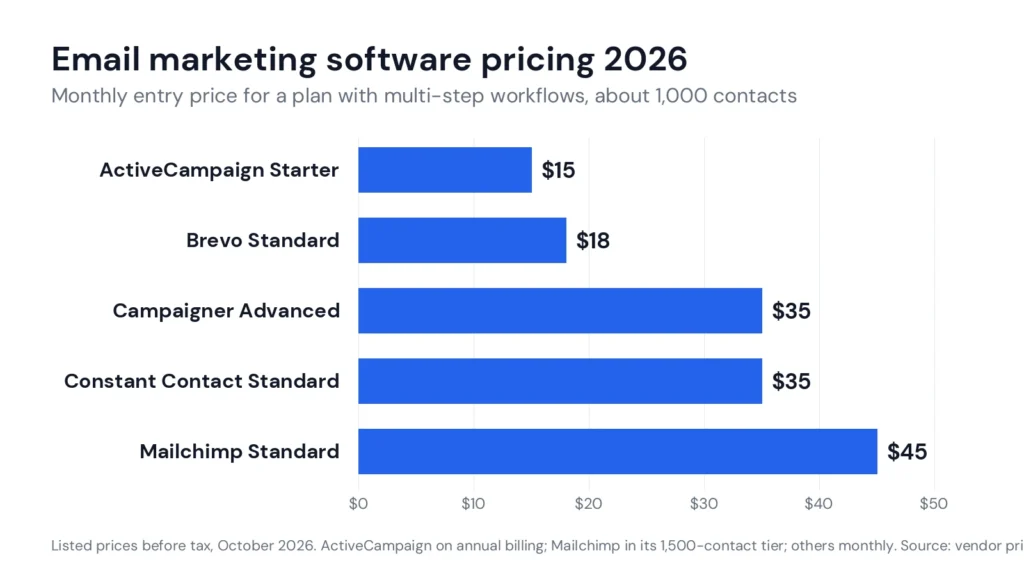
Remember that these are starting points. On per-contact plans, the price at 10,000 contacts can be several times the price at 1,000, so always check the tier you’ll reach within a year.
Use the steps above to build your own shortlist. If you want a starting point, these are the tools we have reviewed in depth and recommend for specific needs:
If automated sequences are your main goal, our email marketing automation guide shows the seven workflows to build first.
Many CRMs now include email marketing features, which raises a fair question: do you need a separate tool at all? The honest answer depends on how much email matters to your growth.
Built-in CRM email works well when your list is small, you mainly send one-to-one follow-ups and simple newsletters, and you want every interaction in one place. It usually falls short when you need advanced automation with branching, detailed segmentation, strong deliverability tools or large sending volumes, because those features often sit on expensive upper tiers of the CRM. A dedicated email platform connected to your CRM is often cheaper and more capable once email becomes a real sales channel.
Sales pages rarely answer the questions that decide your real experience. Ask these directly, by chat or on a demo call, and keep the answers in writing.
If you are moving from an existing tool, the switch itself is where many small businesses damage their sender reputation. Follow this order to protect it:
For the deliverability side in more depth, our email deliverability guide covers the sender rules and a 30-day recovery plan.
Once you’ve chosen a tool, the first week sets up everything that follows. This short plan gets you sending with good habits from day one:
That is all most small businesses need to start well. Add more automations only after the welcome series is running and you can see how people respond.
Related reading: ActiveCampaign vs Mailchimp.
There isn’t one best tool for every small business. A solo newsletter writer, an online store and a B2B service company need different things. Work out what you send, how big your list will be next year and which integrations you need, then test two or three tools against those needs during their free trials.
A small newsletter can often run on a free plan. Once you need automated sequences, expect roughly $15 to $50 a month at about 1,000 contacts on most of the tools in this guide, rising as your list grows. Always price the plan that includes the features you need at your expected list size.
For a small newsletter, often yes. Free plans usually limit contacts, monthly sends and automation, and may add the vendor’s branding to your emails. When you need automated sequences or segmentation, a paid plan is normally worth it.
Not always. Some marketing tools include transactional sending on higher plans. If you send a lot of order confirmations, invoices or password resets, a dedicated delivery service keeps those critical messages separate from your campaigns, so a campaign problem can’t delay them.
Moving contacts is easy, but rebuilding templates, automations, forms and integrations takes time, and you’ll need to authenticate your domain again. That is why it pays to choose a tool that fits where your business will be in a year, not just where it is today.
Every review, comparison and guide we publish on this topic is added here automatically.
A basic setup, with your domain authenticated, contacts imported, a signup form and a welcome series, takes about a week of part-time work. Advanced automations and integrations can take a few weeks more. Plan it before a busy period, not during one.
How this guide was put together. Built from vendor documentation and pricing pages, and from recurring themes in public customer reviews — not from a hands-on lab test. Prices move; confirm on the vendor’s own page before you buy. How we work.
Keep going
AI customer support chatbots explained for small businesses: 9 checks before you buy, real 2026 prices from 8 vendors, legal risks and a 14-day trial plan.
How to choose AI tools for a small business in 2026: 7 practical steps, real prices from 4 vendors, data privacy checks and a one-week trial plan.
How to choose a CRM for a small business in 2026: 7 practical steps, real prices from 5 vendors, hidden costs to check and a free-trial test plan.