MailerLite Review 2026: Is It the Best Email Marketing Tool for a Small Business on a Budget?
Email Marketing
MailerLite Review 2026: Is It the Best Email Marketing Tool for a Small Business on a Budget?
7.4/10
“Start on the free plan or the 14-day trial, authenticate your own domain, build one form and one welcome automation, and send a real campaign before you pay. Move to Comfort when your list passes 250 subscribers, or to Power if you need unlimited automations and live chat support.”
Hands-on testedIncludes direct use of the product, alongside its documentation, pricing pages and customer reviews. How we work.
Starting price
Free plan up to 250 subscribers; Comfort from $12/month
Best for
Small businesses, creators and online shops that want simple, affordable newsletters and automations
Free trial
Free plan with no time limit, plus 14 days of premium features without a card
Based on
My own MailerLite account (October 2026: sign-up form, subscriber group, brand styles, domain authentication and the in-account plans page), plus MailerLite’s help center, refund policy and terms of use, and customer ratings on Capterra
Scores
Ease of setup & use8.0
Feature depth7.5
Pricing & value7.0
Integrations7.0
Support & terms7.5
How these scores were worked out
Ease of setup & use: 8.0 (Strong) Sign-up is quick and the interface is often praised as clean, but you must authenticate a sending domain after the trial, and MailerLite says account verification is automated, though some reviewers report delays.
Feature depth: 7.5 (Good) Email, automations, forms, pop-ups, landing pages, a website and digital products in one account. Automation is simpler than tools built for complex journeys.
Pricing & value: 7.0 (Good) Low starting prices and a free plan, but the free plan shrank in June 2026, pricing rises with subscribers and yearly billing saves only 10%.
Integrations: 7.0 (Good) Paid plans include API and MCP access and connect to stores such as Shopify and Stripe, but transactional email is sold separately through MailerSend.
Support & terms: 7.5 (Good) Customer service is the highest-rated area on Capterra, with 24/7 email on Comfort and chat on Power, but free accounts lose direct support after 14 days and refunds are rare.
Overall: (8.0 + 7.5 + 7.0 + 7.0 + 7.5) ÷ 5 = 7.40, shown as 7.4. The five criteria are weighted equally.
Scores are editorial judgments in half-point steps, based on my own use of the product, documented features, published pricing and repeated themes in customer reviews. They are not lab measurements, so treat the words as the guide: 8.0+ Strong, 7.0 to 7.9 Good, 6.0 to 6.9 Average, below 6.0 Weak.
What works
Newsletters, automations, forms, pop-ups, landing pages and a small website in one account.
Paid plans start low, and yearly billing saves 10%.
A free plan with no time limit, plus 14 days of premium features without a card.
Customers rate its ease of use and support among the best in the category.
Nonprofits get 30% off paid plans.
MailerLite takes no commission on digital product or paid newsletter sales.
What doesn’t
The free plan dropped to 250 subscribers and 2,500 emails a month in June 2026.
Strict written refund terms: no refunds for unused plans or forgotten cancellations, though MailerLite says it reviews requests case by case.
You must authenticate your own domain after the trial to keep sending, a standard step since Gmail and Yahoo’s 2024 sender rules.
Automation stays simple next to tools built for complex journeys.
Transactional email is a separate product, MailerSend.
What we couldn’t verify
Campaign sending, deliverability and support response times were not tested; they are based on documentation and customer reviews.
If any of these matter to your decision, check them directly with the vendor or during your trial.
Who should skip it
Businesses that need complex multi-branch automation and sales scoring, detailed revenue reporting, very large lists where subscriber pricing dominates, or anyone planning to send to bought or old lists.
By Abdullahi Abdirahman, Founder & Editor, SoftReviewLab. Plans, limits and policies checked on MailerLite’s pricing page, help center and legal pages in October 2026. For this MailerLite review I opened my own account in October 2026, built a sign-up form and authenticated SoftReviewLab’s domain; the rest comes from MailerLite’s documentation and customer ratings. This page contains affiliate links: if you sign up through them, SoftReviewLab may earn a commission at no extra cost to you. See our affiliate disclosure and research and scoring method.
Short answer: is MailerLite the best email marketing tool for a small business on a budget? For many, it is the most sensible place to start. One account covers newsletters, automations, sign-up forms, landing pages and a small website, paid plans start at a low monthly price, and customers rate its ease of use and support among the best in the category. Know three things before you sign up: the free plan shrank in June 2026, you must authenticate your own domain to keep sending, and refunds are rare.
Table of Contents
What Is MailerLite?
MailerLite is an email marketing platform for small businesses, creators and online shops. You collect subscribers with forms and pop-ups, send them newsletters, and set up automations that send emails on their own, such as a welcome series when someone joins your list. Around the email tools, MailerLite adds a website and landing page builder, a blog, and a way to sell digital products and bookings.
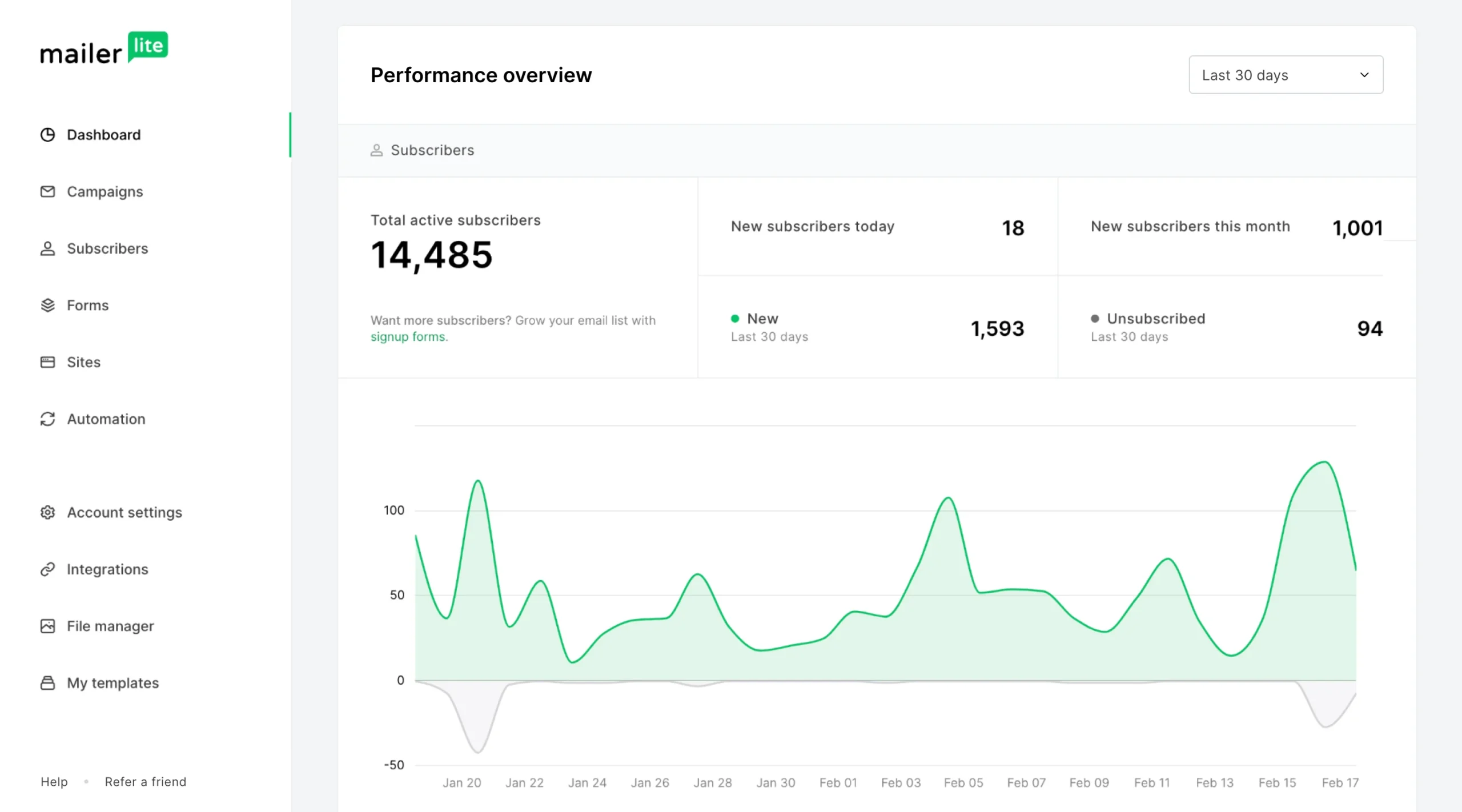
The MailerLite dashboard shows active subscribers, new sign-ups and unsubscribes for the period you pick. Check the unsubscribe count after each campaign: a sudden rise points to the wrong content or too many emails.
Its reputation rests on simplicity. Where some email tools try to be a full marketing suite, MailerLite keeps the editor, the automation builder and the reports easy to read, which is why it is often the first paid email tool a small business buys.
How I Tested This MailerLite Review
I opened a MailerLite account in October 2026 and went through what a new user does in the first week: the sign-up questions, a sign-up form connected to a subscriber group, brand styles and domain authentication. Sign-up asks for your list size, the tool you are moving from, your industry and website, then whether you want to start by sending an email, getting subscribers or selling products, and the dashboard checklist follows that choice. The prices in this review come from the plans page inside the account.
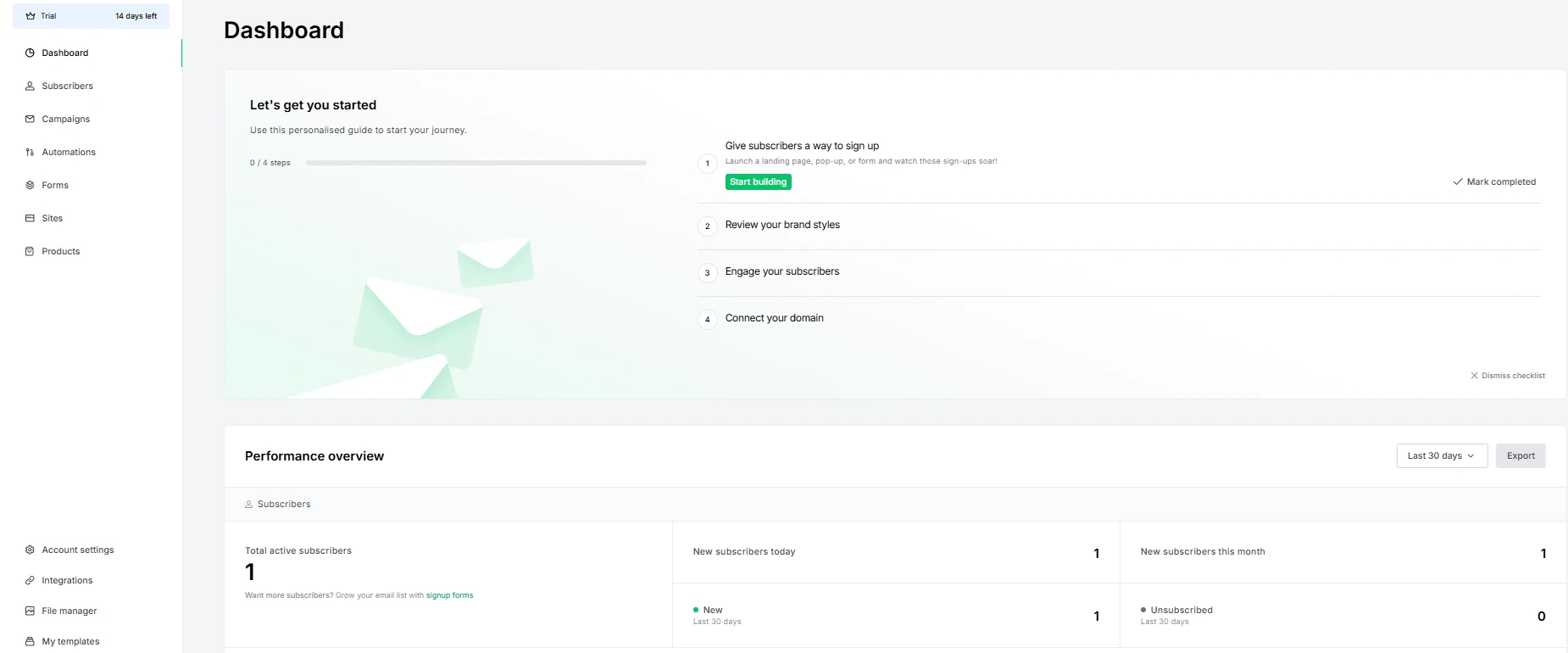
A new account opens on the trial with a four-step checklist: give subscribers a way to sign up, review brand styles, engage subscribers and connect a domain. The sidebar counts down the trial days, and the overview below tracks new subscribers and unsubscribes.
I haven’t yet sent campaigns to a real list, so deliverability, how the editor feels in daily use and support response times still come from MailerLite’s help center, its refund policy and terms, and customer reviews on Capterra, all read in October 2026.
Advertisement
What MailerLite Does for a Small Business
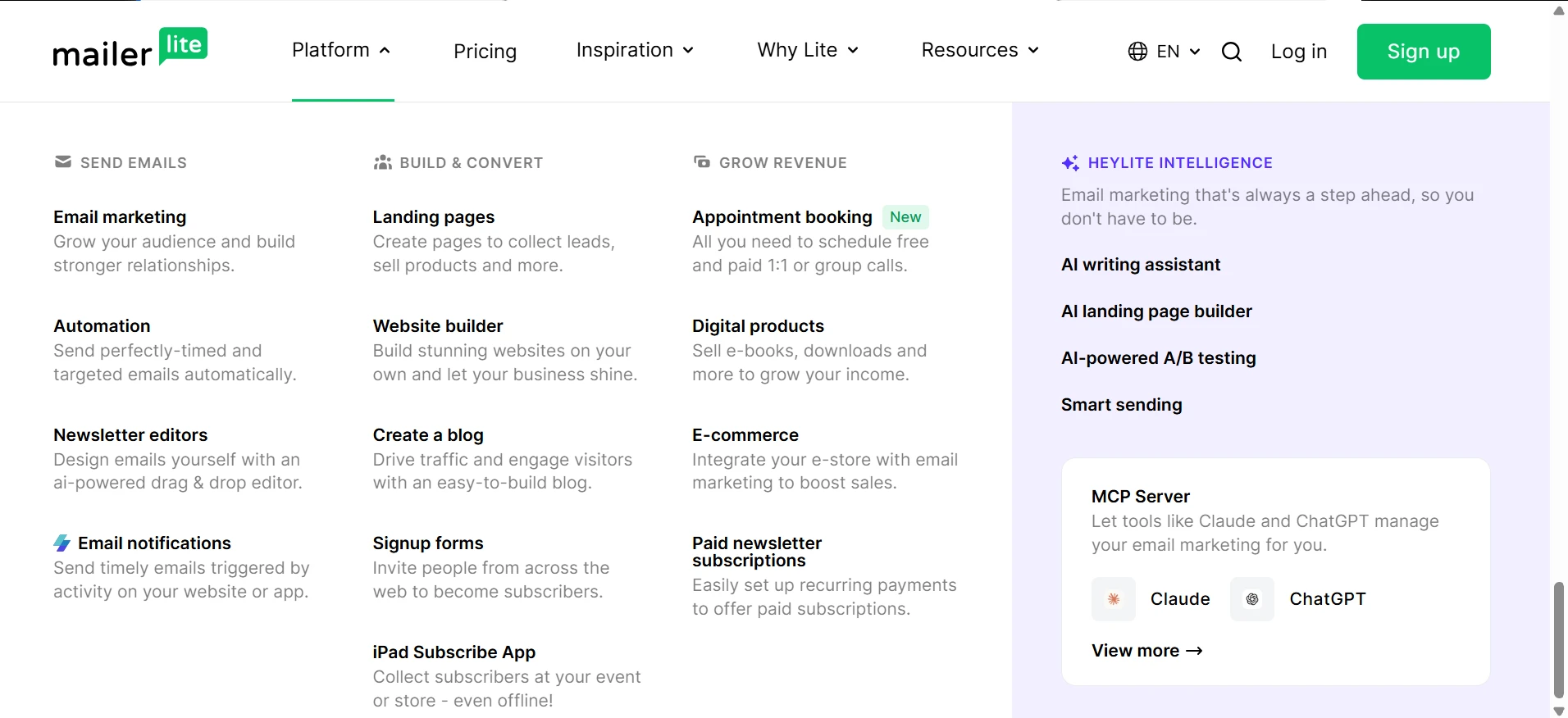
MailerLite started as an email tool and now sells a small-business marketing kit around it. Its product menu groups the features into three jobs: sending email, building pages and forms that collect subscribers, and earning money through bookings, digital products and paid newsletters. The sections below cover the parts most small businesses use first.
The product menu: email, automation and newsletter editors on the left, landing pages, websites and sign-up forms in the middle, and sales tools such as appointment booking, digital products and paid newsletter subscriptions on the right. HeyLite is the name for the AI features, covered in the next section.
HeyLite Intelligence: Which MailerLite AI Tools Each Plan Gets
HeyLite Intelligence is MailerLite’s name for its AI tools. Some help a small team draft content, and others help with send times, list health and account admin. Which ones you get depends on your plan, and the free plan gets only a small part of the toolkit, so check the table before you count on a feature.
AI tool
What a team can use it for
Plans
AI writing assistant
Drafting text from a short prompt inside the email, landing page and pop-up editors
Comfort, Power (Comfort gets a limited number of credits)
AI subject line generator
Getting several subject line options for a campaign
All plans (Free gets a limited number of credits)
AI-generated HTML emails (beta)
Building or adjusting a custom HTML email from a plain-English description
Comfort, Power
AI-generated landing pages
Generating landing page drafts from a short questionnaire
Comfort, Power (Free can do it once)
Smart sending
Sending each subscriber the campaign at the time they are most likely to open it
Comfort, Power
HeyLite insights (beta)
Suggestions on re-engaging inactive subscribers, send times and deliverability issues
Comfort, Power, limited accounts only
MCP server
Letting an AI assistant such as Claude or ChatGPT read and manage your account
All plans (the AI tool may need its own paid plan)
Source: MailerLite help center, HeyLite Intelligence toolkit overview (last edited August 31, 2026), checked October 2026.
Know the limits before you plan around these tools. MailerLite describes the AI HTML agent as a starting point rather than a finished campaign, and it does not yet build quizzes, countdown timers or surveys. HeyLite insights is still in beta, so your account may not have it yet. MailerLite does not publish how many AI credits Comfort includes, so a team that drafts a lot of copy with AI may run out sooner than it expects.
On privacy, MailerLite says data you process with its built-in AI features is not used to train its AI partners’ models (OpenAI and Google). The MCP server shares data only with the AI tool you connect, and only when you give it a command; after that, the AI provider’s own terms apply. I haven’t used the HeyLite tools for this review, so this section reflects MailerLite’s documentation only.
Emails and Newsletters
MailerLite gives you three ways to build an email: a drag-and-drop editor, a Simple editor for plain, letter-style emails, and a custom HTML editor. The Simple editor replaced the older rich-text editor in May 2026 and keeps your formatting when you paste from Google Docs, Notion or an AI tool, and the HTML editor now has a built-in AI agent that edits code from plain-English instructions. Paid plans add an AI writing assistant, multivariate testing and smart sending, which times each email for the individual subscriber. With email A/B testing you can test two subject lines or two versions of an email and send the better one to the rest of your list.
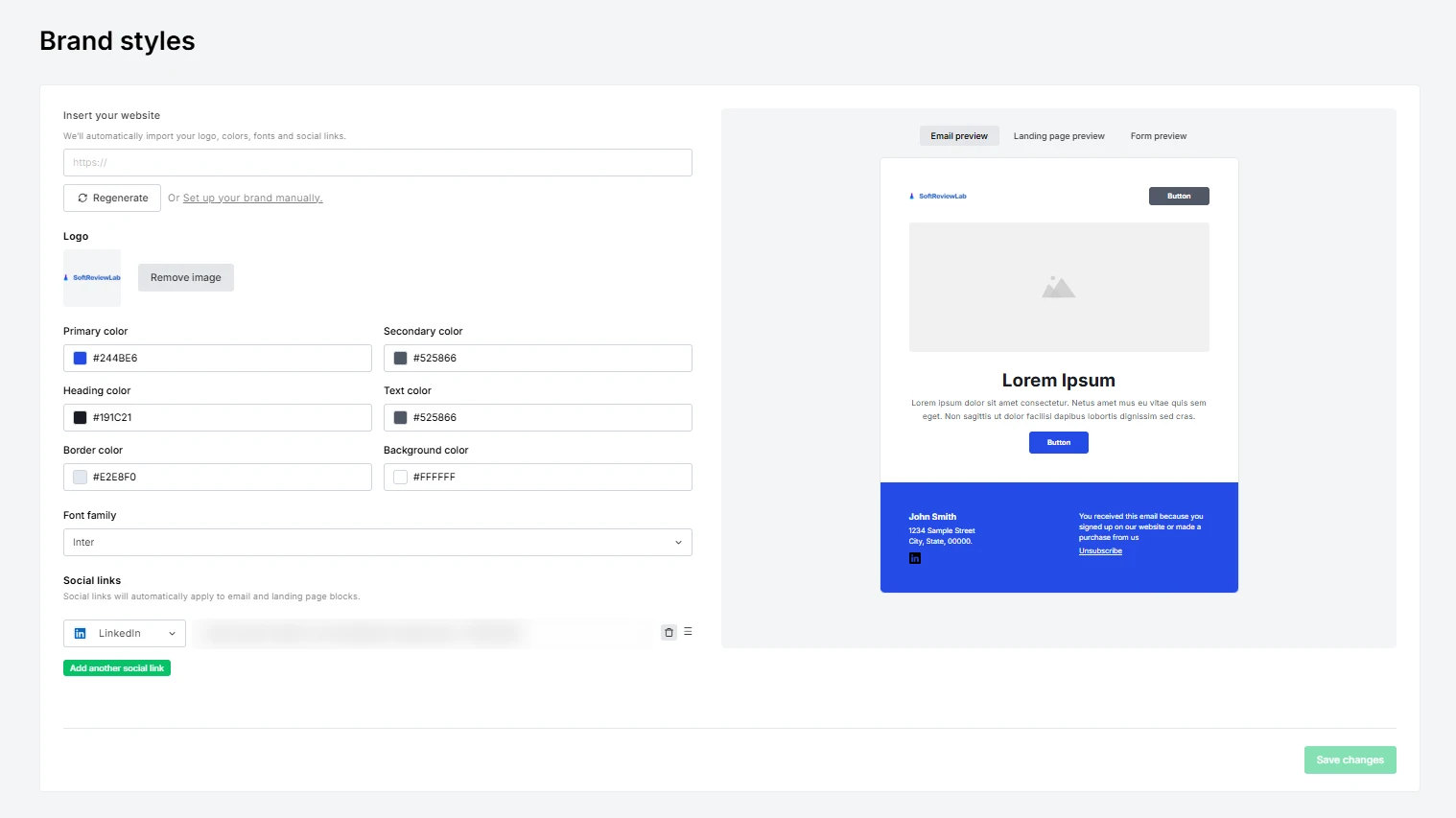
Before the first email, the Brand styles page fills in your logo, colours, font and social links from your website address, and new emails, landing pages and forms start from them. Check the footer before you send anything: it begins with a sample name and postal address, and US anti-spam law (CAN-SPAM) requires a real postal address in every marketing email.
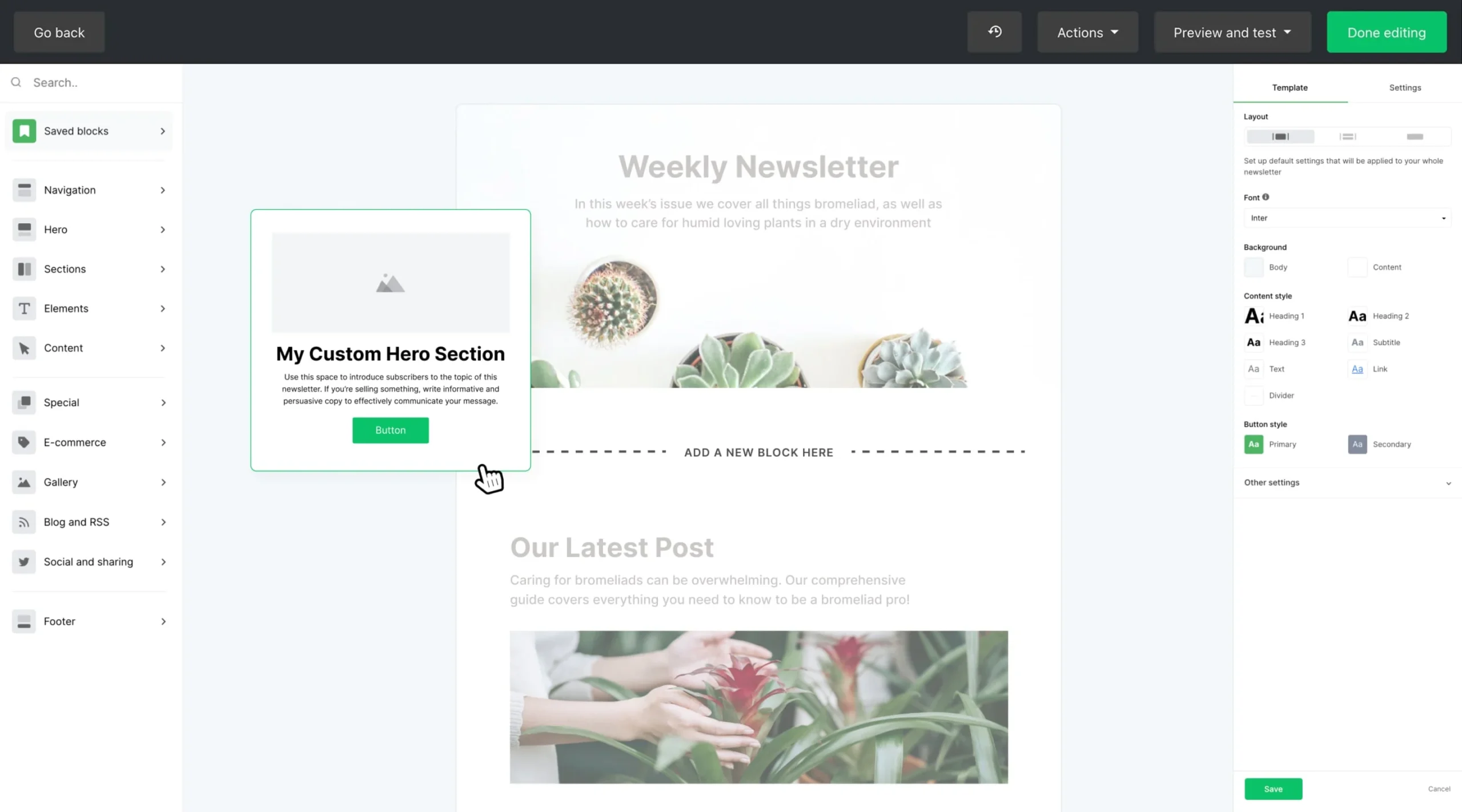
Brand styles: enter a website address and MailerLite imports the logo, colours, font and social links, then previews them in an email, a landing page and a form. The name and address in the footer are sample text until you replace them.The drag-and-drop editor: blocks for headers, text, products and blog posts sit on the left, and you drop them into the email. Save the blocks you reuse, such as your header and footer, so every newsletter stays on-brand.
Automations
Automations send emails when something happens: a subscriber joins a group, fills in a form, clicks a link or reaches a date. The builder supports A/B tests inside a workflow, and on Power one automation can start from more than one trigger. For online stores, triggers include abandoned cart and abandoned checkout, a purchase of a specific product, now down to the variant such as size or colour for WooCommerce, Shopify, Wix and BigCommerce stores, and purchase milestones such as a customer’s third order. The plan you choose limits how many automations can run at once: 3 on Free, 50 on Comfort and unlimited on Power.
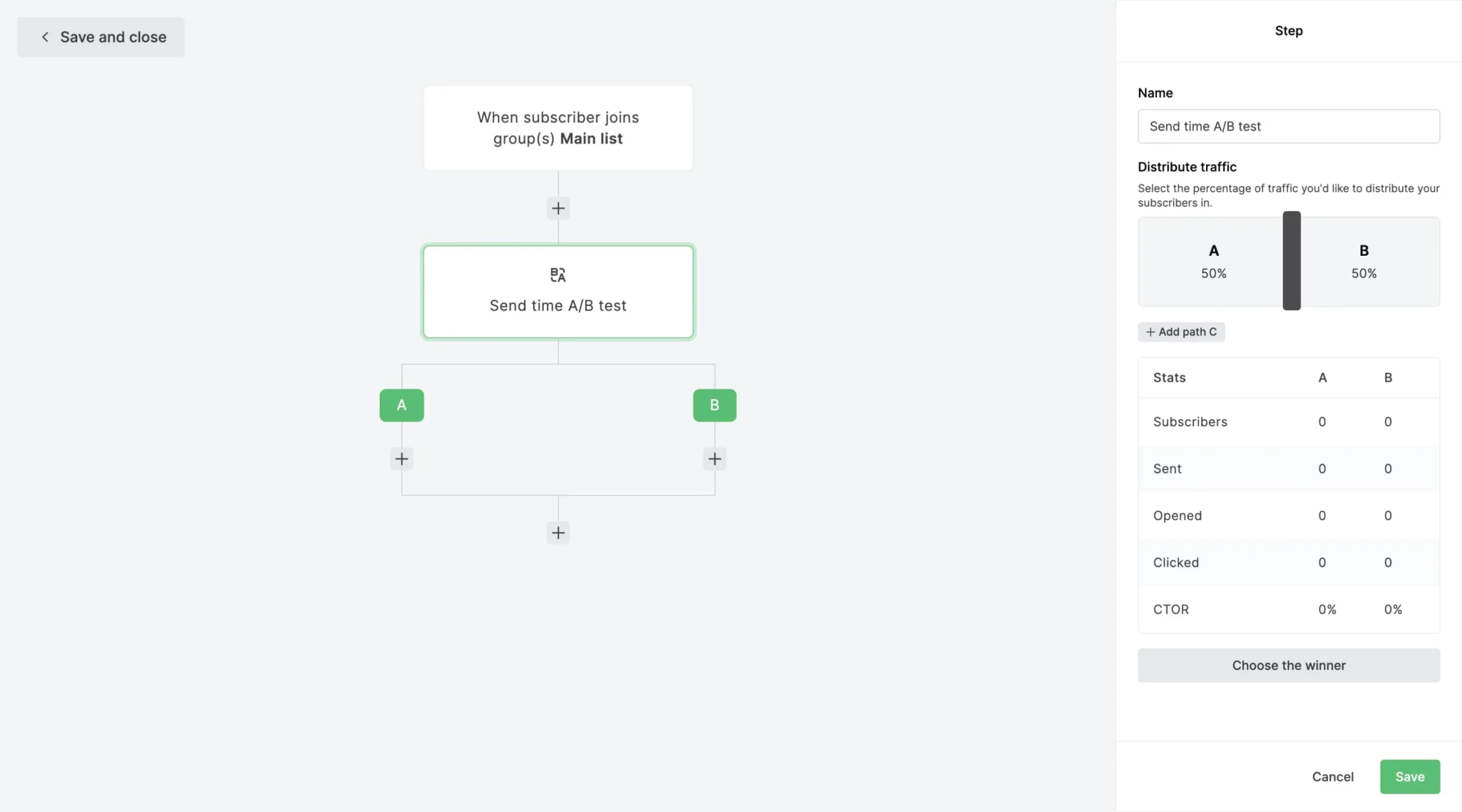
On the Power plan, one automation can start from several triggers. This one sends a win-back email to subscribers who have not logged in or opened an email since a set date.A send-time A/B test inside an automation: subscribers are split 50/50 between two versions, the table compares opens and clicks, and you pick the winner.
For a small business, the first automation worth building is a welcome series that introduces you and points new subscribers to your best offer. I explain how to plan one in how to set up a welcome email series. Customers on Capterra say the builder is easy for this kind of flow, but some want more advanced logic for complex customer journeys.
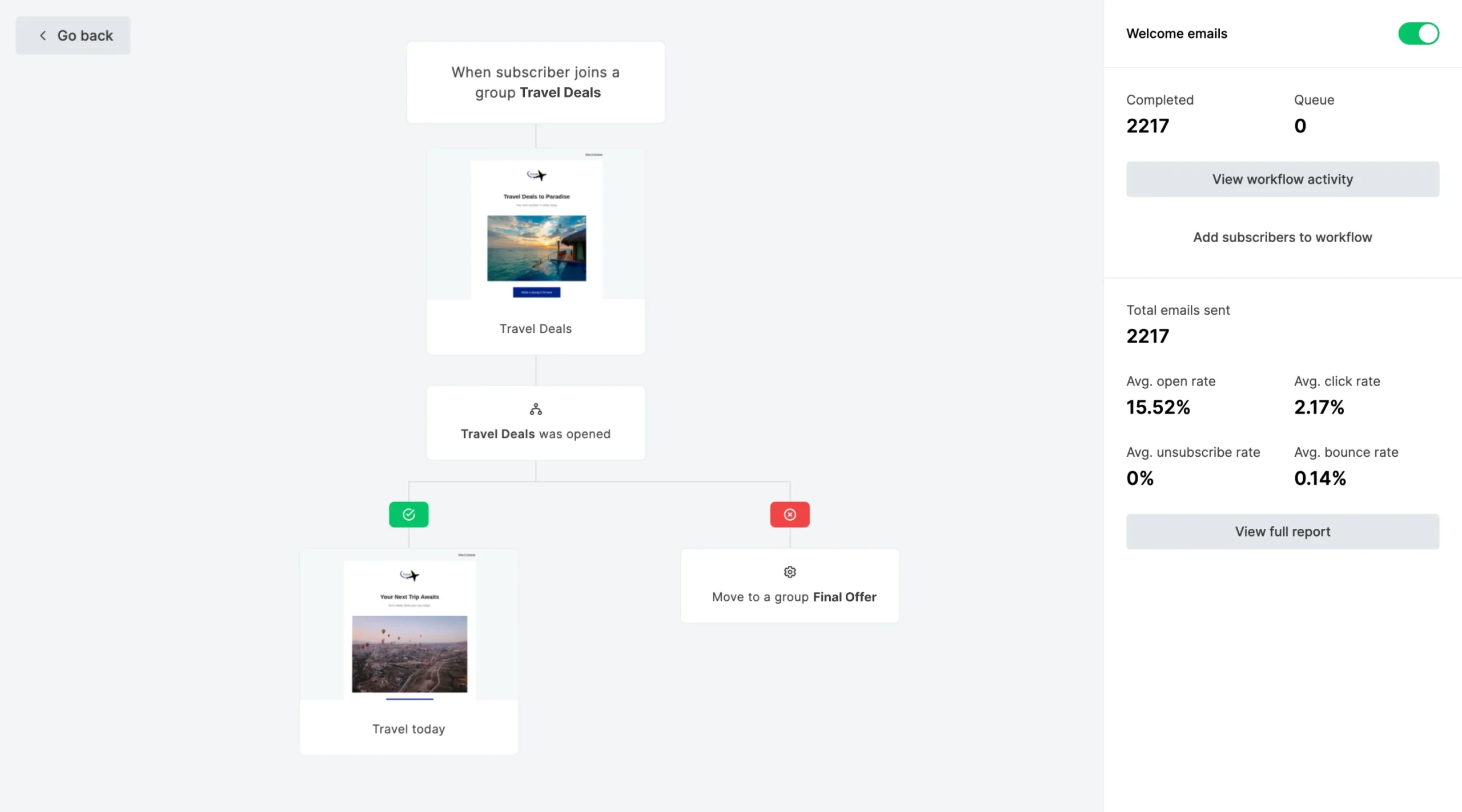
A welcome workflow: a new subscriber gets the first email, and the next step depends on whether they opened it. The panel on the right shows how many people completed the workflow and their open and click rates.
Forms, Pop-Ups and Landing Pages
Embedded forms, pop-ups and landing pages are how a list grows, and MailerLite includes all three, with A/B testing for forms. The free plan allows 3 forms and 1 landing page, Comfort allows 10 of each, and Power removes the limits. Since June 2026, promotional pop-ups and custom landing page templates are also available on the free plan.
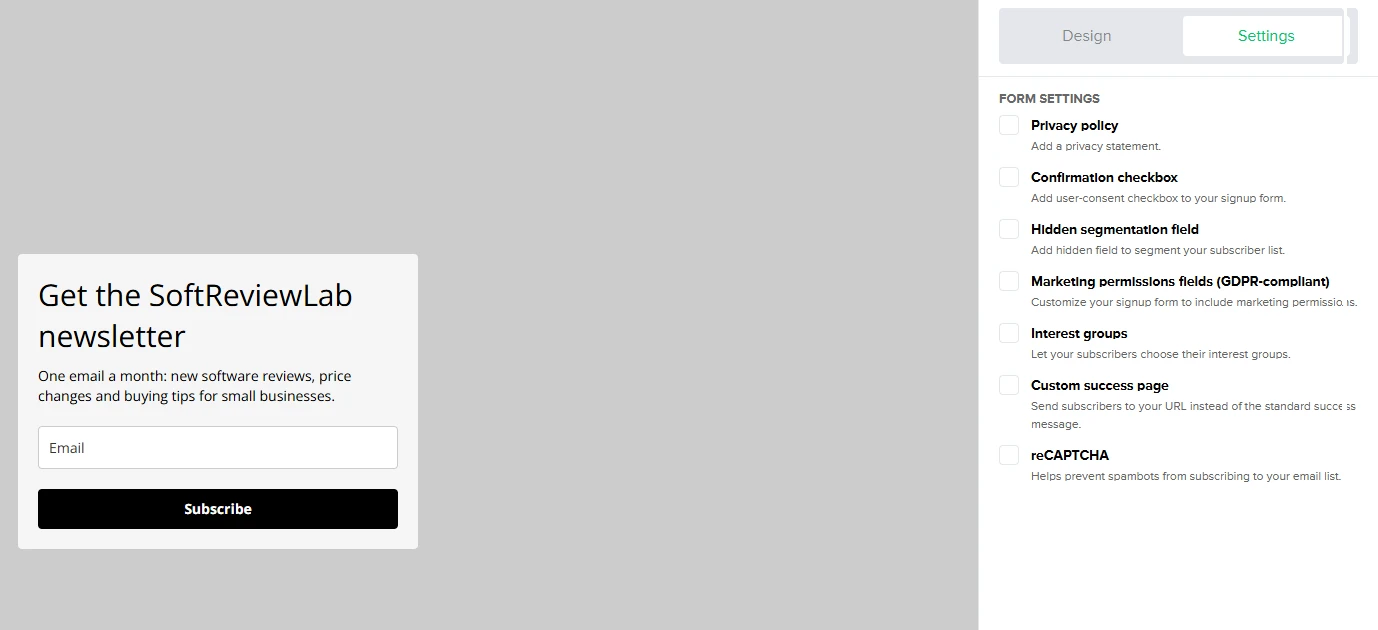
Each form also has a settings panel for consent and spam protection: a privacy statement, a consent checkbox, GDPR marketing-permission fields, interest groups that let people pick topics, a custom thank-you page and reCAPTCHA. All of them start switched off, so turn on at least reCAPTCHA and the privacy statement before a form goes on your site.
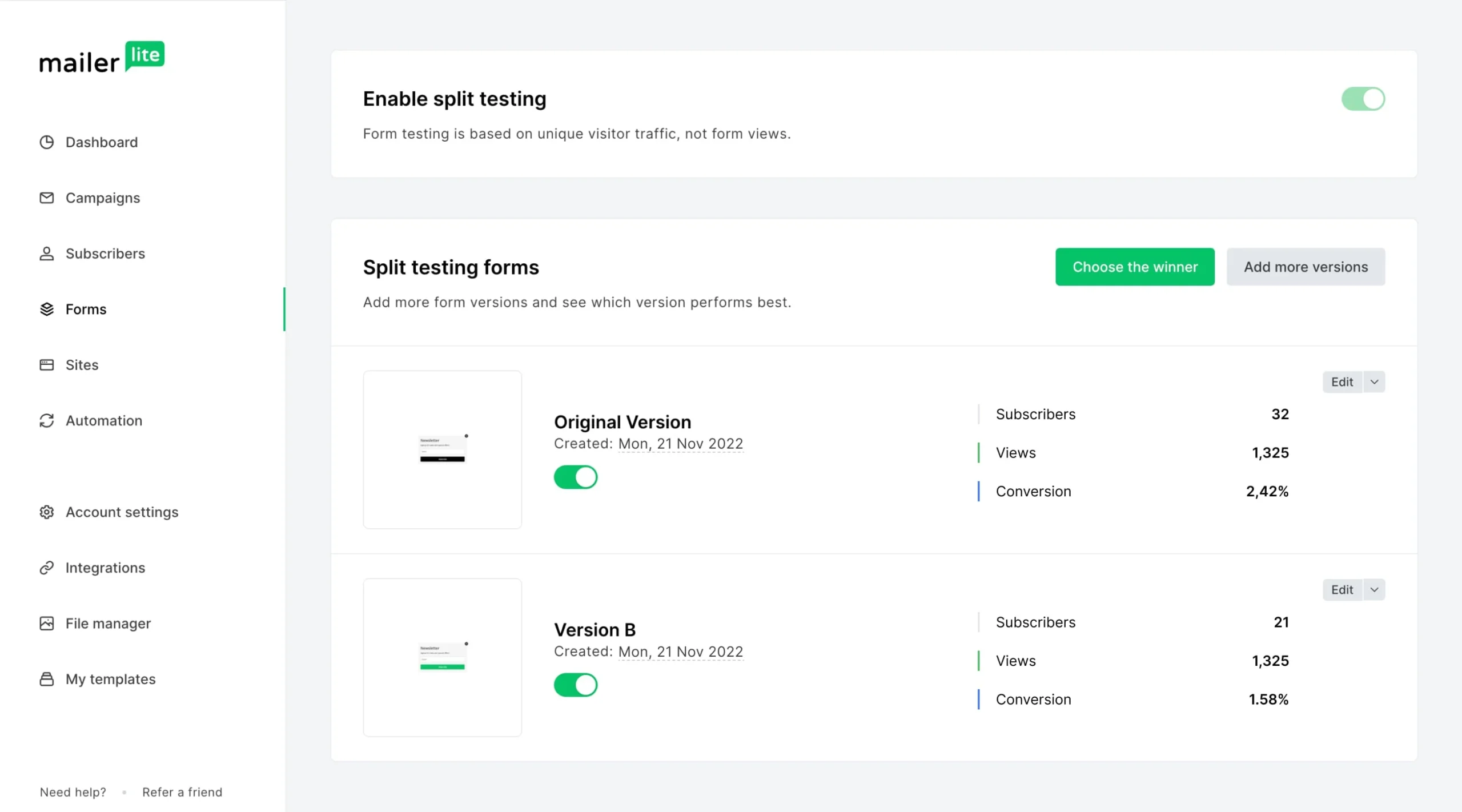
The Settings tab of the form editor lists seven options, from a privacy statement and consent checkbox to interest groups, a custom success page and reCAPTCHA. The preview on the left changes as each one is switched on.An embedded sign-up form on a website page. Asking only for a name and email, as this one does, keeps sign-ups higher; every extra field gives visitors a reason to stop.The pop-up builder: choose the form type, then set width, fonts, background and button style without code. A pop-up works best when it gives a clear reason to join, such as a guide or an invitation.A form split test shows each version’s subscribers, views and conversion rate side by side. Let both versions collect enough views before you choose the winner.
Websites, Blogs and Digital Products
MailerLite can host a simple website with a blog, which suits a creator or a service business that does not yet have a site. It can also sell digital products, bookings and paid newsletters, with checkout through Stripe, and MailerLite takes no commission on those sales, so you only pay Stripe’s fees. The free plan allows 1 website and 1 digital product or booking, Comfort allows 10 websites and 5 products, and Power removes both limits. A business that already runs a WordPress site will mostly use MailerLite for email and forms and keep its main website where it is.
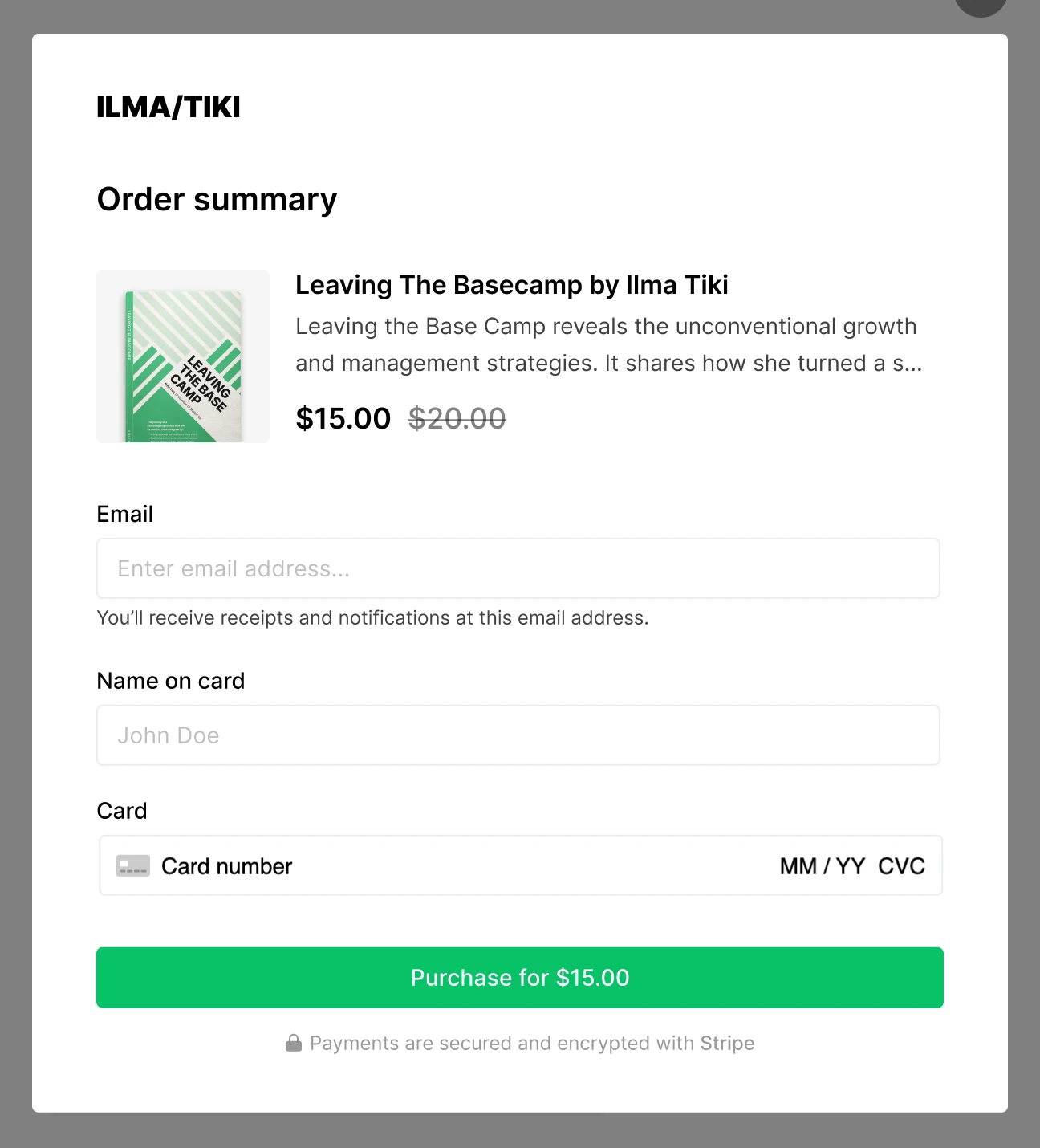
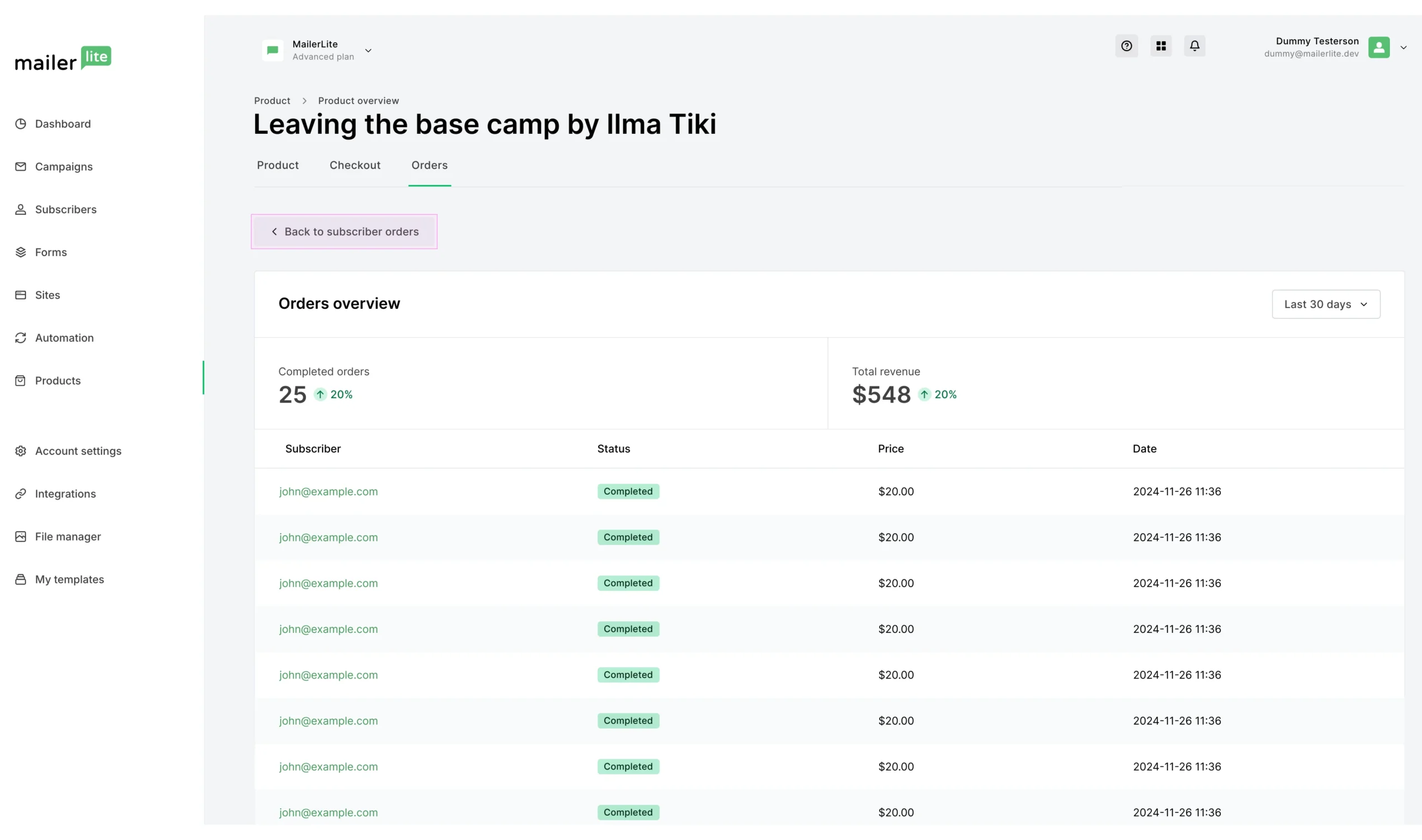
The website builder: pages are built from ready-made blocks for text, images, testimonials and buttons, with a preview before you publish.The checkout a buyer sees for a digital product. Payments are processed by Stripe, so selling requires a connected Stripe account.Each product has an orders view with completed orders, revenue and the buyer’s email, so every sale is linked to a subscriber you can follow up with.
Subscriber Management and the Preference Center
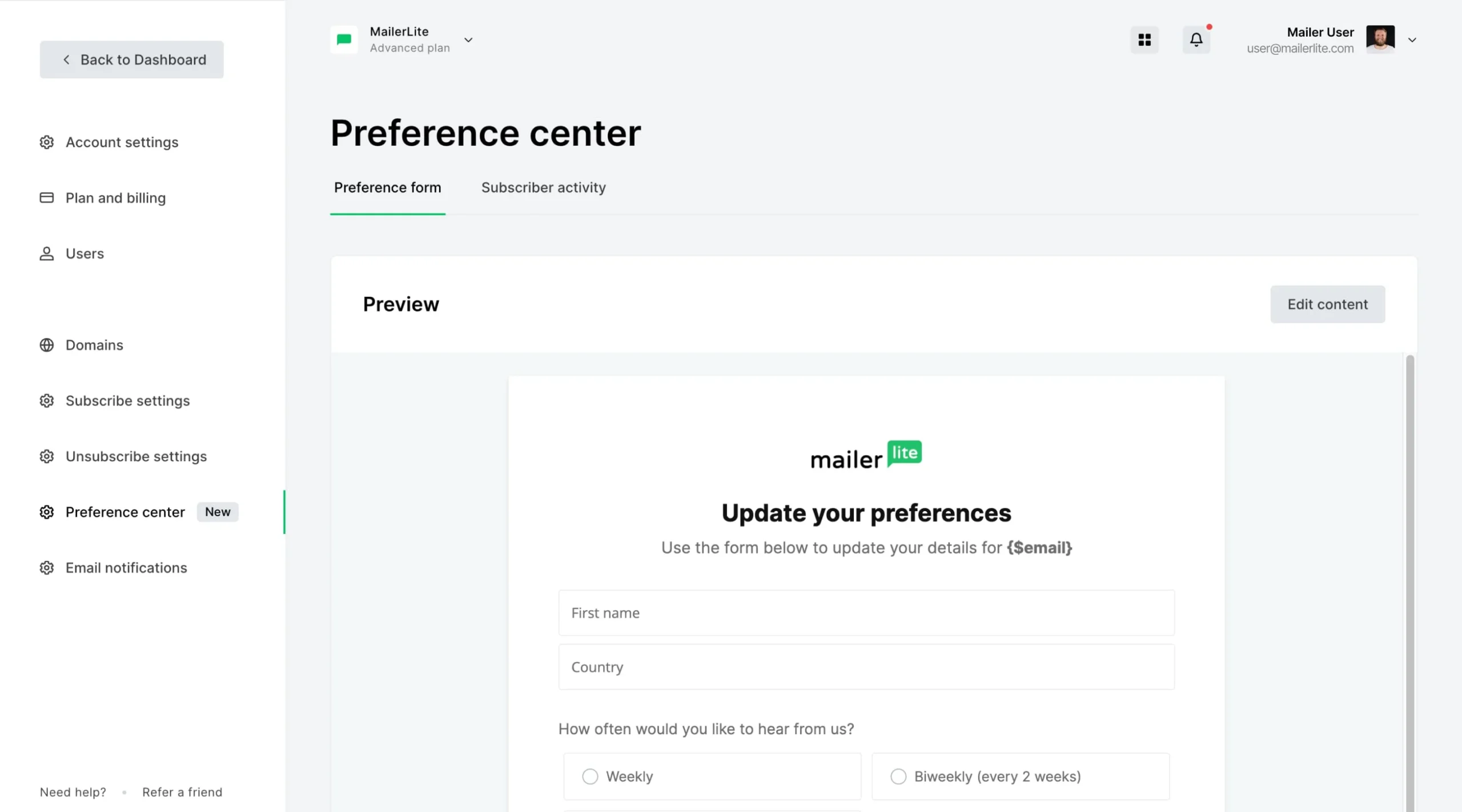
Subscribers can be sorted into groups and segments, so you send each email only to the people it concerns. A preference center lets subscribers choose which kinds of emails they want instead of unsubscribing from everything, which helps keep a list healthy.
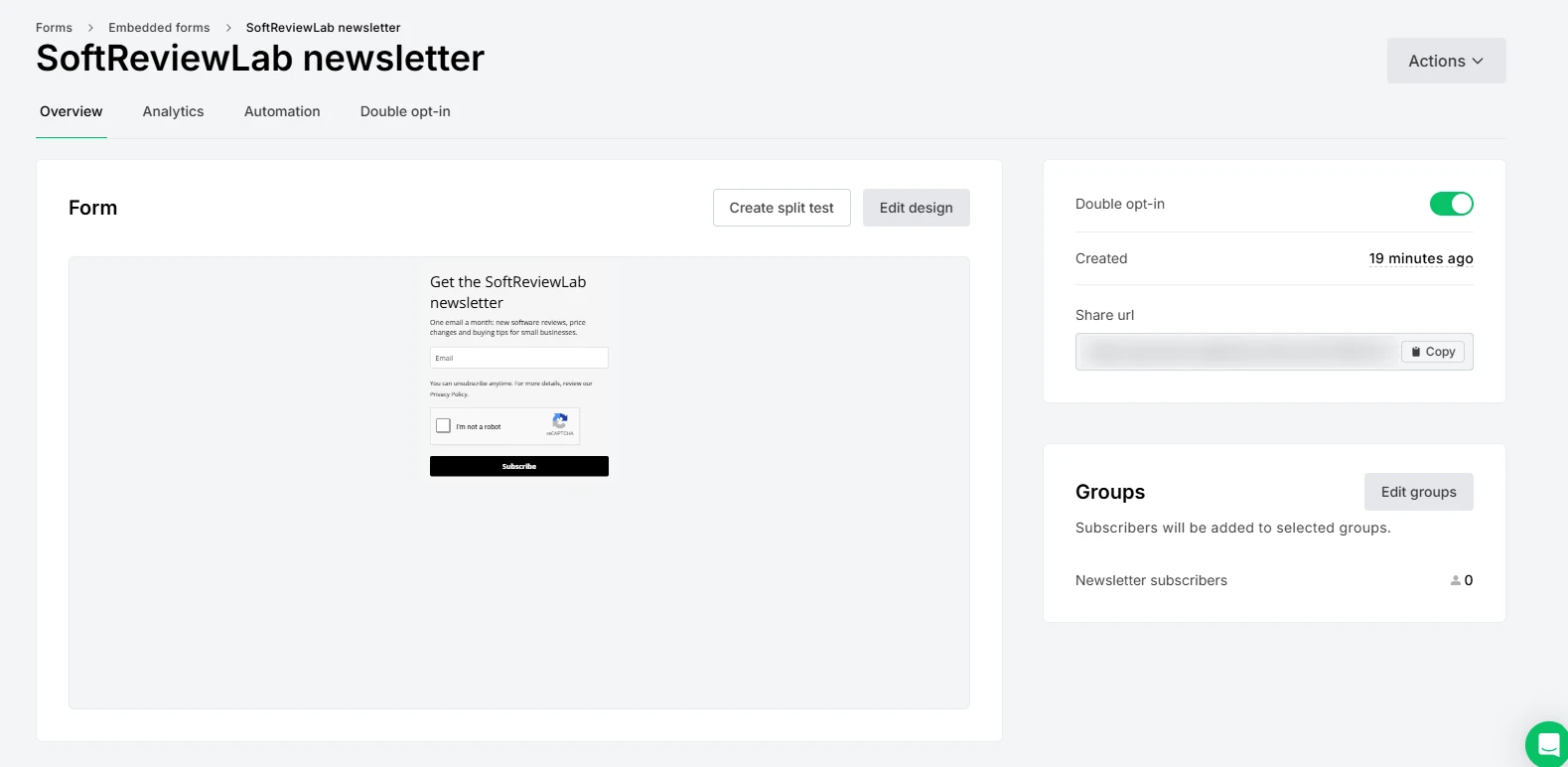
New embedded forms have double opt-in switched on, so someone only joins after clicking a confirmation email. That loses a few sign-ups, but it keeps typos and fake addresses off the list, which protects the deliverability of everything you send.
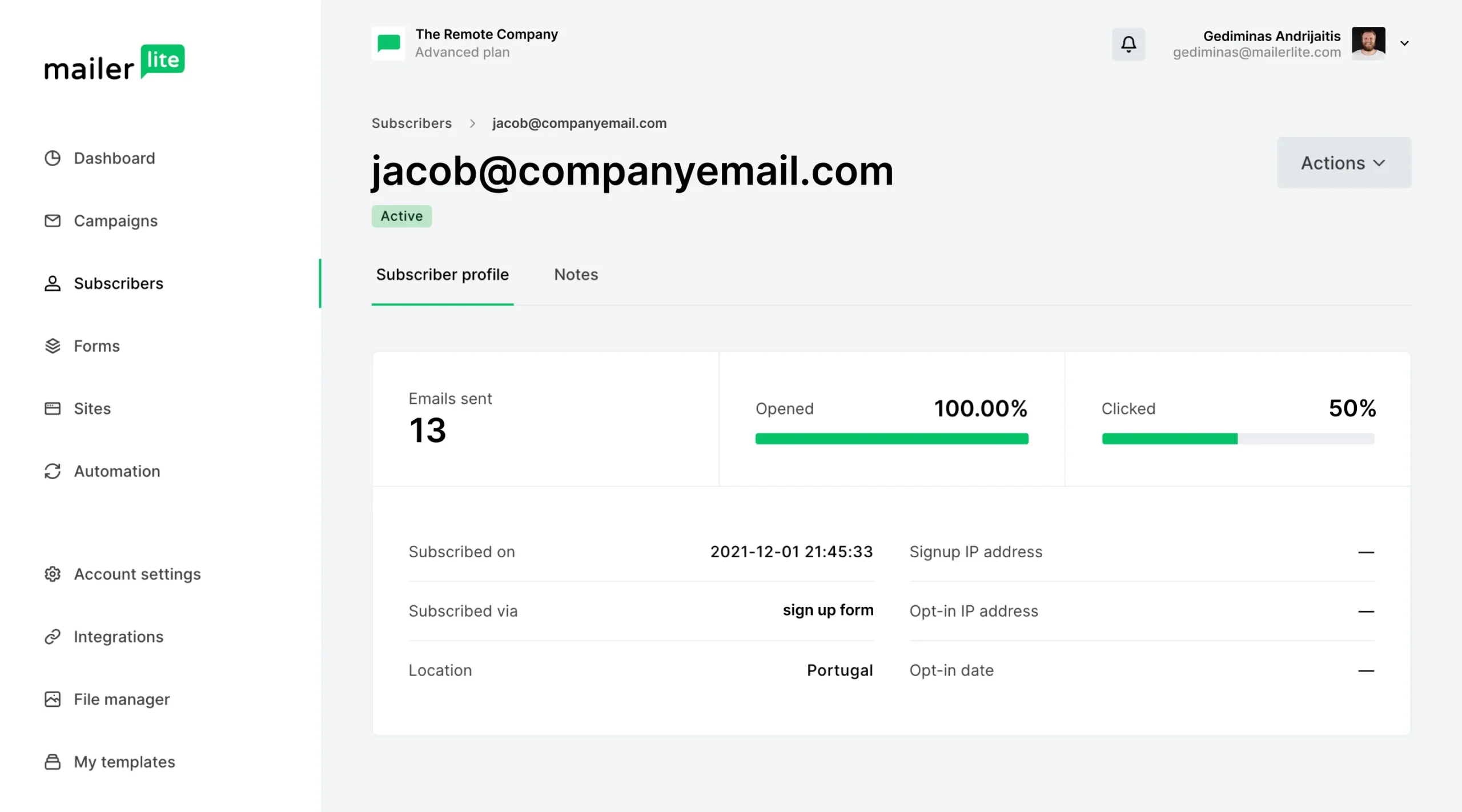
A form’s overview page: double opt-in is on by default, and the Groups panel shows which group new subscribers join and how many it holds. The Analytics and Automation tabs show the form’s sign-ups and what happens after them.A subscriber profile shows when and how the person signed up, the emails sent, and their open and click rates. When someone asks why they get your emails, the sign-up source answers it.The preference center form, where subscribers update their details and choose how often they hear from you, for example weekly or every two weeks.
Integrations and AI Assistants
MailerLite connects to more than 100 apps, including Shopify, WooCommerce, WordPress, Stripe and Zapier. Since August 2026 the Shopify integration syncs both ways, so a name, email or marketing-status change in MailerLite also updates the customer in Shopify.
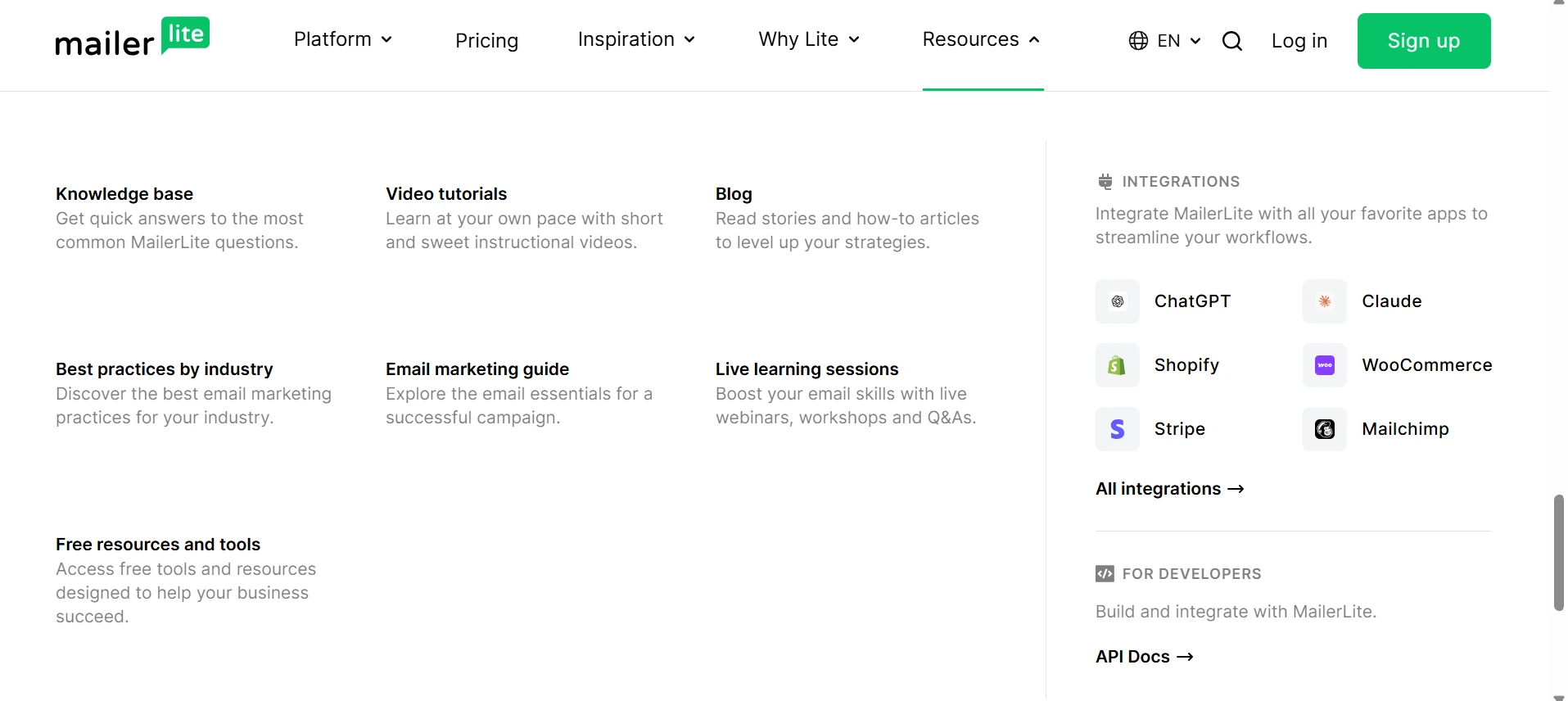
The resources menu lists the integrations people use most: ChatGPT and Claude through the MCP server, Shopify and WooCommerce for online stores, Stripe for payments and Mailchimp for bringing an existing list across. The API documentation underneath is for custom connections.
For anyone who works with AI assistants, MailerLite runs an official MCP server that connects tools such as Claude and ChatGPT to your account, so you can ask them in plain language to add subscribers, manage groups or create a campaign. On paid plans the assistant can also send; on the free plan, API and MCP access is limited and does not include sending.
MailerLite Pricing 2026
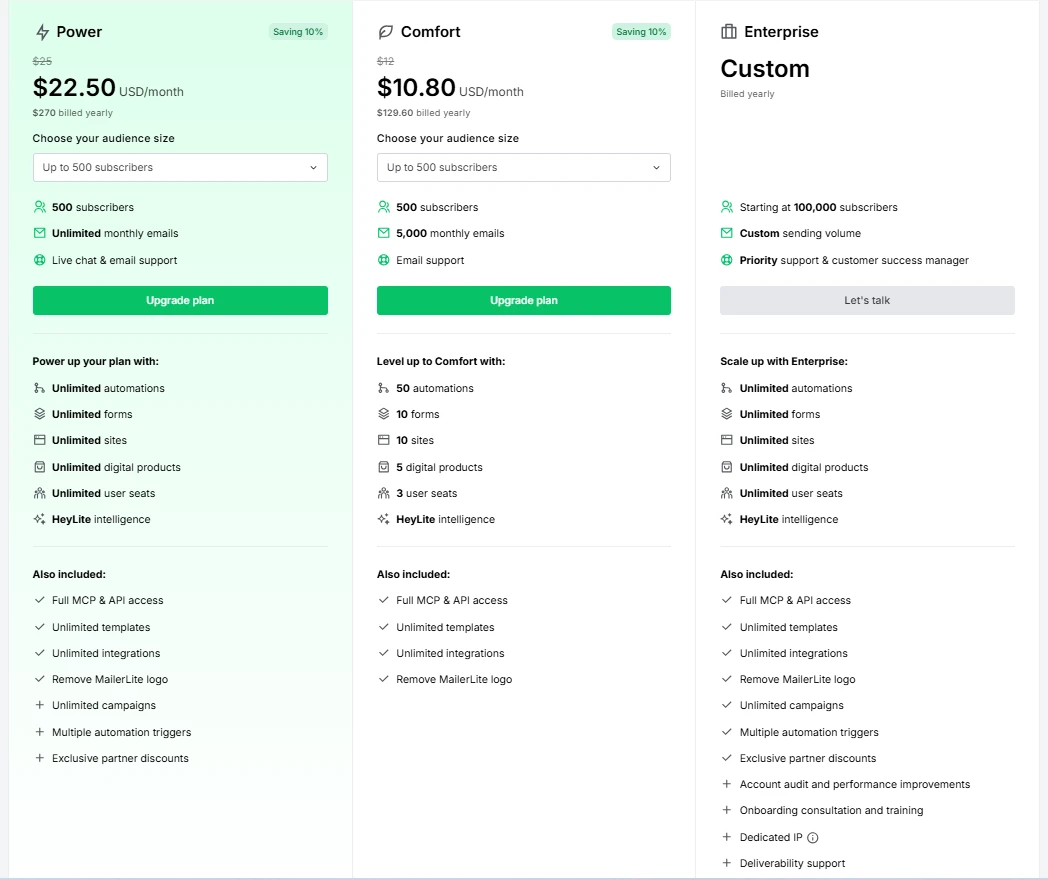
The plans page at the 500-subscriber tier on yearly billing; the crossed-out figure above each price is the monthly rate. The audience-size menu under each plan changes the price as a list grows.
Prices rise with each audience-size step, so budget for the tier your list will reach within a year, not the one you start on. The free plan isn’t on this screen; its limits are below. Nonprofits get 30% off paid plans with proof of status, and only one discount can apply at a time.
At larger lists, these are the monthly prices on the same page in October 2026; paying yearly takes 10 percent off:
Subscribers
Comfort
Power
1,000
$19
$39
2,500
$33
$49
5,000
$49
$69
10,000
$89
$129
MailerLite monthly prices by list size, October 2026
Comfort covers most small businesses. Power is worth the extra cost when you need more than three user logins, unlimited sending or live chat support.
Transactional email, such as order confirmations and password resets, is not part of these plans. MailerLite sells it separately through its sister product, MailerSend. If your website emails are landing in spam, my guide on website emails going to spam covers that problem.
If the free plan or the 14-day trial sounds like a good way to test it with your own list, you can start with MailerLite here.
The Free Plan After the June 2026 Change
MailerLite changed its free plan on June 16, 2026. The subscriber limit dropped from 500 to 250 and the monthly email limit from 12,000 to 2,500, while the number of user seats rose from 1 to 2 and some features, such as pop-ups, blogs and the HTML editor, were opened up. In practice, 2,500 emails a month means a full 250-subscriber list can receive about 10 campaigns a month. A weekly newsletter fits easily; sending several times a week to your whole list does not. If your list passes 250 active subscribers, sending, automations and imports are paused until you remove subscribers or upgrade. Older reviews that still mention 1,000 free subscribers are out of date.
Advertisement
Before You Sign Up: Domain and Content Rules
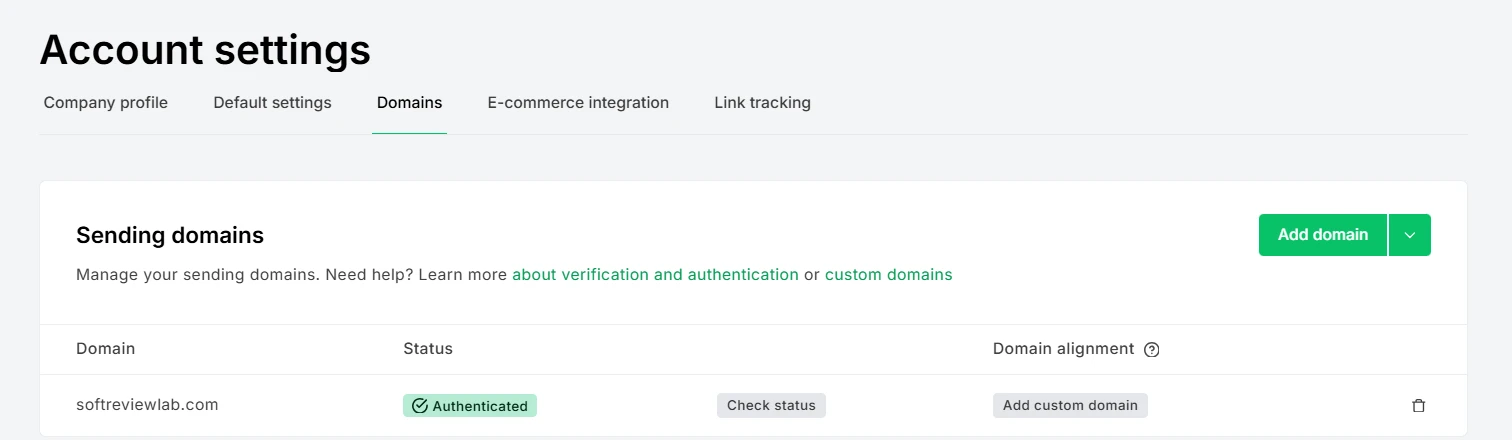
MailerLite is strict about what you send and to whom, and that protects its deliverability, which helps every customer. Two rules matter in practice. First, after the 14-day trial you must authenticate your sending domain before you can keep sending campaigns, and the help center notes that a Gmail or other free email address comes with limitations. Use an address on your own domain from the start. This rule is not unique to MailerLite: since Gmail and Yahoo introduced their sender requirements in 2024, reputable email platforms ask senders to authenticate their domain. MailerLite has since made manual domain setup simpler, with each DNS record in its own short step. When I authenticated softreviewlab.com, MailerLite offered two routes: an automatic one that signs in to your domain provider and adds the records for you, and a manual one that lists them.
I chose manual, because the domain already had an SPF record for its email host and MailerLite’s suggested value had to replace that record, not sit beside it. Three records were needed, a CNAME for DKIM, the combined SPF record and a verification TXT record, and the domain showed as authenticated the same evening. Second, every subscriber must have signed up willingly, so bought or scraped lists are not allowed, and MailerLite says it reviews content regularly for compliance.
Account settings, Domains: once a sending domain shows as Authenticated, campaigns can go out from any address on it. Custom domains for MailerLite-hosted landing pages and websites need a paid plan.
MailerLite told us in October 2026 that account verification is automated and completes immediately, although some Capterra reviewers mention delays while their account was verified, and one reports an account closed after payment without a refund. If you follow the rules above, that risk is low, but it is the reason to start on the free plan rather than pay for a year on day one.
Refunds and Support
MailerLite’s written refund terms are among the strictest I have read, although MailerLite told us in October 2026 that it reviews each request individually and takes the timing into account, so a request made soon after a renewal may be treated differently from one made months later. Under the terms, there is no refund for an unused or partly used plan, for forgetting to cancel, for cancelling right after a renewal, or for buying the wrong plan. MailerLite may still offer a refund in other cases if you ask within 30 days of the last payment, and people using it for personal rather than business purposes can ask within 14 days of agreeing to the terms.
Support depends on the plan. Free accounts get email and live chat only during the first 14 days, then the self-service center. Comfort includes email support around the clock, with live chat only on plans for 50,000 or more subscribers. Power includes both email and live chat 24/7. Customer service is the area Capterra reviewers rate highest.
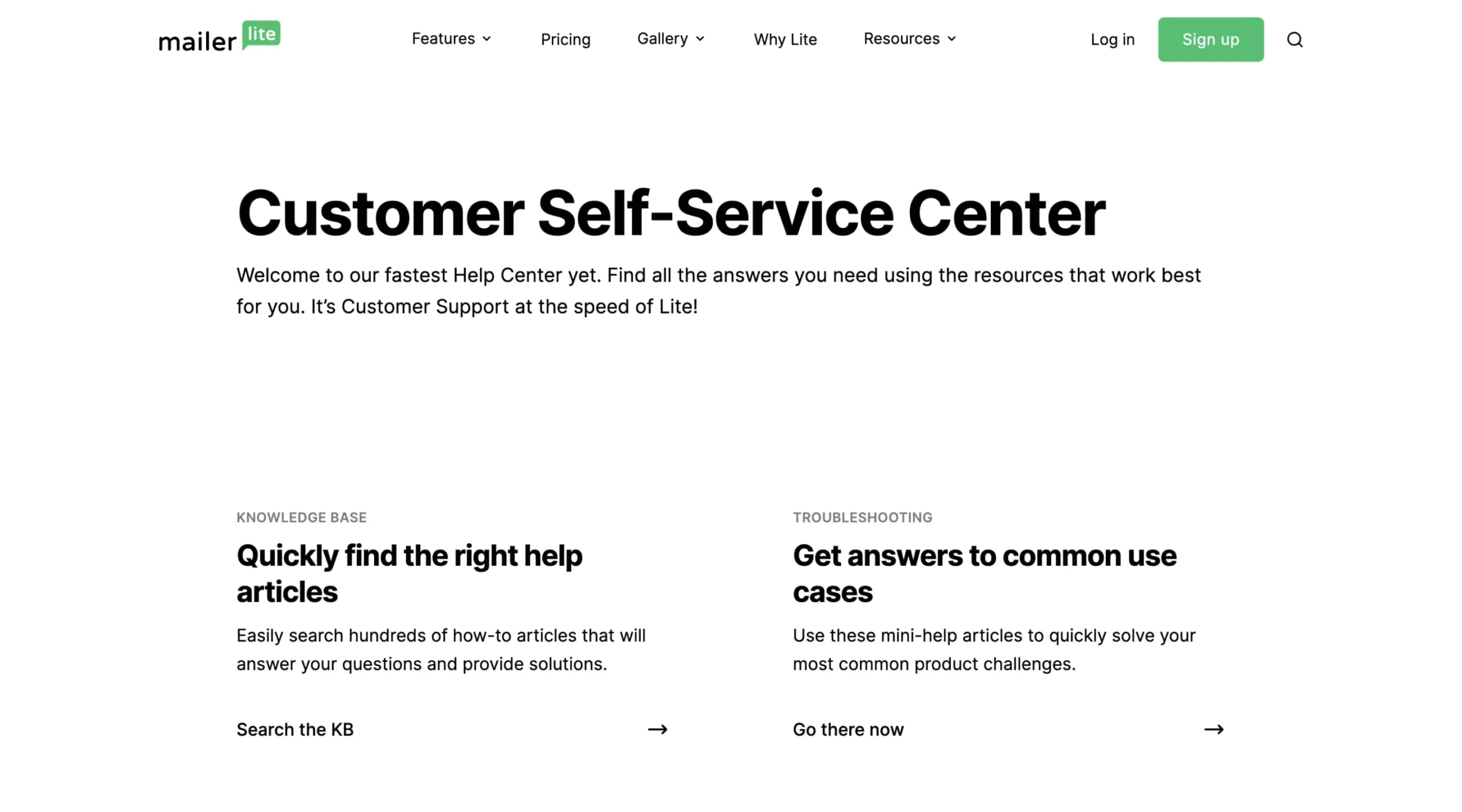
MailerLite’s self-service help center, with a knowledge base and troubleshooting guides. Searching it first is usually faster than waiting for a support reply.
What Customers Say About MailerLite
On Capterra, MailerLite holds 4.7 out of 5 from more than 2,300 reviews, with 4.6 for ease of use and 4.8 for customer service. Reviewers most often praise the clean interface, the quick learning curve, helpful support and good value for small lists. The complaints repeat as well: costs that climb as the list grows, free-plan limits on automations, an editor that some find unreliable with text formatting, and domain authentication that can be hard to set up.
MailerLite vs Mailchimp and ActiveCampaign
I have reviewed two of the tools buyers most often compare with MailerLite. Mailchimp has a free plan of the same size and a larger marketing suite with more integrations, but its paid plans cost more as a list grows and it also counts unsubscribed contacts in some cases. ActiveCampaign is the stronger choice for detailed, multi-branch automation and built-in sales tools, and it costs more for that depth.
In short: choose MailerLite for simple, affordable email with forms and pages included, ActiveCampaign when automation is the main job, and Mailchimp if you want one marketing suite with many integrations. If you are choosing between the first two, my MailerLite vs ActiveCampaign comparison sets their prices and automation side by side. My guide on how to choose email marketing software walks through the decision step by step.
Who Should Use MailerLite, and Who Should Skip It
MailerLite suits a small business, creator or online shop that wants to send regular newsletters and a few useful automations without learning a complex tool, and that likes having forms, landing pages and a simple site in the same account. It is also a sensible first email tool for a business that is moving off a personal inbox.
Skip it if your marketing depends on complex automation with many branches and sales scoring, if you need detailed revenue reporting, or if your list is large enough that subscriber-based pricing becomes the main cost. Skip it too if you plan to send to bought or old lists, because MailerLite’s rules will not allow it.
MailerLite Review Verdict: Is It Worth It in 2026?
MailerLite is worth it for most small businesses that want email marketing to be simple and affordable. The paid plans start low, the tools cover everything a small list needs, and customer ratings, especially for support, are excellent. Its limits are clear rather than hidden: a smaller free plan since June 2026, strict sending and refund rules, and automation that stays on the simple side.
Start on the free plan or the 14-day trial, authenticate your domain, build one form and one welcome automation, and send a real campaign to your own list. If it fits how you work, you can try MailerLite here and move to a paid plan when your list or your needs outgrow the free limits.
Frequently Asked Questions About MailerLite
Is MailerLite the best email marketing tool for a small business on a budget?
For many small businesses, yes. It covers newsletters, automations, forms, landing pages and a simple website in one account, its paid plans start low, and customers rate its ease of use and support highly. It is a weaker fit if you need deep, multi-branch automation or detailed sales reporting, or if your list is large enough that subscriber-based pricing gets expensive.
Is MailerLite free?
Yes, there is a free plan with no time limit. Since June 2026 it covers up to 250 active subscribers and 2,500 emails a month, with 2 user seats, 3 automations, 3 forms, 1 landing page and a 5-page website. Every new account also gets 14 days of premium features without a credit card.
What happens when the MailerLite free trial ends?
The premium features from the 14-day trial switch off unless you upgrade, and your data is kept. Before you can keep sending campaigns, MailerLite asks you to authenticate your sending domain.
Does MailerLite give refunds?
Rarely, going by its written terms. MailerLite says it reviews each request individually, but its refund policy says no refunds for unused or partly used plans, forgotten cancellations or buying the wrong plan. MailerLite may offer a refund in other cases if you ask within 30 days of the last payment, and people using it for personal rather than business purposes can ask within 14 days of agreeing to the terms. Test on the free plan or the trial before you pay.
Is MailerLite better than Mailchimp?
For most small businesses that mainly send newsletters and simple automations, MailerLite is easier to learn and its paid plans start lower. Mailchimp has more integrations and a bigger marketing suite. The right pick depends on what you need beyond email.
Does MailerLite integrate with Shopify?
Yes. MailerLite connects to Shopify, and since August 2026 the connection syncs in both directions, so customers, orders and abandoned carts can trigger automations. It also connects to WooCommerce, WordPress and Stripe.
Does MailerLite count unsubscribed contacts?
No. MailerLite prices its plans by active subscribers, so people who unsubscribe or bounce do not count toward your plan or the free plan limit.
Sources and References
Every fact in this review comes from the pages below, checked in October 2026. Plans and limits change, so confirm them on MailerLite’s own pages before you buy.
MailerLite pricing page
MailerLite help: free plan update
MailerLite help: customer support options
MailerLite help: how to create a MailerLite account
“A strong scheduler for small businesses, built on content categories and evergreen recycling. The two cheaper plans include one user.”
From $29/mo ($24.17/mo billed yearly)Best for: Small businesses that want consistent posting across several networks14-day free trial with full Pro access, no credit card
“A complete social media management platform for small teams: publishing, inbox, automations, reports and an AI assistant in one account. Too expensive for a solo owner with a few profiles.”
From $99/mo ($80/mo billed yearly)Best for: Small marketing teams and agencies that manage many social profiles14-day free trial, no credit card
“A deep automation platform with AI tools and more than 1,000 integrations, held back by a price that climbs with your list, a five-action cap on the cheapest plan and paid add-ons for the sales CRM and SMS.”
From $15/month (1,000 contacts, 1 user); Plus $49 billed yearly or $59 monthlyBest for: Small and mid-sized businesses that want behaviour-based email automation14-day free trial: no credit card, no contact limit, 100 email sends
We use Google Analytics cookies to see which articles help readers, and our ad partner Adsterra uses cookies to show ads. The site works the same whether you accept or not. Privacy