
How to Post on Social Media Consistently When You Have No Time
Why posting on social media slips, how to fix each reason without paying, and how to use SocialBee when free schedulers stop being enough.
Why is my email marketing not working? Find where your newsletter leaks sales, make 9 free fixes, copy a welcome sequence and track revenue per email.

By Abdullahi Abdirahman, Founder & Editor, SoftReviewLab. Updated October 2026.
Disclosure: SoftReviewLab is a Campaigner affiliate partner. This page contains affiliate links, and if you sign up through them, SoftReviewLab may earn a commission at no extra cost to you. See our affiliate disclosure.
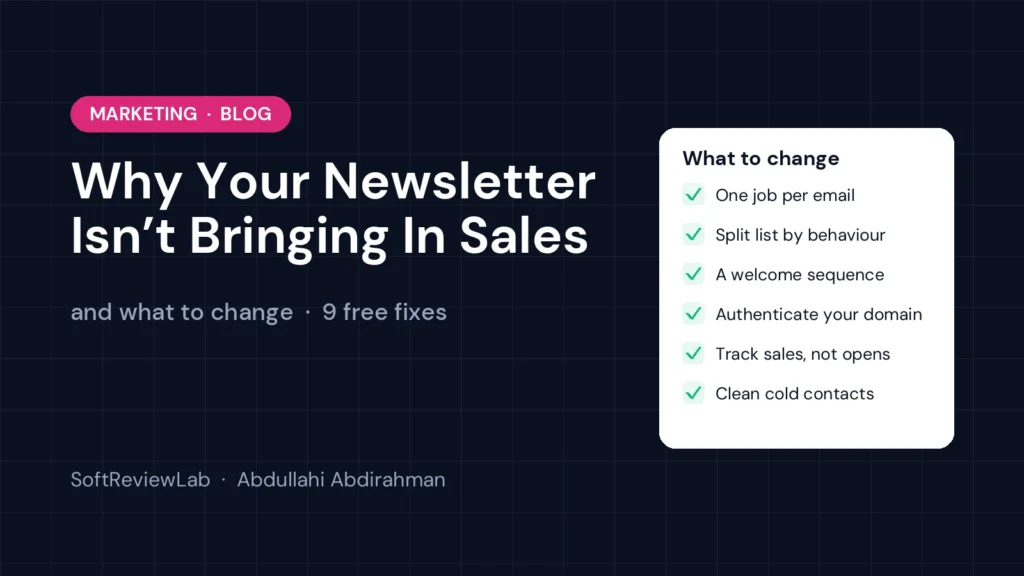
Short answer: email marketing that isn’t generating sales usually has one of five problems. Your emails share news but never ask the reader to do anything, everyone gets the same email, a share of your emails lands in spam, you have no automated emails for the moments when people are ready to buy, or you judge success by opens instead of revenue. Each one can be fixed without spending money: give every email one clear job, split your list by what people have done, authenticate your domain, set up a short welcome sequence, and track sales from each email with tagged links. When your list and product range grow, an email platform with automation and behaviour-based segmentation does most of this work for you.
If you’ve been asking yourself why is my email marketing not working, you’re not alone, and the answer is rarely “email doesn’t work for my business.” Below I explain why newsletters stop selling, how to find where your sales leak, nine free fixes you can make this week, the numbers worth watching, and when a better tool is worth paying for.
Most small businesses start a newsletter for good reasons, collect a few hundred addresses and send a monthly update. A year later the sales report shows almost nothing from email, and the owner decides email doesn’t work for them. In my experience researching email tools for this site, the channel is rarely the problem. The setup is. These are the seven reasons I see most often, roughly in order of how much revenue they cost, with the fix for each one further down.
It’s easy to treat a weak newsletter as harmless: it doesn’t sell much, but it doesn’t hurt. That isn’t true. Every month it keeps going as it is, three things happen.
Here is a simple example. Say you have 4,000 subscribers and an average order value of $80. If a better email setup produced just one extra order for every 1,000 subscribers each month, that is 4 extra orders, or $320 a month and $3,840 a year, from customers who were already on your list. Most businesses that fix the problems in this article see more than that, but even the small number is usually worth the effort.
Before you change anything, find out where the sales are being lost. A newsletter not converting into orders is a symptom, not a diagnosis. Every email passes through the same five steps: it is sent, it reaches the inbox, it is opened, it is clicked, and someone buys. Sales leak out at each step for different reasons, and the fix depends on which step is leaking.
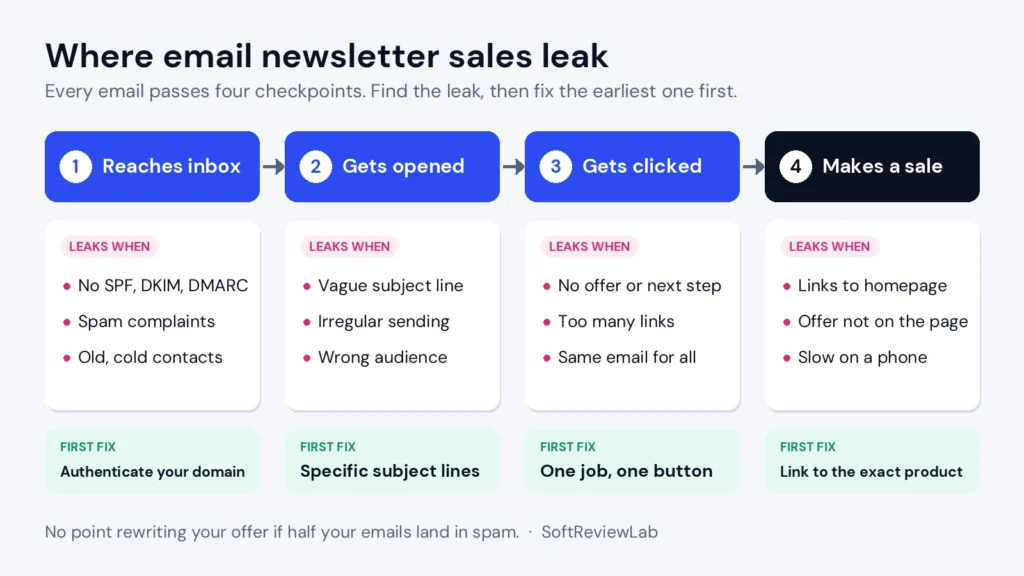
Use this table to match what you see in your reports to the most likely cause. Always fix the earliest leak first. There’s no point rewriting your offer if half your emails go to spam.
| What you see | Most likely cause | First thing to try |
|---|---|---|
| Opens fell suddenly across all emails | Emails going to spam | Check SPF, DKIM and DMARC, then look at spam complaints |
| Opens are fine, clicks are very low | No clear reason to click | One job per email, one main button, a specific offer |
| Clicks are fine, almost no sales | Problem on the landing page | Link straight to the product, repeat the offer, test on a phone |
| Sales only when you send a discount | List trained to wait for deals | Mix value emails with offers, use automated emails at buying moments |
| Unsubscribes jump after each send | Wrong message for the audience | Segment the list and send fewer, more relevant emails |
| Spam complaints above 0.1% | People forgot who you are or didn’t expect your email | Clear sign-up promise, steady schedule, visible unsubscribe link |
If you can’t see clicks or sales per email at all, that is your first leak. You’re making decisions blind. Fix number 7 below comes first.
These are the most practical email marketing tips for small business owners who want to increase sales from their email newsletter. None of them require new software. Most email platforms, including free plans, can do all of them. Work through them in order; the first three usually make the biggest difference.
Before you write an email, finish this sentence: “After reading this email, I want the reader to ___.” Book a call, buy a product, read a buying guide, reply with a question. Then build the email around that one action. Put the main button near the top and again at the end. Other links can stay, but they should support the main job, not compete with it. An email with eight equal links usually gets fewer total clicks than an email with one clear one.
Rewrite your newsletter so each section starts with something the reader cares about. Instead of “We’ve added a new product line,” write “If your kitchen tiles stain easily, this new sealant fixes that in one coat.” Instead of “Meet our new accountant,” write “Tax deadline coming up? Sarah can review your return this month.” The same news, framed around the reader’s problem, turns an announcement into a reason to act.
A useful rule of thumb is to make most of your emails genuinely helpful (tips, answers, how-tos) and a smaller share openly sales-focused. Readers who get useful emails keep opening them, which means they’re still there when you do make an offer.
You don’t need advanced software to start segmenting. Even a free plan lets you add tags or groups. Start with just three groups:
Send prospects proof and reasons to buy: customer stories, answers to common doubts, a first-order offer. Send customers help with what they bought, related products and early access. Send inactive contacts a short re-engagement series (see fix 6). Just these three groups will make most emails more relevant overnight.
New subscribers are the most interested people on your list. They just raised their hand. Yet many businesses send them nothing until the next monthly newsletter, by which time the interest has cooled. A short welcome sequence fixes this. Most email platforms, including many free plans, can send at least a simple automated welcome. I’ve put a template you can copy in the next section. For the full method, with five emails and a launch plan, see how to set up a welcome email series.
If you send from your own domain (you@yourbusiness.com), check that it has three DNS records set up: SPF, DKIM and DMARC. Your email platform’s help centre will give you the exact records to add; it’s usually a 15-minute job in your domain settings. Also make sure every marketing email has a visible unsubscribe link and supports one-click unsubscribe, and keep an eye on spam complaints. Google asks senders to stay below 0.3% and recommends under 0.1%.
If this sounds technical, our guide to why website emails go to spam and how to fix it walks through each record step by step, and our email deliverability guide goes deeper for B2B senders.
Contacts who haven’t opened or clicked in six months or more drag down your engagement and cost you money. Don’t delete them straight away. Send them a short re-engagement series first: one email asking if they still want to hear from you, one with your best content or offer, and a final “we’ll stop emailing you” message. Anyone who clicks stays. Anyone who doesn’t gets removed or moved to a list you email only rarely. Your list gets smaller, and your results get better.
Add UTM tags to every link in your emails so your website analytics can tell which email sent each visitor and sale. Google’s free Campaign URL Builder creates these links for you: set the source to your email tool’s name, the medium to “email,” and the campaign to the email’s name. Many email platforms can add these tags automatically in their settings. In Google Analytics, you can then see visits, sign-ups and purchases for each email.
If you sell through an online store connected to your email platform, check whether it shows revenue per campaign. Many do, and that becomes the single most useful number in your reports.
“October Newsletter” gives nobody a reason to open. A subject line should tell the reader what they’ll get: “3 ways to cut your heating bill before winter,” “Your order is ready to reorder, 10% off this week,” “The mistake most new landlords make with deposits.” Use the preview text, the grey line after the subject in most inboxes, to add a second reason to open. Keep it honest: a subject line that tricks people into opening leads to spam complaints, and the US CAN-SPAM Act prohibits deceptive subject lines. The FTC’s CAN-SPAM compliance guide sets out the basic rules for US senders.
Pick a frequency you can keep up (every two weeks is a good start for most small businesses) and stick to it. Tell people at sign-up how often you’ll email and what they’ll get. Then test one thing at a time: send time, day of the week, subject line style. Change one variable per month so you can see what made the difference.
This three-email sequence works for most small businesses, whether you sell products or services. Adjust the timing to how quickly your customers usually decide.
| When to send | Its one job | What to include | |
|---|---|---|---|
| 1. Welcome | Straight after sign-up | Deliver what you promised and set expectations | The freebie or discount, what you’ll send and how often, one link to your best-selling product or service |
| 2. Proof | 2 to 3 days later | Build trust | A short customer story, the problem you solve, answers to the two most common doubts, one call to action |
| 3. Offer | 5 to 7 days after sign-up | Ask for the first order or booking | A clear offer with a real deadline, the main benefit in one sentence, a single button |
Once people finish the sequence, they join your regular newsletter. Anyone who buys during the sequence should stop receiving the “offer” email; most email tools can do this with a simple rule, and it saves you from annoying new customers.
Forget vanity numbers. These are the metrics that tell you whether email is making money, and what each one means.
| Metric | How to work it out | What it tells you |
|---|---|---|
| Click rate | Unique clicks ÷ delivered emails | Whether the email gave people a reason to act |
| Conversion rate from email | Orders or bookings from email ÷ clicks | Whether the landing page and offer did their job |
| Revenue per email sent | Revenue from a campaign ÷ emails delivered | Compares campaigns of different sizes fairly |
| Revenue per subscriber | Email revenue in a month ÷ active subscribers | Whether your list as a whole is worth what you pay for it |
| Unsubscribe rate | Unsubscribes ÷ delivered emails | Whether the content matches what people signed up for |
| Spam complaint rate | Complaints ÷ delivered emails | Whether inbox providers will keep delivering you |
Look at these every month, per email and per segment. Numbers vary a lot by industry and list, so the most useful comparison is with your own past results: is revenue per subscriber going up month after month?
Revenue per subscriber is the simplest way to see whether your newsletter is worth it. Here’s a worked example for a small online shop.
Now compare this over time. If you add a welcome sequence and a cart reminder, and revenue per subscriber moves from $0.70 to $1.05, you know the changes worked and roughly how much they’re worth each month. If you’re a service business, replace revenue with booked calls or signed jobs multiplied by your average job value.
The fixes above will take most small businesses a long way on the tool they already have. They start to become hard work in a few situations:
If none of these apply, stay on your current tool and work through the free fixes. If several apply, a platform built for automation and segmentation will save you time and usually pay for itself in recovered sales. Our guide to choosing email marketing software explains what to check before you switch, and our email automation guide covers the workflows worth building first.
There are many email marketing platforms, and the right one depends on your list size, what you sell and how much automation you need. For growing businesses whose newsletter isn’t selling because they lack automation and behaviour-based segmentation, one I recommend looking at is Campaigner. It isn’t the right tool for everyone, and I explain below who should choose something else. If it sounds like a fit and you want to try it, you can start a 30-day Campaigner free trial here, or read our full Campaigner review first for the complete picture, including pricing, pros and cons.
Campaigner is an email marketing platform, with optional SMS, designed for businesses that have outgrown a basic newsletter tool. The day-to-day process looks like this:
| Problem from this article | How Campaigner helps |
|---|---|
| Everyone gets the same email | Segments based on purchases, engagement, location and custom fields |
| No automated emails at buying moments | Multi-path workflows for welcome, abandoned cart, post-purchase and win-back emails |
| Generic content | Dynamic content that changes sections of an email for each reader |
| Guessing what works | A/B and multivariate testing and campaign reporting |
| Email and SMS out of sync | Email and SMS in the same automated journeys (SMS sold separately) |
| Cold contacts dragging results down | Engagement-based segments to run re-engagement and clean-up campaigns |
Campaigner is a good fit for growing businesses with a few thousand contacts or more that want automated email and SMS journeys. It is not the best fit for everyone:
If you’re weighing it against the best-known alternative, our Campaigner vs Mailchimp comparison sets out the differences side by side.
Ready to test it? The best way to judge any email tool is to rebuild one real automation during the trial, for example your welcome sequence, and see how easy it is. If you want to try it, you can try Campaigner free for 30 days. If you decide to subscribe, the offer page behind that link currently adds a further 10% discount on monthly payments, so confirm the discounted price appears at checkout. Our Campaigner review includes a week-by-week plan for using the trial well.
You don’t have to fix everything at once. This plan spreads the work over a month and puts the highest-impact changes first.
At the end of the month, you’ll know exactly where your email sales were leaking, which fixes worked, and whether your current tool can keep up. That’s the point to decide whether a platform with deeper automation is worth it.
Usually because of one of five problems: no clear offer, one message for everyone, emails landing in spam, no automated emails, or judging success by opens. To find yours quickly, check your reports against the leak table above. If opens fell suddenly, start with deliverability. If opens are fine but clicks are low, give each email one job. If people click but don’t buy, fix the page they land on.
Every two weeks is a sensible starting point for most small businesses. What matters most is consistency and relevance: a steady schedule you can keep, and emails that give readers something useful. Automated emails such as welcome and cart reminders go out on top of your regular schedule.
It varies widely by industry, list quality and email type, so comparing with a general average can mislead you. The best benchmark is your own history: track click rate and revenue per subscriber monthly and aim to improve them over time.
The key takeaway: a newsletter that isn’t bringing in sales usually needs a clear job for every email, a list split by behaviour, domain authentication, a welcome sequence and revenue tracking, and you can do all of that for free this month. When you need automated, behaviour-based emails at scale, a platform like Campaigner does the heavy lifting.
Keep reading
Why posting on social media slips, how to fix each reason without paying, and how to use SocialBee when free schedulers stop being enough.
How to manage email overload: why inboxes get out of control, 9 free fixes for Gmail and Outlook, a daily routine, a 7-day plan,…
How to set up a welcome email series: 7 steps, a 5-email template you can copy, timings, free ways to run it, what to…