SMTP.com Review 2026: Pricing, Features, Pros and Cons
Email Delivery (SMTP & API)
SMTP.com Review 2026: Pricing, Features, Pros and Cons
6.8/10
“SMTP.com suits businesses that send 100,000 or more emails a month and want a dedicated IP and people to call. Small senders pay more per email, and cancelling needs 30 days’ notice by phone with no refunds.”
Research-based review · not hands-on testedBuilt from the vendor’s documentation and pricing pages and from patterns in customer reviews. How we work.
Starting price
From $25/month (50,000 emails)
Best for
Growing SMBs sending 100K+ emails a month
Free trial
No free plan; month-to-month from $25
Based on
SMTP.com pricing page, terms and conditions, product and contact pages, and customer reviews
Scores
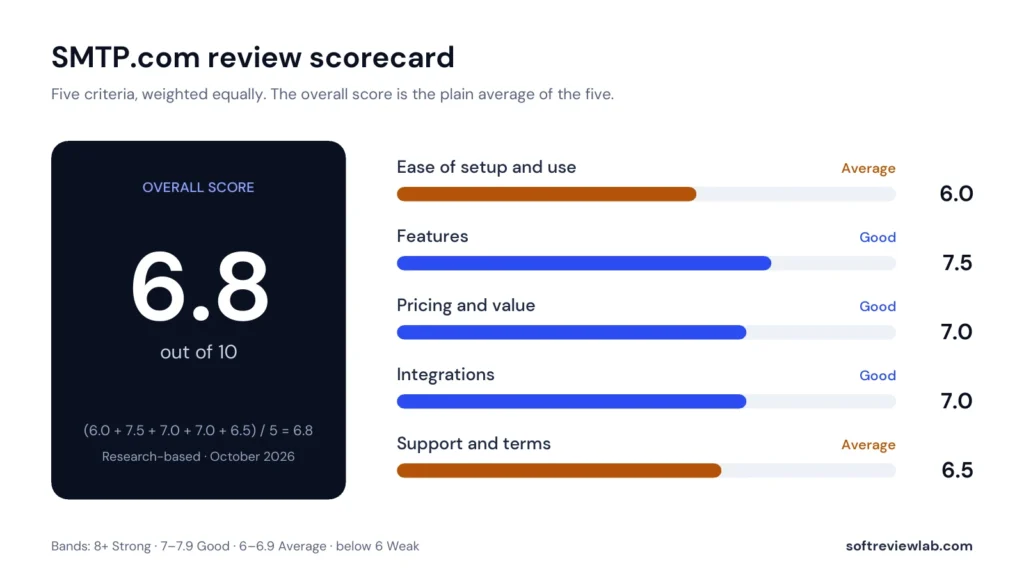
Ease of setup & use6.0
Feature depth7.5
Pricing & value7.0
Integrations7.0
Support & terms6.5
How these scores were worked out
Ease of setup & use: 6.0 (Average) Standard domain setup, but customers describe the dashboard as dated, and the API has no official SDKs.
Feature depth: 7.5 (Good) SMTP relay and REST API on every plan, a dedicated IP from $80, and Reputation Defender, validation and Insight Engine as add-ons.
Pricing & value: 7.0 (Good) Falls to $0.50 per 1,000 emails at volume, but no free plan and the $80 Starter plan costs the most per email.
Integrations: 7.0 (Good) WordPress, Shopify and a dozen app connections, and SMTP relay works with almost any system.
Support & terms: 6.5 (Average) Phone, chat and email support, but cancelling needs 30 days’ notice by phone and fees are non-refundable.
Overall: (6.0 + 7.5 + 7.0 + 7.0 + 6.5) ÷ 5 = 6.80, shown as 6.8. The five criteria are weighted equally.
Scores are editorial judgments in half-point steps, based on documented features, published pricing and repeated themes in customer reviews. They are not lab measurements, so treat the words as the guide: 8.0+ Strong, 7.0 to 7.9 Good, 6.0 to 6.9 Average, below 6.0 Weak.
What works
A dedicated IP from the $80 Starter plan.
Falls to $0.50 per 1,000 emails on the Business plan.
SMTP relay and REST API on every plan, so almost any system can connect.
Support by phone, chat and email.
Reputation Defender and list validation to protect your sending reputation.
What doesn’t
No free plan, so a proper test costs at least $25.
Cancelling needs 30 days’ notice by phone, and fees are non-refundable.
No official SDKs and a dashboard customers call dated.
Reputation Defender and Insight Engine each add 20 percent.
Overage rates and validation prices are not published.
What we couldn’t verify
No independent inbox-placement test was available, and I did not run one.
Whether new accounts face a manual review before sending at volume; some customers report it, but SMTP.com’s pages don’t say.
Overage rates, email validation prices and which managed services each plan includes are not on the public pages.
Whether dedicated IPs are warmed up automatically.
Current G2 and Capterra ratings; the customer themes are from reviews read in September 2026.
Support hours: the contact page lists Monday to Friday, 3 a.m. to 9 p.m. Eastern, while other pages describe 24/7 support.
If any of these matter to your decision, check them directly with the vendor or during your trial.
Who should skip it
Businesses sending under about 10,000 emails a month, teams that need a campaign editor or automation, developers who expect official SDKs, and anyone who wants to cancel online without notice.
By Abdullahi Abdirahman, Founder & Editor, SoftReviewLab. Prices, plan details and terms checked on SMTP.com’s own pages on October 8, 2026. This review is research-based: I have not sent email through an SMTP.com account myself.
Disclosure: SoftReviewLab is an SMTP.com affiliate partner. This page contains affiliate links, and if you sign up through them, SoftReviewLab may earn a commission at no extra cost to you. See our affiliate disclosure and research and scoring method.
Table of Contents
SMTP.com Review at a Glance: The Short Answer
This SMTP.com review scores the service 6.8 out of 10. SMTP.com is an email delivery service, not an email marketing tool: it sends the receipts, password resets, alerts and bulk messages your website, store or app creates, through SMTP relay or a REST API. Its strengths are a dedicated IP from the $80 Starter plan, phone, chat and email support, and a low price per email at high volume. Its weaknesses are no free plan, terms that require 30 days’ notice by phone to cancel and give no refunds, and a small list of official integrations and no official SDKs. It suits a business that sends 100,000 or more emails a month and wants its own IP and people to call.
Item
Details
Overall score
6.8 out of 10 (research-based)
What it is
Email delivery service: SMTP relay and REST API
Starting price
$25 a month for 50,000 emails on a shared IP
Dedicated IP
From the $80 Starter plan (100,000 emails)
Free plan
None
Support
Phone, chat and email
Cancellation
30 days’ notice by phone; fees are non-refundable
SMTP.com at a glance (SMTP.com pricing page and terms, October 8, 2026)
If that fits your volume and you want to compare plans, you can see SMTP.com’s current plans here. Read the cancellation terms before you pay, because they are stricter than most.
What Is SMTP.com and How Does It Work?
Every business sends two kinds of email. Marketing email goes out in campaigns from tools like Campaigner or Mailchimp. Transactional and system email is triggered by your own software: order confirmations, invoices, login codes and shipping updates. SMTP.com delivers the second kind, and many businesses send it from a separate subdomain so a spike in complaints about a promotion never delays a customer’s receipt. SMTP.com is part of Ziff Davis, the group that also owns Campaigner, and says it has more than 22 years of email delivery behind it. It works like this:
Verify your domain. Add the SPF and DKIM records SMTP.com gives you, plus a DMARC record, so mailbox providers can confirm the mail comes from you.
Connect your systems. Any software that can send email can use SMTP relay by changing its server settings, and developers can send through the REST API instead.
Send. The Essential plan sends from a shared IP. From Starter up, your mail goes out from a dedicated IP, so your reputation depends only on your own sending.
Track. Delivery reports, callbacks and webhooks show what happened to each message, including bounces and complaints.
If your website emails are already landing in spam, my guide on why website emails go to spam covers the free fixes to try before you pay for anything.
How I Evaluated SMTP.com
I score every tool on the same five criteria, weighted equally: ease of setup and use, features, pricing and value, integrations, and support and terms. The overall score is the plain average. Prices, plan details and terms come from SMTP.com’s pricing page, terms and conditions and product pages, checked on October 8, 2026.
Criterion
Score
Why
Ease of setup and use
6.0
Standard domain setup, but customers describe the dashboard as dated, and the API has no official SDKs
Features
7.5
SMTP relay and REST API on every plan, a dedicated IP from $80, and Reputation Defender, validation and Insight Engine as add-ons
Pricing and value
7.0
Falls to $0.50 per 1,000 emails at volume, but no free plan and the $80 Starter plan costs the most per email
Integrations
7.0
WordPress, Shopify and a dozen app connections, and SMTP relay works with almost any system
Support and terms
6.5
Phone, chat and email support, but cancelling needs 30 days’ notice by phone and fees are non-refundable
SMTP.com scores by criterion
SMTP.com review scorecard: five criteria, weighted equally.
SMTP.com Pricing 2026: Plans and Real Costs
SMTP.com prices by the number of emails you send each month. Every plan includes SMTP relay, the API, support and reporting. The main difference between plans, apart from volume, is whether you share an IP with other senders.
Plan
Monthly price
Emails a month
IP address
Cost per 1,000 emails
Essential
$25
50,000
Shared
$0.50
Starter
$80
100,000
Dedicated
$0.80
Growth
$300
500,000
Dedicated
$0.60
Business
$500
1,000,000
Dedicated
$0.50
High Volume
Custom quote
250 million or more
Dedicated instance
Negotiated
SMTP.com plans (SMTP.com pricing page, October 8, 2026)
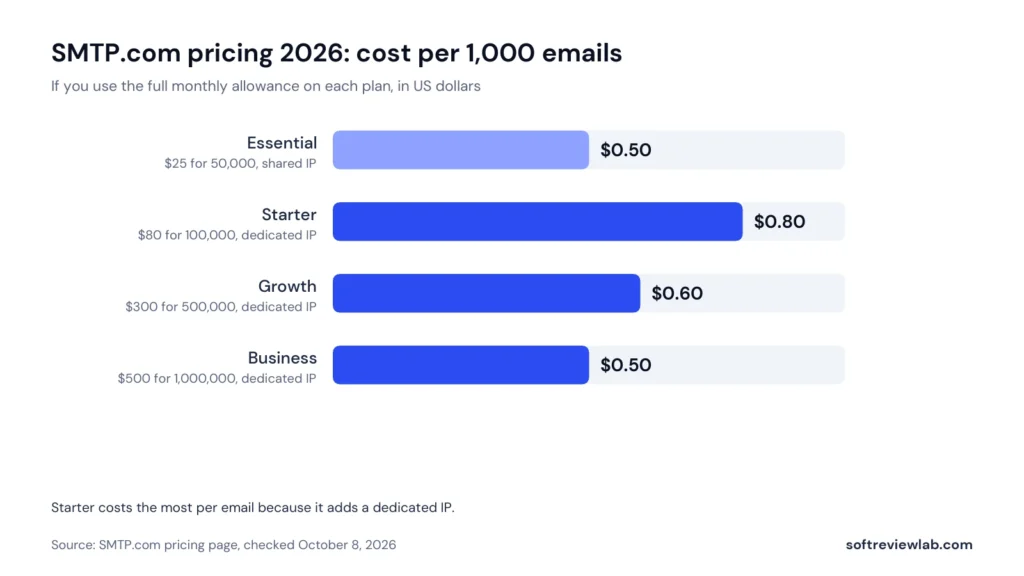
Cost per 1,000 emails if you use the full monthly allowance, October 2026.
The per-email figures show the real trade-off. Starter is the most expensive plan per message because you are paying for a dedicated IP, and Business brings the cost back down to $0.50 per 1,000. If you go over your allowance, SMTP.com’s terms say usage fees are charged automatically for each extra email, but the rate is not on the pricing page, so ask before you choose a plan close to your real volume. SMTP.com accepts cards and PayPal.
Add-Ons That Change the Bill
Add-on
What it does
Cost
Reputation Defender
Scans your sending lists and suppresses bad addresses in real time, before they bounce
20 percent of your plan price
Insight Engine
Adds data about your contacts to their profiles
20 percent of your plan price
Email list validation
Checks a list for bad addresses before you send
Not on the public pages
Managed services
Inbox placement consulting, account management, migration and template design
Quote from sales
SMTP.com add-ons (SMTP.com pricing and product pages, October 8, 2026)
A worked example: a business on Growth pays $300 a month, and adding Reputation Defender takes that to $360, or $4,320 a year. That is the number to compare with alternatives, not the headline plan price.
Which Plan Fits Which Sender
Essential ($25): a store or app with steady transactional volume under 50,000 a month that is happy on a shared IP
Starter ($80): a sender that needs its own IP for reputation or allow-listing, at up to 100,000 a month
Growth ($300): a scaling sender at up to 500,000 a month
Business ($500): a sender near one million a month that wants the lowest standard rate
Free Plan, Contract and Cancellation
SMTP.com has no free plan, so testing it properly means paying for at least one month. Read its terms and conditions before you do. They say month-to-month customers can upgrade, downgrade or cancel at any time with 30 days’ notice, by calling the number on SMTP.com’s contact page, and that subscription fees are paid in advance and are non-refundable. In practice, if you decide to leave, call well before your next billing date and ask for written confirmation.
SMTP.com Features: What You Actually Get
SMTP Relay and REST API
SMTP relay works with almost any software that sends email, including WordPress, CRMs and help desks, by changing the server settings. The REST API, version 4, takes and returns JSON and accepts your API key in several ways, including a bearer token. Its API documentation does not list official SDK libraries, so developers work with the API directly or with general-purpose libraries, which adds some friction compared with services that ship their own SDKs.
Dedicated IPs
A dedicated IP is included from the $80 Starter plan, earlier than many rivals that charge extra for one. A dedicated IP helps when you send steady, significant volume, because your reputation depends only on your own mail. At low or irregular volume a well-managed shared IP often does better, which is why the Essential plan is the sensible start under about 50,000 emails a month. Senders of 250 million emails or more a month can get a dedicated instance of the platform with its own mail queue.
Reputation Defender and Validation
Reputation Defender suppresses bad addresses from your sends in real time, which tackles the most common cause of poor delivery: mailing addresses that bounce. SMTP.com also offers list validation to clean a list before you send. Both are paid extras rather than part of the base plan.
Reporting, Webhooks and Insight Engine
Every plan includes detailed reporting, and the API supports callbacks and webhooks for delivery events. Insight Engine is a newer add-on that enriches your contact profiles with extra data. I could not judge its quality without an account, so treat it as optional until you have tested it.
What SMTP.com Does Not Do
SMTP.com has no drag-and-drop campaign editor, no landing pages and no marketing automation builder. If you need those, pair it with a marketing platform. My Campaigner review covers a sister product that handles campaigns.
Integrations
SMTP.com’s integrations page lists WordPress, including the Post SMTP and Gravity SMTP plugins, Shopify, Google Sheets, Google Forms, Google Docs, Google Calendar, Gmail, Slack, Trello, Airtable, Wufoo and Google lead form extensions. Because SMTP relay works with nearly any system that sends email, most businesses can connect their CRM, store or help desk without a dedicated integration.
Deliverability
No sending service can guarantee the inbox. SMTP.com’s deliverability page describes IP reputation management, Reputation Defender and list validation, and its managed services add inbox placement consulting and ISP relations for customers who pay for them. Since 2024, Gmail, Yahoo and Microsoft have required bulk senders to authenticate with SPF, DKIM and DMARC and to keep spam complaints low, whatever service they use, and marketing mail also needs a one-click unsubscribe. My email deliverability guide explains each rule step by step.
Support and Security
SMTP.com offers support by phone, chat and email. Its contact page lists support hours of Monday to Friday, 3 a.m. to 9 p.m. Eastern, while some of its product pages describe 24/7 support, so check the hours that apply to you if out-of-hours help matters. It says its service is compliant with GDPR, CASL and CCPA, and that its infrastructure is monitored around the clock.
What Customers Say About SMTP.com
In the customer reviews I read in September 2026, satisfied customers praised reliable delivery for website and app email, clear API documentation and quick help by phone and chat. The recurring complaints were automatic renewals, the notice needed to cancel and a dated interface, and a few customers reported mail landing in spam at low volume, which usually traces back to domain setup or list quality.
SMTP.com Pros and Cons
Pros
A dedicated IP from the $80 Starter plan
Falls to $0.50 per 1,000 emails on the Business plan
SMTP relay and REST API on every plan, so almost any system can connect
Support by phone, chat and email
Reputation Defender and list validation to protect your sending reputation
Cons
No free plan, so a proper test costs at least $25
Cancelling needs 30 days’ notice by phone, and fees are non-refundable
No official SDKs and a dashboard customers call dated
Reputation Defender and Insight Engine each add 20 percent
Overage rates and validation prices are not published
SMTP.com Alternatives
Service
Entry plan
Cost per 1,000 at entry
Free option
SMTP.com Essential
$25 a month for 50,000 emails
$0.50
None
Postmark Basic
$15 a month for 10,000 emails
$1.50
100 test emails a month
Mailgun Basic
$15 a month for 10,000 emails
$1.50
100 emails a day
Amazon SES Essentials
Pay as you go
$0.16
Pay only for what you send
Entry plans of common sending services (each vendor’s pricing page, October 8, 2026)
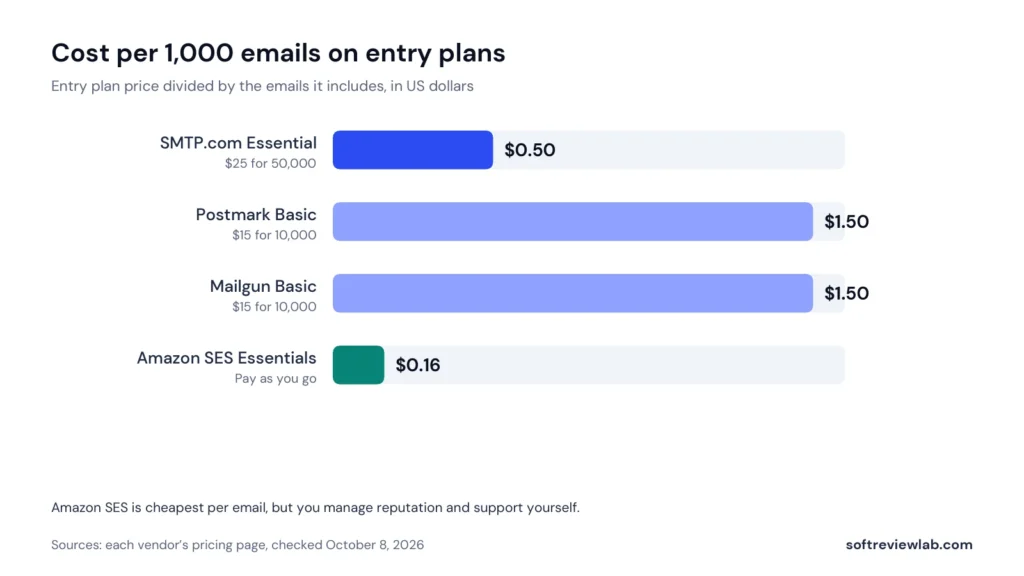
Cost per 1,000 emails on each service’s entry plan, October 2026.
SMTP.com costs more to start than the $15 developer plans but less per email once you send more than about 17,000 a month. Amazon SES is far cheaper per message but expects you to manage reputation and support yourself. SMTP.com sits in between: you pay more than raw infrastructure for a dedicated IP sooner and people you can call. If marketing campaigns are your main need rather than transactional email, my guide on how to choose email marketing software is the better starting point.
Who Should Use SMTP.com, and Who Should Skip It
SMTP.com Is a Good Fit If
You send 100,000 or more emails a month and want a dedicated IP
Your store or app depends on transactional email arriving reliably
You want to phone a person when delivery problems appear
You want help moving from another provider
Skip SMTP.com If
You send fewer than about 10,000 emails a month and a $15 plan would cover you
You need a campaign editor, landing pages or marketing automation
Your developers expect official SDKs and a modern dashboard
You want to cancel online without notice
How to Test SMTP.com in Your First Month
Week 1: Set up the account, publish SPF, DKIM and DMARC for your sending domain or subdomain, and confirm all three pass on a test sent to a Gmail address.
Week 2: Move one transactional stream, such as password resets or order confirmations, and keep your current provider running for everything else.
Week 3: Register your domain in Google Postmaster Tools and watch bounce and complaint rates.
Week 4: Compare the results and the full monthly cost, including add-ons, with your current provider. If you are not staying, call to cancel at least 30 days before the next billing date.
SMTP.com Review Verdict
SMTP.com scores 6.8 out of 10. It is a dependable, managed delivery service that gives you a dedicated IP sooner than many rivals and real people to call, and its price per email is competitive at volume. It is not for everyone: small senders pay more per email, developers may miss official SDKs, and the cancellation terms deserve a careful read. If your volume matches the profile above, you can compare SMTP.com’s current plans and start with the one that matches your real monthly volume.
Frequently Asked Questions About SMTP.com
How much does SMTP.com cost in 2026?
SMTP.com costs $25 a month for 50,000 emails on a shared IP, $80 for 100,000 with a dedicated IP, $300 for 500,000 and $500 for 1,000,000. Senders of 250 million emails a month or more get a custom quote.
Is SMTP.com free?
No. SMTP.com has no free plan, so the cheapest way to test it is one month on the $25 Essential plan. Postmark and Mailgun offer small free allowances for testing an integration.
Is SMTP.com worth it for 100,000 emails a month?
It can be. The $80 Starter plan covers 100,000 emails and includes a dedicated IP, which helps if steady volume and your own sending reputation matter to you. If you don’t need a dedicated IP or phone support, Amazon SES costs far less per email, but you manage everything yourself.
Is the Business plan worth it over Growth?
Business costs $200 more than Growth for twice the emails, which brings the price down from $0.60 to $0.50 per 1,000. If you regularly send well over 500,000 a month, Business is usually the better buy, because Growth charges usage fees for every email above its allowance.
Can I move from SendGrid or Mailgun to SMTP.com?
Yes. SMTP.com says it helps hundreds of customers a month migrate from providers like SendGrid and Mailgun, and offers managed migration and onboarding. Move one email stream at a time and keep your old provider running until the new one is proven.
How do I cancel SMTP.com?
Under SMTP.com’s terms, month-to-month customers can cancel at any time with 30 days’ notice by calling the number on its contact page. Fees already paid are not refunded, so call before your next billing date and keep written confirmation.
“A strong scheduler for small businesses, built on content categories and evergreen recycling. The two cheaper plans include one user.”
From $29/mo ($24.17/mo billed yearly)Best for: Small businesses that want consistent posting across several networks14-day free trial with full Pro access, no credit card
“A leading call tracking platform with accurate attribution and useful AI features, held back by usage fees and add-ons that raise the real monthly cost.”
From $50/month billed annuallyBest for: Local service businesses and agencies that rely on phone leads14-day free trial, no credit card required
“A deep automation platform with AI tools and more than 1,000 integrations, held back by a price that climbs with your list, a five-action cap on the cheapest plan and paid add-ons for the sales CRM and SMS.”
From $15/month (1,000 contacts, 1 user); Plus $49 billed yearly or $59 monthlyBest for: Small and mid-sized businesses that want behaviour-based email automation14-day free trial: no credit card, no contact limit, 100 email sends