
How to Post on Social Media Consistently When You Have No Time
Why posting on social media slips, how to fix each reason without paying, and how to use SocialBee when free schedulers stop being enough.
How to set up a welcome email series: 7 steps, a 5-email template you can copy, timings, free ways to run it, what to measure and a 14-day launch plan.

By Abdullahi Abdirahman, Founder & Editor, SoftReviewLab. Updated October 2026.
Short answer: to set up a welcome email series, decide the one action you want a new subscriber to take, write three to five short emails that each do one job, and have your email tool send them automatically over the first one to two weeks after sign-up. Send the first email within minutes, deliver whatever your sign-up form promised, and stop the series the moment someone buys. A simple version costs nothing: almost every email tool can send one automatic welcome email, and you can write the rest today. If you want the whole series to run by itself, with different paths for buyers and non-buyers, an automation tool such as ActiveCampaign can do that, but it is an option, not a requirement.
This article is research-based. The series structure, templates and timings are my own editorial advice for small businesses, the legal and deliverability points come from the FTC, the UK ICO and Google, and the details about ActiveCampaign come from its own pages and help center. I have not run campaigns through ActiveCampaign, and I say so where it matters. Disclosure: SoftReviewLab is an ActiveCampaign affiliate partner, and this page contains affiliate links. If you sign up through them, SoftReviewLab may earn a commission at no extra cost to you. See our affiliate disclosure.
A welcome email series is a short set of automated emails that a new subscriber receives in their first days on your list. It starts when someone signs up, runs without you touching it, and ends either when the last email is sent or when the person does what you hoped, such as placing a first order or booking a call.
It is not a newsletter. A newsletter goes to everyone on the same day, whenever you decide to send it. A welcome series goes to one person at a time, on a schedule that starts from their own sign-up. That difference is the whole point. The person who joined this morning gets email one today, and the person who joins next month gets the same email one on their first day.
It is also not a single thank-you message. One welcome email is better than none, and I will show you how to start with that. But one email cannot introduce you, earn trust and ask for an order without becoming long and pushy. A series spreads those jobs over several short emails.
| Welcome series | Newsletter | Single welcome email | |
|---|---|---|---|
| Who gets it | Each new subscriber, one at a time | The whole list at once | Each new subscriber |
| When it is sent | Counted from each person’s sign-up | When you choose | Straight after sign-up |
| How many emails | Three to five | Ongoing | One |
| Main job | Turn a new subscriber into a first-time customer | Keep existing subscribers interested | Confirm the sign-up and deliver what was promised |
| Effort after setup | A review every few months | Every issue | Almost none |
A new subscriber is the most interested person on your list. They have just visited your site, read enough to trust you with their email address, and often have a specific need in mind. That interest does not last. If the next thing they hear from you is a newsletter three weeks later, many will have forgotten why they signed up, some will have bought elsewhere, and a few will mark the email as spam because they no longer recognise your name.
Here are the usual ways the first weeks go wrong:
The cost is easy to underestimate because it never shows up as a loss. It shows up as sales that did not happen. Here is a rough illustration, with made-up numbers so you can swap in your own. Suppose 100 people join your list each month, and without any follow-up 2 of them buy within a month, at $60 an order. That is $120. If a welcome series moves that to 4 buyers, the same 100 sign-ups produce $240, every month, from emails you wrote once. I am not promising that result. The point of the sum is that the series works on people you have already paid to attract, so even a small change is worth more than it looks.
There is a second cost. Subscribers who do not hear from you early are more likely to ignore or report you later, and mailbox providers watch for that. Google’s email sender guidelines ask senders to keep spam complaints below 0.1 percent and never let them reach 0.3 percent. An early, expected, useful email is one of the cheapest ways to stay on the right side of those numbers. If your regular newsletter is not producing sales either, I cover the other causes in why your email newsletter isn’t bringing in sales.
Every decision in a welcome series gets easier once you name the single action you want a new subscriber to take. Choose one:
Then decide what counts as done. For a store it is a completed order. For a service business it might be a booked call. That event is your exit rule: when it happens, the person leaves the series. Writing this down first prevents the most common mistake, which is a series that keeps selling to someone who has already bought.
These steps work in any email tool. Most of them are about decisions and writing, which is where most of the result comes from. Only the fifth and sixth depend on what your software can do.
The series begins before the first email, with the words on your form. A form that says only that people can join a newsletter gives you nothing to deliver. A form that says what they will get and how often sets up your first email. Examples: a 10 percent first-order code, a one-page checklist, a short price guide, or simply one practical tip every Tuesday. Whatever you promise, email one must deliver it.
Ask for as little as you can. An email address and a first name are enough for most small businesses. If one extra question would let you send more relevant emails, such as whether the person is buying for a business or for themselves, add that one and stop.
For most small businesses, three to five emails over seven to fourteen days is the right range. Fewer than three and you are trying to do too much in each email. More than five and you are writing a course, which is a different project.
Match the span to how long your customers take to decide. Someone buying a $30 product decides in days, so three emails in a week is enough. Someone choosing an accountant or a software supplier takes longer, and five emails over two weeks fits better. If you are unsure, start with three. You can add emails later, once you see where people stop reading.
This is the rule that separates a series people read from one they ignore. Each email has one job and one main link. If you find yourself writing a second topic, it belongs in the next email.
| Its one job | The one link | |
|---|---|---|
| 1. Welcome | Deliver what you promised and say what to expect | The download, the code or your best starting page |
| 2. Story | Explain who you help and why you do this | One page that shows your work |
| 3. Proof | Show that it works for people like the reader | A customer story or your reviews |
| 4. Help | Answer the two or three doubts that stop people buying | Your FAQ, guarantee or sizing guide |
| 5. Offer | Ask for the first order or booking | The product, the booking page or the quote form |
Write the way you would write to one customer who asked a question. Short paragraphs, plain words, one button or link. A welcome email does not need a designed template to work, and a simple layout is less likely to break on a phone. Use the same sender name on every email, ideally a person at the business, so the reader recognises you by the third message.
Write all the emails in one sitting before you set anything up. Reading them in order shows you where you repeat yourself and where the jump from one email to the next is too big. The templates in the next section give you a starting point.
The trigger is the event that starts the series. Use the sign-up itself: a form submission, or a contact being added to a specific list. Avoid starting the series from a bulk import, or every old contact you upload will be welcomed as if they had just arrived.
Then set the gaps. Send the first email immediately, within minutes of the sign-up, while your site is still open in the reader’s browser. After that, leave one to three days between emails. In most tools you build this as a chain: send an email, wait two days, send an email, wait two days, and so on.
Decide how people leave the series early. The simplest version is a check before the offer email: has this person already bought? If yes, skip the offer. Better tools let you set a goal for the whole series, so that a purchase or a booking ends it at any point. If your tool cannot do either, word the last email so it still makes sense to a customer, for example by offering help with their first order instead of a discount on it.
A welcome series is marketing email, so the usual rules apply. I am not a lawyer, and this is general information, not legal advice.
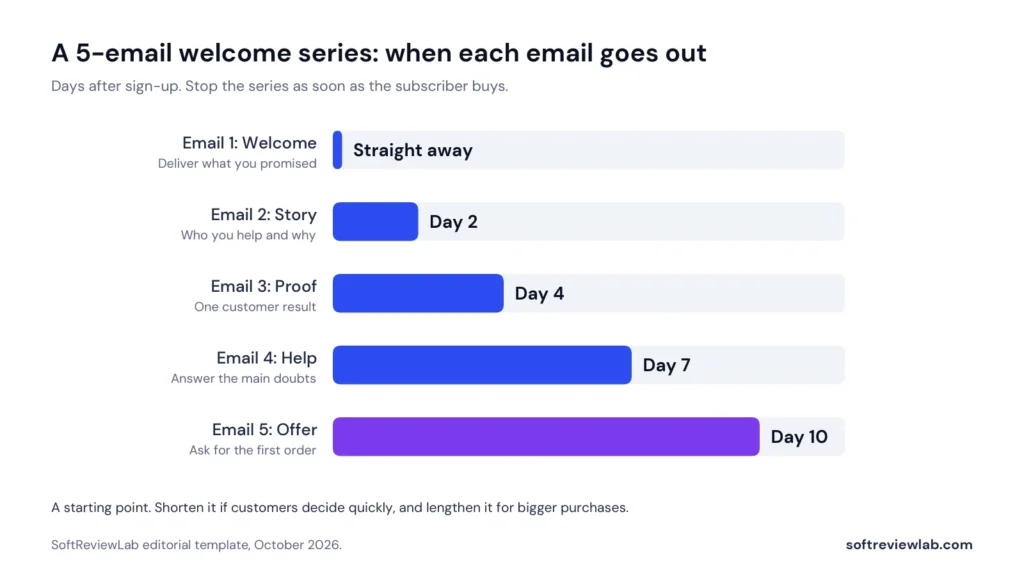
Here is a complete series you can adapt. It uses the five jobs above, spread over ten days.
| When | Subject line idea | What it says | |
|---|---|---|---|
| 1. Welcome | Straight after sign-up | Here is your [guide or code] | The thing you promised, what you will send and how often, one link |
| 2. Story | Day 2 | Why we started [business] | The problem you saw, who you help, what you do differently |
| 3. Proof | Day 4 | How [customer] solved [problem] | One short customer story with a specific result |
| 4. Help | Day 7 | The questions people ask before they buy | Two or three plain answers, including who should not buy |
| 5. Offer | Day 10 | Ready when you are | A clear, simple ask, with a deadline only if it is real |
Send it at once. Open with the thing you promised, at the top, before anything else. Then tell the reader in two sentences what they will get from you and how often. Finish with one link to the best place to start. Ask one easy question they can answer by replying, such as what they are trying to fix this month. Those replies are market research you do not have to pay for.
A skeleton you can adapt: Thanks for joining. Here is the checklist I promised: [link]. Over the next ten days I will send you four short emails about [topic], and after that one useful email a week. If you only have two minutes today, start here: [link]. One question: what is the biggest thing you are trying to solve with [topic] right now? Reply and tell me. I read every answer.
People buy from businesses they feel they know. Tell them, briefly, what problem you saw and why you started doing this. Keep it about the customer’s problem, not your history. Three short paragraphs are enough: the problem, what you do about it, and who it is for. Link to one page that shows your work.
Show one real customer and one specific result. A sentence in the customer’s own words is stronger than a paragraph of yours. Use only real stories and real numbers, with the customer’s permission. If you are new and have no customer stories yet, use something else that is true: how you test your product, what your guarantee covers, or a photo of the work.
Every business hears the same few doubts before a sale: price, delivery, fit, and whether it will work for someone in the reader’s situation. Answer two or three of them plainly. Include one line on who you are not right for. It sounds risky and it works in your favour, because it makes everything else you say more believable.
Now ask. Say what you would like the reader to do, link to it once or twice, and make it easy. If you promised a first-order discount, remind them of it here. If you add a deadline, make it a real one. A false deadline is the fastest way to lose the trust the first four emails built. For anyone who is not ready, say what happens next: they will keep getting your regular emails and can reply at any time.
| Business | Goal | Length | What to change |
|---|---|---|---|
| Online store | First order | 3 to 4 emails in 7 days | Lead with the code and your best sellers. Add a short how-to-choose email. Stop the series on purchase |
| Service business | Booked call or quote request | 4 to 5 emails in 14 days | More proof and more answers to doubts. The offer is a conversation, not a price |
| B2B or software | Trial start or demo | 5 emails in 14 days | One email on the main use case and one on getting set up. Send from a named person |
| Local business | First visit or booking | 3 emails in 7 days | Opening hours, location and how to book in email one. A reason to make a first visit in email three |
| Content or newsletter business | Reading and replying | 3 to 4 emails in 10 days | Send your best three pieces, one per email, then ask what they want next |
Two adjustments matter more than the rest. If your customers buy quickly, shorten the series so the offer arrives while they are still deciding. If what you sell is expensive or needs a conversation, lengthen it and make the ask smaller, such as a reply or a short call.
The first subject line has one job, which is to be recognised. The reader signed up minutes ago, so say plainly what is inside.
Avoid subject lines that hide what the email is. They may win an open and lose trust, and the FTC’s guide is clear that a subject line must reflect the content of the message. Put the sender name to work as well. A person’s name with the business name, such as Amina at Northside Bakery, is easier to recognise than the business name alone.
You do not need to buy anything to start. Pick the option that matches what you have now.
Run the free version for a month before you spend money. You will learn which email gets replies, which link gets clicked and whether new subscribers actually buy, and that tells you whether a full automated series is worth paying for.
Measure the series against its one goal, not against opens. An open tells you the subject line was recognised. It does not tell you whether the series did its job.
| Measure | How to work it out | What it tells you |
|---|---|---|
| Conversion to the goal | New subscribers who bought or booked within 30 days, divided by new subscribers | Whether the series does its job |
| Revenue per new subscriber | Revenue from those subscribers in 30 days, divided by new subscribers | What a sign-up is worth, and what you can afford to spend to get one |
| Click rate by email | Clicks divided by emails delivered, for each email | Which email is weak |
| Unsubscribes and complaints by email | Unsubscribes and spam reports for each email | Which email annoys people |
| Replies | Count them and read them | What new subscribers actually want |
Compare like with like. Record the conversion figure for the month before you launch the series, then for each month after. One month of data is a hint, and three months is a pattern. When one email shows a sharp drop in clicks or a rise in unsubscribes, rewrite that email and leave the others alone, so you know what made the difference.
I am not giving you an average open or click rate to aim for. Published benchmarks vary widely by industry and by who is doing the measuring, and the only comparison that matters is your own series against your own numbers from before it.
The free versions have limits. These are the signs you have reached them:
If two or more of those are true, an automation tool is worth a serious look. If none is true yet, keep the free version running and come back to this later. My guide to email marketing automation workflows shows which automations to build after the welcome series.
For a business that has outgrown a single welcome email and wants the series to branch by what each subscriber does, I recommend looking at ActiveCampaign. It is one option among several, and I explain below who should skip it.
In my ActiveCampaign review I scored it 7.6 out of 10, with its highest marks for features and integrations. The reason it fits this job in particular is that the automation builder is the centre of the product. A welcome series is the simplest thing it does, and the same builder handles what usually comes next: a cart reminder, a post-purchase follow-up, a win-back sequence.
I have not run campaigns through ActiveCampaign. What I describe here comes from its pricing page, feature pages and help center, and from what customers say in public reviews.
ActiveCampaign is an email marketing and automation platform. Each contact has a record, and things that happen to that record, such as a form submission, a click, a page visit or a purchase from a connected store, can start an automation. You build automations on a visual canvas by adding steps: send an email, wait, check a condition, add a tag, notify a person.
| What the series needs | How ActiveCampaign handles it |
|---|---|
| A trigger at sign-up | Automations start from triggers such as a form submission or a contact joining a list |
| Timed gaps | Wait steps between emails |
| One job per email | Each email is a separate step you can edit and report on |
| An exit when someone buys | Conditions and goals in the builder, fed by a connected store such as Shopify, WooCommerce or Square |
| Different paths for different people | If/else branches and split paths |
| A starting point | A library of more than 950 automation recipes, which includes welcome series templates, and an AI automation builder that drafts a workflow from a written description |
| Reporting | Reports on each automation and each campaign |
Two limits are worth knowing before you plan around it. ActiveCampaign’s cheapest plan allows five actions in an automation. A three-email series with two waits between the emails uses exactly five, so it fits, but adding a condition to stop the series on purchase does not. A five-email series with an exit rule needs the next plan up, where actions are unlimited. And the free trial allows 100 email sends in total, with test emails going only to your own address, so use it to build and test the series, not to run it.
Customer reviews are also mixed on one point that matters here. Capterra’s summary of ActiveCampaign reviews praises the automation and lists the builder tools among the most common complaints. If the look of your emails matters a great deal to you, test the email designer first.
I have kept prices out of this article on purpose. The plans, the real cost as a list grows, the refund terms and the full list of pros and cons are in the ActiveCampaign review. If you are weighing it against a simpler tool, ActiveCampaign vs Mailchimp compares the two side by side.
If the series you have planned needs branching and an exit rule, and ActiveCampaign sounds like a fit, you can try it free for 14 days without entering a card. Bring the emails you wrote from this article and build the series during the trial, so you are judging it on your own work.
| Days | What to do |
|---|---|
| 1 | Choose the one goal and the exit rule. Rewrite the promise on your sign-up form |
| 2 to 3 | Write all the emails in one sitting. Read them aloud in order and cut anything that repeats |
| 4 | Check SPF, DKIM and DMARC for your sending domain, and that every email has your postal address and an unsubscribe link |
| 5 | Put Email 1 into your tool’s automatic welcome. Sign up yourself and check that it arrives within minutes |
| 6 to 7 | Build the rest of the series in your tool, or set a weekly reminder to send it by hand |
| 8 | Test the whole series with your own address, on a phone and on a computer. Click every link |
| 9 to 13 | Go live. Read every reply. Note your baseline: sign-ups and first orders for the previous month |
| 14 | Put a review in your calendar for 30 days from now, to compare conversion and rewrite the weakest email |
The structure, timings and templates in this article are my own editorial advice, written for small businesses that are setting up a welcome series for the first time. They are a starting point to test, not a guarantee of results, and the revenue example near the top uses illustrative numbers. The legal points come from the FTC’s CAN-SPAM guide and the UK ICO’s direct marketing guidance, and the sending requirements come from Google’s email sender guidelines. The details about ActiveCampaign come from its pricing page, feature pages and help center, checked in October 2026, and from the research behind my full review.
Three to five is right for most small businesses. Use three emails over about a week if customers decide quickly, and five over about two weeks if what you sell is expensive or needs a conversation. Start with three and add more once you see how people respond.
Immediately, within minutes of the sign-up. The subscriber is still thinking about your business at that moment, and the first email should deliver whatever your form promised.
Deliver the promised discount or download at the top, say in two sentences what you will send and how often, give one link to the best place to start, and ask one simple question the reader can answer by replying.
Only if your form promised one, or if a first-order offer suits the way you sell. A discount is not required. Many service businesses do better offering something useful, such as a guide or a short call. If you do offer one, deliver it in the first email and remind the reader in the last.
Yes, in a simple form. Most email tools can send one automatic welcome email at no extra cost, and you can send the remaining emails by hand to each week’s new subscribers. A fully automated series with branching usually needs a paid plan.
Keep reading
Why posting on social media slips, how to fix each reason without paying, and how to use SocialBee when free schedulers stop being enough.
How to manage email overload: why inboxes get out of control, 9 free fixes for Gmail and Outlook, a daily routine, a 7-day plan,…
Build a lead follow-up process that stops leads and deals getting lost as your team grows: 7 causes, 9 free fixes, a lead tracking…