Mailchimp Review 2026: Features, Pricing, Pros, Cons and Honest Verdict
Email Marketing
Mailchimp Review 2026: Features, Pricing, Pros, Cons and Honest Verdict
7.2/10
“Mailchimp suits small businesses, creators and online stores that want an easy start, a free plan and lots of integrations. Plan for the real cost: unsubscribed contacts count toward billing, the first-year discount ends, and branching automation sits on Standard. Archive inactive contacts and price your list size a year ahead before you commit.”
Research-based review · not hands-on testedBuilt from the vendor’s documentation and pricing pages and from patterns in customer reviews. How we work.
Starting price
Free plan; paid from $13/month
Best for
Small businesses and creators starting email marketing
Free trial
Free plan for 250 contacts; 14-day trial on Essentials and Standard
Based on
Mailchimp's official pricing pages, plan comparison and help center, plus customer ratings on G2 and Trustpilot
Scores
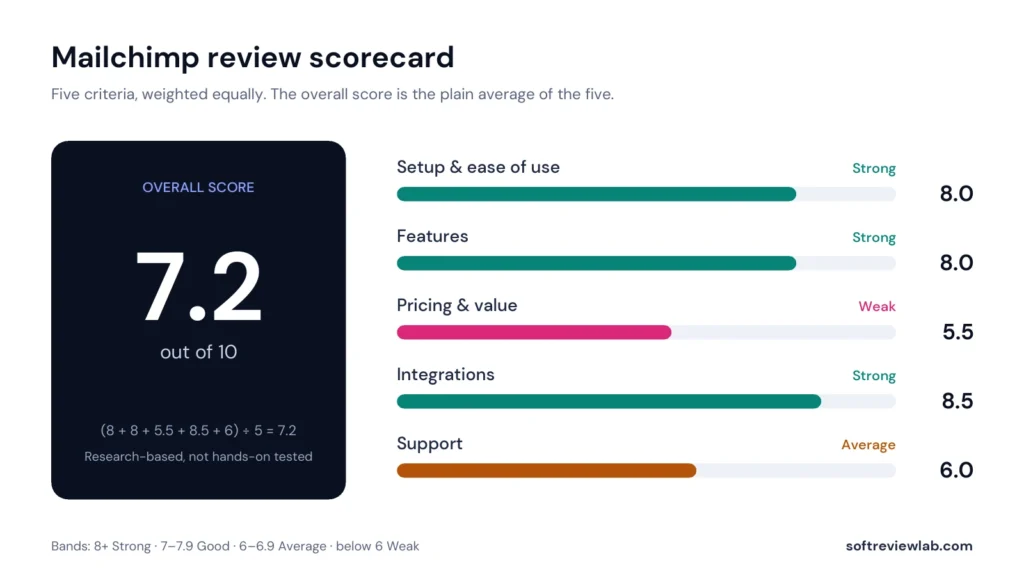
Ease of setup & use8.0
Feature depth8.0
Pricing & value5.5
Integrations8.5
Support & terms6.0
How these scores were worked out
Ease of setup & use: 8.0 (Strong) Drag-and-drop builder, templates and self-serve setup make the first campaign easy; advanced segmentation and flows take longer to learn.
Feature depth: 8.0 (Strong) Email, automation, forms, landing pages, SMS, AI and transactional email in one account; the best automation and segmentation need Standard.
Pricing & value: 5.5 (Weak) A real free plan and low entry price, but costs rise fast with list size, unsubscribed contacts count, and promo prices double after a year.
Integrations: 8.5 (Strong) More than 300 integrations on every plan, which covers most stores, websites and CRMs.
Support & terms: 6.0 (Average) 24/7 email and chat on paid plans, but phone support only on Premium, limited help on Free, and poor Trustpilot ratings.
Overall: (8.0 + 8.0 + 5.5 + 8.5 + 6.0) ÷ 5 = 7.20, shown as 7.2. The five criteria are weighted equally.
Scores are editorial judgments in half-point steps, based on documented features, published pricing and repeated themes in customer reviews. They are not lab measurements, so treat the words as the guide: 8.0+ Strong, 7.0 to 7.9 Good, 6.0 to 6.9 Average, below 6.0 Weak.
What works
Free plan for up to 250 contacts and a low entry price on Essentials.
Easy drag-and-drop builder, forms and landing pages on every plan.
More than 300 integrations on every plan, including Free.
Standard adds branching automation, predictive segmentation and multivariate testing.
SMS, transactional email and AI writing help in the same account.
24/7 email and chat support on all paid plans.
What doesn’t
Prices climb steeply as your list grows, especially past 10,000 contacts.
Unsubscribed and non-subscribed contacts count toward billing unless archived.
Essentials automation is limited to 4 flow steps with no branching.
The 50% first-year discount ends after 12 months and the price doubles.
Phone support only on Premium; Free gets 30 days of email support.
Trustpilot rating of 2.5 from 1,531 reviews, mostly one-star.
What we couldn’t verify
Deliverability and inbox placement were not measured for this review.
Mailchimp's 99% delivery figure for Transactional Email is the vendor's own claim.
The 50% first-year discount is a current offer and may change or differ by region.
Free trial terms such as sending caps and payment details are shown at sign-up, so confirm them before you start.
Capterra's current Mailchimp listing had no user reviews when checked, so no Capterra rating is used.
The quality of Intuit Assist's generative AI output was not assessed; Mailchimp lists it as beta and English only.
If any of these matter to your decision, check them directly with the vendor or during your trial.
Who should skip it
Businesses with large lists on a tight budget, teams that need branching automation on the cheapest paid plan, companies that want phone support without paying for Premium, and senders who only need transactional email.
By Abdullahi Abdirahman, Founder & Editor, SoftReviewLab. Pricing and plan limits checked on Mailchimp’s official pricing pages in October 2026. This is a research-based review built from Mailchimp’s plan pages and help center, plus customer ratings on G2 and Trustpilot. SoftReviewLab has no affiliate relationship with Mailchimp, so nothing on this page earns a commission.
Table of Contents
Mailchimp Review at a Glance: The Short Answer
This Mailchimp review answers the question most small business owners actually have: is Mailchimp still a good choice in 2026, and what will it really cost once your list grows? My answer is yes for small businesses, creators and online shops that want an easy start, a free plan and a huge list of integrations. It is a weaker choice if you have a large list and a tight budget, or if you need advanced automation on the cheapest paid plan.
Mailchimp is an all-in-one email marketing platform owned by Intuit. You build emails with a drag-and-drop editor, collect sign-ups with forms and landing pages, send automated messages with Marketing Automation Flows, and add SMS or transactional email if you need them. The product is easy to start with. The catch is pricing: every contact on your account counts toward the bill, including people who unsubscribed, and the price rises quickly as your list grows. I score Mailchimp 7.2 out of 10.
Best for: small businesses, creators and e-commerce stores starting or growing an email list.
Skip it if: you have tens of thousands of contacts on a tight budget, or you need branching automation without paying for Standard.
Starting price: free for up to 250 contacts. Essentials is $13 a month and Standard is $20 a month for 500 contacts at the regular price.
Free trial: 14 days on Essentials and Standard, plus a permanent Free plan.
If you want to check the current plans yourself, the official page is Mailchimp’s marketing pricing page. That link is a plain link to Mailchimp, not an affiliate link.
What Is Mailchimp and How Does It Work?
Mailchimp is an email marketing platform for small and mid-sized businesses, branded today as Intuit Mailchimp. The core job is email: you collect contacts, group them, write campaigns and send them. Around that core, Mailchimp adds automation, forms, landing pages, social posting, SMS, reporting and AI writing help.
The way it works is simple to explain. First, you bring contacts into an audience, either by importing a list, connecting your online store or adding a sign-up form to your website. Second, you organise those contacts with tags and segments, for example “bought in the last 90 days” or “signed up from the webinar page.” Third, you send one-off campaigns, or build automation flows that send messages when someone does something, such as joining your list or abandoning a cart. Finally, the reports show opens, clicks, orders and revenue so you can see what worked.
Three terms matter before you compare plans:
Contacts: everyone stored in your account. Mailchimp bills on this number, not on how many people you email.
Sends: each email delivered to one contact counts as one send. Each plan has a monthly send limit tied to your contact limit.
Audiences: separate lists inside one account. The Free plan has one, Essentials three, Standard five and Premium unlimited.
If you are still deciding what kind of email tool you need, my guide to choosing email marketing software walks through the questions to answer first. This review focuses on what Mailchimp gives you and what it costs.
How I Evaluated Mailchimp
This review is research-based. I did not run a paid Mailchimp account through a lab test for it, and I don’t present any measured results. Instead, I worked from the sources a careful buyer would use: Mailchimp’s pricing page, its full plan comparison, its help center article About Mailchimp Pricing Plans, the Transactional Email pricing page and Mailchimp’s documentation on how contacts are counted. For customer experience, I looked at Mailchimp’s ratings on G2 and Trustpilot.
I score every tool on the same five criteria: setup and ease of use, features, pricing and value, integrations, and support. Each criterion is worth 20 percent, so the overall score is the plain average of the five. In this review, I keep facts and opinion apart. Plan limits, prices and ratings come from the named sources. Statements such as “this is a weak point” or “this plan is the sensible default” are my editorial judgment, and I say so where it matters.
Mailchimp’s feature list is long, and many of the features people mention in reviews sit on Standard or Premium rather than the cheaper plans. Here is what each part does and where it starts.
Email Builder, Templates and Content Studio
Every plan includes the drag-and-drop email builder, forms, landing pages and Content Studio, which is where you store images and brand assets. The Free plan gets a limited set of pre-built templates, and paid plans unlock the full library. Paid plans also remove Mailchimp branding from your emails and let you schedule campaigns, which the Free plan can’t do.
If you have a designer or developer, note one detail: on Free and Essentials you can create custom-coded templates, but Mailchimp’s comparison page says you need Standard or Premium to send them. Dynamic content, which changes parts of an email based on who receives it, also starts on Standard.
Marketing Automation Flows
Mailchimp renamed its Customer Journey Builder to Marketing Automation Flows. This is where you build welcome series, abandoned cart reminders, post-purchase follow-ups and re-engagement emails. The plan limits here are the single most important feature difference in Mailchimp:
Free: a free preview of automation flows.
Essentials: flows of up to 4 steps, with no branching and no multiple starting points.
Standard and Premium: up to 200 flows, with branching points and multiple starting points.
In practice, a 4-step limit is enough for a short welcome series. It is not enough for flows that split people by behaviour, for example sending one message to buyers and another to people who only browsed. In my judgment, that is why Standard is the sensible default for most businesses that plan to use automation seriously. My guide to email marketing automation workflows shows which flows are worth building first.
Segmentation and Personalisation
All plans include contact profiles, tags, surveys, an audience dashboard and basic segmentation. Standard and Premium add advanced segmentation, predictive segmentation, behavioural targeting, customer lifetime value and purchase likelihood. Those predictive features are useful mainly for online stores with enough order data to make the predictions meaningful.
Every plan also gets a few AI-assisted features that Mailchimp lists separately: a subject line helper, personalised product recommendations and “next best action” suggestions.
Testing and Reporting
Basic reports are on every plan. A/B testing starts on Essentials, and the Free plan does not include it. Standard and Premium add multivariate testing, custom reports, anomaly detection, send time optimisation and delivery by time zone. If you send to customers in several countries, delivery by time zone is a practical feature, and it sits on Standard.
Forms, Landing Pages and Social
Landing pages, pop-up forms, sign-up forms, social posting and the inbox are on every plan, including Free, and so is the mobile app. Standard and Premium add social post scheduling, Campaign Manager, Google retargeting ads and a marketing calendar.
SMS and MMS Add-On
SMS is a paid add-on rather than part of the base price. Essentials can add SMS, while Standard and Premium can add SMS and MMS. Mailchimp says MMS is available in select locations on Standard and for US and Canadian customers on Premium. Short codes cost extra on every plan, and sending to several audiences or several countries may also cost more. You can send SMS from automation flows and use pre-built SMS automations on any plan that has the add-on.
Intuit Assist and Generative AI
Mailchimp’s generative AI features, branded Intuit Assist, are listed on Standard and Premium as a no-additional-cost add-on. They are not included on Free or Essentials. Mailchimp describes these features as being in beta and available in English. I have not assessed the quality of the AI output for this review, so treat it as a helper for first drafts rather than a reason to choose a plan.
Transactional Email Add-On
Transactional emails are the one-to-one messages your website or app sends automatically, such as order confirmations, password resets and receipts. Mailchimp sells this as a separate add-on. On the plan comparison, it is “demo only” on Free and Essentials and available as a paid add-on on Standard and Premium. I cover the block pricing in the pricing section below.
If you only need transactional email and no marketing campaigns, a dedicated sending service is usually a simpler fit. My SMTP.com review covers one option, and the guide to fixing website emails that go to spam explains the setup that any sender needs.
Mailchimp Pricing 2026: Plans and Real Costs
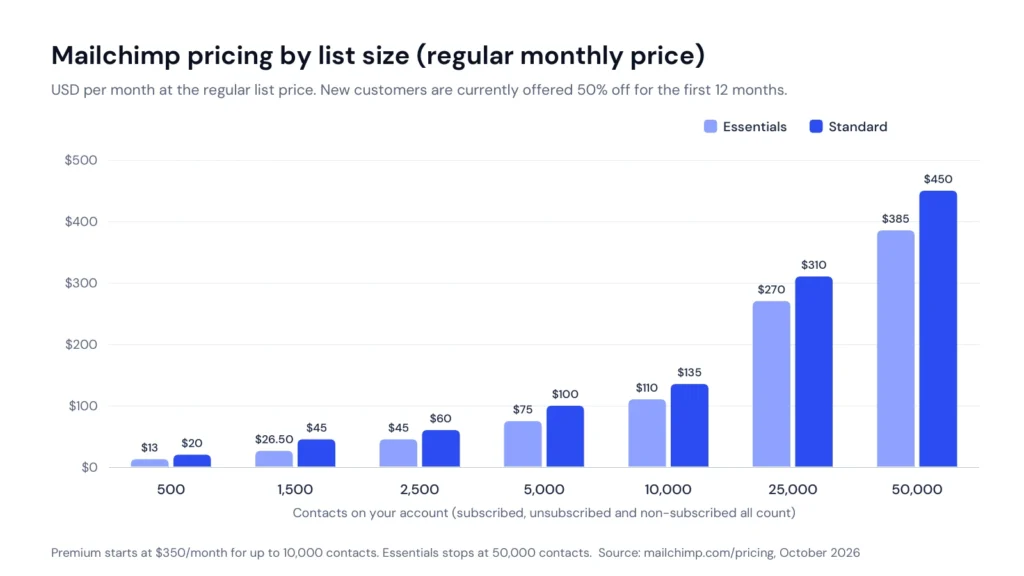
Mailchimp has four plans: Free, Essentials, Standard and Premium. The price of each paid plan depends on how many contacts you have, so the “starting price” only applies to a very small list. The table below shows Mailchimp’s regular monthly price at common list sizes, as listed on its pricing page in October 2026.
Contacts
Essentials
Standard
Premium
Up to 500
$13
$20
$350
1,500
$26.50
$45
$350
2,500
$45
$60
$350
5,000
$75
$100
$350
10,000
$110
$135
$350
15,000
$180
$230
$465
20,000
$230
$285
$535
25,000
$270
$310
$620
30,000
$300
$340
$685
40,000
$340
$410
$750
50,000
$385
$450
$815
75,000
Not available
$630
$900
Mailchimp regular monthly prices in USD by contact tier. Source: Mailchimp pricing, checked October 2026.
Mailchimp’s regular monthly prices rise steeply after 10,000 contacts.
A few limits come with these prices. Essentials stops at 50,000 contacts, so a bigger list has to move to Standard or Premium. Standard goes up to 100,000 contacts, which costs $800 a month at the regular price. Premium starts at $350 a month for up to 10,000 contacts, and larger Premium accounts are handled by Mailchimp’s sales team. Mailchimp also says annual plans for Standard and Premium are available through sales once you pass 10,000 contacts.
The 12-Month Discount and What You Pay After It
When I checked, Mailchimp’s pricing page offered new customers 50 percent off for the first 12 months, and said the discount stays even if you switch between Essentials, Standard and Premium. Under that offer, Standard for 500 contacts costs $10 a month and Essentials $6.50 a month for the first year.
This is a real saving, but it is temporary. After 12 months, your bill goes to the regular price, which is double. A business on Standard with 5,000 contacts would pay $50 a month in year one and $100 a month from year two, before any list growth. My advice is to budget with the regular price, not the promotional one, and treat the first year as a bonus.
Contacts
Essentials: first 12 months / after
Standard: first 12 months / after
Up to 500
$6.50 / $13
$10 / $20
2,500
$22.50 / $45
$30 / $60
10,000
$55 / $110
$67.50 / $135
25,000
$135 / $270
$155 / $310
50,000
$192.50 / $385
$225 / $450
Promotional versus regular monthly prices in USD, as shown on Mailchimp’s pricing page in October 2026. Offers can change at any time.
How Mailchimp Counts Contacts (the Detail Most Buyers Miss)
This is the part of Mailchimp pricing that surprises people most. According to Mailchimp’s pricing plans help article, subscribed, unsubscribed and non-subscribed contacts all count toward your contact total and your price. Archived, cleaned and deleted contacts do not.
So if 4,000 people are subscribed but 1,500 more have unsubscribed over the years, you may be paying for a 5,500-contact tier. The fix is free: archive or delete contacts you no longer email. Mailchimp explains how in its help article on archiving and unarchiving contacts. Archiving keeps their history in case you need it later, without counting them toward the bill.
This billing model is one of the clearest differences between Mailchimp and some competitors. For example, my Campaigner review notes that Campaigner says it does not charge for unsubscribed contacts. If your list has a lot of churn, check this point on any platform you consider.
Send Limits and Overages
Each plan has a monthly send limit tied to your contact tier:
Plan
Monthly send limit
Example: 1,500-contact tier
Free
500 sends a month, maximum 250 a day
Not available (Free is capped at 250 contacts)
Essentials
10 times your contact limit
15,000 sends
Standard
12 times your contact limit
18,000 sends
Premium
15 times your contact limit
150,000 sends (Premium starts at a 10,000-contact tier)
For most small businesses that send one or two campaigns a week, 10 times the contact limit is plenty. The limit matters more if you send daily or run a lot of automation. Mailchimp’s help center also notes that test emails and transactional emails count toward your monthly sending limit.
What happens when you go over is different by plan. On paid plans, Mailchimp says it won’t interrupt your service and will add an additional charge instead. On the Free plan, it places a hold on sending live or test emails. In my view, automatic overage charges are convenient but easy to miss, so check your contact count and send usage before each billing date.
Transactional Email Pricing
The Transactional Email pricing page sells sending in blocks. Each block is a credit for 25,000 emails, and the price per block falls as you buy more:
Total blocks
Emails per month
Price per block
1 to 20
Up to 500,000
$20
21 to 40
500,000 to 1 million
$18
41 to 80
1 million to 2 million
$16
81 to 120
2 million to 3 million
$14
121 to 160
3 million to 4 million
$12
161 or more
4 million or more
$10
Mailchimp Transactional Email block pricing, checked October 2026. Charged on top of your Mailchimp marketing plan.
A dedicated IP address is optional at $29.95 a month. Mailchimp says new transactional users can get up to 500 free sends to their verified domain, with restrictions. At the time I checked, there was also a sales-led offer of 50 percent off the base price for 12 months for new transactional customers who buy at least 1 million emails (40 blocks) a month on a Standard or Premium plan. Essentials accounts are not eligible.
Mailchimp advertises “99% email delivery” for this product. That is Mailchimp’s own claim, and I have not measured it.
Mailchimp Free Plan: What You Get and Where It Stops
The Mailchimp free plan is still one of the main reasons people start with it. It gives you up to 250 contacts, 500 sends a month with a daily cap of 250, one audience and one user seat. You get the email builder, forms, landing pages, the mobile app, basic reports and a free preview of automation flows.
The limits are real, though:
No email scheduling, no A/B testing and only a limited set of templates.
Mailchimp branding stays in your emails.
Email support only for the first 30 days.
If you go over a limit, Mailchimp puts a hold on sending rather than charging you.
Unsubscribed contacts still count toward the 250-contact cap, so archive them to keep room.
My take: the free plan is good for testing the editor, building a sign-up form and sending your first few newsletters. It is not built to run a business’s email marketing for long. Once you have more than a couple of hundred subscribers, you will need a paid plan.
Mailchimp Free Trial and Pay As You Go
Besides the Free plan, Mailchimp describes a risk-free 14-day trial on its paid plans. The trial is offered on Essentials and Standard. Trial terms such as sending caps and payment details are shown at sign-up, so read them before you start. For Premium, Mailchimp says qualified new customers can arrange a trial through its sales team.
If you send only occasionally, Mailchimp also sells pay-as-you-go email credits instead of a monthly plan. According to its help center, pay-as-you-go accounts get the same features as Essentials. This can suit a business that sends a few seasonal campaigns a year, but compare the credit cost against a month or two of Essentials before you buy.
Mailchimp Integrations, Setup and Support
Integrations are one of Mailchimp’s strongest points. Mailchimp lists more than 300 integrations on every plan, including the Free plan. That matters because email marketing works best when your store, website, CRM and forms feed contacts and purchase data into your email tool automatically.
Setup is mostly self-serve. You verify a sending domain, import contacts, connect your store or website and build a sign-up form. Whatever tool you use, follow Google’s email sender guidelines for authentication and spam rates, because a well-built campaign still fails if it lands in spam. My email deliverability guide covers that setup step by step.
Support by Plan
Plan
Support
Onboarding and success
Free
Email support for the first 30 days
None
Essentials
24/7 email and chat
Customer success management with 30,000+ contacts
Standard
24/7 email and chat
1 personalised onboarding session; customer success management with 30,000+ contacts
Premium
Phone and priority support, plus screen-share cobrowse
4 onboarding sessions and customer success management; migration help through sales
Mailchimp notes that phone support is offered in English only. My judgment here is that support is adequate on paid plans for routine questions, but phone access only on Premium is a real gap for smaller businesses that hit a billing or account problem and want to talk to someone quickly.
What Customers Say About Mailchimp
Customer ratings for Mailchimp tell two very different stories depending on where you look, so I report them side by side rather than average them:
Source
Rating
Reviews
What stands out
G2
4.3 out of 5
12,989
Praise for ease of use, templates, automation, analytics and integrations
Trustpilot
2.5 out of 5 (“Poor”)
1,531 (299 in the last 12 months)
66% one-star and 20% five-star reviews
Capterra
No rating yet
0 on the current listing
Listing showed no user reviews when checked
Customer ratings as shown on each site when checked in late September and October 2026.
On G2, the themes that repeat in positive reviews are ease of use, templates, automation, analytics and the integration list. The repeated complaints are that pricing grows with the list, advanced features take time to learn, automation is limited on lower plans, support can be slow, and design customisation has limits.
On Trustpilot, the picture is much harsher. Mailchimp’s profile showed a TrustScore of 2.5 from 1,531 reviews, with 66 percent of reviews at one star, 5 percent at two stars, 4 percent at three, 5 percent at four and 20 percent at five. Trustpilot also showed that Mailchimp invites customers to review, has a paid Trustpilot subscription, and replied to 92 percent of negative reviews, typically within 24 hours. Trustpilot says its TrustScore gives more weight to recent reviews and adds seven neutral 3.5-star reviews to every company’s calculation.
Why the gap? This is my reading rather than a measured fact: G2 reviews tend to come from people rating the product as a tool, while Trustpilot is open to anyone and often reflects account, billing or support experiences. Both are useful. If you are choosing Mailchimp, the Trustpilot pattern is a good reason to understand the billing rules in this review before you commit.
One more lesson from this research. Capterra’s current Mailchimp listing said “contact vendor for pricing” and “free trial not available,” while Mailchimp’s own pricing page shows public prices, a Free plan and a 14-day trial. Third-party listings go out of date, which is why I always check prices on the vendor’s own page.
Mailchimp Pros and Cons
Pros
A permanent Free plan for up to 250 contacts and a low entry price on Essentials.
Easy drag-and-drop builder, forms and landing pages on every plan.
More than 300 integrations on every plan, including Free.
Standard adds branching automation, predictive segmentation, multivariate testing and send time optimisation.
SMS, transactional email and AI writing help available in the same account.
24/7 email and chat support on all paid plans.
Cons
Prices climb steeply as your list grows, especially past 10,000 contacts.
Unsubscribed and non-subscribed contacts count toward billing unless you archive them.
Essentials automation is limited to 4 flow steps with no branching.
The current 50 percent discount ends after 12 months, and the price doubles.
Phone support only on Premium, and the Free plan gets email support for 30 days.
A Trustpilot rating of 2.5 from 1,531 reviews, mostly one-star.
Drag-and-drop builder, templates and self-serve setup make the first campaign easy. Advanced segmentation and flows take longer to learn.
Features
8.0
Email, automation, forms, landing pages, SMS, AI and transactional email in one account. The best automation and segmentation need Standard.
Pricing and value
5.5
A real free plan and low entry price, but costs rise fast with list size, unsubscribed contacts count, and promo prices double after a year.
Integrations
8.5
More than 300 integrations on every plan, which covers most stores, websites and CRMs.
Support
6.0
24/7 email and chat on paid plans, but phone support only on Premium, limited help on Free, and poor Trustpilot ratings.
Overall score 7.2 out of 10. Research-based scoring, not a hands-on test.
Common Mailchimp Mistakes to Avoid
Paying for people who left. Archive unsubscribed and long-inactive contacts regularly, because they still count toward your tier.
Budgeting on the promo price. Plan for the regular price from month 13, not the first-year discount.
Choosing Essentials for automation. If you need welcome series that branch, abandoned cart flows with conditions or multiple entry points, start on Standard.
Ignoring overage charges. Paid plans charge automatically when you go over, so check usage before each billing date.
Running a business on the Free plan. No scheduling, no A/B testing and 30 days of support make it a starting point, not a long-term setup.
Skipping domain authentication. Set up your sending domain properly before your first big campaign, or good emails can still land in spam.
If your emails go out but sales don’t follow, the problem is often the strategy rather than the tool. My article on why email newsletters don’t bring in sales covers the free fixes worth trying first.
Mailchimp Alternatives
Mailchimp is not the only sensible choice. These are the alternatives I would look at, depending on what pushes you away from Mailchimp:
Campaigner: worth a look if Mailchimp’s billing for unsubscribed contacts or its automation limits on lower plans bother you. Read my Campaigner review and the side-by-side Campaigner vs Mailchimp comparison.
MailerLite: often considered by small businesses and creators who want a simple editor at a lower price.
Brevo: often considered by businesses that want email, SMS and transactional messages from one provider.
ActiveCampaign: often considered by teams that want deeper automation and CRM features.
Klaviyo: often considered by e-commerce brands that live on store data and want detailed segmentation.
I have reviewed ActiveCampaign in full, and my ActiveCampaign review covers its plans, automation limits and real costs. I also compare the two directly in ActiveCampaign vs Mailchimp. I haven’t published full reviews of MailerLite, Brevo or Klaviyo yet, so check their official pricing pages directly and compare them at your real list size.
Who Should Use Mailchimp, and Who Should Skip It
Mailchimp Is a Good Fit If
You are starting an email list and want a free plan to learn on.
You run a small online store or service business and need your store, website and email connected.
You want one account for email, forms, landing pages, SMS and basic social posting.
You expect to stay under roughly 10,000 contacts, where prices are easier to absorb.
You are ready to use Standard for branching automation and better segmentation.
Skip Mailchimp If
You have a large list and a tight budget, because the price climbs quickly past 10,000 contacts.
Your list has heavy churn and you don’t want to archive contacts regularly to control the bill.
You need advanced automation but can only afford the cheapest paid plan.
You want phone support without paying for Premium.
You only need transactional email for an app or website, where a dedicated sending service is simpler.
Mailchimp Review Verdict
Mailchimp remains one of the easiest ways for a small business to start email marketing, and Standard covers the automation most growing businesses eventually need. What holds it to 7.2 out of 10 is cost and support: billing for unsubscribed contacts, steep price rises as your list grows, and phone support only on Premium.
My recommendation: if you are starting out or have a small list, Mailchimp is a reasonable and low-risk choice, so start on Free, move to Standard when you need real automation, and archive inactive contacts from day one. If you already have a large list or your margins are tight, compare it against an alternative such as Campaigner at your actual list size before you commit. Before you pay, use the Free plan or the 14-day trial to import a real sample of your list, connect your store or website, and build the one automation you need most. You can check current plans on Mailchimp’s official site.
Frequently Asked Questions About Mailchimp
How much does Mailchimp cost in 2026?
Mailchimp has a Free plan for up to 250 contacts. At the regular price, Essentials starts at $13 a month and Standard at $20 a month for 500 contacts, and Premium starts at $350 a month for up to 10,000 contacts. Prices rise with your contact count. When checked in October 2026, new customers were offered 50 percent off for the first 12 months.
Does Mailchimp charge for unsubscribed contacts?
Yes. Mailchimp counts subscribed, unsubscribed and non-subscribed contacts toward your contact total and price. Archived, cleaned and deleted contacts do not count, so archiving people you no longer email lowers your bill.
What is the difference between Mailchimp Essentials and Standard?
Essentials limits automation flows to 4 steps with no branching and offers basic segmentation and A/B testing. Standard adds up to 200 flows with branching, advanced and predictive segmentation, multivariate testing, send time optimisation, custom reports, generative AI features and one onboarding session.
Does Mailchimp offer phone support?
Phone support is included only on the Premium plan, and Mailchimp says it is offered in English only. Essentials and Standard get 24/7 email and chat support, and the Free plan gets email support for the first 30 days.
“A strong scheduler for small businesses, built on content categories and evergreen recycling. The two cheaper plans include one user.”
From $29/mo ($24.17/mo billed yearly)Best for: Small businesses that want consistent posting across several networks14-day free trial with full Pro access, no credit card
“A leading call tracking platform with accurate attribution and useful AI features, held back by usage fees and add-ons that raise the real monthly cost.”
From $50/month billed annuallyBest for: Local service businesses and agencies that rely on phone leads14-day free trial, no credit card required
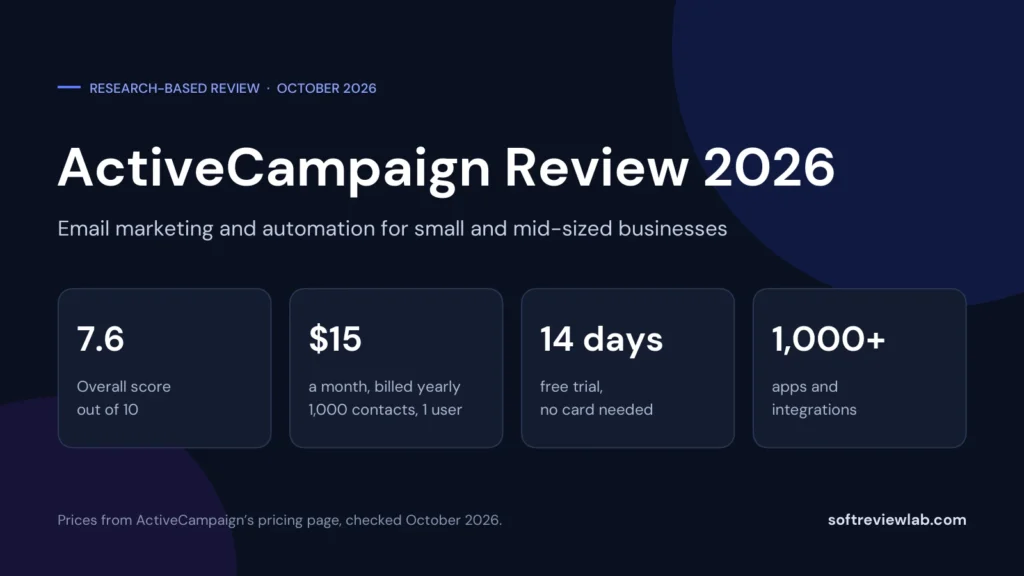
“A deep automation platform with AI tools and more than 1,000 integrations, held back by a price that climbs with your list, a five-action cap on the cheapest plan and paid add-ons for the sales CRM and SMS.”
From $15/month (1,000 contacts, 1 user); Plus $49 billed yearly or $59 monthlyBest for: Small and mid-sized businesses that want behaviour-based email automation14-day free trial: no credit card, no contact limit, 100 email sends